

Google News Scraper: Full-Text Google News Articles
Pricing
Pay per usage
Google News Scraper: Full-Text Google News Articles
Scrape Google News search results into clean full-text articles: real publisher URLs, text, images, author, date and quality scores. Run one query or thousands in bulk. HTTP-only pipeline, no browser. Ideal for media monitoring, NLP datasets and news feeds.
Pricing
Pay per usage
Rating
5.0
(1)
Developer

GoFetch
Maintained by CommunityActor stats
2
Bookmarked
27
Total users
6
Monthly active users
8 hours ago
Last modified
Categories
Share

Google News Scraper turns Google News search results into clean, full-text Google News articles from the original publisher sites. In the default full-text mode, each saved article carries the real publisher URL, the full text, images, author, publication date, source and a quality score, ready for media monitoring, NLP pipelines and research datasets.
Scrape one query or thousands in a single run. Each article lands as its own dataset row, and every full-text row passes text, image and quality checks before it's saved. The pipeline is plain HTTP with no browser, so runs finish in minutes.
Use cases
- Media monitoring and PR: a communications team schedules one daily run with a query per brand, product and executive, each tagged with its own
profileUrlpassthrough field, and gets every new article as full text for share-of-voice and sentiment analysis. - LLM and RAG news feeds: a developer pulls 50 articles per topic on an hourly schedule, deduplicates on
urland pipes cleantextstraight into a vector store, with no per-site extractors to maintain. - Financial news signals: an analyst runs ticker and sector queries every morning and alerts on new full-text articles before the market opens.
- Research datasets: a journalism or academic team collects coverage of a topic across a date range, region by region, to build a timeline of sources.
What data you get
Each article includes:
- title: the headline as published
- url: the publisher's URL, not the Google News redirect (the redirect is kept in
originalGoogleUrl) - source: the publisher's name, such as "Reuters" or "Scientific American"
- publishedAt: the publication date as the feed or the page gives it (RFC 2822 or ISO 8601 string)
- author: the byline, when the page has one
- text: the clean full text, at least 300 characters
- description: the article's summary from the publisher page; when the page has none, the Google News feed snippet
- images: the featured image first, then in-article images, each with
url,type,altandcaption - tags and language
- extractionSuccess: a boolean for downstream filtering
- contentQuality: a score from 0 to 100, a level and any warnings
- query plus any passthrough fields you attached to the query (see Input)
Set fetchArticleDetails: false to skip the publisher pages and get the RSS metadata only (title, source, date, link).
How to scrape Google News
- Open Google News Scraper in Apify Console.
- Enter a search query, such as
artificial intelligence, or a list of queries. - Set how many articles you want per query with Articles per Query.
- Click Start and download the articles as JSON, CSV, Excel or HTML when the run finishes.
Or run it from the API and get the articles back in a single request:
AI agents can use it through Apify's MCP server. Add this URL to any MCP client (Claude, Cursor, VS Code and others):
Then ask, for example, "get today's full-text news articles about electric vehicles".
How much does it cost to scrape Google News?
From 18 October 2026 (15:00 UTC), Google News Scraper is priced pay per result: you pay for articles saved to the dataset. Platform usage and proxies are included, so there are no compute or proxy charges on top. The price per 1,000 articles depends on your Apify plan:
| Apify plan | Price per 1,000 articles |
|---|---|
| Free | $5.00 |
| Starter (Bronze) | $4.00 |
| Scale (Silver) | $3.00 |
| Business (Gold) | $2.00 |
| Platinum and Diamond | $2.00 (Gold price) |
Each run also has a start charge of $0.00005 per GB of run memory, which is $0.0001 for a run at the default 2 GB.
Examples on a Starter plan:
- 100 full-text articles cost about $0.40.
- Monitoring 20 topics daily at 50 articles each comes to about 30,000 articles a month, or about $120. On a Business plan, that's about $60.
Every dataset row counts as one result, including RSS-only rows from fetchArticleDetails: false. Articles that fail to load or fail the quality checks are not saved, so you don't pay for them. Cap the count with maxItemsPerUrl and maxItems, or set a maximum cost per run: the scraper stops saving once it reaches that limit and keeps everything saved so far.
Is it free?
Until 18 October 2026 (15:00 UTC), the Actor itself is free: you pay only your own Apify platform usage. After that, you can still try it on the Apify Free plan, whose monthly platform credit covers about 1,000 articles at the Free price. The developer sets no extra limits on runs or results for free-plan users.
Input
One query
Many queries
Pass an array of strings to scrape several topics in one run. Queries run in parallel.
Queries with passthrough fields
Each query can be an object. Any field besides query is copied into every article for that query, which is useful for linking results back to your own IDs, profile URLs or tags:
If both query and queries are given, queries wins.
Parameters
| Parameter | Type | Default | Description |
|---|---|---|---|
query | string | - | One search query. Use this or queries. |
queries | array | - | Strings, or objects with query plus passthrough fields |
maxItemsPerUrl | integer | 50 | Maximum articles per query |
maxItems | integer | 0 | Maximum articles for the whole run (0 = no global cap) |
fetchArticleDetails | boolean | true | If false, skip the publisher pages and return RSS metadata only |
region | string | "US" | Country edition of Google News (US, GB, CA, AU, DE, ES, MX, IT) |
language | string | "en-US" | Language (en-US, en-GB, en-CA, en-AU, de-DE, es-ES, es-MX, it-IT) |
dateFrom | string | - | Only articles published on or after this date (YYYY-MM-DD); empty = no lower bound |
dateTo | string | Today | Only articles published on or before this date (YYYY-MM-DD) |
topics | array | [] | Google News topic names to browse (such as "business" or "technology"), with or without a query |
topicsHashed | array | [] | Google News topic hashes, if you know the internal hash of a topic section |
proxyConfiguration | object | Apify Proxy enabled | Keep the default Apify Proxy (see below) |
Keep Apify Proxy enabled. Google News link decoding depends on it. With custom proxies or
"useApifyProxy": false, links can't be resolved and the run returns 0 articles.
Output
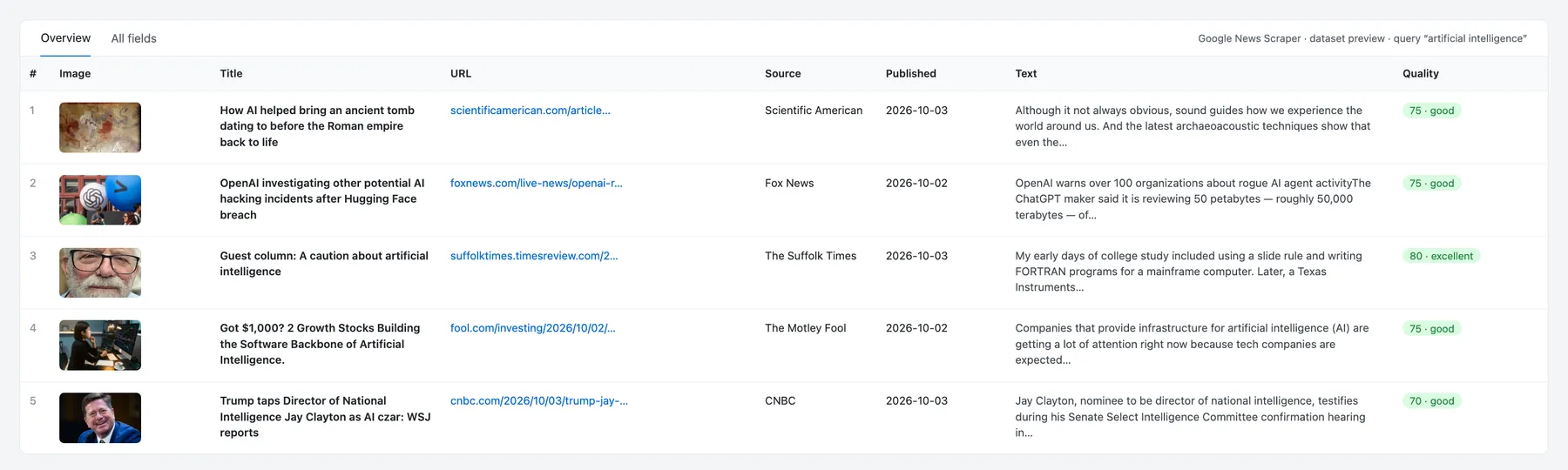
Each article is one dataset row. A real row from a run for artificial intelligence (text shortened):
With fetchArticleDetails: false you get one row per RSS item with title, url (the Google News link, not the publisher URL), source, publishedAt, the RSS snippet as text, an empty images array and extractionSuccess: false.
Guarantees and failure semantics
What every saved article has passed
- Its Google News link resolved to the publisher URL, and the page loaded over HTTP without a bot-check page.
- Extraction found 300+ characters of text. Six strategies run in order (Readability, Extractus, JSON-LD, per-site selectors, meta tags, heuristics) and stop at the first good result.
- It has at least one valid image.
- Its quality score is 25 or higher, and it isn't an error page or navigation boilerplate.
Within a query, each publisher URL is saved once, and maxItemsPerUrl is an exact cap.
When a run fails or returns fewer articles
- The run FAILS only when the input has no
queryorqueries, Google News refused the feed for every query (status message starts withblocked:; retry later), or the scraper crashes. The run log says why. - A query with no matching news returns no rows, and the run still SUCCEEDS. An empty dataset means Google News had no coverage in your date range.
- Fewer articles than requested is normal.
maxItemsPerUrlis a ceiling. The scraper keeps pulling candidates from Google News until it reaches your count or runs out; narrow queries, tight date ranges and image-light publishers run out first. - Articles that can't be fetched or fail a check are skipped and not charged.
Limitations
- Paywalls: hard-paywalled articles return partial text or are skipped. The scraper never logs in or bypasses a paywall.
- JavaScript-only and bot-protected pages are skipped, because no browser is used.
- Region and language: Google News returns different articles per edition, so the same query can differ between US and DE.
- Feed window: each Google News feed covers a limited window, so for longer periods the scraper splits
dateFrom–dateTointo several feeds. Deep archives aren't available. - Duplicates across queries: deduplication is per query, so overlapping queries can return the same article once per query. Deduplicate by
urlif you need global uniqueness.
Integrations and API
The Actor's ID for the API, clients and agents is xmolodtsov/google-news-scraper.
JavaScript:
Python:
Apify CLI:
- Schedules and webhooks: run your queries every hour or day, and get notified when a run finishes.
- Export: download results as JSON, CSV, Excel, XML or RSS, in Console or through the API.
- Make, Zapier, n8n and LangChain: Apify's integrations can start this Actor and pass the articles on to your sheets, chat, database or LLM app without code.
- AI agents (MCP): the Actor is available through mcp.apify.com, with the same input and pricing.
More scrapers from this developer
TikTok: TikTok Search Scraper: videos and creators for any keyword, pay per result · TikTok Profile Scraper (Pay Per Result): profiles, followers and latest posts by username · TikTok Comments Scraper: comments and full reply threads from any video · TikTok Hashtag Scraper: videos for any hashtag, with views, likes and music · TikTok Sound & Music Scraper: videos that use a sound or song
Social & news: Reddit Search Scraper: posts by keyword, subreddit or author
E-commerce: Prom.ua Product Search Scraper: Prom.ua product search results, no browser needed · Amazon Product Search & Bestsellers Scraper: search results, Best Sellers and product details from Amazon
Maps & leads: Google Maps Scraper: places, leads and emails from Google Maps
Ads: Facebook Ad Library Scraper (Meta Ads Library): ads from the Meta Ad Library, with EU reach and payers
Video: YouTube Transcript Scraper: transcripts, subtitles and captions from YouTube videos
FAQ
Is it legal to scrape Google News?
This Actor collects only publicly available data: it reads public Google News feeds and public article pages, never logs in, and doesn't bypass paywalls or other access controls. Articles can contain personal data, such as names and quotes, which laws like the GDPR in the EU and the CCPA in California protect, and the article text is the publisher's copyrighted work. Collect only what you need, store it securely, and check that your use respects copyright and the sites' terms, especially before republishing text. For background, read Apify's article Is web scraping legal?. This is general information, not legal advice.
Why did I get fewer articles than I asked for?
Every saved article must pass the checks above, and Google's pool for a query is finite. See When a run fails or returns fewer articles.
Can I get historical news?
Partly. The scraper splits dateFrom–dateTo into several feed requests, but coverage is bounded by what Google News returns, and deep archives aren't available.
Does it work on paywalled articles?
It extracts whatever text is publicly visible. Hard paywalls return partial text or the article is skipped.
How much does a run cost?
You pay per article saved, with platform usage and proxies included. See pricing. The maxItemsPerUrl/maxItems caps and a maximum cost per run keep the bill predictable.
Why does the same article appear under two different queries?
Deduplication runs per query. If two queries overlap (for example tesla and elon musk), an article matching both is returned once per query. Deduplicate by url if you need global uniqueness.
Do I need a Google account or my own proxies?
No. The scraper uses Apify Proxy, which is included in the price. Keep it enabled.
Support
Found a bug, a site that extracts badly, or need a field? Open an issue on the Issues tab of this Actor and include the run ID. Feature requests are welcome there too.


