

Apify Niche Demand Radar
Pricing
from $42.50 / 1,000 delivered niche demand snapshots
Apify Niche Demand Radar
Measure the current direction of visible Apify Store activity for one declared niche across comparable 7/30 or 30/90-day windows. Get trajectory, evidence, confidence, gaps, and a manual validation action—not a demand forecast.
Pricing
from $42.50 / 1,000 delivered niche demand snapshots
Rating
0.0
(0)
Developer

Tim Zinin
Maintained by CommunityActor stats
0
Bookmarked
1
Total users
0
Monthly active users
a month ago
Last modified
Categories
Share
Apify Niche Demand Radar — explainable Store activity direction
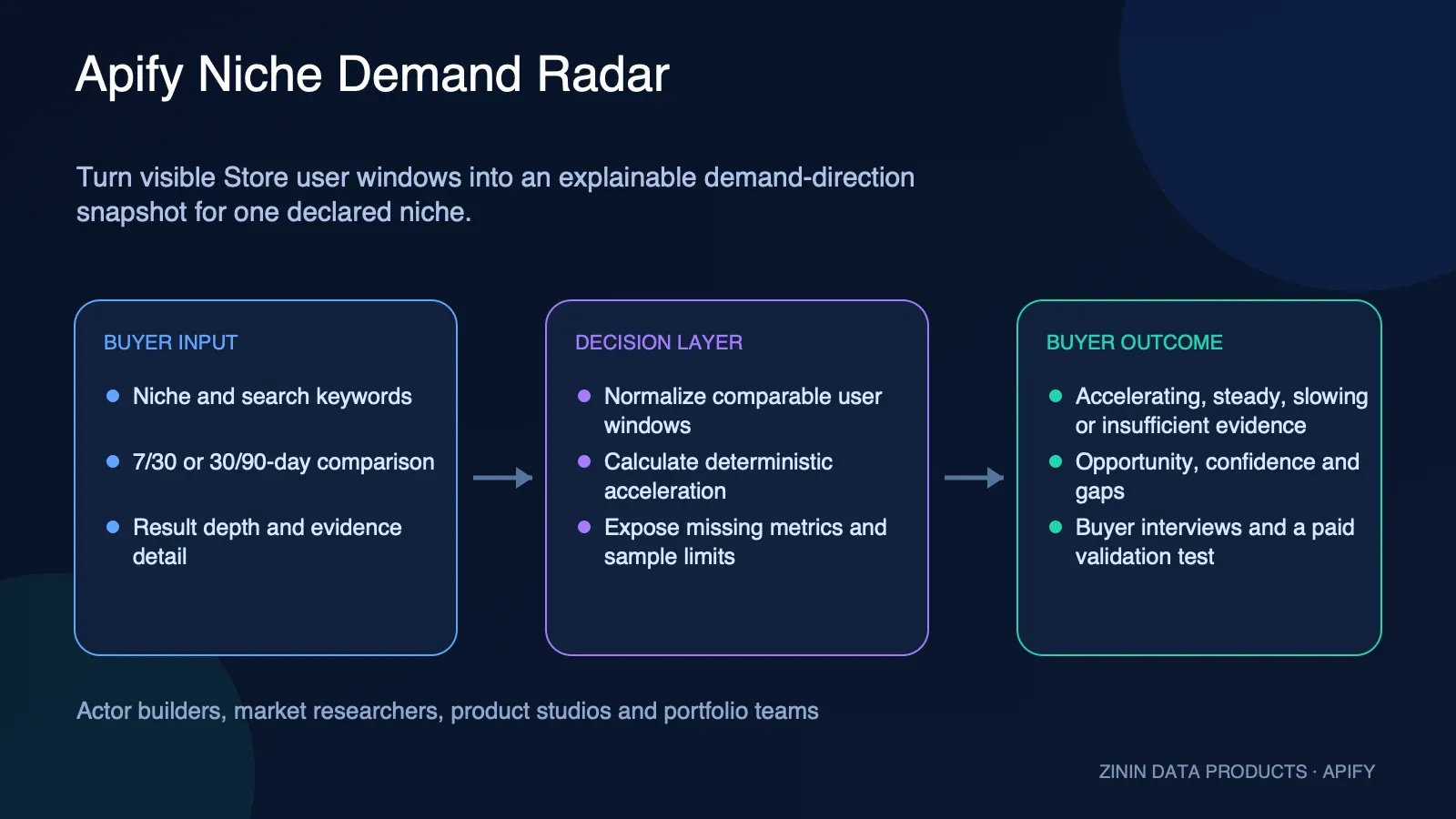
Measure whether visible Apify Store activity for one declared niche is accelerating, steady, slowing, or insufficient, then route the evidence to buyer interviews and a bounded paid test—not an automated forecast.
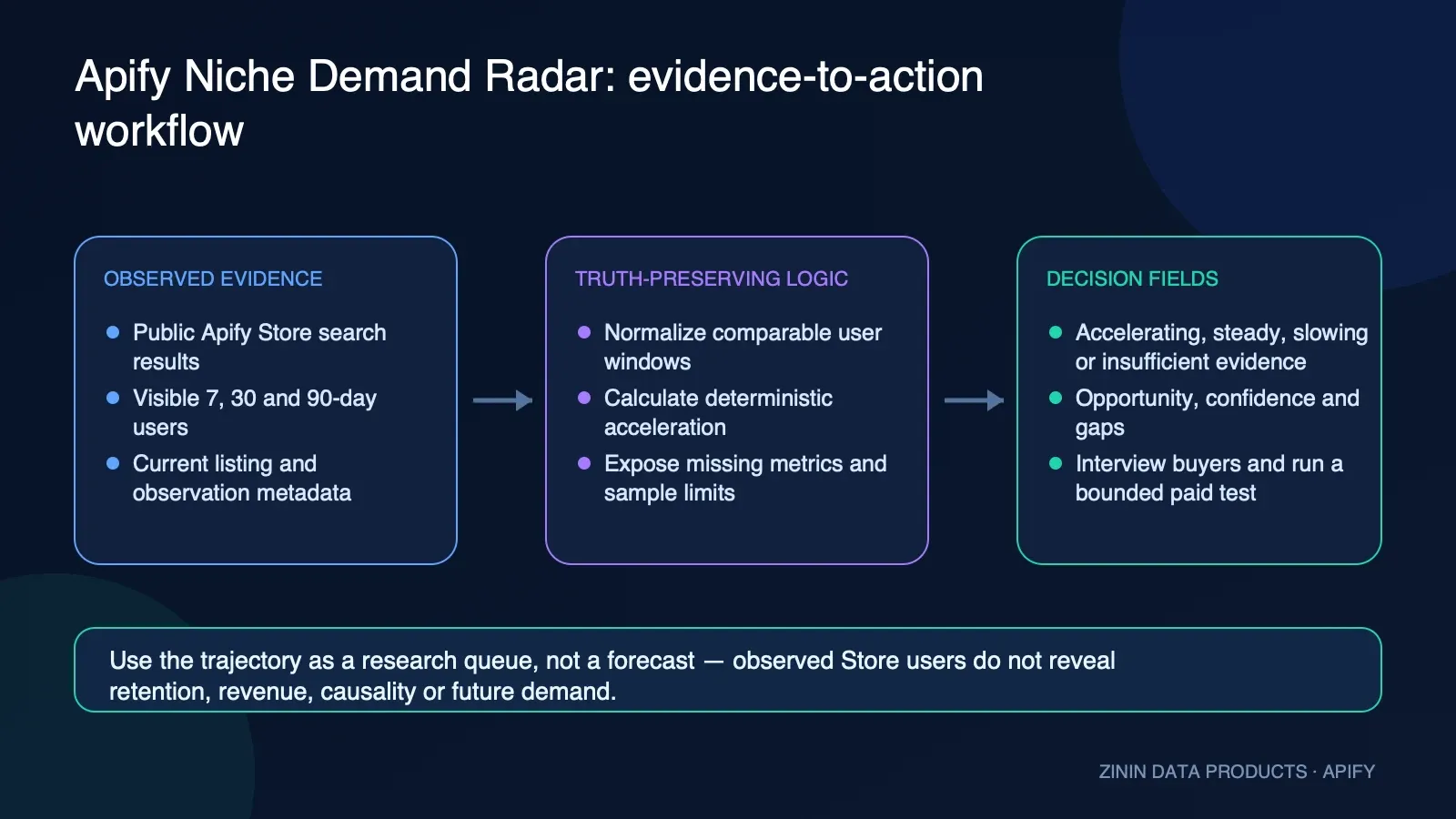
This Actor searches the official public Apify Store API, builds a bounded comparable cohort, normalizes visible 7-, 30-, and 90-day user windows, calculates a deterministic opportunity snapshot, and returns evidence, confidence, gaps, and one conservative manual action. It uses no LLM, browser, login, proxy, or buyer API token.
What you get
Each useful run delivers one niche demand snapshot. It contains the exact comparison window, trajectory enum, explainable opportunity factors, public-source coverage, sample confidence, evidence gaps, and the fixed review action VALIDATE_TRAJECTORY_WITH_BUYER_INTERVIEWS_AND_A_PAID_TEST. The output schema exposes the default Dataset link as REPORTS and the terminal KVS link as OUTPUT.
- Exact trajectory vocabulary: accelerating, steady, slowing, or insufficient.
- A bounded cohort of relevant public Apify Store Actors and visible user-window evidence.
- Deterministic scoring and sorting with no generated narrative or hidden model judgment.
- Confidence and data gaps that prevent public activity from being mistaken for revenue or purchase intent.
- A Dataset report for analysis plus current-run KVS OUTPUT for terminal and settlement reconciliation.
- One explicit manual action with safeToAutomate always false.
The Actor does not produce a market-size estimate, customer list, revenue forecast, retention model, product recommendation, or launch approval. Accelerating is not synonymous with rising paid demand, and slowing is not synonymous with declining activity.
Who uses it
The product is useful for Actor builders, product studios, marketplace researchers, portfolio operators, agency product teams, and data-product leads who need a reproducible public-signal queue before spending on deeper research.
Use it when your team can name a niche, define comparable keywords, and commit to validating the result with buyers. Do not use it as an automated investment, hiring, acquisition, roadmap, pricing, or go-to-market decision system.
Appropriate uses include research prioritization, portfolio monitoring, competitor discovery, interview planning, and hypothesis logging. Inappropriate uses include inferring private customer identity, scraping non-public Store data, deanonymizing users, estimating a competitor's revenue, or presenting a trajectory as verified future demand.
How to run
- Define one narrow niche phrase in plain business language.
- Add one to ten unique Store search keywords without URLs, tokens, names, or confidential strategy.
- Choose
7d_vs_30dfor a shorter activity direction or30d_vs_90dfor a broader comparison. - Use a unique
requestIdfor a new intentional observation; reuse it only when replay suppression is desired. - Start with
maxResults: 10,freshnessMinutes: 0, anddetailLevel: evidencefor acceptance. - Wait for the exact run to finish, then read default KVS key
OUTPUTbefore routing the Dataset row. - Require OUTPUT.runId to match the platform run and reconcile Dataset/paid counters.
- Send the report to a human researcher for interviews and a bounded paid test.
Input example:
The checked-in public-task.json and examples/input.json intentionally match the Store prefill. The public prefill receives a run-specific request ID suffix on Apify so repeated Try for free runs do not collide accidentally.
Pricing
The primary pricing noun is one niche demand snapshot. The Actor uses pay per event. A run can incur the automatic apify-actor-start event; one useful Dataset delivery can incur one result-found event. Invalid input, insufficient evidence, source failure, budget stop, cache reuse, and compatible request replay do not intentionally create a new result-found event.
| Tier | Actor start | One niche demand snapshot |
|---|---|---|
| FREE | $0.00500 | $0.05000 |
| BRONZE | $0.00475 | $0.04750 |
| SILVER | $0.00450 | $0.04500 |
| GOLD | $0.00425 | $0.04250 |
| PLATINUM | $0.00410 | $0.04100 |
| DIAMOND | $0.00400 | $0.04000 |
At FREE-tier event prices, one delivered snapshot plus start is $0.055 before compute and storage. At DIAMOND event prices it is $0.044 before compute and storage. The live pricing panel is authoritative for the buyer's current tier.
Before delivery, the runtime requires the exact two-event price map, an available run ID, a readable charge cap and spend, available result capacity, and a named result-found counter starting at zero. After a linked Dataset push returns, it requires the named counter to advance exactly from 0 to 1 and a bounded aggregate receipt. The Dataset billing object describes eligibility and intent; OUTPUT is the settlement authority.
Input contract
| Field | Required | Boundary |
|---|---|---|
schemaVersion | Yes | Exactly 1.0. |
requestId | Yes | 1–128 safe identifier characters; explicit replay key. |
maxResults | No | 1–100 nested evidence items; default 10. |
freshnessMinutes | No | 0–10,080 minutes; default 60. Zero forces a fresh public-source observation. |
detailLevel | No | compact or evidence. |
niche | Yes | 2–120 characters; no controls or URI-like text. |
keywords | Yes | 1–10 unique strings, 1–80 characters each; no controls or URI-like text. |
comparisonWindow | No | 7d_vs_30d or 30d_vs_90d. |
Unknown top-level fields, duplicate keywords, non-string items, embedded URL schemes, control characters, and out-of-range values fail closed. The runtime never coerces arbitrary objects into strings. Input schemas do not accept an Apify token because the source route is public and fixed.
Do not put personal data, customer names, prospect lists, emails, API keys, signed URLs, confidential roadmap names, unreleased product names, or sensitive strategy into these fields. Inputs are persisted by the Apify run platform and can be retained according to the buyer's storage settings.
Happy, partial, and failure output
A happy acceptance has one Dataset report, one current-run OUTPUT, one start event, one named result event, exact named counter 0→1, no default Dataset billing event, and replaySafe:false because a linked push was attempted.
A compatible replay returns the stored business result as one free Dataset row without a second result charge. It is a new run with a new start event; OUTPUT records one Dataset write, zero paid results, and replay truth:
These are run-bound acceptance wrappers for the exact current contract; placeholder IDs are replaced by real candidate evidence before public acceptance. They are not evidence that a future run will have the same cohort or trajectory.
Partial/no-result states include partial, not_found, invalid_input, source_unavailable, and budget_exhausted. A thrown linked push is unknown delivery. A returned push with unreadable or contradictory named settlement is unknown settlement. Both stop without retry and set replaySafe:false.
Field dictionary
| Field | Meaning and boundary |
|---|---|
schemaVersion | Closed input/report contract version. The current value is 1.0. |
requestId | Buyer-controlled idempotency key. Reusing it with the same canonical input suppresses a second paid delivery; reusing it with different input fails as a conflict. |
reportType / recordType | Stable report identities niche_demand_snapshot and niche_demand_decision_report. |
generatedAt / observedAt | UTC observation time for the current public Store snapshot. It is not a forecast horizon. |
dedupeKey / entityId | Stable SHA-256-derived join keys for the canonical request. They are integrity aids, not proof of one real-world market. |
detailLevel | compact returns a short evidence list; evidence uses the requested maximum nested evidence depth. |
sampleConfidence | insufficient, low, medium, or high, derived only from observed cohort size and coverage. |
confidenceScore / confidenceBand | A queryable projection of sample evidence sufficiency. It is not forecast accuracy or commercial confidence. |
dataGaps | Explicit missing business facts: purchase intent, revenue, retention, acquisition cost, support burden, margin, and persistence. |
recommendedAction | Always VALIDATE_TRAJECTORY_WITH_BUYER_INTERVIEWS_AND_A_PAID_TEST for a delivered result candidate. |
safeToAutomate | Always false for roadmap, pricing, budget, hiring, acquisition, investment, or launch decisions. |
billing | Dataset settlement-neutral eligibility and intent. The current-run KVS OUTPUT is the paid/free/unknown settlement authority. |
niche | The declared market phrase. Runtime trims and bounds it but does not prove that the phrase represents one coherent market. |
comparisonWindow | Exact public user-window comparison: 7d_vs_30d or 30d_vs_90d. |
trajectory | Exactly accelerating, steady, slowing, or insufficient. Slowing is deceleration and does not mean declining activity. |
opportunity.score | Deterministic bounded opportunity score from public Store evidence; not revenue potential. |
opportunity.acceleration | Normalized activity-direction value used by the classifier. |
opportunity.growth7dVs30d / growth30dVs90d | Comparable-window growth components where the public source provides usable values. |
opportunity.demand / competition / momentum | Explainable components from the observed cohort. They remain public-metadata proxies. |
opportunity.evidence | Bounded comparable Actor observations retained for review. |
sourceMetrics.actorCount | Number of relevant public Store Actors in the bounded cohort. |
sourceMetrics.coverage | Fraction of required public observations available for the calculation. |
sourceMetrics.sourceCount / sourceSuccessCount / sourceFailureCount | Exact bounded source request partition. |
sourceMetrics.recordsRead / recordsEligible | Observed records and records usable after validation. |
OUTPUT.runId | Current platform run identity. A paid acceptance must bind this to the actual Apify run. |
OUTPUT.replaySafe | True only before any Dataset push attempt. A new intentional observation uses a new requestId; an uncertain push is never blindly retried. |
OUTPUT.work | Requested, unique, duplicate, successful, and failed report-work counts. This Actor has at most one commercial report unit. |
OUTPUT.delivery | Attempted push, Dataset, paid, free, withheld, unknown-delivery, unknown-settlement, named-counter, and last-attempt facts. |
OUTPUT.terminal | Outcome, failure stage, KVS write state, and requested or failed exit state. |
The Dataset overview surfaces report identity, observed time, niche, trajectory, opportunity factors, source evidence, confidence, gaps, action, failure state, and settlement-neutral billing intent. Nested values use JSON display rather than pretending evidence is prose. Full API rows retain the closed report structure.
Evidence and boundaries
The only external source is the official public Apify Store API at https://api.apify.com/v2/store. The runtime accepts only that HTTPS origin and fixed path, resolves DNS under public-address rules, disables redirects, bounds request count, pages, response bytes, total source bytes, per-attempt time, and total work-unit time, and retries only bounded transient conditions.
The observed Store fields are public product/activity metadata. They do not reveal private buyer identity, subscription status, payment, contract value, churn, retention, margin, acquisition cost, satisfaction, support burden, or causal demand. A public Actor can have internal tests, promotions, one-off users, or seasonal activity. Search relevance also depends on the niche and keyword definition.
Trajectory is a deterministic classifier over normalized activity acceleration: null becomes insufficient, values at or above 60 become accelerating, values at or below 40 become slowing, and other values become steady. The label describes the calculation, not an economic state. In particular, slowing is not a safe synonym for decline.
Confidence describes cohort and coverage evidence only. The fixed gaps remain visible even when confidence is high. A stable digest proves that the same canonical input was used; it does not prove source completeness, market identity, or forecast accuracy. No output is financial, investment, legal, competition, or product-market-fit advice.
Privacy is intentionally narrow: the Actor does not accept a token and does not request user identities. Buyers must still avoid personal or confidential input, control access to run storage, choose a retention period, and delete records when the research purpose ends. SHA-256 is an integrity tool, not anonymization.
Decision routing
| Output state | Route | Prohibited interpretation |
|---|---|---|
accelerating with usable coverage | Schedule buyer interviews and a bounded paid test. | Not proof of rising revenue or future demand. |
steady | Review cohort composition and test a sharper problem statement. | Not proof of a stable market. |
slowing | Inspect absolute evidence and query changes; interview before deprioritizing. | Not proof of declining activity or a bad niche. |
insufficient / no result | Refine the niche, wait, or add an authorized source outside this Actor. | Never fill missing evidence with a forecast. |
| Partial source coverage | Keep the report in research only and resolve source gaps. | Do not compare it as if complete. |
| Compatible replay | Reuse the stored evidence in one free Dataset row; no new paid result was delivered. | Do not count it as a fresh observation. |
| Unknown delivery or settlement | Stop and reconcile the original run manually. | Never blind-retry. |
| Fatal pre-delivery failure | Correct the explicit issue, then intentionally run again. | Do not assume the start charge is reversed. |
Every Dataset report remains safeToAutomate:false. A downstream system may automate storage, alerts, or ticket creation, but it must not automate the commercial decision itself.
Commercial playbooks
1. New Actor thesis
Compare a specific niche phrase, inspect accelerating/steady/slowing plus cohort coverage, then schedule interviews with buyers who already pay for adjacent workflows. Do not treat the public score as demand validation.
2. Portfolio review
Run a fixed set of niche definitions on the same cadence and comparison window. Store every accepted OUTPUT with its run ID so a team can separate market movement from query changes.
3. Pricing discovery
Use the report only to prioritize conversations. Ask buyers about current workaround, frequency, budget owner, switching cost, willingness to pay, and failure cost before changing price or packaging.
4. Competitor watch
Inspect the evidence cohort and visible user windows, then open the relevant public Store listings manually. The Actor does not evaluate feature quality, reviews, retention, or revenue.
5. Launch gate
Require usable coverage plus human interview evidence and a bounded paid test. A trajectory label by itself is never a launch approval.
6. Declining-attention investigation
Do not translate slowing into declining. Slowing means the normalized direction is below the fixed threshold; absolute visible activity may still be positive.
7. Insufficient evidence
Refine niche wording or keywords, wait for a later observation, or use another authorized source. Do not manufacture a trajectory from a small cohort.
8. Warehouse history
Append Dataset report facts and a separate OUTPUT run-fact table. Join by requestId, runId, dedupeKey, and observation time.
9. Human review queue
Create a research ticket with trajectory, source coverage, cohort, gaps, and the fixed recommended action. Keep safeToAutomate false.
10. Failure reconciliation
Compare platform status, current-run OUTPUT, Dataset length, and named result-found counter. Never retry an unknown delivery or settlement without manual reconciliation.
For each playbook, document the owner, niche definition, comparison window, cadence, interview sample, paid-test cap, decision threshold, retention date, and what result would falsify the thesis. Without that plan, repeating the Actor can create activity data without improving a decision.
Integration recipes
Apify API
Poll only the returned run ID. After terminal status, fetch KVS OUTPUT and Dataset items. Require the current run binding and settlement partition before creating a research task.
JavaScript
Python
Webhook and warehouse
Trigger after terminal platform status, read OUTPUT, then route COMPLETE/PARTIAL/no-result/failure explicitly. Store Dataset report facts separately from run settlement facts. Keep requestId, runId, dedupeKey, observedAt, trajectory, source coverage, and gaps. Do not flatten null into zero or slowing into declining.
MCP or agent workflow
Treat the Actor as a deterministic evidence tool. An agent can prepare an interview brief or research ticket, but it cannot turn the trajectory into an autonomous roadmap or investment choice. Keep the exact run ID and gaps in every proposed action.
Operating guide
Before the first production cadence, freeze the niche definition, keywords, comparison window, owner, decision question, paid-test cap, and retention policy. Run one small acceptance and verify source response, Dataset row, OUTPUT, named counter, and live pricing. Do not scale a schedule until that chain is green.
During operation, monitor sourceSuccessCount/sourceFailureCount, actorCount, coverage, trajectory, sampleConfidence, warnings, requestReplay, Dataset writes, paid rows, unknown delivery, unknown settlement, duration, and KVS write success. A sudden cohort change can be a search/source effect rather than market movement.
Use a new requestId for each intended time-series observation. Preserve the prior accepted run before creating a new one. If a run is replayed, record that its Dataset row is a free copy rather than a fresh paid observation. If a push is uncertain, stop schedules for that request and reconcile manually.
Review the methodology whenever Apify changes public Store fields, pagination, rate behavior, or metric definitions. Review the commercial thesis whenever the niche, keyword set, buyer, use case, or comparison window changes. A series is comparable only when its definitions remain comparable.
Security posture: fixed HTTPS origin/path, no redirects, DNS public-address checks, bounded pages/bytes/attempts/time, no buyer source token, strict input fields, deterministic ordering, named KVS state, replay claims, serialized single paid operation, exact price allowlist, current run binding, named counter proof, and no linked-push retry.
Acceptance checklist
Before calling an observation accepted, verify all of the following against the same run: the platform build ID is the intended immutable build; platform status is terminal; OUTPUT.runId equals the platform run ID; requestId equals the submitted business key; Dataset length is one for a useful delivery; work requested/unique/successful is 1/1/1; attemptedPushCount and confirmedDatasetWrites are one; paidRowCount and confirmedEventDelta are one; resultChargeCountBefore/After is 0/1; unknownDeliveryCount and unknownSettlementCount are zero; terminal outcome is COMPLETE; and logs contain no error, fatal, exception, pricing, schema, timeout, or source-failure marker.
Also verify the Dataset row itself: trajectory is one of the four closed values, recommendedAction equals the fixed manual action, safeToAutomate is false, billing.settlementSource points to current-run KVS OUTPUT, sourceMetrics coverage is at least the product threshold, and the evidence cohort is consistent with the requested niche. A syntactically valid row with contradictory OUTPUT is not an accepted result.
Scheduled monitoring
For a scheduled series, keep niche, keywords, comparisonWindow, maxResults, and detailLevel stable. Generate a new requestId per intended observation, store the prior report and OUTPUT, and compare the new report only after the current run reconciles. If the query definition changes, begin a new series rather than joining incompatible observations.
A schedule should have a kill switch for repeated source failure, pricing drift, unknown settlement, and unexpected cohort discontinuity. It should not retry a failed linked push, should not backfill a missing trajectory, and should not continue buying snapshots when no researcher owns the resulting interview or test queue.
Interpreting movement
Read trajectory together with absolute components and coverage. An accelerating label with tiny observed activity can be less commercially interesting than a steady label with a larger relevant cohort. A slowing label can still describe positive activity that is increasing less quickly. A label change can also come from cohort composition or newly available fields. The output intentionally exposes those facts so a reviewer can avoid a one-word decision.
When two observations disagree, inspect the exact query, source records, snapshot time, actorCount, recordsEligible, coverage, growth components, and warnings. Do not average away a missing-source condition. Record the reason for the human interpretation alongside the Actor evidence so a later reviewer can distinguish calculation from judgment.
Incident response
Preserve the original run, Dataset ID, KVS ID, build ID, requestId, input digest, timestamps, event counters, and logs. Unknown delivery means the linked push threw before a Dataset receipt returned. Unknown settlement means the push returned but the named counter or bounded aggregate receipt could not prove paid/free state. Both require manual platform reconciliation and neither authorizes an automatic second run.
For pre-delivery input, source, identity, pricing, or budget failures, correct the stated cause and start a new intentional run only after confirming replaySafe. Remember that the automatic start event belongs to the failed run and is separate from result-found. Never edit old evidence to make a later run appear to be the original acceptance.
FAQ
Is accelerating the same as rising demand?
No. It is a deterministic direction label for observed public Apify Store user windows. It does not prove buyer intent, revenue growth, retention, or future demand.
Does slowing mean a niche is declining?
No. Slowing means the normalized acceleration value is at or below the documented threshold. Absolute activity can remain positive. The previous rising/declining wording was removed because it was not a safe alias.
What does steady mean?
The calculated acceleration lies between the slowing and accelerating boundaries. It does not mean the market, revenue, or buyer need is stable.
Why can the result be insufficient?
The report requires an opportunity score, at least three relevant public Actors, coverage of at least 0.50, and a non-null trajectory. Missing or incompatible public fields fail closed.
Does the Actor use an LLM?
No. Search, normalization, scoring, classification, sorting, confidence, and routing are deterministic.
Does it scrape Store pages?
No. It calls the public Apify Store API on the fixed https://api.apify.com/v2/store route and does not use a browser, login, proxy, or buyer token.
Can I automate a roadmap decision?
No. safeToAutomate is false and the fixed action requires buyer interviews plus a bounded paid validation test.
Why is requestId required?
It gives the commercial observation an explicit replay key. The same requestId and canonical input cannot create another paid report. A changed input under the same requestId is rejected.
Can I repeat the same niche later?
Yes, with a new intentional requestId. A new run is a new observation and can incur a new start and result charge.
What if OUTPUT is missing?
Treat the run as unreconciled. Do not infer paid success from a Dataset row or a SUCCEEDED label alone.
What if replaySafe is false?
Stop automated retry. A Dataset push was attempted, so delivery or settlement must be reconciled from the original run before any new run.
Are public Store users unique paying customers?
No. Public Store fields are source observations defined by Apify, not verified buyer identities, subscriptions, retention, or revenue.
Can a hash anonymize a niche or Actor?
No. A digest supports integrity and joins; it does not anonymize low-entropy phrases, public Actor names, or public source data.
What personal data does it process?
The intended input is business-market vocabulary and the source is public Store product metadata. Do not place names, emails, tokens, customer lists, confidential strategy, or sensitive data in niche, keywords, or requestId.
What is the paid unit?
One useful delivered niche demand snapshot linked to result-found. The automatic Actor start event is separate.
Sources and rights
The runtime uses the official public Apify Store API, specifically the fixed https://api.apify.com/v2/store endpoint. It does not open Store HTML pages, use a browser, follow redirects, query private Actor endpoints, access run inputs/outputs, or accept a buyer Apify API token for source retrieval.
Apify documents its Platform API and Store endpoints for programmatic use. Buyers should review the current Apify API documentation, platform terms, rate limits, and public-data expectations before operating a persistent commercial research workflow. Public technical access permits observation; it does not turn public metadata into proof of revenue, retention, customer identity, or a right to misrepresent another Actor.
This product transforms a bounded set of public product/activity observations into an analytical snapshot. It is not a mirror of Store listings and does not republish source code, private datasets, user identities, secrets, or customer records. Evidence rows should remain minimal and tied to the stated research purpose.
Respect Actor publishers and users. Do not use this output to harass, deanonymize, defame, rank individuals, infer protected characteristics, copy proprietary product material, or claim access to private commercial performance. Do not put third-party confidential data or personal data into the query merely because the source is public.
The buyer remains responsible for the lawful purpose, access controls, retention, downstream sharing, and human decision process. The recommended action is research—not an instruction to launch, invest, acquire, copy, undercut, contact, or make an irreversible business decision.


