

Rakuten Ichiba Scraper — Japan Product Prices, Shops & Reviews
Pricing
from $6.00 / 1,000 product founds
Rakuten Ichiba Scraper — Japan Product Prices, Shops & Reviews
Search Rakuten Ichiba (楽天市場) by keyword or search URL and get product listings: price in JPY, shop, review score and count, points, free shipping, sold-out flag and item URL. No login or API key.
Pricing
from $6.00 / 1,000 product founds
Rating
5.0
(2)
Developer

Tim Zinin
Maintained by CommunityActor stats
0
Bookmarked
4
Total users
2
Monthly active users
3 days ago
Last modified
Categories
Share
Rakuten Ichiba Scraper — Japan Product Prices, Shops, Reviews and Points
Enter a keyword or Rakuten search URL and get a downloadable product table from Rakuten Ichiba (楽天市場): price in JPY, shop, review score, review count, points, free shipping, sold-out flag and the direct item URL — for any keyword or search URL, no Rakuten account and no API key.
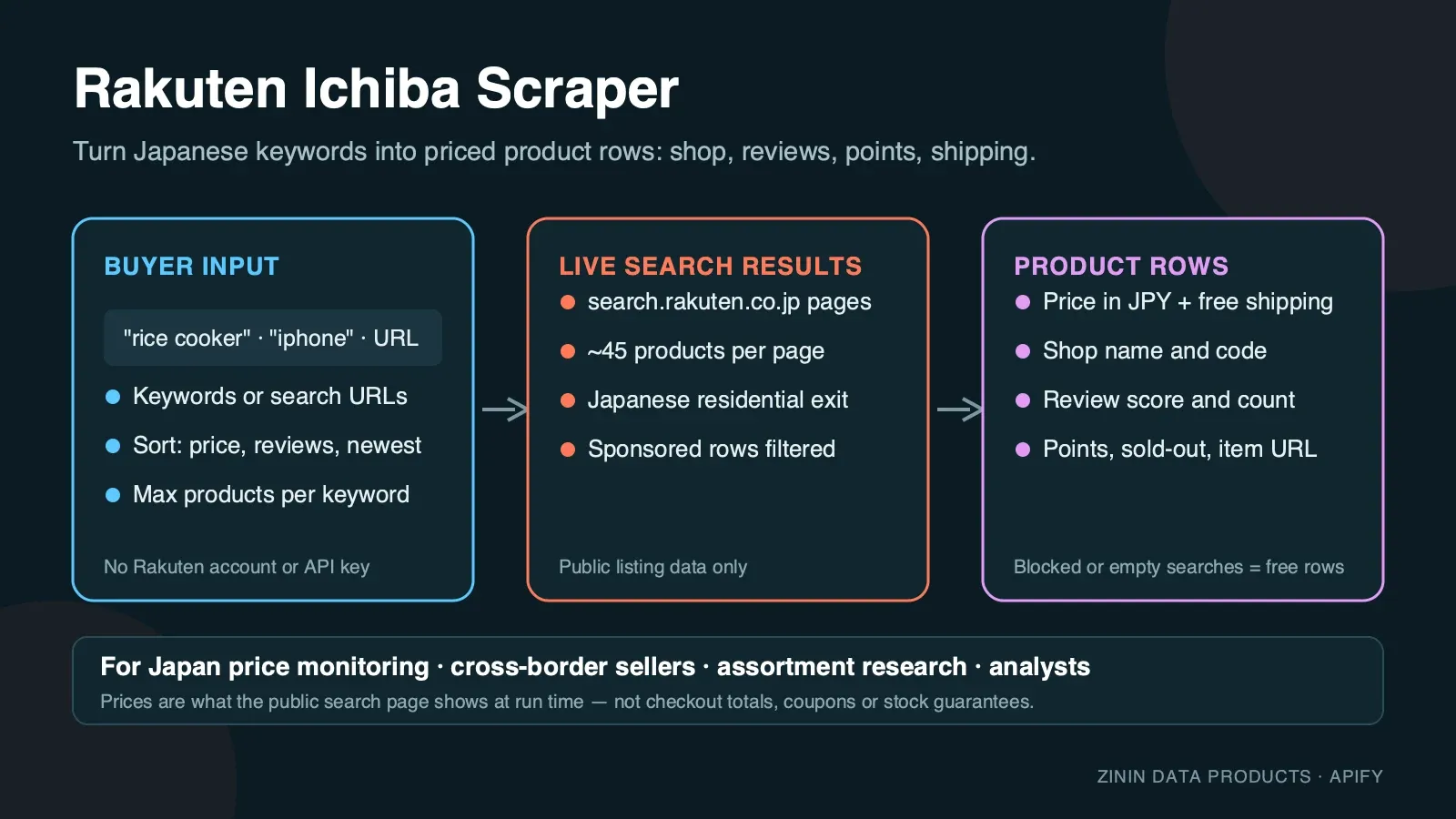
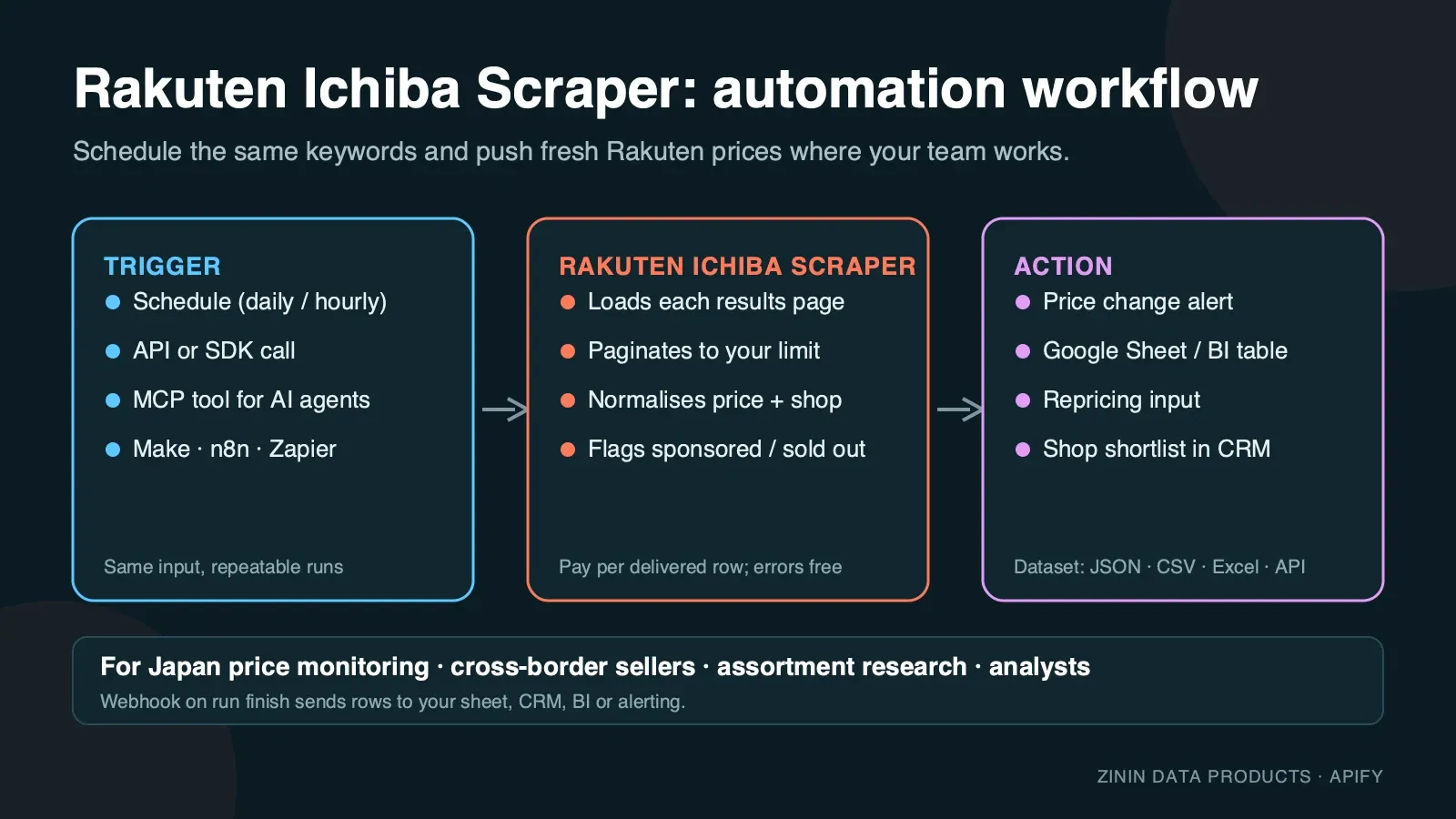
Rakuten Ichiba is Japan's largest online mall: tens of thousands of independent shops sell through one search box, and the same product often appears at a dozen different prices from different shops. This Actor reads the public search results pages exactly as a shopper in Japan sees them and turns every product card into one structured row. You choose the keywords (Japanese or English) or paste a search URL with your own filters, set how many products you need, and get a dataset you can download as JSON, CSV or Excel, pull through the Apify API, or send to Google Sheets, Make, n8n, Zapier or an AI agent over MCP.
It is built for recurring price and assortment work: run it daily on the same keywords, compare the rows, and you know who changed a price, who ran out of stock and which shop is gaining reviews.
Quick example
Use this input for a small price check:
The output contains product titles, numeric JPY prices, shop identifiers, review counts, points, shipping flags and item links. It reads search cards; it does not visit product detail pages or return full review text. At the default 2 GB, 10 delivered products cost $0.10: $0.04 at start plus 10 × $0.006. Set a run spending limit before starting.
What you get
One row per product card on the Rakuten Ichiba search results page:
- Product identity —
itemCode(shop code + item code, stable across runs), full producttitle, directurlon item.rakuten.co.jp and the Rakuten catalogueproductUrlwhen Rakuten has matched the item to a catalogue product. - Price —
priceas a number in Japanese yen (currencyis alwaysJPY), exactly as shown on the result card at run time. - Shop —
shopNamein Japanese,shopCode(the shop's URL code) and a readyshopUrlto the shop's storefront. - Social proof —
reviewScore(0–5, Rakuten's average) andreviewCountfor the item. - Rakuten points —
pointsEarned, the number of Rakuten Super Points a buyer earns on the listed price, which is a real part of the effective price in Japan. - Delivery —
freeShipping(true when the card shows free shipping) andshippingNote, Rakuten's own delivery promise text such as 「15:00までの注文で最短9/27(翌日)お届け」. - Availability —
isSoldOutflag. - Ad transparency —
isSponsoredmarks paid placements. They are excluded by default; switch them on to see which shops are buying visibility for your keyword. - Position —
pageandpositionon the results page, so you can track ranking over time. - Context — the
queryorsearchUrlthat produced the row andscrapedAttimestamp.
Every row is a real product that Rakuten showed for your search. Keywords with no results, blocked pages and budget stops are reported as free rows with an error field, so you always know what happened to each keyword and never pay for an explanation.
Who uses it
- Cross-border sellers and importers checking what Japanese shops charge for a product before they list it, and which shops dominate a keyword.
- Brands and distributors watching authorised and unauthorised resellers of their products on Rakuten: price floors, points campaigns, sold-out gaps.
- E-commerce and pricing teams feeding a repricing tool or a BI dashboard with daily Rakuten prices next to Amazon Japan and Yahoo! Shopping data.
- Market researchers and analysts sizing a category: how many shops, what price band, how reviews are distributed, how much of page one is sponsored.
- Affiliate and content publishers building "best rice cookers under ¥10,000" style pages from fresh prices, review counts and item links.
- AI agents that need a grounded answer about current Japanese retail prices and can call the Actor as an MCP tool.
How to run
- Click Try for free (or Start) on this page. You need a free Apify account; no Rakuten account, no API key.
- In Search keywords, enter one or more keywords, one per line. Japanese works best for Japanese products (
炊飯器,ワイヤレスイヤホン), English brand names work too (iphone,nintendo switch). - Optional: paste one or more Rakuten search URLs into Rakuten search URLs to reuse filters you already set on the site (genre, price range, free shipping, shop). The Actor preserves filter and sort parameters, removes any pasted page number, and starts pagination from page one.
- Pick a Sort order (relevance, price, price plus shipping, newest, most reviews, best review score) and set Max products per keyword or URL. One results page holds about 45 organic products.
- Click Start. The 20-product example below took 39 seconds in the recorded September test. Source delays and retries can make new runs take longer.
- Open the Output tab: the Products view shows image, title, price, shop, rating, points and link; the Errors and empty searches view shows the free explanation rows. Download as JSON, CSV, Excel or HTML, or call the dataset through the API.
To run it on a schedule, open Schedules, pick the Actor (or a saved task with your keywords) and choose daily or hourly. To connect it to other tools, see Integration recipes.
Pricing
This Actor uses pay per event pricing. You pay only for products actually delivered to your dataset, plus a small start fee:
| Event | Price | When it is charged |
|---|---|---|
| Actor start | $0.02 per GB of memory | Once per run. The default 2 GB memory means two start events. |
| Product found | $0.006 per product | For every product row delivered to the dataset. |
Example: with the default 2 GB memory, a run that delivers 100 products costs 2 × $0.02 + 100 × $0.006 = $0.64; 1,000 products cost $6.04. The same price applies on every Apify plan.
What you do not pay for:
- Rows with an
errorfield — keywords with no results, pages Rakuten did not return, and the note written when your spending limit is reached — are free. - Proxy traffic, browser time and retries are included in the product price. You never see a separate proxy bill.
- Sponsored listings are only delivered (and charged) when you switch Include sponsored listings on.
Spending limit. Apify lets you set Max total charge for any run. The Actor checks the remaining budget before every product and stops cleanly when the next product would exceed it, then writes a free row saying so. The historical budget-stop example below used the earlier launch tariff. Under the current tariff, a $0.02 cap cannot fund the default 2 GB start ($0.04) plus products; use a cap that includes both start events and result events.
Free plan. Apify's free plan includes monthly platform credit that covers small test runs of this Actor. The prefilled example is sized so that it completes well inside that credit.
Several searches in one run
Put independent keywords in the same searchQueries array to share one run start fee. maxItems applies to each keyword or URL, not to the whole run. With the default 2 GB, 49 separate runs returning 10 products each cost $4.90; one run returning the same 490 rows costs $2.98. These are current list-price calculations, not a claim about any customer's input, memory setting or invoice. Only the rows actually delivered are charged; a spending cap can stop the run earlier.
Keep separate runs when you need separate schedules or datasets. This Actor does not compare prices across runs; join exports using itemCode and scrapedAt in your own workflow. Missing source values stay null.
Input contract
| Field | Type | Default | What it does |
|---|---|---|---|
searchQueries | array of strings | — (prefill ["iphone"]) | Keywords to search. The Console form accepts up to 50 keywords; duplicate keywords are removed. |
startUrls | array of URLs | [] | Rakuten search URLs (https://search.rakuten.co.jp/search/...). Filters in the URL are kept. Other hosts are rejected before any work starts. |
sort | string | standard | standard (relevance), 2 price low→high, 3 price high→low, 11 price+shipping low→high, 12 price+shipping high→low, 4 newest, 5 most reviews, 6 best review score. Applied to keywords only. |
maxItems | integer 1–3000 | 45 (prefill 20) | Products to return per keyword or URL. The Actor stops paginating as soon as the limit is reached. |
includeSponsored | boolean | false | Deliver sponsored placements too, flagged with isSponsored: true. |
You must provide at least one keyword or one URL. An empty input fails immediately with a clear message and costs nothing beyond the start event.
Minimal input (the prefill):
Price research input — cheapest first, several keywords:
Reuse filters you set on the site:
Output examples
All examples below are copied from real runs of this Actor on the Apify platform (September 2026). Nothing is invented or edited except whitespace.
Happy output
Input {"searchQueries": ["iphone"], "maxItems": 20} — run finished in 39 seconds, 20 products delivered, 0 errors. First two rows:
A larger real run — {"searchQueries": ["炊飯器"], "maxItems": 150} — walked four results pages and delivered all 150 products in 83 seconds.
Partial output (spending limit reached)
Historical launch-tariff test; not a current price example. Input {"searchQueries": ["nintendo switch"], "maxItems": 45} started with Max total charge set to $0.02. The current default start alone is $0.04; do not reuse that old cap. The Actor delivered 5 products, saw that the next one would exceed the limit, stopped before charging and wrote this free row:
The five delivered rows are complete products like the ones above (the first was daichugame:10012928, 「Nintendo Switch すぐに遊べるセット」, ¥27,980, 4.48★ from 155 reviews).
Failure output
When Rakuten does not return a usable results page after three fresh residential sessions, the keyword gets a free error row and — if every keyword in the run failed — the run still ends as Succeeded with the status message "The site blocked all N search(es)… No result was billed, only the run start." — check that message or the error field to retry automatically. This row comes from a real early run while the Actor was being built:
No product was charged in that run; only the start event applied. Keywords that simply have no matching products get a similar free row: No results found for "…".
Field dictionary
| Field | Type | Meaning | Notes |
|---|---|---|---|
itemCode | string | shopCode:itemCode, Rakuten's stable identity of the listing | Use it as the primary key when you compare runs. null only on error rows. |
title | string | Product title exactly as the shop wrote it | Usually Japanese, often with campaign tags in 【】 brackets. Not translated. |
price | number | Price shown on the result card, in yen | Integer. Excludes coupons, member prices and shipping unless the shop included them. |
currency | string | Always JPY | Present on every row, including error rows, for schema stability. |
url | string | Item page on item.rakuten.co.jp | For sponsored rows this is the clean item URL, not the ad-tracking redirect. |
imageUrl | string | First product image (thumbnail CDN) | Images are not downloaded by the Actor; the URL is Rakuten's. |
shopName | string | Shop's display name | Japanese. |
shopCode | string | Shop's URL code | Stable; use it to group rows by shop. |
shopUrl | string | Shop storefront URL | Built from shopCode. |
reviewScore | number | Average review score, 0–5 | 0 means the item has no reviews yet. |
reviewCount | integer | Number of reviews for the item | |
pointsEarned | integer | Rakuten Super Points earned on this price | Base plus shop multipliers shown on the card; personal SPU bonuses are not included. |
freeShipping | boolean | Card shows free shipping | null if Rakuten did not return shipping data. |
shippingNote | string | Rakuten's delivery promise text | Japanese; dates are relative to the run time. |
isSoldOut | boolean | Item marked sold out | |
isSponsored | boolean | Paid placement | Only true when Include sponsored listings is on. |
productUrl | string | Rakuten catalogue product page | null when Rakuten has not matched the item to a catalogue product. |
page | integer | Results page the product appeared on | 1-based. |
position | integer | Position on that page | 1-based, organic order after filtering sponsored rows. |
query | string | Keyword that produced the row | null for URL inputs. |
searchUrl | string | First results page URL for this keyword or URL | |
scrapedAt | string | ISO timestamp when the row was written | UTC. |
error | string | Present only on free explanation rows | Never present on paid product rows. |
Evidence and boundaries
What this Actor observes and what it does not:
- Source. Only the public Rakuten Ichiba search results pages at
search.rakuten.co.jp, the same pages any visitor in Japan sees without logging in. It does not open item pages, carts or account areas. - Price is the card price at run time. Rakuten prices change during campaigns (お買い物マラソン, 楽天スーパーSALE), time sales and point-multiplier days. The row is what the search card said when the Actor loaded it. It is not a checkout total and does not include coupons, member-rank bonuses, shipping for remote areas or tax changes.
- Points are the card's points. Personal SPU multipliers depend on the buyer's own Rakuten services and are not visible to a logged-out visitor.
- Stock is the sold-out flag only. Rakuten does not publish quantities on search cards.
- Ranking depends on context. Relevance order on Rakuten can vary with location, time and personalisation. The Actor uses a Japanese residential connection and no login, which is the closest thing to a neutral shopper view, but two runs minutes apart can order page one differently.
- Titles are not translated or cleaned. Shops put campaign tags into titles; you get them as written so nothing is lost.
- No guarantees about completeness. Rakuten reports tens of thousands of hits for broad keywords but only lets visitors page through a bounded subset. For broad keywords, narrow the search (genre, price range in a pasted URL) rather than asking for tens of thousands of rows.
How the Actor reaches the page: Rakuten, like most large retailers, protects its pages against automated traffic. The Actor opens each results page in a real, privacy-hardened browser through Japanese residential proxies, waits until Rakuten's own page data is present, and reads it. Images, fonts and video are never downloaded, which keeps the run fast and the traffic small. If a page is not usable, it retries with a fresh session up to three times and then reports the keyword as a free error row instead of guessing.
Decision routing
| What you see in the data | What it usually means | What to do next |
|---|---|---|
| Your product appears from many shops within a 5–10% price band | Commodity competition; price is the main lever | Track daily and alert on the lowest price per itemCode group |
| One shop sells well below everyone else | Clearance, grey import, or pricing error | Check the item page and shop history before matching the price |
High pointsEarned relative to price | Shop is paying for point multipliers | Compare effective price = price − points value, not list price alone |
isSoldOut: true for the market leader | Supply gap | Opportunity to win share if you have stock; watch for restock |
Many isSponsored rows for a keyword (with sponsored on) | Competitive, ad-driven keyword | Budget for ads or target long-tail keywords instead |
reviewCount growing fast for a new itemCode | A rising product or a shop running a review campaign | Add the item to a watch list; compare against your listing |
Free error row No results found | Keyword too narrow or misspelled | Try the Japanese term or a broader keyword |
| Free error row about attempts | Rakuten did not serve the page to three sessions | Re-run later; it is not charged |
Commercial playbooks
1. Daily price watch for a product line. Save a task with your 10–30 product keywords, sort: 2 (cheapest first) and maxItems: 45. Schedule it daily. In your sheet, group by itemCode, keep the minimum price per day, and alert when a competitor drops below your floor. Effective price for Japanese buyers is price minus points, so add a column for that.
2. Reseller and MAP monitoring for brands. Search your brand name and model numbers. Group rows by shopCode. Shops that are not on your authorised list, or that sell under your minimum advertised price, are your follow-up list. Store url and scrapedAt as evidence.
3. Category sizing before entering Japan. Run one broad keyword per sub-category with maxItems: 300 and sort: standard. Count distinct shops, look at the price distribution and the share of items with more than 100 reviews. This tells you in an afternoon whether the category is fragmented or dominated.
4. Campaign tracking. Rakuten's big sales change prices and points for days. Run the same task hourly during お買い物マラソン and compare price and pointsEarned to the pre-sale baseline to see who discounts and who only adds points.
5. Content and affiliate pages. Pull the top products by sort: 6 (best review score) for a keyword, filter to reviewCount ≥ 50, and use the fresh price, rating and item link in your comparison page. Refresh weekly.
Integration recipes
Apify API (any language). Start a run and get items in one call:
Python client.
JavaScript client.
Google Sheets. Use Apify's Google Sheets integration on a saved task: every finished run appends rows to your sheet. Filter out rows where error is not empty.
Make, n8n and Zapier. Use the Apify app: trigger "Watch Actor runs" (or "Watch task runs"), then "Get dataset items", then your action — Slack message when the minimum price drops, a row in Airtable, a record in your CRM.
Webhooks. Add a webhook for ACTOR.RUN.SUCCEEDED pointing at your endpoint; it receives the run object with defaultDatasetId, and you fetch items from there.
AI agents (MCP). The Actor is available as a tool through the Apify MCP server (https://mcp.apify.com). An agent can call it with a keyword and use the returned rows to answer "what does X cost on Rakuten right now". Keep maxItems small for interactive use.
Comparing runs over time
Most buyers use this Actor to see change, not a single snapshot. A reliable change-detection setup looks like this:
- Fix the input. Save a task with the exact keywords, sort order and
maxItems. Changing any of them changes which products are in scope and makes day-to-day comparison noisy. - Key on
itemCode. It isshopCode:itemCode, which Rakuten keeps stable for the life of a listing. Titles change with every campaign; positions move every hour. - Store
scrapedAtwith every row. It is the observation time. Two rows with the sameitemCodeand differentpriceare a price change between those two timestamps. - Separate "missing" from "sold out". If an
itemCodedisappears from the results, it may have dropped out of the page window you requested rather than been delisted.isSoldOut: trueis the only explicit availability signal. For important items, request more pages so the item stays in scope. - Compare like with like. Relevance order moves; if you need a stable universe, use
sort: 2(price) or a pasted URL restricted to a genre and price band. - Watch points, not only price. During campaigns many shops keep the price and raise
pointsEarned. A change in points is a real change in what the buyer pays.
A simple daily sheet: one tab per day of rows, a pivot of minimum price per itemCode, and a conditional format that highlights a drop of more than 5%. That is enough to catch most competitor moves on Rakuten within a day.
Typical signals worth an alert: a new shopCode appearing in the top 10 for your brand keyword; the cheapest price for an itemCode group falling below your floor; isSoldOut flipping to true for the leader; reviewCount jumping by more than 20 in a week for a competitor item.
Scheduling and budget planning
A scheduled task is the usual way to run this Actor. Three things decide what a schedule costs and how useful it is:
- One run, many keywords. Put all keywords into one run instead of starting one run per keyword. The start event is charged once per run (per GB of memory), so ten keywords in one run pay one start, ten separate runs pay ten.
- Size by pages, not by wishes. Rakuten shows 45 products per page.
maxItems: 45or90reads whole pages;maxItems: 50reads two pages and throws most of the second away. The price is per delivered row, so this is about run time, not money. - Daily is enough for most price work. Rakuten shop prices change with campaigns (Super SALE, Marathon, 5 and 0 days), not every hour. A daily run at a fixed time gives a clean series; during a campaign week, add a second run in the evening.
Worked budget. Five brand keywords, 60 products each, once a day: 2 × $0.02 + 300 × $0.006 = $1.84 per day, about $55 per month. The same schedule once a week costs about $8 per month. Set Max total charge on the task to a little above the expected run cost; the Actor stops cleanly at that limit and writes a free row saying so, so a mistaken keyword list can never run away with your budget.
Operating guide
- Memory. The default 2 GB is enough; more memory does not make pages load faster and increases the start fee.
- Run size. One results page ≈ 45 products and a few seconds. A run with 10 keywords × 45 products typically finishes in a few minutes.
- Scheduling. Daily is enough for most price work; hourly makes sense only during sales events.
- Stable keys. Compare runs on
itemCode, not ontitle(shops edit titles constantly) and not onposition(ranking moves). - Many keywords. Put up to 50 keywords into one run rather than starting 50 runs — you pay one start fee instead of fifty.
- Timeouts. The default run timeout is 30 minutes. For very large jobs (thousands of products), raise the timeout or split keywords across runs.
- Retries. A keyword that failed with an attempts error is safe to run again; nothing was charged for it.
Troubleshooting
The run finished but I got fewer products than maxItems. Rakuten had fewer matching products, or only lets visitors page through part of a very broad result set. Narrow the search with a pasted URL (genre, price range) to reach deeper items.
I see No results found. Check the spelling, try the Japanese term (イヤホン instead of earphones) or remove a filter from the pasted URL.
I see an error about attempts. Rakuten did not serve a usable page to three separate sessions. This is rare and temporary; start the run again. The failed keyword was not charged.
The run stopped early with a spending-limit row. Your Max total charge was reached. Raise it in the run options or lower maxItems.
Prices look different from what I see in my browser. Your browser may be logged in (member prices, points) or outside Japan. The Actor sees Rakuten as a logged-out shopper in Japan at the moment of the run.
My pasted URL was rejected. Only https://search.rakuten.co.jp/search/... result URLs are accepted. Item pages and shop pages are not search result pages.
FAQ
Do I need a Rakuten account or Rakuten API application ID? No. The Actor reads public search pages; there is nothing to register.
Is this the official Rakuten API? No. It is an independent tool that reads the public website. Rakuten's official Ichiba Item Search API requires an application ID and has its own rate limits and field set; this Actor needs neither and returns what the website shows, including sponsored flags and delivery promises.
Can I get product descriptions, all images or variant prices? Not in this Actor. It reads search results, which is what price and assortment work needs at scale. The url field takes you to the item page.
How fresh is the data? It is read at run time. Schedule the Actor as often as you need fresh prices.
Can I search other Rakuten sites (Rakuten France, Rakuten Books, Rakuten Travel)? No, this Actor covers Rakuten Ichiba Japan only.
Can I run it from outside Japan? Yes. The Actor always uses a Japanese residential connection, so your own location does not matter.
What happens if Rakuten changes its page? Rows would stop appearing and keywords would return free error rows rather than wrong data. The Actor is monitored and updated.
Why do some titles contain 【】 tags? Shops put campaign information into titles. The Actor keeps titles exactly as written.
日本語での説明(楽天市場スクレイパー)
楽天市場の検索結果を、キーワードまたは検索URLから自動で取得するツールです。楽天会員ログインもAPIキーも不要です。
- 取得できる項目:商品名、価格(円)、ショップ名・ショップコード、レビュー平均点・件数、獲得ポイント、送料無料フラグ、配送目安、売り切れフラグ、広告(PR)フラグ、商品URL、画像URL、検索順位。
- 使い方:「Search keywords」に「炊飯器」「ワイヤレスイヤホン」「iphone」などのキーワードを1行に1つ入力し、取得件数(Max products)を指定して「Start」を押すだけです。楽天の検索画面で絞り込んだURL(ジャンル・価格帯・送料無料など)をそのまま貼り付けることもできます。
- 並び順:標準、安い順、高い順、送料込みの安い順・高い順、新着順、レビュー件数順、レビュー評価順に対応しています。
- 料金:取得できた商品1件ごとの従量課金です。検索結果なし・取得失敗・予算上限に達した旨のお知らせ行は無料です。
- 用途:価格調査、競合ショップの監視、転売・並行輸入のチェック、カテゴリの市場調査、アフィリエイト記事の価格更新など。
- 出力形式:JSON、CSV、Excel。Google スプレッドシート、Make、n8n、Zapier、API 連携にも対応しています。
検索キーワードの例:楽天 価格調査、楽天市場 スクレイピング、楽天 商品一覧 CSV、楽天 競合 価格 監視、楽天 ランキング 取得。
Sources and rights
- Data comes from publicly accessible Rakuten Ichiba search result pages. The Actor does not log in, does not bypass paywalls and does not collect personal data about shoppers; shop names are business names published by Rakuten.
- Product titles, prices and images belong to Rakuten Group, Inc. and the respective shops. Use the data in line with Rakuten's terms and the laws that apply to you, especially for republication. For large-scale commercial reuse, consider Rakuten's official APIs and partner programmes.
- This Actor is not affiliated with, endorsed by or sponsored by Rakuten Group, Inc. "Rakuten" and 「楽天市場」 are trademarks of their owner and are used here only to describe the data source.
- Report a bug or ask for a feature in the Issues tab of this Actor. Custom fields or other Japanese marketplaces can be built on request.
More marketplace scrapers from the same author
| Actor | What it gives you |
|---|---|
| Mercado Libre Scraper | Latin American product prices and sellers |
| bol.com Scraper | Dutch and Belgian product prices and sellers |
| Wildberries Scraper | Russian marketplace prices, brands and sellers |
| Shopify Store Price & Catalog Change Monitor | Price and catalogue changes on Shopify stores |


