

App Release Regression Intelligence from Reviews
Pricing
from $42.50 / 1,000 delivered app-release regression reports
App Release Regression Intelligence from Reviews
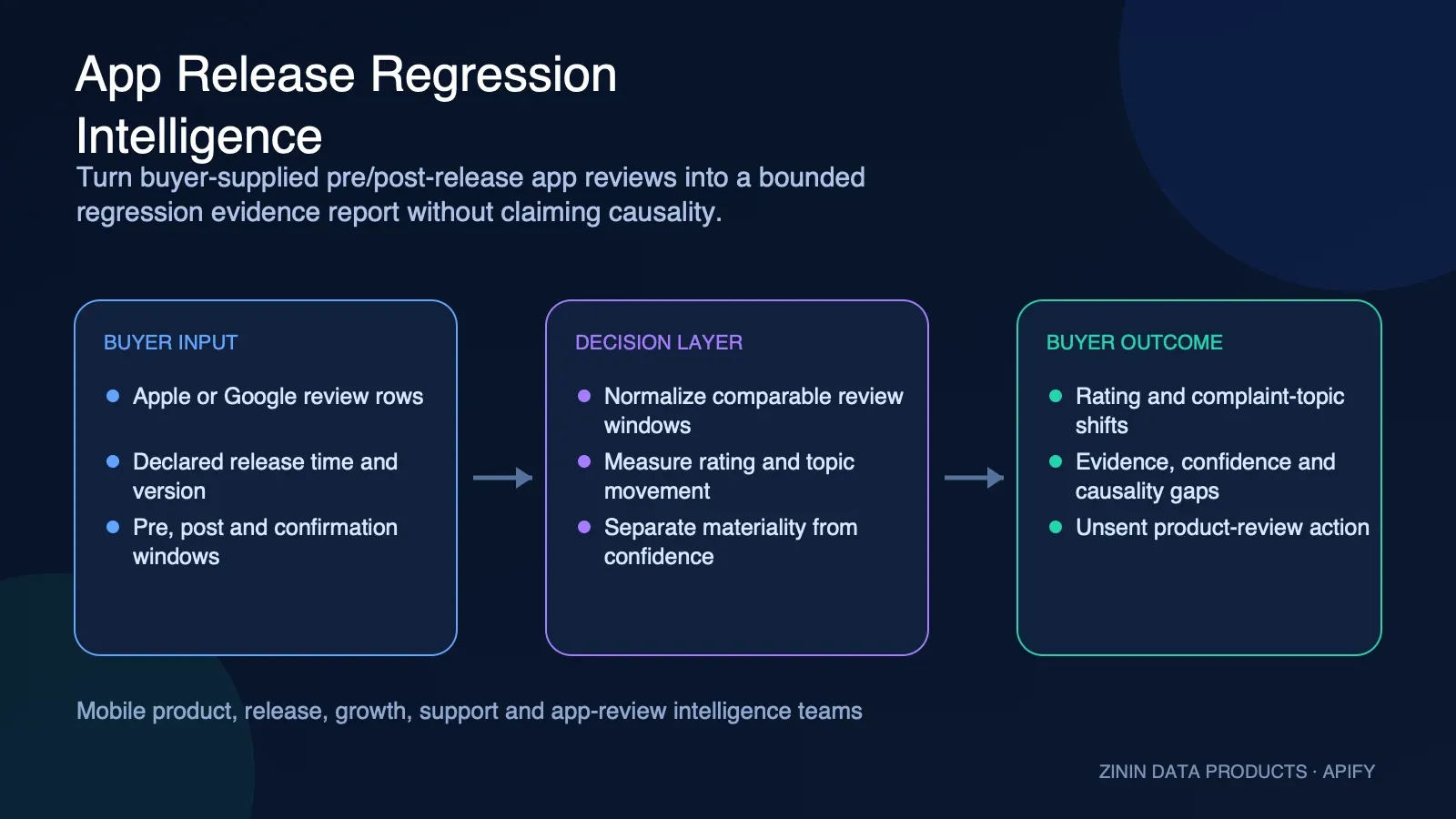
Compare buyer-supplied Apple App Store or Google Play reviews before and after a release. Get one deterministic regression report with rating and topic shifts, confidence, representative evidence, data gaps, and unsent review actions. No review fetching, telemetry, or causal attribution.
Pricing
from $42.50 / 1,000 delivered app-release regression reports
Rating
0.0
(0)
Developer

Tim Zinin
Maintained by CommunityActor stats
0
Bookmarked
1
Total users
0
Monthly active users
13 days ago
Last modified
Categories
Share
App Release Regression Intelligence — Review Window Analysis
Compare buyer-supplied Apple App Store or Google Play reviews before and after a release using deterministic rating and topic thresholds, evidence quality, materiality, and unsent actions.
This guide is written for buyers, operators, analysts, and automation builders. It explains what the Actor observes, how to turn the Dataset into a controlled workflow, and where human verification remains mandatory.
What you get
Did the supplied review evidence show a material rating or complaint-topic shift after the declared release, and what should product or support teams inspect next?
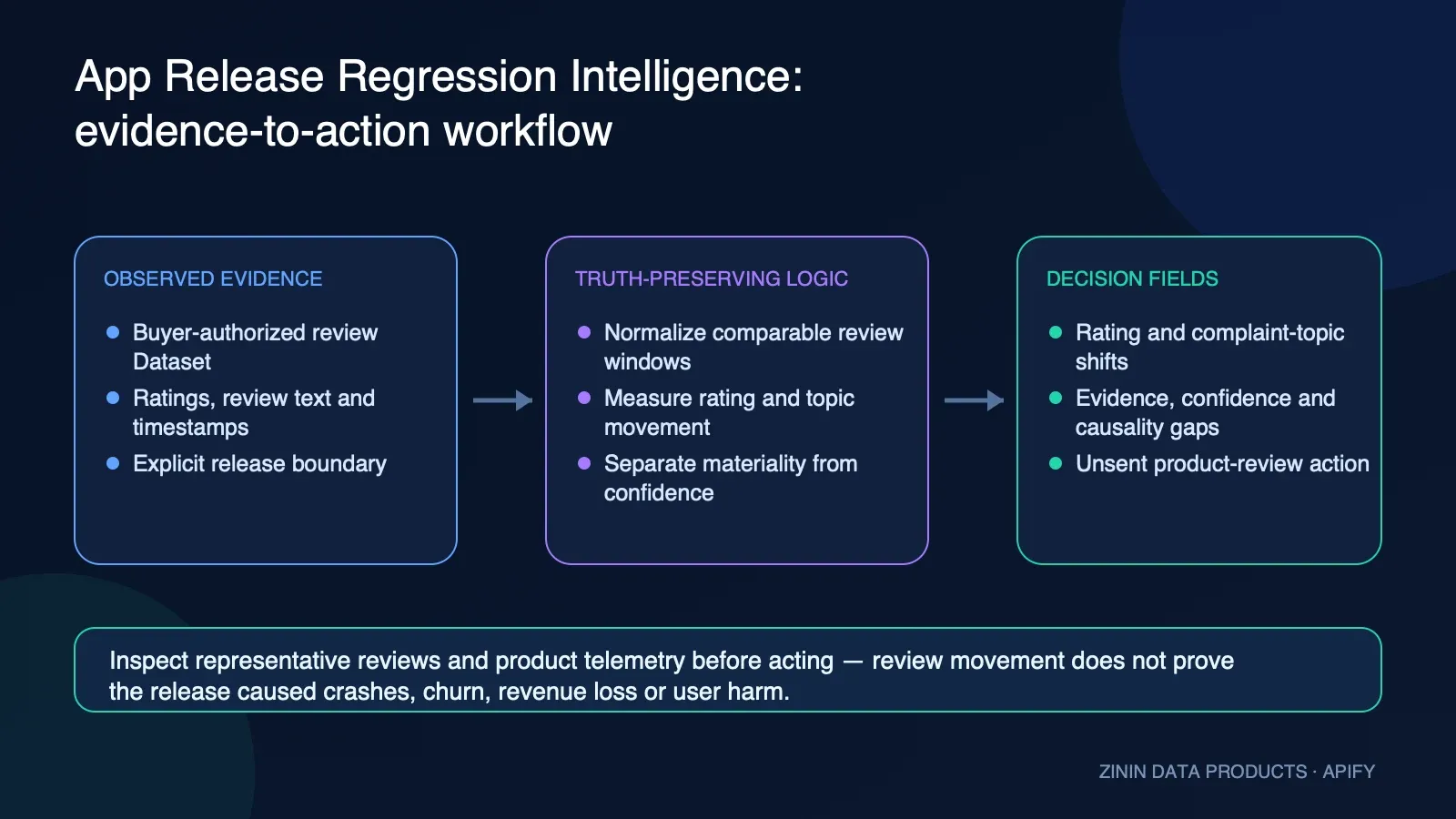
The Actor reduces collection and first-pass triage work. It does not remove responsibility for source verification or authorize an external business action. The commercial value comes from a structured, repeatable evidence layer: stable identity, observation time, source evidence, confidence, gaps, recommended action, and failure semantics travel with the raw facts.
Who uses it
| User | Value |
|---|---|
| Mobile product managers | Receive a bounded post-release review signal with transparent thresholds and representative evidence. |
| App growth teams | Separate rating movement and topic-share changes from unsupported causal claims. |
| Support leaders | Create unsent investigation actions for crash wording, login, payment, performance, onboarding, ads, pricing, and feature requests. |
| Release managers | Compare explicit UTC windows and exact version evidence when available. |
| Agencies | Analyze a buyer-authorized review Dataset without hidden crawling or nested Actor costs. |
| Data teams | Use deterministic normalization for canonical, Apple, and Google row shapes under strict bounded contracts. |
How to run
- Open the Input tab and keep
schemaVersionat1.0. - Identify one buyer-owned app with
platform,appId,watchId, and a UTCreleaseAtboundary. - Supply reviews inline through
rows, or select one buyer-authorized Apify Dataset withdatasetId. Never submit both. - Start with the bounded public example and
explanation: "off"; inspect the Dataset report and KVSOUTPUTbefore expanding the review cohort. - Confirm the exact pre/post windows, accepted and rejected review counts, completeness, confidence risks, and run settlement.
- Route
recommendedActionto human review. The Actor does not roll back releases, contact reviewers, or change an app-store listing.
The public example is synthetic and deliberately small. Production review text remains the buyer's responsibility: minimize personal data, keep the collection basis and retention period documented, and never place a secret in review text or a Dataset field.
Pricing
The Actor uses PAY_PER_EVENT. Every run has the separate automatic apify-actor-start event. Exactly one useful, confirmed regression report can emit the primary result-found event. Invalid input, insufficient evidence, source failure, a duplicate replay, a budget-withheld result, or an unconfirmed delivery must not be interpreted as another paid report.
| Apify tier | Start event | Delivered report event |
|---|---|---|
| FREE | $0.005 | $0.050 |
| BRONZE | $0.00475 | $0.0475 |
| SILVER | $0.0045 | $0.045 |
| GOLD | $0.00425 | $0.0425 |
| PLATINUM | $0.0041 | $0.041 |
| DIAMOND | $0.004 | $0.040 |
These are the closed prices used by the current runtime contract. The live Apify pricing panel and the current run receipt remain authoritative. Set maxTotalChargeUsd high enough for the start plus one result at your tier; a lower cap deliberately withholds the result instead of silently exceeding the cap. Optional OpenRouter explanation uses the buyer's key and is not included in the Actor event price.
Input contract
| Input field | How to use it |
|---|---|
| schemaVersion, requestId, watchId | Contract, idempotency, and stable app-watch identity. auto resolves to the trusted Apify run ID in Tasks. |
| platform, appId, appName | Apple/Google source family and buyer-owned app identity/display context. |
| releaseAt, releaseVersion | Exact UTC comparison boundary and optional release version. Missing review versions cannot establish release causality. |
| rows | Inline canonical review rows. Use this or datasetId, never both. |
| datasetId | One buyer-owned read-only Dataset containing canonical or supported Apple/Google shapes. |
| options | Pre/post/confirmation windows, minimum reviews, maximum rows, and optional bounded explanation mode. |
| maxTotalChargeUsd, openrouterApiKey | Optional spend cap and caller-owned secret used only for BYOK explanation. |
Recommended first Input
Start with this bounded example, inspect every Dataset field, and only then expand the scope. Input limits are product controls, not inconveniences: they make cost, completeness, and error handling visible.
Field dictionary
| Field or group | Meaning |
|---|---|
| reportId, watchId, platform, status | One useful analysis identity and runtime outcome. |
| ratingMovement | Pre/post counts, average ratings, and observed delta for accepted review windows. |
| topicFindings | Deterministic threshold crossings for the closed complaint/review-topic taxonomy. |
| decision.entityId, eventId, inputRef | Stable app and release-analysis event identity. |
| decision.before, decision.after, changeFlags | Comparable rating and topic-share state around the release boundary. |
| decision.materialityScore, materialityBand | Weighted triage significance of negative rating and topic movements. |
| decision.confidenceScore, confidenceBand, confidenceRisks | Evidence support based on exact version and review volume, not causal probability. |
| decision.sourceEvidence, dataGaps | Release/review-window evidence and unresolved causality or sample limitations. |
| decision.recommendedAction, actionPriority, safeToAutomate | Review-only next step; external product/support actions are never sent. |
| dataQuality, limitations, actions | Coverage, rejected or partial conditions, explicit constraints, and unsent review tasks. Billing settlement is run-level KVS evidence, not a Dataset report field. |
Common decision fields
| Field | Operational meaning |
|---|---|
| recordType | The semantic row family. Use it to distinguish a business result from an advisory or terminal record. |
| schemaVersion | Version of the additive decision-intelligence contract. Pin or validate it in strict consumers. |
| entityId | Stable entity identity for deduplication and joins. It is not necessarily a legal identifier. |
| inputRef | The relevant submitted input reference after normalization. |
| observedAt | When the Actor observed or finalized the evidence. It is not necessarily the source publication time. |
| firstSeenAt and lastSeenAt | Always-emitted observation boundaries. Stateful monitors use the compatible baseline/current boundary. Stateless rows set both equal to observedAt for the current run; that equality does not establish historical tenure. |
| freshness | A structured statement about evidence age or availability, not a prediction. Its basis and age unit follow the source-specific field definition. |
| eventId | For monitors, the stable identity of one observed transition or monitor outcome. It is distinct from entityId. |
| before and after | For monitors, the bounded comparable snapshots used for the decision. Null means that side of a comparison was not honestly available. |
| changedFields and changeFlags | Machine-readable monitor deltas and normalized change labels. Empty arrays mean no supported changed field was established, not that every possible real-world fact stayed constant. |
| materialityScore and materialityBand | Magnitude of an observed monitor change when the Actor can calculate it. Materiality is separate from evidence confidence and may be unknown when the source lacks the required facts. |
| confidenceScore | Evidence support on a 0–100 scale. It is separate from materiality, lead score, or business value. |
| confidenceBand | Readable high/medium/low/unknown grouping of evidence support. |
| confidenceReasons | Observed facts that raise confidence. |
| confidenceRisks | Missing, partial, ambiguous, inferred, or conflicting aspects that reduce confidence. |
| confidenceConflict | Explicit consistency warning when structured evidence does not reconcile. |
| sourceEvidence | Source-linked observations supporting the row. Preserve this during export. |
| dataGaps | Important evidence the Actor did not observe or cannot establish. Keep these gaps visible in CRM, spreadsheet, and automation exports. |
| negativeSignals | Machine-readable risks or gaps. A negative signal is not automatically a negative business outcome. |
| recommendedAction | Bounded review label produced from the available evidence. |
| actionPriority | Suggested queue priority, not urgency guaranteed by the source. |
| actionReason | Plain-language explanation for the recommended action. |
| safeToAutomate | Whether the narrow recommended action is deterministic enough for automation. Organizational policy still applies. |
| failureType | Normalized terminal or partial failure classification. Null means no classified failure. |
| failureDiagnostics | Empty on a successful report; machine-readable terminal detail remains in KVS OUTPUT.errors. |
| retryable | Whether a later retry may legitimately change an operationally incomplete result. |
| recommendation | Human-readable handling guidance, especially for terminal rows. |
Happy, partial, and failure output
Read KVS OUTPUT before consuming the Dataset. runSummary exposes requested,
unique, duplicate, successful, failed, delivered, paid, free, withheld, partial,
budget-stop, fatal-error, and replay-safety truth for this one-watch run. The older
review-row counts, datasetWriteCount, billedResultCount, delivery, and
billing fields remain unchanged for backward-compatible consumers. A paid report
requires one confirmed Dataset write and one result-found event; budget-withheld
or ambiguous outcomes cannot be interpreted as a new paid report. Error, replay,
and invalid-input receipts keep row counters in the same one-watch unit, while a
run-level failure with no accepted request is represented by fatalError, not by an
invented failed row. An idempotent replay is one duplicate and zero new successful rows.
Two immutable historical run receipts demonstrate the current one-report unit. The first was the accepted production proof for build 1.1.1. The second proved the later runtime and billing contract on candidate 1.2.1; it also exposed the Dataset-view packaging mismatch corrected in the current source. evidenceAccepted below refers to the stated runtime and settlement evidence, not to a claim that the older Store packaging was already final.
Interpret terminal states conservatively:
| Outcome | Dataset/KVS meaning | Operator action |
|---|---|---|
| Complete report | One report was delivered and the named result event reconciled. | Review evidence and the suggested action; do not infer causality. |
| Partial evidence | The bounded report discloses truncation, an incomplete window, or another material gap. | Preserve partial, limitations, and gaps; acquire the missing evidence before action. |
| Free status | No paid report was established because input/evidence was insufficient, duplicated, withheld, or failed before confirmed delivery. | Read KVS OUTPUT; correct only retryable operational causes. |
| Delivery unknown | A push or settlement could not be reconciled safely. | Do not blind-retry. Reconcile Dataset, KVS, and platform event counters first. |
| Failed run | fatalError identifies a run-level failure with no invented negative business result. | Treat it as an operational incident, not as evidence that the release was safe. |
Evidence and boundaries
What the evidence supports
- The Actor never fetches reviews; it analyzes only rows supplied inline or through one buyer-authorized read-only Dataset.
- Comparison windows are UTC half-open intervals around the supplied release timestamp.
- Every comparison side must meet the configured minimum accepted review count.
- Topic findings require documented percentage-point or relative-share plus count thresholds.
- Exact version and larger samples raise confidence; missing version remains null and cannot prove release causality.
What this Actor never claims
- The Actor does not prove the release caused a rating or complaint change, a real crash/ANR rate, revenue loss, churn, or user impact.
- Review wording classified as crash_complaint is review inference, not telemetry.
- It does not fetch app-store pages, call another Actor, access private analytics, or modify a release.
- It does not send support, engineering, rollback, or marketing actions automatically.
- Optional explanation prose cannot override deterministic evidence or add missing facts.
Reading data gaps correctly
A data gap is part of the result. Nulls, partial flags, confidence risks, source failures, and unavailable fields must survive export. Removing these fields makes the remaining facts look more complete than they are. When two sources conflict or a required identity cannot be proven, lower confidence and keep safeToAutomate=false.
Source evidence is not permission
A public source proves only that a value or statement was observable at the recorded time and URL. It does not establish consent, contractual rights, legal status, accuracy after observation, or authorization for a downstream action. Your organization remains responsible for source terms, privacy rules, outreach policy, retention, and human review.
Decision routing
| Action | How to use it |
|---|---|
| REVIEW_RELEASE_REGRESSION_EVIDENCE | Inspect representative reviews, version evidence, release changes, telemetry, and support data before routing work. |
| REVIEW_RATING_DECLINE | Validate sample quality and compare with app analytics before treating the observed rating delta as operational impact. |
| NO_THRESHOLD_REGRESSION | Record the bounded result without claiming the release was problem-free. |
| RECONCILE_DELIVERY_UNKNOWN | Resolve ambiguous paid delivery or baseline state before retrying. |
Confidence is not attractiveness
confidenceScore answers “how strongly does the available evidence support this factual classification?” It does not answer “how valuable is this lead, property, account, or address?” A high-confidence negative fact may be commercially uninteresting; a low-confidence positive signal may deserve research but not action. Keep the concepts separate in dashboards, exports, and CRM fields.
Why safeToAutomate is conservative
safeToAutomate is intentionally false whenever the next step could amplify an uncertain inference. It may be true only for narrow deterministic actions explicitly supported by the row, such as suppressing an email with invalid syntax. A true value does not waive legal, privacy, consent, contractual, or organizational rules.
Retry policy
- Retry when
retryable=trueand the failure is operational, such as a temporary source or DNS problem. - Do not endlessly retry deterministic invalid input, policy refusal, or confirmed absence.
- A retry must preserve the original input reference and must not create duplicate downstream actions.
- Budget exhaustion is not negative evidence about the entity. Resume only the unprocessed scope with an authorized budget.
- A failed Actor run is an operational event. Never transform it into “no listing,” “no contact,” “bad lead,” or “invalid email.”
Commercial playbooks
1. Release-day review watch
Goal. Supply authorized review rows for the default windows and inspect the first deterministic report.
Recommended runbook.
- Define the submitted cohort and write down why it is in scope.
- Start with the smallest useful Input and preserve the exact run ID.
- Inspect the Dataset overview before exporting anything.
- Check
failureType,retryable, completeness indicators, andconfidenceBand. - Open the relevant
sourceEvidenceor source URL for material rows. - Apply the recommended action as a review label, not as an instruction to contact, buy, delete, accuse, or publish.
- Record the analyst's final disposition in the destination system.
Do not skip. A report proves that deterministic rating or review-topic thresholds were evaluated in the supplied pre/post windows. It does not prove release causality, crash rates, revenue impact, product failure, or authorization to act.
2. Crash-language triage
Goal. Route crash_complaint evidence to an analyst and compare it with crash telemetry before escalating.
Recommended runbook.
- Define the submitted cohort and write down why it is in scope.
- Start with the smallest useful Input and preserve the exact run ID.
- Inspect the Dataset overview before exporting anything.
- Check
failureType,retryable, completeness indicators, andconfidenceBand. - Open the relevant
sourceEvidenceor source URL for material rows. - Apply the recommended action as a review label, not as an instruction to contact, buy, delete, accuse, or publish.
- Record the analyst's final disposition in the destination system.
Do not skip. A report proves that deterministic rating or review-topic thresholds were evaluated in the supplied pre/post windows. It does not prove release causality, crash rates, revenue impact, product failure, or authorization to act.
3. Payment regression review
Goal. Inspect payment-topic examples and release changes without assuming failed transactions or revenue loss.
Recommended runbook.
- Define the submitted cohort and write down why it is in scope.
- Start with the smallest useful Input and preserve the exact run ID.
- Inspect the Dataset overview before exporting anything.
- Check
failureType,retryable, completeness indicators, andconfidenceBand. - Open the relevant
sourceEvidenceor source URL for material rows. - Apply the recommended action as a review label, not as an instruction to contact, buy, delete, accuse, or publish.
- Record the analyst's final disposition in the destination system.
Do not skip. A report proves that deterministic rating or review-topic thresholds were evaluated in the supplied pre/post windows. It does not prove release causality, crash rates, revenue impact, product failure, or authorization to act.
4. Ads and pricing feedback
Goal. Track share shifts in ads/pricing language while preserving sample and causal limitations.
Recommended runbook.
- Define the submitted cohort and write down why it is in scope.
- Start with the smallest useful Input and preserve the exact run ID.
- Inspect the Dataset overview before exporting anything.
- Check
failureType,retryable, completeness indicators, andconfidenceBand. - Open the relevant
sourceEvidenceor source URL for material rows. - Apply the recommended action as a review label, not as an instruction to contact, buy, delete, accuse, or publish.
- Record the analyst's final disposition in the destination system.
Do not skip. A report proves that deterministic rating or review-topic thresholds were evaluated in the supplied pre/post windows. It does not prove release causality, crash rates, revenue impact, product failure, or authorization to act.
5. App agency report
Goal. Deliver rating movement, topic findings, evidence quality, and unsent actions with the run URL.
Recommended runbook.
- Define the submitted cohort and write down why it is in scope.
- Start with the smallest useful Input and preserve the exact run ID.
- Inspect the Dataset overview before exporting anything.
- Check
failureType,retryable, completeness indicators, andconfidenceBand. - Open the relevant
sourceEvidenceor source URL for material rows. - Apply the recommended action as a review label, not as an instruction to contact, buy, delete, accuse, or publish.
- Record the analyst's final disposition in the destination system.
Do not skip. A report proves that deterministic rating or review-topic thresholds were evaluated in the supplied pre/post windows. It does not prove release causality, crash rates, revenue impact, product failure, or authorization to act.
6. Dataset composition
Goal. Select a buyer-owned Apple or Google review Dataset read-only and preserve exact source review identities.
Recommended runbook.
- Define the submitted cohort and write down why it is in scope.
- Start with the smallest useful Input and preserve the exact run ID.
- Inspect the Dataset overview before exporting anything.
- Check
failureType,retryable, completeness indicators, andconfidenceBand. - Open the relevant
sourceEvidenceor source URL for material rows. - Apply the recommended action as a review label, not as an instruction to contact, buy, delete, accuse, or publish.
- Record the analyst's final disposition in the destination system.
Do not skip. A report proves that deterministic rating or review-topic thresholds were evaluated in the supplied pre/post windows. It does not prove release causality, crash rates, revenue impact, product failure, or authorization to act.
7. Confirmation-window follow-up
Goal. Rerun with sufficient later evidence to see whether the initial topic signal persists.
Recommended runbook.
- Define the submitted cohort and write down why it is in scope.
- Start with the smallest useful Input and preserve the exact run ID.
- Inspect the Dataset overview before exporting anything.
- Check
failureType,retryable, completeness indicators, andconfidenceBand. - Open the relevant
sourceEvidenceor source URL for material rows. - Apply the recommended action as a review label, not as an instruction to contact, buy, delete, accuse, or publish.
- Record the analyst's final disposition in the destination system.
Do not skip. A report proves that deterministic rating or review-topic thresholds were evaluated in the supplied pre/post windows. It does not prove release causality, crash rates, revenue impact, product failure, or authorization to act.
8. Partial and failure lane
Goal. Keep insufficient, pagination, budget, source, lock, and delivery-unknown outcomes out of the positive report stream.
Recommended runbook.
- Define the submitted cohort and write down why it is in scope.
- Start with the smallest useful Input and preserve the exact run ID.
- Inspect the Dataset overview before exporting anything.
- Check
failureType,retryable, completeness indicators, andconfidenceBand. - Open the relevant
sourceEvidenceor source URL for material rows. - Apply the recommended action as a review label, not as an instruction to contact, buy, delete, accuse, or publish.
- Record the analyst's final disposition in the destination system.
Do not skip. A report proves that deterministic rating or review-topic thresholds were evaluated in the supplied pre/post windows. It does not prove release causality, crash rates, revenue impact, product failure, or authorization to act.
Integration recipes
All examples use placeholders. Keep the Apify token in a secret manager and never write it into a Dataset, README, screenshot, or client-side application.
cURL: start a run and wait briefly
The run response includes defaultDatasetId. Read clean JSON rows with:
JavaScript with apify-client
Python with apify-client
Apify MCP call
Generic webhook consumer policy
- Trigger on a terminal Actor run event.
- Confirm the run status is
SUCCEEDEDbefore reading business rows. - Retrieve rows from
defaultDatasetId. - Reject or quarantine rows whose
failureTypeis non-null unless your policy explicitly handles that failure. - Send
safeToAutomate=falserows to a human-review queue. - Store
entityId,observedAt,sourceEvidence, confidence, action, and the Apify run ID together. - Make retries idempotent by keying the destination on the stable entity ID plus the intended observation or event identity.
Operating guide
Before the first production run
- Write the business question in one sentence: Did the supplied review evidence show a material rating or complaint-topic shift after the declared release, and what should product or support teams inspect next?
- Confirm every submitted input is within your authorized scope.
- Use the prefilled small example and review all returned row types.
- Map stable identifiers, confidence, evidence, actions, gaps, failure, and retry fields into the destination.
- Establish a human owner for review exceptions.
- Set a run budget and output bound appropriate to the test.
- Verify that secrets are stored only in the platform or workflow secret manager.
After every scheduled run
- Check terminal run status and logs.
- Compare the number of submitted entities, produced business rows, and advisory rows.
- Review partial, unknown, conflict, and low-confidence buckets.
- Inspect a sample of source evidence, including at least one positive and one negative result.
- Confirm the destination deduplicated on the intended stable key.
- Verify that no downstream action was triggered from an error row.
- Track cost per useful reviewed row rather than cost per raw request alone.
Production monitoring signals
Monitor source-unavailable rate, partial-row rate, low-confidence share, missing evidence, retry volume, run duration, Dataset row count, and spend. A sudden shift may indicate source drift, input drift, or an upstream outage. Stop automation and investigate before accepting a new pattern as business truth.
Cost control
Use the synthetic public prefill first, inspect accepted/rejected counts and exactly one result charge, then run a small buyer-owned Dataset. Current event prices and actual run usage on Apify are authoritative.
Use maxTotalChargeUsd when calling a monetized Actor if your workflow supports it. Treat a buyer-set cap as a hard safety boundary. If the cap stops work, the unfinished items remain unprocessed; they do not become negative results.
Buyer and operator acceptance checklist
Use this checklist before calling the workflow production-ready.
Product fit
- The business question matches: Did the supplied review evidence show a material rating or complaint-topic shift after the declared release, and what should product or support teams inspect next?
- The submitted entities were selected through an authorized process.
- A human owner understands the positive, negative, partial, and failure row types.
- The team accepts the boundaries listed in “What this Actor never claims.”
- The destination keeps evidence confidence separate from business scoring.
Input and run controls
-
schemaVersion, requestId, watchIdis explicitly reviewed and bounded. -
platform, appId, appNameis explicitly reviewed and bounded. -
releaseAt, releaseVersionis explicitly reviewed and bounded. -
rowsis explicitly reviewed and bounded. -
datasetIdis explicitly reviewed and bounded. -
optionsis explicitly reviewed and bounded. -
maxTotalChargeUsd, openrouterApiKeyis explicitly reviewed and bounded. - The first production-like run uses a small representative sample.
- A maximum charge or internal spend alert is configured where appropriate.
- The workflow records Actor ID, build/version, run ID, Dataset ID, and input hash.
Data handling
-
entityIdis mapped to an idempotent destination key. -
observedAtand source-specific time fields remain distinct. -
sourceEvidence, gaps, and nulls are preserved. - Advisory and failure rows cannot enter the positive-results lane.
- Low-confidence and partial rows have a visible manual-review view.
- Retention and deletion rules match the type of data collected.
Action safety
-
recommendedActionis treated as a review label. -
safeToAutomate=falseblocks automatic external action. - Consent, suppression, legal, contractual, and platform rules are evaluated downstream.
- A reviewer can trace a material action back to source evidence and run metadata.
- Retry logic cannot duplicate a downstream action.
Ongoing quality
- The team monitors failure, retry, partial, low-confidence, and empty-result rates.
- A source-drift threshold pauses the workflow for inspection.
- Sample evidence is manually reviewed on a recurring basis.
- Cost per useful reviewed row is measured.
- Documentation and field mappings are updated when schemaVersion changes.
FAQ
Is this a database?
No. It is an on-demand observation tool. Each run collects or evaluates the submitted scope and records evidence at that time.
Does a found row prove commercial interest?
No. A found row proves only the factual observation described by its fields. Buyer intent is never inferred.
Can I automatically contact every result?
No. Use recommendedAction as triage, verify the evidence and identity, and apply your own consent, privacy, suppression, and outreach rules.
Why is safeToAutomate often false?
Because a useful observation can still require identity, context, legal, or source verification before action. Conservative routing prevents false certainty from scaling.
What should I do with low confidence?
Open confidenceRisks and sourceEvidence, close the important gap, or keep the row in a manual queue. Do not hide the confidence field.
What does partial mean?
The Actor obtained some usable evidence but could not support a complete observation of the configured scope. Partial is not the same as empty.
What is a confirmed zero?
Only an explicit source or deterministic rule can support a confirmed absence. An outage, truncation, or unreadable response is not a zero.
Should I retry every failure?
No. Retry only when retryable is true. Invalid input, policy refusal, or deterministic classification should be corrected or handled, not looped.
Can I delete failure rows?
You can exclude them from a business-results view, but retain them in operational logs so Dataset completeness and retry decisions stay explainable.
How should I deduplicate?
Use entityId for the entity and, for stateful monitors, eventId for the observed transition. Also retain the Apify run ID.
Can I treat confidence as conversion probability?
No. Confidence measures evidence support, not purchase probability, revenue, suitability, or expected return.
Can I change the recommended action?
Yes. It is an explainable default. Your downstream policy can be stricter, and should encode organization-specific authorization and risk tolerance.
How do I estimate cost?
Run the smallest representative input, inspect live event prices and run usage in Apify, then model the number of billable result events. The live pricing panel is authoritative.
Why use a small prefill?
It produces a cheap, fast, inspectable first run and reduces the chance of scaling a wrong input or workflow assumption.
Can I schedule it?
Yes. Use an Apify schedule, but make the destination idempotent and review changes in failure, partial, and confidence rates.
Can I export CSV or Excel?
Yes. Apify Datasets support common export formats. JSON is recommended when you need nested evidence and decision fields.
Can I send results to Sheets or Airtable?
Yes. Preserve entityId, confidence, evidence, gaps, actions, and failure fields instead of mapping only the headline value.
Can I use it from Make, Zapier, or n8n?
Yes. Start the Actor, wait for a successful terminal state, read Dataset items, then branch on decision and failure fields.
Can an LLM consume the output?
Yes, but pass the structured evidence and limitations together. Instruct the model not to invent missing facts and to cite sourceEvidence.
What happens when a source changes?
The run may become partial, unavailable, or fail validation. Monitor these rates and inspect logs before treating changed output as a real-world shift.
Does public mean unrestricted?
No. Public visibility does not remove source terms, privacy obligations, retention rules, or the need for a legitimate downstream purpose.
Is a source URL permanent?
Not necessarily. Store observation time and material facts because web content can change or disappear.
Can I rely on one row for a high-stakes decision?
No. High-stakes legal, financial, employment, compliance, safety, or personal decisions require appropriate primary evidence and qualified review.
How do I report a suspected parsing issue?
Provide the Actor run ID, a redacted input, affected field, expected source evidence, and whether the issue reproduces. Never include tokens or private data.
What does success mean?
A report proves that deterministic rating or review-topic thresholds were evaluated in the supplied pre/post windows. It does not prove release causality, crash rates, revenue impact, product failure, or authorization to act.
Sources and rights
This Actor is a processor for buyer-supplied review observations. It does not fetch Apple App Store or Google Play pages, dereference a source URL, use a proxy, call another Actor, or claim an app-store redistribution licence. The caller must have a valid basis to collect, upload, analyze, retain, and share every submitted review row.
rowsmust contain review observations the buyer is authorized to process.datasetIdmust identify a buyer-controlled or buyer-authorized Apify Dataset.- Review text can contain names, account references, health statements, payment details, or other personal data. Minimize or redact those values before submission when they are unnecessary for release analysis.
- Do not use the report for automated adverse decisions about an identifiable reviewer.
safeToAutomategoverns only the narrow stated workflow action and does not waive privacy, consumer, platform, or employment rules. - Apple/Google-shaped field support is a normalization contract, not an affiliation with, endorsement by, or licence from Apple or Google.
- Preserve review identity, observation time, release boundary, rejection counts, data gaps, and provenance through export. Removing those fields can turn bounded evidence into an unsupported claim.
- Define retention and deletion rules for Input, Dataset, and KVS data. Apify run storage is operational persistence; it is not a substitute for the buyer's data-governance policy.
- Optional OpenRouter use is BYOK. The buyer is responsible for the provider agreement, model choice, data-handling settings, and whether review text may be sent to that provider. Deterministic report facts do not depend on explanation prose.
For authoritative run truth, use the current public Input/Output schemas, the current Apify pricing panel, the Dataset report, and the same run's KVS OUTPUT. This README documents the product boundary; it does not grant rights to any third-party data.
Related Actors
| Actor | What it does |
|---|---|
| AI Answer Change Alert | Compare supplied AI answer observations when a release may change brand visibility. |
| AI Overview Citation Tracker | Track supplied Google AI Overview observations alongside app-release evidence. |
| LLM Brand Visibility Tracker | Measure supplied model answers and competitor mentions for the same brand watch. |
| Domain Health Checker | Check a landing domain when release feedback points to a destination issue. |
| US Brand Action Queue | Shape unsent review actions into a downstream operational queue. |
Support information to include with an issue
Provide the public Actor name, Apify run ID, Dataset item index or stable entity ID, a redacted Input, the relevant source URL, expected behavior, observed behavior, and whether retrying produced the same result. Do not include an Apify token, API key, private customer record, or unnecessary personal data.
Final interpretation rule
A report proves that deterministic rating or review-topic thresholds were evaluated in the supplied pre/post windows. It does not prove release causality, crash rates, revenue impact, product failure, or authorization to act.


