

App Store App Intel
Pricing
from $1.70 / 1,000 app record delivereds
App Store App Intel
Get a public intel card for any iOS App Store app by numeric id, slug+id, or Store URL: rating, review count, price, publisher, seller, size, age rating, in-app purchases, compatibility and the latest release notes. No login, no Apple API key.
Pricing
from $1.70 / 1,000 app record delivereds
Rating
0.0
(0)
Developer

Tim Zinin
Maintained by CommunityActor stats
0
Bookmarked
3
Total users
0
Monthly active users
17 days ago
Last modified
Categories
Share
App Store App Intel: The Public App-Detail Card, With the Right JSON Block, Every Time
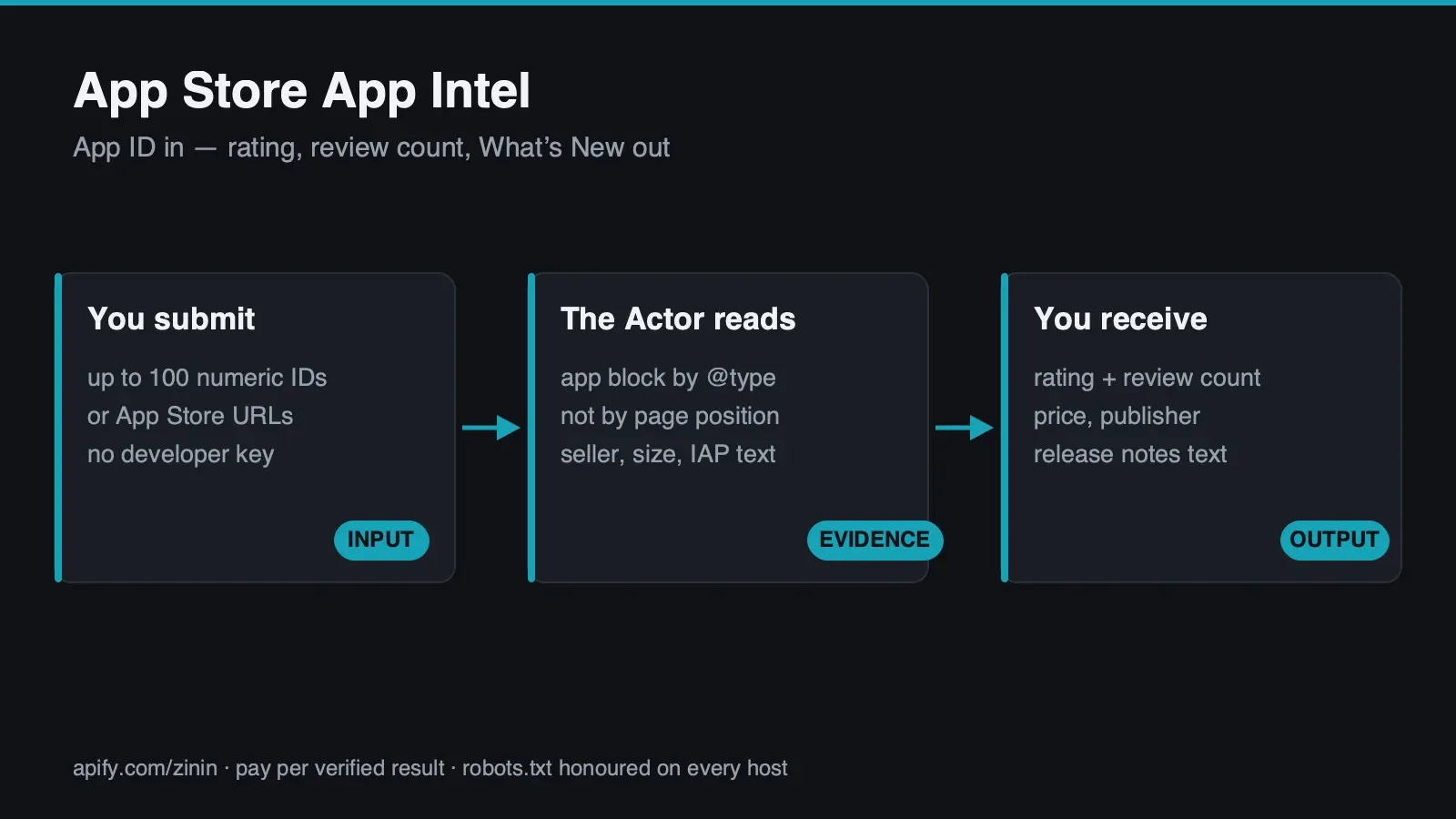 Every iOS App Store app-detail page carries two
 <script type="application/ld+json"> blocks. The
first is typed Organization and has no rating at all. The second is typed SoftwareApplication and
carries the rating, the review count, the price and the publisher. A scraper that reads "the first
ld+json block on the page" — a completely reasonable-looking implementation choice — returns an empty
rating at HTTP 200. Not an error. Not a timeout. A confident, success-shaped response with the wrong
data in it, which is worse than an honest failure because nothing about the response tells you it's
wrong. This Actor selects the block it needs by its declared @type, scanning every ld+json block on
the page and matching on type, never on position — verified live, and re-verified while writing this
page, against the exact page shape that makes a naive implementation fail.
Give this Actor a numeric App Store id, a slug+id, or a full Store URL, and get back one JSON row per app: rating, review count, price, publisher, seller, size, age rating, in-app purchases, iOS compatibility, and the latest release notes with their version number and date. No login, no Apple API key, no headless browser, no anti-bot bypass.
The billable outcome is a delivered app: an id that resolved to a live app-detail page and was parsed with confidence. An id Apple's own App Store confirms does not exist — a genuine HTTP 404 — comes back as a free row. A blocked, timed-out, or unparseable request also comes back free, with a named reason. You pay for apps actually delivered, never for a lookup that failed or an app that was never there.
What you get
- The rating and review count from the RIGHT structured-data block, proven, not assumed. See the
CRITICAL entry under Evidence and boundaries for the exact live page (WhatsApp, id
310633997) that demonstrates the trap, and this Actor's ownevidencefield, which states outright which of the two blocks supplied the data ("block 2 of 2") — so the fact this Actor read the right block isn't a claim you have to trust blind, it's printed on every single row. - Eight fields Apple keeps OUTSIDE that structured data entirely. Seller, size, age rating, in-app
purchases and iOS/iPadOS/macOS/watchOS compatibility live in the page's plain HTML "Information" panel
— not in any
ld+jsonblock. Release notes, version number, and release date live in a separate, genuinely server-rendered "Version History" panel. A parser that only reads JSON-LD keys reports every one of these eight fields as "missing" on a page where all eight are sitting in plain HTML at HTTP 200. - The apostrophe landmine, closed. The page spells "What's New" with a Unicode right single quote
(
’, U+2019) — not the ASCII apostrophe (', U+0027) a hand-typed label constant would naturally use. A label match built against the ASCII character silently fails to find a real, present field. This Actor's HTML-field engine normalizes both the page text and every label constant before comparing, so this specific landmine — and any future one shaped the same way — is closed for every field, not patched around for one string. - Two bonus fields Apple's own page includes for free:
versionandreleaseDate, read directly from the same "Version History" panel that supplieswhatsNew. Neither was in this Actor's original field list — found live while this Actor was built, on two separate apps, and kept because the source is reliable and the fields are genuinely useful for a change-tracking watch. - Flexible input, one authoritative identifier. A numeric id (
310633997), a slug+id together (whatsapp-messenger/id310633997), or a full Store URL all work — the numeric id is always what actually gets used, because Apple's own server redirects any slug paired with a correct numeric id to the canonical one (a real, live-observed 301, not an assumption), so this Actor never has to trust or validate slug text at all. - Honest not-found, never a guess. A nonexistent numeric id gets Apple's own HTTP 404 — verified
live, re-verified while writing this page — returned as
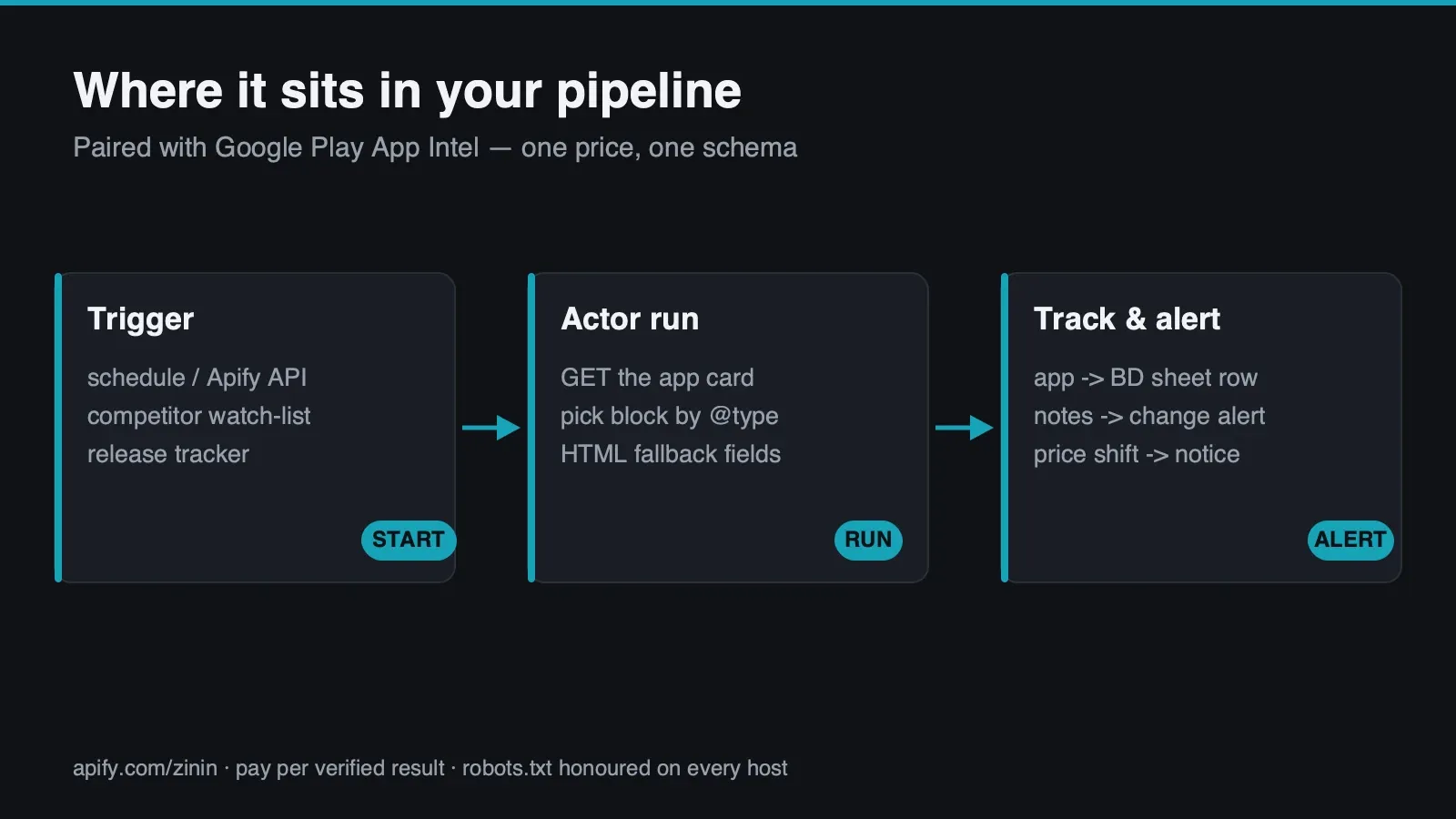
status: "not_found", at no charge. - Built for watchlists. Up to 100 ids per run, concurrency configurable 1–20, so a dozen competitor apps for rating and release-note drift is one scheduled run.
- Runs on Apify: trigger from the Console, a scheduled Task, the Apify API, the Apify MCP server, or any HTTP client — export as JSON, CSV, Excel, or push results onward via webhook or integration.
Who uses it
- Competitive and product intelligence teams watching a set of competitor iOS apps for rating
movement, a price change, or a new release —
versionandreleaseDateturning over is a direct, unambiguous signal that a competitor just shipped, days before that shows up anywhere else. - BD, ASO and app-marketing teams who need the exact fields an App Store shopper actually sees — seller, size, age rating, in-app-purchase pricing, iOS-version compatibility — in one structured row instead of read manually off the page for each app in a portfolio.
- Investor and analyst research building a lightweight app-portfolio table where release cadence
(
releaseDaterecency) and the latestwhatsNewtext are cheap, honest signals of whether a product is actively maintained versus effectively abandoned. - Developers and agent/workflow builders who want a flat, three-state contract —
found/not_found/error— an agent or n8n/Make node can branch on directly, without parsing Apple's HTML or picking the rightld+jsonblock themselves. - Buyers of the paired
googleplay-app-intelActor who want the iOS half of the same competitive set on the same schema and the same price, so both stores show up in one dashboard without reconciling two vendors' field names.
How to run
- Click Try for free — the free plan needs no card.
- Paste numeric ids, slug+id pairs, or full Store URLs into App IDs or Store URLs, one per line —
310633997,whatsapp-messenger/id310633997, andhttps://apps.apple.com/us/app/whatsapp-messenger/id310633997are all accepted, and can be mixed freely in the same list. - Leave Max concurrent requests at its default of 5 unless you have a specific reason to raise it — see Operating guide.
- Press Start. Console, a scheduled Task, the Apify API, or an MCP client all behave identically.
- Read the Dataset for one row per app.
- Check this run's key-value store record
OUTPUTfor a one-time run summary — requested/delivered/ paid/free/failed/incomplete counts, replay safety and any fatal error — written once at the end of the run.
There is no separate review step and no captcha. A run either finishes one row per requested app, or stops early only if the run's own charge budget runs out.
Pricing
Pay-per-event: $0.005 per run start, plus $0.002 per delivered app. A delivered app is an id that
resolved and was parsed as status: "found". An id that comes back not_found (a confirmed 404) or
error (a blocked or malformed request) is still written to the Dataset as a full row, with the reason
— and is never charged.
Delivered app is the one pricing noun used throughout this page, in the Actor's pricing record, and
in the Dataset's own terminology — ten ids where eight resolve and two come back not_found is billed
for eight delivered apps plus one run start, not ten.
This price is identical to the paired googleplay-app-intel Actor, on purpose — a buyer tracking the
same app portfolio across both stores reasons about one price, not two.
On Apify's own billing record these are metered as two separate platform events — apify-actor-start
for the run fee, and result-found for each delivered app — the same two lines you will see on your
invoice.
Input contract
appIds(required) — an array of strings, each a numeric App Store id ("310633997"), a slug+id pair ("whatsapp-messenger/id310633997"), or a full Store URL ("https://apps.apple.com/us/app/whatsapp-messenger/id310633997"). Up to 100 entries per run, all three forms mixable in the same list. A URL-shaped entry is checked againstapps.apple.comas an exact parsed hostname (never a substring match) before anything is requested; the numeric id is extracted from anid<digits>token wherever it appears, and any slug text is discarded outright — it is never substituted into the fetch URL, so it needs no validation of its own, because it never reaches the network. Duplicate entries are de-duplicated before billing.maxConcurrency(optional, default5, range1–20) — how many apps are fetched in parallel. Conservative by default; see Operating guide.
Region is not a buyer-controlled input in this build. Every URL this Actor constructs uses the /us/
path — the only region verified live during this Actor's build. See Limits for exactly what that means
for a non-US listing.
(Both are contract illustrations built from .actor/input_schema.json, not run output — an input has no
result to reproduce. The second one is the exact input used for the four-app batch run whose real output,
including a real partial: true row, appears throughout the next section.)
Real happy, partial and failure output
Every row shares one flat schema regardless of outcome: eight decision-envelope fields
(appId, sourceUrl, status, evidence, confidence, partial, checkedAt, error) plus, on a
found row, thirteen data fields. error is null on every honestly-completed row, including
not_found.
Every JSON block below is copied verbatim from this Actor's own local runs (apify run --purge),
executed while writing this page — nothing invented, nothing backfilled from documentation.
Happy path — WhatsApp, id 310633997, the trap defeated and printed in evidence
Notice evidence says "block 2 of 2" explicitly, on every single row this Actor delivers — not a
README claim you have to trust, a fact printed on the row itself, every time. ageRating,
inAppPurchases and compatibility are Apple's own raw display text, exactly as rendered — verbose
because Apple's own page is verbose; this Actor does not summarize or reformat it.
Partial path, real — Spotify, id 324684580, one HTML field genuinely absent
Run in the same batch as WhatsApp, Instagram and Candy Crush Saga. Three of the four came back
confidence: "high", partial: false; Spotify's own live page did not carry an in-app-purchases dt/dd
pair at the moment of this check, and the row reports that honestly instead of inventing a value:
Two things worth reading closely here, both real, neither edited for tidiness: inAppPurchases is
null, not an empty string and not omitted — this Actor never substitutes a placeholder for a field it
genuinely could not find. And ageRating ends in … — the field's own 400-character cap was hit on
Apple's verbose age-rating text and the value was truncated with an ellipsis rather than silently cut
with no indication; see Limits for the exact cap on every field.
Not-found path — a real, confirmed 404
A genuine HTTP 404 with Apple's own "Not Found" page as the body — not a redirect to a genre page, not
an HTTP 200 with an empty ld+json, either of which SPEC work for this Actor flagged as plausible before
this exact case was checked live. Confirmed, re-confirmed while writing this page.
Failure path — the SSRF guard, a real blocked request
Input for this run was ["https://evil.example/us/app/x/id310633997", "310633997"]. The first entry is
rejected before any request leaves this Actor — no DNS lookup, no connection attempt — while the second,
legitimate id in the same run is processed and billed normally (
1 found (billed), 0 not found, 1 errored, of 2 totalstatus: "error" row is always free.
Field dictionary
| Field | Meaning | Important boundary |
|---|---|---|
appId | The numeric App Store id you passed, or extracted from a slug+id/URL | null on a row where input validation failed before an id could be extracted |
sourceUrl | The exact URL requested, built from the numeric id with a placeholder slug | Apple's own server 301-redirects it to the real slug — this Actor never has to know or trust the real one |
status | found, not_found (confirmed 404) or error | The billing boundary — only found is charged |
evidence | What confirmed the result, including which of the two ld+json blocks was used | States "block 2 of 2" explicitly on every found row — this is the printed proof of the critical trap being handled, not a claim to trust blind |
confidence | high, medium or low | high when the correct ld+json block AND all 8 HTML-fallback fields parsed; medium when one or more HTML fields did not; low on any error row |
partial | true if any of the 8 HTML-fallback fields was not found | See the real Spotify example above — happens live, not hypothetical |
checkedAt | ISO timestamp of this row's own check | Independent per row within a run |
error | Human-readable reason | null on every honestly-completed row, including not_found |
title | The app's display name | From the SoftwareApplication ld+json block |
ratingValue | 0–5 star rating | From ld+json, the correct block, selected by @type |
reviewCount | Number of ratings behind the score | From ld+json, same block |
priceText | Price and currency as a single display string (e.g. "0 USD") | Built from ld+json's offers.price/offers.priceCurrency; null if either is missing |
publisher | The developer/publisher name | From ld+json's author.name |
whatsNew | Latest release notes | From the page's "Version History" panel, first (most recent) entry — plain server-rendered HTML, no JavaScript execution needed |
seller | The legal selling entity | From the page's plain-HTML dt/dd "Information" grid — can differ from publisher (see the Candy Crush example: publisher "King", seller "King.com Limited") |
sizeText | App download size, display text | From the same HTML grid — a display string ("392.2 MB"), not a byte-exact number |
ageRating | Full age-rating text, including content-descriptor list | From the same HTML grid — verbose by nature, capped at 400 characters with … truncation if longer |
inAppPurchases | Full in-app-purchase price list, or null if the page carries none | From the same HTML grid, capped at 400 characters — genuinely null on some apps, not every app has one (see the real Spotify example) |
compatibility | Full OS-version-requirement text across every supported Apple device | From the same HTML grid, capped at 400 characters |
version | The version number behind the latest release notes | From the same "Version History" panel as whatsNew — bonus field, not in the original spec, kept because the source is reliable |
releaseDate | The date of that version's release, as Apple's own <time datetime> attribute | Bonus field, same source as version |
Evidence and boundaries
The critical trap, in full, with the exact live page that proves it.
apps.apple.com/us/app/whatsapp- messenger/id310633997<script type="application/ld+json"> blocks in this order: first @type: "Organization" (no rating
property at all), then @type: "SoftwareApplication" (carries ratingValue, reviewCount,
offers, author). A parser written as "find the first ld+json script tag and parse it" — arguably the
more natural first implementation, not a contrived edge case — returns ratingValue: null at HTTP 200.
This is the single most important design decision in this Actor: it scans every ld+json block on
the page and selects strictly by @type === "SoftwareApplication", never by position. evidence prints
"block 2 of 2" on every delivered row specifically so this isn't a claim buried in a README — it's on
the data itself. Verified against two separate apps during this Actor's build (WhatsApp and Instagram)
and reproduced live again for this page.
The eight fields Apple keeps entirely outside ld+json. Seller, size, age rating, in-app purchases
and compatibility sit in a plain-HTML <dt>/<dd> "Information" grid, not in any structured-data block
— a parser reading only JSON-LD keys reports all five as "not present" on a page where all five are
sitting in plain markup at HTTP 200. Release notes, version and release date live in a separate
server-rendered "Version History" <dialog> — genuinely rendered into the HTML response, not injected by
client-side JavaScript, so no browser or JS execution is needed to read it.
The apostrophe landmine, exactly. The "What's New" label on the live page uses a Unicode right single
quote, ’ (U+2019) — not the ASCII apostrophe, ' (U+0027), that a hand-typed constant naturally
contains. A naive label match against the ASCII string silently fails to find a real, present field —
the same class of failure as the ld+json position trap: confident absence at HTTP 200. This Actor's
field-extraction engine normalizes apostrophe variants on both the page text and every label constant
before comparing, closing this for every label, current and future — not patched around one string.
(As it happens, the specific whatsNew field is extracted via the separate "Version History" anchor, not
a label match at all — so this landmine doesn't bite that one field directly. The normalization still
runs defensively for every other label in the HTML-fallback field map, and any future one.)
The "Version History" anchor, and why it isn't a naive string search either. The literal text
"Version History" appears four times on the live page — once as the panel's own <h1>, three more
times as button-action labels inside a separate, later hydration data blob. Anchoring on the bare string
would work today, by luck, because the <h1> happens to come first in document order — and would silently
break the moment Apple ever reorders the page. This Actor anchors on the full closing tag,
Version History</h1>, which appears exactly once and does not depend on document order at all. The
release-notes <ul> that follows is read as newest-first, and only the very first <li> entry is parsed
— so an older release's notes can never be mistaken for the current one.
Seller versus publisher, a real, observed difference — not a display quirk. publisher (from
ld+json) and seller (from plain HTML) are not always the same string. WhatsApp: "WhatsApp Inc." for
both. Candy Crush Saga: publisher: "King", seller: "King.com Limited" — both correct, both Apple's own
text, from two genuinely different fields on the same page. Neither field is dropped or reconciled to
match the other; both are delivered as Apple published them.
The SSRF/DNS-rebinding guard. URL input is checked against apps.apple.com as an exact parsed
hostname, never a substring. Every outbound request additionally resolves DNS itself, judges every
returned address against private/reserved ranges (loopback, link-local, RFC 1918, CGNAT, cloud-metadata,
and IPv6 equivalents), and pins the connection to exactly the addresses just checked — closing the window
where a later, separate DNS lookup could answer differently. The live example under Real happy, partial
and failure output shows this rejecting a request to evil.example mid-run, before any network call.
The numeric-id redirect, verified live, not assumed. This Actor always builds its request URL from a
fixed template with a placeholder slug — /us/app/app/id<numeric id> — and lets Apple's own server
redirect it to the real slug. This was checked live, not assumed: .../app/app/id310633997 returns a
genuine 301 to .../app/whatsapp-messenger/id310633997, and this Actor's fetch layer follows that
redirect, re-verifying the new host on every hop, up to 5 hops. This is why a slug is never trusted or
validated as authoritative input — Apple's own numeric id always wins, proven by Apple's own redirect
behavior, not by industry convention alone.
The byte cap and retry policy. Every response is capped at 3,000,000 bytes streamed, comfortably
above the roughly 816KB this Actor's own pages measured live, and flagged truncated (never silently
parsed as complete) if the cap is hit. Retries (up to two, exponential backoff) apply only to
network-level failures, HTTP 429 and HTTP 5xx — never to a 404, which is the source's own confirmed
answer, and never to an anomalous 200 whose expected ld+json block is missing, which is reported
honestly rather than retried blind.
Decision routing
| Row shape | Billable? | status | confidence | What it means |
|---|---|---|---|---|
| Full parse | Yes | found | high | Correct ld+json block AND all 8 HTML-fallback fields parsed |
| Partial parse | Yes | found | medium | Correct ld+json block parsed; one or more HTML-fallback fields did not — partial: true, real live example above |
| Confirmed missing | No | not_found | high | Apple's own HTTP 404 — a genuine confirmed negative |
| Input rejected | No | error | low | SSRF/format validation failed before any request left this Actor |
| Fetch failed | No | error | low | Timeout, DNS failure, non-404 HTTP error, or byte-cap truncation |
| Anomalous 200 | No | error | low | HTTP 200 but no SoftwareApplication block found — the exact class of anomaly the @type selection rule exists to make loud instead of silent |
| Budget exhausted mid-run | No | — | — | The run's charge cap was reached; remaining ids are neither processed nor charged, reported as a free explanatory row |
A workflow needs two rules: act on status === "found", and treat partial === true as "usable, but
check which specific field is null in evidence/the row itself before trusting it complete" — as the
real Spotify row above shows, inAppPurchases: null on a partial: true row is a genuine "not present,"
not a bug.
Commercial playbooks
Competitor release-cadence tracking
A product team lists direct competitors and schedules a weekly run, watching version and releaseDate
turn over — a shipped release is an unambiguous signal, days ahead of a changelog blog post or a
press-cycle mention, and whatsNew gives the actual release-notes text for free in the same row.
Pricing and monetization-model watch
A BD or pricing team tracks priceText and inAppPurchases across a competitive set — a competitor
adding a new IAP tier, or a price change on a previously-free app, shows up as a diffable field, not a
manual App Store visit.
Portfolio maintenance-recency signal for diligence
An analyst uses releaseDate recency the same way googleplay-app-intel's updatedOn is used on
Android — a cheap, honest, non-inferential signal of whether a product is actively maintained.
Cross-store competitive dashboard, paired with googleplay-app-intel
A team tracking the same portfolio on both platforms runs this Actor alongside googleplay-app-intel on
the same schedule. Both share the identical decision-envelope shape
(status/confidence/evidence/partial) and the same price, so one dashboard query unions both
Actors' output without reconciling two vendors' schemas.
Integration recipes
Scheduled release watch
An Apify Task runs this Actor weekly against a fixed competitor list, reading the Dataset for
status: "found" rows and alerting when version or releaseDate differs from the previous run's
value — this Actor is stateless per run, so change-detection lives in the calling workflow.
Agent/MCP pattern
An agent supplies a numeric id, slug+id, or Store URL and reads status before trusting any other field
— found means the row is real data (check partial for completeness), not_found means the app
genuinely does not exist right now, error means retry later or surface the error string.
Data-warehouse append pattern
Rows are appended keyed by appId plus checkedAt; null is preserved as null — an app genuinely
without in-app purchases (like the real Spotify row above) is distinguishable from a field this Actor
simply failed to extract, because both cases produce the identical null, but partial/confidence
tell you which one you're looking at.
Operating guide
Why maxConcurrency defaults to 5, not 20. The Gate B check that proved this source reachable was
one request per app, on two independent network legs — not a sustained burst. Sustained high-concurrency
load has not been load-tested by this Actor's own build process; raise concurrency gradually on a large
watchlist rather than assuming the schema's ceiling of 20 is safe from the first run.
Reading a medium-confidence row. It means the correct ld+json block parsed cleanly (so title,
ratingValue, reviewCount, priceText, publisher are all trustworthy) but at least one of the eight
HTML-fallback fields did not. This happens live — not a hypothetical edge case, see the real Spotify
example. Check evidence's fraction ("(7/8)" vs "(8/8)") and treat the specific null field as
genuinely absent on the source, not a bug to retry away.
Why long fields get truncated with …, and what that means for you. ageRating, inAppPurchases
and compatibility are capped at 400 characters; seller at 200; sizeText at 60; whatsNew and
version are not separately capped beyond the general 500-character HTML-cleaning default. Apple's own
ageRating and inAppPurchases text is genuinely long on some apps (see the real Spotify row, which
truncates mid-sentence) — the cap exists to keep one anomalously long field from destabilizing a row, and
the … marker tells you truncation happened rather than hiding it.
Batch sizing. Up to 100 ids per run, enforced both in the input schema and independently in the Actor's own code. A larger watchlist needs more than one run.
Why the pair shares one price and one envelope, on purpose. googleplay-app-intel and this Actor
were built together, from the same underlying library, specifically so a buyer tracking a cross-platform
app portfolio reasons about one schema and one price, not two.
Related tools
Related tools for adjacent workflows in e-commerce.
| Actor | What it does |
|---|---|
| Google Play App Intel | Pair it in the e-commerce workflow: Get a public intel card for any Google Play app by package id or Store URL: rating, category, description,... |
| Shopify Catalog & Merchandising Intelligence | Pair it in the e-commerce workflow: Qualify Shopify merchant leads with evidence-backed public catalog coverage, observed price positioning,... |
| Zid Product Export Intelligence | Pair it in the e-commerce workflow: Turn merchant-owned, merchant-authorized, or otherwise licensed Zid product exports into stable evidence,... |
| Shopify Store Price & Catalog Change Monitor | Pair it in the e-commerce workflow: Monitor store-level price range, catalog size, currency, Shopify detection, and heuristic revenue-band... |
| Chotot Vietnam Listings Scraper | Pair it in the e-commerce workflow: Normalize authorized or licensed classified listings into provenance-linked review rows with stable... |
FAQ
Does this need an Apple ID or an API key?
No. It reads the same public detail page anyone sees in a browser, unauthenticated.
Can I get reviews or review text?
No, permanently. Both itunes.apple.com/robots.txt (Disallow: /*/rss/*, Disallow: /*/lookup?) and
apps.apple.com/robots.txt (Disallow: */search?*, covering the search-driven discovery path) forbid
the relevant paths — this Actor never touches either host's disallowed paths, on this account or any
other.
Can I search by keyword?
No, same reason. apps.apple.com/robots.txt explicitly disallows */search?*. This Actor only ever
reads a specific app's detail page by id.
Why do I sometimes see publisher and seller as different strings?
Because they genuinely are different fields on Apple's own page, sourced from two different places —
publisher from ld+json, seller from the plain-HTML legal-entity field. Candy Crush Saga is a real
example: publisher: "King", seller: "King.com Limited". Neither is wrong; they answer different
questions.
Why is inAppPurchases sometimes null?
Because some apps genuinely don't carry an in-app-purchases entry on their page at the moment checked —
see the real Spotify row above, where partial: true and confidence: "medium" mark this honestly
rather than silently.
What region does this cover?
Only /us/ — the only region verified live during this Actor's build. See Limits for what that means if
you need a different storefront's pricing or availability.
What happens if I pass an id that doesn't exist?
status: "not_found", confirmed by Apple's own HTTP 404 — verified live, not a guess — and you are not
charged for it.
Can I trust the rating even though the page has two ld+json blocks?
Yes — that's the entire reason this Actor exists in this exact form. evidence states which block was
used on every row ("block 2 of 2"), so this isn't something you have to take on faith.
Can I call this from an AI agent?
Yes — a standard Apify Actor, callable from the Apify API, the Apify SDK, or the Apify MCP server, with a
flat status field designed to be branched on directly.
How reviewed is this build before release?
The ld+json block-selection logic, the SSRF/DNS guard, and the billing guard are shared, line for line,
with the paired googleplay-app-intel Actor. acceptance.json carries 5 goldens for this Actor
specifically, including one that fails loudly (ratingValue: null) if the block-selection logic ever
regresses to picking by document position instead of @type — the single most important regression this
build is guarded against.
Sources and rights
Everything below is read from the public app store listing page of the app you name — the same HTML any visitor receives, fetched anonymously with no login and no API key.
The only sources. The public App Store app-detail page,
https://apps.apple.com/us/app/<slug>/id<numeric id>. No itunes.apple.com path is ever requested by
this Actor — that host's disallowed review/lookup paths are a completely separate host from the one this
Actor reads, and this Actor does not touch it at all.
What was checked, stated precisely. apps.apple.com/robots.txt, read live while writing this page,
confirms the app-detail path this Actor requests carries no Disallow rule; /WebObjects/*, /api/*,
/includes/*, /v1/* and */search?* are all explicitly disallowed, and this Actor requests none of
them. itunes.apple.com/robots.txt separately confirms /*/rss/* and /*/lookup? are disallowed on
that host — this Actor never requests that host at all, so this is stated as context for why reviews stay
out of scope permanently, not as a rule this Actor needs to obey on its own traffic.
What was NOT checked, stated equally precisely. This Actor's build verified robots.txt crawler-
access permission for the specific path it reads. It did not conduct a legal review of Apple's Media
Services Terms and Conditions or App Store usage terms regarding automated collection or resale of
listing data, and makes no claim about what those documents do or do not permit beyond the crawler-access
question robots.txt answers. Title, description, seller/publisher name, and release notes are the
publisher's own text, already made public on this same page — not gated or confidential — but a buyer is
responsible for their own review of how they intend to use this Actor's output, the same as building on
any other public web page.
No warranty of continued availability. Apple can change this page's markup or structured-data shape
at any time without notice — the two-block ld+json trap and the "Version History" quirks this page
describes are true of the page as it exists today, checked live and re-checked while writing this page,
not a permanent guarantee about the future. This Actor's acceptance tests are pinned to a live snapshot
(17.08.2026) and are expected to need updating if the source's shape drifts.
Limits
- No reviews, no review text, no review-count trend, and no keyword search — permanently, by two
separate hosts'
robots.txt, not a roadmap item. - Covers only the
/us/App Store region — other regions' pricing, availability, or listing text are neither measured nor promised. seller,sizeText,ageRating,inAppPurchases,compatibilityare capped at 200/60/400/400/400 characters respectively and truncated with…if longer — observed live on the SpotifyageRatingexample above, so this is a demonstrated limit, not a theoretical one.inAppPurchasescan be genuinelynull— not every app carries this field on its page (see the real Spotify row).- Sustained high-concurrency load has not been load-tested against this source —
maxConcurrencydefaults conservatively for this reason. version/releaseDateare bonus fields found live during this build, not part of the original spec and not a documented stable Apple API — best-effort, not contractually guaranteed present forever.sizeTextis Apple's own display text ("392.2 MB"), not a byte-exact number.- Up to 100 ids per run; a larger watchlist needs more than one run.
- This Actor does not fetch or verify the review-count trend over time —
reviewCountis a single live snapshot per run, and detecting change is a job for the calling workflow, not this Actor.
Support boundary
Actor support covers this page's described input validation, the source-access and parsing behavior
(including the ld+json block-selection rule), the Dataset schema, and the billing/replay guarantees for
an accepted run. It cannot guarantee Apple's own uptime, page shape, or continued publication of any
specific field — Apple can change any of this without notice, and this Actor's acceptance tests will need
updating if it does. It cannot provide legal advice on Apple's Media Services Terms, cannot restore access
if Apple blocks this Actor's traffic pattern going forward, and cannot add reviews or keyword search —
both permanently out of scope by robots.txt on two separate hosts, not a missing feature. When reporting
a problem, include the Actor run ID, the exact appIds input used, the affected row's
status/evidence/error fields, and the approximate checkedAt time.


