AI Overview Citation Tracker
Pricing
from $17.00 / 1,000 delivered ai citation observations
AI Overview Citation Tracker
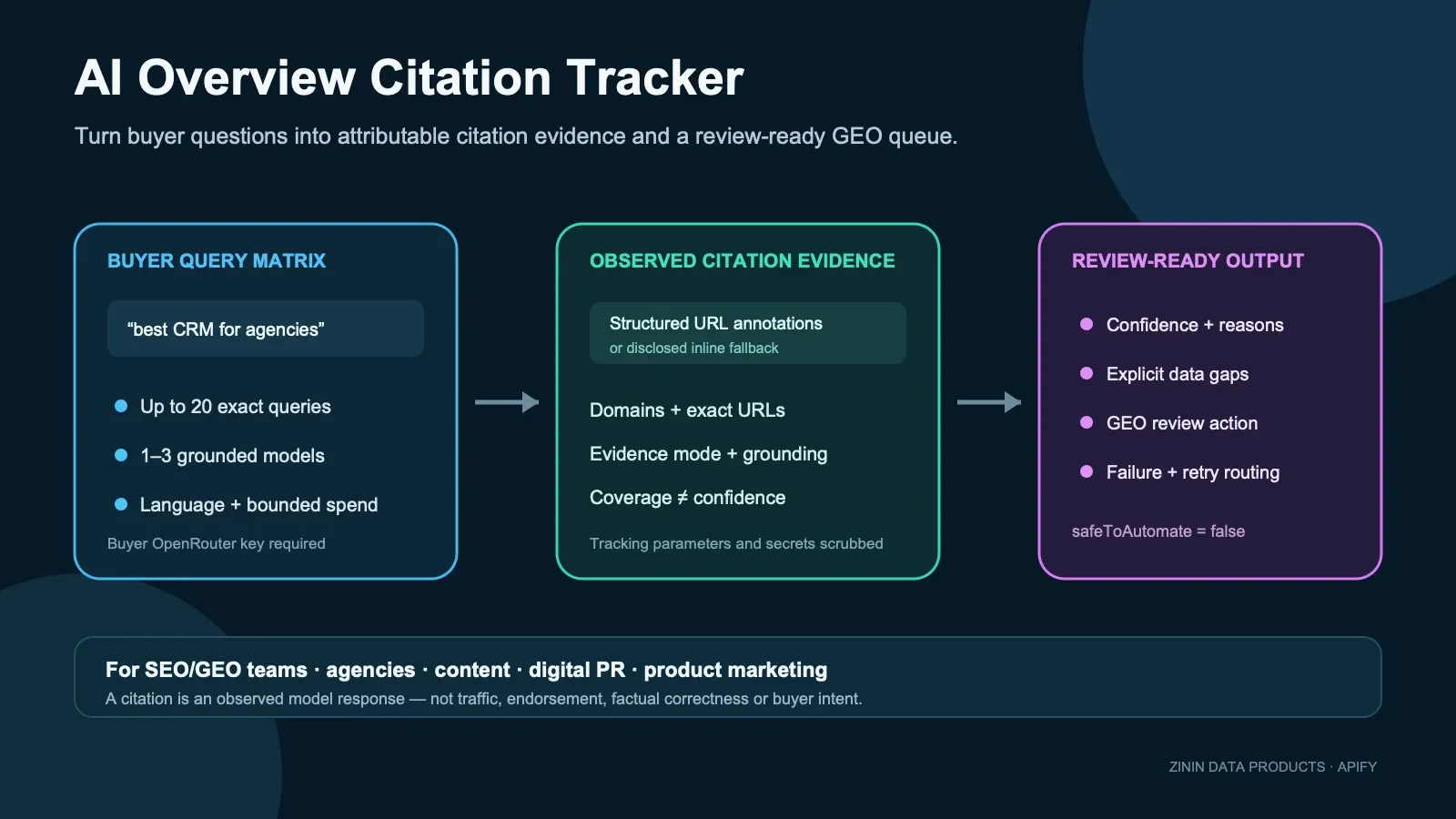
Track which public URLs and domains selected grounded AI models cite for your queries. Get one evidence-backed observation per query-model pair with citation provenance, coverage, confidence, gaps and a review action. No API key needed; your own OpenRouter key is optional.

AI Overview Citation Tracker — Who Gets Cited by AI Answers?
When a buyer asks Perplexity or ChatGPT "best project management software," the answer links to a handful of sources — a review site, a vendor's own docs, maybe a competitor's blog. Those citations are the new backlinks, and this Actor tells you which domains and URLs get cited, query by query, model by model, with no API key required and without a monthly seat.
Search is moving into AI answers, and GEO (Generative Engine Optimization) tools like Ahrefs Brand Radar, Profound and Otterly charge hundreds a month to track this. This Actor does the core job — per query, pay-as-you-go, no seat.
What you get
- Per-query, per-model citation data. For every
query × modelpair: the domains cited, the full source URLs, and a snippet of the model's actual answer. - No API key required. Without a key, the three grounded defaults run through the Apify-billed
dependency runner
fayoussef/bulk-llm-runner; its model usage bills to your Apify account at cost. Optionally pass your own OpenRouter key for direct provider access or custom models. This Actor never resells or marks up model usage. - Three grounded engines.
perplexity/sonar(built-in web search), plusopenai/gpt-4o-miniandgoogle/gemini-2.5-flashwith OpenRouter's currentopenrouter:web_searchserver tool. - Any language. Set
langand the grounded model answers natively — this isn't a translation layer bolted on afterward. - Runs on Apify: schedule it, monitor it, call it from the API or the MCP server, export to JSON, CSV or Excel, or push results straight into your own pipeline.
How to run
- Click Try for free — no card needed on the free plan.
- Paste your queries into Queries and select models. An OpenRouter key is optional: add it only for direct provider access or a custom model.
- Press Start. Results appear in the dataset — one row per query × model — read them in the UI, pull them from the API, or have a webhook push them onward.
Pricing
Pay-per-event on the FREE tier: $0.005 per run start + $0.02 per query × model row,
with lower tiered prices on paid Apify plans. The public Pricing tab is authoritative for
your account. The row price covers Actor orchestration, evidence parsing, decision fields,
settlement and delivery. It does not include the model call. OpenRouter charges the
buyer-supplied key separately. Provider cost varies by model, query and answer and is exposed as
providerCostUsd when OpenRouter reports it; do not treat a single run as a guaranteed unit cost.
Every model you add multiplies the bill, not just every query — 10
queries across 2 models is 20 billed rows, not 10: 20 × $0.02 + $0.005 start ≈
$0.405 on the FREE tier. Both fields are capped, so the current maximum is 60 rows
(20 queries × 3 models), about $1.205 on the FREE tier, no matter what a direct API
caller submits.
Without openrouterApiKey, the supported defaults run through the Apify-billed dependency runner
fayoussef/bulk-llm-runner; its model usage (about $0.014 for one perplexity/sonar query in our 15 Sep 2026 canary; capped at
$0.03 per query) is charged to your Apify account by that Actor, separately from this Actor's result-found event. With openrouterApiKey,
model tokens bill to your OpenRouter account instead. Rows where a model call fails are returned with
found: false and the reason and do not emit result-found.
Input contract
| Field | Required | What it does |
|---|---|---|
queries | yes | Prompts a real buyer would ask. Up to 20 per run. Each is run against every model in models. |
models | no | Grounded defaults: perplexity/sonar, openai/gpt-4o-mini, google/gemini-2.5-flash. Run through the Apify-billed dependency runner, or through your OpenRouter key when supplied. Up to 3 per run. Default ["perplexity/sonar"]. |
lang | no | Answer language, e.g. en, ru, tr. Default en. |
openrouterApiKey | no | Optional secret OpenRouter key for direct provider access and custom models. Without it, the supported defaults run through the Apify-billed dependency runner. |
maxConcurrency | no | Parallel LLM calls, 1–3 (default 1), bounded to limit rate and in-flight billing exposure. |
Happy, partial, and failure output
One row per query × model pair. This is a real row from a real run — nothing invented:
Field dictionary
| Field | What it means |
|---|---|
recordType / schemaVersion | Stable identity of the additive v2 citation-observation contract |
query / model / lang | Echo of the input for this row |
found | Whether the call succeeded |
citedDomains | The domains the model's answer is grounded in |
citedUrls | The full source URLs behind those domains |
answerSnippet | First 280 characters of the model's answer |
promptTokens / completionTokens | Token usage reported by OpenRouter for this call, for reconciling your own bill |
providerCostUsd | Provider-reported cost when OpenRouter returns it; useful for BYOK reconciliation and product economics, otherwise null |
summary | Human-readable one-line summary of the domains cited for this query × model |
found: false | Same shape, citedDomains/citedUrls empty, answerSnippet: null, and an error — not billed |
The Dataset row describes the observation and its billing intent; it is not the settlement receipt.
Use KVS OUTPUT from the same run to determine whether the linked result event was confirmed, free,
withheld, anomalous or outcome-unknown. The selected fields below show a successful one-row
current-run envelope; the stored object also includes persistence and frozen compatibility fields:
Historical run-bound evidence anchors
The two compact JSON records below are two evidence projections of the same immutable historical canary, not two independent observations and not proof of the new BYOK v2 runtime. They preserve the exact run/build/Dataset/KVS and platform settlement that exposed the old seller-funded cost problem. The replacement candidate must produce a new run-bound v2 receipt before promotion.
Current v2 receipt shape
With no OpenRouter key, the supported defaults run through the Apify-billed dependency runner and
the receipt is a normal COMPLETE/PARTIAL one; each row's modelAccessMode is
apify_billed_dependency. A custom model without a key fails before any model call with a free
diagnostic row and a FAILED receipt whose failureStage is model_policy.
The business question this Actor answers
Traditional rank tracking asks where a page appears in a list of blue links. AI-answer tracking asks a different question: which sources did the answer engine choose as evidence when it built the answer? A domain may rank well in search yet never be cited by an assistant. Another domain may appear repeatedly because its comparison page, documentation or research is easy for retrieval systems to use.
This Actor turns that question into rows you can join and compare. Each row keeps the query, model, language, cited domains, normalized public URLs, structured citation titles when supplied, the short answer excerpt, token counters, evidence mode, coverage score, confidence score, explicit data gaps and a conservative next action. It does not pretend that one response proves a universal AI ranking.
Use the output to answer questions such as:
- Which domains are cited for our highest-value category questions?
- Does our own domain appear, and which exact page is selected?
- Which publishers or competitors recur across several prompts?
- Are results supported by structured citation annotations or only inline URLs?
- Which rows are strong enough for human GEO review, and which need a grounded re-check?
- What should an analyst inspect next without turning an LLM observation into an automatic claim?
Who uses it
In-house SEO and GEO teams
Run a stable set of buyer questions every week, export the rows and group by citedDomains. The
result is an evidence list for content planning: pages that assistants currently choose, domains
that dominate a topic, and prompts where structured citation evidence is absent. The Actor supplies
the observation layer; your team still decides whether a page deserves an update.
Content and editorial teams
Use exact cited URLs to inspect the page formats being selected: original research, definitions, comparisons, documentation, statistics or community answers. This is more actionable than a single visibility percentage because an editor can open the cited page and compare its structure and evidence with the content being planned.
Digital PR teams
Map which third-party publications recur in answers to category questions. A recurring cited domain
can become a research or outreach lead, but the output is not permission to contact anyone. The
recommended action remains review-first and safeToAutomate remains false.
Agencies
Use one query set per client or market, preserve the input beside each export and deliver the actual citation rows rather than an unexplained proprietary score. The evidence fields help an agency show why one row has high confidence and another is only an inline-URL fallback.
Product marketing and competitive intelligence
Ask the questions a buyer asks before choosing a product. Repeated citations reveal which comparison and educational sources shape the answer context. This is directional market evidence, not proof of purchase intent, market share, endorsement or factual correctness.
Automation builders and agents
Consume the Dataset through the Apify API, MCP server, webhook or scheduled run. Use failureType,
retryable, citationEvidenceMode, confidenceBand and dataGaps for routing. Do not auto-publish,
auto-contact or auto-edit content from a single row: the contract deliberately sets
safeToAutomate: false.
Decision routing
The enriched row separates four ideas that are often collapsed into one misleading “AI visibility” number:
- What was requested.
query,model,lang,modelSupportandmodelAccessModedescribe the actual check. - What was observed.
citedUrls,citedDomains,citations,answerSnippet,checkedAtandobservedAtrecord the response evidence. - How strong the evidence is.
citationEvidenceMode,groundingRequested,groundingObserved,coverageScore,confidenceScore,confidenceReasonsanddataGapsexplain what the row can and cannot support. - What to do next.
recommendedAction,actionPriority,actionReason,failureTypeandretryableroute the row to a human analyst or a configuration retry.
coverageScore and confidenceScore are intentionally different. Coverage rises when more cited
domains are observable. Confidence describes the provenance of those observations. Five inline URLs
can produce broader coverage while remaining weaker evidence than two structured URL annotations.
Evidence and boundaries
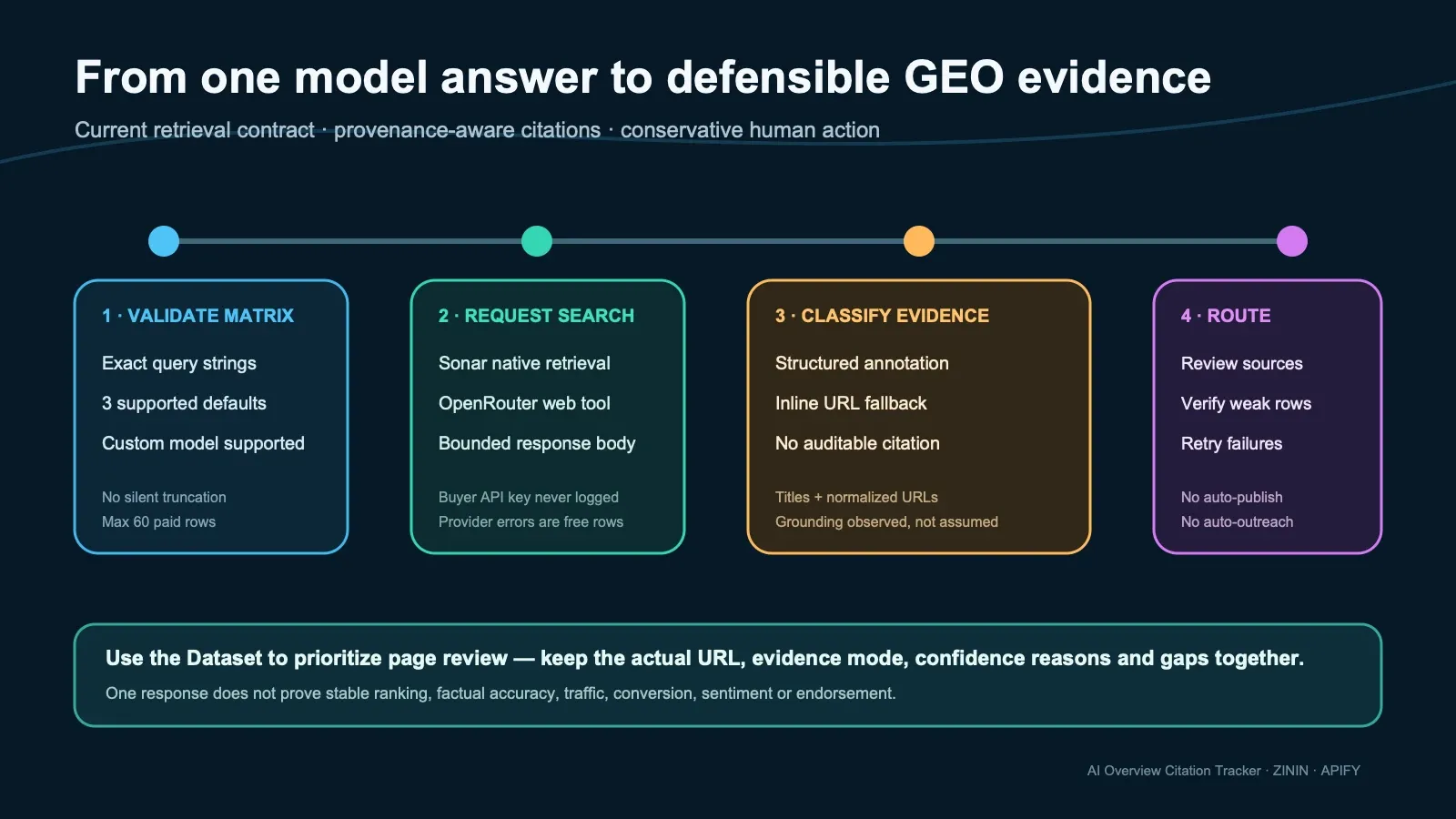
structured_url_annotations
The provider returned structured url_citation annotations. The Actor keeps the normalized URL and
available title and marks groundingObserved: true. This is the strongest supported evidence mode,
but it still does not verify that the cited page is reachable now, that every statement in the
answer is correct, or that the model will repeat the answer later.
inline_url_fallback
No structured annotations were returned, but public HTTP(S) URLs appeared in the answer text. The Actor preserves them as useful leads while explicitly lowering confidence. Inline links may have been written by the model rather than returned as retrieval metadata.
none
No auditable citation URL was observed. A successful prose response is not silently relabeled as a grounded citation result. The row keeps the answer excerpt, exposes the gap and recommends another grounded check before action.
Grounded defaults and custom BYOK models
The supported default set is deliberately small and explicit. Without a key every default runs
through the Apify-billed dependency runner fayoussef/bulk-llm-runner (web search enabled); with
your OpenRouter key the same models are called directly:
| Model | Retrieval request | Access without key | Access with your key |
|---|---|---|---|
perplexity/sonar | Native retrieval (plus high search context on direct calls) | Apify-billed dependency runner | Buyer OpenRouter key |
openai/gpt-4o-mini | Web search (openrouter:web_search server tool on direct calls) | Apify-billed dependency runner | Buyer OpenRouter key |
google/gemini-2.5-flash | Web search (openrouter:web_search server tool on direct calls) | Apify-billed dependency runner | Buyer OpenRouter key |
The retired :online examples are not used for these defaults. You may submit another model ID
together with your key. A custom model is labeled custom_byok_model; grounding is requested only
when the model contract indicates it, and the row still reports whether structured grounding
evidence was actually observed. modelAccessMode records which path served each row:
apify_billed_dependency or buyer_openrouter_key.
Why no shared provider key? A public shared key must not become an unlimited proxy or hide provider cost inside an unrelated Actor event. The dependency runner bills its own usage to your Apify account transparently, and BYOK keeps model selection, provider spending, rate limits, data policy and retention choices under your provider account when you want that control.
Commercial playbooks
Workflow 1 — category citation map
- Choose 10–20 stable category and comparison questions.
- Start with one supported grounded model and one language.
- Export
query,citedDomains,citedUrls,citationEvidenceModeandconfidenceBand. - Count recurring domains and open the actual cited pages.
- Record content patterns only after reading the source pages.
This produces a compact citation map without pretending that the number of appearances is a market share estimate.
Workflow 2 — multilingual GEO review
Run the same commercial intent in en, ru, tr or another valid language tag. Keep each language
as its own observation set. Do not merge translated prompts as if they were identical: wording,
locale, sources and model behavior can change the answer.
Workflow 3 — model comparison
Submit one query against two or three supported models. Rows are billed per query × model pair. Join
on query and compare cited-domain overlap, evidence mode and confidence. A disagreement is not an
error; it is evidence that model/provider retrieval differs.
Workflow 4 — content brief evidence
Filter to structured-annotation rows, open the cited pages and classify their page type manually.
Use that research to build an editorial brief. The Actor does not scrape or summarize the full
cited page, so CITATION_URL_CONTENT_NOT_FETCHED remains an explicit gap.
Workflow 5 — scheduled monitoring
Schedule a stable input and store each Dataset with its run timestamp. This Actor is a snapshot producer; it does not maintain a historical baseline or emit “changed” by itself. Use AI Answer Change Alert when the job is specifically to compare answers across runs.
Integration recipes
Apify API
Run the Actor with your Apify token and read the resulting Dataset URL returned by the platform. Keep secrets in the API input's secret field or platform configuration; never paste keys into a query, webhook URL, spreadsheet cell or log message.
JavaScript client
Webhook or n8n routing
Route rows with found: false by retryable. Send structured_url_annotations rows to an analyst
queue. Send inline_url_fallback or none to a verification queue. Preserve the complete row so
the reviewer sees confidence reasons and gaps rather than only a score.
CSV and spreadsheets
The Dataset table exposes the most useful decision columns. Arrays such as citedDomains,
citedUrls and dataGaps remain available in JSON/CSV exports. If you explode URLs into separate
spreadsheet rows, retain eventId and entityId so every derived row can be traced back to the
original observation.
Stable identities and timestamps
entityId is deterministic for the normalized query × model × language combination. eventId
adds the observation time and cited URLs, so it identifies this particular response observation.
checkedAt is retained for backward compatibility; observedAt, firstSeenAt and lastSeenAt
make the decision contract explicit for pipeline consumers.
The Actor does not reuse a citation cache. freshness.cacheReused is always false, and successful
rows use ageSeconds: 0 with basis: model_response_time. A failed row has unknown freshness. This
prevents a fresh-looking timestamp from being attached to an old model observation.
Billing and partial-result behavior
- The start event is charged by Apify according to memory and account tier.
- A successful delivered result uses the linked
result-foundDataset write. - Failed model calls produce transparent free error rows and do not emit
result-found. - The runtime checks the remaining run charge cap before each paid delivery inside a serialized billing section.
- A fully delivered final requested row remains complete even if the platform reports that no future event can be charged.
- If requested work remains after the cap is reached, OUTPUT marks the run partial and a free halt row explains what was not processed.
- An ambiguous linked delivery receipt fails closed. Because the Dataset write or charge may already have happened, OUTPUT marks replay unsafe and tells the operator to inspect the prior run before repeating the exact request.
The Actor reads the named result-found counter immediately before and after each linked write in
the same serialized billing section. The counter before each write must equal the number of already
confirmed results in this run, and the delta must be exactly +1. Aggregate chargedCount is not
accepted as a substitute for the named-event counter.
The public JSON Schema validates the closed structural shape. Acceptance also requires the bundled
lib/terminal-contract.js#assertTerminalOutput semantic validator, which reconciles work counts,
Dataset delivery, the current-run named-event counter, terminal status and replay safety. A receipt
that passes only structural validation is not an accepted settlement receipt.
Failure rows and recovery
Failure rows keep the same decision envelope where possible. Useful fields include:
failureType: RUN_CONFIGURATION_FAILEDwhen the run never had a valid query/model identity;failureType: MODEL_CHECK_FAILEDwhen a particular query/model call failed;retryableto separate transient provider/network failures from missing or invalid configuration;errorfor a short redacted reason;safeToAutomate: falseso a downstream agent does not turn absence of evidence into a content decision.
A 401 or 402 from OpenRouter proves that the selected key cannot complete the remaining jobs. The Actor stops additional calls with that same key instead of producing many identical failures. It never copies the key into the Dataset, OUTPUT or logs.
Security and privacy boundaries
- Only buyer-supplied queries are sent to the chosen OpenRouter model.
- The OpenRouter key is declared
isSecret, used only for authorization and redacted from provider error bodies. - Citation URLs are limited to public HTTP(S), stripped of fragments, credentials and common tracking or secret-bearing query parameters.
- The Actor does not fetch the cited pages, submit forms, contact people, log into sites or bypass access controls.
- The answer excerpt is capped; the full provider response is not stored in the Dataset.
- Provider responses are read through a bounded body reader to limit malformed-response memory exposure.
Do not put personal data, confidential strategy, customer records or secrets into prompts. The model provider receives the query as part of the requested check. Review OpenRouter and the selected model provider's terms for your own use case and jurisdiction.
Sources and rights
The Actor does not scrape a publisher, search-result page or cited website. Its only external model request is the buyer-authorized OpenRouter API call. The buyer chooses the model, supplies the API key and is responsible for having the right to submit each query and use the returned answer and citations under OpenRouter's terms and the selected model provider's terms. The cited URLs are provider-returned references, not copies of the cited pages; the Actor does not fetch, reproduce or verify those pages.
OpenRouter documents that openrouter:web_search may use native provider search or a configured
search engine and that search charges are additional to model-token charges. The runtime therefore
does not promise a fixed provider cost, a fixed number of searches or universal zero-data-retention.
Review your OpenRouter privacy/routing settings and the selected provider's retention policy before
submitting confidential prompts. Do not place personal data, credentials, customer lists, private
documents, privileged material or third-party secrets in a query.
Dataset and KVS records remain in the buyer's Apify storage according to the buyer's Apify retention and deletion settings. Export only the fields you need, define a retention period for scheduled runs, and delete old run storage when the observation is no longer required. The Actor does not contact cited publishers or grant any right to republish their content. Opening, copying or acting on a cited page is a separate buyer decision governed by that source's rules.
Useful primary references for the provider contract are:
- OpenRouter web-search server tool for request behavior, usage counters and search-engine pricing;
- OpenRouter models for current model IDs, provider availability and model-token prices;
- OpenRouter privacy policy and the selected downstream model provider's policy for processing and retention choices.
These links describe provider behavior; they do not turn a model answer into verified fact or grant rights in the cited material.
What the scores mean
coverageScore is a bounded heuristic based on observable cited-domain breadth and evidence mode.
It is useful for triage, not a percentage of the web, a probability of citation, an SEO grade or a
forecast.
confidenceScore reflects evidence provenance:
- high confidence is available when the provider returns structured URL annotations;
- inline-only URLs lower confidence;
- requested grounding without observed annotations caps confidence;
- custom ungrounded model paths are explicitly weaker;
- failed checks remain low confidence.
Read confidenceReasons and dataGaps with the numeric value. A naked score is deliberately not
the contract.
What this Actor does not prove
- It does not prove that an answer is factually correct.
- It does not verify the cited page's current reachability or content.
- It does not measure impressions, clicks, conversions, revenue or buyer intent.
- It does not represent every ChatGPT, Gemini, Perplexity or search UI experience.
- It does not remove model nondeterminism or guarantee repeatability.
- It does not infer that a citation is positive, negative or an endorsement.
- It does not produce legal, medical, financial or compliance advice.
- It does not make automated outreach or content changes safe.
Choosing the right adjacent Actor
| Need | Best fit |
|---|---|
| One-time map of sources cited for buyer questions | AI Overview Citation Tracker |
| Detect whether a named brand is mentioned or recommended | LLM Brand Visibility Tracker |
| Compare a recurring answer with its prior baseline | AI Answer Change Alert |
| Check whether AI crawlers can fetch a website | AI Crawler Access Checker |
These products answer different questions. Citation presence is not brand presence; crawler access is not citation; and a snapshot is not a change alert.
Operating guide
Before spending on a larger matrix:
- Start with one exact commercial query and
perplexity/sonar. - Confirm that the Dataset contains a completed row and inspect
citationEvidenceMode. - Check your public Pricing tab and set an Apify run charge cap appropriate to the matrix.
- Add models one at a time; remember that each model multiplies rows.
- Keep wording stable when comparing exports.
- Treat inline-only rows as leads for verification.
- Preserve the run input, Dataset ID and observation time in client work.
Troubleshooting
A custom model is rejected without a key. Custom models need openrouterApiKey; the supported
defaults run without one. A dependency-runner failure is returned as a free found: false row with the reason.
A custom model is rejected. Check the OpenRouter model ID and your key's access. Custom model responses may not provide structured citation annotations even when the call succeeds.
The answer has prose but no citations. The provider may not have returned structured annotations.
Inspect citationEvidenceMode, groundingObserved and dataGaps; do not interpret prose alone as
verified retrieval evidence.
The run is partial. Read the OUTPUT record and halt row. Raise the run charge cap only if the
remaining matrix is intended. Do not automatically retry when OUTPUT says replaySafe: false.
The same prompt gives different domains later. Model and retrieval outputs are nondeterministic and source indexes change. Preserve timestamps and use repeated observations rather than assuming one response is permanent.
The Dataset shows a provider error. Check retryable, the provider status in the redacted error,
your BYOK credit/rate limits when applicable, and whether the model ID is still available.
Acceptance contract
A commercially accepted release must prove all of the following on the exact production build:
- strict input bounds with no silent truncation or type coercion;
- current supported model IDs and grounded request contracts;
- a buyer-supplied key used without exposing its value;
- one bounded live query producing auditable citation evidence;
- one Dataset result, exact PPE settlement and machine-readable OUTPUT counters;
- no secret-like marker in logs or output;
- the same immutable build tagged for canary and production;
- the public Store README, exactly two product-specific visuals and public Input schema rendered in an isolated buyer browser.
If a release cannot prove those gates, “build succeeded” is not enough for acceptance.
Related tools
Related tools for adjacent workflows in AI and search visibility.
| Actor | What it does |
|---|---|
| LLM Brand Visibility Tracker | Pair it in the AI and search visibility workflow: For each query that matters, check whether AI assistants recommend YOUR brand — and which competitors they... |
| AI Answer Change Alert | Pair it in the AI and search visibility workflow: Track whether an AI assistant's answer to a query you care about changed since last time — new sources... |
| AI Crawler Access Checker | Pair it in the AI and search visibility workflow: Check which AI crawlers (GPTBot, ClaudeBot, PerplexityBot, Google-Extended & more) can access your website |
| Domain Health Checker | Pair it in the AI and search visibility workflow: Bulk-audit domains: DNS records, SSL certificate expiry, SPF & DMARC email authentication |
| Social Preview Checker | Pair it in the AI and search visibility workflow: See exactly how your links look when shared on Telegram, WhatsApp, X, LinkedIn, Slack, Facebook & Discord |
FAQ
Do I need an API key? No. The supported defaults run through the Apify-billed dependency runner
fayoussef/bulk-llm-runner, whose model usage is charged to your Apify account. Pass an OpenRouter key
only for direct provider access or custom models; then usage bills to your provider account.
Which languages work? Any — set lang (e.g. ru, tr). Grounded models answer
natively.
Can an agent call it? Yes — a standard Apify Actor, callable from the Apify API, the SDK, or the Apify MCP server.
What this is NOT. It does not trust whatever an LLM says without grounding — it is
built for web-searching models; an ungrounded model will simply produce a thinner
citedUrls list scraped from its own text.
Found a wrong result, or need a model we don't list? Open an issue on this Actor's page.