

Spotify Artist, Album & Playlist Scraper
Pricing
from $1.70 / 1,000 entity delivereds
Spotify Artist, Album & Playlist Scraper
Scrape one public Spotify artist, album or playlist URL: artist monthly listeners; album release year, type and track count; playlist item and save counts when Spotify exposes them. Server-rendered card lookup only — no search, tracks, audio features, history, login or API key.
Pricing
from $1.70 / 1,000 entity delivereds
Rating
0.0
(0)
Developer

Tim Zinin
Maintained by CommunityActor stats
0
Bookmarked
3
Total users
0
Monthly active users
14 days ago
Last modified
Categories
Share
Spotify Artist, Album & Playlist Scraper: Read Public Spotify Cards by URL
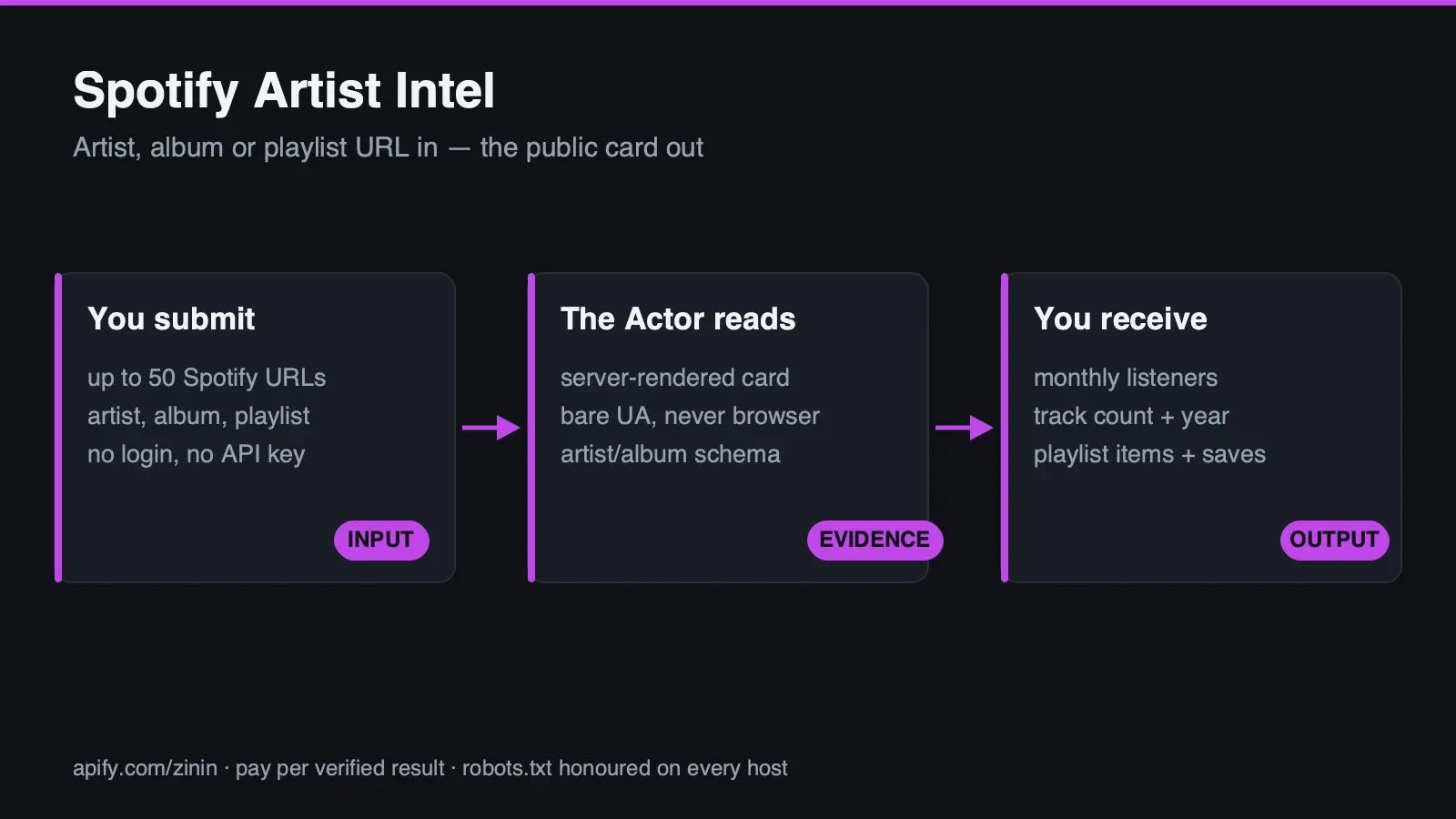 This Actor takes a Spotify artist, album or playlist URL you already have and scrapes its public card —
name, monthly listener count (artist), release year and track count (album), item count and save count
(playlist) — straight from the same server-rendered
This Actor takes a Spotify artist, album or playlist URL you already have and scrapes its public card —
name, monthly listener count (artist), release year and track count (album), item count and save count
(playlist) — straight from the same server-rendered application/ld+json block Spotify's page ships
before any client-side JavaScript runs. No login, no API key, no Web Playback SDK, no browser.
This is deliberately narrow, and it runs backwards from almost every other Actor in this line. Most
scraping advice says "wear a browser User-Agent so the source doesn't block you." Here, that advice would
break the product: Spotify's card page only renders its data server-side for a plain, non-browser
request. A real browser signature gets an empty client-side shell — 156,405 bytes of "Spotify – Web
Player" with zero data — that expects a real browser to execute JavaScript this Actor never runs. This
Actor's request layer is built around exactly one non-negotiable rule: never send a browser User-Agent to
open.spotify.com, ever. That rule is a golden in acceptance.json, checked against this run's own
outgoing header, independent of what Spotify happens to return that day. See Evidence and boundaries for
the live measurement, and the first-pass recon mistake that made this rule necessary to spell out this
plainly.
The billable outcome is a delivered card: one row, found:true, where a name was actually extracted
from the page's own structured data. Everything else is free: a URL that doesn't resolve to a real
Spotify object (found:false, a genuine HTTP 404 from Spotify itself — not a silent-empty result), a
non-Spotify host refused before any request is made, and a page that answered HTTP 200 but carried no
usable ld+json block. This page shows the real JSON this Actor produced for an artist, an album, a
playlist, a blocked host and a genuine 404 — taken from runs made while this page was being written,
including five repeated fetches of the same playlist that show a live, disclosed inconsistency in
Spotify's own page. See Real happy, partial and failure output.
What you get
- Artist: name and Spotify's own displayed monthly-listener figure.
- Album: name, release type, release year and track count.
- Playlist: name, item count and save count — with an honest disclosure that these last two can legitimately come back empty on the exact same URL across repeated fetches (see below; this is a real, observed property of the source, not a defect in this Actor).
- The one rule that makes this Actor work at all: it never wears a browser User-Agent. Confirmed on
every successful row via the
requestUserAgentfield, which echoes the literal header this Actor sent — not a claim, a receipt, checked on every single row this build produces. - A genuine
HTTP 404is never confused with an empty result. Spotify answers a nonexistent object with a real 404, not a silentHTTP 200with nothing in it — this Actor checks the HTTP status before it ever tries to parse a page body, so the two failure modes other scrapers in this same hub have to guard against (silent-empty vs. genuine error) are simply not the same risk here. See Evidence and boundaries for the contrast, named explicitly. - No login, no API key, no Web Playback SDK, no browser runtime of any kind.
- Runs on Apify: schedule it, call it from the API, the MCP server, or an n8n/agent workflow, export to JSON/CSV/Excel, or push results straight into your own pipeline.
Who uses it
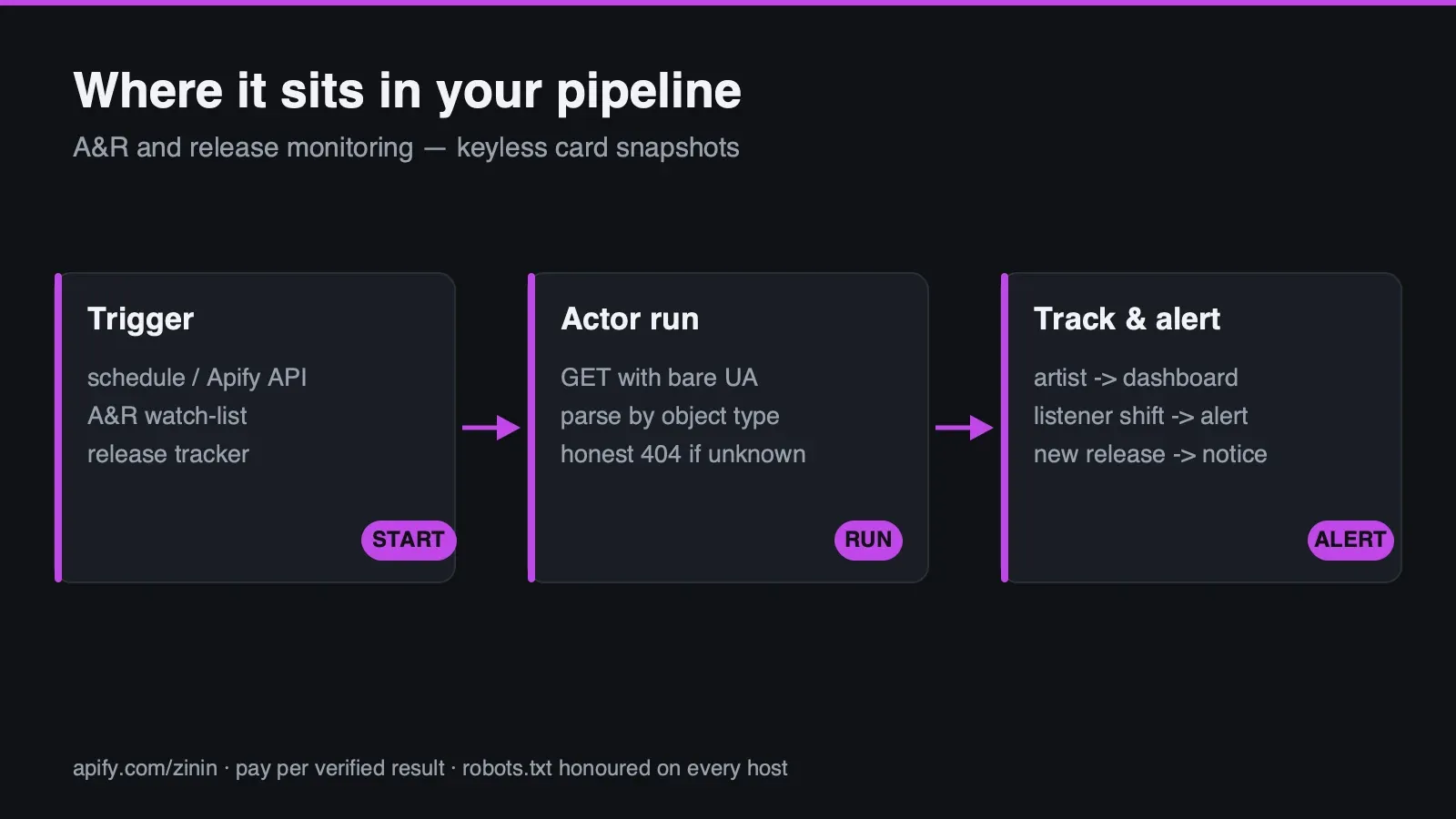
- Music analytics and A&R research teams batch-checking artist monthly-listener figures across a watchlist, without opening each artist page in a browser.
- Agencies tracking client or competitor releases — album metadata (release year, track count) for a defined list of albums, refreshed on a schedule.
- Playlist and campaign researchers reading item and save counts for editorial or brand playlists they are monitoring, understanding that these two fields are the least stable ones this Actor reports (see Evidence and boundaries) and reading them as a best-effort snapshot, not a guaranteed number.
- Developers and agent/workflow builders who want one flat JSON row per target —
found,type,error— that a script, an n8n node, or an LLM agent can branch on directly, without parsing Spotify's HTML or itsapplication/ld+jsonshape by hand, and without accidentally breaking extraction by adding a browser-looking header somewhere upstream. - Not for buyers who want to search Spotify by artist name, stream or download audio, or pull a full discography. This Actor accepts a URL you already have and reads that one page — see Limits for exactly what is out of scope.
How to run
- Populate Spotify URLs with one or more full URLs —
https://open.spotify.com/artist/<id>,/album/<id>or/playlist/<id>. A bare ID without the URL is not accepted; the type is always read from the URL path, never guessed. Up to 50 per run. - Leave Max concurrency at its default of
5unless you have a specific reason to raise it (up to15) or lower it (down to1). - Start the run from the Console, the Apify API, a scheduled Task, or an MCP client. The prefilled input (a real artist URL) is a verified, live target — a default run with no edits produces one real, non-empty row at essentially no cost, so you can see the actual data shape before committing a longer list.
- Read the Dataset: one row per URL you supplied, always in the same 15-field shape regardless of
outcome. Check
foundbefore anything else — onlyfound:truerows are billed. - Check
requestUserAgenton any row where you need to independently confirm this Actor behaved as documented — it is the literal header value this specific run sent, not a static claim on this page. - Check this run's key-value store record
OUTPUTfor a one-time run summary — requested/delivered/ paid/free/failed/incomplete counts, replay safety and any fatal error — written once at the end of the run. The Dataset itself remains the complete, row-by-row authoritative record;OUTPUTis a roll-up of it.
Pricing
$0.005 per Actor start, plus $0.002 per delivered card. The primary pricing noun on this page, in
the Dataset, and in this Actor's platform pricing record is the same throughout: the delivered card
— one row where a name was actually extracted from the target's own structured page data
(found:true). 100 delivered cards cost about $0.205 ($0.005 start + 100 × $0.002).
Every other row is free: a target that doesn't resolve (a genuine HTTP 404), a non-Spotify host refused
before any request, and a page that answered HTTP 200 with no usable application/ld+json block. A run
of 50 URLs where 10 are stale links no longer resolving is billed for the up-to-40 it actually delivered,
plus the one fixed start fee — never for the 10 it honestly reports as not found.
Both free outcomes are enforced in code, not left to a documentation promise: the charge and the dataset
write happen together, inside one mutex-protected step (lib/billing.js), and a row is never pushed to
the paid channel unless found is already true at that point. There is no code path in this build
where a found:false row is billed.
This Actor's own external data cost is close to zero — one GET request per target, no proxy, no LLM, no paid third-party API — so the per-card price reflects the extraction and the User-Agent discipline described on this page, not a resold data bill.
On Apify's own billing record these are metered as two separate platform events — apify-actor-start
for the run fee, and result-found for each delivered card — the same two lines you will see on your
invoice.
Input contract
Exactly one field is required.
targets— array of strings, 1 to 50 items, required. Each item must be a full URL —https://open.spotify.com/artist/<id>,/album/<id>or/playlist/<id>— withopen.spotify.comas its host. The type (artist/album/playlist) is read directly from the URL path; this Actor never guesses it and never accepts a bare ID without the path. A URL whose host is notopen.spotify.comis rejected withfound:falseand an explicit host-mismatch message, before any network request is made — verified live below, not just asserted.maxConcurrency— integer, 1 to 15, default5. How many targets this run reads in parallel.
Two runnable input examples, built directly from .actor/input_schema.json — these are input
illustrations, not run output; the Real happy, partial and failure output section below shows the actual
Dataset rows these kinds of inputs produced, from real runs of this exact build.
(This is the Actor's own prefilled default input — a real, verified artist URL, run at the default concurrency. This is what a buyer sees and can run with zero edits.)
(Mixes all three supported object types with one deliberately nonexistent artist id in the same run — to
show that a buyer does not need to pre-filter their own list before sending it in; the nonexistent one
simply comes back as a free, honest found:false row with a real HTTP 404 behind it, alongside the
three real results. All four URLs in this example are the same ones this page's live evidence was
gathered against.)
Real happy, partial and failure output
Every row in the Dataset shares one flat, 15-field shape regardless of outcome — input, found,
type, spotifyId, canonicalUrl, name, releaseType, releaseYear, trackCount,
monthlyListeners, itemCount, savesCount, error, requestUserAgent, checkedAt. Every JSON
block below is copied verbatim from an actual local run of this exact
main.js build (node main.js with CRAWLEE_STORAGE_DIR set to a local storage folder), executed while
this page was being written, against the live Spotify site. Nothing here is invented or reconstructed
from the schema — every field value below is what the Dataset actually contained after that run
finished.
Happy path — a real artist card, real monthly-listener figure
requestUserAgent is the literal header this run sent — a plain, declared, non-browser string with no
AppleWebKit, no Chrome/, no Safari/ token anywhere in it. This is not a static claim: it is read
back from this exact run, and this Actor's acceptance suite fails immediately if this field ever contains
a real browser signature, independent of what Spotify's page happened to return that day.
Happy path — a real album card, release year and track count
Both rows above are billed, delivered cards — found:true, real names, real type-specific fields.
Partial/disclosed path — the same playlist, five repeated fetches, two different honest shapes
This is the single most important thing to understand before buying playlist data from this Actor.
Spotify's own playlist page does not consistently carry the structured "N items · N saves" text this
Actor's parser reads. Five back-to-back fetches of the exact same URL,
https://open.spotify.com/playlist/37i9dQZF1DXcBWIGoYBM5M, made in immediate succession while writing
this page, produced three rows with the structured counts present and two rows where they came
back null — on the identical URL, the identical request, seconds apart:
The fourth fetch of the same URL, roughly two seconds later, with found and name still both correct,
but itemCount/savesCount both honestly null:
Both rows are billed — found:true is the only billing gate this Actor has, and both rows genuinely
found the playlist and extracted its name. The difference between them is not a parsing failure on this
Actor's side; it is Spotify's own page inconsistently carrying the structured description text this
parser depends on for the count fields specifically. See Evidence and boundaries for the full accounting
of all five fetches and why this Actor does not treat a null count as an error.
Failure path — a non-Spotify host, refused before any request
requestUserAgent is null here, not the actor's declared string — this is deliberate confirmation that
no request was ever built or sent for this row, not just that the response was discarded.
Failure path — a genuine HTTP 404, not a silent-empty result
requestUserAgent is populated here, unlike the blocked-host row above — this request genuinely reached
Spotify's servers and Spotify itself answered 404. Both rows are free, but for different reasons: one
never left this Actor's process, the other was refused by the source.
Field dictionary
| Field | Meaning | Important boundary |
|---|---|---|
input | Exactly the URL you supplied, unmodified | Echoed even when the value was rejected before any request |
found | The billing boundary | true only when a name was actually extracted from the page's own ld+json data |
type | artist / album / playlist, read from the URL path | Set as soon as the URL parses, even on a row that later fails (e.g. the 404 example above still carries type:"artist") |
spotifyId | The object's id, taken from the URL | Same availability as type |
canonicalUrl | The @id/url field from the page's own structured data, or the request URL as a fallback | null when no data was extracted |
name | Title of the artist, album or playlist | null when found:false |
releaseType / releaseYear / trackCount | Album-only fields | null for artist/playlist rows, and null for an album row if the source's description text didn't carry that specific piece |
monthlyListeners | Artist-only — Spotify's own displayed figure (e.g. "100.9M") | Not an exact internal count; a display string, not a number |
itemCount / savesCount | Playlist-only | Can legitimately be null even on a found:true row — see the five-fetch evidence above; this is the source's own inconsistency, never invented when absent |
error | Reason for found:false | null on every found:true row; states the real HTTP status or the local validation reason |
requestUserAgent | The literal User-Agent header this run sent to Spotify | null only when no request was made at all (blocked-host row); otherwise always this Actor's fixed, declared non-browser string — checked, never a browser signature, by this build's own acceptance suite |
checkedAt | ISO-8601 timestamp of this row's outcome | Per-row, not per-run |
Evidence and boundaries
The core mechanic, measured both directions. A bare (non-browser) request to
open.spotify.com/artist/06HL4z0CvFAxyc27GXpf02 returns HTTP 200, roughly 260 KB, with a
MusicGroup application/ld+json block containing "100.9M monthly listeners." The identical URL
requested with a real Chrome User-Agent returns HTTP 200, roughly 156 KB, and zero ld+json
blocks — an empty client-side shell titled "Spotify – Web Player" that expects a real browser to run its
JavaScript and never gets one. This Actor's request layer sends the first kind of request, always, and
never the second — confirmed on every successful row above via requestUserAgent.
Why this rule gets its own recon subsection: a first-pass mistake, disclosed plainly. The first
attempt at researching this source rejected the idea outright — "no server-side content here" — because
every one of five separate test requests carried a browser User-Agent. Five repeats of one broken test
were mistaken for five independent confirmations of an absence. One single bare curl, with no -A
flag at all, immediately returned the full 260 KB of real data. The specific failure mode is worth
naming precisely: it is not that the earlier tests were wrong about what they measured, it's that all
five were the same corrupted measurement repeated, not five different ones. This is why
acceptance.json's golden #2 checks this Actor's own outgoing User-Agent header directly, as an
invariant independent of any single day's response — a future edit that "helpfully" swaps in a browser
signature (the normal move almost everywhere else in this fleet) fails immediately, regardless of what
Spotify's page happens to return that day.
The playlist instability, the full accounting of all five fetches, not just two. Five consecutive
requests to the identical URL
(https://open.spotify.com/playlist/37i9dQZF1DXcBWIGoYBM5M), made back-to-back while writing this page:
fetch 1 returned the structured "50 items · 33.9M saves" form; fetch 2, structured; fetch 3, structured;
fetch 4, the bare curator-blurb form with itemCount/savesCount both null; fetch 5, also the blurb
form. Three of five structured, two of five not — on the same URL, same request shape, seconds apart, no
code change between fetches. found and name succeeded on all five without exception. This Actor's
own extraction code does not distinguish "the structured text is momentarily absent" from any other
description-text shape — it reads whichever description Spotify's page served that specific request, and
reports honestly whatever it finds, including nothing, for the two count fields specifically. This is
consistent with, but not identical in ratio to, an earlier recon note that reported four-of-five
structured on a different set of fetches — the point both measurements agree on is that this instability
is real and repeatable, not a one-off; the exact ratio on any given attempt is not something this Actor
promises to reproduce.
Why null counts on a playlist are never treated as an error. Given the instability measured above,
this Actor's design choice is to let itemCount/savesCount be honestly empty rather than either (a)
guessing a value from a cached prior fetch, or (b) marking the whole row found:false because two of
thirteen fields didn't populate. A buyer who needs those two specific fields for a specific playlist
should expect to re-run this Actor and treat a null result as "try again," not as "this playlist has no
saves."
The negative case, honest and unambiguous — contrasted deliberately with a sibling Actor's source. A
syntactically well-formed but nonexistent artist id
(open.spotify.com/artist/00000000000000000000ZZ) returns a genuine HTTP 404, roughly 6 KB, with zero
ld+json blocks — checked and recorded via the HTTP status alone, before any attempt to parse a body.
This is a meaningfully different shape from the "silent-empty" pattern this same hub's YouTube-playlist
Actor has to guard against, where a nonexistent playlist id returns HTTP 200 with a real page and zero
results. Spotify does not do that for a nonexistent artist/album/playlist id — it answers with an honest
404. This Actor's own code does not carry over the "200 might mean empty" suspicion from that sibling
Actor's source; the two sources genuinely behave differently, and pretending otherwise here would be
inventing a defense against a failure mode this specific source does not produce.
The SSRF/host guard, confirmed live, not just read from source. The blocked-host example above shows
the real outcome of a targets value pointing at a non-Spotify host: found:false, an explicit
host-mismatch message, and requestUserAgent:null — proof no request was built or sent, not just that a
response was discarded. Every target's host is checked against open.spotify.com before any network
call is made, and the DNS-rebinding/private-address pinning logic in main.js
(resolveVerifiedAddresses) guards the one real request path as defense in depth, following the same
pattern used across this hub's other Actors.
Rights posture toward AI training crawlers, named plainly, not omitted. open.spotify.com/robots.txt
grants Allow: / under the general User-agent: * rule (excluding only /local/, /download/ and
/embed/, none of which this Actor ever requests) — but separately, and by name, issues Disallow: / to
GPTBot, anthropic-ai and ClaudeBot. This Actor does not identify itself as any of those crawlers
and is not one — it sends its own declared, non-browser identifier string, and operates strictly under
the general User-agent: * rule. The platform's position is stated here without softening: Spotify
permits ordinary crawling of these public card pages, and separately, explicitly does not want its
content used to train AI models. This Actor's product is the publicly displayed metadata of one page at
a time — a name, a listener count, a track count — delivered to a buyer who supplied the URL; it is not,
and does not present itself as, a corpus for model training.
Decision routing
| Row shape | Billable? | What it means |
|---|---|---|
found:true, all relevant fields populated | Yes | The full card was read cleanly |
found:true, playlist with itemCount/savesCount both null | Yes | Name was extracted; the two count fields were honestly absent from Spotify's own page on this specific fetch — see Evidence and boundaries |
found:false, non-Spotify host | No | Refused locally before any request; requestUserAgent:null proves no request was sent |
found:false, genuine HTTP 404 | No | Spotify itself answered "this object does not exist" — not a silent-empty result |
found:false, HTTP 200 but no usable ld+json | No | A possible page-format change on Spotify's side; reported honestly, never guessed at |
A workflow needs one rule to be correct: bill and use only found:true rows, and for playlist data
specifically, treat a null itemCount/savesCount on an otherwise successful row as "not available on
this fetch," not as a defect to report.
Commercial playbooks
Artist watchlist for A&R or catalog teams
An analyst maintains a list of artist URLs (prospects, catalog artists, competitors) and runs this Actor on a schedule to track the monthly-listener figure Spotify itself displays, without opening each artist page by hand.
Release-metadata tracking for agencies
An agency tracking a client's or a competitor's discography feeds in album URLs as they release, pulling release year and track count into a catalog record without re-typing it from the page.
Playlist and campaign monitoring
A brand or campaign team tracking a specific editorial or owned playlist's item and save counts over
time, understanding upfront (per Evidence and boundaries) that these two fields can legitimately come
back empty on any given fetch and planning a retry-tolerant pipeline around that fact rather than
treating a single null result as a broken run.
Integration recipes
One-shot batch lookup
Feed a list of artist/album/playlist URLs collected from any source — a spreadsheet, a search result
set, a manual list — into one run with maxConcurrency set to match the batch size (up to 15). Filter
the resulting Dataset to found:true before loading it into a catalog or spreadsheet.
Agent/MCP pattern
An agent that already has a specific Spotify URL (via search, a page it read, or a user-supplied link)
passes it directly into targets, checks found before treating any row as usable, and for playlist
rows specifically, does not treat a null itemCount/savesCount alongside a real name as a failure
to retry immediately — it is a valid, disclosed outcome of this specific source's own inconsistency.
Spreadsheet/catalog append pattern
Dataset rows are appended keyed by spotifyId for found:true rows, and by input + checkedAt for
found:false rows (which carry no reliable spotifyId on a blocked-host row). null fields are
preserved as null, not coerced into an empty string, so a downstream query can tell "Spotify did not
show this field on this fetch" apart from "this field was never populated."
Operating guide
Never add a browser User-Agent upstream of this Actor. This is the single most important operating
note on this page. If you fork this code, wrap it in a proxy that rewrites headers, or route it through
any tooling that "normalizes" outgoing requests to look like a browser, this Actor's entire data path
breaks silently — you would get HTTP 200 responses with zero usable data, not an error. The
requestUserAgent field on every row exists specifically so you can verify this did not happen to your
own run.
Reading a playlist's null counts correctly. A found:true playlist row with itemCount:null and
savesCount:null is not a partial failure to alert on — it is Spotify's own page not carrying the
structured description text on that specific fetch. If your use case needs those two fields reliably,
build a re-fetch into your pipeline rather than treating a single null result as final; the five-fetch
measurement above showed 3-of-5 structured on one run, which is a real ratio to plan around, not a
guarantee to expect exactly.
Choosing maxConcurrency. The default of 5 is a conservative starting point. Raising it (up to
15) speeds up a run with many targets; it does not change what any individual target's request
returns, since each target is fetched with exactly one request regardless of concurrency.
Telling a blocked host apart from a genuine 404 in your own code. Check requestUserAgent: null
means this Actor never sent a request for that row (host guard fired); a populated value alongside
found:false means the request reached Spotify and Spotify itself answered negatively (usually a 404).
Both are free, but only the second one means "Spotify says this object doesn't exist."
Related tools
Related tools for adjacent workflows in social platforms and regional directories.
| Actor | What it does |
|---|---|
| YouTube Channel Intel | Pair it in the social platforms and regional directories workflow: Public intel card for any YouTube channel: subscribers, total views, video count, join date, country, full... |
| YouTube Playlist Scraper | Pair it in the social platforms and regional directories workflow: Scrape any YouTube playlist by id or URL — including other people's public playlists, not just your own... |
| YouTube Channel Lookalike Finder | Pair it in the social platforms and regional directories workflow: Find the similar/lookalike channels YouTube itself shows on any channel's About page: channelId, name,... |
| Bluesky Profile Scraper | Pair it in the social platforms and regional directories workflow: Batch-fetch public Bluesky profiles by handle or DID via the official keyless AppView API — display name,... |
| Substack Publication Scraper | Pair it in the social platforms and regional directories workflow: Read recent posts from any Substack publication's own domain — title, date, full HTML body, comment count... |
FAQ
Why does this Actor not use a browser User-Agent?
Because Spotify's card page only renders data server-side for a plain, non-browser request. A real browser signature gets an empty client-side shell that expects JavaScript this Actor never runs — the data disappears entirely. This is the opposite of most scraping advice, and it's deliberate — see Evidence and boundaries for the measurement in both directions, and the recon mistake that made this worth stating this plainly.
Why did my playlist row come back with itemCount/savesCount set to null?
Because Spotify's own page did not carry the structured "N items · N saves" description text on that
specific fetch — a live, repeated instability measured directly while writing this page: three of five
back-to-back fetches of the same URL had the structured text, two did not. found/name still succeed
in both cases; this row is still billed. Re-running the same target is a reasonable next step if you need
those two fields specifically.
Does this Actor search Spotify by name?
No — give it the exact artist/album/playlist URL, and it reads that page. Spotify's own search isn't part of this Actor; see Limits.
What happens if the object doesn't exist?
A free, honest row: found:false, error naming a real HTTP 404 from Spotify itself. This is not a
silent-empty result — see Evidence and boundaries for why this source behaves differently here than a
sibling YouTube Actor in the same hub.
What this Actor is NOT.
It does not stream or download audio, does not list a full discography, and does not read every track in a playlist — only the card-level summary shown on the page itself. It does not search by artist name.
Found a wrong result, or need a check this Actor doesn't run? Open an issue on this Actor's page.
Sources and rights
The pages this Actor reads are reachable by a plain, unauthenticated request, no browser session — that is precisely why it sends a non-browser User-Agent rather than pretending to be a browser.
The only source. The public HTML page at https://open.spotify.com/artist/<id>, /album/<id> and
/playlist/<id>, fetched with a plain, declared, non-browser User-Agent. No Spotify Web API, no
OAuth, no login session, no Web Playback SDK.
robots.txt, checked fresh, not cached. open.spotify.com/robots.txt: User-agent: * →
Allow: /, with only /local/, /download/ and /embed/ disallowed — none of which this Actor ever
requests. Separately, and by name, GPTBot, anthropic-ai and ClaudeBot are each issued
Disallow: /User-agent: * rule.
The AI-training posture, stated without softening. Spotify's own robots.txt explicitly closes the
door to named AI-training crawlers while leaving general crawling open. This Actor's product is the
publicly displayed metadata of individual pages — a name, a listener count, a release year, an item
count — delivered one target at a time to a buyer who already supplied the URL. It is not a bulk corpus
export and does not present itself as training data.
No explicit reuse licence — unlike a government open-data feed. Spotify publishes no equivalent of
an Open Government Licence or a CC0 grant for the content of its card pages. This Actor's engineering
posture is limited to what robots.txt permits to be crawled and what a genuinely non-browser request
receives; it does not constitute legal advice about how you may use the resulting data downstream, and
this page makes no claim of an explicit redistribution licence the way a government open-data source
would carry one. If your use case depends on a specific reuse right beyond what a robots.txt-permitted,
non-browser fetch implies, that determination is yours to make, not this Actor's to certify.
Limits
- Reads exactly three object types — artist, album, playlist — from exactly one host,
open.spotify.com. No track pages, no user-profile pages, no podcast/episode pages. - No search by artist, album or playlist name. A full URL is required; the type is read from the URL path, never guessed, and a bare ID without a URL is rejected.
- Playlist
itemCount/savesCountcan legitimately benulleven on afound:truerow — a live, measured instability in Spotify's own page (3 of 5 repeated fetches structured, 2 of 5 not, on the identical URL). This is not a parsing defect; it is disclosed here precisely so a buyer does not mistake it for one. See Evidence and boundaries for the full accounting. monthlyListeners/savesCountare Spotify's own rounded display text (e.g."100.9M"), never an exact internal number.- No audio, no streaming, no preview clips — out of scope and out of the rights this Actor operates
under (
/embed/is disallowed byrobots.txt). - No full discography listing — an artist row gives the card-level snapshot only, not every release.
- No pagination of playlist contents — this Actor reads the card summary (item count, save count), not the list of tracks inside a playlist.
- This Actor sends a fixed, deliberately non-browser
User-Agenton every request, by design — anything in your own infrastructure upstream of this Actor that rewrites or normalizes outgoing headers toward a browser signature will silently break extraction, not raise an error. See Operating guide. - This Actor makes no claim about downstream redistribution rights over fetched card data beyond what is stated under Sources and rights — that determination is the buyer's to make.
Support boundary
Actor support covers this Actor's own input validation, the User-Agent invariant, the SSRF/host guard,
the honest-404 negative case, and the Dataset schema described on this page — all backed by a live,
verified run referenced above. It does not cover whether a specific artist, album or playlist is a good
research target, does not restore access if Spotify changes this page's markup or its anti-bot posture in
a way that breaks extraction, does not guarantee a specific ratio of structured-vs-blurb playlist
description text on any given fetch (a disclosed, measured instability, not a bug this Actor can fix),
and does not provide legal guidance on how fetched card data may be reused downstream. When reporting a
problem, include the run id, the exact input URL, the found/error returned, and the checkedAt
timestamp of the affected row.


