

AI Crawler Access Checker
Pricing
from $17.00 / 1,000 ai crawler policy audits
AI Crawler Access Checker
Audit up to 100 sites for 16 AI crawler policies. Get search vs training verdicts, robots.txt and llms.txt evidence, confidence, unknown states, priorities, and next actions for GEO/AEO reviews.

Check AI crawler access in 7 seconds
Find out whether ChatGPT, Claude, Perplexity, Google and 12 other AI crawlers can reach a website—and get the evidence and next action your marketing team needs.
▶ Watch the 7-second demo with sound on YouTube.
Add your domain and press Start.
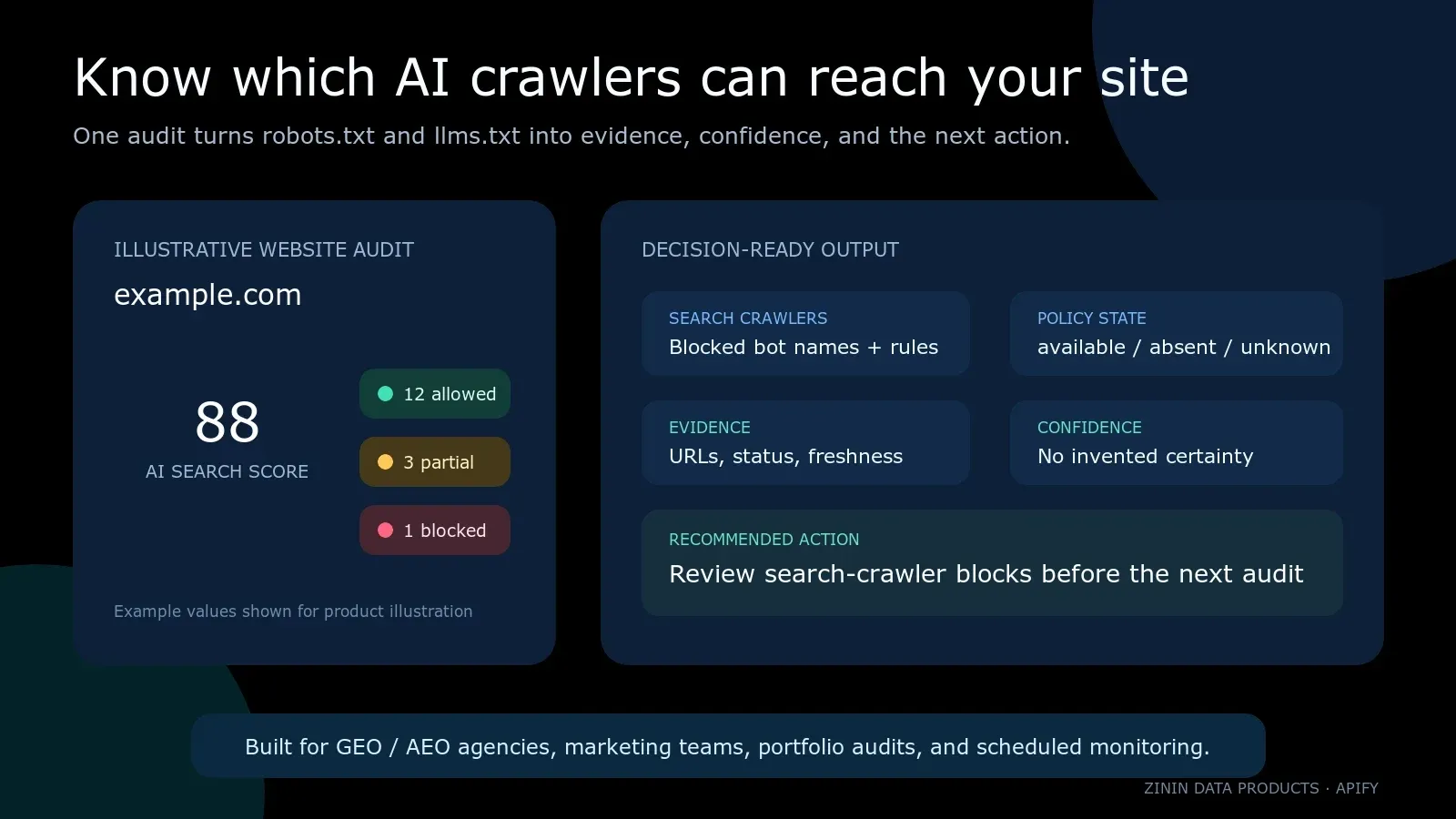
Paste up to 100 domains or URLs. The Actor reads robots.txt, llms.txt, and llms-full.txt; interprets rules for 16 named AI crawlers; separates search, training, and user-triggered bots; and returns a review-ready row for every unique website.
This is built for marketers and agencies, not only developers. Start with a list of client or competitor websites, click Start, and use the result table as an AI-access review queue. Every row includes scores, blocked bot names, source URLs, confidence, gaps, priority, and a recommended action.
The result in one minute
For each unique website you get:
- an AI Access Score across all 16 tracked bots;
- an AI Search Score focused on search and user-fetch bots that may affect discovery inside AI experiences;
allowed,partial,blocked, orunknownverdicts per bot;- the
robots.txtpolicy state:available,not_published, orunavailable; - restricted path patterns and the group type that matched each bot;
llms.txtandllms-full.txtpresence and HTTP status;- declared sitemap URLs found in
robots.txt; - direct evidence URLs, observation time, confidence, and data gaps;
- a recommended action and priority for a human review queue;
- a stable
entityIdfor the origin and an observation-levelresultIdfor downstream storage; - run-level completeness and replay safety in the
OUTPUTrecord.
The Actor does not turn a timeout into a positive score. If the policy endpoint is temporarily unavailable, the verdict is unknown, both scores are null, the row is free, and the recommended action is to retry after source recovery.
Repeat audits: see what changed
Export a previous run's Dataset as a JSON array and paste it into the optional Previous audit results input. Run the same websites again. Each new row includes comparison: the earlier observation time, changed fields with before/after values, and fields that could not be compared. Comparison is included in the existing per-site audit price; there is no additional event or subscription.
Use this for a weekly client-portfolio review or to check a release that may have changed crawler rules. Filter comparison.hasChanges=true to find observed changes, then review comparison.complete and comparison.skippedFields. A partial comparison can contain a confirmed change while some file checks remain unavailable. For a complete unchanged result, require comparison.status="unchanged".
| Comparison status | Meaning |
|---|---|
first_observation | No earlier result for this exact origin was supplied. |
changed | At least one comparable reported policy field changed; all compared sources were known. |
unchanged | Reported crawler verdicts, restricted paths, and policy-file presence match the supplied earlier observation. |
partial | Some llms.txt presence checks were unavailable; inspect changes and skipped fields together. |
unavailable | One robots policy is unknown, timestamps are not chronological, or crawler sets differ; no change is asserted. |
Supply at most 100 previous rows, up to 2 MB, with one snapshot per origin. Keep the original checkedAt, website, found, error, robotsTxt, bots, llmsTxt, and llmsFullTxt fields. A budget-notice row from the exported Dataset is ignored. HTTPS, HTTP, subdomains, and non-default ports remain distinct websites. Previous results are supplied by you and are not independently authenticated. The Actor reads that inline JSON and makes the usual public policy-file requests; it does not open another user's Dataset or persist a cross-run baseline.
This compares the fields reported by the audit, including per-bot verdicts and restricted paths. It does not compare every robots.txt directive, Allow exception, sitemap, document body, citation, or ranking. Timestamps, row IDs, and the order of crawlers or paths do not count as policy changes. Unknown sources never count as a block, removal, or recovery.
Changed crawler details include the verdict, total restricted-path count, a SHA-256 digest of the sorted unique paths, and up to three path samples of 180 characters. samplesTruncated identifies abbreviated samples; comparison itself uses the complete reported paths. If adding comparison would make a row exceed 9 MB, the original audit is delivered without a comparison field and OUTPUT.comparison.omittedRows records the omission. Keep the full earlier audit JSON to inspect earlier path rules.
To automate a repeat audit through the Apify API, pass the last successful run's exported rows as previousResults alongside the new websites list. Retain the older usable snapshot when a comparison is unavailable. Scheduling alone with a fixed input does not advance the baseline automatically.
Who buys and uses this data
| User | Job to be done | Deliverable |
|---|---|---|
| GEO / AEO agency | Audit a client portfolio before a strategy call | Branded spreadsheet or dashboard with blocked bots and priorities |
| SEO agency | Add AI crawler policy to a technical SEO audit | Evidence-backed section beside indexability and sitemap checks |
| In-house marketing team | Check whether a deployment changed AI access | Scheduled before/after audit with stable site identities |
| Content operations | Find accidental restrictions on content paths | Bot-by-bot restricted path review queue |
| Web development agency | Validate a launch, migration, CDN, or WAF change | Acceptance evidence for public crawler policy files |
| Competitive intelligence team | Compare public AI-access posture across a market | Normalized portfolio dataset for competitors and categories |
| Founder or small business owner | Get a plain answer without reading robots syntax | Summary, score, gaps, and the next recommended action |
| Automation builder | Feed structured public policy evidence into a workflow | JSON rows plus run-level OUTPUT completeness contract |
Problems it helps solve
“Our site is visible in Google, so AI bots must be fine.”
Traditional search crawling and AI crawling are not one permission. A site can allow a conventional search crawler while naming GPTBot, ClaudeBot, PerplexityBot, or other product tokens separately. The Actor checks each tracked AI bot against the observed policy instead of inferring one from another.
“We intentionally blocked training, but did we also block AI search?”
That distinction is exactly why two scores are returned. aiAccessScore covers the complete tracked set. aiSearchScore covers bots marked search or user-fetch in this Actor. A team can preserve its training policy while separately reviewing rules that may affect AI discovery or user-triggered retrieval.
“The audit tool said everything was allowed during an outage.”
Temporary source failure is not evidence of permission. A timeout, 403, 429, 5xx, HTML masquerading as robots.txt, DNS failure, or blocked unsafe destination produces an unavailable policy state. The Actor does not calculate an access score from missing evidence.
“We need something clients can understand.”
The Dataset overview surfaces website, policy state, scores, blocked bots, recommended action, priority, confidence, and summary. The full JSON remains available for technical review, but the first view is designed as a decision queue rather than a raw parser dump.
“We need to know whether a 100-site run is complete.”
Dataset rows alone cannot tell you whether duplicates were suppressed, a budget stopped delivery, or a source failed. The OUTPUT Key-Value Store record reports requested, unique, duplicate, attempted, successful, failed, delivered, paid, free, and withheld counts plus partial, fatalError, and replaySafe.
What the Actor checks
The Actor requests only three conventional public files per origin:
https://domain.example/robots.txthttps://domain.example/llms.txthttps://domain.example/llms-full.txt
It does not crawl page content, execute JavaScript, submit forms, log in, bypass access controls, or follow arbitrary links found inside a page. Redirects are handled manually so every destination passes the same public-address safety checks.
Tracked crawlers
| Bot | Vendor | Purpose used in this Actor |
|---|---|---|
GPTBot | OpenAI | training |
OAI-SearchBot | OpenAI | search |
ChatGPT-User | OpenAI | user-fetch |
ClaudeBot | Anthropic | training |
Claude-SearchBot | Anthropic | search |
Claude-User | Anthropic | user-fetch |
PerplexityBot | Perplexity | search |
Perplexity-User | Perplexity | user-fetch |
Google-Extended | training | |
Applebot-Extended | Apple | training |
Amazonbot | Amazon | search |
CCBot | Common Crawl | training |
Bytespider | ByteDance | training |
meta-externalagent | Meta | training |
DuckAssistBot | DuckDuckGo | search |
MistralAI-User | Mistral | user-fetch |
The purpose labels are a practical segmentation for this product’s two scores. They are not a promise about a vendor’s internal processing, product availability, indexing behavior, or future bot naming. Re-run audits and review vendor documentation when a policy decision has material consequences.
How it works
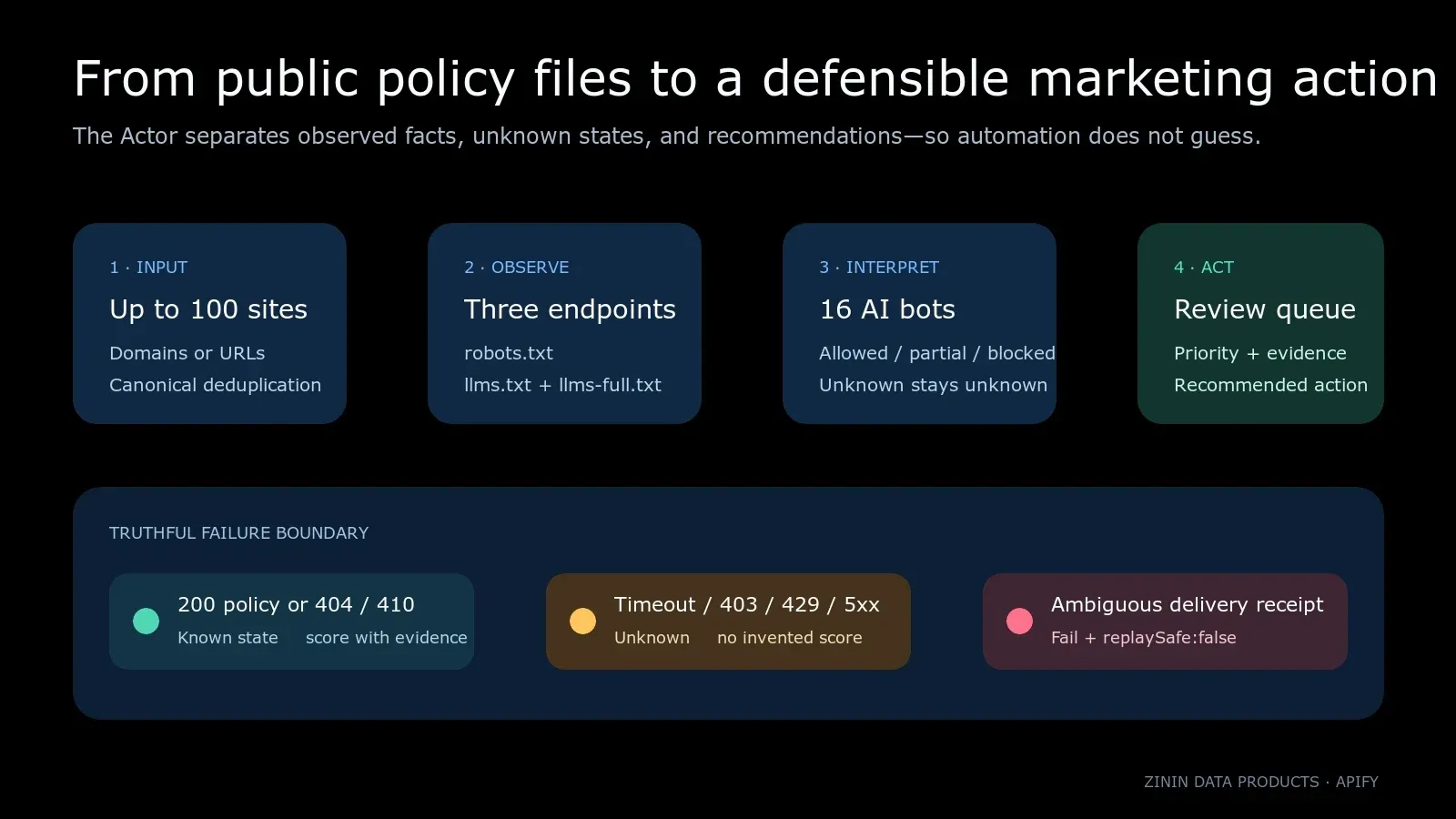
- Validate input. Every item must be a string containing an HTTP(S) domain or URL. Credentials, hidden type coercion, control characters, unsupported schemes, oversized items, and out-of-range concurrency are rejected.
- Canonicalize origins. Paths are removed because public policy files live at the origin. Equivalent HTTPS URL variants are deduplicated before source work. HTTP and HTTPS remain separate origins because they can behave differently.
- Resolve safely. Each hostname is resolved, private and reserved address ranges are rejected, and the verified address set is pinned to the connection to reduce DNS-rebinding risk.
- Follow redirects safely. Redirects are manual, bounded, and revalidated on every hop. A public URL cannot silently redirect the Actor into a private or metadata address.
- Read bounded responses. Each endpoint has a deadline, response byte cap, UTF-8 decoder flush, final URL, byte count, and truncation signal.
- Classify the policy source. A valid text
200isavailable;404or410isnot_published; transport failures and other unsafe or ambiguous responses areunavailable. - Interpret bot groups. Equally specific matching user-agent groups are combined. Specific matches take precedence over wildcard groups. Root access uses the most specific matching rule and an
Allowwins an equal-specificity tie. - Build decisions. The Actor adds evidence, confidence, gaps, priority, recommended action, and a review boundary while preserving the original output fields.
- Deliver in input order. Network work may run concurrently, but rows are delivered and billed sequentially in normalized input order.
- Record completeness. Dataset rows contain per-site outcomes.
OUTPUTrecords run-level source, delivery, billing, partial-state, and replay-safety facts.
Quick start in the Apify Console
- Open the Actor and click Try for free or Start.
- In Websites, paste one domain or URL per line.
- Leave Max concurrency at
10unless a target portfolio needs gentler traffic. - Start the run.
- Open the Dataset Overview for the marketing review queue.
- Open a row’s JSON for per-bot rules, evidence, confidence, and gaps.
- If completeness matters, open the
OUTPUTrecord from the default Key-Value Store.
Example input:
Paths do not change the audited origin. https://anthropic.com/about becomes https://anthropic.com. Duplicate HTTPS variants are checked once and reported in OUTPUT.input.duplicateItems.
Input reference
| Field | Type | Required | Limits | Meaning |
|---|---|---|---|---|
websites | array of strings | yes | 1–100 items; 2,048 characters each | Domains or HTTP(S) URLs to audit |
maxConcurrency | integer | no | 1–50; default 10 | Maximum simultaneous website audits |
Accepted input examples
example.com defaults to HTTPS. www.example.com and example.com remain separate hosts. Explicit HTTP remains separate from HTTPS. Query strings and paths are removed when the origin is created.
Rejected input examples
- non-string items such as numbers or objects;
- empty strings;
- URL credentials such as
https://user:password@example.com; - schemes such as
file:,ftp:,data:, orjavascript:; - more than 100 requested items;
- string or fractional concurrency values;
- URLs longer than 2,048 characters;
- control characters.
Invalid input fails before source work. It is better to correct the list than to guess what a malformed value meant.
How to read the scores
aiAccessScore
The percentage of all 16 tracked bots whose root verdict is allowed or partial. A partial bot can reach the site root but has one or more reported restricted path patterns.
aiSearchScore
The percentage of tracked search and user-fetch bots whose root verdict is allowed or partial. This narrower score helps a marketing team review discovery-oriented access separately from training-oriented policy.
Scores are policy observations, not performance metrics
A score of 100 does not prove that an AI product indexed the site, cites it, ranks it, sends traffic, respects every rule, or will continue using the same bot identity. It only summarizes the observed public policy for the tracked bot list at checkedAt.
When robots.txt is unavailable, both scores are null. Zero would incorrectly imply a proven full block; 100 would incorrectly imply a proven allow. null communicates that the source evidence was not sufficient.
Policy states and verdicts
robotsTxt.state
| State | Evidence | Score behavior | Recommended handling |
|---|---|---|---|
available | HTTP 200 with a non-HTML text body | Calculated from parsed rules | Review blocks and partial paths |
not_published | HTTP 404 or 410 | Default allow policy is represented | Consider whether an explicit policy is needed |
unavailable | timeout, DNS error, unsafe address, 401/403, 429, 5xx, HTML response, or other ambiguity | null | Retry after source recovery; do not assert permission |
Per-bot verdict
| Verdict | Meaning |
|---|---|
allowed | No effective non-empty disallow pattern was observed for the selected group |
partial | Root access is allowed, but one or more disallow patterns remain for review |
blocked | The most specific effective rule blocks the root path / |
unknown | The robots policy source could not be read reliably |
matchedRule
| Value | Meaning |
|---|---|
specific | One or more equally specific named user-agent groups matched |
wildcard | No named group matched and one or more User-agent: * groups were used |
none | No matching group was observed |
unknown | No policy selection was asserted because the source was unavailable |
Dataset output
One row is delivered per unique requested origin that reaches the delivery stage. Existing fields remain available for backward compatibility; commercial decision fields are additive.
Illustrative abbreviated row:
The example is explanatory, not a current observation about example.com. Actual values depend on the files served when your run executes.
Output field dictionary
| Field | Meaning |
|---|---|
website | Canonical audited origin |
found | true when the core robots policy state is known |
error | Failure reason for a free outcome; otherwise null |
checkedAt / observedAt | UTC observation time |
robotsTxt.exists | Whether a valid non-HTML 200 policy body was observed |
robotsTxt.status | Terminal HTTP status, or 0 for transport-level failure |
robotsTxt.state | available, not_published, or unavailable |
robotsTxt.finalUrl | Terminal URL after bounded, validated redirects |
robotsTxt.bytesRead | Bytes accepted into the bounded body reader |
robotsTxt.truncated | Whether the response hit the byte cap |
llmsTxt.exists | Whether a non-empty non-HTML 200 body was observed |
llmsTxt.status | HTTP status for the conventional llms.txt path |
llmsFullTxt | Same observation contract for llms-full.txt |
sitemaps | Sitemap URLs declared in the observed robots body |
aiAccessScore | Root-access percentage across all tracked bots, or null |
aiSearchScore | Root-access percentage across search/user-fetch bots, or null |
blockedBots | Bot names with a proven root blocked verdict |
bots | Complete 16-bot verdict array |
bots[].restrictedPaths | Up to ten observed disallow patterns for review |
bots[].matchedRule | Specific, wildcard, none, or unknown group selection |
responseTruncated | Whether any of the three response bodies hit the byte cap |
summary | Plain-English outcome summary |
schemaVersion | Additive decision-layer contract version |
entityId | Stable identifier derived from the canonical origin |
resultId | Observation identifier derived from origin and observation time |
evidence | Direct source URLs, status, and observation time |
confidence | Confidence in the policy observation—not expected traffic impact |
dataGaps | Claims the source data cannot prove |
recommendedAction | Suggested human review step |
actionPriority | High, medium, or low review priority |
safeToAutomate | false; publishing policy changes requires contextual review |
billing | Whether the row is billable and what unit was delivered |
Run-level OUTPUT
Read the OUTPUT record whenever your workflow needs to prove that the run is complete.
OUTPUT.status
COMPLETE: every unique origin produced a known, delivered policy audit with no truncation.PARTIAL: at least one source outcome was free/unknown, a response was truncated, or budget stopped remaining paid delivery.FAILED: billing state, delivery receipt, or another fatal contract became ambiguous.
Replay safety
Paid rows use one linked Dataset and pay-per-event operation. On a monetized run, the platform receipt must prove both linked operations. If delivery throws or the receipt count is ambiguous, the run fails and OUTPUT.replaySafe becomes false.
Do not blindly retry a run with replaySafe:false. Inspect the Dataset and charged events first because the last row may already have been delivered.
Recommended actions
| Action | Trigger | Human review |
|---|---|---|
RETRY_AFTER_SOURCE_RECOVERY | Core robots policy unavailable | Check endpoint/CDN/WAF health, then rerun |
REVIEW_SEARCH_CRAWLER_BLOCKS | One or more search/user-fetch bots blocked at root | Confirm intent with SEO, legal, security, and content owners |
REVIEW_RESTRICTED_PATHS | No root block, but restricted path patterns exist | Verify that important public content is not unintentionally covered |
CONSIDER_PUBLISHING_LLMS_TXT | Known robots policy and no valid llms.txt observed | Decide whether an AI-readable site description fits the content strategy |
MONITOR_AI_CRAWLER_POLICY | No higher-priority issue observed | Schedule the next audit and compare stored results |
safeToAutomate is deliberately false. The Actor can safely automate collection and triage, but it should not automatically rewrite or publish a company’s crawler policy without business context.
Agency workflow
One-time client audit
- Export the client’s production domains, subdomains, and regional hosts.
- Run the Actor with a moderate concurrency value.
- Filter high-priority rows first.
- Separate search/user-fetch blocks from training-only blocks.
- Open evidence URLs and confirm the live policy.
- Review partial paths against the client’s content architecture.
- Deliver the overview table, selected row JSON, and
OUTPUTcompleteness record.
Portfolio monitoring
- Create one named Apify task for the stable website list.
- Schedule weekly or after planned deployments.
- Store site identity using
entityIdand individual observations usingresultId. - Compare
robotsTxt.state, scores, blocked bots, restricted paths, and recommendation. - Alert only on meaningful changes or unknown states.
- Keep
OUTPUTbeside each snapshot so missing rows are not mistaken for “no change.”
Client-facing packaging
Use three layers:
- executive layer: website, two scores, priority, and summary;
- specialist layer: per-bot verdicts, restricted patterns, and policy state;
- evidence layer: source URLs, status, observation time, confidence, gaps, and run completeness.
This lets a founder understand the result while an SEO or engineering team can verify exactly what produced it.
Small-business workflow
If you manage one or a few websites:
- Add the primary website and any separate blog, shop, docs, or help-center hosts.
- Start the run with default concurrency.
- Look at
actionPriorityandrecommendedActionbefore reading all 16 bot rows. - If a search crawler is blocked, send the evidence row to the person who manages the CMS, CDN, WAF, or
robots.txtfile. - If the state is unknown, retry later before changing anything.
- Schedule a new run after the change and compare the evidence.
Do not copy a competitor’s policy blindly. Access choices depend on the site’s licensing, privacy, security, discovery, and commercial strategy.
Competitive benchmark workflow
Public crawler policy can be compared across a defined market, but the conclusion must remain narrow.
Suggested benchmark columns:
- brand and website;
robotsTxt.state;- AI Access Score;
- AI Search Score;
- blocked search/user-fetch bots;
- blocked training bots;
llms.txtobserved;- sitemap count;
- action priority;
- observation time.
A competitor score does not prove share of voice or AI traffic. Pair this Actor with citation, answer visibility, or referral analytics when the business question is actual visibility rather than public access policy.
Launch and migration QA
Crawler policy often changes outside the page code itself. A CDN rule, hosting migration, staging header, security product, or generated robots template can change what the public endpoint returns.
For launch QA:
- run a baseline before deployment;
- store Dataset rows and
OUTPUT; - deploy the site or infrastructure change;
- rerun the same task;
- compare policy state, final URL, status, blocked bots, restricted paths, and scores;
- investigate unknown states instead of accepting them as passes;
- rerun after remediation and attach the evidence to the launch ticket.
API access
Start an asynchronous run:
After the run reaches a terminal state, read Dataset items:
Read run-level completeness:
For portfolio jobs, prefer asynchronous runs and inspect both storage objects. A synchronous HTTP timeout should not be interpreted as an Actor failure without checking the run status.
JavaScript integration
Python integration
Webhooks, Make, Zapier, n8n, and agents
Trigger a downstream workflow when the Actor run succeeds, then:
- retrieve the run object;
- read
OUTPUTfirst; - stop and alert on
FAILEDorreplaySafe:false; - decide whether
PARTIALis acceptable for the workflow; - retrieve Dataset rows;
- route high-priority actions to a human;
- store evidence and observation time with the ticket or CRM record.
For an AI agent, include these guardrails in the prompt:
- cite
evidence[].sourceUrlwhen describing a policy; - never replace
unknownornullwith an allow/block guess; - preserve
dataGapsin the answer; - distinguish search/user-fetch policy from training policy;
- do not claim indexing, ranking, citation, or traffic from these rows;
- require human approval before changing a live site policy;
- inspect
OUTPUT.replaySafebefore proposing a retry.
Pricing and billing contract
This Actor uses pay per event. At the time this README was prepared, the Free-tier Store price was:
- Actor start:
$0.005per run start; - Domain checked:
$0.02per successfully delivered unique website audit.
Paid Apify plans can receive lower tiered event prices; the current Store pricing table is authoritative.
Examples at the Free-tier event price, before platform compute or plan-specific effects:
| Unique successful websites | Result events | Start event | Event subtotal |
|---|---|---|---|
| 1 | $0.02 | $0.005 | about $0.025 |
| 10 | $0.20 | $0.005 | about $0.205 |
| 100 | $2.00 | $0.005 | about $2.005 |
Duplicates are normalized before source work and do not create a second paid audit. A core source failure is delivered as a free outcome row. A known 404/410 policy state is a completed audit and can be billable because it is a supported, decision-relevant result.
The Actor checks the run’s maximum charge before each paid delivery. If the remaining budget cannot cover another row, eligible remaining rows are withheld and reported in OUTPUT.delivery.withheldRows.
Reliability and safety controls
Public-network boundary
- HTTP and HTTPS only;
- URL credentials rejected;
- private, loopback, link-local, multicast, reserved, and metadata address ranges blocked;
- every DNS answer checked;
- connection pinned to the verified address list;
- redirects bounded and revalidated on every hop;
- no browser execution or page crawling.
Resource boundary
- up to 100 requested input items;
- maximum response-body bytes per endpoint;
- total request deadline across redirects;
- bounded redirect count;
- controlled concurrency;
- body truncation surfaced in rows and
OUTPUT.
Commercial boundary
- free Dataset writes must be proven unpriced before source work on-platform;
- the
result-foundevent must be positively priced on-platform; - paid delivery and charge use one linked operation;
- the receipt must prove both linked operations;
- ambiguous delivery is fatal and not silently reported as success;
- run-level counters and replay safety are persisted before exit.
Known limitations
- The Actor observes public files at run time; policies can change immediately afterward.
- It does not verify whether a crawler obeys the published policy.
- It does not prove indexing, retrieval, citation, answer inclusion, ranking, impressions, clicks, or revenue.
- It does not inspect meta robots tags,
X-Robots-Tag, page-level authentication, JavaScript rendering, WAF behavior for each real bot IP, or content licenses. llms.txtpresence is observed at a conventional path; the Actor does not judge document quality or vendor adoption.- Restricted path patterns are reported for review, not expanded into a complete crawl simulation for every possible URL.
- Bot names and vendor behavior can evolve; use the observation as one input to policy review.
- A known default policy from
404/410does not prove that every crawler will choose to fetch the site. safeToAutomate:falsemeans policy publication remains a human-controlled decision.
Troubleshooting
Scores are null
Check robotsTxt.state, robotsTxt.status, and robotsTxt.error. The source was unavailable or ambiguous, so the Actor refused to invent an access verdict. Retry after checking DNS, hosting, CDN, WAF, and endpoint behavior.
robotsTxt.exists is false but the score is present
If robotsTxt.state is not_published, the Actor observed 404 or 410. That is a known absence state, so default access can be represented. This differs from unavailable, where no score is asserted.
A bot is partial, not blocked
The selected rules allow the root path but include one or more disallow patterns. Review restrictedPaths against important public content. Partial does not mean “half the site”; it is a categorical signal that restrictions exist below the root.
An Allow and Disallow both appear
Root access uses the most specific matching rule. An allow rule wins an equal-specificity tie. Equally specific matching user-agent groups are combined before the verdict is calculated.
The run is PARTIAL
Inspect OUTPUT.source.failedItems, truncatedItems, delivery.withheldRows, and budgetStopped. A partial run can contain useful rows, but your workflow should not assume the requested list was fully delivered.
The run says replaySafe:false
Do not retry blindly. A Dataset/PPE delivery result was ambiguous, so a row may already exist. Inspect Dataset items and charged events first, then decide whether and how to reconcile.
Duplicate URLs produced one row
That is expected. HTTPS URL variants that canonicalize to the same origin are audited once. OUTPUT.input reports requested, unique, and duplicate counts.
The site redirects to another host
The terminal finalUrl is recorded. Each redirect hop must remain HTTP(S), resolve only to allowed public addresses, and stay within the redirect limit.
The Actor rejected a local or private hostname
This Actor is intentionally restricted to public website policy auditing. It is not designed for intranet, localhost, private cloud, or metadata endpoints.
FAQ
Does it crawl pages or execute JavaScript?
No. It requests the three conventional public policy/document paths only.
Can I audit competitors?
The Actor reads public endpoints. Use the data responsibly, respect applicable terms and laws, and keep conclusions within what the evidence proves. This README is product documentation, not legal advice.
Does a 100 score mean my brand appears in AI answers?
No. It means the observed public policy did not block the tracked bots from the root. Measure actual citations, answer presence, referrals, and conversions separately.
Does blocking GPTBot block ChatGPT search?
The Actor does not collapse vendor bots into one identity. It reports GPTBot, OAI-SearchBot, and ChatGPT-User separately because a policy can name them separately.
Why check both llms.txt and llms-full.txt?
They are conventional AI-readable documentation paths that some sites choose to publish. The Actor reports presence and status; it does not claim that publication changes ranking or guarantees consumption.
What happens when the site is down?
If the core robots policy cannot be read reliably, the row is a free unknown outcome with null scores and a retry recommendation.
Can I schedule it?
Yes. Save the input as an Apify task, schedule it, and use webhooks or your automation platform to compare snapshots.
Can I export CSV or Excel?
Yes. Use the Dataset export options in the Apify Console. The overview fields are useful for a review queue; JSON preserves nested bot, evidence, confidence, and billing data.
Can an AI agent use the output?
Yes, but force the agent to preserve unknown states, cite evidence, obey data gaps, and require human approval for policy changes.
Why is safeToAutomate false?
Crawler access can involve marketing, content licensing, security, privacy, and legal choices. Collection and triage can be automated; publishing a live policy should remain contextual and approved.
What is one billable result?
One successfully delivered audit for one unique requested origin. A linked Dataset/PPE receipt must prove the delivery and event relationship.
Related Actors
Use adjacent tools when the business question extends beyond public crawler policy.
| Actor | Add it when you need |
|---|---|
| LLM Brand Visibility Tracker | Brand presence across prompts or answers |
| AI Overview Citation Tracker | Sources cited in AI-generated search overviews |
| Domain Health Checker | DNS, SSL, SPF, DMARC, and domain health evidence |
| Social Preview Checker | Public sharing-card QA across channels |
| AI Answer Change Alert | Monitoring answer changes over time |
What this product is—and is not
It is a bulk public-policy observation and decision-support product for AI crawler access. It is designed to make a marketing or agency workflow faster, more consistent, and easier to verify.
It is not a guarantee of crawler behavior, indexing, citations, rankings, traffic, legal compliance, or commercial outcome. Use evidence, confidence, gaps, and the recommended review boundary together.
Built by zinin. Questions or a missing crawler? Use the Actor issue tab or contact Telegram @timzinin.


