

YouTube Scraper
Pricing
from $1.50 / 1,000 results
YouTube Scraper
Scrape YouTube searches, channels, playlists and videos without an API key or quota: views, duration, tags, subscribers, plus optional transcripts (text, SRT, VTT), comments, likes and engagement rate (these may need a residential proxy). Filtered or failed videos never billed. $3 per 1,000 results.
Pricing
from $1.50 / 1,000 results
Rating
0.0
(0)
Developer

Badr Bouargan
Maintained by CommunityActor stats
0
Bookmarked
2
Total users
1
Monthly active users
3 days ago
Last modified
Categories
Features
Share
YouTube Scraper – Videos, Channels, Comments & Transcripts (No API Key)
Get views, likes, comments, durations and full transcripts of YouTube videos, channels, searches and playlists — no API key, no quota.
- 🔎 Searches, channels, playlists and video links, several of each in one run.
- 📈 Views, likes, comments, duration, date, plus engagement rate and views per day.
- 📝 Transcripts and top comments in the same run: 1,000 videos = $3.00 on the Free plan.
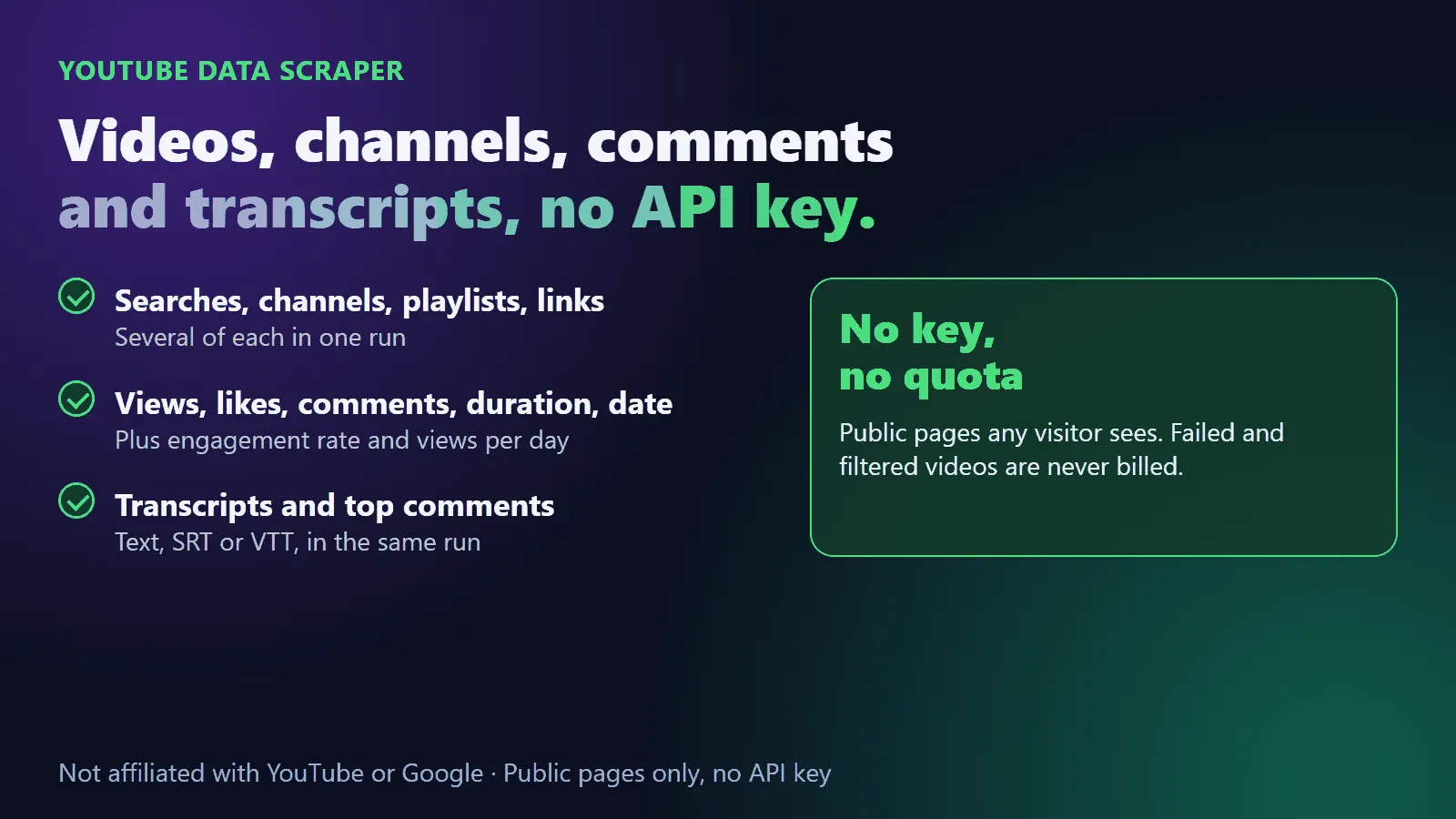
This Actor is not affiliated with, endorsed by or sponsored by YouTube or Google. It reads only public pages and never logs in.
What it does. It turns YouTube searches, channels, playlists and video links into a clean table: views, likes, comment counts, duration, upload date, tags, hashtags and channel subscribers, plus optional full transcripts (plain text, SRT or VTT) and top comments.
The problem it solves. The official YouTube Data API needs a Google Cloud project, an API key and a daily quota, and it does not return transcripts. This Actor reads the public pages any visitor sees: no key, no quota, nothing to configure.
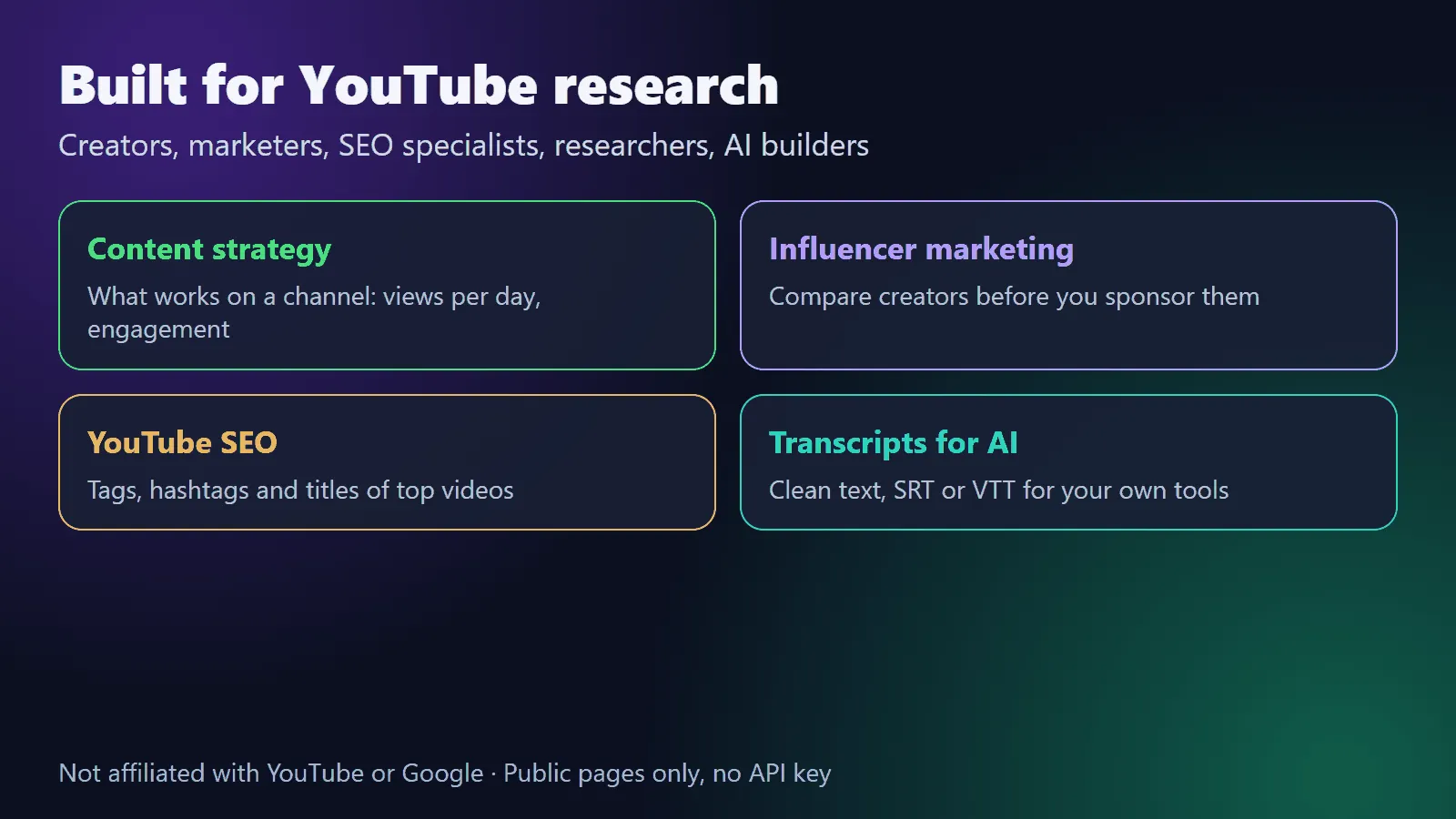
Who it is for. Creators and content strategists, influencer marketers, YouTube SEO specialists, market researchers, and developers feeding transcripts to AI tools.
What you get. One row per video (and optionally one per channel and per comment). Main columns: title, url, viewCount, likeCount, commentCount, duration, publishedAt, tags, channelTitle, channelSubscribers, transcript, plus computed engagementRate, viewsPerDay, likesPerThousandViews and performanceVsChannel. Sample (shortened, real run):
| title | viewCount | likeCount | channelTitle | channelSubscribers | engagementRate | transcriptWordCount |
|---|---|---|---|---|---|---|
| Raimu - The Spirit Within | 410458 | 12043 | Lofi Girl | 15700000 | 3.012 | 1840 |
Start in 3 steps
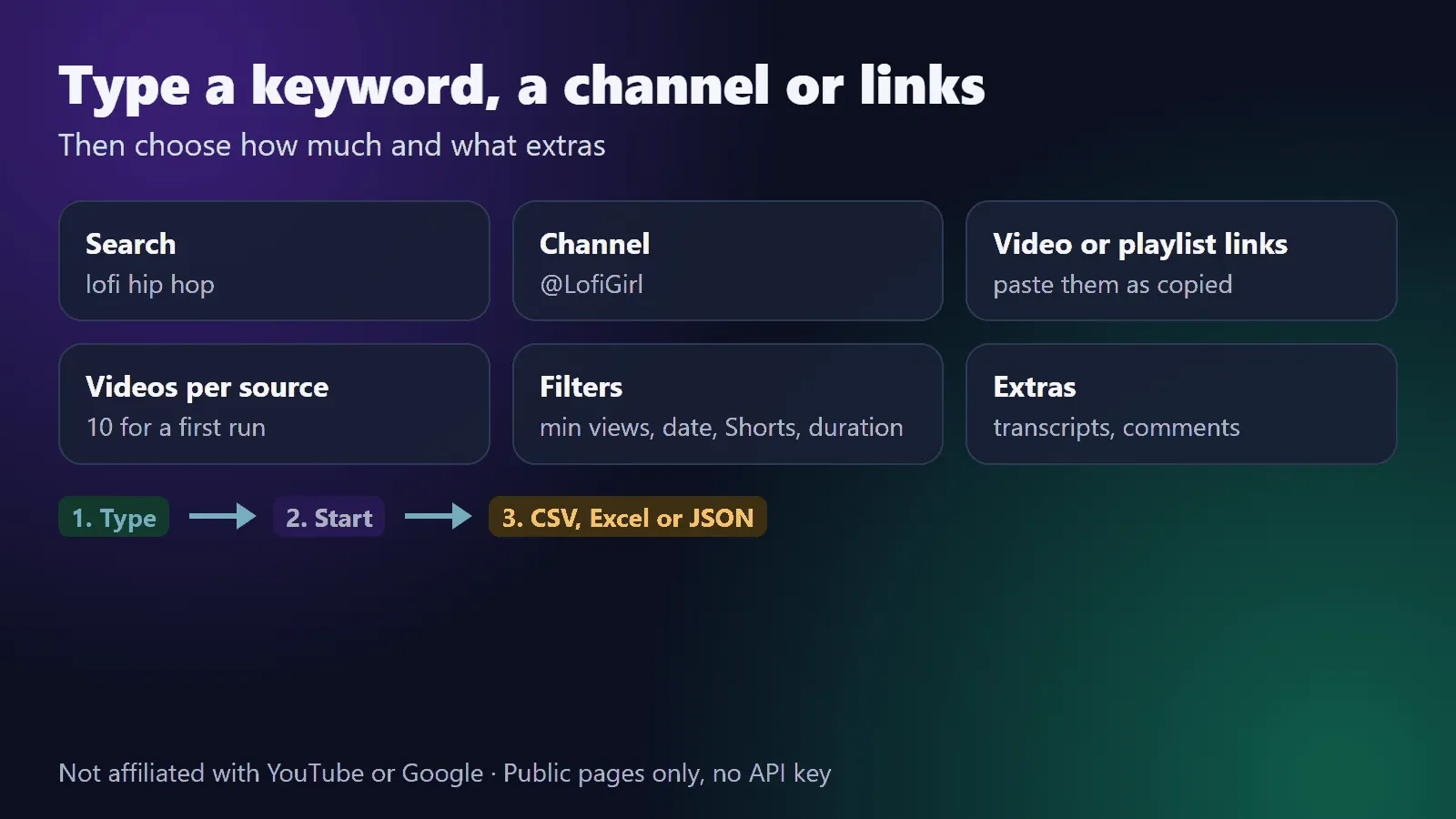
- Open the Actor on the Store: apify.com/badr_xba/youtube-data-scraper and click Try for free. Or start from the ready-made task (search results with transcripts) listed on the same page.
- Type a keyword (
lofi hip hop), a channel (@LofiGirl) or paste video / playlist links. Keep Maximum videos per source at 10 for a first run; switch on transcripts or comments if you need them. - Click Start, then export CSV, Excel or JSON, or send the dataset to Google Sheets.
Leave everything empty and the Actor runs a 10-video demo search instead of failing.
Why choose this one
- No API key, no Google account. Public pages only.
- Transcripts in the same run as the video data, in text, SRT or VTT, published subtitles first and automatic captions as fallback (
transcriptIsAutomatictells you which). - Computed metrics on every video:
engagementRate,viewsPerDay,likesPerThousandViews,performanceVsChannel(this video's views versus the channel's average). - Filters before you pay: minimum views or likes, published within N days or after a date, Shorts / long videos / live, duration, title keywords. Filtered videos are not billed.
- Pay only for rows saved. Unavailable or refused videos go to
FAILED_INPUTSand are never billed; Maximum results and Maximum cost per run stop the run cleanly. - Familiar input and output names (
startUrls,searchQueries,maxResults,id,text,likes,commentsCount,channelName,numberOfSubscribers…), so inputs written for other YouTube scrapers on the Store usually work as they are.
New in v2: AI summary, chapters, timed captions, replies
- AI summary and chapters from the captions, with your own key (available from a date to be announced; until then the option has no effect and the run log says so). Switch on AI summary and chapters, pick Claude, ChatGPT or Gemini and paste your API key. Each video gets
aiSummary(3 to 6 sentences),aiKeyPoints,aiChapters([{start, startLabel, title}]),aiModelandaiTokens({input, output}). Only the caption text and the title are sent to the AI provider: no audio or video is ever downloaded, and there is no speech-to-text. Empty AI model = the provider's cheapest default (claude-haiku-5-5,gpt-6-luna,gemini-3.5-flash-lite). Summary language defaults to the language of the captions; Maximum chapters defaults to 8. - Chapters you can trust. Every chapter start is checked: it must lie between 0 and the video duration, be in ascending order and match a caption timestamp (it is snapped to the nearest caption line, and dropped if none is within 30 s).
- Long videos. Transcripts above about 24,000 tokens (roughly two hours of speech) are shortened evenly over the whole video before being sent, so the chapters still reach the end;
aiInputTruncatedis thentrue. - Which captions were used.
captionSourceismanual(captions published on the video, always tried first) orauto(YouTube's automatic captions). Switch off Allow YouTube automatic captions to use published captions only. A video without a usable caption track getsaiError: "noCaptions"and no summary charge. - Timestamped segments. Timestamped segments adds
transcriptSegments([{start, end, text}], seconds) andavailableCaptionLanguages([{language, name, kind}]), capped at 5,000 segments and by Maximum transcript length. - Comments. Comments order (
topornewest), Include replies and Maximum replies per comment (default 5). Reply rows haveisReply: trueandparentCommentId. Anonymise comments still applies to replies. - Errors are clear and cheap. A wrong key, a key without access, an empty AI account or an unknown model stops the run at the first error (run Succeeded with the reason in the status message,
RUN_SUMMARY.status=FAILED_INPUT,stoppedReasonand aFAILED_INPUTSentry; switch on Mark the run as failed on input errors (failRunOnError) to get a Failed run instead); videos already saved keep their data, and no summary is charged after the error. A temporary provider error on one video leaves its row with the scraped data and anaiErrorcode (rateLimited,providerError,timeout,network,badAnswer), not charged as a summary. Your key is stored as a secret input and never written to logs or results. - Summaries view. The dataset has a Summaries view: title, summary, key points, chapters, caption source and model.
Quality note: summaries and chapters have been tested with simulated provider answers only; their quality with real API calls has not been measured yet.
How much it costs
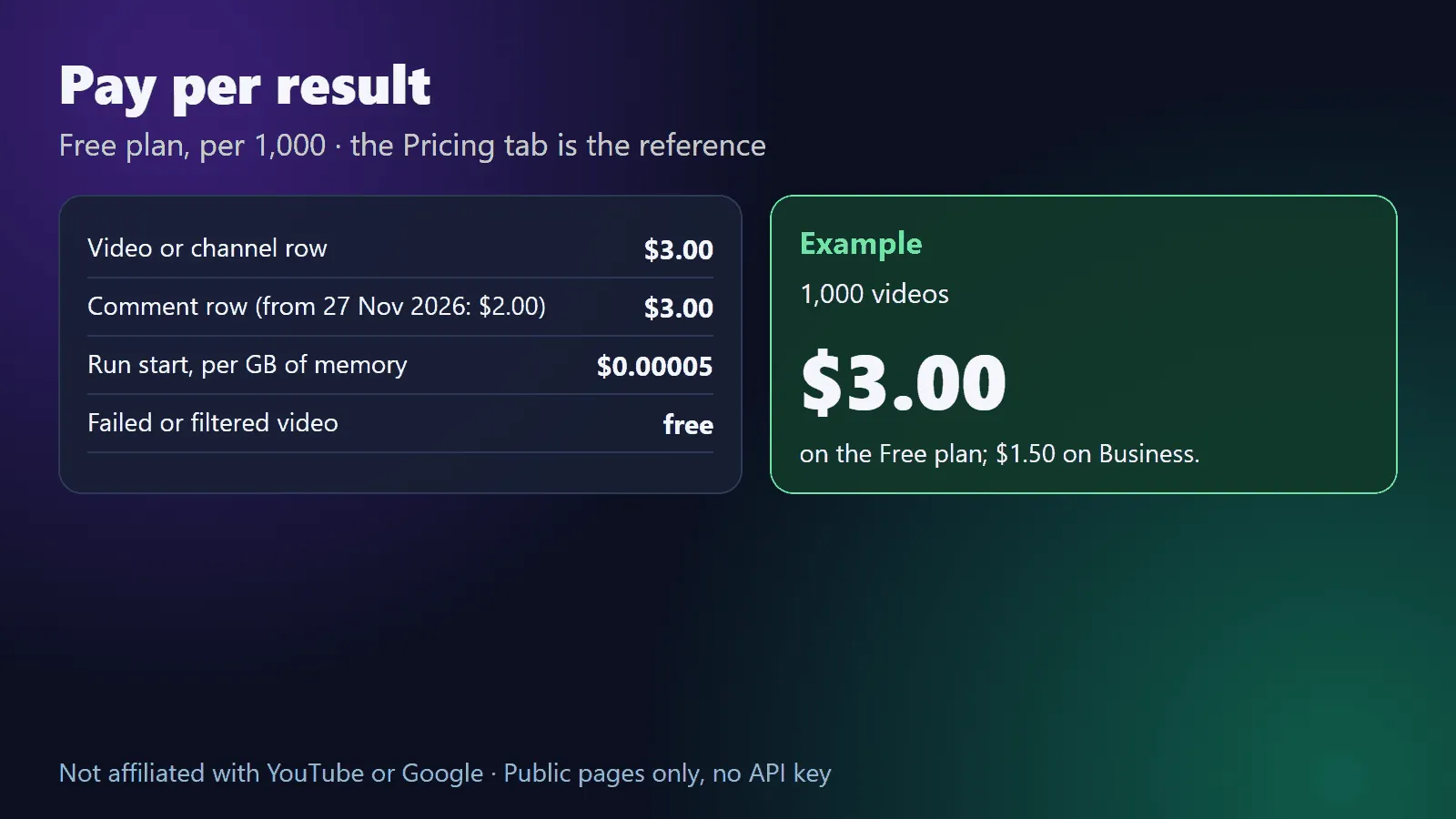
Pay per event: one charge per result row saved (video, channel or comment), plus a tiny start fee. Failed and filtered videos are never charged. Platform and proxy costs are included.
| Apify plan | Price per result | Per 1,000 results |
|---|---|---|
| Free | $0.003 | $3.00 |
| Starter | $0.0024 | $2.40 (−20 %) |
| Scale | $0.00195 | $1.95 (−35 %) |
| Business | $0.0015 | $1.50 (−50 %) |
Actor start: $0.00005 per GB of memory (default 1 GB = one event).
Upcoming prices (v2, not active yet). Video and channel rows keep exactly the price above; comment rows get their own lower price and AI summaries a fee per summarized video. Until this pricing is switched on, every row (comments included) keeps the price above and AI summaries are free (the run log says so in one line). A row is never charged twice.
| Apify plan | Video or channel row, per 1,000 | Comment row, per 1,000 | AI summary, per 1,000 videos |
|---|---|---|---|
| Free | $3.00 (unchanged) | $2.00 | $10.00 |
| Starter | $2.40 (unchanged) | $1.50 | $8.00 |
| Scale | $1.95 (unchanged) | $1.20 | $7.00 |
| Business and above | $1.50 (unchanged) | $0.90 | $6.00 |
The AI summary fee is charged only for a video that really got a summary: never for a video without captions, a provider error, an invalid answer or a run stopped by a wrong key. Your AI provider bills you separately for the tokens (aiTokens on each row).
Videos with incomplete details are never charged. When YouTube refuses the full video page on every attempt, the video is still saved with what could be read — detailsLevel: "partial" (title, views… from the video page) or "listing" (from the search, channel or playlist list) — with a detailsNote saying what is missing, and it is not charged. Where it is saved depends on the pricing in force:
- Today (per-row price, until the switch to the upcoming prices): the platform charges every row of the main dataset, so these videos are saved in a separate dataset of the run (
partial-rows), free. Its link is in thePARTIAL_ROWSrecord (Output tab: Videos with incomplete details) and inRUN_SUMMARY.partialRows. - With the upcoming prices: they are saved in the main dataset with the other videos, without any charge.
RUN_SUMMARY.rowsByDetailsLevel counts the rows by level and RUN_SUMMARY.partialRowsNotCharged the rows saved free of charge. List mode ("videoDetails": "listing") is a speed you choose, not a refusal: its rows are charged as regular rows.
Worked examples (Free plan): 1,000 videos ≈ $3.00. 20 videos with transcripts = 20 rows ≈ $0.06. 10 videos with 20 comments each = 10 + 200 rows ≈ $0.63, so cap comments with Maximum comments per video, and the whole run with Maximum results or Maximum cost per run.
What you can do with it
-
Creators & content strategy: find which topics, formats and lengths get watched in your niche; spot outliers with
performanceVsChannel. -
Influencer marketing: shortlist channels by subscribers, average views, views per subscriber and engagement before you pay for a sponsorship.
-
YouTube SEO & keyword research: collect titles, tags, hashtags and transcripts for a keyword to see what ranks.
-
Competitor tracking: schedule a weekly run on competitor channels and follow views per day and engagement.
-
Audience research & AI: pull comments (optionally anonymised) and transcripts (text, SRT or VTT) for sentiment analysis, summaries or a search index.
-
Researchers & data teams: a schedule on a keyword builds a dataset of what gets published and how it performs over time.
Two speeds: full detail (one request per video) or list mode (up to 50 videos per request, without likes or exact date). Exact limits: maxVideosPerSource, maxItems (whole run) and separate caps for Shorts and live streams.
How it works
- Each search, channel, playlist or video URL becomes a list of video IDs (one request per list).
- In full-detail mode each video page is read with yt-dlp; a truncated or refused response (bot check, 403, 429, consent page) is retried up to 8 times within about 90 seconds, each time with another YouTube player (the Safari web player first, then the player that last gave a full answer) and from a new IP (a new proxy session; with the proxy off, the first attempt uses the run's own address and the retries Apify datacenter addresses). A proxy connection that fails to open is retried at once with a new session and does not use up an attempt. Each attempt is logged (route, attempt number, player, time left), and a "Still working" line is written at least every 30 seconds. If all of them are refused, enhanced recovery can make 2 last attempts (see below). A run where YouTube refused everything ends Succeeded with "Blocked by YouTube" in the status message,
RUN_SUMMARY.status=BLOCKED_BY_YOUTUBEand nothing charged (withfailRunOnErrorit ends Failed); otherwise the run succeeds and lists the refused inputs inFAILED_INPUTS. When YouTube gives only the video page without the player data ("No title found in player responses"), the other players are still tried; if none gives the full data, the video is saved withdetailsLevel: "partial"and adetailsNote(never charged, see How much it costs). When YouTube refuses the player to 3 videos in a row, the next videos get one attempt each and may come with partial or list data (detailsLevel: "listing") instead of insisting. - Time limits: one video never takes more than about 4 minutes, all attempts included; and 30 seconds before the run's own timeout no new work starts — the run ends Succeeded with what it saved, and what was not done is listed in
FAILED_INPUTSwith codeTIME_LIMIT. - Channel figures are fetched once per channel and reused; for videos found in a search or playlist they are read at the same time as the video page.
- Searches, channels, playlists and the videos you list are processed together, within the Videos read in parallel limit (with Maximum results set, they keep this order of priority instead).
- Transcripts come from the subtitle tracks YouTube serves (published first, automatic captions as fallback); a track download is retried on network errors, 429 and 5xx.
- At the end the run writes
RUN_SUMMARY,FAILED_INPUTSandPARTIAL_ROWSto the key-value store.
Enhanced recovery (residential proxy, last resort)
Available from a date to be announced. Off by default: you switch it on yourself.
- What it is. When YouTube refuses an item (a video page, a list page or a comments page) from every regular address tried, 2 last attempts go through a residential proxy, which YouTube refuses far less often.
- When it is used. Only after all regular attempts failed, so most runs never use it. It becomes available together with the upcoming prices; until then refused items simply go to
FAILED_INPUTS. - What it costs. One Enhanced recovery event per item that was really recovered; failed attempts are never charged. It also counts toward Maximum cost per run.
- How to switch it on, cap or disable it. Maximum enhanced recoveries is 0 (off) by default; set a number (e.g. 20) to switch it on with that cap per run, or 0 to switch it off. When it is off and videos are blocked, the end of the run log says how many and how to retry them.
RUN_SUMMARY.enhancedRecoveriesshowsused,charged,capReached,notRecoveredCapand an estimated volume. - When the cap is reached. Items still refused by YouTube are not retried: they go to
FAILED_INPUTSwith codeBLOCKED_BY_YOUTUBEanderrorReason: "ENHANCED_RECOVERY_CAP_REACHED"(not billed; a video found in a list may still be saved with its list data and the sameerrorReason). The last lines of the run log say how many, e.g. "3 videos not recovered because the enhanced recovery cap was reached — increase maxEnhancedRecoveries". The run still succeeds when anything was saved.
Every input format is accepted
| You paste | Understood as |
|---|---|
https://www.youtube.com/watch?v=dQw4w9WgXcQ, https://youtu.be/dQw4w9WgXcQ?si=…, https://m.youtube.com/watch?v=…, /shorts/…, /live/…, dQw4w9WgXcQ | a video |
https://www.youtube.com/@LofiGirl, @LofiGirl, LofiGirl (in Channels), UCSJ4gkVC6NrvII8umztf0Ow, /channel/UC…, /c/…, /user/… | a channel |
https://www.youtube.com/playlist?list=PL…, PL… | a playlist |
https://www.youtube.com/results?search_query=…, /hashtag/lofi, plain words in Start URLs | a search |
Several values on one line (separated by commas or new lines), extra spaces and duplicates are cleaned up automatically, and a link pasted in the "wrong" field is still routed correctly. Anything that is not YouTube (a Vimeo link, a typo) is skipped with a warning and listed in FAILED_INPUTS — never billed, and the run does not fail.
Input example
Output example
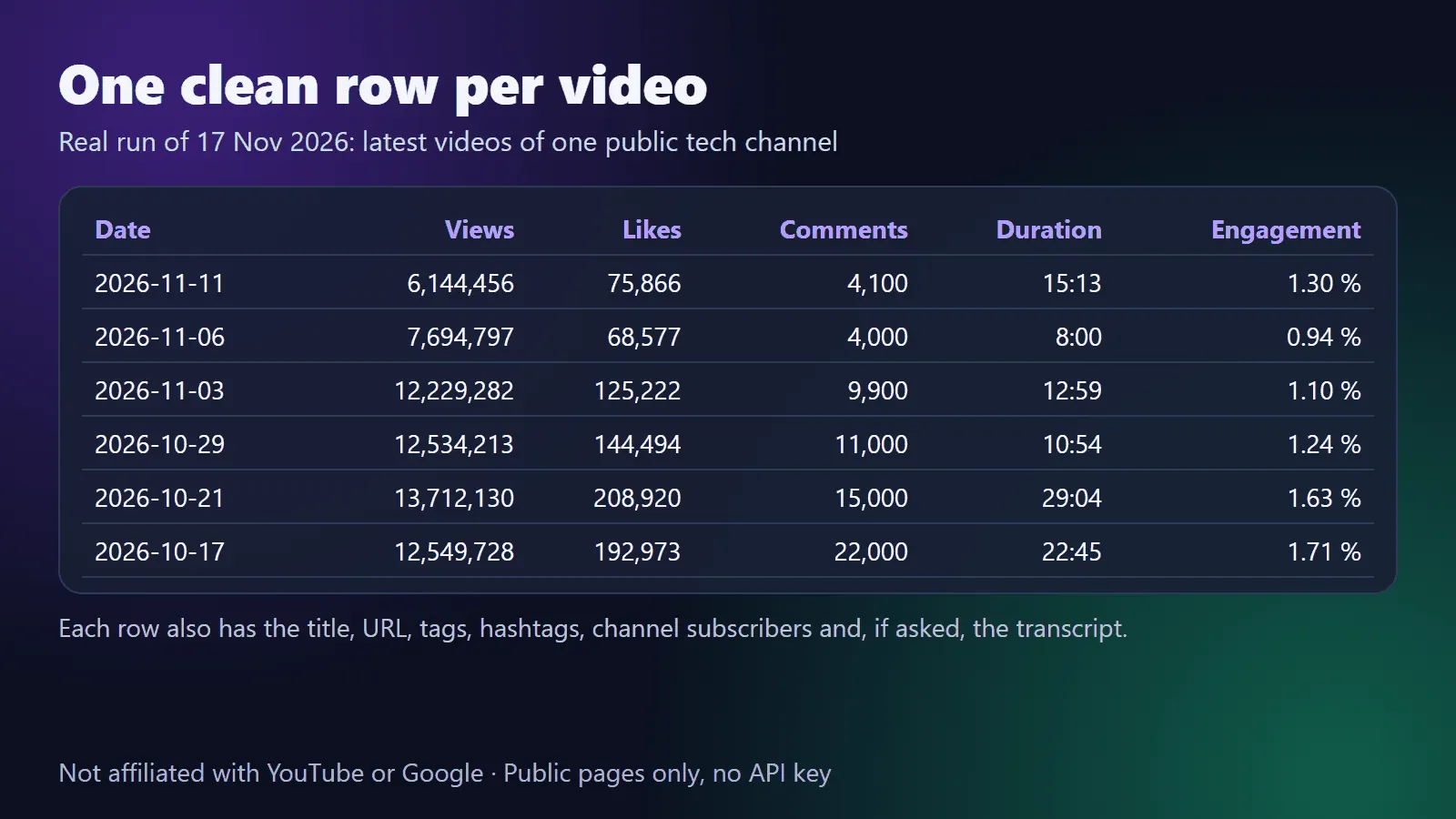
Real run of 17 Nov 2026: latest videos of one public tech channel.
A video row (shortened — every video row carries the same columns, null when unknown):
Channel rows have type: "channel" (subscriberCount, averageViewsPerVideo, viewsPerSubscriber, keywords, verified), comment rows type: "comment" (text, author, likeCount, publishedAt, isPinned, videoUrl). The dataset has three views: Videos, Channels, Comments.
In the key-value store: RUN_SUMMARY (status, stopReason, itemsPushed, videos, channels, comments, failedCount, durationSeconds, requests, retries, listingFallback (videos delivered with list data after a refusal), rowsByDetailsLevel (full / partial / listing), partialRowsNotCharged (videos with incomplete details saved free of charge), partialRows (where they are), timeLimited, proxyTunnelFailures, outputTypeMismatches (rows whose types differ from the dataset schema; 0 expected), failuresByCode…) and FAILED_INPUTS (type, code, input, reason, failedAt).
Error codes in FAILED_INPUTS
Each failed input has a stable code, so you can count or route failures without parsing the text of reason. Failed inputs are never billed.
code | Meaning | What to do |
|---|---|---|
INVALID_INPUT | Not a YouTube link, @handle, ID or search | Fix the value (examples in the input form) |
REMOTE_LIST_UNSUPPORTED | A remote URL list (requestsFromUrl) was given | Paste the links themselves |
VIDEO_UNAVAILABLE | Video private, deleted, age-restricted or region-locked | Nothing: YouTube does not show it without signing in |
SOURCE_NOT_FOUND | Channel, playlist or search not found or private | Check the link or handle |
BLOCKED_BY_YOUTUBE | YouTube refused the request after every attempt and nothing usable came back | Rerun later, or choose the RESIDENTIAL proxy group |
TIME_LIMIT | Not finished before the run's timeout (new work stops 30 s before it) | Raise the run timeout or lower Maximum videos per source / Maximum results |
PARTIAL_DETAILS | YouTube gave only partial details and the video could not be saved free of charge in this run | Rerun later, or choose the RESIDENTIAL proxy group |
UNEXPECTED_ERROR | Anything else | Rerun; if it repeats, send us the run link |
Visual report
Every run also saves a visual report: one HTML page that shows your results as cards instead of rows.
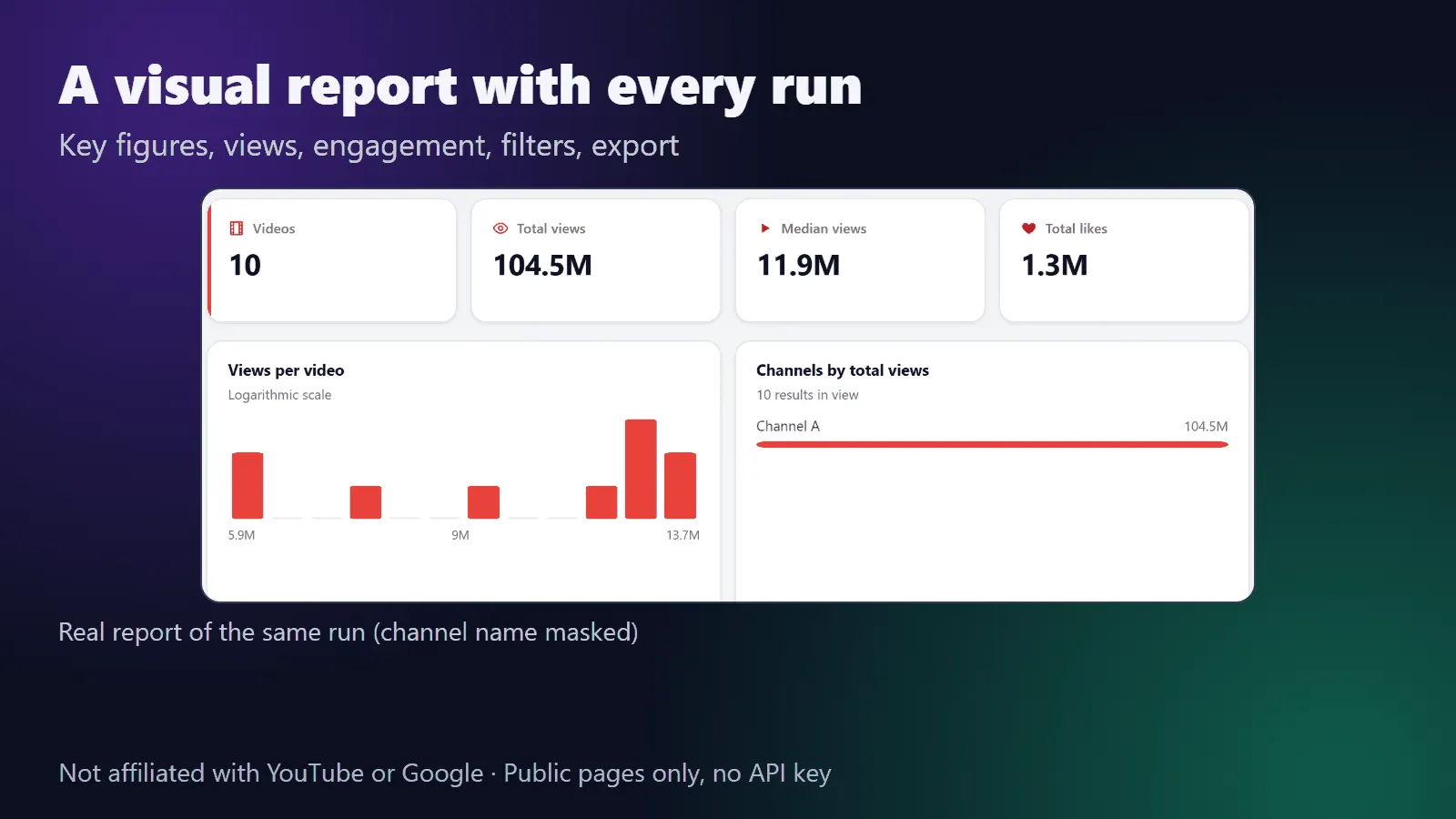
- Videos as 16:9 cards: thumbnail, duration, Shorts, LIVE (with the number of people watching), Upcoming and Past live badges, title, channel name, verified badge and subscribers, views, likes, comments, engagement rate, performance against the channel's average, category and captions.
- Channels as header cards: picture, name, handle, description, keywords, subscribers, average views per video and views per subscriber. Comments as text cards with likes, pinned and "by the creator" badges.
- Key figures and charts: videos, total and median views, total likes, average engagement, channels; views distribution, channels by total views, most viewed videos. They follow your filters.
- Search, filters and sorting: title/channel/tag/comment search; filters by type, format (regular, Shorts, live, upcoming, past live), channel, category, source, views (10K+, 100K+, 1M+), verified channels and captions; sort by views, likes, comments, engagement, views per day, performance against the channel, date, length or subscribers. Card or table view.
- Viewer: click a thumbnail to see it full size, with arrows, keyboard (← → Esc) and swipe on mobile.
- Export: download the filtered rows as JSON or CSV, or the full dataset as JSON, CSV or Excel.
- Warnings and errors at the top: failed inputs grouped by error code (they are not billed) and run warnings (maximum results or cost reached, details refused by YouTube, options without effect in list mode).
- Data quality: a one-line summary (completeness of the main fields, share of rows with a thumbnail, duplicates) that opens to a fill rate per field: title, channel, views, likes, comments, date, duration, subscribers, link. It measures completeness, not accuracy; in list mode likes, comments and dates are empty because YouTube's lists do not contain them.
- Live progress: while the run is going, the page shows the sources done out of the sources given and the results so far, and refreshes itself every 30 seconds (updated at most once a minute).
- At most 3 pictures per result (a video has one thumbnail, a channel its picture).
How to open it: in the run, go to the Output tab and choose Visual report (or open the REPORT record of the key-value store). The page works in any browser, offline included, except for the images.
Images are shown straight from YouTube in your browser; nothing is re-hosted. Video rows carry no channel picture, so channels appear with their initials on video cards; in listing mode YouTube gives no thumbnail, so those cards show a neutral placeholder. The report holds the first 2,000 results of a run; the full dataset is always one click away. Saving the report is never billed and can never make a run fail.
FAQ
Why do some items say ENHANCED_RECOVERY_CAP_REACHED?
YouTube refused them from every regular address, and the run had reached the Maximum enhanced recoveries you set, so no residential attempt was made. They were not billed. Increase Maximum enhanced recoveries to recover more of them, or set it to 0 to never use enhanced recovery.
Is it legal to scrape YouTube? The Actor scrapes only publicly available data that anyone can see without signing in. You are responsible for complying with YouTube's terms and with data-protection law (such as the GDPR) when you store or use the data, especially comment authors' names.
Do I need a YouTube API key or a Google account? No. The Actor reads the public pages any visitor sees.
Am I charged for videos that failed?
No. Only rows written to the dataset are billed; failures are listed in FAILED_INPUTS.
What is a row with detailsLevel: "partial", and do I pay for it?
YouTube sometimes returns the video page but refuses the player data, so some fields (often the channel, duration, likes or caption tracks) are missing; detailsNote lists them. Such rows, and rows filled from list data after a refusal ("listing" in full-detail mode), are never charged. While the current per-row price is in force they are saved in a separate dataset of the run (link in the PARTIAL_ROWS record); with the upcoming prices they are saved in the main dataset. Choosing the RESIDENTIAL proxy group makes them much rarer.
Why did my run stop with TIME_LIMIT items?
The run reached its timeout. It stops starting new work 30 seconds before, ends Succeeded with what it saved, and lists the rest in FAILED_INPUTS (never charged). Raise the timeout in the run options or ask for fewer videos.
Why do list-mode rows have no likes or exact date?
YouTube's lists do not contain them. Use full detail ("videoDetails": "full") when you need likes, comments and dates.
Are transcripts always available?
Only when the video has subtitles. Published subtitles are preferred, automatic captions are the fallback; transcriptIsAutomatic tells you which.
Can I collect comments without personal data? Yes: Anonymise comments keeps the text and removes the author name and link.
YouTube refuses my requests — what should I do? Switch on Apify Proxy in the input; each retry then uses a new IP. Lower Videos read in parallel for long runs.
Can I track channels over time?
Yes: create an Apify Schedule and compare runs; viewsPerDay and performanceVsChannel make trends readable.
What it can and cannot do
| ✅ Can | ❌ Cannot |
|---|---|
| Public videos, Shorts, live replays, channels, playlists, searches, hashtags | Private, members-only or deleted videos (listed in FAILED_INPUTS) |
| Likes, comment counts, tags, exact date (full-detail mode) | Likes and exact dates in list mode — YouTube's lists do not contain them |
| Top comments, published or automatic subtitles | Dislikes, revenue, watch time, YouTube Analytics data |
| Channel subscribers and average views | Download video or audio files |
| Videos whose player data YouTube refuses: saved with partial details, free of charge | Guarantee full details from datacenter addresses (the RESIDENTIAL proxy group helps) |
Ends cleanly before the run timeout (rest in FAILED_INPUTS, TIME_LIMIT) | Finish more work than the run timeout allows |
Troubleshooting
- "YouTube refused all requests" — rerun a few minutes later, or open Proxy and choose the
RESIDENTIALgroup. errorReason: "ENHANCED_RECOVERY_CAP_REACHED"inFAILED_INPUTS— YouTube refused these items and the run had already used its Maximum enhanced recoveries. Raise that number (each recovered item is one Enhanced recovery event) or rerun those items later.- I want only this week's videos (or only HD, 4K, Creative Commons, subtitled…) from a search — use Search: upload date, Search: duration and Search: features. YouTube applies them before returning the list, so Maximum videos per source fills with matching videos (the Actor's own filters can only remove videos from the list afterwards). They apply to Search queries only.
- Fewer videos than expected — filters (views, likes, date, video type, duration) remove videos before saving;
RUN_STATS.filteredshows how many. Age-restricted videos cannot be read without signing in. - No
likeCount/publishedAt— you are in list mode; set How much detail per video to Full detail. - An input was ignored — open
FAILED_INPUTSin the Storage tab: each skipped value has a reason and acode(table above). - The run succeeded but saved nothing — an input problem: no usable link (
RUN_SUMMARY.statusNO_VALID_INPUT), every link not found or private (NO_RESULTS) or the AI key missing or refused (FAILED_INPUT), or YouTube refused every request (BLOCKED_BY_YOUTUBE: try again later or choose the RESIDENTIAL proxy group). The status message says what to fix,FAILED_INPUTSlists each value, and nothing is charged. Switch on Mark the run as failed on input errors (failRunOnError) if your schedules or webhooks must see such runs as Failed. Values with an impossible format (a country code that is not two letters, a date that is not ISO, a negative limit…) are refused by the input form before the run starts. - The run stopped early —
RUN_SUMMARY.stopReasonsaysmaxItems(your ceiling),budget(your maximum cost per run) ortimeLimit(the run's timeout; the rest is inFAILED_INPUTSwith codeTIME_LIMIT). - Some videos are missing from the main dataset but the log says they were saved free of charge — they have incomplete details; open the
PARTIAL_ROWSrecord (Output tab) for the link to the separate dataset. - Local runs — with
"proxyConfiguration": {"useApifyProxy": false}a run on your own computer never uses the Apify proxy: every attempt goes out from your address.
Use it via API
Python (pip install apify-client):
JavaScript (npm install apify-client):
cURL (runs the Actor and returns the dataset items in one call):
Integrations
- API: run the Actor and download results as JSON, CSV or Excel from the Apify API or Python/JavaScript clients (see above).
- MCP / AI agents: add the Actor to Claude, Cursor or any MCP client through the Apify MCP server (
https://mcp.apify.com?actors=badr_xba/youtube-data-scraper). - Webhooks: trigger your backend when a run finishes; branch on
RUN_SUMMARY.status. - Make, Zapier, n8n: use the Apify app/node to push new videos into Airtable, Notion, a CRM or Slack.
- Google Sheets: send the dataset straight to a sheet for a live content or influencer dashboard.
- Schedules: a daily or weekly run turns this into a channel-tracking tool.
Related Actors
Other Actors by the same developer that work well with this one:
- YouTube Email Scraper – found the right channels? Get the business e-mails they publish.
- YouTube AI Summary & Channel Analytics – AI summaries of videos and channel analytics (posting rhythm, engagement, topics).
Support
Bug, missing field or a video that should have worked? Open an issue in the Issues tab with the run ID.
Did this Actor do the job? A short review on its Store page helps other creators and marketers find it.
Feedback and reviews
If this Actor saved you time, a short review on its Store page helps other users find it. If something did not work as expected, please open an issue on the Issues tab with your run ID: we read every issue.
Legal
This Actor reads public YouTube data that anyone can see without signing in. It never signs in, never downloads video or audio files, and never touches private content. Comment authors' display names are personal data: use Anonymise comments if you do not need them. How you store and use the data — GDPR included — is your responsibility. Automated access may conflict with YouTube's Terms of Service.
En français
Extrait les vidéos, chaînes, playlists, commentaires et transcriptions YouTube, sans clé API ni compte Google, avec des indicateurs calculés : taux d'engagement, vues par jour, likes pour 1 000 vues, performance face à la moyenne de la chaîne. Idéal pour les créateurs, le marketing d'influence et le SEO YouTube. Vous ne payez que les résultats enregistrés : les échecs sont listés dans FAILED_INPUTS et jamais facturés, et le run s'arrête proprement au plafond maxItems ou au budget maximal.


