

YouTube Scraper
Pricing
from $1.50 / 1,000 results
YouTube Scraper
YouTube videos, channels and playlists without an API key or quota: views, likes, comments, tags, duration, date and subscriber count, plus full transcripts in plain text, SRT or VTT. List mode returns 50 videos per request. Example: 'lofi hip hop', 10 videos with transcripts.
Pricing
from $1.50 / 1,000 results
Rating
0.0
(0)
Developer

Badr Bouargan
Maintained by CommunityActor stats
0
Bookmarked
2
Total users
1
Monthly active users
9 days ago
Last modified
Categories
Security
Limited permissionsShare
YouTube Scraper – Videos, Channels, Comments & Transcripts (No API Key)
Scrape YouTube videos, channels, playlists, comments and full transcripts without a YouTube Data API key or Google account — views, likes, comment counts, duration, tags, hashtags, subscribers — plus metrics YouTube does not show: engagement rate, views per day, likes per 1,000 views and performance versus the channel's own average. Export to CSV, Excel, JSON or Google Sheets. You pay only for results actually saved: videos that fail are listed in FAILED_INPUTS, never billed.
What you can do with it
- Creators & content strategy: find which topics, formats and lengths get watched in your niche; spot outliers with
performanceVsChannel. - Influencer marketing: shortlist channels by subscribers, average views, views per subscriber and engagement before you pay for a sponsorship.
- YouTube SEO & keyword research: collect titles, tags, hashtags and transcripts for a keyword to see what ranks.
- Competitor tracking: schedule a weekly run on competitor channels and follow views per day and engagement.
- Audience research & AI: pull comments (optionally anonymised) and transcripts (text, SRT or VTT) for sentiment analysis, summaries or a search index.
Why this Actor
- No API key, no quota. Public pages only; nothing to configure.
- Pay only for success. Only complete rows reach the dataset; unavailable or refused videos go to
FAILED_INPUTSand are not billed. - Exact limits.
maxVideosPerSource,maxItems(whole run), separate caps for Shorts and live streams, and a clean stop when your maximum cost per run is reached. - Computed metrics on every video:
engagementRate,viewsPerDay,likesPerThousandViews,performanceVsChannel. - Two speeds: full detail (one request per video) or list mode (up to 50 videos per request, no likes/exact date).
- Drop-in replacement: input and output names follow the most used YouTube scrapers on Apify Store (
startUrls,maxResults,searchQueries,id,text,likes,commentsCount,channelName,numberOfSubscribers…).
How it works
- Each search, channel, playlist or video URL becomes a list of video IDs (one request per list).
- In full-detail mode each video page is read with yt-dlp; a truncated or refused response is retried up to 4 times, on a new IP when Apify Proxy is on.
- Channel figures are fetched once per channel and reused.
- Transcripts come from the subtitle tracks YouTube serves (published first, automatic captions as fallback).
- At the end the run writes
RUN_SUMMARYandFAILED_INPUTSto the key-value store.
How to use in 3 steps
- Paste what you want: keywords (
lofi hip hop), a channel (@LofiGirl), video, Short or playlist links — or simply drop any mix of them into Start URLs. - Choose how many: Maximum videos per source (10 by default — a first run takes about a minute and costs a few cents). Optionally switch on transcripts, comments or filters (views, likes, date, Shorts/long/live, duration).
- Press Start, then download CSV/Excel/JSON or send the dataset to Google Sheets, Make, Zapier or n8n.
Leave everything empty and the Actor runs a 10-video demo search instead of failing.
Every input format is accepted
| You paste | Understood as |
|---|---|
https://www.youtube.com/watch?v=dQw4w9WgXcQ, https://youtu.be/dQw4w9WgXcQ?si=…, https://m.youtube.com/watch?v=…, /shorts/…, /live/…, dQw4w9WgXcQ | a video |
https://www.youtube.com/@LofiGirl, @LofiGirl, LofiGirl (in Channels), UCSJ4gkVC6NrvII8umztf0Ow, /channel/UC…, /c/…, /user/… | a channel |
https://www.youtube.com/playlist?list=PL…, PL… | a playlist |
https://www.youtube.com/results?search_query=…, /hashtag/lofi, plain words in Start URLs | a search |
Several values on one line (separated by commas or new lines), extra spaces and duplicates are cleaned up automatically, and a link pasted in the "wrong" field is still routed correctly. Anything that is not YouTube (a Vimeo link, a typo) is skipped with a warning and listed in FAILED_INPUTS — never billed, and the run does not fail.
Input example
Output example
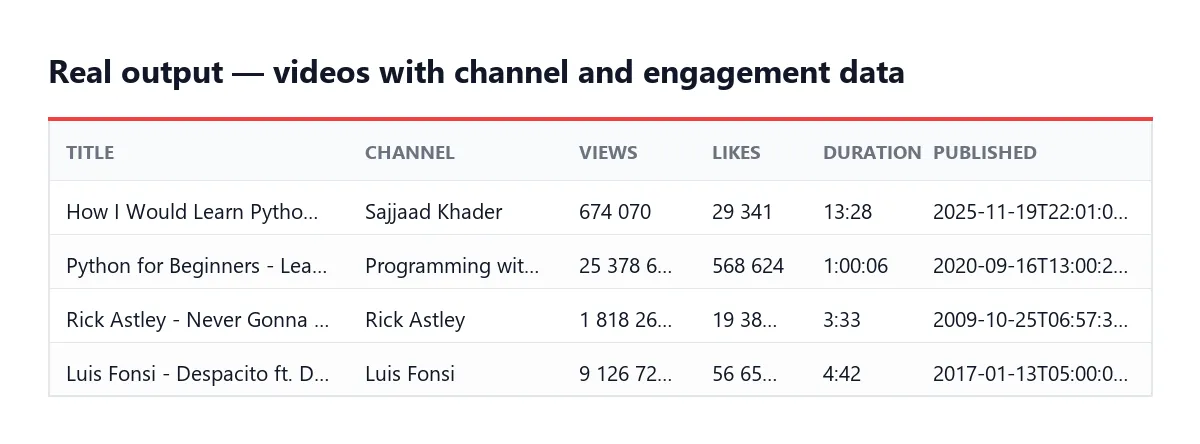
A video row (shortened — every video row carries the same columns, null when unknown):
Channel rows have type: "channel" (subscriberCount, averageViewsPerVideo, viewsPerSubscriber, keywords, verified), comment rows type: "comment" (text, author, likeCount, publishedAt, isPinned, videoUrl). The dataset has three views: Videos, Channels, Comments.
In the key-value store: RUN_SUMMARY (status, stopReason, itemsPushed, videos, channels, comments, failedCount, durationSeconds…) and FAILED_INPUTS (type, input, reason, failedAt).
Pricing
Pay per event: a tiny start fee plus one charge per result row saved (video, channel or comment). Failed and filtered videos are never charged. Platform and proxy costs are included.
| Apify plan | Price per result | Per 1,000 results |
|---|---|---|
| Free | $0.003 | $3.00 |
| Starter | $0.0024 | $2.40 (−20 %) |
| Scale | $0.00195 | $1.95 (−35 %) |
| Business | $0.0015 | $1.50 (−50 %) |
Actor start: $0.00005 per GB of memory. Comments add one row each — cap them with Maximum comments per video, and cap the whole run with Maximum results or Maximum cost per run.
FAQ
Do I need a YouTube API key or a Google account? No. The Actor reads the public pages any visitor sees.
Am I charged for videos that failed?
No. Only rows written to the dataset are billed; failures are listed in FAILED_INPUTS.
Why do list-mode rows have no likes or exact date?
YouTube's lists do not contain them. Use full detail ("videoDetails": "full") when you need likes, comments and dates.
Are transcripts always available?
Only when the video has subtitles. Published subtitles are preferred, automatic captions are the fallback; transcriptIsAutomatic tells you which.
Can I collect comments without personal data? Yes: Anonymise comments keeps the text and removes the author name and link.
YouTube refuses my requests — what should I do? Switch on Apify Proxy in the input; each retry then uses a new IP. Lower Videos read in parallel for long runs.
Can I track channels over time?
Yes: create an Apify Schedule and compare runs; viewsPerDay and performanceVsChannel make trends readable.
What it can and cannot do
| ✅ Can | ❌ Cannot |
|---|---|
| Public videos, Shorts, live replays, channels, playlists, searches, hashtags | Private, members-only or deleted videos (listed in FAILED_INPUTS) |
| Likes, comment counts, tags, exact date (full-detail mode) | Likes and exact dates in list mode — YouTube's lists do not contain them |
| Top comments, published or automatic subtitles | Dislikes, revenue, watch time, YouTube Analytics data |
| Channel subscribers and average views | Download video or audio files |
Troubleshooting
- "YouTube refused all requests" — rerun a few minutes later, or open Proxy and choose the
RESIDENTIALgroup. - Fewer videos than expected — filters (views, likes, date, video type, duration) remove videos before saving;
RUN_STATS.filteredshows how many. Age-restricted videos cannot be read without signing in. - No
likeCount/publishedAt— you are in list mode; set How much detail per video to Full detail. - An input was ignored — open
FAILED_INPUTSin the Storage tab: each skipped value has a reason. - The run stopped early —
RUN_SUMMARY.stopReasonsaysmaxItems(your ceiling) orbudget(your maximum cost per run).
Use it via API
Python (pip install apify-client):
JavaScript (npm install apify-client):
cURL (runs the Actor and returns the dataset items in one call):
Integrations
- API: run the Actor and download results as JSON, CSV or Excel from the Apify API or Python/JavaScript clients (see above).
- MCP / AI agents: add the Actor to Claude, Cursor or any MCP client through the Apify MCP server (
https://mcp.apify.com?actors=badr_xba/youtube-data-scraper). - Webhooks: trigger your backend when a run finishes; branch on
RUN_SUMMARY.status. - Make, Zapier, n8n: use the Apify app/node to push new videos into Airtable, Notion, a CRM or Slack.
- Google Sheets: send the dataset straight to a sheet for a live content or influencer dashboard.
- Schedules: a daily or weekly run turns this into a channel-tracking tool.
Support
Bug, missing field or a video that should have worked? Open an issue in the Issues tab with the run ID.
Did this Actor do the job? A short review on its Store page helps other creators and marketers find it.
Legal
This Actor reads public YouTube data that anyone can see without signing in. It never signs in, never downloads video or audio files, and never touches private content. Comment authors' display names are personal data: use Anonymise comments if you do not need them. How you store and use the data — GDPR included — is your responsibility. Automated access may conflict with YouTube's Terms of Service.
En français
Extrait les vidéos, chaînes, playlists, commentaires et transcriptions YouTube, sans clé API ni compte Google, avec des indicateurs calculés : taux d'engagement, vues par jour, likes pour 1 000 vues, performance face à la moyenne de la chaîne. Idéal pour les créateurs, le marketing d'influence et le SEO YouTube. Vous ne payez que les résultats enregistrés : les échecs sont listés dans FAILED_INPUTS et jamais facturés, et le run s'arrête proprement au plafond maxItems ou au budget maximal.


