
Amazon Deals Scraper
Pricing
from $2.80 / 1,000 results
Amazon Deals Scraper
[💰$4 / 1K] ⚡ Fast, cheap Amazon Deals scraper. No login, no API key. Paste any Today's Deals URL from any Amazon marketplace, with tabs and filters. Get deal price, list price, discount, end time, % claimed, coupons, ratings, variations and images. Perfect for deal sites and price monitoring.
Pricing
from $2.80 / 1,000 results
Rating
0.0
(0)
Developer

Aboo Script
Maintained by CommunityActor stats
0
Bookmarked
2
Total users
1
Monthly active users
2 days ago
Last modified
Categories
Share
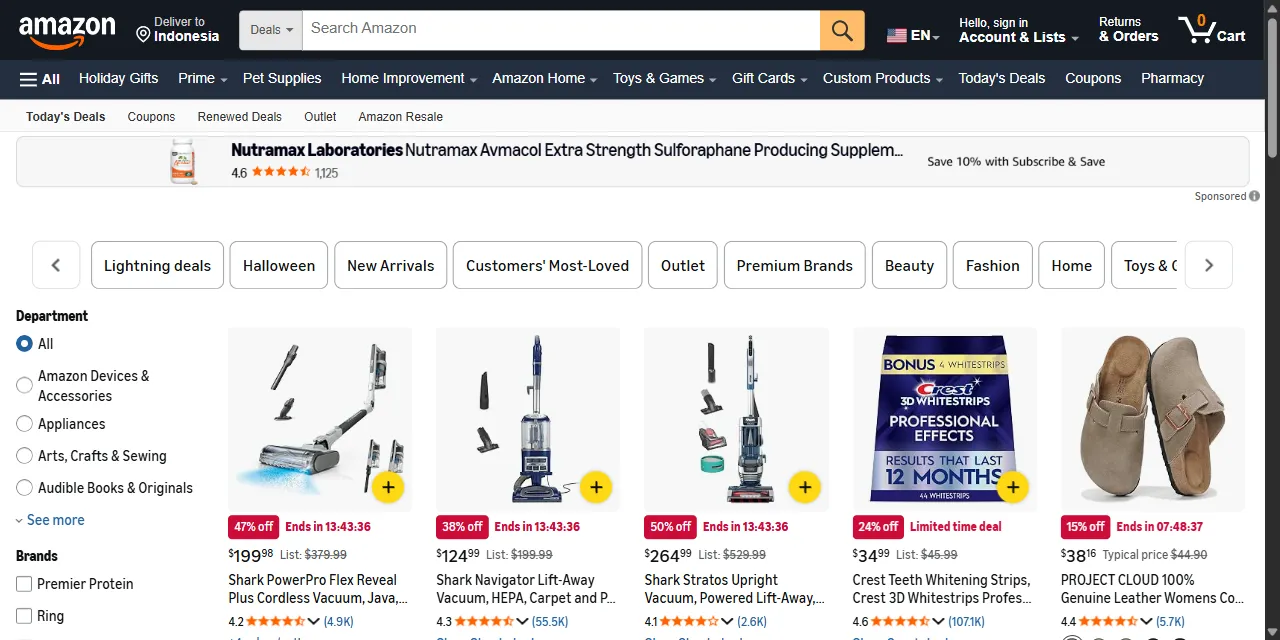
Amazon Deals Scraper extracts every deal from Amazon Today's Deals into clean, structured data you can download as JSON, CSV, Excel, or HTML. Paste an Amazon deals URL from any marketplace, and get the deal price, list price, discount, deal end time, lightning deal progress, coupons, ratings, and images for every deal. No account or login required.
Introduction
Amazon Today's Deals is the page where Amazon lists its current limited time deals, lightning deals, and coupons across all departments. Prices and discounts change several times a day, which makes the page a key source for deal sites, price trackers, and brands that watch their competitors' promotions.
This actor collects the same public information you see in your browser and turns it into a ready-to-use dataset. It works on every Amazon marketplace (amazon.com, amazon.co.uk, amazon.de, amazon.fr, amazon.ca, amazon.co.jp, and more). You can run it once, schedule it to run every few hours, or connect it to your own tools.
What data can you extract from Amazon Deals?
- 🏷️ Product title, ASIN, brand, product type, and departments
- 💲 Deal price, list or typical price, currency, and discount percentage
- ⏰ Deal type (limited time deal, lightning deal), deal end time, and percentage claimed
- 🎟️ Coupon offers (for example "Save 10% with coupon")
- ⭐ Rating, number of reviews, and the star rating breakdown
- 🎨 Product variations (colors, sizes, styles) with their ASINs
- 🖼️ Product image in high resolution
- 🔗 Direct product URL and the deal's position on the page
Use Cases
- 📈 Market research: see which categories and brands Amazon discounts, how deep the discounts go, and how they change during the day.
- 🕵️ Competitor monitoring: find out when competing brands run lightning deals or coupons, and at what price.
- 📰 Deal sites and newsletters: publish fresh Amazon deals with prices, discounts, and end times automatically.
- 🛒 Price tracking: record deal prices over time to spot the best moment to buy or restock.
- 🤖 AI and automation: feed clean, structured deal data into spreadsheets, dashboards, alerts, or AI workflows.
How to scrape Amazon Deals step by step
- Paste one or more Amazon Today's Deals URLs into Start URLs (for example
https://www.amazon.com/deals). - Set Maximum number of results to how many deals you want per URL.
- Click Start and wait for the run to finish.
- Download your data in JSON, CSV, Excel, or HTML from the Output tab.
Input
- Start URLs: Amazon Today's Deals URLs from any marketplace, such as
https://www.amazon.com/deals,https://www.amazon.co.uk/deals, orhttps://www.amazon.de/deals. Category tabs (Lightning deals, Electronics, Home, Coupons, and others) and the filters you pick on the deals page (department, brand, customer reviews, discount, price, Prime programs) are kept: select them on Amazon and copy the URL from your browser. - Maximum number of results: how many deals to collect for each start URL. Set
0to collect all deals available for the URL.
Input Examples
Scrape Amazon Today's Deals:
Scrape lightning deals on amazon.com and all deals on amazon.co.uk:
Output
Each deal is saved as one item in the dataset. Here is an example of a single item:
You can download the dataset in JSON, CSV, Excel, XML, or HTML, or access it through the Apify API.
Notes
- Only Today's Deals pages (
/dealsand/gp/goldbox) are supported. Product pages, search pages, and other URLs are skipped with a warning. - Prices are returned in the marketplace's own currency (USD on amazon.com, GBP on amazon.co.uk, EUR on amazon.de, and so on), shown in the
currencyfield. - Products that Amazon lists without a visible price are skipped, the same way the deals page hides them. On some marketplaces this means fewer deals per page than the page size suggests.
- Amazon shows a limited number of deals per tab (around 500 on amazon.com). To get more, scrape several category tabs or filtered URLs.
endsAtis filled only for deals that show a countdown;dealMessageholds the badge text (such as "Limited time deal") for the others.percentClaimedis only available for lightning deals.- Deals change often, so the same URL can return different deals a few hours later. Each deal appears only once per start URL.
Why use the Amazon Deals Scraper?
- ✅ No login needed: works with public data only, so there is no account to manage.
- 🌍 All marketplaces: the same input works for amazon.com, amazon.co.uk, amazon.de, amazon.fr, amazon.it, amazon.es, amazon.ca, amazon.co.jp, and more.
- 🎯 Keeps your filters: paste any deals URL with tabs and filters from your browser and get exactly those deals.
- 🧹 Clean data: prices and ratings are real numbers, end times use the ISO 8601 format, and text is free of HTML.
- 💸 Pay for what you need: set a result limit per URL and keep every run small and cheap.
- 🔄 Ready for automation: schedule runs, export to Google Sheets, or connect to Make, Zapier, and n8n.
FAQ
How many deals can I scrape?
Set any number in Maximum number of results, or 0 to get every deal available for the URL. See Notes for the number of deals Amazon shows per tab.
Do I need an Amazon account?
No. The actor only collects publicly available data. You do not need to log in or provide any account details.
How do I scrape only one category or only big discounts?
Open Amazon Today's Deals in your browser, pick a category tab or set filters such as department, discount, or customer reviews, then copy the URL from the address bar into Start URLs.
Can I scrape deals on a schedule?
Yes. Use Apify Schedules to run the actor every hour or every day and get fresh deals automatically.
Can I request a new feature or filter?
Yes. Right now the actor works with deals page URLs. If you need other inputs, such as a category or minimum discount setting, get in touch and they can be added.
Can I get a custom or private version?
Yes. The actor can be customized for your workflow, delivered as a private version, or a new scraper can be built for a different website. Use the contact details below.
Need to scrape other e-commerce platforms?
- Amazon Ad Library Scraper: ads, advertisers, products, and impressions from the Amazon Ad Library in the EU.
- Versace Scraper: clothing, bags, and accessories with prices from 80+ Versace country stores.
- Moncler Scraper: Moncler products and prices in all country markets.
- Givenchy Scraper: bags, shoes, and clothing with prices from the Givenchy store.
Need help or want a custom solution?
- 📧 Email: aboo.script@gmail.com
- 🧩 More scrapers: Apify profile
Image Credit
Image credit: Amazon


