AI Agent Web Fetcher
Pricing
from $1.40 / 1,000 results
AI Agent Web Fetcher
An advanced web fetcher that can fetch almost all websites and convert them to LLM-friendly Markdown format. Perfect for AI agents, RAG systems, and integration with search actors.
Pricing
from $1.40 / 1,000 results
Rating
0.0
(0)
Developer

Abot API
Maintained by CommunityActor stats
1
Bookmarked
25
Total users
3
Monthly active users
3 days ago
Last modified
Categories
Share
AI Web Fetcher: Any Page to Clean, LLM-Ready Markdown
AI Web Fetcher renders any URL in a full browser (default engine) and returns clean, LLM-ready Markdown, plus the page's title, description and author when the page publishes them. Fetch one URL on demand, or point it at another actor's output dataset and it works through every link in a field you choose, up to a cap you set. Read results back from the dataset (with Overview, Markdown Content, Crawl info and Metadata & SEO views), the key-value store, the API, or call the actor's own persistent Standby HTTP endpoint for real-time fetches from your own backend or agent.
Why This Scraper?
- Real browser rendering. With the default engine every page loads in a full headless browser, so JavaScript-rendered content, not just the raw HTML response, ends up in the output (
engineset tohttpskips the browser for its first, plain request and has no JavaScript rendering). - Clean Markdown, not raw HTML. Scripts, navigation, ads, forms and hidden elements are stripped before conversion, so downstream LLMs and agents get readable text instead of markup noise.
- Automatic fallback. A page that fails or times out on the first attempt is retried in a second browser session, up to two more times within the same per-page time budget; with a proxy on, each fallback attempt opens a new proxy session.
- More than Markdown. Title, description and author come back with every page; optional plain text, raw HTML, an HTML file and a screenshot in the key-value store, plus canonical URL, keywords, language, Open Graph, JSON-LD and response headers.
- Flexible URL input. Fetch one URL, a list of start URLs, or another actor's output dataset (link field from every item); optionally crawl same-site links, bounded by a page cap and glob patterns.
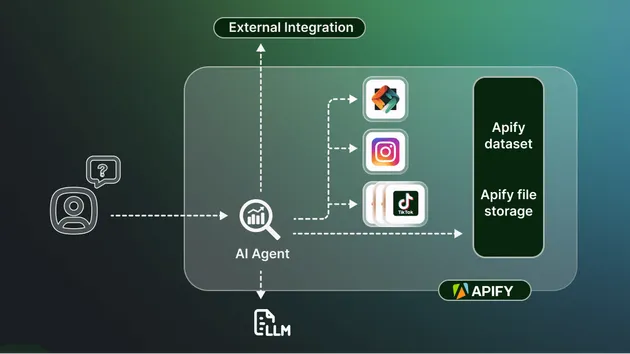
- Built for agent pipelines. Chain it after a search actor from the Integrations tab (it picks up that run's dataset automatically) or call the persistent Standby HTTP endpoint for real-time, low-latency fetches from your own backend or agent framework.
- Fails loudly, not quietly. A page that cannot be fetched within its time budget is reported as a failure in the run's status and log, never as a dataset item with empty content.
Use Cases
- AI agent and RAG builders: convert any page into LLM-ready Markdown as live context for an agent, chatbot or retrieval index.
- Search-augmented apps: chain this actor after a web search actor so every result link is fetched and converted automatically, without writing glue code.
- Research and content teams: pull readable text from articles, docs and product pages without manually stripping ads and navigation.
- Backend and automation builders: call the Standby HTTP endpoint directly from your own service for on-demand, real-time page fetches.
Data You Get
Sample shape: values are illustrative placeholders, not from a live record.
| Field | Example |
|---|---|
url | "https://example.com/articles/global-markets-update" |
markdown (page content) | "# Global Markets Update\n\nA summary of today's session..." |
markdown (headings) | "## Today's Highlights" |
markdown (paragraphs) | "Plain paragraph text carried over from the page body." |
markdown (lists) | "- First point\n- Second point" |
markdown (links) | "[Read the full report](#)" |
markdown (tables) | "| Metric | Value |\n| --- | --- |\n| Sample | 42 |" |
markdown (images) | "" |
markdown (emphasis) | "**bold** and *italic* text kept as written" |
markdown (blockquotes and code) | "> A quoted passage" and `inline code` |
markdown (noise removed) | scripts, navigation, ads, forms and hidden elements never reach this field |
markdown (empty string) | possible when a page loads but nothing readable is left after cleanup |
metadata | { "title": "...", "description": "...", "author": "..." } |
metadata.title | "Global Markets Update" |
metadata.description | "A daily summary of major market moves." |
metadata.author | "Jane Analyst" |
metadata.title, metadata.description and metadata.author come back as empty strings, not missing keys, when the page does not publish that piece of information.
How to Use
- Choose a mode: fetch a single URL, or point at a dataset from another actor's run to fetch every URL listed in it.
- Fill in the URL (or the dataset ID and the field name that holds the URL), and turn on a connection for pages that block plain requests.
- Set Max URLs to cap a batch run, then click Start.
- Read the Markdown and metadata from the dataset (Overview or Markdown Content view), the key-value store (single URL mode), or the API.
Fetch a single URL:
A JavaScript-heavy page, waiting for the network to settle:
A page that blocks plain requests (residential group; availability depends on your Apify plan):
Batch mode from another actor's dataset:
Run it from your code
Python:
JavaScript:
Or connect it to Make, Zapier, n8n, Google Sheets or webhooks from the Integrations tab. Chained after another actor's run from the Integrations tab, this actor automatically receives that run's dataset ID, so you usually only need to set Url Field if the URLs sit in a field other than link.
How a run handles a slow or blocked page
Each URL gets its own 90 second budget, which also covers the optional plain HTTP request of engine: http (that request is capped at 15 seconds). The actor first renders the page in a full headless browser; if that attempt fails or times out, it retries the page in a second headless browser session, up to two times, as long as the 90 second budget allows. With Apify Proxy on, each retry uses a newly established proxy session. A dataset item is written only for a successful fetch, so a failed URL never creates a billable dataset row, it is reported through the run's status message and log instead. Max URLs (1 to 100) caps how many links a batch run reads from the dataset; it has no effect in single URL mode.
Send results into your apps (MCP connectors)
Optionally pipe results into the apps you already use through Model Context Protocol (MCP) connectors. This is an extra delivery step after the fetch: the Apify dataset is never changed and no extra charge is made.
What gets written to the connector: a condensed summary of each fetched page (title, URL, description and the first part of the markdown), not the full record. The complete record always stays in the Apify dataset.
- Authorize a connector once under Apify -> Settings -> Integrations (Notion, Linear, Airtable, or Apify).
- Select it in the
mcpConnectorsfield. (If the picker is empty, you have not authorized a connector yet.) - For Notion, also set
notionParentPageUrlto the page where items should be created. maxNotifyListings(default 50) caps how many pages are written to each connector per run.
The connection is mediated by Apify's MCP proxy, so this actor never sees your third-party credentials. Leave the field empty to skip.
Input Parameters
| Parameter | Type | Default | Description |
|---|---|---|---|
url | string | https://www.google.com | The webpage to fetch (single URL mode). If startUrls is left at its two built-in examples, only this URL is fetched (1 page, 1 billed row); if you edit startUrls, this URL and the list are fetched together (duplicates removed). Clear this field to fetch the list alone. Exception: the default value https://www.google.com is not added to an edited list; to fetch google.com together with your own list, put it in the Start URLs list. |
datasetId | string | (none) | Dataset ID to pull URLs from (batch mode); leave empty for single URL mode. |
urlField | string | link | Field in each dataset item that holds the URL. |
maxUrls | integer | 10 | Maximum URLs to fetch from the dataset, from 1 to 100. |
proxy | object | (none) | Optional connection settings for the fetch; enable Apify Proxy with a residential group for pages that block plain requests. |
waitUntil | string | domcontentloaded | Navigation wait condition: load, domcontentloaded, networkidle, or commit. |
debug | boolean | false | Adds a debug object (fetch seconds, HTML length, engine, links found) to each row. |
startUrls | array | two sample pages (https://www.example.com and a Wikipedia article) | Several URLs in one run (used when no dataset is given). Left at the two built-in examples, only url is fetched: an untouched Console run and an empty API call both fetch one page (the url value) and bill one row. If you edit the list, url and your list are fetched together (duplicates removed); clear url to fetch the list alone. Capped by maxCrawlPages. Exception: the default value https://www.google.com is not added to an edited list; to fetch google.com together with your own list, put it in the Start URLs list. |
maxCrawlDepth | integer | 0 | 0 fetches only the given URLs. 1-10 also follows same-site links that many levels deep; links that return an HTTP error, are not HTML (for example .ttl or .pdf), or point to an already fetched address (trailing slash, redirect target) are not pushed or billed. Not used with datasetId: dataset mode fetches only the dataset's links. |
maxCrawlPages | integer | 10 | Upper bound on pages in a multi-URL or crawl run, 1-1000. |
includeUrlGlobs | array | (none) | Follow only links matching one of these glob patterns (not used with datasetId). |
excludeUrlGlobs | array | (none) | Skip links matching any of these glob patterns (not used with datasetId). |
removeElementsCssSelector | string | (none) | Drop matching elements before the Markdown and text conversion. |
keepElementsCssSelector | string | (none) | Keep only matching elements for the Markdown and text conversion. |
waitForSelector | string | (none) | Wait up to 15 seconds for this selector. Uses the standard browser path instead of the stealth first path. |
customHttpHeaders | object | {} | Extra request headers. Uses the standard browser path instead of the stealth first path. |
initialCookies | array | [] | Cookies set before loading. Uses the standard browser path instead of the stealth first path. |
engine | string | auto | auto (browser with automatic fallback, the existing behaviour), http (one plain HTTP request first, then auto; skipped when screenshots, headers, cookies or a wait selector are set), browser. |
saveHtml | boolean | false | Puts the page HTML in the html field. |
saveHtmlAsFile | boolean | false | Stores the HTML in the key-value store and returns its link in htmlUrl. |
saveScreenshots | boolean | false | Stores a screenshot in the key-value store and returns its link in screenshotUrl. Uses the standard browser path instead of the stealth first path. |
mcpConnectors | array | (none) | Optional MCP connectors to send a summary of each page to. |
notionParentPageUrl | string | (none) | Notion parent page (Notion connector only). |
maxNotifyListings | integer | 50 | Cap on pages written to each connector per run (1 to 1000). |
Each row also carries crawl (loadedUrl, loadedTime, referrerUrl, depth, httpStatusCode, contentLengthBytes, contentType), a plain text field, and inside metadata: canonicalUrl, keywords, languageCode, openGraph, jsonLd and headers. html, htmlUrl and screenshotUrl appear only when you turn on the matching option. Runs with several URLs or a crawl also write a RUN_SUMMARY record to the key-value store (requested, succeeded and failed counts, and per-URL status).
Dataset views: Overview (URL, title, description), Markdown Content, Crawl info (loaded URL, status, content type, depth, load time) and Metadata & SEO (canonical URL, language, keywords, Open Graph).
Multi-URL and crawl example:
A crawl only ever pushes pages that loaded as HTML: a followed link that returns an HTTP error (404 and similar) or a non-HTML file is logged, counted as failed in RUN_SUMMARY and never billed. Start URLs are returned as requested, with their real crawl.httpStatusCode. A crawl stops starting new pages after about 50 minutes, keeping what it already fetched. There is no AI-written summary field: use markdown or text with your own model.
Output Example
Sample shape: values are illustrative placeholders, not from a live record.
Plan Requirement
By default the actor fetches over a direct connection, which works for publicly reachable pages. Apify Proxy (automatic datacenter group and residential) was verified to load public pages such as example.com and google.com; acceptance on a specific protected site depends on that site, so this actor cannot promise it. If you pick a residential group and your Apify plan does not include it, the actor logs: "The selected connection is unavailable to this run. Apify free plans do not include residential proxies. Continuing on a backup connection; some pages may still be unavailable." and then reads pages over a backup connection ("Served over the backup connection (the default connection was unavailable)."). If every connection is refused the run fails with "The proxy connection was refused for this account, so no page could be read. Your Apify plan does not include proxy access; a paid plan is required", and if the backup also cannot load a page on a free plan the message is "No results: residential proxies are unavailable on this run (Apify free plans do not include them), and the backup connection could not load the requested web pages." When no page loads at all you get "Could not load any results page (the requests failed), so nothing was collected. This is a connection problem, not an empty search." Standby mode needs enough concurrent capacity for the requests you expect; adjust memory under the actor's Standby settings for sustained real-time traffic.
FAQ
How much does it cost?
You pay for what your run uses; the Pricing tab on the Store page shows the current rate. Batch runs are capped by Max URLs (single and batch runs bill one dataset-item charge per row pushed), and a failed fetch never creates a dataset item, so a blocked or slow page does not add a billable row. Crawl and multi-URL runs bill exactly the same way: one existing dataset-item charge per row actually pushed, bounded by Max pages, and nothing for pages that failed. Saved HTML files and screenshots are stored in your run's key-value store.
Is it legal to fetch a page with this actor?
This actor renders whatever page you point it at, the same way a browser would; it does not target one site's data specifically. You are responsible for how you use the fetched content: check the target site's terms and the laws that apply to you, especially before republishing paywalled or personal content.
Can I run it on a schedule?
Yes, schedule it from the Schedules tab like any other actor. Every run is independent: it always (re)fetches the URLs or dataset you give it, there is no built-in change tracking or incremental memory, so add your own de-duplication if you only want new pages.
Why is the Markdown mostly empty or missing text I can see in my browser?
The default wait condition stops as soon as the initial page loads, so content a page injects later (infinite scroll, chat widgets, some single-page apps) may not be present yet; switch Wait Until to networkidle for pages like that. Scripts, navigation, ads, forms and hidden elements are also deliberately stripped before conversion, so a navigation-heavy page will look sparse in Markdown by design.
Why did my run fail instead of returning an empty dataset?
If a page cannot be fetched within its time budget, through both the primary and fallback browser attempts, that URL fails on its own without writing anything to the dataset, and the run's status message reports how many URLs succeeded and failed. If every URL in a run fails, the whole run fails rather than finishing with an empty dataset, so "nothing could be read" is never confused with "no data on this page". One exception: in batch mode, if no dataset item has a value in the Url Field you set, there is nothing to fetch, so the run finishes with an empty dataset and a warning in the log; check that Url Field matches your dataset.
Can I use it with AI agents or MCP?
Yes. Call it like any other Apify actor from your agent framework or MCP client through the API or client libraries, or enable Standby mode and call its /fetch endpoint directly (GET or POST, with url and optional waitUntil) for real-time, low-latency fetches without starting a new run each time. Standby requests use a direct connection; for pages that need a proxy, start a regular run instead.
🔗 Want more AI data?
Pair this actor with these related scrapers from the same team:
| 🤖 Web Scraper For Llms Stealth web scraping engine built for LLMs. Converts any web page to clean markdown or... | 🏨 Doc To Markdown MCP Server An MCP server that converts documents to clean Markdown. Convert PDFs, Word docs, Excel... |
| 🤖 AI Search Tool Give your AI agents real-world knowledge. This Actor provides high-quality web, news... | 🤖 Doc To Markdown Convert documents (PDF, Word, PowerPoint, Excel, HTML, images) to clean Markdown... |
| ✈️ Fuel Prices AU Scraper Scrapes petrol and fuel prices data across Australia and New Zealand. Search by address... | 📱 Universal Media Extractor Extract videos, audio, and metadata from 1000+ websites including YouTube, TikTok... |
💬 Support
- 🐞 Found a bug or a missing field? Open a ticket on the Issues tab. We usually reply within hours.
- 🛠️ Need another site, extra fields or a private build? Email contact@abotapi.com.
- ⭐ Enjoying it? A quick review on the actor page helps other users find it.