Japan Diet Records Search MCP—Parliament Speeches for AI(国会会議録)
Pricing
from $5.00 / 1,000 tool calls
Japan Diet Records Search MCP—Parliament Speeches for AI(国会会議録)
Search Japan's National Diet (parliament) proceedings from your AI agent: speeches, committee meetings and excerpts for summaries, via the National Diet Library's official API, as MCP tools. Also runs as a normal batch Actor. 国立国会図書館の会議録検索を MCP ツール化。通常 run にも対応。
Pricing
from $5.00 / 1,000 tool calls
Rating
0.0
(0)
Developer

Hullspark
Maintained by CommunityActor stats
0
Bookmarked
1
Total users
0
Monthly active users
14 days ago
Last modified
Categories
Security
Limited permissionsShare
Let your AI assistant (Claude, Cursor, …) search what was actually said in Japan's Diet — with the exact speaker, date, committee and a source link — or pull Diet speeches into a spreadsheet. Data comes straight from the National Diet Library's official Kokkai (Diet Records) Search API (free, no API key). Works as an MCP server (Apify Standby) and as a normal Actor run that writes a dataset.
AI アシスタント(Claude、Cursor など)に「国会で○○はどう議論されたか」を、発言者・日付・委員会・出典リンク付きで調べさせたり、国会の発言をスプレッドシートに集めたりできます。国立国会図書館「国会会議録検索システム」の公式 API を使用(無料・キー不要)。MCP サーバー(Apify Standby)としても、通常の Actor(データセット出力)としても使えます。
The Store page's "runs succeeded" figure does not include MCP sessions, so it can read 0% for this Actor. Press Try for free with the default input to see real speeches in the Output tab.
Store の成功率には MCP の利用が入らないため、この Actor では 0% と出ることがあります。初期入力で実行すると、実際の発言が Output に出ます。
Independent tool, not affiliated with or endorsed by the National Diet Library or the Diet. 本 Actor は非公式のツールです。
Who is this for?
- Journalists and policy researchers who need "who said what, when, in which committee" with a link to check the original.
- People building AI assistants or RAG over Japanese politics: the AI gets quotable excerpts with sources instead of guessing.
- Lobbying, public-affairs and think-tank teams that follow one topic, party or minister over time (watch mode returns only new speeches).
- Students and analysts who want Diet speeches in CSV/Excel without writing code.
What you get
- Excerpts around your keyword, not the first lines. Each result shows about 300 characters around the matched word (full-width/half-width and upper/lower case are matched, e.g.
AIfindsAI), with speaker, party/group, position, meeting, date and a link to the original record. - Full text of one speech on demand.
get_speechtakes aspeechId(such as122105261X01720260727_073) and fetches it straight from the official API — no prior search needed (up to 5,000 characters). - The filters the official API supports: speaker, house, dates, meeting name (e.g. 予算委員会), party/group (会派), position (肩書き), role (証人/参考人/公述人) and Diet session number.
- Watch a topic: only new speeches. Turn on
onlyNewSpeechesand schedule the run. The first run returns normally; every later run with the same search returns only speeches you have not received before — and you pay the start fee plus only those. See Watch mode. - Paging. Results include
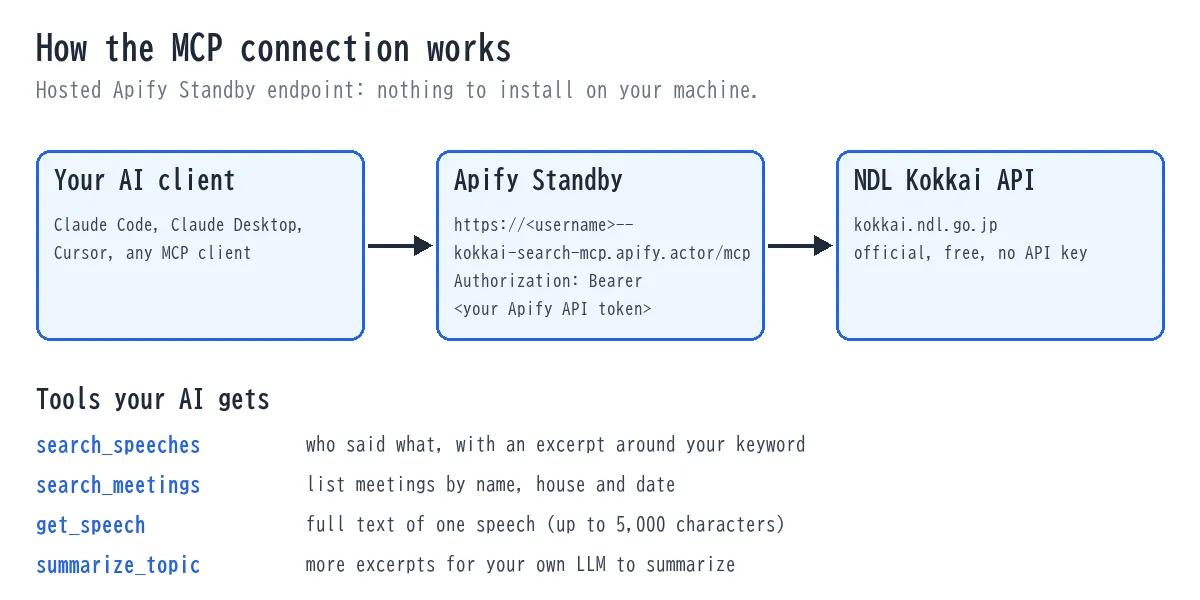
nextStartRecord; pass it asstartRecordto get the next page. - Four MCP tools:
search_speeches,search_meetings,get_speech,summarize_topic(returns more excerpts for your LLM to summarize — this Actor does not summarize).
30-second quick start
Use it from Claude (MCP)
- In the Apify Console open this Actor's Standby tab and copy the URL, e.g.
https://<username>--kokkai-search-mcp.apify.actor/mcp. Create or copy your own Apify API token (Console → Settings → Integrations). - Add it to Claude Code with one command (this is the published Actor's own Standby URL):
- Check with
claude mcp list(or/mcpinside Claude Code), then ask in plain language. Try:
- "Search the Diet records for what the Prime Minister said about 生成AI in the last month and give me links."
- "What did Liberal Democratic Party members say about 物価 in the Budget Committee in session 221? Quote the speakers and give the source URLs."
- "Get the full text of speech 122105261X01720260727_030 and summarize it in three bullets."
Other MCP clients (Cursor and similar) that accept a Streamable HTTP server with headers can use this block:
The token is your own Apify API token, not the Actor owner's. Starting this Actor from the Console or API does not start the MCP server (it runs a normal search and exits). The MCP server is started by Apify when a client calls the Standby URL. If you saved a task with mode empty or mcp_server earlier, it keeps starting the server as before.
The four MCP tools
| Tool | What it returns | Limit per call |
|---|---|---|
search_speeches | Speeches with an excerpt (~300 characters) around your keyword, speaker, party, position, meeting, date, source URL. | default 10, max 30 |
search_meetings | A list of meetings (name, issue, house, date, URL). | default 10, max 30 |
get_speech | The full text of one speech by speechId. | up to 5,000 characters |
summarize_topic | More excerpts on a topic for your own LLM to summarize (this tool does not summarize). | default 20, max 30 |
Example Prompts
Paste these into Claude (or any MCP client connected above) once the kokkai server is added — each one maps to one of the four tools:
- "Search the Diet records for what was said about 子育て support in the House of Representatives since April 2026, and give me the speaker, committee and a source link for each." (
search_speeches) - "List the committee meetings held by the 産業委員会 in Diet session 221, with dates and links." (
search_meetings) - "Get the full text of speech 122105261X01720260727_030." (
get_speech) - "Pull 20 more excerpts about エネルギー政策 so I can summarize the debate myself." (
summarize_topic)
As a normal run (no MCP needed)
- Click Try for free and Start — the form is pre-filled with the query
生成AIand 5 results. - Open the Output tab: 5 speeches with excerpt, speaker and source link. (If you start without any search condition, the Actor searches
生成AIso you always get data.)
Input examples (normal run)
What did members of the LDP say about prices in the Budget Committee, session 221?
What did one minister say in a date range?
Read one speech in full:
Follow a topic every day (watch mode, put it on a Schedule):
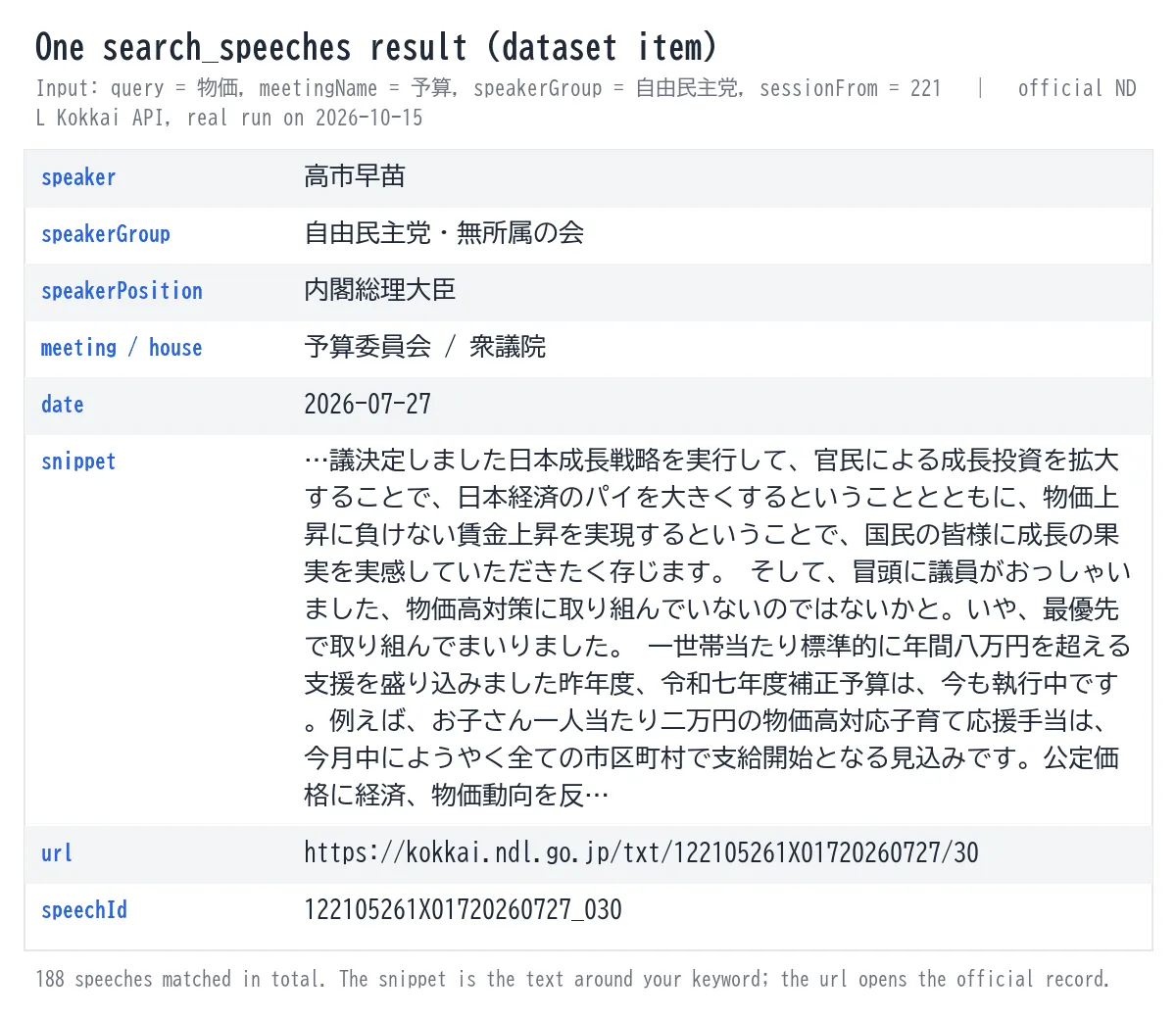
Example output (one dataset item for the first input above; real record from the official API on 2026-10-15, snippet shortened):
The run summary (key-value store OUTPUT) contains totalHits, pushedCount and nextStartRecord. Put that number into startRecord for the next page.
Input (normal run)
| Field | Type | Description |
|---|---|---|
mode | string | search_speeches (default), search_meetings, get_speech, summarize_topic. mcp_server / empty = start the MCP server (legacy). |
query | string | Words in the speech; space = AND. At least one search condition is needed (otherwise the sample query 生成AI is used). |
speaker | string | Speaker name, partial match; space = OR. (speeches only) |
house | string | 衆議院 / 参議院 / 両院 / 両院協議会. |
from / until | YYYY-MM-DD | Meeting date range. |
meetingName | string | Meeting name, partial match; space = OR (official nameOfMeeting). |
speakerGroup | string | Party/group, official name, partial match. (speeches only) |
speakerPosition | string | Position (肩書き), partial match. (speeches only) |
speakerRole | string | 証人 / 参考人 / 公述人. (speeches only) |
sessionFrom / sessionTo | integer | Diet session number; one value = that session only, both = range. |
limit | integer | Results per call (1–100 per normal run, max 30 per MCP call). |
startRecord | integer | 1-based start position for paging (use nextStartRecord from the previous result). |
onlyNewSpeeches | boolean | Watch mode (default false): return only speeches not returned in an earlier run with the same search. search_speeches and summarize_topic only. |
stateStoreName | string | Advanced, watch mode only: name of the key-value store that remembers returned speeches. Empty = automatic. |
speechId | string | For get_speech. |
maxChars | integer | For get_speech: max characters (up to 5,000). |
search_meetings ignores the speaker-related fields (a meeting has no single speaker). All filters are parameters of the official API; nothing here is emulated.
Watch mode: only new speeches
Use it to follow a topic, a speaker or a committee without re-reading old results.
- Set your search (for example
query: "生成AI",limit: 20) andonlyNewSpeeches: true.limitis the most new speeches one run returns. - Run once. You get the newest speeches (up to
limit) as usual. Everything the run looked at is marked as known, so the older backlog does not trickle out later. - Put the same input on a daily or weekly Schedule. Each run returns only speeches that are new since the last one. If nothing new was said, the dataset is empty and you pay only the start fee.
How it works:
- Watch mode is for normal runs (dataset output). The MCP tools do not use it.
- Each run asks the official API once for the newest 100 speeches (the API maximum; no extra cost) and returns the ones not returned before, up to
limit. After the first run the oldest unreturned speeches go first, so the ones that wait do not sink out of the 100. Whatever does not fit is not recorded and comes in the next run. If new speeches keep exceedinglimit, the waiting ones can still fall out of the newest 100 in the end: raiselimitor run more often. Speeches that appear late with an older meeting date are caught too, as long as they are still within the newest 100 results of your search.OUTPUT.watch.heldBackCountshows how many wait. - If the oldest of the 100 looked-at speeches is still unreturned and more pages exist, waiting speeches have reached the bottom of the window and some may be lost next time. The run then sets
watch.mayHaveMissed: true, logs a warning and writes it to the status message. Run more often or narrow the search. - The record keeps the last time each speech was seen, so a speech that keeps appearing never becomes "new" again. It holds at most 100,000 speeches; the least recently seen are dropped first.
- If the record cannot be saved after the run, the run still finishes (
watch.stateSaved: false, warning in the log), and the next run may return the same speeches again. - If the named store cannot be opened (for example a permission error), the log says so before the start fee is charged, and the final status message repeats it. The run then treats every run as a first run and returns the top
limitspeeches each time, so a scheduled run costs the same every time. Fix the permission or setstateStoreName. - The list of returned speeches is kept in a named key-value store
kokkai-seen-<hash>in your account.<hash>comes from the search conditions (query, speaker, house, dates, meeting name, party, position, role, session), so each watch has its own list. Changing onlylimitorstartRecordkeeps the list. - Watch mode never reads the 24-hour result cache, so a speech published a moment ago is not missed.
- A speech is recorded as returned only when it was written to the dataset. If your spending limit stops a run early, the rest is delivered next time.
- To start over, delete the store under Storage → Key-value stores. To share or separate lists on purpose, set
stateStoreName. - The run summary (
OUTPUT.watch) showsfirstRun,fetchedCount,alreadyReturnedCount,newCount(what this run returned; on the first run the rest of the 100 is counted inbaselineKnownCount),heldBackCount,mayHaveMissedandstateSaved.
Output fields
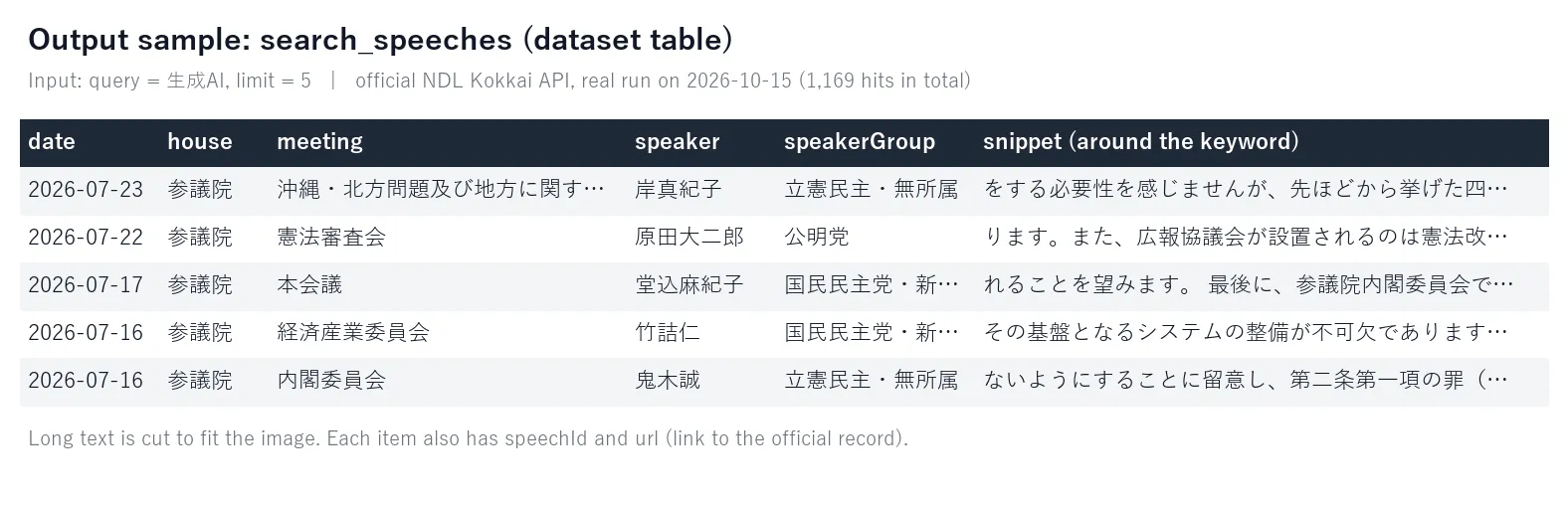
speechId, meeting, house, date, speaker, speakerGroup and speakerPosition (when the record has them), snippet, url. get_speech returns text and textTruncated; search_meetings returns issueId, name, issue, url. Download the dataset as JSON, CSV, Excel or HTML.
Pricing
Pay-per-event. You pay for what you use; there is no monthly fee and no charge while the MCP server sits idle.
| Event | Price | When |
|---|---|---|
tool-call | $0.005 | Each MCP tool call (cached results are charged too) |
actor-start | $0.02 | Once per normal (non-MCP) run |
speech-record | $0.001 | Each record written to the dataset in a normal run |
What that means in practice:
| What you do | Cost |
|---|---|
| Ask Claude 20 questions in a session (about 20 tool calls) | about $0.10 |
| The default quick-start run (5 speeches) | about $0.025 |
| One normal run with 100 speeches (the most one run can return from a single search) | $0.12 |
| Daily watch of one topic, about 3 new speeches a day, for 30 days | about $0.69 a month (30 × $0.02 start + 90 × $0.001) |
| Daily watch on a quiet day with nothing new | $0.02 (start fee only) |
Set Maximum cost per run in the Console if you want a hard ceiling.
How this compares
Free open-source MCP servers for the same API exist (for example kokkaikaigiroku-mcp on Glama). If you are happy to run a server on your own machine, that is a fine choice. This Actor is for when you want a hosted endpoint (nothing to install, one URL + token), a normal batch mode that fills a dataset/CSV, and the official filters, paging and keyword-centred excerpts listed above. The raw NDL API is also free; this Actor is a convenience layer, not a different data source.
Limits (please read)
- Requests are paced (the NDL asks for one request at a time with a few seconds between requests), so a call takes a few seconds, more when the API retries. Results are cached for 24 hours; a cached MCP call is still charged.
- Excerpts, not full documents: search results carry ~300 characters.
get_speechreturns at most 5,000 characters per speech. Speech text belongs to the speakers (Diet members); use it within what copyright law allows (quotation, information analysis, etc.). - No push notifications. Watch mode returns only new speeches when you run it (scheduled or by API). To get a message in Slack or e-mail, connect the run to Apify's Slack, Make, n8n or webhook integrations.
- What this Actor does not cover: a full meeting transcript, and non-text media (video/audio) — only per-speech text up to 5,000 characters via
get_speech; and more than 100 records per search call, which is the NDL API's own hard limit (not an Actor-side restriction) — usestartRecordto page. summarize_topicdoes not summarize. It returns more excerpts (default 20) so your own LLM can.- Coverage and accuracy are those of the National Diet Library service.
- Success rate on the Store page (see also the FAQ): Apify counts only other users' standard runs of the last 30 days, not MCP sessions (confirmed with Apify support on 2026-10-06), so an MCP-focused Actor can show a low rate. 公開ページの成功率は MCP の利用を数えません。
FAQ
Do I need an API key for the Diet records? No. The National Diet Library API is free and needs no key. You only need an Apify API token to call the MCP endpoint.
Does it summarize speeches? No. summarize_topic returns more excerpts so that your assistant can summarize them. Nothing is generated by this Actor.
Is the data complete and up to date? It is whatever the National Diet Library publishes, queried live (results are cached for 24 hours; watch mode never reads the cache). Very recent speeches appear once the Library has published them.
Can I get a whole meeting transcript? Not in one call. Use search_meetings to find the meeting and get_speech for individual speeches (up to 5,000 characters each).
Why does the Store page show a 0% success rate? Apify counts only other users' standard runs of the last 30 days; MCP sessions are not counted (confirmed with Apify support on 2026-10-06). It is not a measure of failures. Starting the Actor with its default input returns real speeches.
Can I use the speeches commercially? The text belongs to the speakers (Diet members) and the data to the National Diet Library. Quotation and information analysis within what copyright law allows are your responsibility; see the Library's terms for the API.
It returned nothing. At least one search condition is needed; check the spelling of the meeting, party or position (they are partial matches against the official names, e.g. 自由民主党, 予算, 内閣総理大臣). Dates are YYYY-MM-DD.
Changelog
- 0.3.8 — Housekeeping: the MCP server now reports the running build number instead of a fixed "0.3.2". The README now says late-appearing speeches are caught only while they are within the newest 100 results. No change to search results.
- 0.3.3 – 0.3.7 — Listing only (README, images, examples). No change to what the Actor does.
- 0.3.2 — Fix: watch mode no longer writes 100 speech records to the cache store on every run (a watch run was killed for memory at 256 MB on the platform). Cache writes are now limited to 4 at a time. Default run memory is 512 MB. Each stage of a run is logged as
[stage] …. - 0.3.0 — New: watch mode (
onlyNewSpeeches,stateStoreName). The run-mode input is now labelled "What this run returns (run mode)".
Related Actors
Also by Hullspark — Japan public-sector data, same pricing model (pay-per-event, no monthly fee):
- kkj-tender-alert — New Japanese government tender notices (入札公告) from kkj.go.jp, delivered to Slack/Discord/Teams or a dataset, new-only on repeat runs.
Disclaimer and support
Only public, official proceedings of the Diet are searched, through the National Diet Library's public API (no login, no scraping). The Actor keeps no personal data of its own beyond a 24-hour cache of search results and speech records; expired cache entries are removed on a best-effort basis. Do not use it to gather personal information about private individuals. Bug or feature request? Open an issue on the Actor's Issues tab.