
LinkedIn Profile Engagement Scraper (Company and Profile)
Pricing
from $5.00 / 1,000 post scrapeds
LinkedIn Profile Engagement Scraper (Company and Profile)
A powerful Apify actor to extract post-engagement metrics from LinkedIn profiles. Gather likes, comments, reposts, and more for data-driven insights. Boost your social media strategy today!
Pricing
from $5.00 / 1,000 post scrapeds
Rating
0.0
(0)
Developer

Ahmed Khaled Ali
Maintained by CommunityActor stats
4
Bookmarked
262
Total users
4
Monthly active users
21 hours
Issues response
9 days ago
Last modified
Categories
Share
Export every post of a LinkedIn profile or company page with its engagement: reactions, comments, reposts, publish date, text and media type and, for your own posts, impressions. Add one or many URLs and download a clean table as Excel, CSV or JSON, or pull it through the API.
What does LinkedIn Profile Engagement Scraper do?
It opens the activity feed of each profile or company page you give it, as a logged-in LinkedIn member, and saves one row per post:
- 📈 Engagement: reactions, comments, reposts and, for posts you wrote, impressions
- 🕒 Publish time (
postedAt): exact to the second when the post ID is known, otherwise the day LinkedIn shows - 📝 Full post text, author, and whether it is a repost
- 🖼️ Media type: image, native video, external video, article or document
- 🔗 Post URL and ID when LinkedIn shows them (always for your own posts and videos, often not for reposts)
Why use it?
- Your own LinkedIn analytics, in one table. LinkedIn shows impressions only to the author, so tools that don't log in can never return them. Run it on your own profile and get your posts with their impressions and engagement, ready for a spreadsheet or dashboard.
- Benchmark competitors and creators. See which topics and formats get the most reactions and comments.
- Monitor company pages for campaign and content analysis.
- Fair billing. You pay only for posts saved to your dataset. Proxy and compute costs are included in the price.
How to use it
- Create a LinkedIn session just for the Actor. In Chrome open
chrome://extensions, find Cookie-Editor → Details → turn on Allow in Incognito. Open an Incognito window (Ctrl/Cmd+Shift+N), log in to LinkedIn, click Cookie-Editor → Export → JSON and paste the result into LinkedIn cookies. Then close the Incognito window without signing out. - Copy your user agent. In Chrome open DevTools (F12) → Console, type
navigator.userAgent, press Enter and paste the text (without quotes) into Your browser's user agent. - Set the proxy to RESIDENTIAL and select the country you normally use LinkedIn from.
- Add profile (
linkedin.com/in/...) or company (linkedin.com/company/...) URLs, set Max posts per URL and click Start.
Keep your LinkedIn session safe
LinkedIn ends a session when it sees the same session used in two places at once: for example, in your browser at home and in a cloud browser at the same time. That's why the Actor works with its own session:
- You log in once in an Incognito window, export the cookies and close the window. That session belongs to the Actor only.
- Your everyday LinkedIn tab keeps its own separate session instead of sharing one with the Actor.
- If LinkedIn ever ends the Actor's session, the run stops right away, keeps the posts already scraped and tells you. Just repeat the Incognito login to create a new one.
On top of that, the Actor looks like a normal browser:
| What LinkedIn checks | What the Actor does |
|---|---|
| Is it a real browser? | Full cookie set (not just li_at), your user agent with a matching platform and screen size, and a full (non-headless) Chrome with automation traces hidden |
| Where is it? | A residential IP in your country, the same IP for the whole run, and a browser clock set to that country's time zone |
| Does it behave like a person? | Scrolls in uneven steps with natural pauses, one page at a time |
Good habits:
- ✅ Use a separate Incognito session for the Actor, never the cookies of the LinkedIn tab you use every day.
- ✅ Use a residential proxy in your own country.
- ✅ Keep runs moderate: a few hundred posts per run and one run at a time per account.
- ❌ Don't sign out in the Incognito window; just close it. Signing out ends the Actor's session.
No automation can guarantee that LinkedIn will never ask you to verify your account. These settings keep the risk as low as possible, and your everyday session stays separate.
Input
| Field | Description |
|---|---|
urls | Profile or company page URLs |
maxPosts | Maximum posts per URL (default 100); also caps your cost |
cookie | Cookie export (JSON from Cookie-Editor) of a LinkedIn session made for the Actor in an Incognito window. Stored encrypted |
userAgent | Your browser's user agent (recommended) |
proxyConfiguration | Proxy settings; use RESIDENTIAL in your country |
debug | Saves a screenshot and the page HTML per URL for troubleshooting |
Output
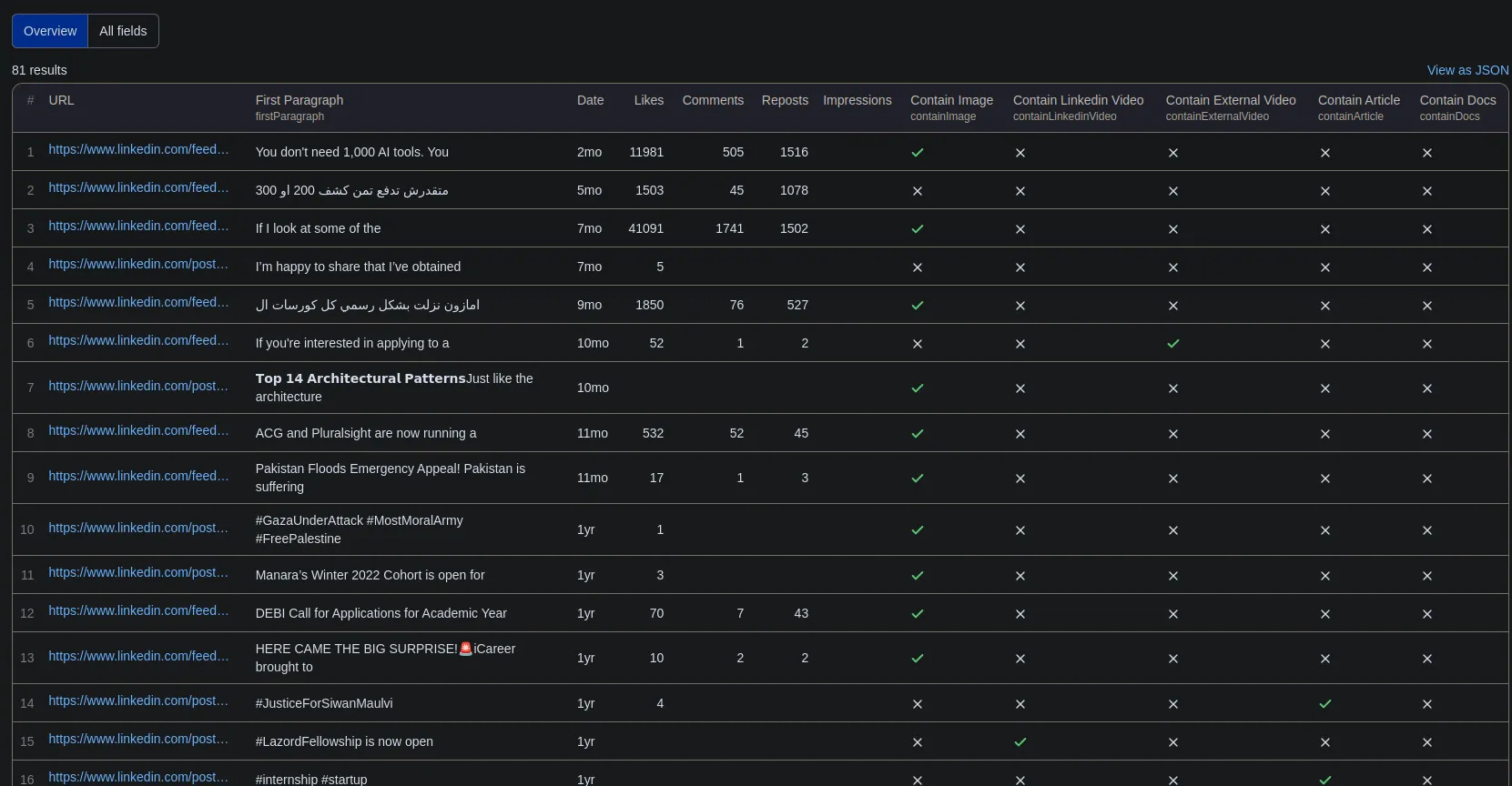
One row per post. Two table views are available in the Output tab: All post data and a compact Engagement summary.
| Field | Description |
|---|---|
url, urn | Direct link and unique ID of the post; null when LinkedIn doesn't show the post's ID (common for reposts) |
sourceUrl, sourceType | Profile or company page the post was found on |
authorName, isRepost | Post author; isRepost is true when the source reposted someone else's post |
firstParagraph, fullPost | First 7 words and full text |
date, postedAt | Date shown by LinkedIn (3d, Apr 6, 2025) and publish time in UTC (exact when the post ID is known) |
reactions, comments, reposts | Engagement counts (0 when LinkedIn shows none) |
impressions | Only for posts written by the logged-in account, when LinkedIn shows them; otherwise null |
contain* | Whether the post has an image, native video, external video, article or document |
How much does it cost?
You pay a fixed price per post saved to the dataset; see the Pricing tab. Proxy and compute costs are included. Two ways to stay in control:
- Max posts per URL limits how many posts are scraped from each profile.
- Maximum cost per run (in run options) stops the run as soon as the limit is reached. You are never charged beyond it.
Integrations and API
Use the results in Google Sheets, Make, Zapier, n8n, Slack or any tool through Apify integrations, or call the Actor from code with the Apify API:
FAQ
Why does it need my cookies? Full activity feeds are only visible to logged-in members. Your cookies are used only inside your own run and are stored encrypted by Apify.
The run says my cookies expired, or that LinkedIn ended the session. Create a new session for the Actor: log in to LinkedIn in an Incognito window, export the cookies, close the window without signing out and run again. Check that the proxy is RESIDENTIAL in your own country and that you pasted your user agent.
Will the Actor log me out of LinkedIn in my browser? Give the Actor its own Incognito session and your browser's session is no longer shared with it. Logouts happen when the cookies of your everyday LinkedIn tab are used in the Actor at the same time as in your browser.
Why is impressions empty?
LinkedIn shows impressions only to the author of a post. Run the Actor on your own profile with your own cookies to get them. LinkedIn doesn't show them on every post, so some of your own posts may still have none.
Why is url empty for some posts?
LinkedIn's new activity page doesn't include the ID of every post. Your own posts and video posts have it; many reposts don't. Their engagement, text, author and date are still saved.
Some posts are missing or a field looks wrong. Open an issue in the Issues tab. When a URL returns no posts, the run saves a screenshot in the Debug snapshots section of its storage; attaching it helps fix the problem fast.
Legal
Scraping personal data may be subject to data protection laws such as the GDPR. Make sure you have a legitimate reason to collect and process the data, and respect LinkedIn's terms of service.


![LinkedIn Profile Posts Scraper - Bulk [NO COOKIES] ✅ avatar](https://images.apifyusercontent.com/OavDED5gNBRYMSWd9uEONykjVXz6b1U3Ew75sjoMKlU/rs:fill:76:76/cb:1/aHR0cHM6Ly9hcGlmeS1pbWFnZS11cGxvYWRzLXByb2QuczMudXMtZWFzdC0xLmFtYXpvbmF3cy5jb20vc0NDU2R3bm1LTUoxUTJzVG4tYWN0b3ItZ0huQXJqSlF1anIwWmZwdTkteHE3N1F0WEx1SC1jek5tY3kxd2NtbDJZWFJsTDNKaGQzQnBlR1ZzWDJsdFlXZGxjeTkzWldKemFYUmxYMk52Ym5SbGJuUXZiSEl2.webp)


