

Agent Commerce Watch [$1/1K💰] | Price & Stock Monitor
Pricing
from $2.00 / 1,000 product snapshots
Agent Commerce Watch [$1/1K💰] | Price & Stock Monitor
Monitor Shopify, WooCommerce and JSON-LD store prices and stock, and get typed change events (price drops, restocks, sell-outs) via an MCP server for AI agents.
Pricing
from $2.00 / 1,000 product snapshots
Rating
0.0
(0)
Developer

Ahmed Jasarevic
Maintained by CommunityActor stats
0
Bookmarked
1
Total users
0
Monthly active users
11 days ago
Last modified
Categories
Features
Share
Agent Commerce Watch — Price & Stock MCP for AI Agents
Track e-commerce prices, discounts and stock across Shopify and WooCommerce stores (plus any storefront with Product JSON-LD) and return one normalized product shape plus typed change events — built as an MCP server so AI agents can call it directly.
Agent Commerce Watch reads stores through their public JSON APIs and sitemap product pages, keeps a per-store baseline in a key-value store, and on each scheduled run emits only what changed: price drops and rises, sales, restocks, sell-outs, new and removed products and variant changes. No browser is required for supported stores, which keeps scans fast and cheap enough for scheduled monitoring.
Monitor Competitor Prices & Stock For E-Commerce Intelligence
- Competitor price and stock monitoring — know within the schedule window when a store cuts prices, raises them, or sells out.
- MAP and reseller enforcement — catch resellers pricing below your minimum, with a timestamped record and variant detail.
- Restock and launch alerts — detect back-in-stock events and newly listed products the moment they appear.
- Catalog snapshots for analytics — export a clean, normalized product catalog from any Shopify or WooCommerce store.
- Agent-driven commerce tools — expose store scanning, product lookup and change feeds to an AI agent over MCP.
How It Works
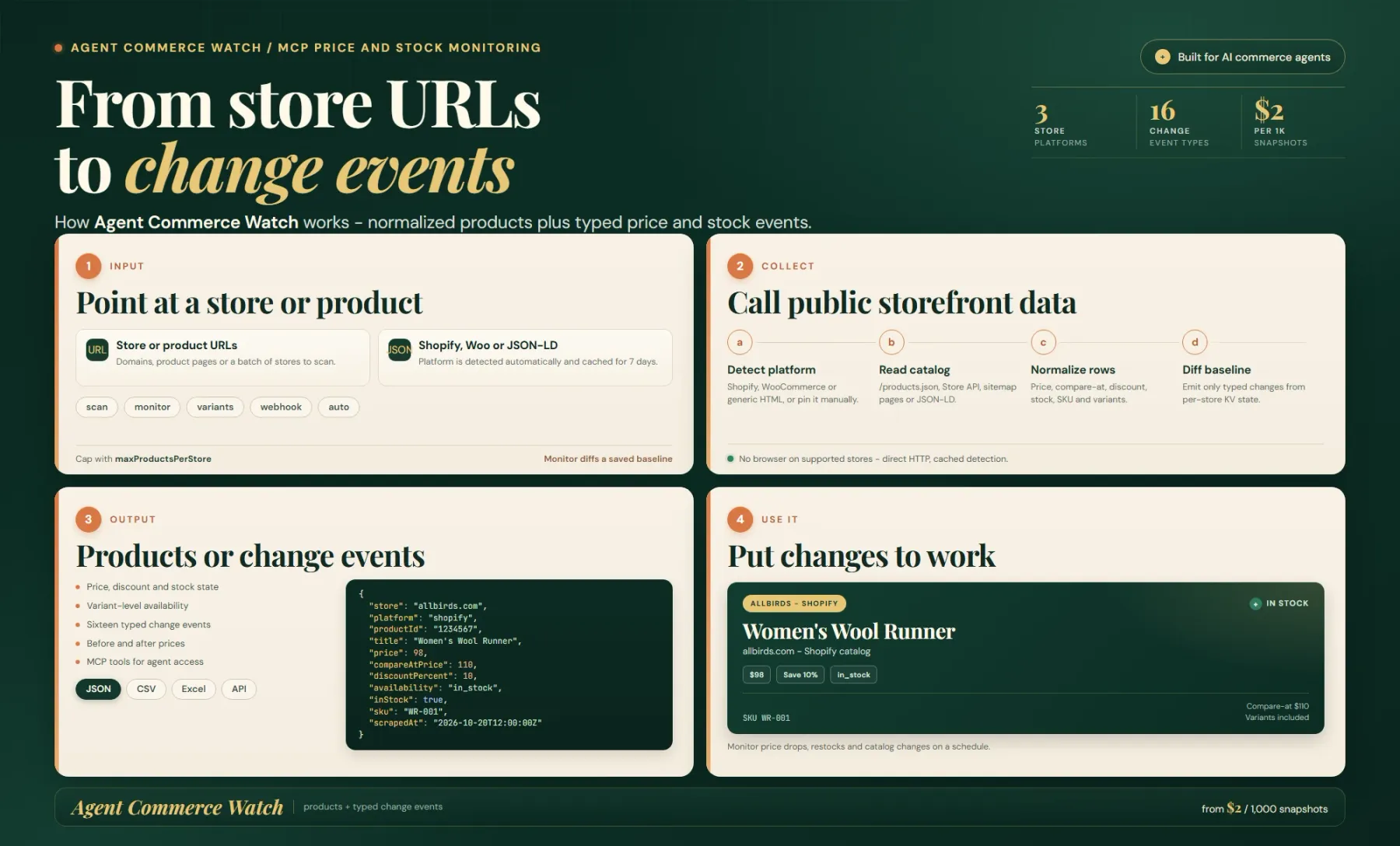
The Actor detects Shopify, WooCommerce or generic JSON-LD storefronts, reads their public catalog surfaces over HTTP and normalizes every product into one shape. In monitor mode it keeps a per-store baseline in a key-value store and compares each run against it.
Output is either a product snapshot with price, compare-at price, discount, stock and variants, or a typed change event such as price_drop, back_in_stock or new_product. The same tools are exposed over MCP for AI agents.
- Platform detection — the store is identified as Shopify (
/meta.json,/products.json), WooCommerce (Store API at/wp-json/wc/store/v1/products) or generic (sitemap + JSON-LD), or pinned manually viaplatform. - Catalog or product read — products are read from the store's own public endpoints (Shopify
/products.json, WooCommerce Store API, or JSON-LD / OpenGraph / microdata / HTML for generic stores). - Normalization — every product is returned in one consistent shape with price, compare-at price, discount percent, currency, availability, SKU, brand, category and images.
- Change detection (monitor mode) — a baseline is saved per store in the
agent-commerce-watch-statekey-value store; each later run compares against it and emits only typed change events.
Platform detection results are cached for 7 days; genuine generic scans are cached for 1 day. For supported stores, no browser is used.
Input Parameters
| Field | Type | Required | Default | Notes |
|---|---|---|---|---|
mode | string | No | scan | scan (once) or monitor (baseline then changes). |
stores | array | No | — | Store domains or URLs for batch scans. |
store | string | No | — | Single store used when stores is empty. |
urls | array | No | — | Exact product URLs to scan. |
maxProductsPerStore | integer | No | 100 | Product cap per store. |
includeVariants | boolean | No | true | Include variant-level price and stock. |
platform | string | No | auto | auto, shopify, woocommerce or generic. |
onlyChanges | boolean | No | true | In monitor mode, push change rows only. |
emitFirstSeen | boolean | No | false | Emit first_seen events on the first monitor run. |
webhookUrl | string | No | — | POST monitor events to this URL. |
requestDelayMs | integer | No | 150 | Delay between generic product page requests. |
proxyConfiguration | object | No | disabled | When enabled, the proxy is used only as a fallback after a direct request fails. |
Output Fields
Product rows: store, platform, productId, title, url, sku, brand, category, price, priceMin, priceMax, compareAtPrice, discountPercent, currency, availability, inStock, variants, image, description, tags, rating, reviewCount, confidence, source, scrapedAt.
Change rows: detectedAt, event, store, platform, title, previousPrice, currentPrice, priceDelta, priceDeltaPct, previousAvailability, availability, variantTitle, message, url.
Change events include: price_drop, price_rise, sale_started, sale_ended, back_in_stock, out_of_stock, availability_changed, new_product, removed, first_seen, variant_added, variant_removed, variant_price_drop, variant_price_rise, variant_back_in_stock, variant_out_of_stock.
Example Input
Scan a store catalog and a list of exact product URLs:
Monitor a store and emit only changes:
Example Output
Product row:
Change row:
Automate Price Monitoring With Schedules & Webhooks
- Schedule monitor mode (hourly, daily or weekly) so each run reports only what changed since the last one.
- Set
webhookUrlto receive one JSON payload per store containing the detected events — pipe it to Slack, email, Zapier, Make or your own service. - Register stores with the
watch_storeMCP tool, schedule the Actor in monitor mode, then readget_changesfrom your agent. - Reuse the baseline state stored in
agent-commerce-watch-statebetween runs, so no re-dumping of unchanged catalogs.
Related Actors
- Shopify Product Scraper — deep Shopify catalog, inventory and variant extraction.
- Shopify Scraper — Shopify tech stack, apps and themes intelligence.
- Idealo Scraper — price comparison data across European marketplaces.
- Slickdeals Scraper — deals and discount tracking across retailers.
- ProductReview Scraper — customer review and sentiment data for products.
Frequently Asked Questions
Why use this Actor instead of the official store API?
Shopify and WooCommerce expose public product endpoints, but not a change feed or a cross-platform normalized shape. This Actor reads those public endpoints, normalizes every store into one schema, and adds stateful change detection so you get what moved — not the whole catalog every run.
What are alternatives to this Actor?
Other approaches include building your own Shopify /products.json — or WooCommerce Store API — poller with a diffing layer, or using a single-platform price monitor. This Actor covers Shopify, WooCommerce and generic JSON-LD stores in one run and also exposes an MCP server for agents.
Do I need a browser or API key?
No. Supported stores are read through their public JSON endpoints with no login and no browser. Generic stores behind bot protection may block requests even when their sitemap is public.
How does monitor mode track changes?
The first run creates a baseline per store in the agent-commerce-watch-state key-value store. Later runs compare against it and emit typed change events. Without a schedule, there are no new change events to read.
Can AI agents call it directly?
Yes. The Actor runs in standby mode and serves MCP over Streamable HTTP at /mcp, exposing scan_store, get_product, compare_products, watch_store and get_changes.
For AI Agents & LLM Apps
Purpose: return a normalized store catalog or a feed of detected price/stock changes, callable over MCP or the Apify API.
Minimal working input (scan):
Minimal working input (monitor):
Output fields: store, platform, productId, title, url, sku, brand, category, price, priceMin, priceMax, compareAtPrice, discountPercent, currency, availability, inStock, image, scrapedAt (products) and detectedAt, event, store, previousPrice, currentPrice, priceDelta, priceDeltaPct, availability, variantTitle, message, url (changes).
MCP server: Streamable HTTP at https://YOUR-STANDBY-URL/mcp, with tools scan_store, get_product, compare_products, watch_store, get_changes.
Behaviors an agent should know:
- If neither
stores/storenorurlsis provided, the Actor runs a small demo scan ofallbirds.com(max 5 products). store(singular) is used only whenstoresis empty;urlsscans exact products without catalog discovery.onlyChangesdefaults totruein monitor mode; setemitFirstSeen: trueonly if the first run should emitfirst_seenfor every product (leave off for large catalogs).mode: "monitor"requires a prior baseline to produce changes; there is no state until the first run.webhookUrladds one POST per store with the detected events.- Billing: pay-per-event —
MCP tool call$0.005 (primary),Product snapshot$0.002,Product check$0.001,Price or stock change$0.002.
Legal & Compliance Disclaimer
This is an independent Actor. It is not affiliated with, endorsed by, or sponsored by Shopify, WooCommerce, WordPress, or any store it reads. It accesses only publicly available product endpoints and pages — no login is performed, no CAPTCHA solving is performed, and no access controls are used. Product prices are approximate and should be verified on the product page before a purchase. Users are responsible for complying with each store's Terms of Service, robots directives, rate limits and applicable law (including data-protection law where any personal data is involved) when using the data.
SEO Keywords
price monitor, stock monitor, product price tracker, shopify price monitor, woocommerce price monitor, competitor price tracking, price drop alerts, back in stock alerts, product stock scraper, shopify scraper, woocommerce scraper, ecommerce price monitoring, product json-ld scraper, price change detection, mcp server for ecommerce, ai agent product data, catalog monitoring, map pricing enforcement, restock alerts, price and availability api


