

Caring.com Scraper [$5/1K💰] | Senior Living | Pricing
Pricing
from $1.90 / 1,000 facility listings
Caring.com Scraper [$5/1K💰] | Senior Living | Pricing
Extract senior living facilities from Caring.com: assisted living, memory care and independent living with address, care types, rating, starting price, phone and optional reviews and amenities.
Pricing
from $1.90 / 1,000 facility listings
Rating
0.0
(0)
Developer

Ahmed Jasarevic
Maintained by CommunityActor stats
0
Bookmarked
2
Total users
1
Monthly active users
8 days ago
Last modified
Categories
Features
Share
Caring.com Scraper – Senior Living Facilities, Pricing & Reviews
Extract senior living and senior care facilities from Caring.com: facility name, operator, address, care types (assisted living, memory care, independent living), overall rating, review count, starting monthly price and phone — plus optional reviews, amenities, per-room pricing, capacity and licence data. $5 per 1,000 facilities, no browser rendering.
What Can You Do With Caring.com Data?
- Senior living market research – count and compare assisted living, memory care and independent living facilities by city
- Pricing benchmarks – collect starting monthly prices and per-room pricing for a metro or a state
- Senior housing investment and site selection – map supply, operators and capacity in a target market
- Care referral and placement lead lists – one row per facility with address, phone and care types
- Review and quality analysis – pull ratings and review text for a sentiment or quality study
- Family comparison tools – build a shortlist dataset of facilities with prices, care types and amenities
How It Works
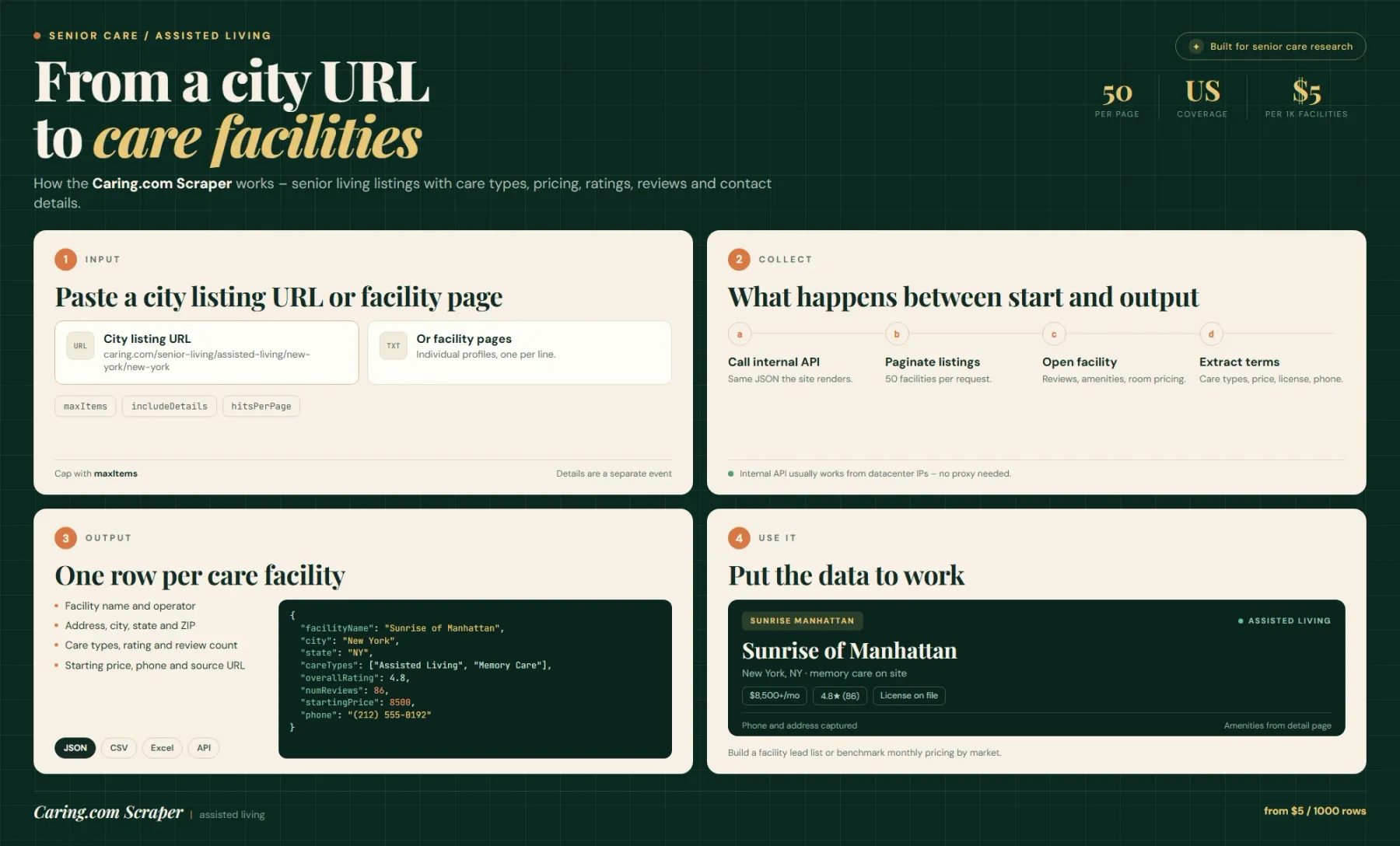
Caring.com's listing pages are rendered from an internal JSON search API. The actor calls that API directly for each city listing URL, so a page of results arrives as JSON rather than HTML — no browser, no rendering, no DOM parsing. By default it requests 50 facilities per listing page and stops at maxItems.
With includeDetails on, each facility's own page is fetched for reviews, amenities, per-room pricing, capacity, licence and website. That is one extra request and one extra billed event per facility, so it is off by default: listing data alone gives you name, address, care types, rating, price and phone.
Extract Senior Living Data Without A Senior Care Data API
There is no free, self-serve API for US senior living facilities. Caring.com aggregates the supply — facility profiles, care types, prices and reviews — but only for humans browsing the site. Commercial senior-housing databases are sold as market reports or enterprise licences.
This actor turns the listing surface into rows you can filter, join and schedule, at a per-facility price instead of an enterprise contract.
Assisted Living, Memory Care And Independent Living In One Dataset
startUrls accepts city listing pages such as https://www.caring.com/senior-living/assisted-living/new-york/new-york, and individual facility pages. The care type is encoded in the listing URL path, so running the same city for assisted-living, memory-care and independent-living gives you three comparable slices with the same schema.
If you pass facility pages directly, the actor scrapes just those facilities — useful for refreshing a known shortlist rather than re-crawling a city.
Senior Living Pricing, Ratings And Review Counts
startingPrice is the facility's advertised starting monthly price in USD, taken from the listing. It is a starting figure, not a quote: room type, care level and add-ons change the final number, which is why includeDetails adds per-room pricing where the source publishes it.
overallRating is Caring.com's aggregate rating and numReviews the number of reviews behind it. Both are the source's editorial signals, not a government inspection score.
Input – Configure A Facility Extract
| Field | Type | Required | Default | Notes |
|---|---|---|---|---|
startUrls | array | No | New York assisted living city page | Caring.com city listing pages or individual facility pages |
maxItems | integer | No | 100 | Max facilities saved; 0 = unlimited |
includeDetails | boolean | No | false | Fetch each facility page for reviews, amenities, per-room pricing, capacity, licence, website |
maxRequestsPerCrawl | integer | No | 500 | HTTP request cap (about one listing request per 50 facilities plus one detail request each) |
maxConcurrency | integer | No | 20 | Parallel API requests; lower it if you get rate-limited |
hitsPerPage | integer | No | 50 | Facilities requested per listing page |
proxy | object | No | — | Optional; the internal API usually works from datacenter IPs |
Output – Senior Living Facility Fields
Overview (always present):
| Field | Type | Description |
|---|---|---|
facilityName | string | Facility name |
address | string | Street address, city, state and ZIP as published |
careTypes | array | Care types offered (Assisted Living, Memory Care, Independent Living, …) |
overallRating | number | Caring.com aggregate rating |
startingPrice | number | Advertised starting monthly price (USD) |
phone | string | Facility phone number |
sourceUrl | string | Canonical Caring.com profile URL |
Added by includeDetails: numReviews and review rows, amenities, per-room pricing, capacity, licence information, website, coordinates and photo references.
Example Input – Memory Care In Two Cities
Example Output – One Facility Record
Export Senior Care Data To JSON, CSV Or Excel And Schedule Runs
Results land in the default dataset and can be downloaded as JSON, CSV, Excel or XML, or read through the Apify API. A city with 200 facilities completes in well under a minute at the default concurrency.
Prices and reviews drift, so a monthly schedule is a good cadence for pricing intelligence; a quarterly run is enough for supply mapping. At $0.005 per facility, 1,000 facilities cost $5; details add a separate charge per facility.
Related Actors
- Docplanner Scraper – healthcare provider and clinic directory data with the same facility-per-row shape
- Google Maps Scraper – enrich facilities with geocoded coordinates, nearby amenities and additional reviews
- Website Content Crawler – pull facility websites, inspection reports and licensing pages into clean text
- Google Search Scraper – find senior living market reports, openings and licensing news per metro
FAQ
Why use this actor instead of the Caring.com website?
Because there is no export and no API. Comparing 200 facilities by hand means opening 200 pages. This actor returns them as a sortable table with price, rating, care types and contact details in one run.
Is there a Caring.com API?
Not a public one. The site's own frontend calls an internal JSON search API; this actor uses that same endpoint, which is why it does not need a browser and why datacenter IPs usually work.
How current are the prices?
startingPrice is read live at run time from the listing. Caring.com prices are advertised starting rates, so they move with promotions and room availability — treat them as a market band, not a quote.
What is the difference between listing data and details?
Listing data is what a city results page carries: name, address, care types, rating, starting price, phone. Details add a request per facility for reviews, amenities, per-room pricing, capacity and licence. Details are off by default because they roughly double both runtime and cost.
What are alternatives for senior living data?
The CMS Provider Data Catalog and state licensing databases are free and authoritative for licensed facilities and inspection results, but they carry no reviews and no advertised pricing. Commercial senior-housing databases sell curated supply and occupancy data. Caring.com is the consumer-facing view: prices, ratings and reviews.
Can I get every facility in the US in one run?
Not practically. Coverage follows the city listing URLs you supply; there is no single national listing page. Queue one URL per metro and the runs are additive.
Do I need a proxy?
Usually not. The internal API tolerates datacenter IPs. If your platform IP gets blocked, enable a residential proxy group and lower maxConcurrency.
SEO Keywords
caring.com scraper, senior living data, assisted living database, memory care facilities list, senior care market data, assisted living pricing data, senior housing research, senior living api, caring.com alternative, senior care lead generation, elder care directory data, senior living reviews data, retirement community database, senior housing investment data, assisted living facilities by city, memory care pricing, senior living market research, skilled nursing data
For AI Agents & LLM Apps
Returns one row per senior living facility scraped from Caring.com city listings or facility pages: name, address, care types, rating, starting monthly price and phone; includeDetails adds reviews, amenities, per-room pricing and licence data.
Minimal working input:
Variant — details on for a specific metro and care type:
Output fields: facilityName, address, careTypes, overallRating, startingPrice, phone, sourceUrl — plus numReviews, amenities, per-room pricing, capacity, licence and website when includeDetails is on.
Behaviors an agent should know:
startUrlsempty scrapes a default New York assisted-living city page — never assume an empty input means "all facilities".maxItemsdefaults to 100, not unlimited;0means no limit.includeDetailsadds one extra billed event per facility (facility-detail) and roughly doubles requests.hitsPerPage(default 50) changes how many facilities one listing request returns; lowering it multiplies requests, not coverage.maxRequestsPerCrawl(default 500) is a hard stop — a details-heavy run can hit it beforemaxItems.careTypesis an array, not a string;startingPriceis a starting monthly rate in USD, not a quote.- The care type comes from the listing URL path, so the same city under
assisted-livingandmemory-carereturns different sets.
Billing: $0.005 per facility saved, plus a small actor-start event.
Legal & Compliance Disclaimer
This actor is an independent tool. It is not affiliated with, endorsed by, or sponsored by Caring.com or its parent company.
It accesses publicly visible senior living listing pages through the site's own internal JSON search endpoint — no login, no paywall bypass, no CAPTCHA solving. Output may include facility phone numbers and addresses; those are business contact details published for enquiries, not private individual data.
Users are responsible for complying with Caring.com's Terms of Service and with applicable law. If you use the phone numbers for outreach, note that unsolicited marketing calls and texts to businesses and individuals are regulated in the US (TCPA, CAN-SPAM) and in the EU (GDPR, ePrivacy). Advertised prices are the facility's own published starting rates and should not be presented as quotes. This section is a factual disclosure, not legal advice.


