

Google Ads Transparency Scraper [$0.75/1K 💰] | Ads
Pricing
from $0.70 / 1,000 ad rows
Google Ads Transparency Scraper [$0.75/1K 💰] | Ads
Monitor Google Ads Transparency by domain, brand or advertiser ID. Get creatives, copy, formats, regions, dates and new-ad alerts. $0.75 per 1,000 ad rows.
Pricing
from $0.70 / 1,000 ad rows
Rating
0.0
(0)
Developer

Ahmed Jasarevic
Maintained by CommunityActor stats
0
Bookmarked
2
Total users
1
Monthly active users
6 days ago
Last modified
Categories
Features
Share
Google Ads Transparency Scraper – Competitor Ad Monitoring
Collect live and recent ad creatives from Google Ads Transparency. Give it domains, brand names or advertiser IDs and get ad copy, headlines, descriptions, CTAs, formats, image and video assets, regions, landing domains, first and last shown dates, active status and Google ad library links. $0.75 per 1,000 ad rows, or $1.75 per 1,000 with full detail enrichment.
Competitor Ad Intelligence
Google Ads Transparency publishes the ads that advertisers run across Google surfaces. This Actor turns those public ad records into structured competitive-intelligence data for performance-marketing teams, agencies, brands, researchers and AI dataset builders.
- Creative research — see which messages, formats and offers competitors run.
- New-ad alerts — monitor a watch and get notified when fresh creatives appear.
- Landing-page analysis — collect destination and display domains.
- Regional research — filter by country and compare creative coverage.
- AI datasets — build structured ad-creative corpora.
How It Works
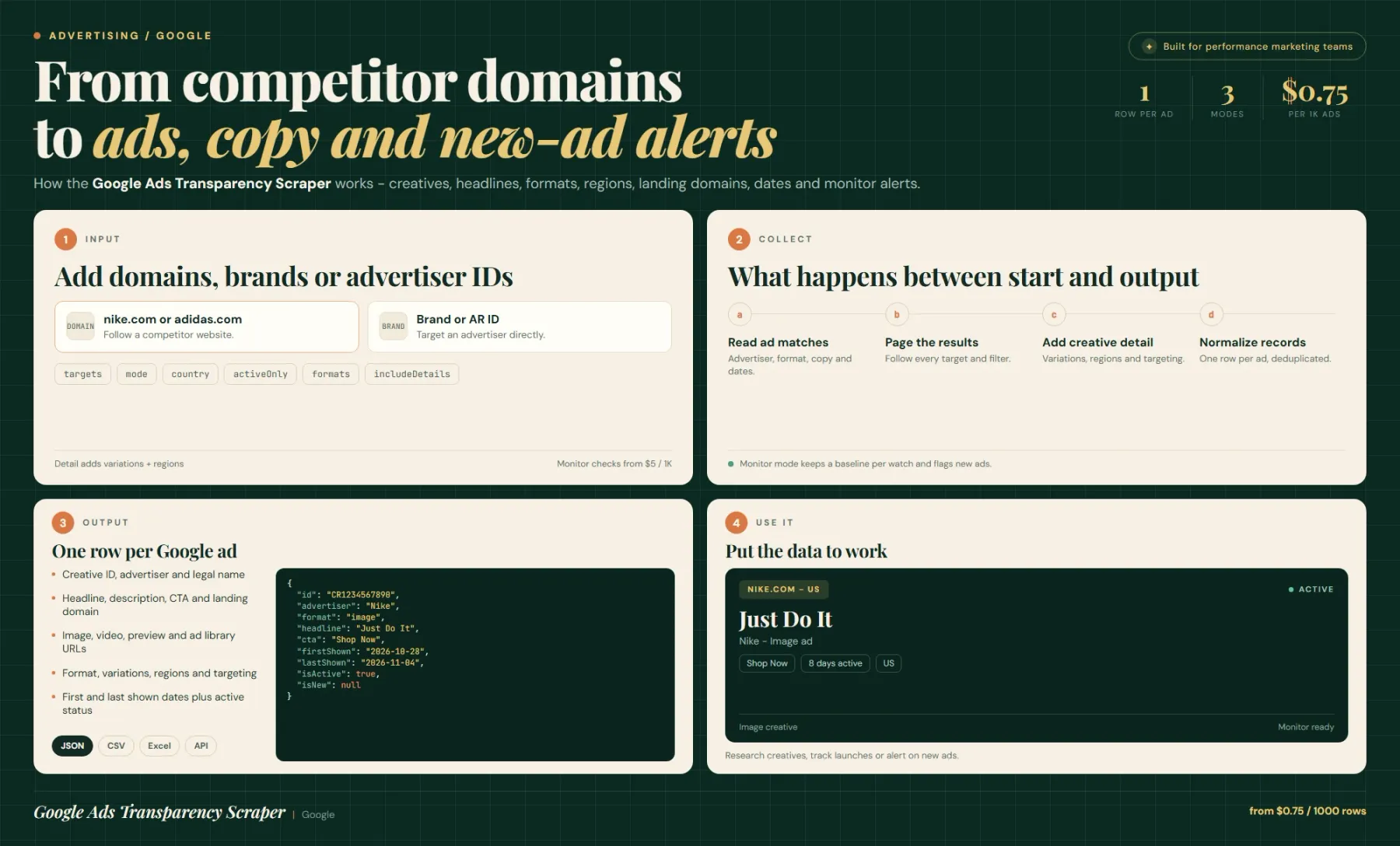
Enter one or more targets, choose a mode and country, then filter by format, activity or first-shown dates. The Actor writes one row per ad to the dataset. Monitor mode keeps a baseline per watch and can send a webhook when new ads appear.
- Domains, brand names and Google advertiser IDs supported.
- Snapshot, monitor and advertiser-check modes.
- Optional creative detail with variations, regions and targeting.
- Optional asset and preview downloads.
- Webhook alerts for new ads.
Modes
- Scrape — emit the current ad snapshot on every run; no monitor baseline is used.
- Monitor — save a baseline on the first run, then emit only ads that are new for that watch.
- Check — emit one summary row per advertiser with sampled ad count and Google's count range.
Use scrape for research snapshots, monitor for recurring alerts and check for a fast advertiser overview.
Targets And Filters
Targets can be domains such as nike.com, brand names such as Nike, or Google advertiser IDs such as AR1234567890. Brand names can match several advertisers; maxAdvertisers controls how many are followed.
Filter by country, active status, ad format and first-shown date range. activeOnly keeps creatives shown in the last seven days. Date filters are inclusive, and ads without a first-shown date are excluded when a date filter is set.
Ad Fields
Ad rows include identity, landing, creative, copy, variation, region, date and status fields. Key fields cover the creative ID, advertiser and legal advertiser name, target and target type, domain, destination URL, display domain, format, image and video URLs, preview URL, ad library URL, headline, long headline, description, CTA, variations, region stats, targeting, first and last shown dates, active days, active status and country.
Monitor rows add isNew and firstSeenAt. Download fields add stored asset URLs and download status. Check rows use recordType: "advertiser_check" with adsSampled, targetAdsLower, targetAdsUpper, firstShown, lastShown and checkedAt.
Input – Configure An Ad Monitoring Run
| Field | Type | Default | Notes |
|---|---|---|---|
targets | array | ["nike.com"] | Domains, brand names or AR... advertiser IDs |
mode | string | scrape | scrape, monitor or check |
country | string | US | Two-letter region filter |
activeOnly | boolean | false | Keep creatives shown in the last 7 days |
formats | array | [] | image, text or video; empty means all |
firstShownAfter | string | — | Inclusive date or timestamp |
firstShownBefore | string | — | Inclusive date or timestamp |
maxAdsPerTarget | integer | 200 | Maximum ads saved per target, up to 5,000 |
maxPagesPerTarget | integer | 5 | Maximum result pages per target, up to 125 |
maxAdvertisers | integer | 3 | Advertisers followed when a brand matches several |
newAdDefinition | string | first-shown | Monitor mode: first-shown or first-seen |
watchName | string | default | Separate monitor baseline per client or market |
includeAdText | boolean | true | Add search-ad headlines, descriptions and CTAs |
includeDetails | boolean | true | Add variations, regions, targeting and legal advertiser |
downloadAssets | boolean | false | Store image and video files in the run store |
downloadPreviews | boolean | false | Store the primary preview image |
maxAssetSizeKb | integer | 10240 | Skip larger files when downloads are on |
webhookUrl | string | — | Monitor mode alert destination |
requestDelayMs | integer | 250 | Delay between collection steps |
maxRetries | integer | 4 | Retries for temporary errors |
maxRunSeconds | integer | 900 | Graceful stop time; monitor progress is saved |
proxyConfiguration | object | Apify residential proxy | Optional connection settings |
Output – Ad Fields
- Identity —
recordType,platform,id,advertiser,advertiserLegalName,advertiserId,target,targetType,matchedAdvertiserId,matchedAdvertiser - Landing —
domain,destinationUrl,displayDomain,landingUrl,landingUrls - Creative —
format,formatCode,detailFormatCode,imageUrl,imageUrls,videoUrl,videoUrls,videoId,videoThumbnailUrl,companionBannerUrl,assetUrls,previewUrl,previewImageUrl,adLibraryUrl - Copy —
adText,headline,longHeadline,description,cta - Detail —
variations,variationCount,creativeRegions,regionStats,aggregateRegionStats,targeting,detailStatus,lastActivityAt - Dates and status —
firstShown,lastShown,daysActive,daysSinceFirstShown,lastShownDaysAgo,isActive,status - Run metadata —
country,scrapedAt,isNew,firstSeenAt - Downloads —
downloadedAssets,downloadedImageUrls,downloadedVideoUrls,downloadedPreviewUrl,assetDownloadStatus,assetDownloadError
Example Input – Snapshot Of Active Image And Video Ads
Example Output – One Google Ad
Monitor Watches And Alerts
Each watchName keeps its own baseline. The first monitor run for a target saves that baseline without marking existing ads as new. Later runs compare against it and emit new ads with isNew: true.
With the default first-shown definition, an ad is new only when it was not seen before and Google first showed it after the previous run. Use first-seen to alert on any creative not seen in that watch, even if it first appeared earlier.
When webhookUrl is set and a non-baseline monitor run finds new ads, the Actor sends a JSON payload with the watch, target, new-ad count and ad summaries. Webhook failures are logged without failing the run.
Export Ads And Schedule Monitors
Download JSON, CSV, Excel or HTML from Apify Console, or send results to Google Sheets, Airtable, BigQuery, Make, Zapier, n8n or a webhook. Schedule daily or hourly monitor runs to catch new competitor creatives.
Related Actors
- Ad Library Scraper — add Meta, Google, TikTok and LinkedIn ads
- Meta Ads Library Scraper — add Facebook and Instagram ads
- Facebook Pages Scraper — add page and advertiser details
- Threads Scraper — add public social posts
FAQ
What targets can I use?
Domains such as nike.com, brand names such as Nike, or Google advertiser IDs such as AR1234567890.
What is the difference between scrape and monitor?
scrape returns the current snapshot on every run. monitor saves a baseline and later returns only new ads for that watch.
What counts as a new ad?
With first-shown, an ad must be unseen and first shown after the previous run. With first-seen, any unseen creative counts as new.
Why do monitor runs sometimes return zero rows?
A quiet watch means no new ads were found. Use scrape when you want the full current snapshot.
What does check mode return?
One row per advertiser with sampled ad count, Google's count range and first and last shown dates.
Why are some ad fields empty?
Google does not expose ad copy, detail, regions or video data for every creative. Empty details still produce an ad row when the search result is available.
How much does it cost?
Ad rows cost $0.00075 each ($0.75 per 1,000) on FREE and BRONZE, and $0.0007 ($0.70 per 1,000) on SILVER and higher. Detail enrichment adds $0.001 per enriched row ($1 per 1,000), so the default detailed scrape is $1.75 per 1,000 on FREE/BRONZE and $1.70 per 1,000 on SILVER+. Monitor checks cost $0.005 per target ($5 per 1,000) after a target's baseline, even when no new ads are found. A small Actor Start event applies to every run.
For AI Agents & LLM Apps
Returns one row per ad, or one summary row per advertiser in check mode, with creative, copy, region, date and monitor fields.
Minimal working input:
Output fields: recordType, platform, id, advertiser, advertiserLegalName, advertiserId, target, targetType, matchedAdvertiserId, matchedAdvertiser, domain, destinationUrl, displayDomain, format, formatCode, detailFormatCode, imageUrl, imageUrls, videoUrl, videoUrls, videoId, videoThumbnailUrl, companionBannerUrl, assetUrls, previewUrl, previewImageUrl, landingUrl, landingUrls, adText, headline, longHeadline, description, cta, variations, variationCount, creativeRegions, regionStats, aggregateRegionStats, targeting, detailStatus, lastActivityAt, firstShown, lastShown, daysActive, daysSinceFirstShown, lastShownDaysAgo, isActive, status, country, adLibraryUrl, scrapedAt, isNew, firstSeenAt, downloadedAssets, downloadedImageUrls, downloadedVideoUrls, downloadedPreviewUrl, assetDownloadStatus, assetDownloadError.
Check mode fields: recordType, platform, target, targetType, advertiserId, advertiser, country, adsSampled, targetAdsLower, targetAdsUpper, firstShown, lastShown, checkedAt.
Behaviors an agent should know:
isNewisnullin scrape mode andtrueonly for new ads in monitor mode.includeDetailsdefaults totrueand adds enriched variations, regions, targeting and legal advertiser data.downloadAssetsanddownloadPreviewswrite files to the run's key-value store.- Temporary Google video URLs can expire; download assets in the same run when needed.
- Monitor checks are billed after each target's baseline, even with zero new ads.
Billing: ad rows $0.00075 ($0.75 per 1,000) on FREE/BRONZE and $0.0007 ($0.70 per 1,000) on SILVER+; detail enrichment $0.001 per enriched row; monitor checks $0.005 per target check after baseline; plus a small Actor Start event.
Legal & Compliance Disclaimer
This Actor is an independent tool. It is not affiliated with, endorsed by or sponsored by Google.
It collects ad information that Google publishes in its public Ads Transparency Center. Ad availability, copy and asset URLs can change without notice. Users are responsible for complying with Google's terms, intellectual-property rules and applicable advertising and data-protection laws. Do not use downloaded creatives in a way that infringes third-party rights.
SEO Keywords
google ads scraper, google ads transparency, competitor ads data, google ad library, ads transparency center, competitor ad monitoring, ad creative data, google ads api, ppc competitor research, ad copy data, ad creative tracking, google advertiser data, ad monitoring api, marketing intelligence, brand ad tracking, ad alerts, paid search data, google ads dataset


