

GreatSchools Scraper [$1/1K💰] | School Ratings | K-12 Data
Pricing
from $0.90 / 1,000 school records
GreatSchools Scraper [$1/1K💰] | School Ratings | K-12 Data
Extract US K-12 school data from GreatSchools: ratings, parent reviews, enrollment, grade levels, test scores and school URLs by city or state. Export JSON, CSV or Excel.
Pricing
from $0.90 / 1,000 school records
Rating
0.0
(0)
Developer

Ahmed Jasarevic
Maintained by CommunityActor stats
0
Bookmarked
2
Total users
1
Monthly active users
7 days ago
Last modified
Categories
Features
Share
GreatSchools Scraper – School Ratings, Test Scores & Parent Reviews
Extract US K-12 school data from GreatSchools.org: GreatSchools rating (1–10), parent rating, review count, enrollment, grade levels, school type, city and state — plus optional parent reviews and detailed test scores. $1 per 1,000 schools and $0.20 per 1,000 reviews. Runs on plain HTTP with no browser.
What Can You Do With GreatSchools Data?
- School ratings research – compare GreatSchools ratings across a city, district or state in one table
- Real estate and relocation analysis – attach school quality data to neighborhood or listing research
- Edtech and tutoring lead research – build a school list by city, grade level and type
- Parent-sentiment analysis – pull parent reviews and ratings for a text or sentiment study
- District benchmarking – compare enrollment, student-teacher ratio and test-score performance between areas
- Market maps and dashboards – schedule monthly runs and track how ratings and review counts change
How It Works
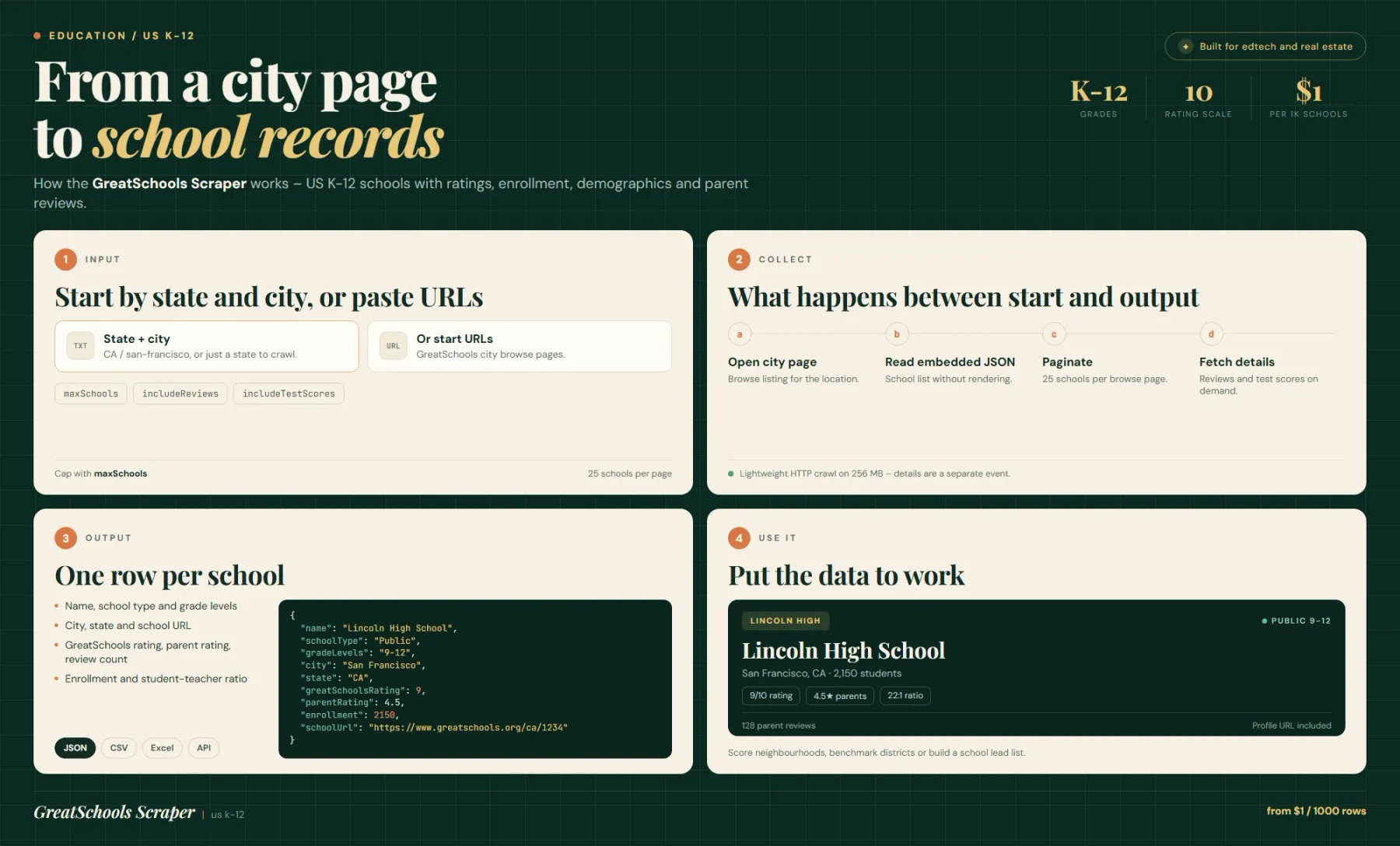
GreatSchools city browse pages ship their school list as embedded JSON inside the HTML — the same payload the site's own React app renders. The actor requests the city page over plain HTTP, extracts that JSON and maps each school into a flat record, so 25 schools per page arrive without a browser or a rendering step.
Pagination follows the site's own ?page= parameter up to maxPagesPerCity. With includeReviews on (the default), each school's profile page is fetched and its reviews parsed into a separate reviews dataset; with includeTestScores on, the profile page's test-score section is parsed as well. Both options add requests, which is why they are billed as separate events.
Extract School Data Without The GreatSchools API
GreatSchools does not offer a public, self-serve API for school records. Its data appears on the website, in third-party real-estate products and in paid data licences. If you need a city's schools as rows — names, ratings, enrollment, grade levels — the website is the only free source.
This actor reads the same embedded JSON the site renders, so the numbers match what a visitor sees, and returns them as JSON, CSV or Excel instead of HTML pages.
School Ratings And Enrollment By City And State
Give the actor a state (two-letter code) and a city in URL form (san-francisco, new-york, austin) and it crawls that city's browse pages. Give only a state and it starts from the state's main page. Give startUrls to target a specific GreatSchools city or district URL instead — for example https://www.greatschools.org/best-schools/california/san-francisco/.
Each record carries greatSchoolsRating on the site's 1–10 scale, parentRating on a 1–5 scale, numReviews, enrollment, gradeLevels, schoolType, city, state and the canonical schoolUrl. Private schools appear where the source lists them; the rating is blank when GreatSchools has not published one.
Parent Reviews And Test Scores As Separate Datasets
Reviews are on by default. Turning includeReviews off makes the run much faster and cheaper (no per-school profile request) but leaves numReviews as the only review signal. When reviews are collected they land in their own dataset, one row per review, so you can analyse text without duplicating school rows.
includeTestScores is off by default because it targets a heavier profile page. Turn it on when you need subject-level proficiency numbers rather than the summary rating.
Input – Configure A School Extract
| Field | Type | Required | Default | Notes |
|---|---|---|---|---|
state | string | No | "" | Two-letter US state code (CA, NY, TX); empty means crawl from startUrls |
city | string | No | "" | URL-friendly city name (san-francisco); empty with a state crawls the state page |
startUrls | array | No | — | Custom GreatSchools city/district URLs; overrides state and city |
maxSchools | integer | No | 0 | Max schools to save; 0 = no limit. Free users capped at 10 |
maxPagesPerCity | integer | No | 0 | Max pagination pages per city (25 schools per page); 0 = all |
includeReviews | boolean | No | true | Fetch each school's profile page and parse reviews |
includeTestScores | boolean | No | false | Fetch detailed test-score data from profile pages |
proxy | object | No | — | Proxy configuration for the crawler |
maxRequestsPerCrawl | integer | No | 5000 | Hard request cap |
Output – School Dataset Fields
| Field | Type | Description |
|---|---|---|
name | string | School name |
schoolType | string | Public, charter, private, magnet, etc. |
gradeLevels | string | Grade span, e.g. 9-12 or K-5 |
city | string | City |
state | string | Two-letter state code |
greatSchoolsRating | number | GreatSchools summary rating, 1–10 |
enrollment | number | Student count |
parentRating | number | Average parent rating, 1–5 |
numReviews | number | Number of parent reviews on the profile |
schoolUrl | string | Canonical GreatSchools profile URL |
Reviews dataset (when includeReviews is on) holds one row per review with the review text, rating and school reference. Test-score data is added to the school record when includeTestScores is on.
Example Input – Every School In San Francisco
Example Output – One School Record
Export School Data To JSON, CSV Or Excel And Schedule Runs
Schools change slowly: enrollment once a year, ratings once a year, reviews continuously. A monthly schedule with includeReviews on is the right cadence for review tracking; a yearly run with includeTestScores on is enough for academic data.
At $0.001 per school and $0.0002 per review, a 300-school city with 100 reviews each costs about $0.30 for schools plus $6 for reviews. Turn reviews off for pure rating pulls.
Related Actors
- GreatSchools Scraper by ParseForge – alternative GreatSchools actor with a per-result pricing model
- Google Maps Scraper – geocode school addresses and collect nearby business context
- Website Content Crawler – pull district websites, school handbooks and policy pages into clean text
- Google Search Scraper – find school news, boundary changes and district announcements
FAQ
Why use this actor instead of the GreatSchools website?
Because the website has no export. This actor returns a city's schools as a table in seconds, follows pagination for you, and can collect every parent review into a separate dataset.
Is there a GreatSchools API?
There is no public self-serve API for school ratings; GreatSchools licenses data to partners. This actor is the practical alternative: it reads the same embedded JSON the site renders on city pages and returns it as structured rows.
Why is includeReviews on by default?
Because review count and parent rating are the fields most people want, and the reviews dataset is the part you cannot get from the browse page alone. It costs one extra request per school — turn it off when you only need ratings, enrollment and grade levels.
How many schools can I get per city?
25 schools per browse page. maxPagesPerCity controls how many pages are followed; maxSchools caps how many are saved. A large city such as New York needs many pages — set maxPagesPerCity explicitly if you want a bounded run.
What are alternatives for US school data?
The federal Common Core of Data (CCD) and Civil Rights Data Collection are free, authoritative and cover every public school, but they carry no GreatSchools rating and no parent reviews. State education departments publish test scores. GreatSchools is the only source that combines a summary rating with parent sentiment.
Are private schools included?
Only where they appear in the source's city browse pages. Coverage of private schools is partial and their ratings are often blank.
Do I need a proxy?
Usually not for a single city. Large multi-city runs and review-heavy runs can hit rate limits — enable a proxy group if that happens.
SEO Keywords
greatschools scraper, greatschools api, greatschools data, school ratings data, k-12 school data, school test scores data, public school database, school district data, school comparison data, parent reviews dataset, school enrollment data, education data api, greatschools alternative, us school data csv, school quality data, edtech data source, real estate school ratings, school catchment research, school lead list, k-12 education dataset
For AI Agents & LLM Apps
Returns one row per US K-12 school scraped from GreatSchools city browse pages, with rating, enrollment, grade span and review counts; parent reviews and test scores are optional add-ons.
Minimal working input:
Variant — ratings only, no review requests:
Output fields: name, schoolType, gradeLevels, city, state, greatSchoolsRating, enrollment, parentRating, numReviews, schoolUrl.
Behaviors an agent should know:
startUrlsoverridesstateandcitywhen both are set.includeReviewsdefaults to true and adds one request plus one review charge per review — set it tofalsefor cheap rating-only runs.maxSchools: 0(default) means no limit; free users are capped at 10 schools.maxPagesPerCity: 0follows all pagination (25 schools per page); set it to bound a large-city run.greatSchoolsRatingis on a 1–10 scale,parentRatingon a 1–5 scale — do not normalise them to each other silently.numReviewsis present even when reviews are not fetched; it is the source's count, not the number of rows you received.
Billing: $0.001 per school saved plus $0.0002 per review, plus a small actor-start event.
Legal & Compliance Disclaimer
This actor is an independent tool. It is not affiliated with, endorsed by, or sponsored by GreatSchools.org or GreatSchools Inc.
It accesses publicly available school pages and the JSON those pages embed — no login, no paywall bypass, no CAPTCHA solving. It does not return personal contact data: parent reviews are published pseudonymously by the source, and the actor stores review text and ratings, not reviewer identities.
GreatSchools ratings and profiles are the platform's content. Users are responsible for complying with GreatSchools' Terms of Service and with applicable law when they store, republish or commercialise the data. If you use review text, respect the source's content licence and do not republish reviews in full. This section is a factual disclosure, not legal advice.


