
Google Maps Lead Generator
Pricing
from $1.00 / 1,000 results
Google Maps Lead Generator
Extract high-quality business leads from Google Maps in minutes. Export names, phones, websites, ratings, reviews, and coordinates to CSV, JSON, Excel, or Apify Dataset.
Pricing
from $1.00 / 1,000 results
Rating
0.0
(0)
Developer

Ahmed Raza
Maintained by CommunityActor stats
0
Bookmarked
2
Total users
1
Monthly active users
3 months ago
Last modified
Categories
Share
Apify Google Leads
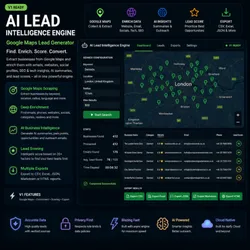
Extract business leads from Google Maps for a keyword and location, then enrich each result with website-based signals such as emails, social links, tech stack hints, SEO data, and a lead score.
What This Actor Does
Give the Actor a search like:
DentistsinLondonRoofersinAustin, TexasImmigration lawyersinDubai
It will return businesses with structured lead data such as:
- business name
- category
- address
- city and country
- phone number
- website
- extracted emails
- social links
- technology stack hints
- SEO details
- lead score and short reason
All results are written to the default Apify dataset.
Typical Use Cases
- build local business prospect lists
- find companies with weak web presence
- collect sales leads by niche and city
- enrich Google Maps results before outreach
- export leads for CRM or spreadsheet workflows
Input
Required
keyword: the type of business or search phraselocation: the city, region, or country to search
Optional
max_results: maximum number of leads to collectprovider_mode: choose how Google data is collectedplaywright_headless: run the browser invisibly or visibly when browser mode is usedexport_format: preferred export artifact formatenable_ai: reserved for future AI summary support
Provider Modes
playwright
This is the default mode on Apify.
Use it when:
- you want the simplest setup
- you do not want to provide a Google Places API key
- browser-based Google Maps extraction is acceptable
api
Use this mode when:
- you want to use the Google Places API
- you have a valid
GOOGLE_MAPS_API_KEY - you prefer API-backed collection instead of browser extraction
If you choose api, add GOOGLE_MAPS_API_KEY in the Actor environment variables or secrets.
Output
Each dataset item contains a structured business record. Common fields include:
idnamecategoryaddresscitycountryphonewebsiteemailssocial_linkstechnology_stackai_summaryoutreach_messagelead_scorelead_reason
How To Use On Apify
- Open the Actor input form.
- Enter a
keywordandlocation. - Leave
provider_modeasplaywrightfor the easiest first run. - Set
max_resultsbased on how many businesses you want. - Run the Actor.
- Open the dataset to review and export the results.
Recommended First Run
keyword:Dentistslocation:Londonmax_results:25provider_mode:playwright
Notes
playwrightmode does not require a Google API key.apimode requiresGOOGLE_MAPS_API_KEY.- Website enrichment depends on whether a business website is publicly available and reachable.
- Some businesses may have partial data if Google Maps or the target website does not expose every field.
Output Quality Tips
- Use specific keywords like
family dentists,solar installers, orpersonal injury lawyers. - Use realistic locations such as a city, metro area, or country.
- Start with smaller runs to validate the niche before scaling up.
- If you need a simpler first run, keep the default Playwright mode.


