
Google Ads Transparency Scraper | Ad Text, Regions, New Ads
Pricing
from $1.26 / 1,000 ads
Google Ads Transparency Scraper | Ad Text, Regions, New Ads
See every ad a company runs on Google Search, YouTube, Shopping, Maps and Play. Search the Google Ads Transparency Center by website, advertiser name or ID and get ad text, images, video links, dates, regions and EU impression ranges. Monitor competitors with 'Only new ads'.

Google Ads Transparency Scraper: ad text, regions, impressions, new ads
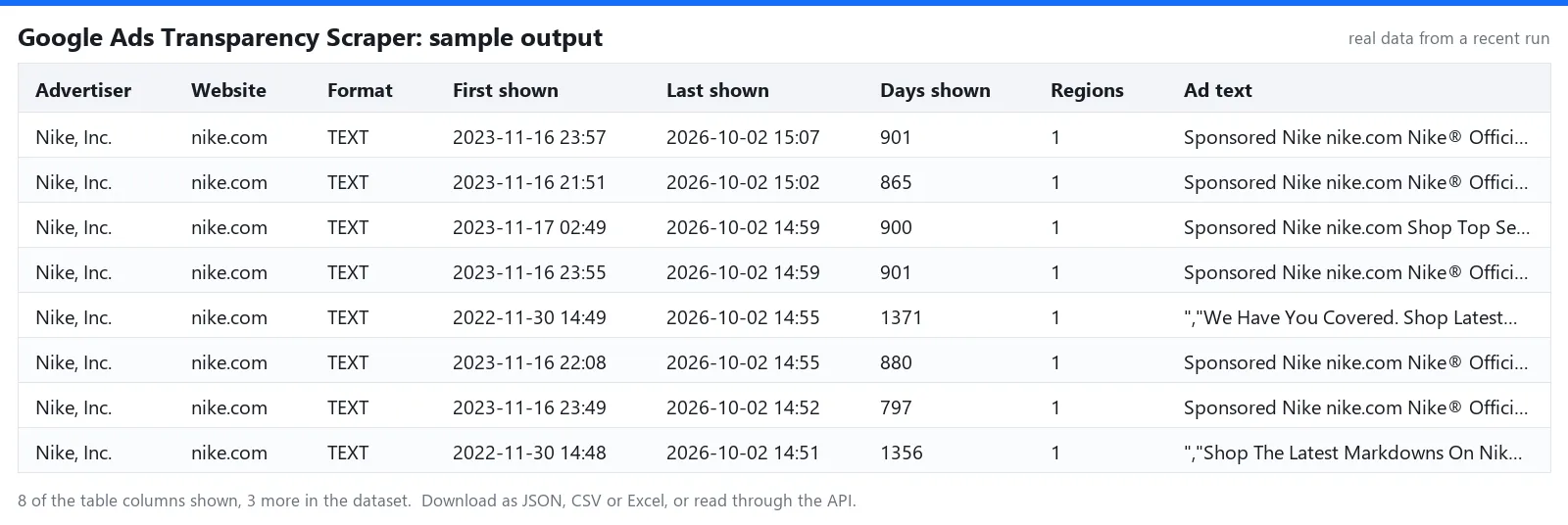
See every ad a company runs on Google: Search, YouTube, Shopping, Maps and Play. This scraper reads the public Google Ads Transparency Center and returns, for each ad, the advertiser, format, first and last shown dates, how many days it ran, the ad's visible text, image and video links, every region it was shown in and, where Google publishes them, impression ranges per region and platform.
Search by website domain, advertiser name, advertiser ID or a Transparency Center URL. Run it on a schedule with Only new ads turned on and you get only the ads that appeared since your last run.
Pay per result · No login, no API key · Public data only · Tested daily · LLM-ready JSON for AI agents (MCP)
🛠️ What does Google Ads Transparency Scraper do?
- 🔎 Search by website domain, advertiser name, advertiser ID or a Transparency Center URL.
- 🧾 Ad text, image and video links, format, first and last shown dates and how many days each ad ran.
- 🌍 Every region an ad was shown in, with impression ranges per region and platform where Google publishes them.
- 🆕 Only new ads mode. Schedule it and get just the ads that appeared since your last run.
- 🛡️ Built to get through blocking. Requests go out with a real browser fingerprint through rotating proxies, and a blocked request is retried from a fresh IP. A result that could not be completed is never charged.
What people use it for
- Competitor ad monitoring. See which ads a competitor launched this week, on which platform and in which countries.
- Creative research. Collect headlines, descriptions, images and YouTube videos of the ads in your market, and see which ones ran the longest.
- Market entry signals. Spot when a brand starts advertising in a new country.
- Agency reporting. Export a client's or a prospect's full ad history in one run.
- EU reach analysis. Use the impression ranges Google publishes for ads shown in the EU.
📊 What data can you extract?
Every result is one JSON object (one row in CSV or Excel) with these fields:
| Field | Meaning |
|---|---|
adId, adUrl | Google's ID for the ad and a link to it in the Transparency Center |
advertiserId, advertiserName, advertiserLegalName | The advertiser as verified and published by Google |
domain | The website the ad promotes (filled when you search by domain) |
format | TEXT, IMAGE or VIDEO |
firstShownAt, lastShownAt, daysShown | When the ad first and last ran, and on how many days |
adText | The visible text of the ad: headline, description, displayed URL. Empty when Google stores the ad only as a picture |
imageUrl | The ad as an image, when Google provides one |
videoUrl | The YouTube link of a video ad |
previewUrl | Google's preview script for ads that are not stored as an image |
variations, variationCount | All versions of the ad |
regions, regionCount | Every country the ad was shown in, with first and last shown dates |
regions[].impressionsMin, impressionsMax, platforms | How often the ad was shown, as a range, in total and per platform. Google publishes these only for some regions, mainly the EU |
🚀 How to use Google Ads Transparency Scraper
- Create a free Apify account and open this Actor.
- Add one or more advertisers, one per line: a domain such as
nike.com, an advertiser name, an advertiser ID (AR...) or a Transparency Center URL. - Optionally pick a region, an ad format (text, image, video), a platform and a date range.
- Set Max ads per advertiser. The most recently shown ads come first.
- Keep Include regions and variations and Include ad text and video link on for the full record, or turn them off for a faster run with the basic fields.
- Turn on Only new ads and add a schedule to watch a competitor.
- Run it and download the results as JSON, CSV, Excel, or connect them through the API.
📥 Input example (JSON)
📤 Sample output (JSON)
🤖 Use it with AI agents, MCP and the API
The output is clean JSON with stable field names, ready for LLM pipelines, RAG and agent tools without extra parsing.
- AI agents and MCP (Claude, ChatGPT, Cursor and others). Add the Apify MCP server with this Actor as a tool:
https://mcp.apify.com?tools=akatra/google-ads-transparency-scraper. The agent can then run it and read the results by itself. - API. Start a run and get the results in a single call:
- No-code tools and SDKs. Works with Make, n8n, Zapier and LangChain through Apify's integrations, and with the Apify clients for Python and JavaScript. Schedule it and send the results to a webhook, Google Sheets or your own database.
💰 Pricing: pay per result
You pay per ad, nothing for empty runs beyond a tiny start fee. See the price on the Pricing tab. Regions, variations, ad text and video links are included at no extra charge. There is no subscription or rental fee. New to Apify? The free plan includes $5 of platform credit every month, enough for about 2,700 ads with this Actor, and no credit card is needed.
🚦 Run status and error messages
Every run ends with a plain status message, so automated workflows (API, Make, n8n, AI agents) can tell what happened without reading the log:
| Situation | What you get |
|---|---|
| Finished normally | Saved N ads. |
| Nothing matched | The run succeeds with No ads saved. Check the domain or advertiser, widen the filters, or turn off 'Only new ads'. You pay only the start fee. |
| Missing or unsupported input | The run fails at once and the log names the field to fix. Nothing is scraped. |
| The site kept blocking some pages | Some pages stayed blocked, so the results are incomplete; run again to get the rest. |
| Details of some ads stayed blocked | Skipped N ads whose details stayed blocked (not charged). |
| Your maximum charge is reached | Stops cleanly with Stopped at your maximum charge limit. Everything saved so far stays in the dataset. |
ℹ️ Good to know
- A domain search returns ads from every advertiser that promotes that website, including resellers and agencies. Use an advertiser ID for one specific company. An advertiser name is matched to the closest advertiser; the run log tells you which one was used.
- Google keeps text ads either as a picture or as a live preview. The scraper reads the text from the preview when there is one; picture-only ads come with
imageUrland an emptyadText. - Dynamic keyword placeholders in ad text are replaced with their default text, as a searcher would see them.
- An ad is delivered once per run, even when it matches several of your lines. If you set a maximum charge for a run, the scraper stops as soon as that limit is reached.
- You never pay for an incomplete record: with details on, an ad whose details cannot be loaded is skipped and picked up on a later run. The run's status message tells you when something was skipped or a search could not be finished.
- Only new ads remembers what it delivered per advertiser and filter set. The first run is your baseline. From the second run on you get ads whose first shown date is after the previous run (with a three-day margin, because Google lists new ads with a delay). Google sorts ads by when they were last shown, so the scraper checks every ad shown since your previous run, up to the 20,000 most recently shown ads per advertiser. Changing the region, format, platform or dates starts a fresh memory.
- Advertiser names come from Google's public transparency registry. The scraper collects no other personal data.
📝 Changelog
- 2026-10-02 'Only new ads' now also scans the most recently shown ads and treats unfinished searches as not done. README restructured: data table, API and MCP examples, run status messages.
- 2026-10-02 Ads whose details cannot be loaded are skipped and not charged; sturdier parsing, after two independent audits.
- 2026-10-02 First release: domain and advertiser search, regions and impression ranges, ad text and video links, only-new mode.
⚖️ Legal and privacy
This scraper is an independent tool and is not affiliated with, endorsed by, or sponsored by Google. "Google", "Google Ads" and "YouTube" are trademarks of their owner and are used here only to show which website the tool works with. It reads only data that Google publishes in its public Ads Transparency Center. Ads and their content belong to their advertisers. Use the data in line with the laws that apply to you and the source site's terms.
The source site's name and logo are trademarks of their owner and appear here only to identify the website this tool works with. The Actor reads only pages that are public without logging in. How you store and use the data is your responsibility: follow the laws that apply to you, such as GDPR and CCPA.
🔗 More scrapers from Akatra
- Indeed Jobs Scraper: 💼 job ads from Indeed in 30 countries, with yearly salary and only-new mode.
- Google News Scraper: 📰 news by keyword or topic in 50 editions, with the real article URLs.
- Google Trends Scraper: 📈 interest over time, by region, and rising related queries.
- YouTube Transcript Scraper: 🎬 video transcripts as clean text and timestamped lines.
💬 Support
Found a bug or need a field that is missing? Open an issue on the Issues tab and we usually reply within a day.


