

SAM.gov Contract Opportunities: Daily RFP Alerts, No API Key
Pricing
from $1.50 / 1,000 contract opportunities
SAM.gov Contract Opportunities: Daily RFP Alerts, No API Key
Get new federal contract opportunities from SAM.gov as Excel, no API key and no coding: filter by NAICS, set-aside (8(a), WOSB, SDVOSB, HUBZone), notice type, state and keywords. Schedule it daily for government RFP alerts.
Pricing
from $1.50 / 1,000 contract opportunities
Rating
0.0
(0)
Developer

Alpine Data Labs
Maintained by CommunityActor stats
0
Bookmarked
2
Total users
1
Monthly active users
3 days ago
Last modified
Categories
Share
SAM.gov Contract Opportunities: daily RFP alerts and Excel export (no API key)
Get new federal contract opportunities from SAM.gov (solicitations, RFPs, RFQs, sources sought, presolicitations and award notices) as Excel, CSV or JSON. Filter by NAICS code, set-aside (8(a), WOSB, SDVOSB, HUBZone, small business), notice type, state and keywords. You don't need a SAM.gov API key, a login or any coding. Pick your industry, click Start, download. It reads the official SAM.gov public data file, so it does not run into the 10-requests-a-day API limit.
How to use it (no code)
- Fill in the form: pick your industry (NAICS code), e.g. 54 – Professional, scientific and technical services or 5415 – IT services. If you like, also pick a set-aside (e.g. 8(a) or SDVOSB) and states. The form already has a working example filled in.
- Click Start. A typical run takes 2–10 seconds.
- Download: open the Output tab and click Export to download Excel, CSV or JSON.
- Optional: get a daily alert. Switch on Only new opportunities since my last run, click Save as a new task, then Schedule (see below).
You never need to write JSON or code: every option is a dropdown, list field or checkbox in the form.
What you get from each federal contract opportunity
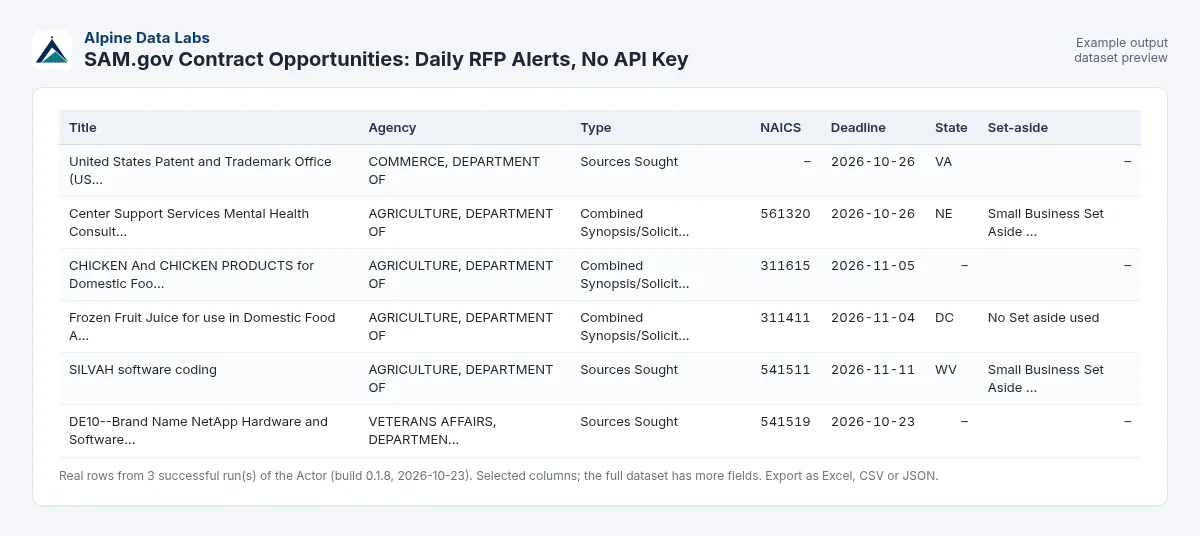
| Posted | Deadline | Days left | Title | Type | Agency | NAICS | Set-aside | State | Link |
|---|---|---|---|---|---|---|---|---|---|
| 2026-10-22 | 2026-11-11 | 19 | SILVAH software coding | Sources Sought | Forest Service | 541511 | Small Business Set Aside - Total | WV | open |
| 2026-10-21 | 2026-10-30 | 7 | ePMO Support Services | Sources Sought | Dept of the Army | 541611 | 8(a) Set-Aside (FAR 19.8) | VA | open |
| 2026-10-21 | 2026-10-30 | 7 | Draft RFP for DRPM RAS ME RAS 1.0 and MCM RAS 2.0 Professional Support | Presolicitation | Dept of the Navy | 541330 | Small Business Set Aside - Total | – | open |
(Real rows from a test run on 23 Oct 2026 with the pre-filled example.) Every row also has the solicitation number, department, sub-tier and office, PSC code, place of performance (city, state, ZIP, country), office location, the response deadline with time zone, archive date, a 400-character description snippet and award details (awardee, amount, date) for award notices. See the All details view. The official point of contact and the full description are optional extras.
Daily RFP alert: schedule it
Schedule it daily: click Schedule (or Saved tasks → Schedule), run it every morning at 08:00 with Posted in the last 3 days and Only new opportunities since my last run switched on. Each run then returns only opportunities you have not received before, which gives you a government bid alert without a subscription. Under Integrations you can send the results to email, Slack, Google Sheets, Zapier or Make.
SAM.gov refreshes its public data file once a day (early morning U.S. Eastern time), so one run a day is enough.
Typical uses
- Daily bid alert for your NAICS codes, e.g. IT services (5415) set aside for SDVOSB firms in Virginia and Maryland
- Bid/no-bid pipeline: send new solicitations with deadlines to Google Sheets, a CRM, Slack, n8n, Make or Zapier
- Proposal writers and bid consultants: one alert per client, each with its own NAICS codes and set-asides
- Market research: switch on Award Notice to see who won which federal contract and for how much
Input fields in plain words
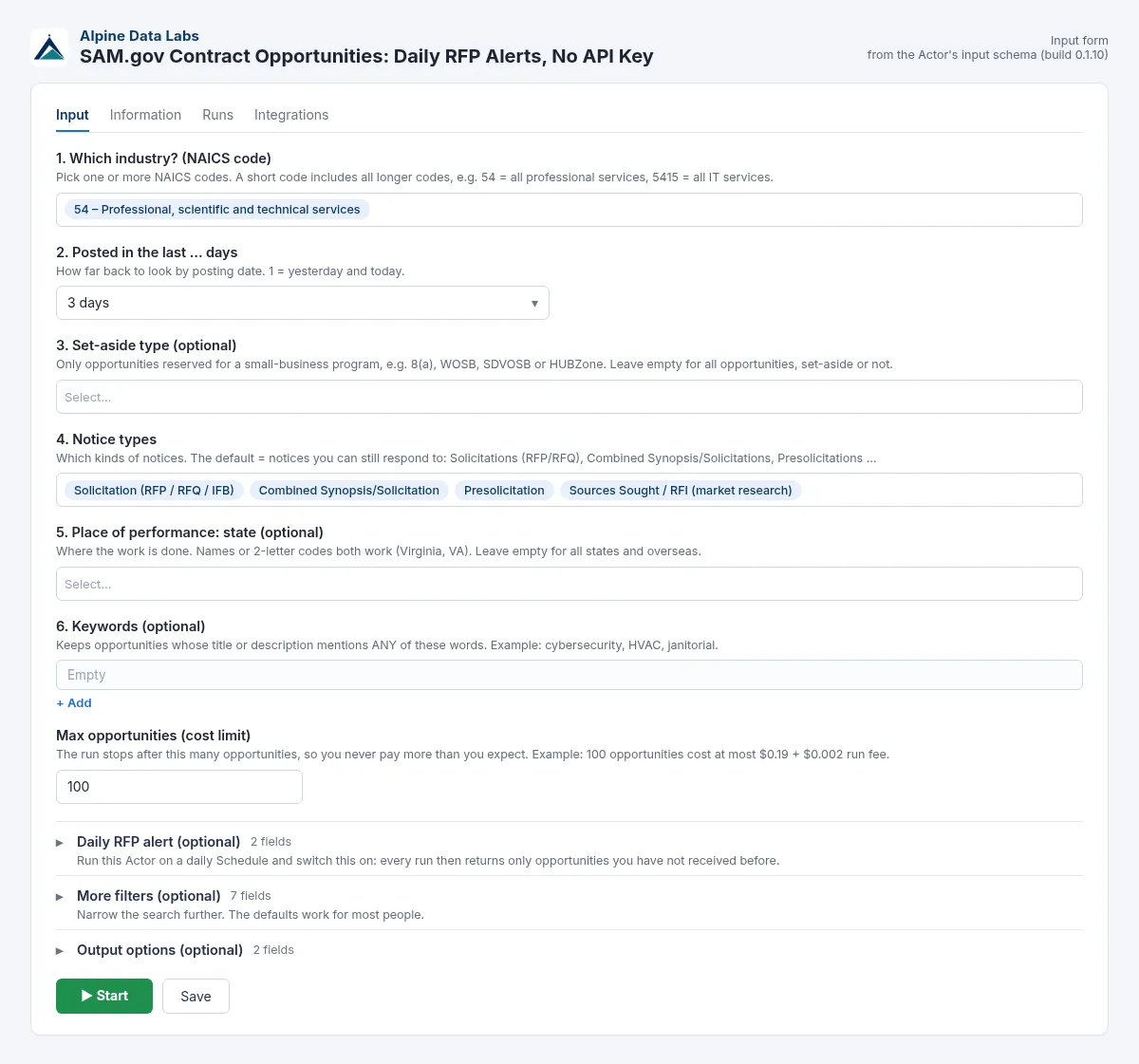
| Field | What it does | Example |
|---|---|---|
| 1. Which industry? (NAICS code) | A short code includes all longer codes (54 = all professional services). You can type any 2–6 digit code or a word such as janitorial or cybersecurity. Leave it empty for all industries. | 54, 5415, 236220 |
| 2. Posted in the last … days | How far back to look by posting date. Default and form value: 3 days. Choose All active notices for everything still open on SAM.gov. You can type a whole number from 1 to 3650 (e.g. 45). Text (e.g. abc), 0 or a negative number stops the run with a message and nothing is charged. | 3 |
| 3. Set-aside type | Only notices reserved for a small-business program. Leave it empty for everything. | 8(a), SDVOSB |
| 4. Notice types | Default: notices you can still respond to (Solicitation, Combined Synopsis/Solicitation, Presolicitation, Sources Sought). Add Award Notice to see winners. | Solicitation |
| 5. Place of performance: state | Where the work is done. Virginia and VA both work. | VA, MD, DC |
| 6. Keywords | Keeps notices whose title or description mentions any of these words. cloud* matches cloud and clouds. | cybersecurity, HVAC |
| Max opportunities (cost limit) | The run stops here, so you never pay more than you expect. | 100 (max. $0.19) |
| Only new opportunities since my last run | For daily alerts: skips notices you already received. Skipped notices are free. | on |
| More filters: Agency | Department or agency. Short forms work: VA, GSA, Army, NASA, DLA, Forest Service. | VA |
| More filters: Minimum days left | Drops notices whose response deadline is sooner. 0 drops deadlines that have already passed. Days are counted in U.S. Eastern time, like the posting-date window. | 7 |
| More filters: Exclude keywords | Drops notices that mention these words. | brand name |
| More filters: PSC code | Product/service code prefix. | D3, R4 |
| More filters: Posted from | An exact start date instead of "last … days". | 2026-10-01 |
| Output: Contact / full description | Adds the official point of contact or the full notice text. Both are off by default. | on |
Pricing
Pay per result:
- $0.0019 per opportunity returned, which is $1.90 per 1,000 opportunities ($0.0017 on the Apify Scale plan, $0.0015 on Business and higher)
- plus $0.002 per run (the fee for downloading and reading the roughly 200 MB SAM.gov file)
There is no monthly fee. Worked example: a daily alert that returns 25 new opportunities costs 25 × $0.0019 + $0.002 = $0.0495 per day, about $1.50 a month. The pre-filled example (max 100 opportunities) costs at most $0.192.
What is free: notices removed by your filters, notices skipped by Only new, and runs that fail. If the input is invalid or the SAM.gov file cannot be downloaded, the run stops and nothing is charged. A valid run that finds 0 new opportunities costs only the $0.002 run fee. Platform usage is included in the price.
These are launch prices. If they change, Apify tells existing users in advance, as its rules require.
FAQ and common mistakes
Do I need a SAM.gov API key or account? No. The Actor reads the official public Contract Opportunities data file that SAM.gov publishes every day for everyone. The SAM.gov API allows non-federal users only about 10 requests a day; this Actor does not use it, so that limit does not apply.
How do I find government contracts for small businesses? Pick your NAICS code and choose Small business set-aside (or 8(a), WOSB, SDVOSB, HUBZone) under Set-aside type. Choose Any set-aside to get every notice reserved for small businesses.
Which NAICS code do I need? Use the one from your SAM.gov registration. If you are not sure, pick a short code from the dropdown: 2 digits is a whole sector (23 = construction), 4 digits a group (5415 = IT services). Words such as janitorial, construction or cybersecurity also work.
How do I get daily government bid alerts? Turn on Only new opportunities since my last run, set Posted in the last … days to 3 and add a daily Schedule. Each different search keeps its own memory, so you can run several alerts side by side.
Is this the same as SAM.gov saved searches? It covers the same notices, but the result is a clean table you can filter in Excel, send to Google Sheets or a CRM, or feed into Zapier/Make. Nothing gets lost in a cluttered email.
I got 0 results. What now? Your filters are too narrow. Try more days (e.g. 14), a 2-digit NAICS sector, fewer keywords, more notice types or no state. Remember that many notices leave the place of performance empty (see Limits).
I typed "Virginia", "8a" or "RFP". Is that OK? Yes. State names and codes, set-aside short forms (8a, SDVOSB, WOSB, HUBZone) and words like RFP, RFQ or RFI are understood. Input that cannot be understood stops the run with a plain-English message, before anything is charged.
Are attachments (SOW, PWS) included? No. The public file has no attachments. Each row links to the notice on SAM.gov, where you can download them.
How fresh is the data? SAM.gov refreshes the file once a day. Notices posted today usually show up the next morning. For same-hour alerts you would need SAM.gov's own API.
Can I get federal contract award data? Yes, for award notices posted on SAM.gov: add Award Notice under Notice types and use the Awards view (awardee, amount, date). For complete spending history, USAspending.gov is the official source.
Limits
- One update a day: the data is as fresh as the SAM.gov public file (refreshed daily, early morning U.S. Eastern time).
- The file contains active notices only. Archived and cancelled notices are not in it.
- Many notices leave the place of performance empty. With the state filter on, the Actor then uses the contracting office's state; you can switch that off under More filters.
- No attachments, and no state or local (SLED) bids. Federal opportunities only.
- The description is cut at 32,000 characters, the Excel cell limit.
- The data is only as good as what agencies publish: deadlines, NAICS codes and set-asides are sometimes missing or wrong.
Data source and legal notes
This Actor uses the official SAM.gov Contract Opportunities public data extract, published by the U.S. General Services Administration for public download (sam.gov/data-services). It does not scrape the SAM.gov website and does not log in. It only uses public U.S. government data, and every row carries a source attribution. Contact details are the official government points of contact published on each notice. They are off by default and should only be used to ask about that procurement. SAM.gov is a U.S. government system. This Actor is not affiliated with, endorsed by, or connected to GSA or SAM.gov. Trademarks belong to their owners.
Related tools from Alpine Data Labs
- EU Tenders (TED): Tender Alerts to Excel: the same kind of daily bid alert for public tenders in the EU, Austria and Germany.
- Zefix Swiss Company Register: company lists and bulk UID checks from the Swiss commercial register.
- Career Page Job Scraper: see which government contractors are hiring, straight from their career pages.
- All tools from Alpine Data Labs: no-code data tools for public data, business research and monitoring.
Support
Found a bug, or need a field or another filter? Open an issue in the Issues tab of this Actor page. Alpine Data Labs answers there, usually within one working day.
Built and maintained by Alpine Data Labs.
For developers / API & integrations
Everything in the form is also available through the API, so the Actor fits into your own workflows, websites and scripts. The input field names, their formats and the output fields are stable: inputs that worked before keep working.
Minimal JSON input (all other fields use the form defaults):
Full example input:
cURL (runs the Actor and returns the dataset rows as JSON):
JavaScript (npm install apify-client):
Python (pip install apify-client):
Example output row:
The input is forgiving: "states": ["Virginia", "md"], "setAside": "8(a), WOSB", "naicsCodes": "541511 - Custom Computer Programming", "noticeTypes": ["RFP", "RFI"] or "days": 7 work as well. Output field names (noticeId, title, responseDeadline, samUrl, …) do not change between versions.
Input field names (API) and accepted alternatives:
| Form field | API field | Also accepted |
|---|---|---|
| Which industry? (NAICS) | naicsCodes | naics, naicsCode, naicsSectors, industry, sector; codes or words like "janitorial" |
| Posted in the last … days | postedWithinDays (string, e.g. "3", or "all"; default "3"; 1–3650; text, 0 or negative fail with $0) | days, daysBack, postedLastDays, lastDays; numbers work |
| Set-aside type | setAside | setAsides, setAsideTypes, setAsideType, set_aside; "8a", "SDVOSB", "WOSB" |
| Notice types | noticeTypes | noticeType, types, type; "RFP", "RFQ", "RFI" |
| Place of performance: state | states | state, placeOfPerformance, popStates; codes or names |
| Keywords / exclude keywords | keywords, excludeKeywords | keyword, query, search, searchTerms, q / excludeKeyword, exclude |
| Max opportunities | maxItems | maxResults, limit, max, maxRecords, count, maxOpportunities |
| Only new since my last run | onlyNew | – |
| Alert name | stateKey | monitorName, alertName |
| Agency | agencies | agency, departments |
| Minimum days left | minDaysUntilDeadline | minDaysLeft |
| PSC code | pscCodes | psc, pscCode |
| Posted from | postedFrom | from, dateFrom |
| Contact / full description | includeContacts, includeFullDescription | contacts, fullDescription |
Integrations:
- Schedules: save your input as a Task and add a Schedule (Apify Console → Schedules). Every scheduled run uses the same input.
- Webhooks: under Integrations → Webhooks, call your URL on "Run succeeded" and fetch the rows from
https://api.apify.com/v2/datasets/<datasetId>/items?format=json(orformat=xlsx/csv). - Make, Zapier, n8n: use the Apify app/node, "Run Actor" or "Run task", then "Get dataset items". Google Sheets, Slack and email integrations are available in the Integrations tab without any code.
- Apify MCP: AI agents can call this Actor through the Apify MCP server (mcp.apify.com) as the tool
alpine-data/sam-gov-contract-opportunities.
Do not put your API token into public code or web pages. Keep it on your server or in the integration's credentials.


