

TED Tenders Scraper: EU Public Procurement Alerts to Excel
Pricing
from $2.40 / 1,000 tender notices
TED Tenders Scraper: EU Public Procurement Alerts to Excel
TED tenders scraper for EU public procurement: pick countries and a sector, get new tenders with deadline, buyer and value as Excel. Daily alerts.
Pricing
from $2.40 / 1,000 tender notices
Rating
0.0
(0)
Developer

Alpine Data Labs
Maintained by CommunityActor stats
0
Bookmarked
2
Total users
1
Monthly active users
2 days ago
Last modified
Categories
Share
TED Tenders Scraper: EU public procurement notices and tender alerts as Excel
Find new EU tenders (TED tenders: EU public procurement notices) from the official TED database (Tenders Electronic Daily) for Austria, Germany or the whole EU, and download them as Excel, CSV or JSON. No coding, no login, no API key: pick your countries, click Start, download. Schedule it for daily tender alerts.
How to find EU tenders in 4 steps (no code)
- Pick your countries (e.g. Austria, Germany) and, if you like, a sector from the dropdown (e.g. 72 – IT services). The form is already filled in with a working example.
- Click Start. A run takes 5–30 seconds. Note: Start with the pre-filled example is a small paid run: about 100–150 IT tenders from Austria + Germany × $0.003, usually $0.30–0.45 and never more than Max notices (200 = $0.60).
- Open the Output tab and click Export to download Excel or CSV.
- Optional: get a daily alert. Turn on Only new notices, save as a Task and add a daily Schedule (see below). Send results by email, Google Sheets, Slack, Make, Zapier or n8n via the Integrations tab. No code needed.
What you get from each TED tender
| Deadline | Days left | Tender | Buyer | Country | Est. value | Link |
|---|---|---|---|---|---|---|
| 2026-11-16 | 24 | Österreich – Softwareprogrammierung und -beratung – Holding Graz - Backend-Vertrieb & Frontend | Holding Graz - Kommunale Dienstleistungen GmbH | AUT | 900,000 EUR | open |
| 2026-11-30 | 38 | Österreich – IT-Dienste: Beratung, Software-Entwicklung, Internet und Hilfestellung – Abschluss einer Rah… | Wiener Tourismusverband | AUT | 500,000 EUR | open |
(Real rows from a test run on 23 Oct 2026 with the pre-filled example.) Every row also has the English title, buyer city, CPV codes, place of performance, notice type, procedure, publication date and a PDF link (see the All details view).
EU public procurement scraper: CPV codes and countries
Pick one or more EU countries and a sector. Each sector is a CPV category, the EU's procurement classification, and a main category includes all its sub-categories. You can also type CPV codes (e.g. 72000000) directly. The scraper returns recent public procurement notices from TED (Tenders Electronic Daily) with notice number, title, buyer, country, deadline and, if the buyer published it, the estimated value. Run it daily as a tender alert for Ausschreibungen in Austria, Germany or the whole EU.
Daily tender alert: schedule it
Schedule it daily: click Schedule (or Saved tasks → Schedule) and run it every morning at 07:00 with Only new notices since my last run switched on. Each run then returns only tenders you have not seen before, which gives you a tender alert without a subscription. Connect email, Slack, Google Sheets or Zapier/Make under Integrations.
Öffentliche Ausschreibungen aus Österreich und Deutschland
Der Actor findet öffentliche Ausschreibungen aus Österreich, Deutschland und der ganzen EU (EU-weite Ausschreibungen ab den EU-Schwellenwerten) ohne Programmieren: Land wählen, Branche wählen (z. B. 72 – IT-Dienste für IT-Ausschreibungen oder 45 – Bauarbeiten für Bauausschreibungen), auf Start klicken und als Excel herunterladen. Mit Only new notices since my last run und einem täglichen Zeitplan wird daraus ein kostenloser Ausschreibungs-Alert.
Typical uses
- Daily tender alert for your sector, e.g. IT services in Austria and Germany
- Sales pipeline: send new tenders to Google Sheets, Slack, a CRM, n8n, Make or Zapier
- Market research: with Contract award notices, see who won which contract and at what value
Input fields in plain words
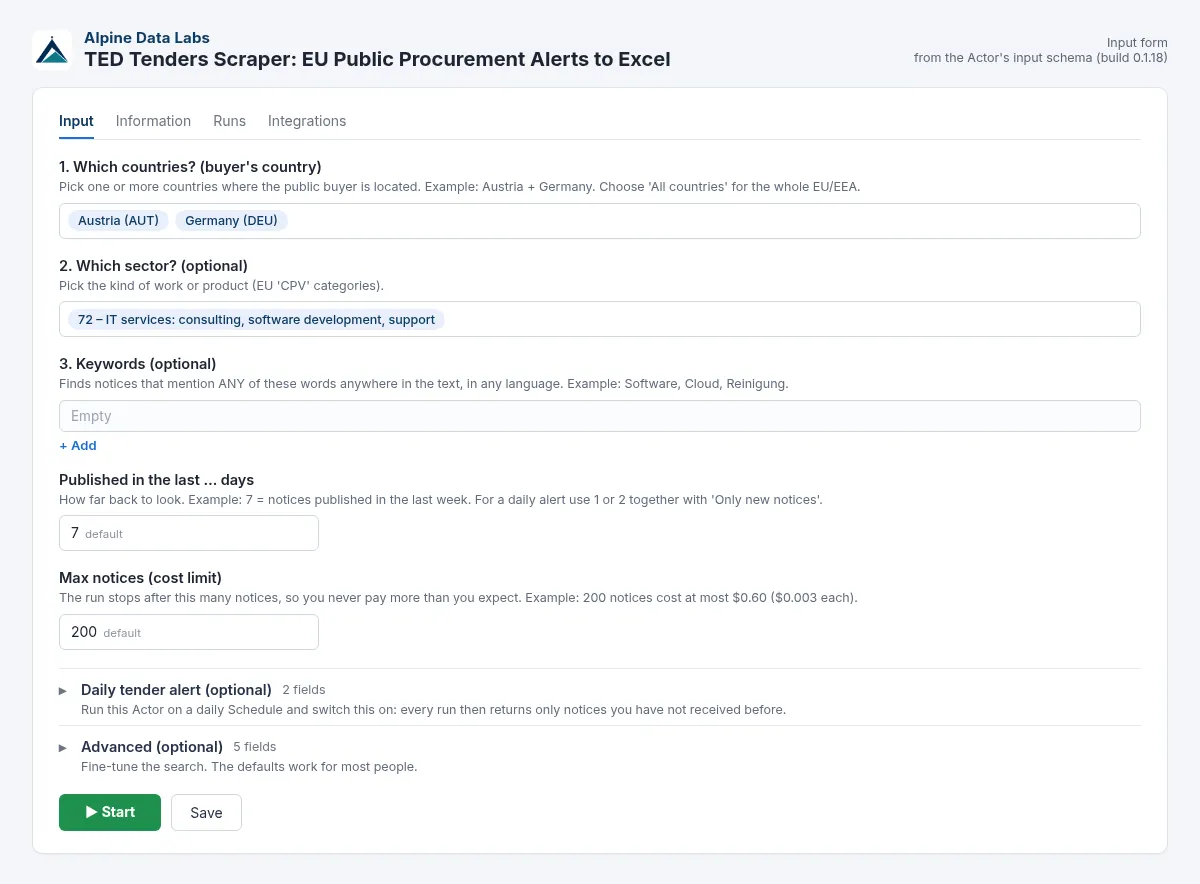
| Field | What it does | Example |
|---|---|---|
| Which countries? | Country of the public buyer. Choose All countries for the whole EU/EEA. You can also type names or codes: Österreich, AT and AUT all work. If you leave it empty, the default Austria + Germany is searched (the run status says so). | Austria, Germany |
| Which sector? | EU product/service category (CPV). A main category includes all sub-categories. You can also type a code (90910000, 72000000-8) or a word (Reinigung, IT). | 72 – IT services |
| Keywords | Finds notices that mention any of these words, in any language. Commas or new lines separate words. | Software, Cloud |
| Published in the last … days | How far back to look. | 7 |
| Max notices (cost limit) | The run stops here, so you never pay more than you expect. | 200 (max. $0.60) |
| Only new notices since my last run | For daily alerts: skips notices you already received. Skipped notices are free. | on |
| Alert name | Only needed if you run several different alerts. | vienna-it |
| Advanced: Notice types | Open calls for tender (default), planned tenders, or award notices (who won). | Open calls for tender |
| Advanced: Only tenders that are still open | Drops notices whose deadline has passed (free). | on |
| Advanced: Minimum estimated value | Keeps notices with a published value at or above this amount (others are skipped and free). | 100000 |
| Advanced: Published from | Exact start date instead of "last … days". 2026-10-01, 01.10.2026, yesterday/gestern and today/heute all work. | 2026-10-01 |
| Advanced: Language | Language for title, buyer and link. | German, English |
Output fields
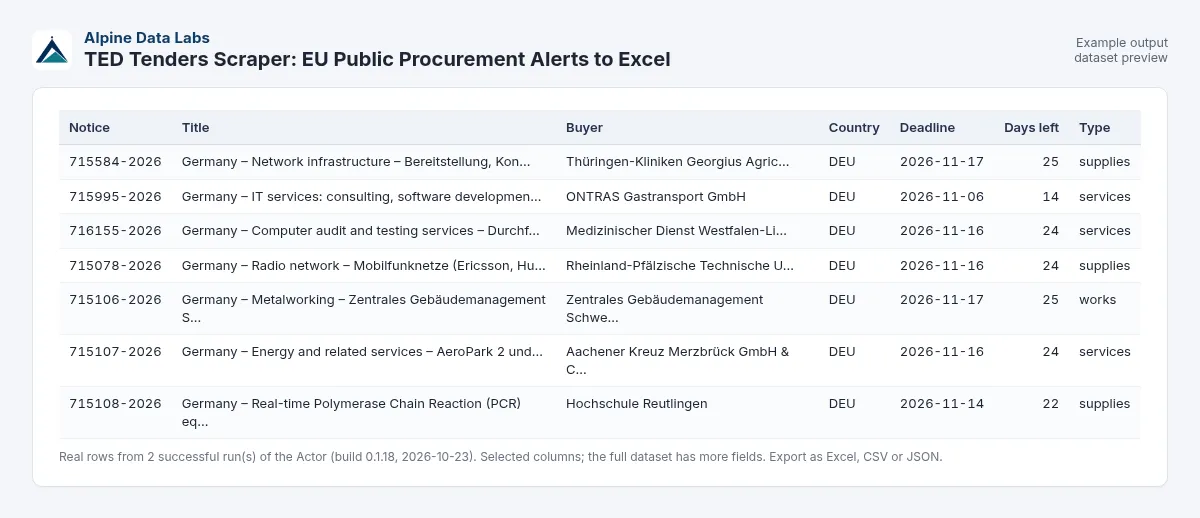
publicationNumber, title, titleEnglish, buyerName, buyerCity, buyerCountry, publicationDate, deadline, deadlineType (tender_submission or request_to_participate), daysUntilDeadline, noticeType (TED code, e.g. cn-standard), noticeTypeLabel (plain words, e.g. Call for tenders), procedureType, contractNature, cpvCodes, placeOfPerformance (NUTS codes), estimatedValue, currency, url, pdfUrl, source.
Pricing
Pay per result: $0.003 per tender notice returned, which is $3.00 per 1,000 notices. There is no start fee and no monthly fee. Notices skipped by Only new notices are free.
These are launch prices while the Actor builds its first user base. If prices change, Apify notifies existing users in advance, as its rules require. Platform usage is included in the price.
Higher Apify plans pay less: SILVER 10 % off, GOLD and above 20 % off.
FAQ and common mistakes
Which CPV code do I need? CPV codes are the EU's sector codes for public procurement. Pick a main category from the Which sector? dropdown (e.g. 72 – IT services, 45 – Construction work, 79 – Business services). It includes all sub-codes. You can also type a code such as 72000000 or a word such as IT.
Do I need a TED API key or an account at TED? No. The Actor uses the public TED API for you. You only need a free Apify account.
How do I find IT tenders or construction tenders? Choose 72 – IT services or 45 – Construction work under Which sector? and your countries. There are ready-made examples in the Examples section of this page.
I got 0 results. What now? Your filters are too narrow. Try more days back (e.g. 30), remove keywords, choose a main sector such as 72 – IT services instead of a very specific code, or add countries. Runs with 0 results cost nothing.
I typed "AT" / "Österreich" / "Austria". Is that OK? Yes. Names (English, German or local) and 2- or 3-letter codes are all understood. If a country cannot be recognised, the run stops with a message telling you what to fix (all input problems at once, e.g. a wrong country and a wrong date), and nothing is charged.
My keyword found too much. A keyword searches the whole notice text. Combine it with a sector, or use a more specific phrase such as facility management.
Why is the deadline missing on some notices? Not every notice has one (award notices, for example). deadlineType tells you whether a date is for submitting a tender or for a request to participate.
Why is the estimated value empty? Many buyers do not publish it. If you set Minimum estimated value, notices without a value are skipped (and free).
How do I get only tenders I haven't seen yet? Switch on Only new notices since my last run and schedule the Actor daily. If you run several different searches, give each its own Alert name.
What happens with odd input? Extra spaces, lower/upper case, commas, CPV codes with check digit (72000000-8) and German dates are cleaned up automatically. Anything that cannot be understood stops the run with a plain-English message before anything is charged.
Is this legal to use commercially? Yes. TED data is official EU open data, and reuse (including commercial reuse) is allowed under Commission Decision 2011/833/EU with attribution.
How fresh is the data? TED publishes about 2,500 notices every working day. Each run queries the live TED API.
Which countries are covered? All EU/EEA countries and some others that publish on TED.
Limits
- The data is only as good as what buyers publish. Estimated value and deadline are often missing.
- TED covers tenders above EU thresholds (plus some voluntary ones). Smaller national tenders are published only on national portals.
- Max 15,000 notices per run (TED API limit). Narrow the dates or filters if you need more.
- If the TED API is down, the run stops with a clear message and nothing is charged.
Data source and licence
Uses the official TED Search API v3 (no website scraping, no login). Source: TED – Tenders Electronic Daily, © European Union. Reuse is permitted under Commission Decision 2011/833/EU. Every row carries a source attribution. This Actor is not affiliated with the EU Publications Office.
Related tools from Alpine Data Labs
- Crypto Arbitrage Scanner: exchange spreads for one coin on 20 exchanges, net of fees, as Excel.
- Honeypot & Rug Pull Checker: token risk score (0-100) and honeypot/rug pull flags for Ethereum, BSC, Base and Solana.
- Zefix Scraper: Swiss Company Register: Swiss company lists with UID, legal form and address (Handelsregister Schweiz).
- Career Page Job Scraper: every open job from Greenhouse, Lever, Workday, Ashby and Personio, plus hiring signals.
- All tools from Alpine Data Labs: no-code data tools for public data, business research and monitoring.
For developers: API & integrations
Everything in the form is also available via the API, with the same field names. Old inputs keep working; new fields are optional.
Input JSON example
The API is forgiving too: "countries": ["Austria", "de"], "cpvCodes": ["72000000-8"] or "publishedFrom": "01.10.2026" work as well.
cURL (run and get the results in one call):
JavaScript (npm i apify-client):
Python (pip install apify-client):
Webhooks, schedules and no-code tools: add a webhook (event Run succeeded) in the Integrations tab to call your own URL when a run finishes, or use the official Apify apps for Make, Zapier and n8n (action Run Actor, then Get dataset items). Schedules work for API users too. AI agents can call this Actor via the Apify MCP server (mcp.apify.com).
Support
Found a bug, need a field or another filter? Open an issue in the Issues tab of this Actor page. Alpine Data Labs answers there, usually within one working day.
Built and maintained by Alpine Data Labs.


