

Zefix Scraper: Swiss Company Register Search to Excel
Pricing
from $3.04 / 1,000 companies
Zefix Scraper: Swiss Company Register Search to Excel
Zefix scraper for the Swiss company register (Handelsregister): search by name, activity or canton, get UID, legal form and address as Excel.
Pricing
from $3.04 / 1,000 companies
Rating
0.0
(0)
Developer

Alpine Data Labs
Maintained by CommunityActor stats
0
Bookmarked
2
Total users
1
Monthly active users
2 days ago
Last modified
Categories
Share
Zefix Scraper: Swiss company register search and company lists as Excel
Get lists of active Swiss companies from the official commercial register (Zefix) and download them as Excel, CSV or JSON. No coding, no login, no API key: type a word, pick a canton, click Start, download. You can also check UIDs in bulk.
How to search the Swiss company register in 4 steps (no code)
- Type a word from the company name (e.g.
treuhand) or its business activity (e.g.software), and pick a canton (e.g. Zug) if you like. The form is already filled in with a working example. - Click Start. Most runs take 5–60 seconds; searches with no match end after about 15–25 seconds and cost nothing. Note: Start with the pre-filled example is a small paid run: up to 100 companies × $0.0038 = at most $0.38. An empty input runs a smaller example (20 Treuhand companies in Zug, about $0.08).
- Open the Output tab and click Export to download Excel or CSV.
- Optional: automate it. Save your search as a Task and add a Schedule (e.g. weekly) to get new companies regularly. Send results to Google Sheets, Make, Zapier or n8n via the Integrations tab. No code needed.
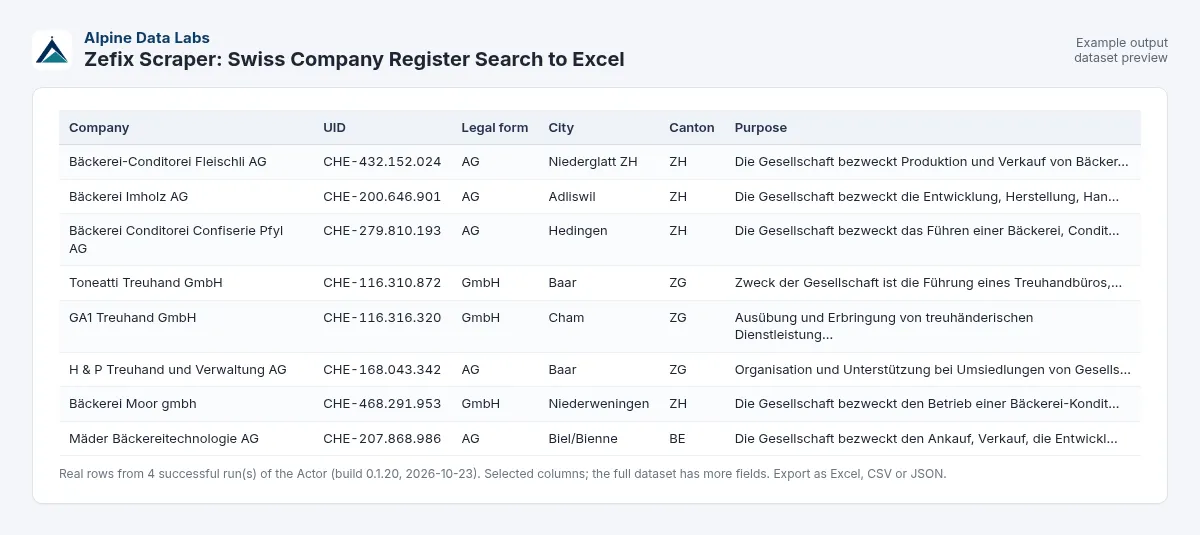
What you get: a Swiss company list with UID, address and purpose
| Company | UID | Legal form | Address | Canton | Business purpose | Link |
|---|---|---|---|---|---|---|
| Toneatti Treuhand GmbH | CHE-116.310.872 | GmbH | Grabenstrasse 5A, 6340 Baar | ZG | die Führung eines Treuhandbüros, insbesondere Jahresabschlüsse, Steuer… | Zefix |
| GA1 Treuhand GmbH | CHE-116.316.320 | GmbH | Eichstrasse 6 A, 6330 Cham | ZG | Ausübung und Erbringung von treuhänderischen Dienstleistungen aller Ar… | Zefix |
| H & P Treuhand und Verwaltung AG | CHE-168.043.342 | AG | Haldenstrasse 5, 6340 Baar | ZG | Organisation und Unterstützung bei Umsiedlungen von Gesellschaften und… | Zefix |
(Real rows from a test run on 23 Oct 2026 with the pre-filled example.) Every row also has name translations, CH-ID, the full legal form in German and French, the municipality number and a link to the UID register (see the All details view).
Schedule it daily: click Schedule (or Saved tasks → Schedule) to refresh your list every morning, e.g. to spot newly registered companies in your canton and industry. Connect email, Google Sheets, Slack or Zapier/Make under Integrations.
List of Swiss companies by canton and industry
Build a list of Swiss companies for one canton (e.g. Zürich, Bern, Vaud) and an activity or industry keyword (e.g. Treuhand, software, Bäckerei). You get the matching active companies from the official Swiss company register (Zefix / Handelsregister) with UID, legal form, address and canton, ready for Excel or your CRM. Max companies (default 100, up to 50,000) caps the list and the cost.
Handelsregister Schweiz: Firmensuche und Firmenliste ohne Programmieren
Der Actor durchsucht das Handelsregister der Schweiz (Zefix-Daten) nach Firmenname oder Zweck, z. B. alle Treuhand-Firmen im Kanton Zug oder alle Software-Firmen in Zürich. Ergebnis: eine Firmenliste Schweiz mit UID, Rechtsform, Adresse und Zweck als Excel. UID-Nummern prüfen geht auch in grossen Mengen: UIDs einfügen, Start klicken.
Typical uses
- Lead lists by industry and region, e.g. all
Photovoltaikcompanies in canton Bern - Check suppliers or customers (KYB): paste UIDs and see if each company is registered and active, with its official name and address
- Market research: how many GmbHs in Zurich mention
softwarein their purpose?
Input fields in plain words
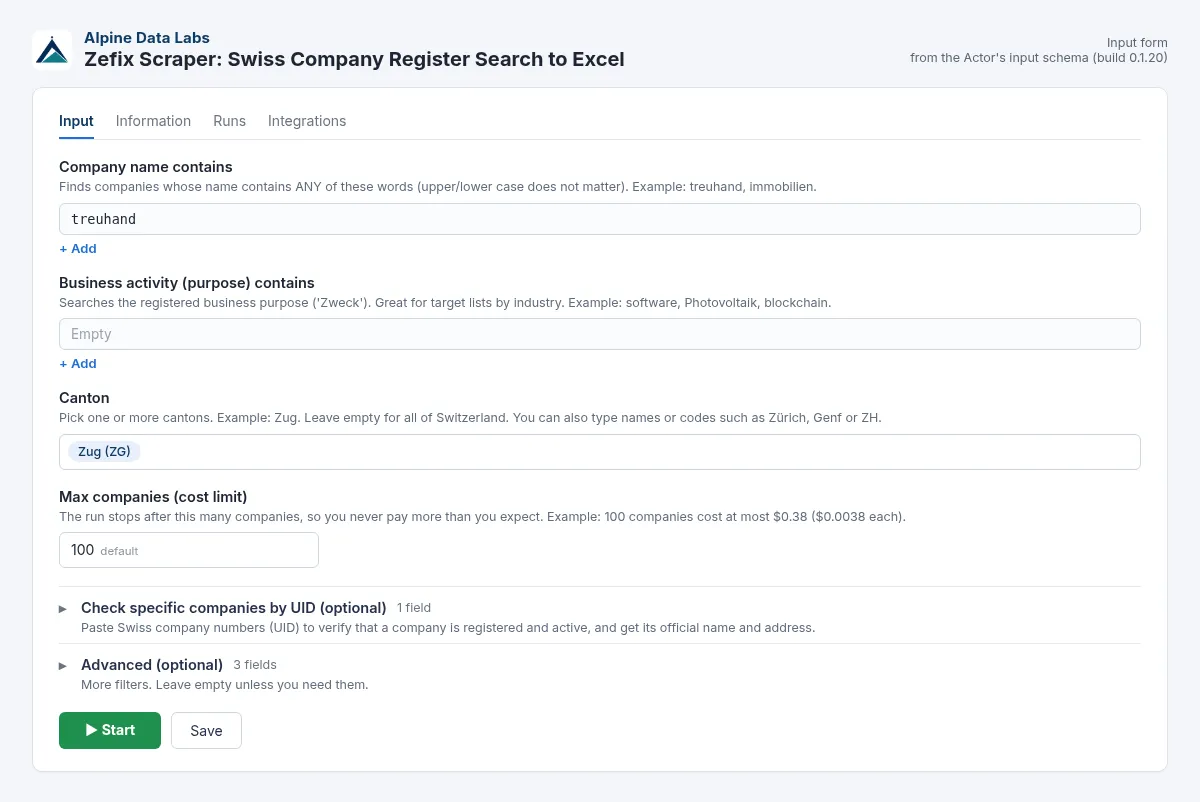
| Field | What it does | Example |
|---|---|---|
| Company name contains | Finds companies whose name contains any of these words. Upper/lower case does not matter. | treuhand |
| Business activity (purpose) contains | Searches the registered business purpose. German, French or Italian words find the most. | software, Photovoltaik |
| Canton | One or more cantons. Leave empty for all of Switzerland. Zürich, Genf, Kanton Zug and ZH all work. | Zug |
| Max companies (cost limit) | The run stops here, so you never pay more than you expect. | 100 (max. $0.38) |
| Look up companies by UID | Paste UIDs in any format: CHE-105.841.533, CHE105841533, 105841533 or CHE-105.841.533 MWST. | CHE-105.841.533 |
| Advanced: Postal codes | 4-digit postal codes. 8001 Zürich or CH-8001 also work. | 8001, 6300 |
| Advanced: Legal form | Pick from the list, or type AG, GmbH, Sàrl, Verein, Stiftung or a code like 0106. | AG, GmbH |
| Advanced: Include sole proprietorships | Off by default (see Data protection). | off |
If you start the Actor with no filter at all, it runs a small example search (20 Treuhand companies in Zug, about $0.08) so you can see what the output looks like.
Output fields
name, nameTranslations, uid (CHE-xxx.xxx.xxx), chid, zefixCompanyId, legalFormShort (e.g. GmbH), legalForm, legalFormFr, legalFormCode (eCH-0097 code, e.g. 0107), purpose, street, postalCode, city, canton, municipalityBfsId, zefixUrl, uidRegisterUrl, linkedDataUri, source.
Pricing
Pay per result: $0.0038 per company returned, which is $3.80 per 1,000 companies. There is no start fee. A UID lookup with 10 UIDs costs about $0.04.
These are launch prices while the Actor builds its first user base. If prices change, Apify notifies existing users in advance, as its rules require. Platform usage is included in the price.
Higher Apify plans pay less: SILVER 10 % off, GOLD and above 20 % off.
FAQ and common mistakes
How do I check a Swiss UID number (UID Nummer prüfen)? Paste one or many UIDs into Look up companies by UID (one per line, CHE-105.841.533 or CHE105841533) and click Start. Each row shows whether the company is active, plus name, legal form and address. Typos are detected via the check digit and are free.
Can I get a list of all companies in a canton or town? Yes. Pick the canton, or type postal codes under Advanced, and set Max companies high enough. Leave the name empty but type a business activity (e.g. software), or use a broad word.
I got 0 results. What now? Use a shorter word: treuhand instead of Treuhand AG Zürich. Remove the postal code or legal form filter. Try the German word (Reinigung) as well as the French one (nettoyage). Runs with 0 results cost nothing.
My UID is "not found". The register contains active companies only. Deleted or merged companies are not included. UIDs that are not found are not charged.
My UID is "invalid". A Swiss UID has 9 digits and a check digit. If the check digit does not match, you probably have a typo. Invalid UIDs are skipped, reported in the status message and not charged. If none of the UIDs is valid, the run stops and nothing is charged.
I typed "Zürich" / "Genf" / "zh". Is that OK? Yes. Canton names in German, French, Italian or English, and the 2-letter codes, are all understood. If a canton cannot be recognised, the run stops with a message telling you what to fix, and nothing is charged.
Can I get directors, signatories or share capital? No. The open dataset does not contain them.
Is this the official register? The data comes from the official Zefix open dataset of the Federal Office of Justice. Legally binding extracts are still issued only by the cantonal commercial registers.
How many companies can I get? There is no hard cap. Set Max companies. Large searches (1,000+ companies) finish in about a minute.
Zefix vs. Moneyhouse: what is the difference? Zefix is the official, free central index of the Swiss commercial register run by the federal government. This actor reads the official Zefix open data (published by the federal government on ld.admin.ch). Moneyhouse is a private service that re-publishes register data with extra information, partly behind a paywall. For bulk company lists with UID and address, Zefix data is the primary source.
Data protection
The open dataset contains company-level data only (no directors, no signatories). Sole proprietorships are excluded by default, because their names usually include a private person's name. You can include them explicitly; you are then responsible for having a lawful basis under the Swiss FADP/GDPR. Electronic marketing to companies may require prior consent (e.g. Swiss UWG Art. 3 o, EU ePrivacy rules).
Limits
- Active companies only. Deleted entities are not in the open dataset.
- No share capital, officers or SOGC publications.
- If ld.admin.ch is unreachable, the run stops with a clear message and nothing is charged. If only some requests fail, the status message says so.
- The data is updated daily by the FOJ. This Actor is not affiliated with the Swiss Confederation.
Data source
Federal Office of Justice FOJ, Zefix central business name index, via the federal LINDAS linked-data endpoint (ld.admin.ch) and opendata.swiss (no website scraping). Terms: Open use. Must provide the source. Every row includes a source field.
Related tools from Alpine Data Labs
- Crypto Arbitrage Scanner: exchange spreads for one coin on 20 exchanges, net of fees, as Excel.
- Honeypot & Rug Pull Checker: token risk score (0-100) and honeypot/rug pull flags for Ethereum, BSC, Base and Solana.
- TED Tenders Scraper: EU public procurement notices and daily tender alerts as Excel.
- Career Page Job Scraper: every open job from Greenhouse, Lever, Workday, Ashby and Personio, plus hiring signals.
- All tools from Alpine Data Labs: no-code data tools for public data, business research and monitoring.
For developers: API & integrations
Everything in the form is also available via the API, with the same field names. Old inputs keep working; new fields are optional.
Input JSON example
More examples:
- AGs and GmbHs in Zug with "blockchain" in their purpose:
{ "purposeContains": ["blockchain"], "cantons": ["ZG"], "legalForms": ["AG", "GmbH"], "maxResults": 500 } - Check UIDs:
{ "uids": ["CHE-105.841.533", "CHE-116.310.872"] }
The API is forgiving too: "cantons": ["Zürich", "genf"], "legalForms": ["0106"] or "nameContains": ["treuhand, immobilien"] (comma-separated in one line) work as well.
cURL (run and get the results in one call):
JavaScript (npm i apify-client):
Python (pip install apify-client):
Webhooks, schedules and no-code tools: add a webhook (event Run succeeded) in the Integrations tab to call your own URL when a run finishes, or use the official Apify apps for Make, Zapier and n8n (action Run Actor, then Get dataset items). Schedules work for API users too. AI agents can call this Actor via the Apify MCP server (mcp.apify.com).
Support
Found a bug, need a field or another filter? Open an issue in the Issues tab of this Actor page. Alpine Data Labs answers there, usually within one working day.
Built and maintained by Alpine Data Labs.


