

Career Page Job Scraper: Greenhouse, Lever, Workday ATS Jobs
Pricing
from $1.20 / 1,000 job postings
Career Page Job Scraper: Greenhouse, Lever, Workday ATS Jobs
Greenhouse jobs scraper and career page job scraper: paste company sites and get every open job from Greenhouse, Lever, Workday, Ashby and Personio boards as Excel, plus hiring signals.
Pricing
from $1.20 / 1,000 job postings
Rating
0.0
(0)
Developer

Alpine Data Labs
Maintained by CommunityActor stats
0
Bookmarked
2
Total users
1
Monthly active users
2 days ago
Last modified
Categories
Share
Greenhouse Jobs Scraper and Career Page Job Scraper: Lever, Workday, Ashby, Personio & more
A Greenhouse jobs scraper and career page job scraper: get every open job from company career pages (Greenhouse jobs and other ATS jobs) and download it as Excel, CSV or JSON. Paste company websites, click Start. The Actor finds each company's job board for you (Greenhouse, Lever, Ashby, Workday, SmartRecruiters, Personio, Workable, Recruitee, Teamtailor) and adds hiring signals per company: open jobs, new and closed jobs since the last run, top departments and locations. No login, no API key, no coding.
How to use (no code, 4 steps)
- Paste companies, one per line: a website (
stripe.com), a careers page URL (https://jobs.lever.co/palantir) or a name (Hugging Face). The form already has five working examples. - Click Start. Most companies take 1–5 seconds each. Note: Start with the pre-filled example is a small paid run (5 companies, max 50 job rows each): about $0.30–0.40. If field 1 is empty, the run stops at once with a clear message and nothing is charged.
- Open the Output tab: Jobs (overview) or Company hiring signals. Click Export for Excel or CSV.
- Optional: automate it. Save your companies as a Task, turn on Only new jobs and add a Schedule (e.g. every Monday). Send results to Google Sheets, Slack, Make, Zapier or n8n via the Integrations tab. No code needed.
What you get: job postings + hiring signals
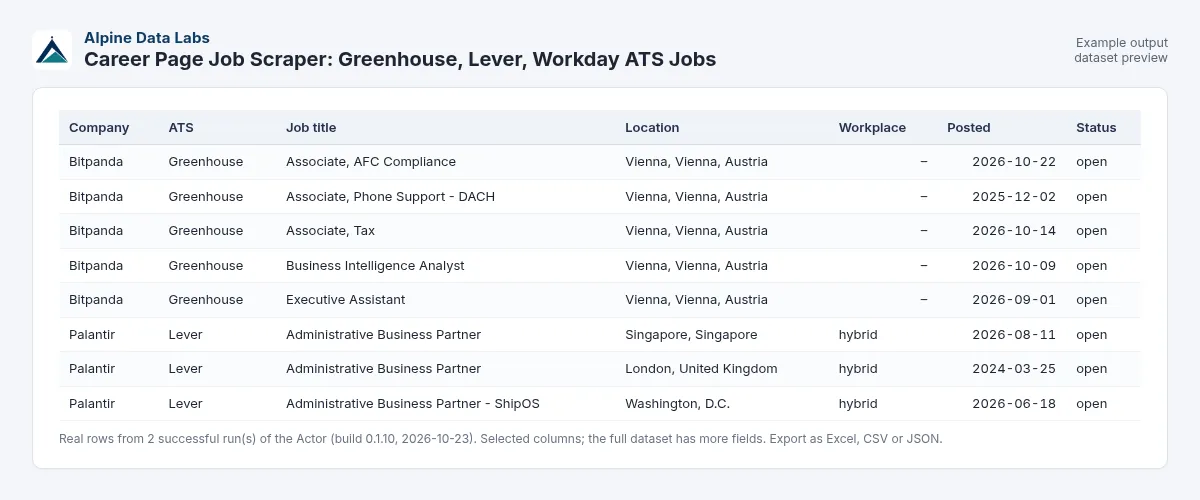
| Company | Job title | Status | Location | Department | Posted | Job board | Link |
|---|---|---|---|---|---|---|---|
| Palantir | Backend Software Engineer - Infrastructure | open | New York, NY | Dev | 2025-08-06 | Lever | open |
| Airbnb | Associate Legal Counsel, Japan | open | Tokyo, Japan | 2026-04-13 | Greenhouse | open | |
| Palantir | HIRING SUMMARY: 10 open jobs | summary | Dev: 9; Recruiting Operations: 1 | Lever |
(Real rows from a test run on 23 Oct 2026.) Job rows also include team, city, country, remote flag, workplace type, employment type, updated date, salary range (when the employer publishes it, e.g. on Ashby), firstSeenAt and, optionally, the full description. Summary rows include openJobs, newSinceLastRun, closedSinceLastRun, postedLast7Days, postedLast30Days, remoteJobs, topDepartments, topLocations and topNewTitles.
Monitor job postings (job alert): click Schedule and run it daily or weekly with Only new jobs since the last run switched on. Each run then returns only new jobs (plus jobs that were closed), and the summary shows how many jobs each company opened and closed. Send the results to email, Slack, Google Sheets, a CRM, Make, Zapier or n8n under Integrations.
Use cases: hiring signals, job alerts, market research
- Sales prospecting / intent signals: companies hiring "Salesforce admin" or "data engineer" are likely buyers of your product. Track hiring velocity of your target accounts.
- Competitor and market intelligence: which teams and cities are your competitors growing? Who opened 30 jobs last month?
- Job alerts for yourself: new remote engineering jobs at 50 favourite companies, every morning.
- Recruiting agencies: spot new openings at client companies before they reach job boards.
- Investors and analysts: headcount growth proxy for private companies.
- Job boards and HR tech: clean, normalised job feeds straight from the employer's own career site.
Input fields in plain words
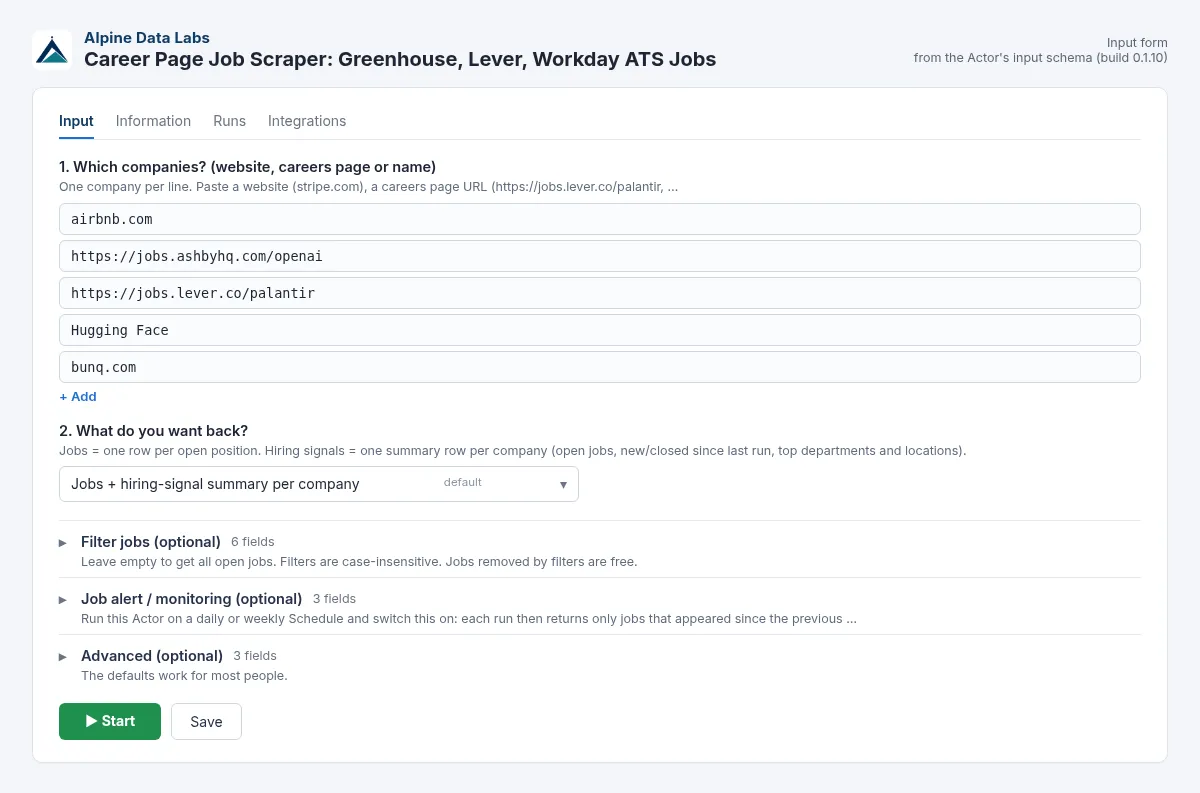
| Field | What it does | Example |
|---|---|---|
| Which companies? | Website, careers page URL or company name, one per line. ats:slug also works. | stripe.com, https://jobs.ashbyhq.com/openai, greenhouse:airbnb |
| What do you want back? | Jobs + summary (default), only jobs, or only the summary (cheapest). | Jobs + summary |
| Filter: Job title must contain | Keep titles containing any of these words (case-insensitive). | engineer, sales |
| Filter: Job title must NOT contain | Drop titles containing these words. | intern |
| Filter: Location contains | Keep jobs in matching places. Remote also matches remote jobs. German and English names both work and umlauts/accents/case do not matter: München = Munich = Muenchen, Wien = Vienna, Zürich = Zurich, Köln = Cologne, Genf = Geneva, Prag = Prague, Deutschland = Germany. | Vienna, Germany, Remote |
| Filter: Department contains | Keep matching departments/teams. | Engineering |
| Filter: Only remote jobs / Posted within N days | Self-explanatory. 0 days = any date. | on / 30 |
| Monitor: Only new jobs since the last run | Skips jobs you already received (free). The first run returns everything. | on |
| Monitor: Also report closed jobs | Adds a row with status closed for jobs that disappeared. | on |
| Monitor: Monitor name | Keeps separate monitors apart. | competitors |
| Advanced: Include description | Adds the plain-text job description (for your own analysis). | off |
| Advanced: Max job rows per company | Cost cap on job rows per company (the summary still counts all jobs). Pre-filled with 50 for cheap test runs; default 1,000, up to 5,000. | 1000 |
| Advanced: Systems to try when guessing | Limits name-based guessing to some systems. | Greenhouse, Lever |
Example output (one job row, JSON)
Pricing
Pay only for results (pay per event), no monthly fee:
| What | Price | Per 1,000 |
|---|---|---|
| Job row (open, new or closed job) | $0.0015 | $1.50 per 1,000 jobs |
| Company hiring-signal summary | $0.004 | $4 per 1,000 companies |
Example: 50 companies with 40 matching jobs each = 2,000 jobs ($3.00) + 50 summaries ($0.20) = $3.20. Only summaries for 500 companies (weekly monitor) = $2.00. The pre-filled example (5 companies, max 50 job rows each) costs about $0.40. Companies whose job board cannot be found, jobs removed by your filters, already-seen jobs and summaries of companies with 0 matching jobs (kept as an info row with charged: false) are free. Set Max charge per run in the run options for a hard cost limit.
Higher Apify plans pay less: SILVER 10 % off, GOLD and above 20 % off.
Supported job-board systems (ATS) with example URLs
Paste any of these URL forms (or just the company website). The ats:slug form skips detection.
| System | Example URL you can paste | Short form |
|---|---|---|
| Greenhouse | https://boards.greenhouse.io/airbnb | greenhouse:airbnb |
| Lever | https://jobs.lever.co/palantir | lever:palantir |
| Lever EU | https://jobs.eu.lever.co/yourcompany | lever-eu:yourcompany |
| Ashby | https://jobs.ashbyhq.com/openai | ashby:openai |
| Workday | https://nvidia.wd5.myworkdayjobs.com/NVIDIAExternalCareerSite | URL only |
| Personio | https://personio.jobs.personio.de | personio:personio |
| SmartRecruiters | https://jobs.smartrecruiters.com/YourCompany | smartrecruiters:YourCompany |
| Workable | https://apply.workable.com/yourcompany/ | workable:yourcompany |
| Recruitee | https://yourcompany.recruitee.com | recruitee:yourcompany |
| Teamtailor | https://yourcompany.teamtailor.com | teamtailor:yourcompany |
yourcompany stands for the company's own board name, which you can see in the address bar of its job list.
Greenhouse job scraper
Paste a Greenhouse board (https://boards.greenhouse.io/airbnb), the short form greenhouse:airbnb or just the company website. You get every open job on the Greenhouse career page with title, location, department, remote flag, posting date and the link to the job posting.
Lever job scraper
Works with https://jobs.lever.co/palantir, EU boards (https://jobs.eu.lever.co/yourcompany) and the short forms lever: / lever-eu:. It exports all Lever postings as Excel, CSV or JSON.
Workday job scraper
Paste the full Workday career site URL, e.g. https://nvidia.wd5.myworkdayjobs.com/NVIDIAExternalCareerSite. Workday has no short form. The scraper pages through the Workday job list (up to 2,000 jobs per board and your Max jobs per company), which the Workday site itself makes hard to export.
Ashby job scraper
Paste https://jobs.ashbyhq.com/openai or ashby:openai. Common with startups and AI companies.
Personio job scraper
Paste https://yourcompany.jobs.personio.de or personio:yourcompany. It exports every open position from Personio, which is widely used in Germany, Austria and Switzerland (see the German section below).
Personio-Jobs exportieren (alle offenen Stellen als Excel)
Viele Unternehmen in Deutschland, Österreich und der Schweiz veröffentlichen ihre Stellen über Personio. So exportieren Sie sie:
- In Feld 1 die Personio-Jobseite einfügen (
https://firma.jobs.personio.de) oder einfach die Website der Firma (firma.de). Mehrere Firmen: eine pro Zeile. - Optional nach Titel, Ort (z. B. Wien oder München) oder Abteilung filtern.
- Auf Start klicken und die Stellen als Excel, CSV oder JSON herunterladen: Titel, Ort, Abteilung, Beschäftigungsart, Remote, Veröffentlichungsdatum und Link.
Für eine Stellenüberwachung Only new jobs since the last run einschalten und den Lauf als Schedule (z. B. wöchentlich) speichern.
FAQ and common mistakes
A company was "not found". Why? It may use a system we do not support (e.g. its own careers site, SAP SuccessFactors, iCIMS), or its careers page loads the job board only with JavaScript. Paste the URL of the actual job list (the page with the job links, e.g. https://boards.greenhouse.io/xyz or https://xyz.jobs.personio.de) and it will work. Not-found companies are never charged and are listed in the run's status message.
How does the career page scraper find the job board? 1) from the URL you paste, 2) by reading the company website and careers pages for links to a job board, 3) by trying the company name on the supported systems. The detectedVia field shows which (ats-url, careers-page, name-match, slug-guess). For slug-guess the system did not publish a company name we could check, so double-check unknown small companies.
Does it work as a Workday job scraper? Yes. Paste the Workday careers URL (https://company.wd5.myworkdayjobs.com/SiteName). Workday only gives approximate posting dates and returns max 2,000 jobs per board.
Why do totals differ from the company's website? We return what the employer publishes on its job-board feed. Some companies list the same job in several cities as separate postings.
Is job scraping legal? Can I get the job descriptions? This Actor reads only public job-board feeds that employers publish for embedding (see Data source and legal notes). Descriptions: switch on Include full job description text. They are written by the employer and protected by copyright: use them for analysis, not for republishing.
Why is newSinceLastRun empty? On the first run for a company there is nothing to compare with. Run it again (ideally on a Schedule) with the same companies and monitor name.
Is this a Greenhouse job board API / Lever jobs API alternative? Yes: one input and one normalised output format for Greenhouse, Lever, Ashby, Personio, Workable, Recruitee, SmartRecruiters, Teamtailor and Workday, so you don't have to call each public job board API yourself.
Can I track new jobs at Personio companies (Stellenanzeigen überwachen)? Yes. Paste firma.jobs.personio.de URLs or websites, switch on Only new jobs since the last run and schedule it.
Limits
- Up to 1,000 companies per run; max 5,000 jobs per company (Workday 2,000).
- Supported: Greenhouse, Lever (incl. EU), Ashby, SmartRecruiters, Workable, Recruitee, Personio, Teamtailor, Workday (URL only).
- Not supported: LinkedIn, Indeed, StepStone and other job portals; SuccessFactors, iCIMS, Taleo and custom career sites.
- Detection from a homepage is best-effort; a careers URL is always more reliable.
Data source and legal notes
This Actor reads only public job postings that employers publish through the public job-board feeds of their applicant tracking system (the same feeds used to embed job lists on career sites). It does not log in, does not bypass any protection and collects no personal data (no recruiter names, no applicant data). Requests are spaced politely. Job-board systems and job descriptions belong to their owners; you are responsible for using the data in line with applicable law and the terms of the sites involved. Greenhouse, Lever, Workday, Ashby, Personio and the other names are trademarks of their owners; Alpine Data Labs is not affiliated with them. We do not use the German Bundesagentur für Arbeit or job portals that forbid automated access.
Related tools from Alpine Data Labs
- Crypto Arbitrage Scanner: exchange spreads for one coin on 20 exchanges, net of fees, as Excel.
- Honeypot & Rug Pull Checker: token risk score (0-100) and honeypot/rug pull flags for Ethereum, BSC, Base and Solana.
- Zefix Scraper: Swiss Company Register: Swiss company lists with UID, legal form and address (Handelsregister Schweiz).
- TED Tenders Scraper: EU public procurement notices and daily tender alerts as Excel.
- All tools from Alpine Data Labs: no-code data tools for public data, business research and monitoring.
For developers: API & integrations
Everything in the form is also available via the API, with the same field names. Old inputs keep working; new fields are optional.
Input JSON example
cURL (run and get the results in one call):
JavaScript (npm i apify-client):
Python (pip install apify-client):
Empty input or no job board found: a run with no companies ({}, [] or only blank lines), or where none of the companies has a job board we can find (typo, unsupported careers site, unreadable entry), ends as Succeeded with $0 charged and an empty dataset; the status message says "No companies given" or names the companies not found. Companies not found in a mixed run are also named in the status message. So in API or webhook flows check the run's status message or an empty dataset.
Webhooks, schedules and no-code tools: add a webhook (event Run succeeded) in the Integrations tab to call your own URL when a run finishes, or use the official Apify apps for Make, Zapier and n8n (action Run Actor, then Get dataset items). Schedules work for API users too. AI agents can call this Actor via the Apify MCP server (mcp.apify.com).
Support
Something not working or a job-board system missing? Open an Issue on the Actor page (Issues tab) with the company URL. We usually respond within one working day. Built by Alpine Data Labs.


