

Crypto Arbitrage Scanner: Exchange Spreads on 20 Exchanges
Pricing
from $0.60 / 1,000 spread rows
Crypto Arbitrage Scanner: Exchange Spreads on 20 Exchanges
Crypto arbitrage scanner: compare one coin's price on 20 exchanges (Binance, OKX, Kraken) and get the exchange spread after fees as Excel. No coding.
Pricing
from $0.60 / 1,000 spread rows
Rating
0.0
(0)
Developer

Alpine Data Labs
Maintained by CommunityActor stats
0
Bookmarked
2
Total users
1
Monthly active users
2 days ago
Last modified
Categories
Share
Crypto Arbitrage Scanner: exchange spreads and crypto price comparison across 20 exchanges
This crypto arbitrage scanner finds crypto arbitrage opportunities, meaning the price gap (the exchange spread) of the same coin between exchanges. Get them for Binance, OKX, Coinbase, Kraken, KuCoin, Gate, Bitget, HTX, MEXC and 11 more centralized exchanges (CEX), and download the list as Excel, CSV or JSON. You don't need coding, API keys or an exchange account: pick coins (or leave empty for all), click Start and download.
How to use it (no code needed): find crypto arbitrage in 4 steps
- Fill in the form: type coins such as
BTC,ETH,SOLinto Which coins? (leave empty for all), or leave it empty to scan every coin. The form is already filled in with a working example (all coins, priced in USDT, gaps of 0.5% or more). - Click Start. A run takes about 10–30 seconds. Note: Start with the pre-filled example is a small paid run: up to 50 rows, at most $0.0385 ($0.001 start fee + $0.00075 per row).
- Download the results: open the Output tab and click Export for Excel, CSV or JSON.
- Optional: schedule it (see below) to get fresh price gaps every 15 minutes or every hour.
If an input is invalid (for example text in a number field), the form shows a plain message before the run starts and nothing is charged.
What you get: price differences between crypto exchanges
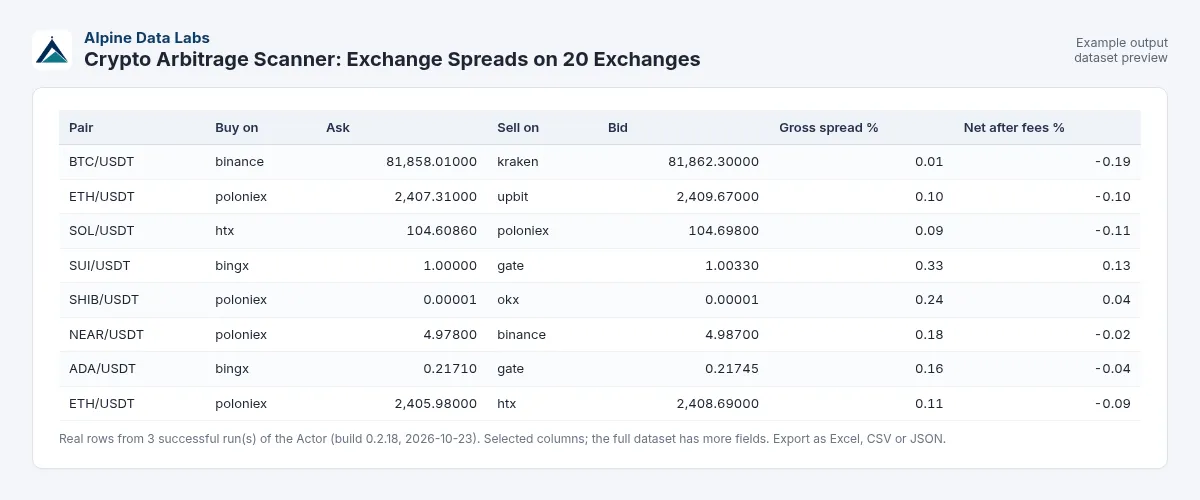
| Pair | Route | Buy at | Sell at | Gap | After fees | Can be moved? | 24h volume (buy / sell side) |
|---|---|---|---|---|---|---|---|
| ZEREBRO/USDT | Buy on htx, sell on gate | 0.0289 | 0.029444 | 1.88% | 1.68% | yes | 1.6M / 286k USDT |
| XMR/USDT | Buy on xt, sell on kucoin | 607.30 | 610.49 | 0.53% | 0.33% | yes | 177k / 105.8M USDT |
| AI/USDT | Buy on okx, sell on binance | 0.01707 | 0.0203 | 18.92% | 18.72% | unknown | 125k / 84.6M USDT |
(These are real rows from a test run with the pre-filled example on 23 Oct 2026, 04:10 Vienna time. The 18.9% row shows why the "Can be moved?" column matters: very large gaps usually mean that withdrawals are closed or that two different tokens share a ticker.) Every row also has the bid/ask and volume on every exchange that lists the pair (allQuotes), plus the deposit/withdrawal flags and the time of the scan.
Crypto price comparison across exchanges
Compare the price of the same coin on Binance, OKX, Kraken and 17 other exchanges in one table. Every row shows the cheapest exchange to buy (lowest ask) and the most expensive exchange to sell (highest bid), the gross spread and the estimated net spread after trading fees (two taker fees, 0.1% per side by default; withdrawal and network fees are not included), so you see which price gaps can be real crypto arbitrage opportunities and which disappear after fees.
Schedule it: a live crypto arbitrage monitor
Schedule it: click Schedule and run it every 15 minutes or every hour. Connect email, Slack, Telegram, Google Sheets or a webhook under Integrations to get each new list of price gaps automatically.
Krypto-Arbitrage-Scanner: Kursunterschiede zwischen Börsen
Vergleicht den Kurs derselben Kryptowährung auf 20 Börsen (Binance, OKX, Kraken u. a.) und zeigt die Preisdifferenz und die geschätzte Differenz nach Handelsgebühren als Excel-Tabelle. Ohne Programmieren: Coins eintragen (oder leer lassen für alle), auf Start klicken, Ergebnis herunterladen.
Typical uses
- Crypto arbitrage scanner: find gaps of 0.5% or more across up to 20 exchanges (CEX arbitrage; usually 18 are reachable)
- Bitcoin price difference between exchanges: type
BTCand set Minimum spread to0.1 - Net spread after fees: set your trading fee and a Minimum net spread to see only gaps that survive two taker fees
- Market research and listings: see on which exchanges a coin trades and at what volume
Input fields in plain words
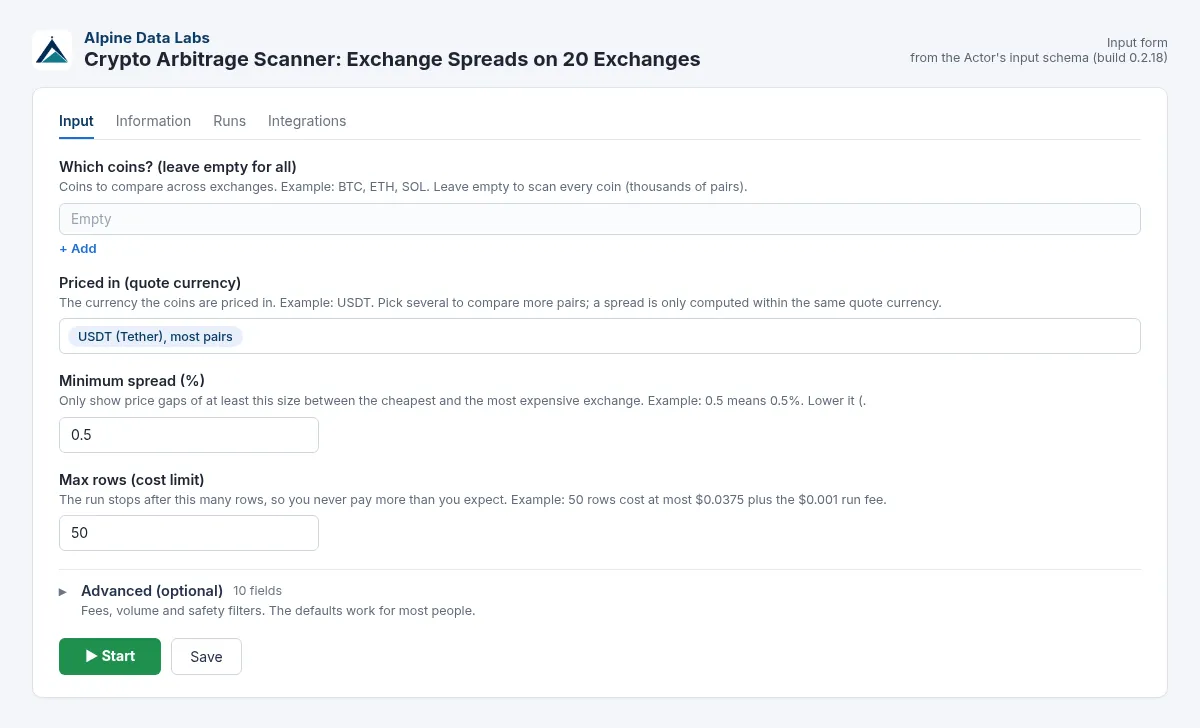
| Form field | What it does | Default / example |
|---|---|---|
| Which coins? (leave empty for all) | Coins to compare. Leave this empty for all. Names and pairs work too: Bitcoin, eth, SOL/USDT. | empty = all / BTC, ETH, SOL |
| Priced in (quote currency) | Quote currency. Gaps are only compared within the same quote currency. | USDT |
| Minimum spread (%) | Only show gaps at least this big. | 0.5 |
| Max rows (cost limit) | The run stops here, so you never pay more than you expect. | 50 in the form (max. $0.0375 + $0.001 run fee); 200 via API if not set |
| Advanced (optional): Exchanges | All 20 by default (usually 18 are reachable from the cloud). Crypto.com, Huobi and gate.io are understood. Unsupported names (e.g. Bitvavo) are skipped and named in the run status, together with the list of supported exchanges. | all 20 / Binance, OKX, Kraken |
| Advanced (optional): Trading fee per trade (%) | Used for the after-fees column (gap minus 2 × fee). | 0.1 |
| Advanced (optional): Minimum net spread after fees (%) | Only show gaps that are still this big after fees. | empty = off / 0.3 |
| Advanced (optional): Minimum 24h volume per exchange | Ignores thin markets with fake gaps. | 50000 |
| Advanced (optional): Check deposit / withdrawal status | Shows whether the coin can be moved from the buy exchange to the sell exchange. | on |
| Advanced (optional): Only coins that can be moved | On by default. Hides gaps where withdrawals (buy side) or deposits (sell side) are closed, because you cannot act on them. Gaps on exchanges that do not publish a transfer status stay visible as unknown. Switch off to see every gap. | on |
| Advanced (optional): Only coins with confirmed open transfers | Stricter: also hides gaps with unknown transfer status. | off |
| Advanced (optional): Maximum plausible spread (%) | Bigger gaps are usually different tokens with the same ticker, so they are hidden. | 20 |
| Advanced (optional): Show suspicious spreads too | Also show gaps that look like different tokens with the same ticker. | off |
| Advanced (optional): Include leveraged tokens (3L/3S…) | Also compare leveraged tokens such as BTC3L. | off |
Pricing
Pay per event: $0.001 per run (start fee for fetching about 6,000 prices) plus $0.00075 per spread row, which is $0.75 per 1,000 rows. On Apify's Scale plan the row price is 10 % lower ($0.000675, $0.675 per 1,000 rows), on Business and higher plans 20 % lower ($0.0006, $0.60 per 1,000 rows); the $0.001 start fee is the same on every plan. A run with 50 rows costs at most $0.0385, and a 3-coin watchlist scan typically costs under $0.01. The $0.001 start fee is charged by Apify for every run that starts, including runs that find 0 price gaps. Input that Apify itself rejects before the start (e.g. text in a number field) costs nothing.
These are launch prices while the Actor builds its first user base. If prices change, Apify notifies existing users in advance, as its rules require. Platform usage is included in the price.
FAQ and common mistakes
Is crypto arbitrage between exchanges still profitable? Sometimes, but rarely by as much as the raw gap. Trading fees, withdrawal fees, slippage and transfer time eat small gaps. Use the after fees column and Only coins that can be moved. This Actor provides market data only and is not financial advice.
I got 0 rows. What now? Your filters are too strict. Lower Minimum spread (e.g. 0.1 for big coins like BTC), remove the coin filter, or lower the 24h volume minimum. Only the $0.001 start fee was charged.
Why does a coin show a 15% gap? It's usually because deposits or withdrawals are closed on one side (see Can be moved?), or because two different tokens share the same ticker. Gaps above 20% are hidden by default.
I typed "Bitcoin", "btc/usdt" or "Huobi". Is that OK? Yes. Coin names, pairs and common exchange names are understood. Unknown exchange names are ignored (named in the status message). If fewer than 2 exchanges remain, all exchanges are used.
Do I need API keys or exchange accounts? No. Only public price data is used. The Actor never trades.
Why are Bybit or BitMart sometimes missing? Some exchanges block requests from the cloud servers' region. An unreachable exchange is skipped and named in the status message, and the others are still compared. A typical run compares 18 exchanges.
Does it include DEX prices or the kimchi premium? No. It compares centralized exchanges only, and only within the same quote currency (e.g. USDT vs USDT). There is no KRW-to-USD conversion.
Sources
The Actor uses each exchange's official public market-data endpoints, which need no login. It is not affiliated with any exchange, and exchange names are used only to describe where prices come from.
Related tools from Alpine Data Labs
- Honeypot & Rug Pull Checker: token risk score (0-100) and honeypot/rug pull flags for Ethereum, BSC, Base and Solana.
- Zefix Scraper: Swiss Company Register: Swiss company lists with UID, legal form and address (Handelsregister Schweiz).
- TED Tenders Scraper: EU public procurement notices and daily tender alerts as Excel.
- Career Page Job Scraper: every open job from Greenhouse, Lever, Workday, Ashby and Personio, plus hiring signals.
- All tools from Alpine Data Labs: no-code data tools for public data, business research and monitoring.
Support
Found a bug, or need another exchange or field? Open an issue in the Issues tab of this Actor page. Alpine Data Labs answers there, usually within one working day.
For developers: API, webhooks, Make/Zapier/n8n
You don't need this section to use the Actor. The form and the API take the same input: every form field has a JSON name (for example baseAssets = Which coins?, quoteAssets = Priced in, minSpreadPct = Minimum spread (%), maxResults = Max rows), and a JSON input sent via the API, a webhook, a schedule, a saved task or Make/Zapier/n8n gives exactly the same result as the form. Field names, output fields and file names stay stable, so existing workflows and websites that call the Actor keep working. An empty input {} scans all coins with the defaults.
Minimal input:
cURL (start a run and get the results in one call; replace <YOUR_APIFY_TOKEN> with your token from Apify Console → Settings → API & Integrations):
JavaScript (npm install apify-client):
Python (pip install apify-client):
Integrations: Schedules run a saved task automatically (e.g. every morning). Webhooks (Integrations tab → "Run succeeded") send the finished run to your own URL. Ready-made Make, Zapier and n8n modules start the Actor and read its results. AI agents can use it as a tool through the Apify MCP server (mcp.apify.com).
Full example input
The API is forgiving too: "baseAssets": ["Bitcoin", "eth/usdt"] and "exchanges": ["Binance", "Crypto.com", "huobi"] work. Unknown exchanges are skipped with a note in the run status. Number fields such as minSpreadPct must be JSON numbers (0.5, not "0,5"); otherwise Apify rejects the input before the start and nothing is charged. The same applies to a negative minSpreadPct (it must be 0 or more; 0 shows all gaps). The old name minSpread still works: if it is present in the input, it takes precedence over minSpreadPct (e.g. {"minSpread": 1.0} = {"minSpreadPct": 1.0}), and a negative minSpread is rejected before the start as well (nothing charged).
Output fields (JSON names)
symbol, route (plain words, e.g. Buy on okx, sell on binance), baseAsset, quoteAsset, buyExchange, buyAsk, sellExchange, sellBid, grossSpreadPct, estNetSpreadPct (gap minus two taker fees), assumedTakerFeePctPerSide, transferable (true / false / null = unknown), buyQuoteVolume24h, sellQuoteVolume24h, buyWithdrawEnabled, sellDepositEnabled, suspectedDifferentAsset, exchangesCompared, allQuotes, fetchedAt, note.
Built and maintained by Alpine Data Labs.


