

US Building Permits: Daily New Permits from 14 City Portals
Pricing
from $1.55 / 1,000 permits
US Building Permits: Daily New Permits from 14 City Portals
No-code: daily new US building permits from 14 official city open-data portals (NYC, LA, Chicago, SF, Seattle, Austin, Dallas...). One clean table: type, value, address, contractor. Filter by type, value and ZIP in a simple form.
Pricing
from $1.55 / 1,000 permits
Rating
0.0
(0)
Developer

Alpine Data Labs
Maintained by CommunityActor stats
0
Bookmarked
2
Total users
1
Monthly active users
11 hours ago
Last modified
Categories
Share
US Building Permits Data: New Permits from 14 City Open-Data Portals
Get new US building permits every day from 14 official city and county open-data portals: New York City, Los Angeles, Chicago, San Francisco, Seattle, Austin, Dallas, Philadelphia, Boston, Cincinnati, Mesa, Baton Rouge, Montgomery County (MD) and Marin County (CA). Each city publishes its data in a different format. This actor puts all of it into one clean table: permit number, type, description, status, issue date, address, ZIP, coordinates, estimated value, and the contractor's business name and license where the city publishes them. Filter by permit type (roofing, solar, pool, new construction…), minimum value, keywords or ZIP code. Run it on a schedule to get only the new permits, which makes it a good source of construction leads and building permit leads.
How to use it (no code needed)
Everything works in the Apify input form. You never need to write code or JSON.
- Pick your cities from the dropdown. Leave the field empty to search all 14.
- Pick a time window and permit types, for example the last 7 days of Roofing and Solar permits. Optional filters (minimum value, words in the description, ZIP codes) are in the sections below.
- Click Start. The pre-filled example costs at most $0.32 (100 permits × $0.0032). When the run is done, open the Output tab and click Export to download Excel, CSV or JSON.
- Optional, get new permits automatically: turn on Only new permits since my last run and click Schedule (e.g. daily). Under Integrations you can send each run's results to Google Sheets, Slack, email, Make, Zapier or n8n without code.
What you get
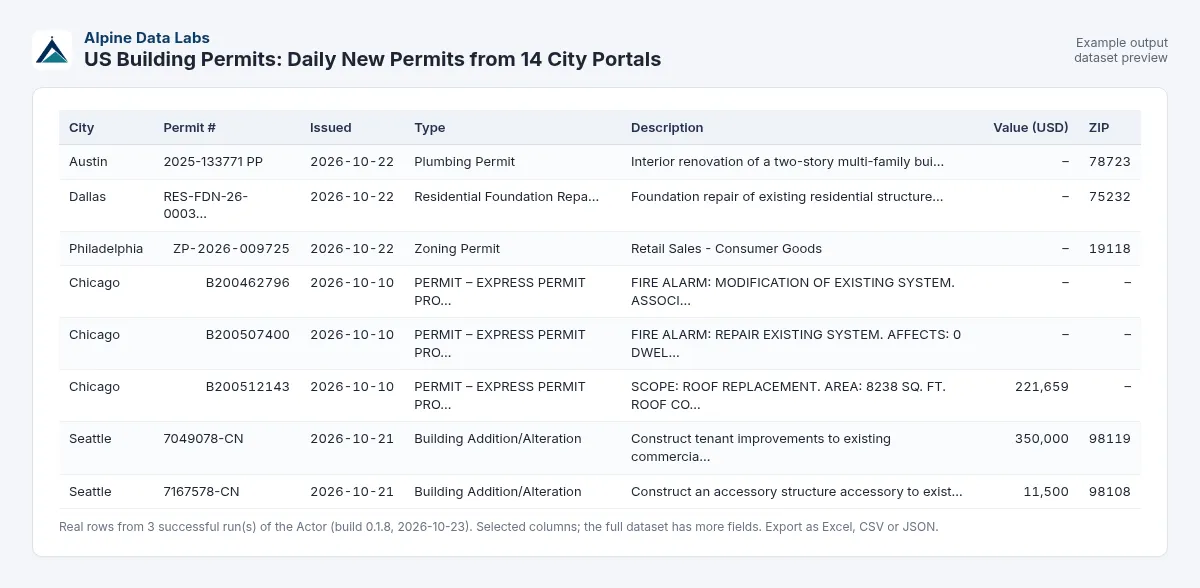
Real rows from a test run on 23 Oct 2026, issued 19–21 Oct 2026:
| City | Permit | Category | Description | Value | ZIP | Contractor |
|---|---|---|---|---|---|---|
| Seattle, WA | 7168557-RR | roofing | Reroof | $15,000 | 98115 | Integrity Roofing & Construction |
| New York City, NY | Q01476940-I1-SL | solar | Rooftop solar installation | $27,400 | 11001 | KAMTECH RESTORATION CORP (GC 616224) |
| Austin, TX | 2024-155910 BP | pool | New swimming pool | $48,000 | 78741 | Southern Pools Service & Spas |
Each row also has the full address, latitude and longitude, status, application date, the original permit type and work class, a link to the source record, and the dataset ID. The dataset has three views: Overview, Leads (contractor-focused) and Map (coordinates). The run's key-value store also holds a free CITY_SUMMARY: rows per city, rows filtered out, and the latest issue date the city has published.
Get only new permits (schedule tip)
Turn on Only new permits and schedule the actor daily or weekly (Console → Schedules). Each run returns only permits you have not received before, and already-seen permits are free. Give each monitor its own Monitor name (for example roofing-tx and solar-nyc).
Use cases
- Roofing, solar, HVAC, pool and remodeling leads: find homeowners' projects and the contractors who just pulled permits in your area.
- Suppliers and subcontractors: see which general contractors are starting new construction, and the job value.
- Real estate and investors: track new construction, additions and demolitions by ZIP code.
- Market research: count building permits by city, type and value over time.
- Insurance, lending and proptech: enrich addresses with recent permit activity.
Input fields
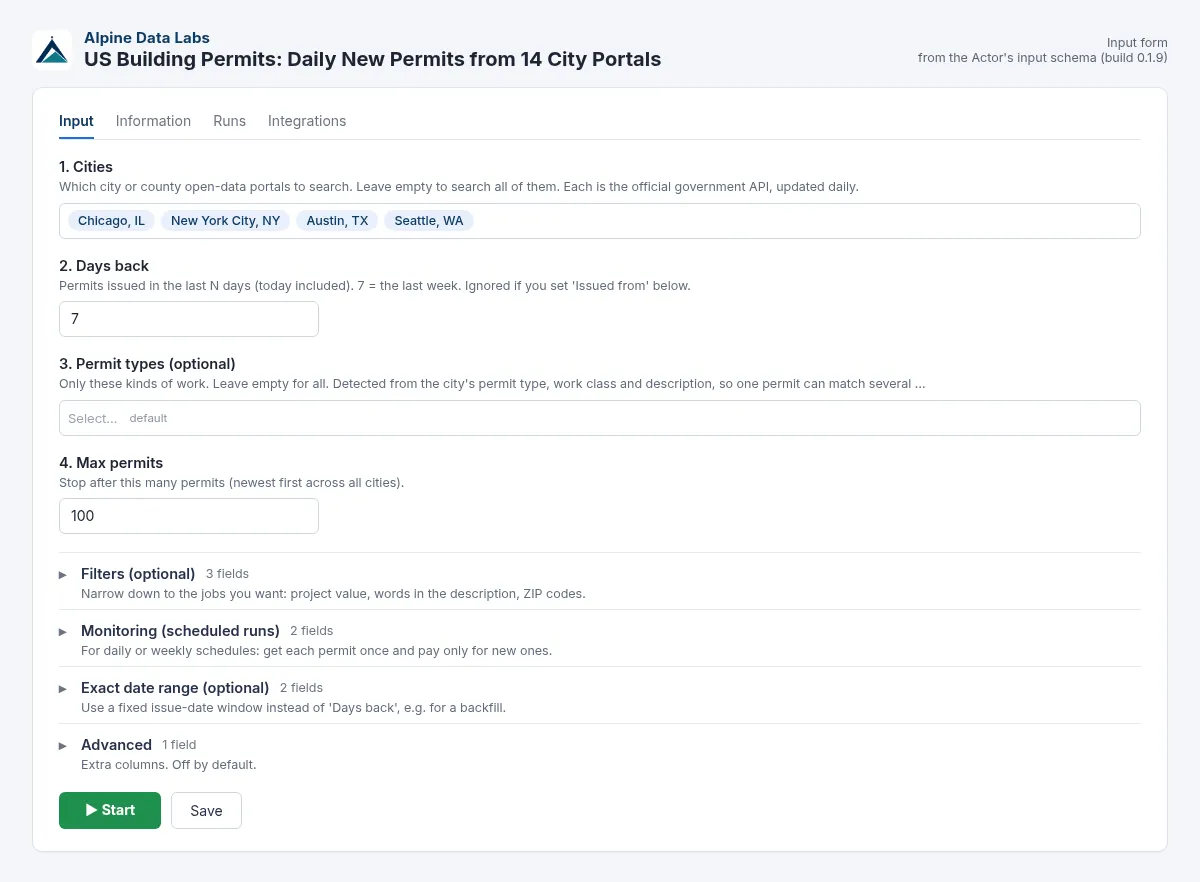
| Field | What it does |
|---|---|
| 1. Cities | Which portals to search. Empty means all 14. |
| 2. Days back | Permits issued in the last N days (1–365, default 7). |
| 3. Permit types | Optional: new construction, addition/alteration, roofing, solar, electrical, plumbing, mechanical/HVAC, demolition, pool, other. Empty means all types. |
| 4. Max permits | Stops after this many rows, newest first, across all cities (default 100). You never pay for more than this. |
| Minimum project value (USD) | Only permits with an estimated job value at or above this. Permits without a value are excluded. |
| Description contains (any of) | Only permits whose type or description contains one of these words, e.g. ADU, solar, kitchen. |
| ZIP codes | Only these ZIP codes or prefixes, e.g. 78704, 941. |
| Only new permits since my last run / Monitor name | Monitor mode: skip permits delivered in earlier runs (free). |
| Issued from / Issued to | An exact date range instead of "Days back", up to 366 days. |
| Include owner business name | Off by default. When on, adds the owner name only if it is clearly a business (LLC, Inc, Corp…). Private persons are never shown. |
Pricing
Pay per result: $0.0032 per permit delivered, which is $3.20 per 1,000 permits. There is no start fee.
- Cheaper on bigger Apify plans: Scale plan users pay 10% less ($0.00288 per permit, $2.88 per 1,000) and Business plan users (and above) pay 20% less ($0.00256 per permit, $2.56 per 1,000). Free and Starter plans pay the standard $0.0032. Apify applies the discount automatically.
- Example: 7 days of roofing permits in Austin, Dallas and NYC, about 150 rows, costs about $0.48.
- The prefilled input (4 cities, 7 days, max 100) costs at most $0.32. If you clear every field and click Start, all cities are searched with the default cap of 100, also at most $0.32.
- Free: invalid input, cities that are temporarily unavailable, permits removed by your filters, and already-seen permits in "Only new" mode.
- Use Max permits or the run's maximum cost setting to cap your spend. The actor stops cleanly at the limit.
FAQ and common mistakes
Where can I find building permits data by ZIP code? Enter one or more ZIP codes, or a prefix like 787, in ZIP codes. Chicago does not publish ZIP codes, so use Description contains keywords there, or filter the exported table yourself (e.g. by address).
Is there a building permits API? Yes. You can use the form only, or call this actor through the Apify API, webhooks, Make, Zapier or n8n (see For developers at the end). You get one schema for all cities instead of 14 different portals.
Do I need to write code or JSON? No. Every option is a field in the form: dropdowns, checkboxes, date pickers and lists.
How do I get roofing or solar permit leads? Choose permit type Roofing or Solar / PV / battery storage, add your cities and turn on Only new permits with a daily schedule.
Why did I get fewer rows than I expected? Check the status message and CITY_SUMMARY. Common reasons are a high Minimum value (some cities publish no values) and Los Angeles' upload delay. Rows your filters removed are free.
Are homeowner names included? No. Private individuals' names, phone numbers and emails are never output. Contractor and owner fields only contain business names.
Can I open the CSV in Excel safely? Yes. Text fields that start with =, +, - or @ get a leading ', so spreadsheet apps never run them as formulas. The XLSX export is also safe.
Can I get permits older than a year? Use Issued from / to for any 366-day window. For longer periods, run the actor once per year.
Limits
- Data is only as fresh as each city's upload. On 23 Oct 2026 most cities had permits through 21–22 Oct 2026, Cincinnati through 20 Oct and Los Angeles through 17 Oct (LA uploads with a delay of about 5–6 days).
- Not every city publishes every field:
- Dallas: no contractor, value or coordinates.
- Chicago: no ZIP code.
- Philadelphia: no job value, so a Minimum value filter excludes Philadelphia.
- Boston and San Francisco: no contractor.
- Permit categories are normalized from each city's own type and description text, so a few permits may land in a neighboring category. The original
permitTypeandworkTypeare always included. - At most 366 days per run and 100,000 permits per run.
Data source and legal notes
All data comes from official public government open-data portals (Socrata, CKAN and Carto APIs) published for reuse by each city or county. The actor reads only public data through the portals' documented public APIs and respects their usage. Private individuals' names, phone numbers and emails are removed. Check your local rules (e.g. telemarketing and CAN-SPAM) before contacting anyone. City names and trademarks belong to their owners; this actor is not affiliated with or endorsed by any city or county.
Related tools from Alpine Data Labs
- EU Tenders (TED): Tender Alerts: public construction and service tenders from the EU's TED database.
- Career Page Job Scraper: see which contractors and builders are hiring, from Greenhouse, Lever, Workday and other career pages.
- Zefix Swiss Company Register: company lists from the Swiss commercial register.
- All tools from Alpine Data Labs: no-code data tools for public data, business research and monitoring.
Support
Found a bug or want another city added? Open an issue in the Issues tab. Built and maintained by Alpine Data Labs.
For developers / API & integrations (optional)
You do not need anything in this section to use the Actor: the form does everything. It is for developers who want to start runs from their own code, website or workflow. The input is the same JSON that the form creates. Every field name in the form is also the API field name, and the form never changes them, so existing API calls, tasks, schedules and integrations keep working. Replace <YOUR_APIFY_TOKEN> with your own token from Apify Console → Settings → API & Integrations, and never put it in public code.
Example input (JSON):
cURL: run it and get the results in one call (for small runs; a run with a few hundred permits usually takes well under a minute):
JavaScript (apify-client):
Python (apify-client):
Where the results are: one dataset row per permit, with the same fields in every city. The key-value store holds a free CITY_SUMMARY. City IDs for cities: chicago, nyc, los-angeles, san-francisco, seattle, austin, dallas, philadelphia, boston, cincinnati, mesa, baton-rouge, montgomery-county-md, marin-county. Permit type IDs: new_construction, addition_alteration, roofing, solar, electrical, plumbing, mechanical, demolition, pool, other.
Example output (one permit row, JSON):
Integrations without code:
- Schedules: run it daily or weekly (Console → Schedules).
- Webhooks: call your URL when a run finishes (event
ACTOR.RUN.SUCCEEDED). The payload contains the run ID and thedefaultDatasetId. - Make, Zapier, n8n: use the official Apify app or node: "Run Actor", then "Get dataset items".
- Google Sheets, Slack, email: these are under the Integrations tab.
- AI agents: the Actor can be called through the Apify MCP server.


