

OCR API: Image to Text & PDF to Text (Scanned PDFs)
Pricing
from $3.00 / 1,000 pages
OCR API: Image to Text & PDF to Text (Scanned PDFs)
Image to text and PDF to text with Tesseract OCR in 11 languages. Reads the PDF text layer first, OCR for scans. One row per page with text, confidence and line boxes. Errors are never charged.
Pricing
from $3.00 / 1,000 pages
Rating
0.0
(0)
Developer

Altronite
Maintained by CommunityActor stats
0
Bookmarked
1
Total users
0
Monthly active users
a day ago
Last modified
Categories
Share
Extract text from images and PDFs with Tesseract OCR. Paste links to PNG, JPEG, WebP, TIFF, BMP or GIF images and to PDF files: image to text, PDF to text, and scanned PDF to text in 11 languages, one row per image or PDF page. PDFs that already contain text are read directly from the text layer, and OCR runs only on pages that need it, such as scans.
Errors are never charged. A broken link, a file that is not an image or PDF, a file that is too large, a password-protected PDF, an OCR failure or a page skipped by a limit gives an error row with the reason, free.
Quick start
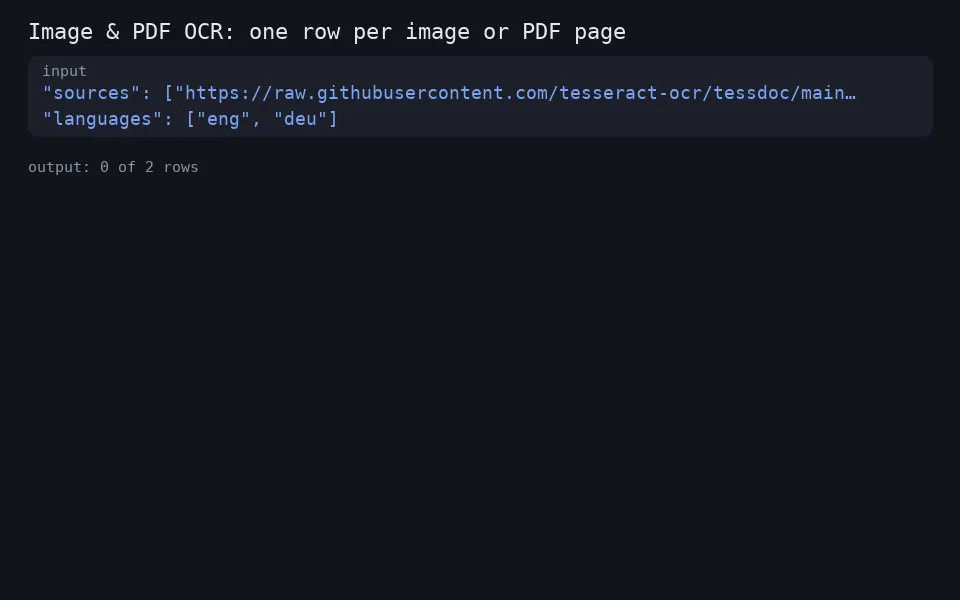
Paste this input and run it. It reads Tesseract's own sample image and returns one row of text.
Then replace sources with your own public links to images and PDFs. Download the results from the run's dataset.
Who it's for
- Finance and operations teams turning scanned invoices, receipts and forms into text.
- Researchers and archivists digitising scanned documents and old print.
- AI and automation builders who need text from images and PDFs for search, extraction or an LLM.
- Developers who want OCR as an API without running Tesseract themselves.
Output
One row per image, and one row per PDF page:
| Field | Example |
|---|---|
status | ok or error |
sourceUrl | the link you gave |
page, pageCount | 3, 12 for a PDF page; page is null for an image |
method | text-layer (read from the PDF) or ocr |
languages | ["eng"]; empty for text-layer pages |
text | the page text, lines in reading order, blank line between paragraphs |
meanConfidence | mean word confidence, 0 to 100 (OCR pages only) |
wordCount, charCount | size of the text |
lines | only with outputFormat: "lines": text, confidence and box per line |
reason, error | on error rows only |
An example row (text shortened, values illustrative):
With outputFormat: "lines" each OK row also has lines, for example {"text": "Univers 55 Roman", "confidence": 95.0, "bbox": [12, 18, 326, 36]}. bbox is [left, top, width, height] in pixels of the original image. Lines from a PDF text layer have confidence and bbox set to null.
An error row looks like this:
Reasons: invalid_url, blocked_url, download_failed, too_large, unsupported_type, ocr_failed, time_limit, page_limit.
Input
| Field | Default | What it does |
|---|---|---|
sources | required | Public http(s) links to images (PNG, JPEG, WebP, TIFF, BMP, GIF) or PDFs, up to 50 MB each and 1,000 per run. Duplicates are merged; a missing scheme becomes https://. File type is detected from the bytes, not from the link or Content-Type. |
languages | ["eng"] | Up to 3 of eng, hin, spa, fra, deu, por, ita, ara, rus, chi_sim, jpn. List every language on the page. |
pdfMode | auto | auto: text layer where a page has at least 10 letters or digits, OCR otherwise. ocr: OCR every page. text: text layer only, no OCR. |
maxPagesPerPdf | 50 | 1 to 500. Longer PDFs are cut; the rest is one uncharged page_limit row. |
outputFormat | text | lines adds a lines array: text, confidence and bbox [left, top, width, height] in pixels. |
More examples:
Scanned PDFs, forced OCR, English and Hindi:
Text layer only, for digital PDFs where you want the exact embedded text:
Line positions for downstream processing:
Use it from code or an AI agent
Run it with the Apify API, the Apify Python or JavaScript clients, or as a tool through the Apify MCP server. Pass the same input JSON through any of these. Check status on each row: ok rows have text, error rows say why not.
Minimal input:
Pricing
Pay per event. You pay for two things:
| Event | Price | When |
|---|---|---|
page | $0.003 per page | each image, and each PDF page, delivered with status ok |
apify-actor-start | $0.001 per run | once per run, one event per GB of memory with a 1 GB minimum |
Examples:
- One image: $0.003 + $0.001 = $0.004.
- A 10-page PDF, all pages delivered: 10 x $0.003 + $0.001 = $0.031.
- 200 single-page images: 200 x $0.003 + $0.001 = $0.601.
- A 120-page PDF with the default
maxPagesPerPdf50: 50 x $0.003 + $0.001 = $0.151; the remaining pages become one unchargedpage_limitrow.
Not charged: invalid and blocked links, failed downloads, files over 50 MB, unsupported or password-protected files, OCR failures, pages skipped by the time limit, and the page_limit row. A page with no text on it is still a delivered page and is charged; filter on wordCount afterwards. Reading the PDF text layer (pdfMode: text or auto on a digital PDF) is charged per page like OCR. Prices were read from the Store on 21 Oct 2026; the Pricing tab is the source of truth.
How it works
- Images are converted to grayscale, contrast is adjusted and small images are enlarged before OCR. Transparent PNGs are placed on a white background.
- PDFs are read with PDFium. In
automode a page with at least 10 letters or digits in its text layer is read directly. Other pages are rendered at about 300 DPI and sent to OCR. - OCR is Tesseract with one OpenMP thread per process. Pages run in parallel instead.
- Downloads accept public internet hosts only. Private, loopback, link-local and cloud metadata addresses are refused, redirects are checked at every step (at most 5), and links with embedded credentials are refused.
- Rows are delivered as pages finish, so a run that reaches its time limit keeps the pages it completed and marks the rest
time_limit, uncharged.
Limits
- Up to 50 MB per file and 1,000 sources per run.
- Up to 500 pages per PDF (default 50; raise
maxPagesPerPdf). - 11 languages, up to 3 per run.
- Public links only. No logins, cookies or custom headers.
- Password-protected and damaged PDFs return an error row.
- Handwriting, very low resolution scans and heavily stylised fonts give low
meanConfidence. Check it before trusting the text. - No layout output beyond lines. Tables come out as lines of text, not cells.
- Memory defaults to 1 GB and goes up to 4 GB. Raise it for very large page images.
Troubleshooting
reason | Message | Fix |
|---|---|---|
invalid_url | "Not an http(s) URL with a valid host name." / "URLs with embedded credentials are not supported." | Use a plain public http(s) link. |
blocked_url | Link points to a private, loopback or internal address | Only public internet hosts are fetched. |
download_failed | "The server answered 404." / "Too many redirects (more than 5)." / "The connection failed (...)" / "The host name ... could not be resolved." | Check the link opens in a browser without login. 429 and 5xx are retried once. |
too_large | "The file is N MB; the limit is 50 MB." / "The image has too many pixels to process." | Split or downscale the file. |
unsupported_type | "Not a supported file: expected a PDF or a PNG, JPEG, WebP, TIFF, BMP or GIF image." / "The PDF is password-protected." / "The PDF is damaged or not a readable PDF." / "The image could not be decoded (corrupt or unsupported)." | Check the file; a web page answering with an HTML error is rejected even if the link ends in .png. |
ocr_failed | "OCR failed or timed out (...)." / "Unexpected error (...)." | Run again; if it repeats on one page, open an issue with the link. |
time_limit | "The run reached its time limit before this page ..." | Raise the run timeout or split the list. Finished pages are kept. |
page_limit | "The PDF has N pages; only the first M were processed (maxPagesPerPdf)." | Raise maxPagesPerPdf (up to 500). |
Low meanConfidence | Handwriting, low resolution or stylised fonts | Provide a sharper scan and list every language present. |
| Run fails with "unsupported language ..." | A language code is not in the supported list | Use only the codes listed above. |
FAQ
How do I extract text from a scanned PDF?
Pass the PDF link in sources. In the default auto mode each page without a text layer is OCRed, and you get one row per page.
How do I convert a PDF to text without OCR?
Set pdfMode to text. It reads the embedded text layer only and never runs OCR. Pages with no text layer come back with empty text and are still charged as delivered pages.
Does it OCR PDFs that already have text?
Not in auto mode. It reads the embedded text directly. Set pdfMode to ocr to force OCR on every page, for example when the embedded text is wrong.
Which languages are supported? English, Hindi, Spanish, French, German, Portuguese, Italian, Arabic, Russian, Simplified Chinese and Japanese. Pick up to 3 per run.
What does meanConfidence mean?
The mean of Tesseract's confidence for each recognised word, from 0 to 100. It is set on OCR pages only. Low values usually mean the text has mistakes, so check it before trusting the text.
Can it read handwriting?
Handwriting usually gives low meanConfidence, so check it; see Limits.
Why did my image return unsupported_type?
The file is not a PDF or a PNG, JPEG, WebP, TIFF, BMP or GIF image, or it is corrupt. The type is read from the file's bytes, so a web page that answers with an HTML error page is rejected even if the link ends in .png.
Can I send a file instead of a link? Not directly. Put the file somewhere reachable by a public link, for example a public Apify key-value store record, and pass that link.
Related tools
- URL to PDF: turn web pages into print-ready PDFs.
- Website Screenshot API: capture pages as PNG, JPEG or PDF.
- Google Sheets Export & Import: send any run's results to a Google Sheet.
Support
Is a file not reading correctly? Open an issue on the Issues tab with the link and your input.


