
Linkedin Post Search Scraper ($1.50/1000 results)
Pricing
from $1.50 / 1,000 results
Linkedin Post Search Scraper ($1.50/1000 results)
🔎 Search LinkedIn posts by keyword, then choose a result limit or collect every available result.
Pricing
from $1.50 / 1,000 results
Rating
0.0
(0)
Developer

API ninja
Maintained by CommunityActor stats
0
Bookmarked
3
Total users
2
Monthly active users
12 hours ago
Last modified
Categories
Share
What does LinkedIn Post Search Scraper do?
LinkedIn Post Search Scraper finds public LinkedIn posts by keyword and turns them into a clean, analysis ready dataset. Enter a search phrase such as generative AI, choose how many posts you need, and optionally filter the results by date, content type, author title, company, mentioned organization, or industry.
The Actor extracts post text, author details, publication time, engagement counts, media, articles, hashtags, and links. It also retains the complete source record in rawData for advanced workflows. No LinkedIn cookies or account credentials are required as input.
Run it on the Apify platform to get:
- 🔎 LinkedIn keyword and phrase search
- 🎯 Filters for recent posts, content types, companies, industries, and author titles
- 📊 Normalized post, author, engagement, article, and media data
- ♾️ Automatic pagination with a fixed result limit or Parse all posts
- 🔌 API access and integrations with tools such as Google Sheets, Make, Zapier, and webhooks
- 🗓️ Scheduled searches for recurring research and monitoring
- 📈 Run monitoring, logs, reusable datasets, and multiple export formats
Why use LinkedIn Post Search Scraper?
Searching posts manually takes time and makes comparison difficult. This Actor creates consistent records that can be filtered, exported, analyzed, or sent into another workflow.
Common uses include:
- Brand monitoring: find conversations about a company, product, or campaign.
- Market research: study topics, customer language, and emerging trends.
- Content research: discover popular formats, hashtags, and discussion themes.
- Lead research: identify relevant authors and open their public LinkedIn profiles.
- Competitor tracking: monitor public posts published by or mentioning selected organizations.
- Industry analysis: find posts written by people associated with a matching industry.
- Reporting: export engagement and post data for dashboards or spreadsheets.
How to scrape LinkedIn posts
- Open the Actor's Input tab.
- Enter a keyword or phrase in Search query.
- Set Maximum posts, or enable Parse all posts to collect all results reported by the search.
- Optionally select a content type, sorting method, or open the Filters section.
- Enter company and industry names as ordinary text. The Actor automatically selects the first and best matching LinkedIn result.
- Click Start and follow progress in the run log.
- Open the Output tab to inspect the LinkedIn posts table or download the dataset.
For recurring searches, create an Apify schedule and connect the resulting dataset to your preferred storage or automation tool.
Input
The only required field is query. The following example finds recent AI posts associated with Google and the technology industry:
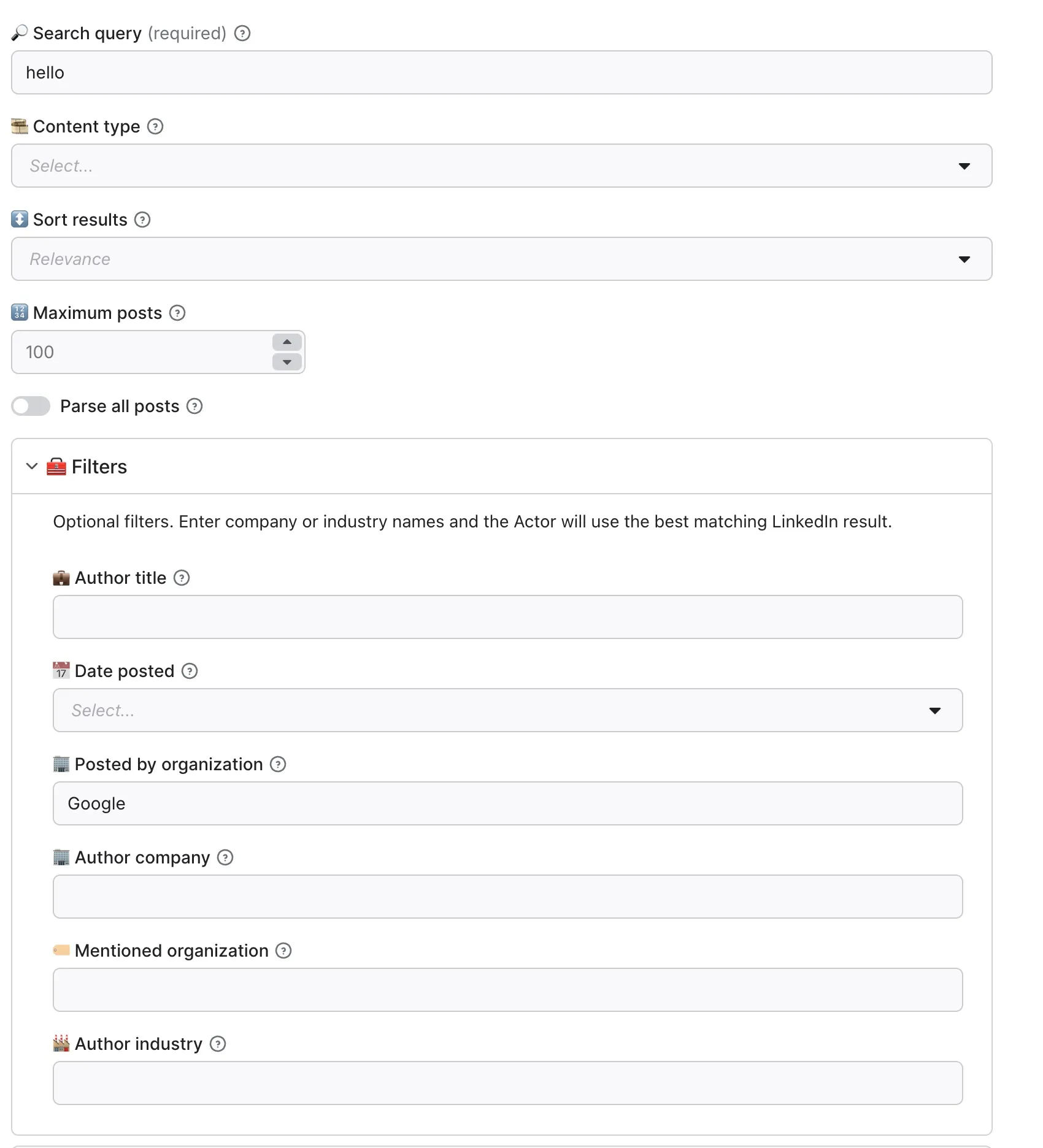
| Input field | Type | Description |
|---|---|---|
query | String | Required keyword or phrase used to search LinkedIn posts. |
maxPosts | Integer | Maximum posts to save when parseAll is disabled. Default: 100. |
parseAll | Boolean | Continues through all reported results when enabled. |
sort | String | Sort by relevance or date_posted. |
contentType | String | Filter for videos, photos, jobs, live videos, documents, or collaborative articles. |
datePosted | String | Limit results to the past 24 hours, week, or month. |
authorTitle | String | Match words in the author's professional title. |
fromOrg | String | Company name whose organization posts should be returned. |
authorCompany | String | Company name associated with the post author. |
mentioningOrg | String | Company name that must be mentioned in the post. |
authorIndustry | String | Industry name or keyword associated with the author. |
Company and industry fields accept one name each. A lookup can return several candidates, so the Actor applies the first matching result. Use the full company or industry name for the most accurate match.
Advanced LinkedIn search syntax
Use straight double quotes for phrases and uppercase Boolean operators. These are LinkedIn's documented search building blocks; support and results through this Actor's search provider can vary. See LinkedIn's Boolean search guide.
| Syntax | Example | Meaning |
|---|---|---|
| Exact phrase | "product launch" | Find posts containing a specific phrase. |
OR | "artificial intelligence" OR "machine learning" | Find posts about either topic. |
AND | AI AND marketing | Find posts containing both terms. |
NOT | hiring NOT internship | Find hiring posts while excluding internships. |
| Grouping | ("artificial intelligence" OR "machine learning") AND marketing | Find either topic together with marketing. |
For example, to monitor discussions about AI and automation, paste this into the Search query field:
In JSON input, quotes inside the string must be escaped. Those backslashes are JSON notation and are removed when JSON is parsed:
The Actor trims surrounding whitespace, converts curly double quotes to straight quotes, and removes redundant parentheses enclosing the whole query. For example, ("product launch" OR "product update") becomes "product launch" OR "product update". Accents, phrase text, and meaningful groups such as (AI OR ML) AND hiring are preserved. Removing all parentheses could change which posts match.
For reliable results, start with a short phrase or a few OR alternatives. Complex Boolean expressions may be rejected by the search provider, even when they use valid LinkedIn syntax. If a grouped expression is rejected, split it into separate searches. Avoid wildcards (*) and bracket substitutes ([], {}, <>); use the dedicated Actor inputs for date, company, and content filters. Lowercase operator words are left unchanged, so use uppercase when you intend Boolean logic.
Invalid input and rejected searches
Unclosed quotes, unmatched or empty parentheses, empty phrases, literal backslashes, and incomplete Boolean operators are detected before searching. These inputs stop gracefully with a warning and Succeeded run status, rather than a failed run.
If the search provider rejects the query or filters, the Actor stops gracefully and explains what to adjust. Try a simpler query such as "product launch", then add operators and filters one at a time.
Check the run status message and logs to see whether the search completed or stopped early. Posts saved before a later page is rejected remain in the dataset. The output contains only post results, and searchQuery in each result contains the normalized query actually used.
Authentication, configuration, and service failures still fail the run. Temporary request failures retry with increasing delays. A graceful stop does not imply a refund or waive platform charges.
Output
Every matching post is stored as one dataset item. The LinkedIn posts table highlights the most useful columns, while All fields provides every normalized value and the complete rawData object.
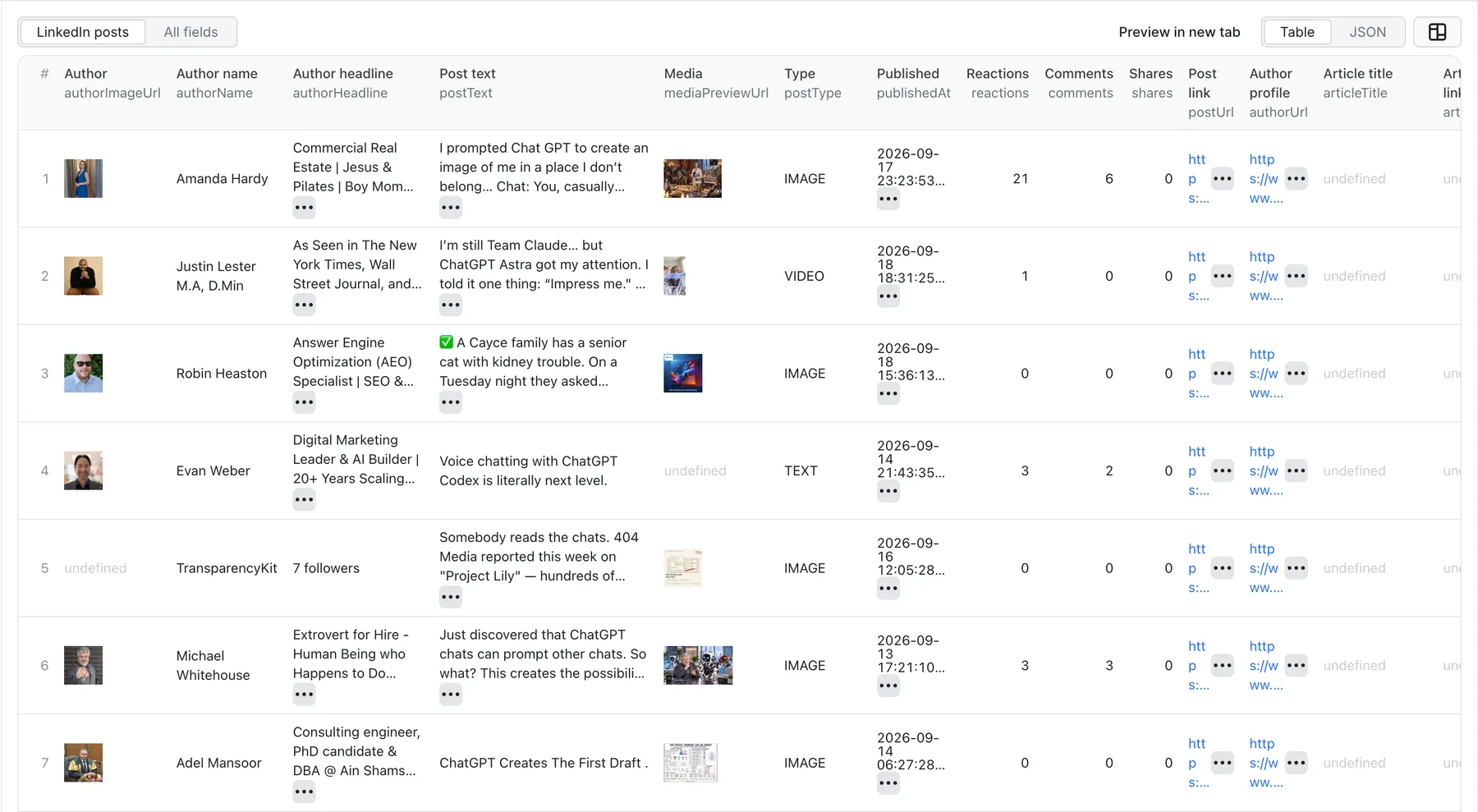
Example output, shortened for readability:
You can download the dataset in various formats such as JSON, HTML, CSV, or Excel. You can also access results through the Apify API without downloading a file.
LinkedIn post data fields
| Category | Main fields | Description |
|---|---|---|
| Search | searchQuery | The keyword or phrase used for the run. |
| Post | postText, postUrl, postType, postUrn, activityUrn | Main post content, link, type, and identifiers. |
| Publication | publishedAt, publishedText, visibility | Calculated timestamp, displayed relative time, and audience. |
| Author | authorName, authorHeadline, authorType, authorId, authorUrl, authorImageUrl | Public author identity and profile details. |
| Engagement | reactions, reactionBreakdown, comments, shares, views, impressions | Available interaction and reach metrics. |
| Images and video | mediaPreviewUrl, mediaUrl, imageUrls, videoUrl, videoThumbnailUrl, videoDurationSeconds | Media previews and direct media details when available. |
| Documents | documentTitle, documentUrl, documentPageCount, documentCoverUrl | LinkedIn document metadata and cover. |
| Articles | articleTitle, articleDescription, articleUrl, isArticle | Article or newsletter details. |
| Text analysis | hashtags, contentLinks | Hashtags and URLs detected in the post text. |
| Reposts and groups | isRepost, groupName, originalAuthorName, originalPostText, originalPostUrl | Context for reposted or group content. |
| Source | rawData | Complete original post object for fields not included in the normalized output. |
Some LinkedIn posts do not expose every field. Missing media, view counts, impression counts, or article details are omitted from that dataset item.
How much does it cost to scrape LinkedIn posts?
This Actor uses pay-per-event pricing with a $0.10 minimum total charge per run.
| Charge | Free plan | Bronze-Diamond plans |
|---|---|---|
| Actor start | $0.01 | $0.01 |
| Result saved to the default dataset | $0.015 per result | $0.0015 per result |
The Actor start event is charged once per GB of memory, with at least one event per run. The final cost depends mainly on how many matching post records are saved. Start with the default limit and a focused query, and enable Parse all posts only when you need the complete result set. Check the Actor's Pricing tab for the latest rates before starting a large run.
Tips for better LinkedIn search results
- Use a focused phrase such as
AI customer supportinstead of a very broad word such assoftware. - Select Date posted sorting and a recent date range for monitoring workflows.
- Enter complete company names so the first automatic match is the intended organization.
- Run separate searches when you need several companies or industries. Each company and industry field accepts one name.
- Set a practical maximum during testing, then increase it after confirming the filters.
- Use Parse all posts for exhaustive research and scheduled monitoring where a changing result count is acceptable.
- Read the run log to see which company and industry matches were selected.
- Use
rawDatawhen a specialized field is not part of the normalized dataset columns.
Other LinkedIn Scraping Tools
If you like this Actor, you might also find these LinkedIn tools useful:
- 👤 LinkedIn Profile Scraper: Collect profile posts, reactions, comments, images, videos, documents, and events in one workflow.
- 👤 LinkedIn Profile Posts Scraper: Collect public posts published by LinkedIn member profiles.
- 💡 LinkedIn Post Reactions Scraper: Collect people who reacted to a post and their reaction types.
- 💼 LinkedIn Jobs Scraper: Search and extract structured LinkedIn job listings.
- 🏢 LinkedIn Company Posts Scraper: Collect posts, media, authors, and engagement from company pages.
- 💬 LinkedIn Post Comments Scraper: Extract comments and optional replies from public posts.
- 🔁 LinkedIn Post Reposters Scraper: Find people and companies that reposted a public post.
FAQ, limitations, and support
Can I use LinkedIn Post Search Scraper through an API?
Yes. Every Actor can be started through the Apify API, and its dataset can be retrieved programmatically. You can also use webhooks, schedules, and integrations without changing the Actor input.
Do I need a LinkedIn account or cookies?
No LinkedIn account, cookie, or password is required in the Actor input.
Why did a company or industry filter select an unexpected result?
LinkedIn matching can return several candidates. The Actor uses the first result, so short or ambiguous names can select a different organization or industry. Enter the full official name and check the matching message in the run log.
Why are some output fields missing?
LinkedIn exposes different structures for text posts, images, videos, documents, articles, reposts, and group posts. Engagement and media fields can also be unavailable. The Actor keeps the complete source record in rawData whenever you need to inspect additional values.
Is it legal to scrape LinkedIn posts?
Scraping publicly available data can be lawful, but requirements vary by country and use case. You are responsible for complying with applicable laws, privacy rules, LinkedIn's terms, and the rights of data subjects. Avoid collecting or using personal data without a valid purpose.
What if I need another field or a custom LinkedIn workflow?
Use the Actor page's Issues tab to report a problem, request a field, or suggest an improvement. Custom solutions and integrations based on this Actor are also available; describe the desired input, output, volume, and destination in your request.


