

E-commerce Scraping Tool
Pricing
from $1.00 / 1,000 product details
E-commerce Scraping Tool
Scrape data from e-commerce websites with E-commerce Scraping Tool. Scrape almost any retail site in minutes, extract e-commerce data and use it to monitor price details over time or compare different e-commerce sites’ offerings.
Pricing
from $1.00 / 1,000 product details
Rating
4.3
(53)
Developer

Apify
Maintained by ApifyActor stats
263
Bookmarked
17K
Total users
728
Monthly active users
6.5 days
Issues response
29 minutes ago
Last modified
Categories
Features
Share
What does E-commerce Scraping Tool do?
E-commerce Scraping Tool extracts product and price data, category listings, reviews, and seller information from online retailers, from a product URL, a category URL, or a keyword. It works on Amazon, Walmart, eBay, and Alibaba, on regional players like Target, Flipkart, Mercado Livre, Lidl, and Rakuten, and on local shops running Shopify, WooCommerce, Magento, BigCommerce, or PrestaShop.
Core capabilities:
- Works on any e-commerce site. Multinationals, regional retailers, and local shops take the same input.
- Several sites in one run, so a competitor price comparison comes back as one dataset.
- Stays undetected. Proxy rotation and browser rendering are applied per site, automatically, where needed.
- Five kinds of output from one input: products, reviews, sellers, food delivery, Amazon influencer storefronts.
- Search across retailers by keyword, instead of naming every site.
- Track change over time by scheduling runs and letting the dataset accumulate.
- Export anywhere: JSON, CSV, Excel, XML, HTML, the API, webhooks, or an MCP client.
What e-commerce data can you extract with E-commerce Scraping Tool?
| Product data | Commercial info | More details |
|---|---|---|
| 📝 Product name | 💰 Price and currency | 📊 Stock status |
| 🔗 Product description | 🏷️ Product ID (SKU, MPN, GTIN, EAN, UPC, ISBN) | ⭐ Average rating |
| 🏢 Brand | 🚚 Shipping information | 💬 Review count |
| 🖼️ Image URL | 📂 Category | 🏪 Seller information |
| 🔗 Product URL | 📺 Product variants |
Can I use E-commerce Scraping Tool to scrape Amazon, Walmart, eBay, Alibaba, Etsy, etc.?
Yes, from the product URL alone. It covers global, regional, and local shops, so you can monitor a whole market. You get name, price, brand, identifiers, and image, exportable as JSON, CSV, Excel, or over the API.
How does E-commerce Scraping Tool work?
It does what you'd do by hand: opens the store, goes to the product or category page, scrolls the listing, and reads every field the page shows into a structured row. One row per product, review, seller, or post.
Scrape mode decides how a page is fetched. AUTO picks per site and is the right default. HTTP is cheaper but misses anything rendered by JavaScript. BROWSER renders fully and costs more per product.
Why use E-commerce Scraping Tool rather than a single-site scraper?
A per-site scraper is better when you only need one site and want its every last field. This one earns its place across several sites at once, or on a site nobody has built a scraper for.
Where a specialist exists for a site you use heavily, run both: this one for breadth, that one for depth.
What can you do with data after scraping product prices and details?
💰 Price monitoring and dynamic pricing
Pricing data is only useful while it's fresh. Schedule it hourly for fast-moving categories, daily for benchmarking and MAP compliance, weekly for stable catalogs. Product URLs track specific items, category URLs give you the shelf. Send the output to Slack, a pricing tool or your warehouse so it reaches a decision.
If the moves you care about happen overnight, catching an unannounced price drop automatically walks through the scheduling and alerting side of it.
😊 Customer sentiment and review analysis
Reviews are the richest product signal and the worst-organized one. Collect them in bulk across marketplaces and pipe them into a sentiment model, a CRM, or your own analysis. Switch the dataset to the Product reviews view, one review per row. Product teams catch quality issues early, marketing teams mine the language customers use, brand teams watch sentiment move after a launch.
📊 Market research and competitive intelligence
Category URLs map a market, keywords discover products inside it. Weekly to track a category, once to size a new one. Pair the product rows with the seller rows to see who sells what.
🥡 Zone-level competitive intelligence
A brand average hides the thing you can act on. Delivery marketplaces price and stock by zone, so one location can be undercut by a rival two streets away while the national number looks fine. Give the food delivery section a delivery address and it reads what a customer at that address sees, across the platforms you pick, so you see prices zone by zone. Restaurant groups and grocers use it to audit their own listings location by location; everyone else uses it to benchmark a catchment area.
📢 Find competitor ads and benchmark products
Product data tells you what a competitor sells and at what price. It doesn't tell you what they're pushing. Pair this Actor with Facebook Ads Library Scraper to get both halves. Run E-commerce Scraping Tool on their catalog for prices, variants, and stock. Run the ads scraper on their page for live creatives, reach estimates, and how long each ad has been running.
The two line up on the product, which is what makes the pair useful: the discount a competitor advertises against the price actually on the page, which SKUs get budget and which are left to sell themselves, and a launch while it's still an ad. If you don't yet know who to watch, the full pipeline starts a step earlier and discovers the competitors on Facebook and Instagram first.
How to use E-commerce Scraping Tool to scrape product data?
- Create an Apify account
- Open E-commerce Scraping Tool in Apify Store
- Add URLs or a keyword to the section that matches what you want: products, reviews, sellers, delivery, or influencers
- Set a total maximum, which is what caps the cost of the run
- Click Start
⬇️ Input
Six independent sections. Fill the one you need and leave the rest empty.
Product options
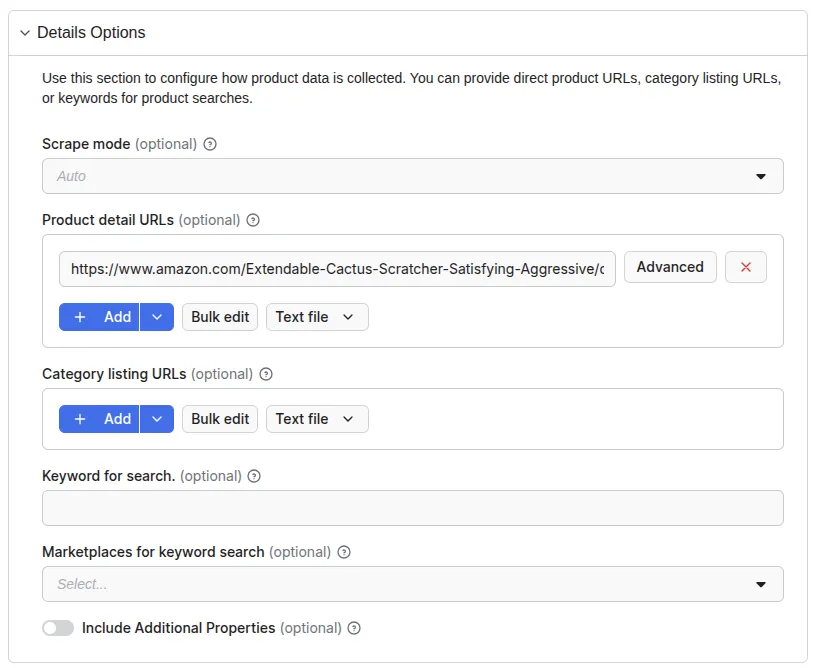
| Field | What it does |
|---|---|
detailsUrls | Product URLs. The most accurate input, and the one for a tracking list |
listingUrls | Category URLs. Far cheaper per product than naming every URL |
keyword | Search term, used with marketplaces |
marketplaces | Which marketplaces the keyword searches |
scrapeMode | AUTO, HTTP, or BROWSER. Leave it on AUTO |
additionalProperties | Adds the platform-specific fields a store publishes |
fieldsToAnalyze | Which fields go to the AI summary |
customPrompt | Your own summary instructions instead of the default |
maxProductResults | The total for the run, not per URL. This is the cost cap |
deduplicateProducts | Saves and charges each product once, even if several inputs return it |
Search engine options
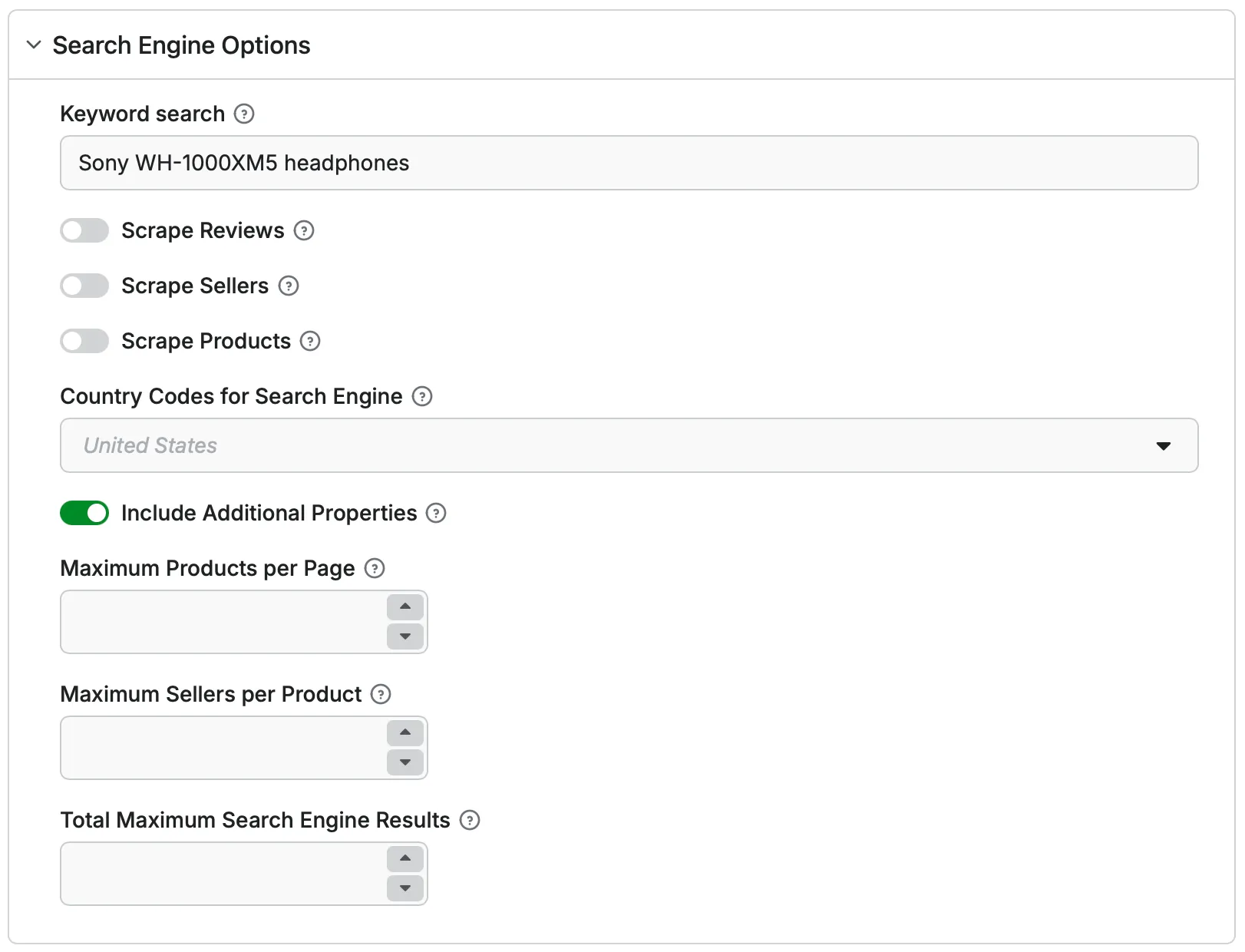
Search across many retailers at once with one keyword per line, up to 50. Each keyword runs as its own search.
| Field | What it does |
|---|---|
searchEngineKeyword | Search terms, one per line, up to 50 |
scrapeModeSearchEngine | What to collect: Google Listing (default), Products, Reviews, or Sellers |
countryCode | ISO country code, for localized results and pricing |
citySearchEngine, regionSearchEngine | Narrow the results further |
additionalPropertiesSearchEngine | Adds the extra attributes a result carries |
maxSearchEngineProducts | Products taken from one results page |
maxSearchEngineSellersPerProduct | Sellers collected per product found |
maxSearchEngineResults | Total for the run in this mode |
scrapeModeSearchEngine is one choice, not a set of switches: a run collects products, or reviews, or sellers.
Review options
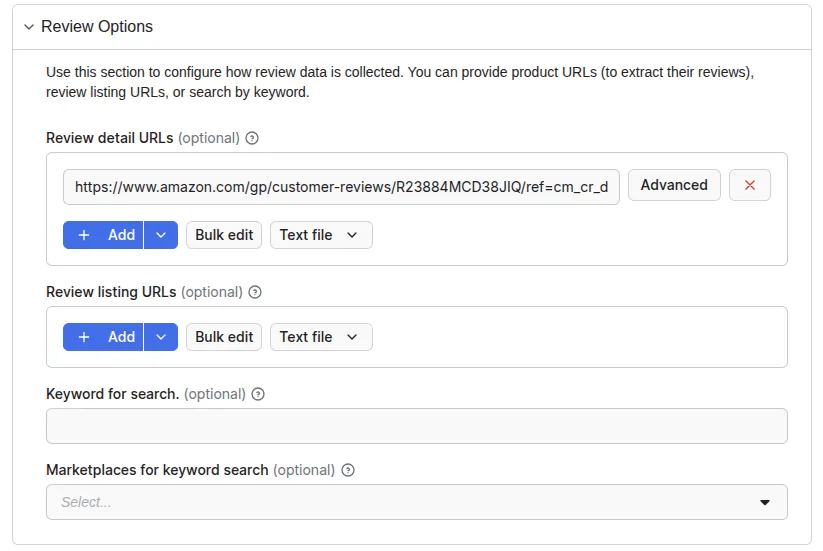
reviewDetailsUrls takes product URLs and returns their reviews; reviewListingUrls takes a category and returns reviews across it; keywordReviews with marketplacesReviews finds them by search. sortReview accepts Most recent, Most relevant, Most helpful, Highest rated, or Lowest rated. additionalReviewProperties adds verified-purchase badges, images, and helpful votes. maxReviewResults caps the run.
Seller options
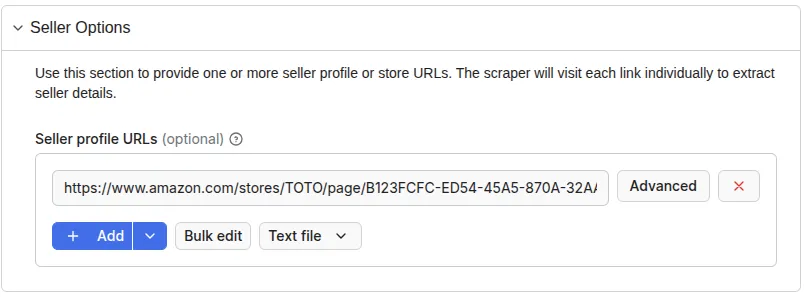
sellerUrls takes seller or store profile URLs, one visit each. maxSellerResults caps the run.
Food delivery options
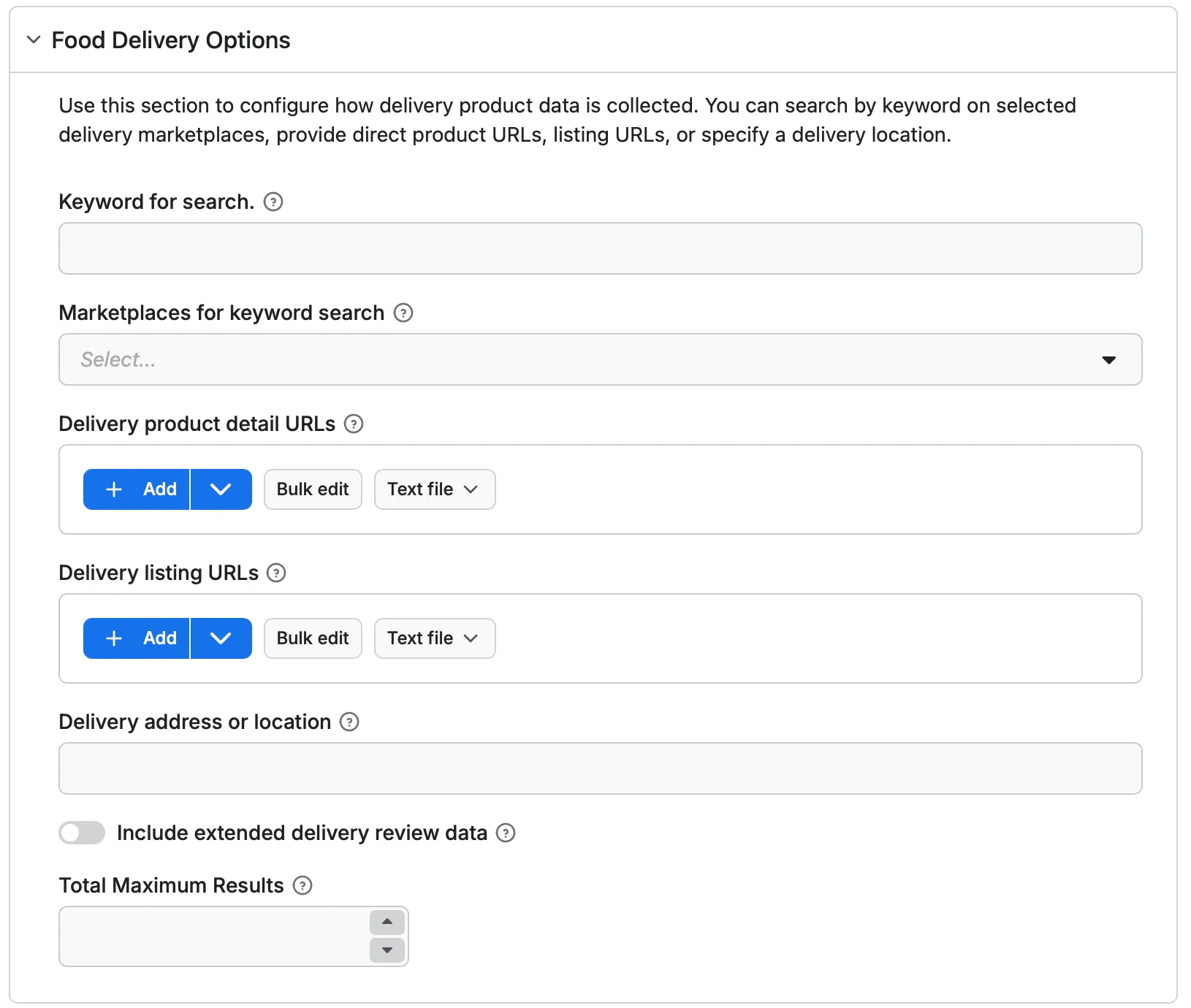
keywordDelivery with marketplacesDelivery searches the delivery platforms, or give deliveryDetailsUrls and deliveryListingUrls directly. addressDelivery matters more here than anywhere: availability and pricing are local, so a city, ZIP, or address changes the answer. scrapeReviewsDelivery adds reviews, maxDeliveryResults caps the run.
Influencer options
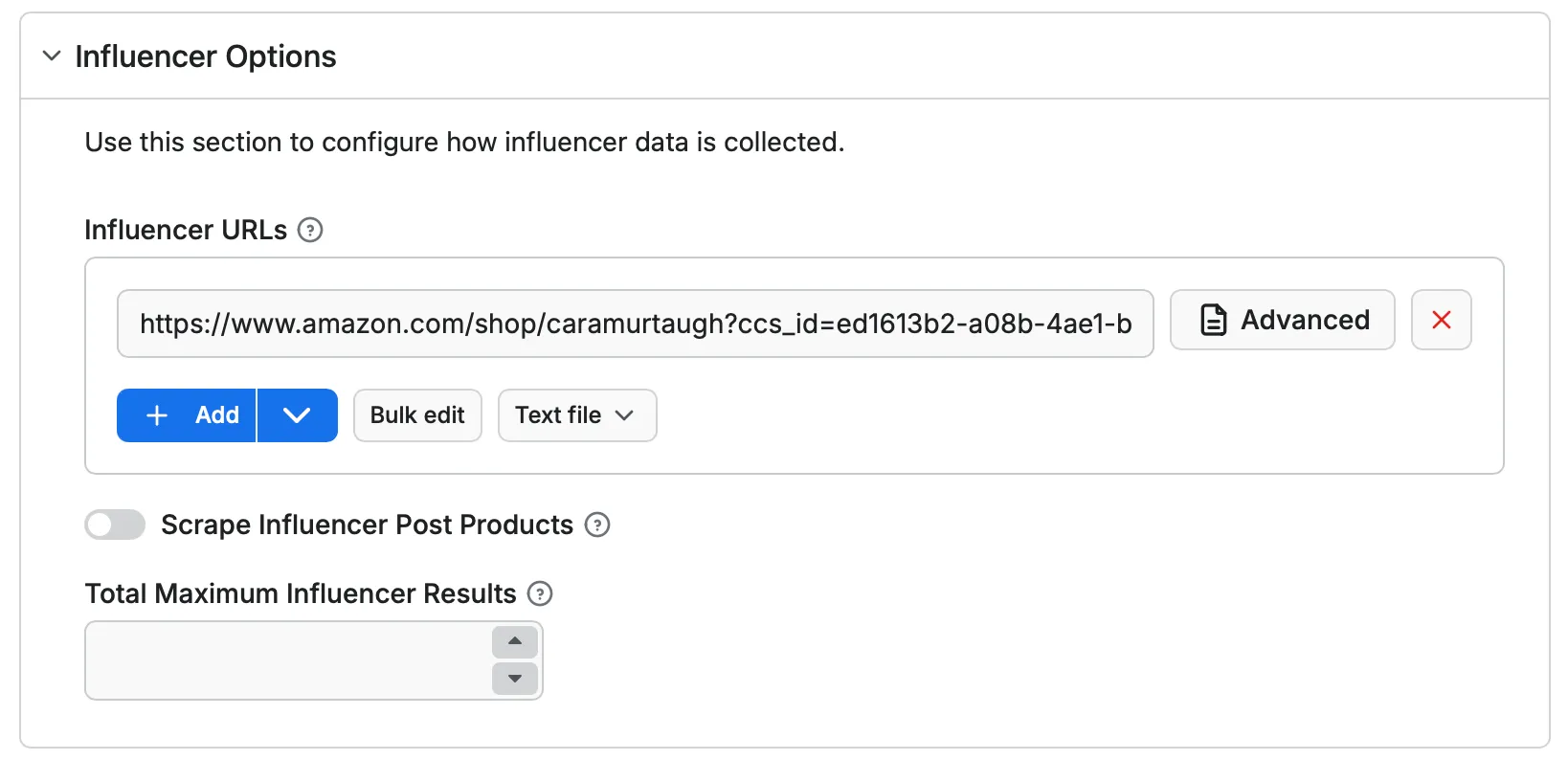
influencerUrls takes Amazon influencer storefronts. scrapeInfluencerProducts follows each post through to the products it promotes. maxInfluencerResults caps the run.
⬆️ Output
One row per item, in the dataset on the Output tab. Five views, so one run reads several ways:
- Products details (default), one row per product
- Product reviews, one row per review, for sentiment work
- Seller info, aggregated per seller
- Influencer post, with the post's product images and URLs
- All fields, everything scraped, platform-specific extras included
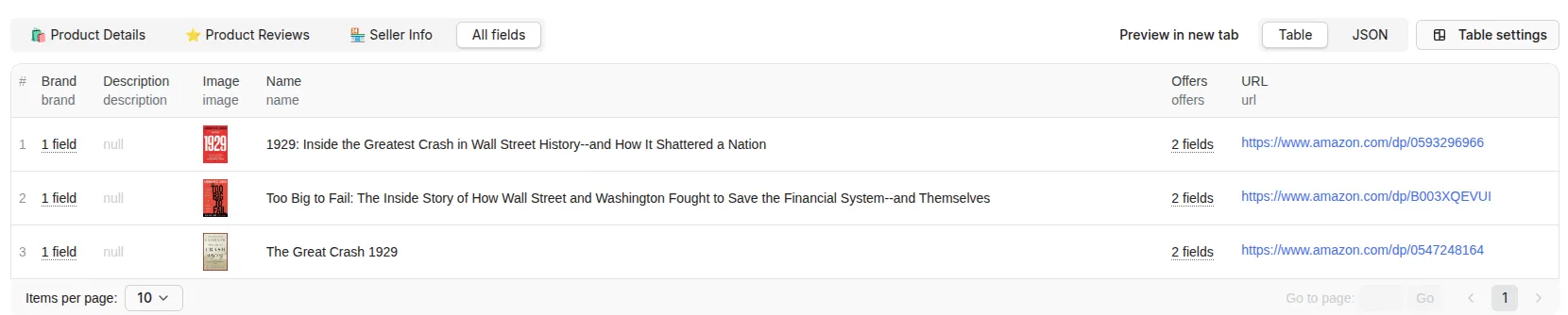
Export as JSON, CSV, Excel, XML, or HTML, picking fields or taking a whole view.
How much will data scraping for e-commerce cost you?
Pay per event, so you pay for records rather than runtime. Prices below are the free tier, and six volume tiers apply, so every price falls with monthly volume.
| Event | Free tier | Top tier | When it applies |
|---|---|---|---|
| Product Details | $0.006 | $0.0005 | Per product scraped |
| Product Listing | $0.0005 | $0.00019 | Per listing or category page read |
| Review Details | $0.002 | $0.0004 | Per review |
| Seller Details | $0.003 | $0.0005 | Per seller page |
| Influencer post details | $0.002 | $0.0005 | Per post |
| AI Summary | $0.0075 | $0.002 | Per summary, only if you enable it |
| Actor Start | $0.0001 | $0.00005 | Once per run |
| Residential Proxy per Product | $0.003 | $0.0006 | Surcharge. The site blocks datacenter traffic |
| Browser Rendering per Product | $0.0006 | $0.000375 | Surcharge. The page needs JavaScript to render |
| Unblocker Proxy | $0.0015 | $0.00075 | Surcharge. The site needs an unblocking proxy |
The last three rows are the ones that catch people out, because the site decides them rather than you.
On a heavily protected, JavaScript-rendered store a product costs $0.0096 on the free tier rather
than $0.006. It's why AUTO mode is worth leaving alone: it only pays for browser rendering on the
sites that need it.
Keeping the cost down
- Use category URLs, not thousands of product URLs. A listing page is $0.0005 against $0.006 per product.
- Set
maxProductResults. It caps the whole run, not each URL, so it's a real limit. - Turn on
deduplicateProductswhen your URLs or keywords overlap. A product found twice is saved and charged once. - Leave AI summary off unless you want it. At $0.0075 it's the most expensive event here.
- Schedule daily, not hourly, unless the category moves that fast.
Full detail is on the pricing tab; plan discounts are on the pricing page.
Are there other e-commerce data scraping tools in Apify Store?
This Actor covers any retailer broadly. Where you need one site in depth, the e-commerce team maintains a specialist for it, and running both is a reasonable pattern: this one for breadth, the specialist for every last field.
The two delivery scrapers pair with the food delivery section above: this Actor finds the listings, they go deep on the reviews. The full set is in the e-commerce category.
❓ Frequently asked questions
Can I scrape Amazon, Walmart, eBay, and other major retailers?
Yes. Amazon, eBay, Alibaba, AliExpress, Etsy, Rakuten, Walmart, Target, Best Buy, Home Depot, Costco, Tesco, Argos, John Lewis, Flipkart, Zalando, Otto, and any store on Shopify, WooCommerce, Magento, BigCommerce, or PrestaShop. If it has public product pages, give it the URL.
How many products can I scrape per run?
No hard limit. What limits you is your plan, your budget, and how heavily the site is protected. maxProductResults sets the limit, and it applies to the run as a whole.
Can I scrape products behind a login or account wall?
No. It reads public pages only and doesn't authenticate.
Can I scrape historical prices?
No, each run captures what the site shows at that moment. To build a history, schedule it and let the dataset accumulate: every run is a timestamped dataset you can compare, or push each one into your own database and build a time series there.
How often should I schedule runs for price monitoring?
Hourly for fast-moving categories, daily for most cases, weekly for stable catalogs. Cost scales with frequency, so match it to how often prices in the category change.
Why did my search engine run return nothing?
Almost always scrapeModeSearchEngine. It's a single choice, and a run collects products, or reviews, or sellers. Setting the sellers maximum while leaving the mode on its default returns listings, not sellers.
What if it doesn't work on a specific website?
Open an issue on the Issues tab with the URL and what you expected. A site that has changed its markup is usually a quick fix.
Can I use integrations with E-commerce Scraping Tool?
Yes: Zapier, IFTTT, n8n, Slack, Airbyte, Make, LangChain, GitHub, Google Sheets, Google Drive, and plenty more. Webhooks fire when a run finishes.
Can I use E-commerce Scraping Tool with the Apify API?
Yes. Use the apify-client npm package for Node.js or the PyPI package for Python. The API tab has ready-made code.
Can I use E-commerce Scraping Tool through an MCP server?
Yes. Point an MCP client such as Claude Desktop or Claude Code at mcp.apify.com?tools=apify/e-commerce-scraping-tool and the model can set the input itself. See the MCP tab.
Is scraping e-commerce data legal?
This Actor reads publicly available pages and nothing behind a login. Product names, prices, and store information are public. Reviews, seller profiles, and influencer posts can include personal data, such as a reviewer's name. You're responsible for having a legal basis to collect and use it under privacy laws such as GDPR. How you store, redistribute, or act on the data is governed by your own agreements and local rules, so take your own legal advice. The Apify blog post on the legality of web scraping covers the general position.
Your feedback
Found a field a store publishes that this Actor misses, or a site it won't read? Open an issue with the URL and what you expected.


