

Shopify Store Analyzer — No Login, Apps, Emails & Phones
Pricing
from $7.00 / 1,000 store analyzeds
Shopify Store Analyzer — No Login, Apps, Emails & Phones
Analyze public Shopify catalog and app signals; revenue and sales estimates are labeled assumptions. No login. Bulk export: JSON, CSV, Excel and API. PPE: from $4/1K store analyses; start fee, usage extra.
Pricing
from $7.00 / 1,000 store analyzeds
Rating
5.0
(2)
Developer

Apivault Labs
Maintained by CommunityActor stats
8
Bookmarked
443
Total users
67
Monthly active users
10 days ago
Last modified
Categories
Share

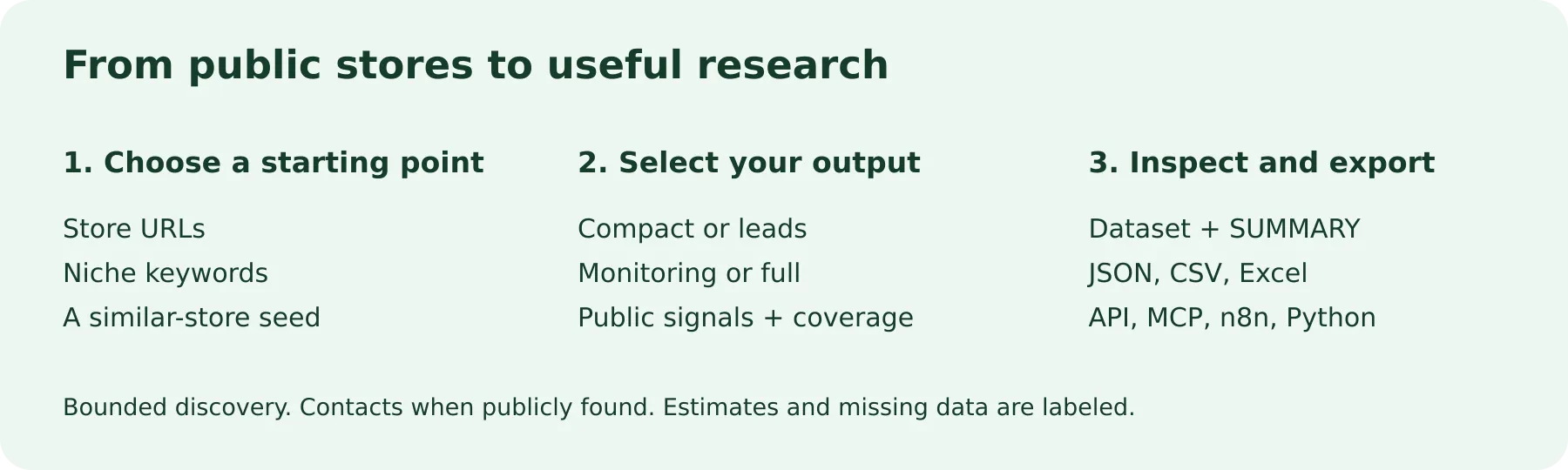
Analyze Shopify stores, detect visible apps and technologies, find public business emails and phone numbers, and research product catalogs from one workflow. Start with store URLs, discover stores by niche, or find candidate competitors from a seed store. Export structured results as CSV, Excel or JSON, or use the Actor through the Apify API, n8n and MCP.
Shopify app detector · Public contact finder · Competitor research · Product and pricing analysis · Store discovery · Change monitoring
No Shopify storefront login or separate data-provider API key is required. You need an Apify account to run the Actor, and an Apify API token for authenticated integrations. Public-source availability determines which fields can be returned.
Quick start: analyze one Shopify store
Paste a store URL, choose a small product sample and run the Actor:
Open the Dataset for the store profile, then inspect SUMMARY and ERRORS in the run's key-value store. Check data_quality before using optional fields. Expand to a larger batch after reviewing the first result and the current pricing.
Who is this Shopify research tool for?
| Your goal | How to use the Actor | What to review |
|---|---|---|
| Shopify agencies and freelancers | Enrich a domain list with public contacts, visible apps and catalog context | Confirm service fit and current website needs manually |
| Shopify app developers | Find niche stores with a detected review, email, subscription or support app | Detection reflects visible signals, not a complete installed-app inventory |
| Ecommerce brands | Compare competitor product samples, prices, promotions and technology | Compare the same currency and understand each catalog's sample scope |
| Market researchers | Discover merchant candidates by product niche and merchant-origin country | Discovery is a bounded sample, not an exhaustive merchant directory |
| Sales operations and analysts | Export structured Shopify lead research into a spreadsheet or workflow | Contact availability and commercial relevance vary by store |
| AI agents and automation builders | Request compact, leads or monitoring output through API/MCP | Read diagnostics and spending limits before expanding a run |
The Actor collects research data. It does not send emails, place calls, verify mailbox deliverability or establish a merchant's purchase intent.
What data can you get from a Shopify store?
| Data group | Example fields and observations |
|---|---|
| Store identity | domain, store name/URL, available myshopify_domain, public country/city and platform classification |
| Apps and technology | tech_stack, detected app categories, available theme metadata and public tracking signals |
| Public business contacts | emails, phones, best_email and available social-profile links |
| Product and price research | sampled_products, sampled product counts, available titles/prices, price statistics and price_currency |
| Catalog coverage | catalog_source, catalog_complete, catalog_sample_basis and source-availability diagnostics |
| Discovery provenance | search_term, discovered_via, discovery_scope, discovery_page and country_basis |
| Monitoring and comparison | changes, comparable catalog observations and an optional COMPARISON_REPORT |
| Optional analytical signals | Traffic inputs, revenue assumptions, health/lead/opportunity scores and other research heuristics |
Fields vary by mode, extraction flags, output preset and source response. Missing email, phone, traffic or revenue is not a verified zero. Use full when you need the available detailed fields; smaller presets intentionally omit parts of the record.
Choose a workflow
mode | Use it when | Main input |
|---|---|---|
analyze | You already have Shopify store URLs | storeUrls |
discover | You want store candidates matching a niche | searchTerms |
discover_and_analyze | You want discovery followed by richer store analysis | searchTerms |
find_similar | You have a seed store and want niche-related candidates | seedStoreUrl |
quick_check | You want to classify a list of websites | storeUrls |
Shopify store discovery and lead generation
Find merchant candidates selling a product type, then collect their available public contacts:
Discovery uses Shopify's documented public Catalog MCP search to find actual seller URLs from matching products. It follows opaque pagination cursors for at most five product pages per term, deduplicates store domains and stops at your limit. No Shop account or additional Catalog key is required.
Treat results as a bounded product-seller sample. They are not a full Shopify store database, a list of every merchant in a country or a verified ranking of the best stores in a niche. discoverCountry applies a Catalog merchant-origin filter; it does not verify headquarters or legal registration. Source warnings remain in discovery_warnings.
Shopify app detector and technology research
Research what apps a Shopify store visibly uses: email/SMS tools, review widgets, subscriptions, customer support, page builders, analytics and payment signals. Recognizable fingerprints include Klaviyo, Omnisend, Judge.me, Yotpo, Loox, ReCharge, Gorgias, PageFly and other supported technologies.
For reverse app lookup, combine niche discovery with a required app:
In discovery workflows, requiredApps keeps detected matches; appMatchMode accepts any or all. excludeApps removes candidates with the specified detected signals. These filters may produce no matches from the bounded search sample; they do not trigger an exhaustive scan of Shopify.
Apps are detected from accessible public evidence. An app can be installed without exposing a recognizable signal, or an old public reference can remain after a change. No detected app is not proof that the merchant does not use it. Verify important findings on the store before making a sales claim. Tracking pixels do not establish active ads, ad spend or common ownership between stores.
Shopify email extractor and phone finder
Enrich known Shopify domains with public contact details and social links. extractContact enables contact discovery; deepContactCrawl enables the additional bounded public-page checks implemented by the Actor. This example reduces unrelated catalog and estimate work:
best_email is the selected discovered address, not proof of ownership, mailbox validity or access to a decision-maker. Contact information is returned only when publicly found; some stores expose a form instead of an email or phone. Review the originating business and your intended use before adding contacts to a CRM.
Shopify competitor analysis and similar-store discovery
Use a seed store to find candidate competitors selling related products:
Similar stores are inferred niche candidates. They are not verified direct competitors, a market-share ranking or evidence that one business copies another. Review product overlap and the actual market yourself.
To compare known stores, analyze their URLs together and enable the comparison report:
The run writes COMPARISON_REPORT to its key-value store. Compare observed technology, available contacts and product-price context. The report is included; it is not an extra charged Dataset row. Different catalog coverage or currencies can make direct comparisons misleading.
Shopify product catalog scraper and pricing research
Use productSampleSize to bound product sampling and extractProducts to control catalog analysis. Depending on source availability, results can include sampled products, price ranges, product types, vendors, sale indicators, collection information and product publication signals.
Always read catalog_source, catalog_complete and catalog_sample_basis. An alternate marketplace route can return a strictly store-matched regional sample; it is not equivalent to the store's full catalog. A small sample can miss product types, variants, stock changes or new launches. price_currency identifies actual sampled prices, rather than assuming USD.
Best-seller research needs an additional distinction: best_sellers_basis: "store-curated collection" reflects observed collection order. "catalog heuristic" ranks sampled products using catalog clues and is not verified sales or confirmed best-seller volume. This Actor does not read private order history.
Shopify store monitoring and change tracking
Track supported changes from your own prior observations:
The first snapshot creates a baseline in your account's named shopify-analyzer-snapshots key-value store. Later runs compare with that account's previous domain snapshot. Tasks in the same account share this history; retain the named store to preserve it. Schedule repeated runs in Apify if you want recurring observations.
Product additions and removals require comparable complete catalogs. Limited samples and unavailable comparisons are explicitly skipped, so a missing sampled product is not reported as a confirmed removal. Monitoring begins with your first retained snapshot; it does not reconstruct historical changes from before your runs.
Shopify checker: classify website URLs
Use this workflow to inspect platform classifications before a deeper analysis. A reachable non-Shopify classification is a useful billable result. An unreachable URL goes to diagnostics instead of creating a charged Dataset row. Source restrictions can prevent a reliable classification; examine reachable, classification_verified and the diagnostics rather than treating every missing Shopify signal as a negative result.
Revenue estimates, traffic and research scores
The Shopify revenue estimator is an optional model based on available inputs and configurable assumptions. It does not provide verified merchant turnover, private transactions, actual conversion rates or order counts. Traffic and review-derived methods can be incomplete or unavailable.
Read the method, assumptions, local currency amounts and available dated FX information in revenue_estimate. USD remains null when necessary inputs or the exchange rate are unavailable. conversionRate and reviewsToSalesMultiplier are modeling inputs, not measured facts about the store. Estimates have not been validated against merchant financials.
Health, lead, opportunity and dropshipper scores summarize public signals using heuristics. Use them to prioritize manual research, not to certify store quality, business risk or buying intent. “No app detected” pitch suggestions require the same manual verification as app detection itself.
Inputs and output presets
| Input | Practical use |
|---|---|
maxStores | Cap the number of stores for the selected workflow |
productSampleSize | Bound the product sample; a sample is not a full-catalog guarantee |
discoverCountry | Optional ISO-2 merchant-origin filter for discovery, such as US |
requiredApps, excludeApps | Apply detected-technology filters in discovery workflows |
extractTechStack, extractContact, extractSocials | Select the public information you need |
extractTraffic, extractRevenueEstimate | Control optional traffic/model-based research |
trackChanges, generateComparison | Control history and multi-store comparison |
maxConcurrency, timeout | Request processing limits; actual concurrency is also constrained by available memory |
minMonthlyVisits, minStoreHealth and minOpportunityScore are qualification controls for the supported analysis flow. A missing input metric can prevent a candidate from passing a positive threshold. Do not interpret a filtered-out record as proof that the business has no traffic or opportunity.
outputPreset | Best use |
|---|---|
compact | Small profiles with core metrics, best email and detected apps |
leads | Public contacts, socials, technology and qualification signals |
monitoring | Changes, catalog coverage, prices and trend observations |
full | Available detailed fields and the complete legacy record |
Omitting outputPreset preserves the legacy full response. Set flatOutput: true to flatten the selected preset. A preset changes the returned projection; it does not automatically turn every underlying extraction option off. Disable optional extraction flags explicitly when you do not need that work.
API, MCP, n8n and Python automation
Use the Actor API to start a bounded run, retain its run ID, wait for completion and read the Dataset. Export JSON, CSV or Excel through Apify. When connecting a spreadsheet or CRM, map the available fields and handle missing contacts and partial results explicitly.
Hosted MCP endpoint: https://mcp.apify.com?tools=apivault_labs/shopify-store-analyzer
Tool name: apivault_labs--shopify-store-analyzer. Send mode explicitly and start with one store plus outputPreset: "compact". Inspect the Dataset, SUMMARY and ERRORS before expanding. The four output presets belong to the same Actor, not different installed versions.
n8n and developer integrations
Use this Actor in your automation or application with the existing community integrations below. An Apify account and API token are required; Actor and platform charges follow the current pricing.
- n8n community node: n8n-nodes-apivault-shopify-analyzer. Install package name
n8n-nodes-apivault-shopify-analyzerin a self-hosted n8n instance that permits community packages. - n8n source and usage: GitHub.
- Python client and examples: GitHub.
- n8n source and usage: GitHub.
These are community packages. Publication on npm does not establish n8n verification or availability in n8n Cloud. Review the linked package README for supported inputs and setup.
For Python, review the linked client's supported parameters. The existing Python client exposes the legacy URL-analysis interface; use the Actor API directly when you need discovery or output-preset controls that the client does not expose. A client-side historical cost estimate is not the live Apify tariff.
Pricing and spending control
Returned store rows cost $4–15 per 1,000, depending on the Apify plan: FREE $15, Bronze $12, Silver $9, Gold $7, Platinum $5 and Diamond $4. A $0.0005 start event applies per run. Apify platform and proxy usage are paid separately by the user. Confirm the current pricing before running a batch.
One returned record is the result-billing unit; contacts or apps within that record are not separate result events. Reachable non-Shopify classifications are billable. Filtered-out stores, unreachable URLs and input diagnostics do not create charged Dataset rows. Start and platform costs can still apply to empty runs. Begin with a small limit and set a maximum total charge in Apify.
Frequently asked questions
Can I find out what apps a Shopify store uses?
The Actor detects supported public app and technology fingerprints. It does not authenticate to Shopify Admin or enumerate private installed apps. A blocked homepage or missing fingerprint cannot establish app absence.
Can I find Shopify store emails and phone numbers?
Yes, when those contacts are publicly discoverable on supported pages. Coverage varies. A returned email is a discovered contact, not a verified mailbox, a guaranteed owner email or permission to contact that person.
Can I discover Shopify stores without a URL list?
Use discover or discover_and_analyze with searchTerms. The bounded Catalog product search returns seller candidates. It is not an exhaustive Shopify directory export, and restrictive app/country filters can return no matches.
Does this show exact Shopify revenue or best-selling products?
No private sales data is accessed. Revenue is a model with disclosed assumptions. Best-seller fields identify either observed store-curated collection order or a catalog heuristic; neither establishes actual sales volume.
Does “no login” mean the Actor is free or anonymous?
No storefront login or separate data-provider key is needed. Running through Apify requires an account; API, n8n and MCP integrations require the appropriate Apify credential. Result, start and usage charges follow the current tariff.
Why can a successful run return partial data?
Optional sources can be restricted, time out or expose only a limited sample. SUMMARY.status distinguishes COMPLETED, PARTIAL_RESULTS, NO_RESULTS, INVALID_INPUT and source/storage failures. Review partialRows, partialStores, data_quality and structured ERRORS; successful run status alone does not prove complete coverage. Do not treat a source failure as a successful search with zero merchants.
Is the community node verified for n8n Cloud?
npm publication is not n8n verification or confirmation of n8n Cloud availability. The linked community package is intended for n8n installations that permit such packages; check its current setup documentation.
Ready-to-run Shopify research Tasks
- Analyze one Shopify store
- Research a store's modeled monthly revenue
- Detect visible Shopify apps
- Find public store contact emails
- Monitor competitor-store observations
Replace sample URLs and niches with your own research targets, review the first records and diagnostics, and increase limits only when the observed coverage meets your needs.


