

YouTube Channel Analyzer — No Login, Bulk API
Pricing
from $1.00 / 1,000 channel reports
YouTube Channel Analyzer — No Login, Bulk API
Collect public YouTube channel signals; earnings and growth forecasts are estimates, not reported revenue. No login. Bulk export: JSON, CSV, Excel and API. Pay per result: from $1/1K channel reports; usage extra.
Pricing
from $1.00 / 1,000 channel reports
Rating
0.0
(0)
Developer

Apivault Labs
Maintained by CommunityActor stats
0
Bookmarked
4
Total users
2
Monthly active users
3 days ago
Last modified
Categories
Share
YouTube Channel Analyzer — Earnings & Growth | $1/1K
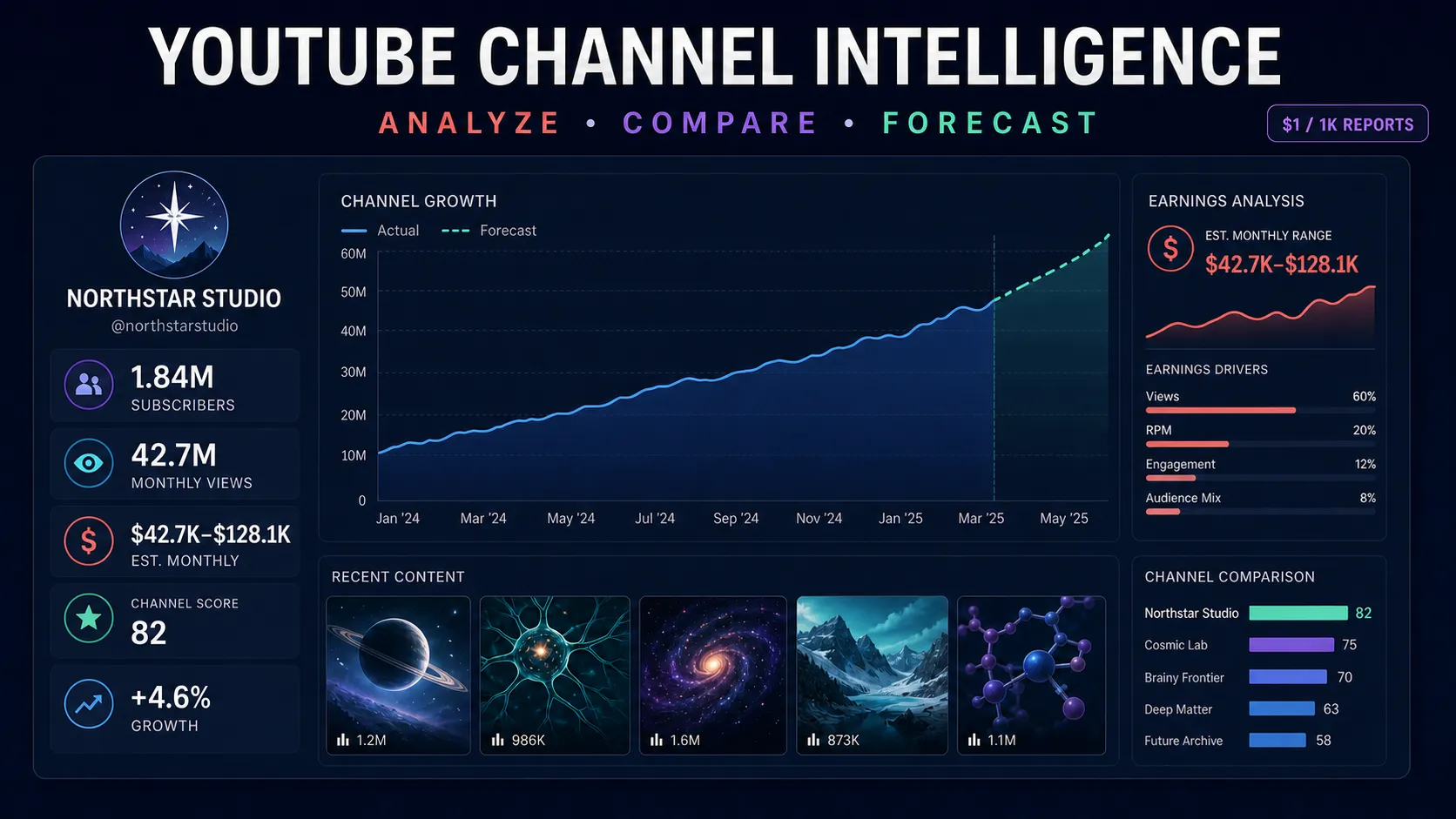
YouTube Channel Analyzer turns a channel handle, URL, ID, or video URL into a structured channel-intelligence report. Analyze subscribers, views, estimated earnings, growth, upload activity, recent videos, audience signals, similar channels, and forecasts in bulk without login or cookies.
$1 per 1,000 successful reports on paid Apify plans · $2/1K on Free · Pay per result · JSON, CSV, Excel, API and webhook-ready
Why use this YouTube channel analyzer?
- Channel or video input — resolve a report from
@handle, channel URL, channel ID, watch URL, short URL, or Shorts URL. - Earnings calculator — estimate daily, weekly, monthly, and yearly revenue ranges from public view signals.
- Growth intelligence — inspect history, subscriber and view changes, upload patterns, channel score, and forecast milestones.
- Content research — review recent videos, engagement, outlier signals, content mix, video duration, and upload cadence.
- Audience signals — receive clearly labeled language and country estimates from an available public-comment sample.
- Competitor discovery — include similar channels for manual niche and creator comparison.
- Bulk and fast modes — choose a full report or core statistics for larger lists.
- Clean billing — failed lookups are stored separately and are never charged as channel reports.
Input
| Field | Description |
|---|---|
targets | Channel handles, URLs, IDs, or video URLs; exact duplicates are removed |
historyDays | Optional day-by-day history: 0, 7, 14, 28, 90, or 365 days |
fastMode | Return core channel identity, totals, averages, and estimated earnings without deeper sections |
maxConcurrency | Parallel channel lookups from 1 to 50 |
proxyConfiguration | Recommended for resilient large bulk runs; Apify datacenter proxy is sufficient |
An empty input runs one free demonstration report. A user-supplied successful target is charged once.
What you get
Identity and reach
| Field | Description |
|---|---|
channelId, handle, channelName, channelUrl | Normalized channel identity |
subscribers, totalViews, videoCount | Public channel totals, which may be rounded by YouTube |
niche, country, dateCreated, verified | Available public classification and account details |
globalSubscribersRank, globalViewsRank | Available comparative ranking signals |
Earnings and performance
| Field | Description |
|---|---|
dailyAvg, weeklyAvg, monthlyAvg, yearlyAvg | Views, subscriber changes, and estimated revenue ranges by period |
monthlyRevenueLowUsd, monthlyRevenueHighUsd | Flat monthly range fields for CSV and spreadsheet workflows |
yearlyRevenueLowUsd, yearlyRevenueHighUsd | Flat yearly range fields |
estimatedRpmUsd | Estimated revenue-per-thousand-view range derived from the public estimate |
uploadsPerWeek, avgViewsPerVideo90d | Upload activity and recent view-performance signals |
Growth, content, and audience
| Field | Description |
|---|---|
dailyStats, growth | Available day-by-day data and period growth summary |
channelScore | Explainable research heuristic combining reach, activity, engagement, and momentum |
engagementRatePct, viewsPerSubscriber | Public recent-video interaction and audience-liveness estimates |
recentVideos | Up to 10 recent videos with public performance and outlier signals |
contentMix | Available long-form and Shorts mix by period |
bestUploadDay, uploadsByWeekday | Publishing-pattern indicators derived from available history |
audienceEstimate | Estimated languages and probable countries with the public-comment sample size |
similarChannels | Up to 10 channels for competitor discovery |
forecast | Available projected totals and upcoming milestones |
isMonetized | Availability-dependent ad-presence signal for a sampled public video |
Fictional output example
The values below describe a fictional channel and are provided only to illustrate the schema.
Fast mode or full mode?
Use fastMode: true for broad list enrichment where you primarily need channel identity, totals, upload frequency, and earnings averages. Use full mode when you need recent videos, similar channels, content mix, forecast, history, monetization signal, or audience estimate.
Optional sections can be unavailable for a particular channel or run. Always design downstream automation to accept null, empty arrays, and availability-dependent samples.
Pricing
- Paid Apify plans:
$0.001per successful report —$1/1K. - Free Apify plan:
$0.002per successful report —$2/1K. - Platform resource and proxy usage are paid by the user and shown separately by Apify.
- Invalid and unresolved targets are stored in
ERRORSand do not create aresultcharge. - Exact duplicate inputs are processed once.
- The built-in empty-input demo is not charged.
Use cases
- Creator research: compare public reach, activity, engagement, growth, and estimated earnings before manual review.
- Influencer marketing: shortlist channels and verify public evidence before sponsorship outreach.
- Competitor intelligence: discover adjacent channels, recent content, upload cadence, and outlier videos.
- Niche research: compare estimated RPM ranges, content mix, and public growth signals across a category.
- Channel monitoring: schedule repeat runs and store snapshots in a warehouse or spreadsheet.
- Lead enrichment: add public channel intelligence to an authorized creator or company list.
Important limitations
- Earnings are estimates, not YouTube Studio revenue or proof of creator income. Geography, niche, ad inventory, Premium revenue, seasonality, sponsorships, and other factors can materially change actual earnings.
- YouTube publicly rounds subscriber counts.
subscribersLive, when present, is also an estimate and not an exact private counter. - Audience countries are inferred from sampled public comment languages and can be incomplete or biased; they are not demographic measurements.
isMonetizedis an availability-dependent ad-presence signal and can vary by video, viewer region, consent state, and time.channelScoreis a research heuristic, not a platform grade, credit score, fraud score, or quality verdict.- Forecasts extrapolate observed public trends and do not predict future creative performance.
- Optional history, ranking, video, forecast, and audience fields may be missing temporarily.
Responsible use
Use public channel data for lawful research and authorized workflows. Do not use estimates as the sole basis for employment, credit, insurance, housing, or other high-impact decisions. Avoid spam, harassment, sensitive-trait inference, and misleading claims about creator income or audience demographics.
FAQ
Does the YouTube channel analyzer require login or cookies?
No. Input does not include a YouTube login, cookie, or third-party analytics API-key field.
Can I analyze a channel from one of its videos?
Yes. Paste a watch, shortened, embed, or Shorts URL and the Actor resolves the channel behind the video.
Are the earnings exact?
No. They are transparent public-data estimates and should be presented as ranges, not verified income.
Are failed channels charged?
No. Only a successfully delivered Dataset report creates the result event. Failure details are stored separately in ERRORS.
Can I export to CSV or Excel?
Yes. Apify Dataset exports include JSON, CSV, Excel, XML, RSS, API access, and webhook integrations.
Support
For an incomplete report, open an issue with the Actor run ID and a non-sensitive public channel example. Do not publish private lists, credentials, or customer data.
⚖️ Legal, Compliance & Acceptable Use
Please read this section carefully. By running this Actor you accept these terms.
Bottom line: this is a neutral, general-purpose software tool. It only retrieves information that is already publicly available. You — the user — decide what to search for and how to use the results, so you alone are responsible and liable for that use. The developer/operator of this Actor merely provides the tool and does not control, endorse, or take responsibility for what you do with it.
1. Public data only. The Actor accesses only publicly available information. It does not log in on your behalf, bypass access controls, or retrieve private, paywalled, or password-protected data.
2. You are the responsible party (data controller). For every run you start, you act as the data controller and are solely responsible for using the output lawfully. This includes having a valid lawful basis (for business/B2B use this is typically legitimate interest), honoring data-subject rights (access, correction, deletion, opt-out), and complying with all applicable laws and regulations — including, where relevant, the GDPR, UK GDPR, CCPA/CPRA, and similar privacy, marketing, and anti-spam laws (e.g. ePrivacy, CAN-SPAM, CASL, TCPA).
3. Not a Consumer Reporting Agency. This Actor and its operator are not a consumer reporting agency (CRA), and the output is not a "consumer report" under the U.S. Fair Credit Reporting Act (FCRA) or similar laws. You must NOT use it, in whole or in part, to decide a person's eligibility for credit, employment, housing/tenancy, insurance, or any other FCRA-regulated purpose.
4. Respect third-party terms. You are responsible for complying with the terms of service of any website or platform whose public data you choose to process, and with any applicable intellectual-property rights.
5. No warranty. The Actor is provided "as is", without warranty of any kind. Public data may be incomplete, outdated, or inaccurate — verify independently before relying on it. Availability of sources and fields can change at any time.
6. Prohibited use. Do not use this Actor or its output for stalking, harassment, discrimination, fraud, spam, or any unlawful or harmful purpose.
7. Indemnification. You assume all risk and liability arising from your use of this Actor, and you agree to defend, indemnify and hold the operator harmless from any and all claims, losses, fines, or liabilities — including reasonable legal fees — resulting from your use or misuse of the Actor or its output, or from your breach of these terms or of any law.
This section is general information, not legal advice. If you are unsure whether your intended use is permitted, consult your own legal counsel before running this Actor.


