

X (Twitter) Advanced Search Scraper & API
Pricing
from $0.40 / 1,000 x post results
X (Twitter) Advanced Search Scraper & API
Run up to 25 advanced X/Twitter searches by keywords, hashtags, accounts, dates, media, and engagement. Export structured posts, authors, metrics, media, Cards, quotes, reposts, and X Articles—no login, cookies, API key, or proxy setup.
Pricing
from $0.40 / 1,000 x post results
Rating
0.0
(0)
Developer

Arjun Data
Maintained by CommunityActor stats
0
Bookmarked
4
Total users
4
Monthly active users
a month ago
Last modified
Categories
Share
Turn X advanced search into structured datasets for social listening, competitor research, lead discovery, and content analysis. Run up to 25 searches by keywords, phrases, hashtags, accounts, or native X operators, then narrow the results by date, language, post type, media, and engagement.
Export rich post and author data—including videos, Cards, reposts, quotes, and X Articles—without providing an X login, cookies, API key, or proxy configuration.
What can this Actor do?
- Search by ordinary keywords or complete native X search expressions.
- Match an exact phrase or any of several words and phrases.
- Include or exclude hashtags, cashtags, and accounts.
- Find posts from, replying to, or mentioning specific X accounts.
- Choose Latest or Top results.
- Filter by language, UTC date range, post type, media type, and minimum engagement.
- Process up to 25 separate searches in one run.
- Follow X result pages automatically and remove duplicate post IDs within each search.
- Export JSON, CSV, Excel, XML, or RSS from the Apify Dataset.
Common use cases
- Monitor public discussion around products, companies, industries, and events.
- Find posts from competitors, customers, journalists, creators, or researchers.
- Build market-research, media-monitoring, and social-listening datasets.
- Discover high-engagement posts with minimum likes, reposts, or replies.
- Collect image, video, link, quote-post, reply, or repost datasets.
How to use
- Add at least one search condition. The easiest option is Search terms or X queries.
- Choose Latest posts or Top posts.
- Set Posts to save per search. Enter
0only when you want the Actor to continue until X stops providing result pages. - Optionally add account, date, language, post-type, media, or engagement filters.
- Start the Actor and open the Dataset to preview or export the results.
Input example in Apify Console
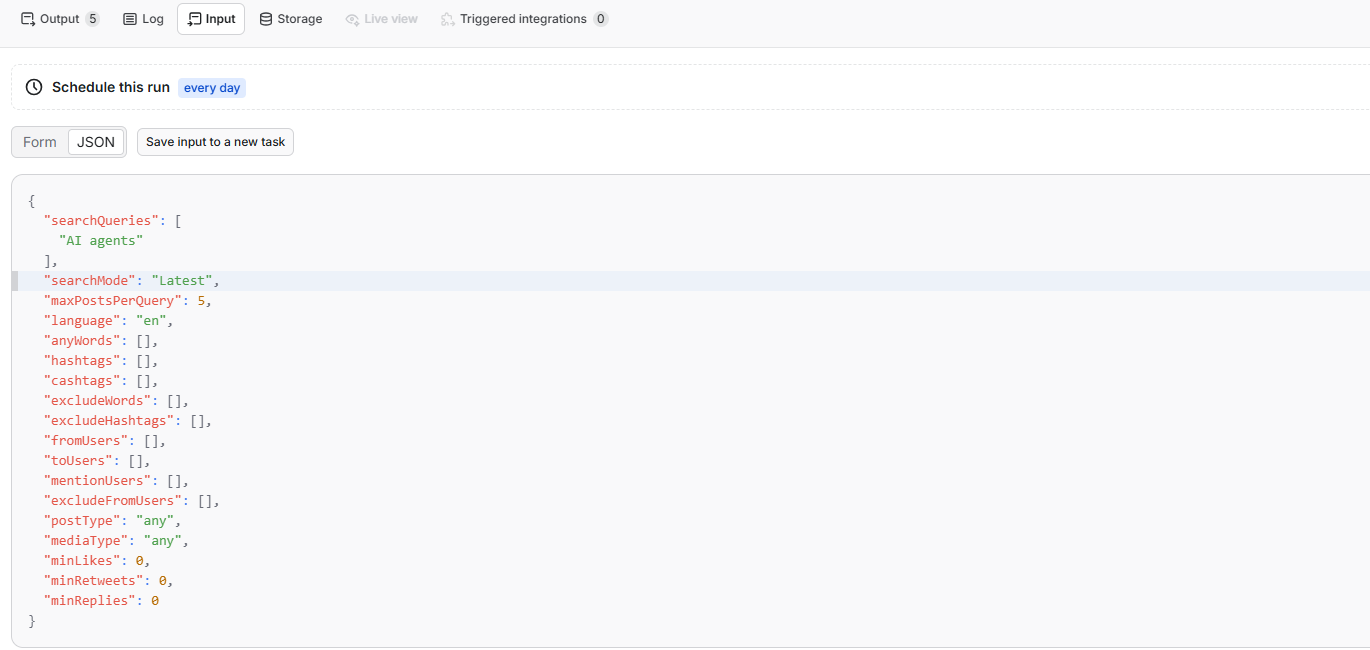
Input
The Apify Console opens with a small ready-to-run example: AI agents, Latest results, 5 posts, and English. When a field is omitted through the API, the runtime default shown below applies instead.
| Field | Purpose | API default / Console prefill |
|---|---|---|
searchQueries | One keyword search or native X search expression per line. Every line runs independently. | Empty / AI agents |
exactPhrase | Match one phrase in the same word order. Can start a search by itself. | Empty |
anyWords | Match any one entered word or phrase using OR logic. | Empty |
hashtags / cashtags | Match any entered hashtag or stock/crypto symbol. Either field can start a search. | Empty |
excludeWords / excludeHashtags | Remove posts containing the entered terms. These refine another search. | Empty |
fromUsers | Posts written by any entered account. Can start a search by itself. | Empty |
toUsers | Replies to any entered account. Can start a search by itself. | Empty |
mentionUsers | Posts mentioning any entered account. Can start a search by itself. | Empty |
excludeFromUsers | Exclude posts written by the entered accounts. | Empty |
searchMode | X's Latest or Top result order. | Latest |
maxPostsPerQuery | Maximum saved posts for each search. Use 0 to follow all result pages available from X. | 100 / 5 |
language | Limit results to a language classified by X. | Any language / English |
startDate / endDate | Inclusive UTC calendar-date range. | Empty |
postType | Any, original posts, replies, reposts, or quote posts. | Any |
mediaType | Any content, any media, images, videos, or links. | Any |
minLikes / minRetweets / minReplies | Minimum engagement thresholds applied by X search. | 0 |
Different filters use AND logic. Multiple entries inside an OR-style field such as anyWords, hashtags, or fromUsers can match any one value.
Example input:
Output
Each successful Dataset item represents one public X post. Important field groups include:
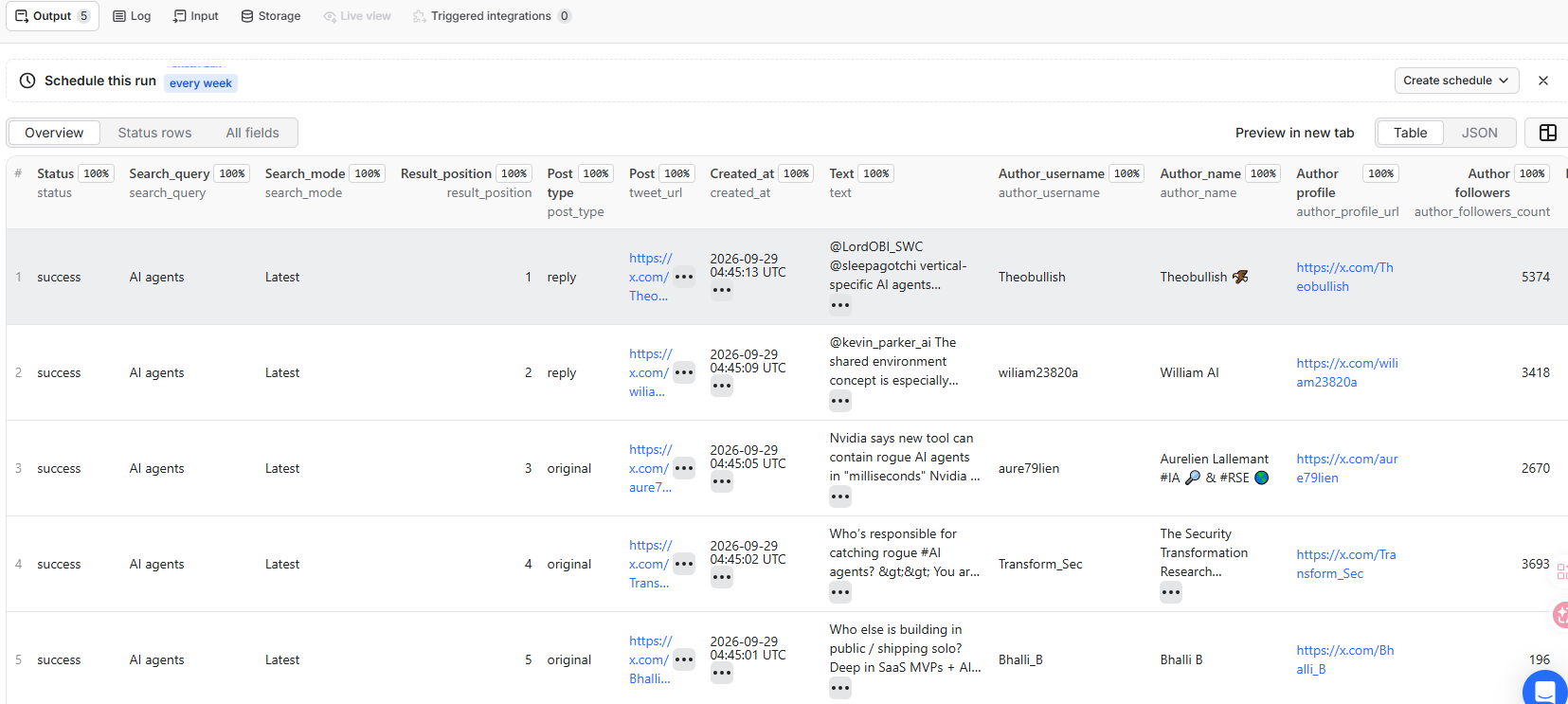
| Group | Fields |
|---|---|
| Search context | status, search_query, compiled_query, search_mode, result_position |
| Post | tweet_id, tweet_url, post_type, created_at, text, language |
| Engagement | reply_count, retweet_count, quote_count, like_count, view_count |
| Author | author_username, author_name, author_profile_url, author_followers_count, verification fields |
| Relationships | reply_to_name, retweeter, retweeted_post, quoted_post |
| Rich content | media, media_types, card, is_article, article_title |
Representative output:
Counts and text in live X data change over time. Optional fields can be null, empty, or absent when X does not provide them for a result.
Reposts, quotes, replies, Cards, and Articles
- A repost uses the reposting account in the top-level
author_*fields, a compact identity inretweeter, and the original post underretweeted_post. - A quote post contains the quoted post and its author under
quoted_post. - A reply contains X's reply target IDs and
reply_to_namewhen the matching user is present in the response. - Posts with an X Card can include its title, description, destination, image, and player information under
card. - X Articles expose their available Article metadata alongside the normal post fields.
Empty results and query failures
Invalid settings do not crash the Actor. The Dataset receives an uncharged invalid_input row explaining which value to fix. A valid search with no public matches produces an uncharged no_results row.
Example from the Status rows view when a search has no matches:
When a run contains several searches, one failed search does not stop the remaining searches. A query that fails before saving a post produces request_failed; a later-page failure produces partial with results_saved. Already saved results stay in the Dataset.
Pricing
This Actor uses pay-per-event pricing. It charges a small start event based on allocated memory and one post-result event for every successfully saved post.
| Event | Free | Bronze | Silver | Gold / Platinum / Diamond |
|---|---|---|---|---|
| Actor start, per 1 GB of allocated memory; minimum one event | $0.00005 | $0.00005 | $0.00005 | $0.00005 |
Successfully saved X post (post-result) | $0.00075 | $0.00060 | $0.00050 | $0.00040 |
At the Free-tier result price, a run using the default 1 GB memory costs approximately $0.00380 for 5 posts, $0.07505 for 100 posts, or $0.75005 for 1,000 posts. A run that returns no posts costs only the $0.00005 start event.
invalid_input, no_results, request_failed, and partial status rows do not trigger a post-result charge. Duplicate post IDs returned on different pages of the same search are removed before charging. The same post can be saved and charged once for each separate query that returns it because every result keeps its query attribution.
Use maxPostsPerQuery and Apify's Maximum cost per run setting to control spending. The Actor's Pricing tab is authoritative if prices change.
Run with the Apify API
The run response contains defaultDatasetId. Use the Dataset API to retrieve the saved items. You can also start runs with the Apify Python or JavaScript client, schedule recurring searches, connect webhooks, or send Dataset results to other integrations.
Related Actors
- X (Twitter) People Search Scraper — find public accounts by keyword.
- X (Twitter) Media Downloader — extract post details and download media.
- X (Twitter) Replies Scraper — collect visible replies and thread context.
- X (Twitter) Retweeters Scraper — collect reposting and quote-post accounts.
- X (Twitter) Trends Scraper — collect current trends by location.
FAQ
Do I need an X account, cookies, or an API key?
No. The Actor handles X access and proxy routing internally. You only provide the search conditions.
Why did I receive fewer posts than requested?
maxPostsPerQuery is an upper limit. X may expose fewer matching posts, stop returning result pages, or return duplicates that the Actor removes within the query.
What does 0 = all mean?
Setting maxPostsPerQuery to 0 tells the Actor to keep following result pages until X stops providing another usable page. It does not guarantee every historical post because availability is controlled by X. More pages can also increase run time and cost.
Are duplicate posts charged more than once?
Not within the same search: duplicate post IDs are removed before storage and charging. If the same post matches two separate queries, it can appear and be charged once under each query so the search attribution remains accurate.
What happens when one query fails in a batch?
The Actor writes an uncharged request_failed or partial status row for that query and continues with the remaining queries. Results already saved from completed pages stay available.
What does an empty search cost?
An empty result writes an uncharged no_results row. With the default 1 GB memory, the run still has the $0.00005 Actor start charge.
Limitations
- Result ranking, availability, and pagination are controlled by X and can change between runs.
- Deleted, private, withheld, restricted, or otherwise unavailable posts may not appear.
maxPostsPerQueryis an upper limit, not a guaranteed result count.- Very selective searches may expose fewer results than requested.
- X can change its web responses or temporarily limit access.
Use the data responsibly and comply with applicable laws, privacy requirements, X's terms, and Apify's terms. This independent Actor is not affiliated with, endorsed by, or sponsored by X Corp.
Support
If a run fails or the output changes, open an issue on the Actor page and include the Apify run ID, input, and expected behavior. Do not include passwords, cookies, tokens, or other secrets.


