
Competitor Google Ads Scraper | Google Ads Transparency API
Pricing
from $0.80 / 1,000 ad results
Competitor Google Ads Scraper | Google Ads Transparency API
Scrape the Google ads your competitors run from the public Ads Transparency Center (Google's ads library), no login: advertiser, creative ID, format, image and YouTube links, first and last shown, countries and platforms. $1.00 per 1,000 ads, details included.
Pricing
from $0.80 / 1,000 ad results
Rating
0.0
(0)
Developer

Aurelix
Maintained by CommunityActor stats
0
Bookmarked
1
Total users
0
Monthly active users
23 minutes ago
Last modified
Categories
Features
Share
What is Competitor Google Ads Scraper?
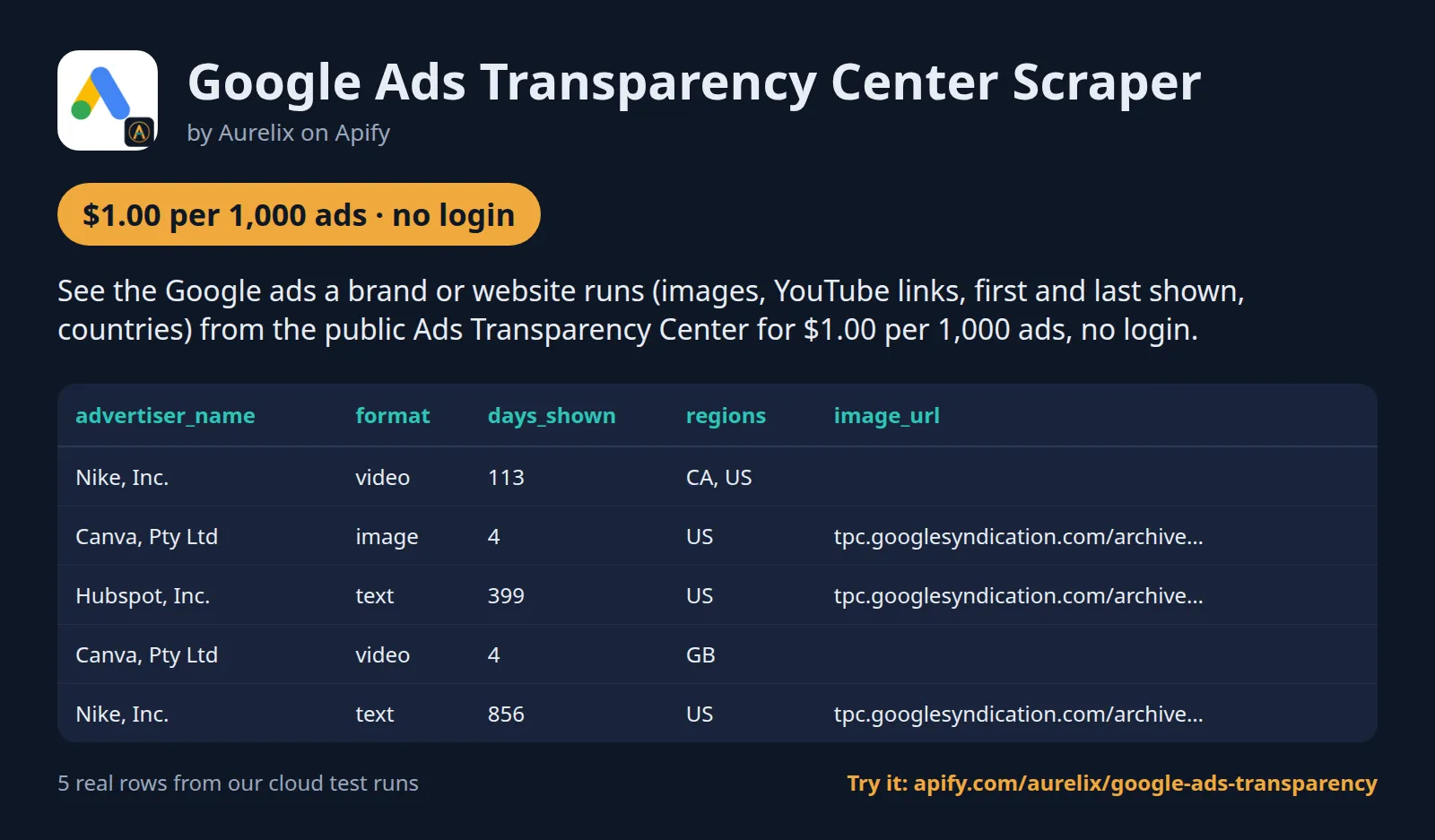
See the Google ads a brand or website runs (images, YouTube links, first and last shown, countries) from the public Ads Transparency Center for $1.00 per 1,000 ads, no login.
For marketers and agencies watching competitors. Search by brand name, advertiser ID, Transparency Center link or just a domain, with region, date, format and platform filters and an only-new daily monitor. Your first run with the example input costs about $0.028 (20 ads in our test run).
| Search by | Advertiser name or ID, website domain, or Transparency Center URL |
| Filters | Region, shown-between dates, format (text, image, video), platform, max ads per advertiser |
| Output | 20 fields per ad; JSON, CSV, Excel, API |
| Automate | Schedules, webhooks, Zapier, Make, n8n, Google Sheets, MCP for AI agents |
| Price | $1.00 per 1,000 ads (from $0.80 per 1,000 ads on paid Apify plans) |
| Free to try | Runs on Apify's free plan: the $5 monthly credit covers about 4,900 ads |
| Login needed | No |
Daily monitor: only what's new, every morning
Set it once, get only the new ads every morning. With Only new ads since last run on, the first run returns up to your per-advertiser limit; each later run returns only creatives Google first showed since the previous check that no earlier run returned, so you pay only for new ones.
- Paste this input into the Input tab (JSON view) and click Save as a new task; it appears under Saved tasks.
- Open the task from Saved tasks and click Schedule.
- Choose Daily, pick the hour, and save.
Cost example: 3 competitors with a few hundred live ads each: 10 results pages with nothing new a day (measured on this input) plus, say, 5 new ads a day ≈ $0.51/month on the free plan (from $0.48 on paid plans): one run a day for 30 days, start fee included. The first run returns up to the per-advertiser limit (here up to 300 ads), so it costs more.
Add a Slack incoming-webhook URL in slackWebhookUrl (or any URL in webhookUrl) to get a short digest of each run's new ads; nothing is sent when a run finds nothing.
Why Competitor Google Ads Scraper users pick this one
- Search by domain. Brand name, advertiser ID, Transparency Center link or website domain.
- Details included. Countries, platforms, image variants and YouTube links at no extra cost.
- How long it ran. First and last shown, days running and per-country dates.
- Exact limits. An exact per-advertiser cap, plus region, date, format and platform filters.
- New ads only. A daily monitor mode that returns just creatives you have not seen.
Get started in 3 steps
- Add advertisers or domains to 'Advertisers or domains' (e.g. 'Nike', shopify.com or an adstransparency.google.com link).
- Optionally pick a region, a shown-between date range, a format, a platform and a max per advertiser; turn on 'Only new ads since last run' to track new creatives.
- Click Start, then download JSON, CSV or Excel, or schedule it and send results to Google Sheets, Zapier, Make or n8n.
▶ Try it with the example input
The form opens with an example input already filled in: that run costs about $0.028 on the free plan.
How much does it cost to scrape Google Ads Transparency Center?
Pay per event: you pay only for what the run returns, plus a small start fee. Bronze, Silver, Gold and higher Apify plans pay less per result. Paid plans pay $0.90 (Bronze) and $0.80 (Silver and higher) per 1,000 ads.
| Ads | Free plan | Bronze | Silver | Gold |
|---|---|---|---|---|
| 100 | $0.11 | $0.098 | $0.088 | $0.088 |
| 1,000 | $1.01 | $0.91 | $0.81 | $0.81 |
| 10,000 | $10.01 | $9.01 | $8.01 | $8.01 |
Totals include the $0.008 start fee per run, rounded to the cent (amounts under $0.10 to four decimals). Apify's free plan includes $5 of credit a month, enough for about 4,900 ads.
Residential proxy and the detail record of every ad are included in the price. A results page or advertiser-name lookup that Google answers but that has no ad to return (a domain with no ads, a name with no advertiser, a filter that matches nothing, an only-new day with nothing new, or a page whose ads another entry in the same run already returned) costs $0.0004, so a check that finds nothing costs almost nothing. Pages that return ads, refused pages and entries never reached carry no page fee.
Billing events
| Event | Free plan | Bronze | Silver | Gold |
|---|---|---|---|---|
ad-result | $1.00 per 1,000 ads | $0.90 per 1,000 ads | $0.80 per 1,000 ads | $0.80 per 1,000 ads |
empty-page | $0.0004 per results page or name lookup with no ad to return | $0.0004 per results page or name lookup with no ad to return | $0.0004 per results page or name lookup with no ad to return | $0.0004 per results page or name lookup with no ad to return |
apify-actor-start | $0.008 per run | $0.008 per run | $0.008 per run | $0.008 per run |
What data you get
Competitor Google Ads Scraper turns the public Google Ads Transparency Center into clean rows: advertiser name and ID, creative ID, format, every image variant, preview link, YouTube link for video ads, first and last shown, days running, countries and platforms. Give an advertiser name, advertiser ID, Transparency Center link or just a website such as shopify.com, and filter by region, date range, format and platform. Election ads and party and campaign advertisers are skipped; other advertiser names are returned as Google shows them.
- advertiser_name, advertiser_id, creative_id, ad_id, format
- first_shown and last_shown (ISO 8601 UTC), days_shown
- image_url and image_urls (every variant), preview_url, video_url and youtube_video_id
- regions (ISO codes), region_details with per-country first/last dates, impressions range and platforms where published
- platforms (google_search, youtube, google_shopping, google_maps, google_play) where published
- ad_url (the ad's Transparency Center page), search_target
| advertiser_name | format | first_shown | last_shown | days_shown | regions | image_url | video_url |
|---|---|---|---|---|---|---|---|
| Nike, Inc. | video | 2026-07-07T14:21:15Z | 2026-11-12T17:18:24Z | 113 | ["CA", "US"] | https://www.youtube.com/watch?v=grj7FyOMWh8 | |
| Canva, Pty Ltd | image | 2026-11-10T06:11:39Z | 2026-11-12T18:38:10Z | 4 | ["US"] | https://tpc.googlesyndication.com/archive/simgad/16574242... | |
| Hubspot, Inc. | text | 2025-06-20T23:45:15Z | 2026-11-12T18:49:13Z | 399 | ["US"] | https://tpc.googlesyndication.com/archive/simgad/18305389... | |
| Canva, Pty Ltd | video | 2026-11-10T06:44:22Z | 2026-11-12T18:37:00Z | 4 | ["GB"] | https://www.youtube.com/watch?v=MGvmlm5kdBM | |
| Nike, Inc. | text | 2023-11-16T23:44:11Z | 2026-11-12T18:40:43Z | 856 | ["US"] | https://tpc.googlesyndication.com/archive/simgad/16320915... |
One full ad record, exactly as a real run returned it (long text and lists shortened here). From a real run:
Use cases
- Marketers and agencies auditing a competitor's Search, YouTube and Shopping ads
- Brands watching rivals for new creatives with a scheduled new-ads feed
- Media buyers checking how long competitor ads have run and in which countries
- Sales teams finding businesses that advertise on Google in a given country
Input
| Field | Type | What it does | Default |
|---|---|---|---|
targets (Advertisers or domains) | array | What to look up. | |
region (Region) | string | Only ads shown in this country, as a two-letter ISO code, e.g. 'CA', 'US', 'GB', 'DE'; or 'anywhere' for all... | "anywhere" |
maxResultsPerTarget (Max ads per advertiser or domain) | integer | Upper limit of ads returned for each entry in 'targets', newest first. 0 = no limit (large advertisers have tens... | 100 |
proxyConfiguration (Proxy) | object | Apify residential proxy by default: Google blocks shared datacenter addresses within a few requests. | {"useApifyProxy": true, "apifyProxyGroups": ["RESIDENTIAL"]} |
format (Ad format) | string | Only this ad format. | "all" |
platform (Platform) | string | Only ads shown on this Google platform. | "all" |
All 13 fields, with examples: see the Input tab.
Use with AI agents (MCP)
MCP (Model Context Protocol) is the open standard that lets AI assistants such as Claude, ChatGPT and Cursor call outside tools. Apify's hosted MCP server at https://mcp.apify.com/?tools=aurelix/google-ads-transparency gives your assistant this Actor only: it fills in the input from your request, runs it and reads the ads back, at the same per-result price as a run started by hand.
Example prompts
- "List the video ads wix.com has run in Canada according to Google's Ads Transparency Center, with first and last shown dates"
- "Show me the Search, YouTube and Shopping ads an advertiser I name has run in the last month"
- "Find the newest ad creatives of three competitors I give you on Google Ads Transparency and group them by format"
Claude Desktop and claude.ai
Settings > Connectors > Add custom connector, name it Apify, paste https://mcp.apify.com/?tools=aurelix/google-ads-transparency, keep the detected OAuth settings, select Add and sign in to Apify.
Claude Code
Cursor and VS Code
Add this to ~/.cursor/mcp.json (Cursor); in VS Code's .vscode/mcp.json put the same entry under "servers" with "type": "http". Sign in to Apify when asked.
ChatGPT
Turn on Developer mode, open Settings > Apps & Connectors > Create, paste the URL above as the MCP server URL, choose OAuth and authorize Apify.
Clients without sign-in send Authorization: Bearer <YOUR_APIFY_TOKEN> instead. No Apify account? This Actor supports Apify's agentic payments: an agent can pay per run with a prepaid, spend-capped token, bought with x402 stablecoin payments.
n8n AI agent
Give an AI Agent node an MCP Client Tool with the endpoint https://mcp.apify.com/?tools=aurelix/google-ads-transparency and a Bearer credential holding your Apify token.
Use it from AI agents (MCP), the API or no-code
Copy this to your AI assistant
MCP server URL for this Actor: https://mcp.apify.com/?tools=aurelix/google-ads-transparency (setup for each client in the section above).
API
Start a run and read the dataset with Apify's REST API or the Python and JavaScript clients:
No-code: schedule it in 3 clicks
Send the results to Google Sheets, Zapier, Make, n8n, Slack or any webhook URL.
- Fill in the input, then click Save as a new task.
- In the task, click Schedule and pick daily or weekly (Apify Schedules).
- Turn on Only new ads since last run so each run returns only what is new, and paste a Slack or webhook URL into Slack webhook URL / Webhook URL to get a digest of the new items (count plus the top 10) after every run.
Prefer n8n or Make? Ask in the Issues tab and we will share a ready-made workflow for it.
FAQ
Can I scrape Google Ads Transparency Center without login?
Yes. It never logs in, so you need no Google account, password or cookies; only a free Apify account to run it.
Is there a Google Ads Transparency Center API?
You can use this Actor as one. Start it with Apify's REST API or the Python and JavaScript clients and read the results as JSON (see the code above), or call it from an AI agent through MCP.
How much does it cost to scrape Google Ads Transparency Center?
About $1.01 for 1,000 ads on Apify's free plan and from $0.81 on paid plans, start fee included. The free $5 monthly credit covers about 4,900 ads.
Can I export Google Ads Transparency Center data to Excel or Google Sheets?
Yes. Download the results as Excel, CSV, JSON, XML or HTML from the run's Storage tab, or send them to Google Sheets with Apify's Google Sheets integration or the API.
Is it legal to scrape Google Ads Transparency Center?
It reads only public data any logged-out visitor can see: the Google Ads Transparency Center. It goes at a polite pace, never logs in and never solves CAPTCHAs. It returns ad fields (advertiser, creative ID, format, media links, dates, regions); political advertisers are skipped. Data is returned as shown publicly on the source; people can ask for removal by opening an issue on this Actor's Issues tab; if Google formally asks us to stop, this Actor will stop. You are responsible for using the data lawfully, incl. anti-spam and privacy laws; this is not legal advice.
Is there a cheaper Google Ads Transparency scraper on Apify?
On the free plan and on Bronze and Silver, yes: this Actor costs $1.00 per 1,000 ads on the free plan, $0.90 on Bronze and $0.80 on Silver, cheaper than the leading tools there, with the detail record (countries, platforms, YouTube links) included rather than billed extra. On Gold and higher the per-ad price is level with the cheaper of them. A run also pays a $0.008 start fee, and $0.0004 for each results page that has no ad to return.
How do I monitor competitor Google ads in Google Sheets, n8n or an AI agent?
Two ways. For a fixed workflow, add Apify's n8n or Make node, choose Run Actor, enter aurelix/google-ads-transparency and map the dataset to the next step. For an AI agent (Claude, ChatGPT, Cursor or an n8n AI Agent node), add https://mcp.apify.com/?tools=aurelix/google-ads-transparency as an MCP server and ask for ads in plain words; setup for each client is in the section above. Runs bill your own Apify account at the same per-result price.
Why are regions and platforms sometimes short or empty?
Google publishes per-country detail and platform splits mainly for the EU and Türkiye (Digital Services Act). Outside those, an ad usually lists only the countries it ran in, with no platform split.
How does the date filter work?
Google applies the range itself: an ad is kept when it was shown at any time between the two dates. With only a start date the range runs to today; with only an end date it covers everything up to that day.
Why is there no ad text?
Google renders text ads as images; the image_url shows the exact ad. The headline is not published as text.
What happens when Google rate-limits?
The Actor paces its requests, backs off, and moves to a fresh Apify residential proxy session (a new IP address) when Google slows it down; it never solves a CAPTCHA. After 5 failed tries of one request in a row, or 2 minutes with no answer at all, the run stops early with a 'PARTIAL' status (or 'NO ADS' when nothing was read yet) and you keep (and pay only for) the ads already read in full; with details on, an ad whose details could not be read is left out rather than returned half-filled. Retry later or lower the limit.
What if my run would take longer than the timeout?
The default run timeout is 1 hour, enough for about 3,000 ads with details on (measured about 1 second per ad on Apify). Shortly before the timeout the Actor stops by itself, keeps every ad already read, and says so in the status message, so a run is never cut off mid-save. For bigger pulls raise the timeout or turn details off.
How does 'Only new ads since last run' work?
Each advertiser or domain (per set of filters) remembers the ads already returned and when it was last fully checked. The first run returns up to your per-advertiser limit. Google lists ads by when they were last shown, so each later run reads down to the ads last shown a day before the previous check and returns only creatives Google first showed since then that no earlier run returned; older ads you have not seen are skipped, not dripped out as new. You pay for the new ads, plus $0.0004 for each results page (up to 40 ads) with nothing new on it: about one page per 40 ads the advertiser showed in that time, so a few cents a day for an advertiser with thousands of live ads and well under a cent for a small one. Use a different stateKey for each separate feed.
Lawful use
- Election, party and campaign advertisers are skipped.
- Data is returned as shown publicly on the source; people can ask for removal by opening an issue on this Actor's Issues tab.
Limits (stated honestly)
- Ad text is not returned as text: Google keeps most text ads only as an image of the ad, which image_url links to. This tool doesn't read text out of images.
- With details on, each ad needs its own request: measured about 1 second per ad on Apify, so about 10 minutes per 1,000 ads. Turning details off skips that request and is many times faster.
- Political filtering uses Google's election-ad label plus advertiser names (party, campaign, for president...); a brand like 'Party City' is skipped too.
- Video links come from Google's preview script; about 1 in 10 video ads has no YouTube link there.
- Google lists an advertiser's ads by when they were last shown. In 'Only new ads' mode an advertiser is read down to the ads last shown a day before its previous complete check, and after that first check an ad counts as new only if Google first showed it since then (less a day for Google's indexing lag). So the first run returns up to your per-advertiser limit, and later runs return only creatives that are actually new, never the rest of an old backlog.
- Google blocks shared datacenter addresses quickly, so the Actor uses Apify's residential proxy by default (included in the price). When Google slows it down it waits and moves to a fresh proxy session; it never solves a CAPTCHA. After 5 failed tries of one request in a row, or 2 minutes with no answer at all, the run ends early with a 'PARTIAL' status (or 'NO ADS' when nothing was read yet) and keeps every ad already read.
Works great with
- Then: Facebook Ad Library Search & API: the same
advertiser_namein itsqueriesinput: the competitor's Facebook and Instagram ads - Then: TikTok Ads Library API: the same
advertiser_namein itsqueriesinput: their TikTok ads
Recent changes
- 0.3: About 4x faster details, every country an ad ran in, Google-side date filter, a better advertiser-name match, an only-new monitor that returns only creatives first shown since the last check, and a lower price ($1.00 per 1,000 ads, details included).
- 0.2: Advertisers that are verified individuals are no longer skipped; advertiser names are returned as Google shows them. Only election, party and campaign advertisers are skipped.
- 0.1: First release: advertiser and domain search, region/date/format/platform filters, details, incremental mode, residential proxy by default, clean stop before the run timeout.
The full history is on the Changelog tab.
Tested daily
An automated health check runs this Actor every day on a fixed input and checks that at least 4 ads come back with ad_id, advertiser_id, advertiser_name, creative_id, format, first_shown filled in; a failed check alerts the maintainer straight away.
Was this useful?
- Something went wrong? Open an issue and tell us what you ran: we answer fast and aim to reply within a day.
- It worked? Leave a review: it takes a minute and helps other people find this tool.


