

Temu Products Scraper
Pricing
from $1.50 / 1,000 products
Temu Products Scraper
Analyse Temu products from your own export or an Apify dataset: explainable Product Score, filters, price/review history and a visual report. Public temu.com pages are tried politely; when Temu requires sign-in they are reported and never charged.
Pricing
from $1.50 / 1,000 products
Rating
0.0
(0)
Developer

Badr Bouargan
Maintained by CommunityActor stats
0
Bookmarked
2
Total users
1
Monthly active users
2 days ago
Last modified
Categories
Features
Share
Temu Products Scraper Pro
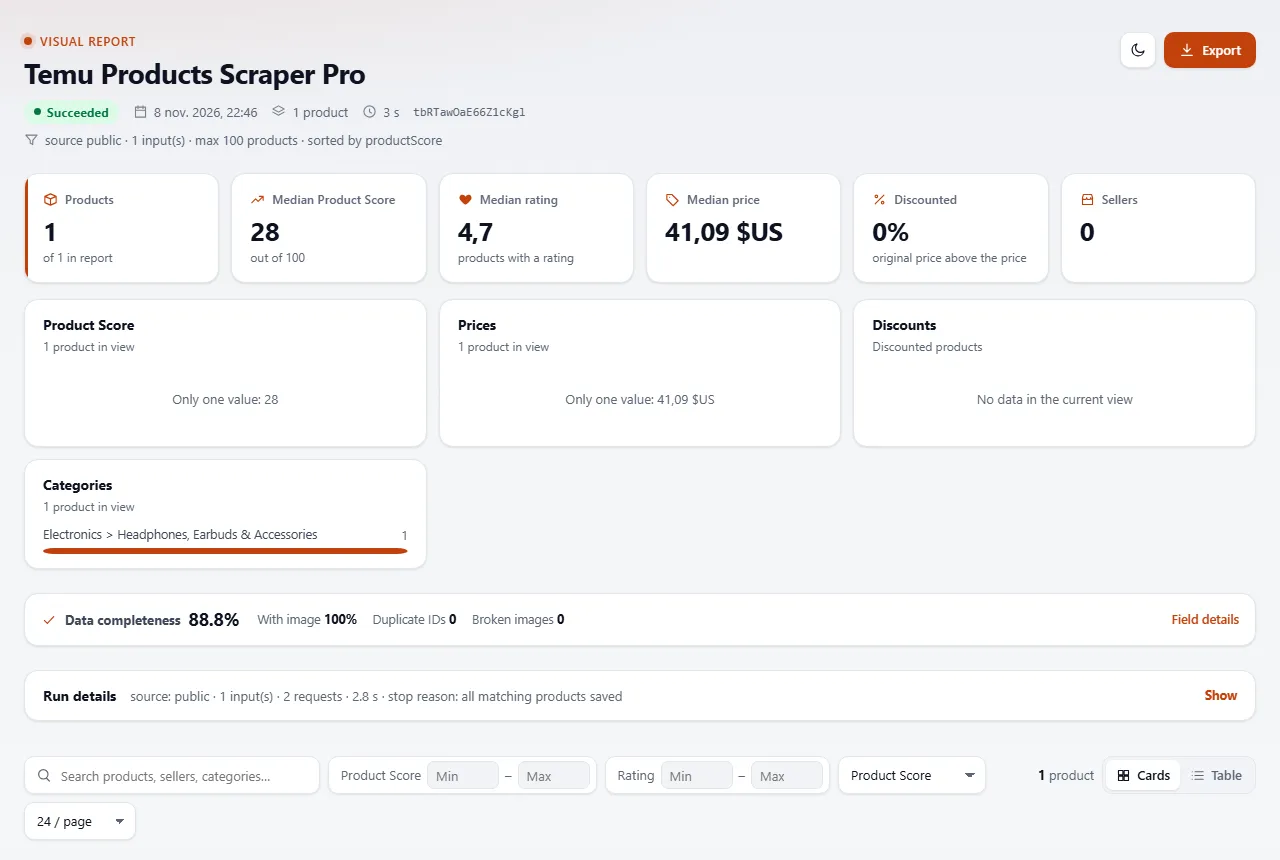
Turn Temu product data into a ranked shortlist. Every product gets an explainable Product Score (0–100), a clean normalized record, price and review history across runs, and a visual report with image galleries, charts and JSON / CSV / Excel export.
Read this first: what works today
Source Status What happens Import: your own Temu export (JSON, JSON Lines, CSV URL) or an Apify dataset ✅ Works Full engine: normalization, dedupe, filters, sorting, Product Score, history, report. Public temu.com product pages: product URLs or ids ⚠️ A few per run Measured on Apify 2026-11-08: the first 7 of 13 product pages were read (title, price, rating, reviews, images, category path, stock), then Temu showed its human-verification page for every following request. Public temu.com searches and category / listing pages ❌ Blocked Temu always answers with its human-verification page. Every blocked input gets 1 polite request, is reported in
FAILED_INPUTSand is never charged. The Actor never solves CAPTCHAs, never logs in, never rotates proxies to dodge blocks and never bypasses protections.If you already collect Temu data elsewhere (a Temu affiliate feed, your own export, another Actor's dataset), point this Actor at it and get the scoring, filtering and report on top.
What you get
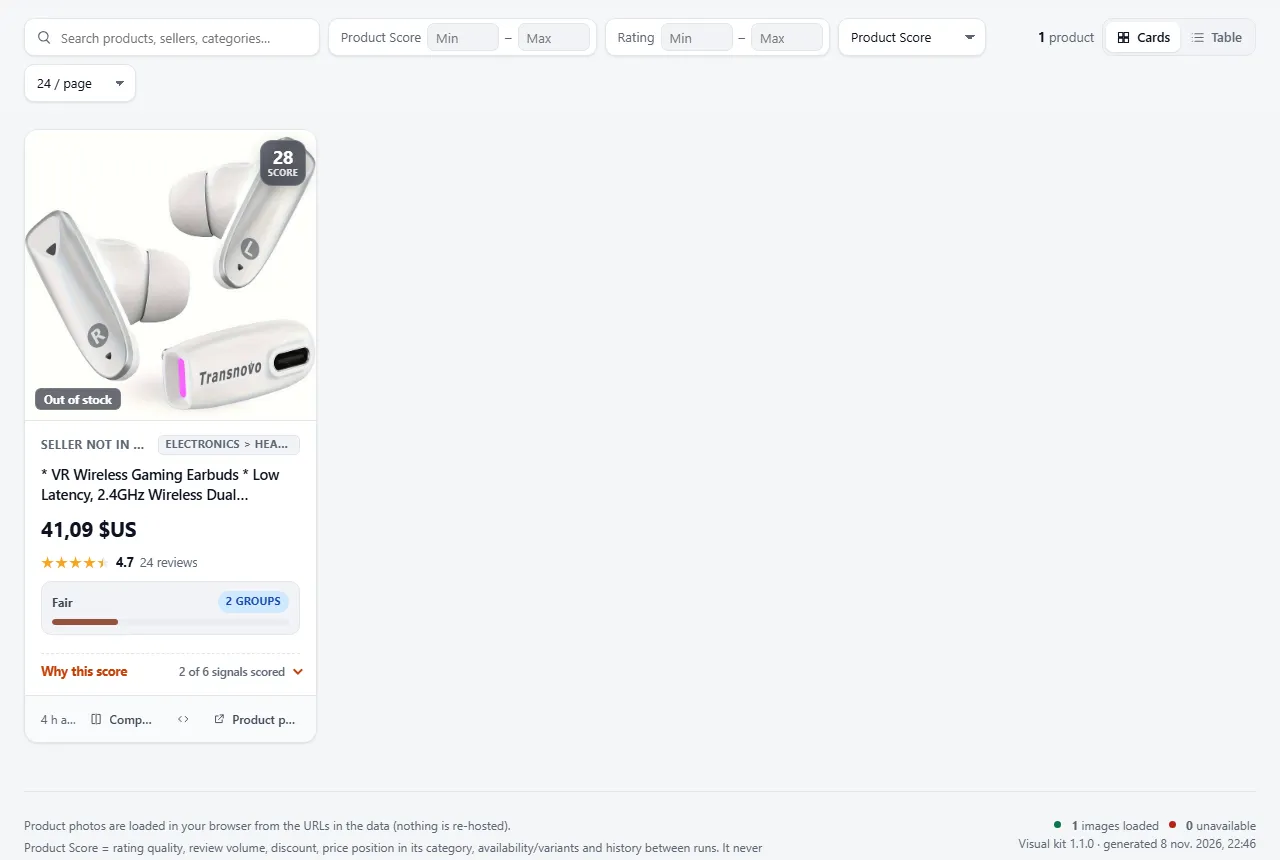
Screenshots from a real platform run.
- Normalized products: id, title, description (plain text), URL, main image + all images, videos, price, original price, discount %, amount saved (
amountSaved, only from a real original price), currency (ISO), rating, review count, category, seller and seller id, availability, variants (SKU, price, stock, options), colours, sizes, specifications, shipping text, listing date, collection time. - Missing data stays missing: absent values are
null, never guessed. Anything unusual is explained indataNotes. - Product Score 0–100 with every signal, its points and its evidence listed on the row.
- History between runs: price drops, review growth and stock changes, kept in a named key-value store.
newSinceLastRuntells which products no earlier run has seen (nullon the first run), and Only products new since the last run (onlyNewProducts) keeps just those, e.g. for a daily schedule. - Duplicate detection: the same product (same id or URL) from several inputs is saved once.
- Visual report (
REPORT.htmlin the key-value store): product grid with up to 3 photos per product (main photo first) and fallbacks, search, filters, sorting, pagination, side-by-side comparison, price / discount / category charts, Product Score ranking, JSON / CSV / Excel export. While the run is in progress it shows live progress (inputs read / total, products so far; refreshed at most once a minute); failed or blocked inputs are grouped by error code at the top, and a data-quality panel shows how complete the key fields are. - Run summary (
RUN_SUMMARY.json): totals, filter counts, per-input status, request counts, timings, memory and CPU.
Quick start
- Export your Temu products (or take the dataset id of another run).
- Set Data source to
import, paste the file URL in Import file URLs or the id in Apify dataset ids. - Pick filters and a sort order, run, then open REPORT.html from the Storage tab.
Accepted import formats
- JSON array, or an object with
items,dataorproducts. - JSON Lines (one product per line).
- CSV with a header row.
Common Temu field names are mapped automatically: goods_id, goods_name, link_url, price / price_str / *_cents, market_price, currency, thumb_url, gallery / images, goods_score, comment_num, mall_name, mall_id, sku_list, in_stock, and more. Unknown fields are kept under extra, so nothing is lost.
Prices: texts like $12.99 and fields named *_cents are always understood. Set Unit of numeric prices to cents if your file stores 1299 for 12.99.
Ready-made tasks
The tasks/ folder holds 7 inputs you can save as Apify Tasks:
| Task | Source | What it does |
|---|---|---|
| Temu Products Search | public | Search one keyword (blocked by Temu today; reported, not charged) |
| Temu Product Details | public | One product page (blocked by Temu today; reported, not charged) |
| Temu Products by Category | import | Keep one category, ranked by Product Score |
| Temu Discount Finder | import | 40%+ discounts, biggest first |
| Temu Best-Rated Products | import | Rating ≥ 4.5 with 100+ reviews |
| Temu Product Comparison | import | One product type, cheapest first, top 10 |
| Temu Multi-Keyword Search | public | Several searches in one run (blocked by Temu today) |
Filters and sorting
Filters: min / max price (in the product's own currency, no conversion), currency, minimum discount, minimum rating, minimum reviews, minimum variants, in stock only, only new since the last run, categories, sellers, keywords, excluded keywords, minimum Product Score.
Sorting: Product Score, price (low → high, high → low), discount, rating, reviews, newest listed, recently collected. Missing values always go last.
Filtered-out products are never saved and never charged. RUN_SUMMARY.json counts how many each filter removed.
How the Product Score works
Six independent signal groups, each with a maximum:
| Group | Max | Signal |
|---|---|---|
| Rating quality | 25 | 3.0★ = 0, 5.0★ = 25; ignored below 5 reviews |
| Review volume | 20 | Log scale, 10,000+ reviews = 20 |
| Discount | 15 | Only from a real original price above the price; 60%+ = 15 |
| Price vs category | 15 | Cheaper than X% of products in the same category and currency (needs 5+ peers in the run) |
| Availability & variants | 10 | In stock + variant depth |
| History | 15 | Price drop and review growth since the previous snapshot |
Safety caps: a product with points in only 1 group is capped at 49; 90+ needs at least 3 groups. Each row has scoreSignals (every signal, including zeros, with its evidence), scoreLevel, scoreConfidence and scoreGroups.
The score never uses or estimates sales volume. If your data contains a displayed sales tip, it is kept as displayedSalesTip but not scored.
Output example
Values below are from the Actor's synthetic test data, not a real Temu product.
Storage
| Key | Content |
|---|---|
| Dataset | One row per saved product |
REPORT.html | Visual report (grid, galleries, charts, comparison, export) |
RUN_SUMMARY.json | Totals, per-input status, filters, timings, memory |
FAILED_INPUTS.json | Every input that could not be read, with a reason. Never charged |
temu-products-history (named store) | Snapshots for price and review history |
Performance
Measured locally on import runs (512 MB):
| Products | Run time |
|---|---|
| 100 | 0.8 s |
| 1,000 | 11.7 s |
| 5,000 | 22.9 s |
The report shows up to 5,000 products; the dataset always keeps every row.
Pricing
Pay per saved product, plus a tiny $0.00005 start fee per run (one event per GB of memory). The price depends on your Apify plan:
| Apify plan | Price per 1,000 products |
|---|---|
| Free | $2.00 |
| Starter | $1.80 |
| Scale | $1.60 |
| Business and above | $1.50 |
| Products saved | Cost (Free plan) |
|---|---|
| 100 | $0.20 |
| 500 | $1.00 |
| 1,000 | $2.00 |
| 5,000 | $10.00 |
Blocked inputs, failed inputs and filtered-out products are never charged. Set a maximum cost per run in the run options if you want a hard cap.
FAQ
Why do only some temu.com URLs return data? Temu serves product pages to a handful of automated requests, then asks for human verification; searches and listing pages are always verified. This Actor respects that: it sends one request per input, reports blocks and charges nothing for them. For large volumes, use the import source.
Will you add a bypass? No. Bypassing sign-in, CAPTCHAs or anti-bot protections breaks Temu's terms and makes an Actor fragile. Official sources (for example a Temu affiliate product feed you are allowed to use) will be added as import sources.
Is my data shared? No. Imported files are read with your run's own token and stored only in your Apify storage.
What are the "synthetic" rows?
Test records clearly labelled "synthetic": true. They are never stored in history and the report shows a demo banner when they are present.
Feedback and reviews
If this Actor saved you time, a short review on its Store page helps other users find it. If something did not work as expected, please open an issue on the Issues tab with your run ID: we read every issue.


