
Shopify Trending Products Scraper
Pricing
from $3.99 / 1,000 trending product (lead)s
Shopify Trending Products Scraper
Find trending products on any public Shopify store: best-seller collections, new arrivals, sold-out variants, discounts and cross-store duplicates in one explainable Trend Score. History between runs, HTML dashboard, 79 curated stores.
Pricing
from $3.99 / 1,000 trending product (lead)s
Rating
0.0
(0)
Developer

Badr Bouargan
Maintained by CommunityActor stats
0
Bookmarked
2
Total users
1
Monthly active users
2 days ago
Last modified
Categories
Features
Share
Shopify Trending Products Scraper – Best Sellers, New Arrivals & Trend Score
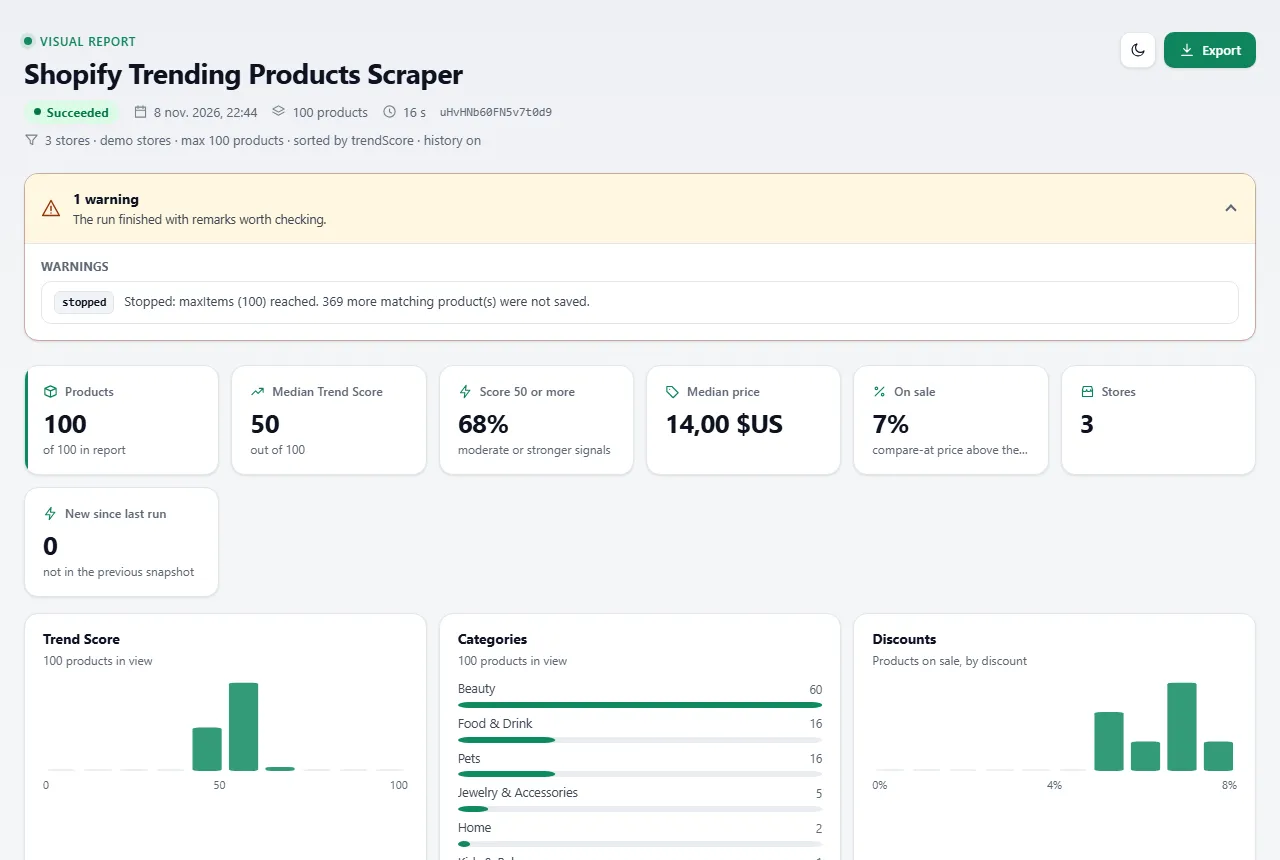
Paste any Shopify store (or pick a category of well-known stores) and get its products ranked by an explainable Trend Score: what the merchant lists as best-seller, what is new, what is selling out, what is discounted and what several stores sell at once.
The problem it solves. Shopify stores do not publish sales numbers, and "best selling" sorting is blocked for crawlers by Shopify's own robots.txt. Product researchers end up clicking through stores by hand and guessing. This Actor reads the public product JSON every Shopify store exposes – only where the store's robots.txt allows it – and turns it into a clean table where each product carries the signals behind its score, so you can see why something looks like it is trending.
Who it is for. Dropshippers and e-commerce entrepreneurs looking for winning products; product researchers and market researchers watching competitors; agencies preparing product or pricing audits; Shopify developers and analysts who need store catalogs as data; AI agents that need Shopify product data through an API.
What you get, per product: title, url, price, compareAtPrice, discountPercent, currency (+ optional converted price), vendor, productType, derived category, tags, available / availableVariants, createdAt / publishedAt, store name, country and currency, the merchant collections it appears in (with its position), SKUs / barcodes / GTINs, trendScore 0–100, trendLevel, trendConfidence and every trendSignal with its evidence, cross-store matches, history between runs (isNew, price / stock / rank changes) and the exact source endpoint. Full example below.
Start in 3 steps
- Open Shopify Trending Products Scraper on Apify Store and click Try for free.
- Paste one or more Shopify stores (e.g.
colourpop.com) – or pick Curated store categories such as Beauty or Pets – and optionally a Minimum Trend Score. - Click Start. Open the Visual report (Output tab: product cards with photos, Trend Score and filters) or export the products as Excel, CSV or JSON.
No Shopify account, login, cookies or proxy needed. Empty input runs a small demo on 3 stores (50 products).
Why choose this Actor
- An explainable Trend Score, not a black box. Every row lists its signals – e.g. "position #3 in Best Sellers (+15, verified)", "4 of 5 variants sold out (+9, inferred)" – and a score is never built from a single data point.
- Best-seller lists without breaking the rules. It reads the merchant's own Best sellers / Trending / Featured / New arrivals collections in merchant order, instead of the
sort_by=best-sellingpages that Shopify's robots.txt forbids. - Gets better every day. With history on (default) each run stores a compact snapshot; scheduled runs detect new products, variants selling out, price moves and rank changes in best-seller collections.
- Cross-store detection. The same product (GTIN, SKU, image file or near-identical title) found in several stores of your run is flagged – a classic viral / dropshipping signal.
- 79 curated, verified stores across fashion, beauty, home, fitness, pets, gadgets, food & drink, jewelry, kids and outdoor, so you can start without a store list.
- Polite and compliant by design. robots.txt obeyed for every URL (including
Crawl-delay), ≤ 2 parallel requests and ≥ 1 s between requests per store, honest user agent, no CAPTCHA / password / bot-protection bypass. - Filtered products are never charged. Keywords, categories, price, discount, stock, dates, store country / currency and minimum Trend Score are applied before saving.
How much it costs
Pay per product saved (pay-per-event). Platform usage is included.
| Event | Free plan | Bronze | Silver | Gold (also Platinum & Diamond) |
|---|---|---|---|---|
| Trending product (lead) saved | $0.004792 | $0.004632 | $0.004232 | $0.003992 |
| Per 1,000 products | $4.792 | $4.632 | $4.232 | $3.992 |
| Actor start (once per run) | $0.00005 | $0.00005 | $0.00005 | $0.00005 |
Worked examples: a default run (100 products) ≈ $0.48 on the Free plan · 1,000 products = $4.79 on Free, $3.99 on Gold.
Never charged: products removed by your filters or below your minimum Trend Score, gift cards and shipping-protection add-ons, duplicates, invalid inputs, and stores that are blocked, password-protected, disallowed by robots.txt or not Shopify (all listed in FAILED_INPUTS). Set Maximum cost per run when you start the Actor and it stops cleanly at that amount.
Use cases
- Winning-product research: run a category (e.g. Beauty + Jewelry), keep
minTrendScore60+, look forcrossStoreCount ≥ 2and recentpublishedAt. - Competitor launch monitoring: schedule your competitors daily with Sort by: Recently detected –
newSinceLastRunmarks every product they added since the previous run. - Stock-out watch: history shows
variants sold out since last run– an early sign of demand (or of a limited drop). - Discount hunting:
minDiscountPercent: 30+sortBy: discountDesc, prices converted to your currency. - Catalog and price audits for agencies: every product of a store with variants, SKUs, barcodes, collections and prices, as Excel.
Trend Score – how it works
Points from eight independent signal groups are added up; each group has a maximum and the total is capped at 100.
| # | Signal group | Max | Kind | What earns points |
|---|---|---|---|---|
| 1 | Merchant curation | 40 | verified | In a collection named best-sellers / top-sellers (25), trending / popular / viral (18), featured / staff picks (10), new arrivals (8); position in that collection: top 3 +15, top 10 +10, top 25 +6, top 50 +3. This is the merchant's own list, not a sales count. |
| 2 | Merchant tags | 15 | verified | Tag bestseller / best-seller (15), trending / viral / hot (12), popular (10), new (6). |
| 3 | Recency | 20 | verified | Published ≤ 7 days (20), ≤ 30 days (14), ≤ 90 days (7); re-published old products get at most 5. |
| 4 | Availability pressure | 12 | inferred | Share of variants sold out on a product still on sale (≥ 50 %: 9, ≥ 25 %: 6, else 3); +3 if published in the last 30 days. |
| 5 | Pricing | 12 | verified + inferred | Discount vs compare-at price (≥ 50 %: 8, ≥ 30 %: 6, ≥ 15 %: 4, ≥ 5 %: 2); cheapest quarter of its category in this run (+4) or cheaper half (+2), same currency, ≥ 10 products. |
| 6 | Cross-store occurrence | 20 | inferred | Same GTIN, SKU, image file or near-identical title in 2 stores (14) or 3+ stores (20) of the run. |
| 7 | Category demand | 8 | inferred | The product's category appears in best-seller / trending collections of 3+ stores (8) or 2 stores (5). |
| 8 | History / growth | 25 | historical | Needs a previous run: newly added (4), variants sold out since last run (3 each, max 10), entered a best-seller list (8), rank improved (2–8), stays in best-seller lists (2 per run, max 6), price increased (3) or decreased (2). |
Rules: one contributing group caps the score at 49 ("insufficient signals"); 70+ needs at least 2 groups and 90+ at least 3. trendConfidence is low (1 group), medium (2–3) or high (4+). Levels: Strong trend signals 90–100 · High potential 80–89 · Promising 70–79 · Moderate 50–69 · Weak or insufficient signals < 50. Seasonal products (Christmas, Black Friday, summer, Halloween, Valentine's, back-to-school…, from title, tags or collections) get a seasonal flag with 0 points.
Popularity is not sales volume. Shopify does not publish sales; this Actor never outputs or estimates sales numbers. The score combines what the merchant shows publicly.
Input examples
Quick start – your stores
Category research on curated stores, strong products only
New products of the last 30 days (schedule it daily)
Discounts across currencies, in USD
One collection or one product
Input parameters
| Field | Description |
|---|---|
storeUrls | Store domains or URLs (myshopify domains, collection or product URLs accepted). |
seedCategories | Add curated stores: fashion, beauty, home, fitness, pets, electronics, food, jewelry, kids, outdoor. |
maxStores / maxProductsPerStore / maxItems | Limits (default 10 / 250 / 100; raise maxItems for bigger runs, maxItems: 0 = no limit). |
minTrendScore, sortBy | trendScore, priceAsc, priceDesc, discountDesc, newest, recentlyDetected, growth. |
includeCollections, maxCollectionsPerStore | curated (default), all or off; collections read per store (default 8). |
useHistory, historyStoreName | Snapshots between runs (default on, shopify-trending-history). |
keywords, excludeKeywords, categories, productTypes, vendors, tags | Product filters. |
minPrice, maxPrice, priceCurrency, minDiscountPercent, onlyAvailable | Price and stock filters. |
createdWithinDays, createdAfter, createdBefore, dateField | Date filters on publishedAt (default), createdAt or updatedAt. |
currencies, countries | Store filters from /meta.json (skipped stores cost one request). |
includeVariants, includeDescription, convertCurrencyTo, excludeNonProducts | Output options. |
maxConcurrency, requestTimeoutSecs, maxRetries, proxyConfiguration | Advanced (proxy off by default). |
Invalid values never crash the run: they are listed in FAILED_INPUTS with an explanation and the default is used.
Output example
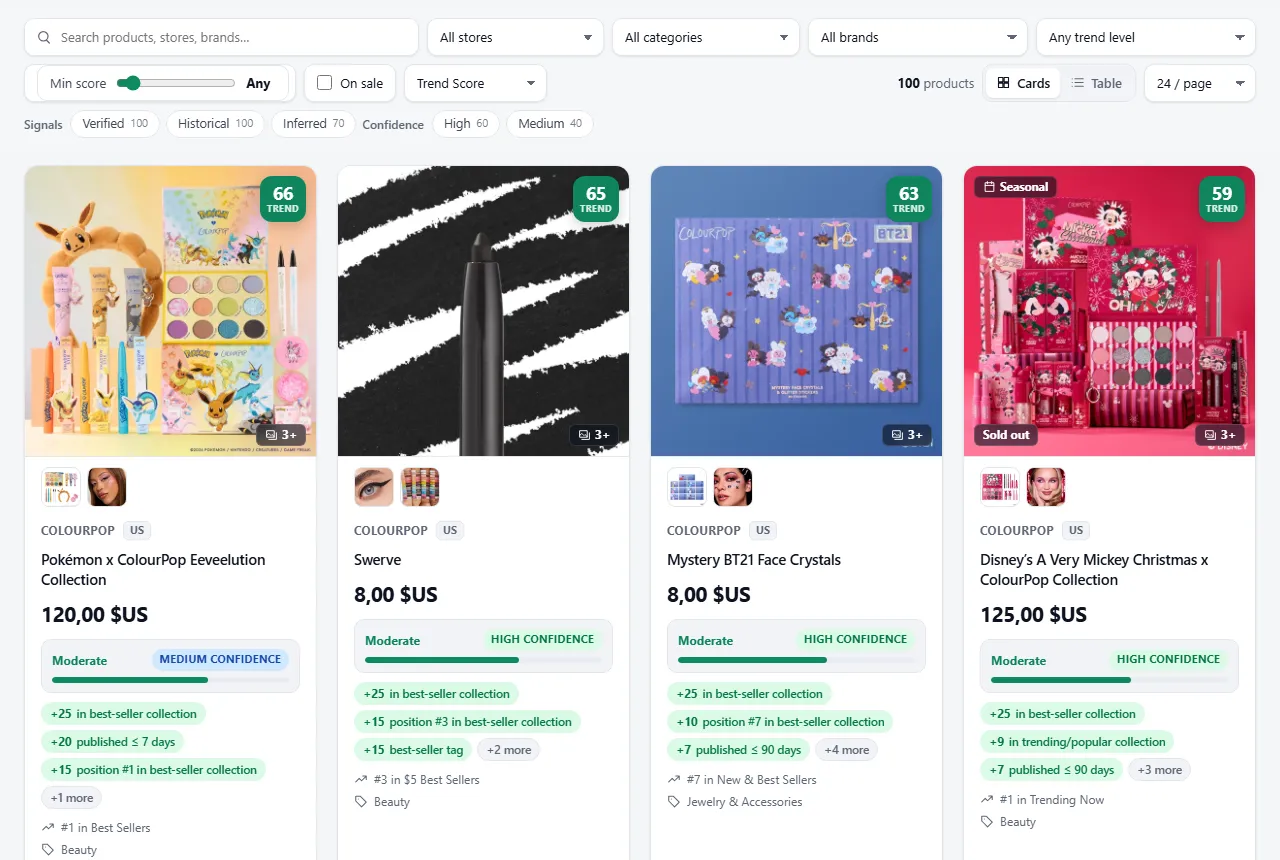
Screenshots from a real platform run.
A real row (store kotn.com, convertCurrencyTo: "USD"), arrays shortened:
Each row also lists the product's options with their values (e.g. [{"name": "Size", "values": ["S", "M", "L"]}], empty for single-variant products). With includeVariants, every variant additionally carries weightGrams, requiresShipping and its own photo imageUrl (null when the store gives none), all from the store's public product JSON.
Dataset views (with product thumbnails): Overview, Trending (score & signals), Pricing, History & growth, Options, variants & identifiers. The key-value store also holds REPORT (the visual report below), RUN_SUMMARY (the run numbers as JSON) and FAILED_INPUTS.
Visual report
Every run also saves a visual report: one self-contained web page to browse the products you just collected, no spreadsheet needed. Open it from the run's Output tab → Visual report (or the key-value store record REPORT).
- Product cards with the product photos (click for a full-size gallery with arrows, keyboard and swipe), price, compare-at price and discount, the Trend Score badge, its level and confidence, the top signals as chips and an expandable "Why this score" panel listing every signal with its points, its kind (verified / inferred / historical) and its evidence.
- Filters and sorting: search, store, country, category, brand, trend level, a minimum Trend Score slider, on sale, new since last run, increasing signals, signal kind and confidence; sort by Trend Score, newest, biggest discount, price or growth. Cards or table view, pagination.
- Compare up to 4 products side by side (best values highlighted).
- Key figures and charts that follow your filters: products, median Trend Score, share with a score of 50+, median price, share on sale, stores; Trend Score and discount distributions, top categories.
- Run details: execution time, requests and success rate, retries, rate limits, peak memory and CPU, the fetched → filtered → saved funnel, every store with its status, and the distributions by category, country, trend level and confidence. Failed inputs are listed at the top.
- Export the filtered products as CSV or JSON from the page, or download the full dataset (JSON, CSV, Excel).
- Live progress: while the run is in progress the report shows the stores analysed so far (progress bar), the products saved so far and refreshes itself every 30 s (at most one update per minute).
- Warnings & errors panel at the top: failed stores grouped by error code (password protected, not Shopify, blocked...) with counts.
- Data-quality panel: how complete the key fields are (title, price, currency, stock status, category, brand, published date, store country) and the share of products with a photo.
Photos are loaded in your browser from each store's own Shopify CDN (nothing is copied or re-hosted) and may disappear if the store removes them; a product without a photo shows a neutral placeholder. The report holds up to 2,000 products (up to 3 photos each, main photo first); bigger runs show a notice and a link to the full dataset. Light and dark mode, works on phones.
Ready-made tasks
| Task | What it does |
|---|---|
| Trending Products Discovery | Beauty, fashion and home stores ranked by Trend Score. |
| New Shopify Products | Products published in the last 30 days, newest first – schedule daily. |
| Discounted Products Finder | In-stock products ≥ 30 % off, in USD. |
| Products by Category | Pet products from curated pet stores. |
| High Trend Score Products | Only products scoring 55+ (always ≥ 2 signal groups). |
| Shopify Product Research | Two stores in depth: all collections, variants, SKUs and barcodes, keyword filter. |
Use it from code, Make, Zapier, n8n or AI agents
Python
JavaScript
No-code: send results to Google Sheets, Make, Zapier, n8n, Slack or a webhook with Apify integrations; an Apify Schedule reruns the same stores daily so the history signals build up.
AI agents (MCP): add https://mcp.apify.com/?tools=badr_xba/shopify-trending-products-scraper to Claude, ChatGPT or Cursor and ask, for example, "which pet products are trending on these 5 Shopify stores?".
Architecture (for developers)
Shopify storefronts expose their catalog as JSON (/products.json?limit=250&page=N, /collections.json, /collections/<handle>/products.json, /meta.json), so no browser and no crawler framework are needed: a small fetch-based client (per-host rate limiter, retries with exponential backoff and jitter, timeouts, Retry-After handling, manual redirects checked against robots.txt) is faster, cheaper and easier to keep polite than a headless crawler. TypeScript (strict) on Node.js 22, Apify SDK 3. Modules: robots.ts (RFC 9309 parser), http.ts, shopify.ts (detection, pagination with stop conditions, curated collections), normalize.ts, trend.ts, history.ts, filters.ts, report.ts (visual report config and card), visualKit.ts (shared visual report kit, a port of the owner's Python kit 1.0.0; visualKitAssets.ts is generated), seeds.ts, run.ts, main.ts. 113 offline tests (npm test) with mocked fetch and real Shopify fixtures.
Limits
- Only public storefront JSON. Stores that disabled
/products.json, protect it with bot challenges or disallow it in robots.txt are skipped and listed inFAILED_INPUTS(for example some large brands). Password-protected stores are never accessed. - Shopify does not expose sales, revenue or stock quantities;
availableis per variant (in stock or not), and the Trend Score uses public signals only. - Collections: the first 250 products of each collection are read (merchant order);
positionis the merchant's order, which is not necessarily a sales rank. - Currency:
/products.jsonreturns prices in the store's default currency; conversions use ECB reference rates (≈ 30 currencies) and are estimates. - Speed: ≤ 1 request per second per store on purpose, more if a store's robots.txt sets
Crawl-delay(above 60 s the store is skipped). Stores run in parallel, so many stores are fast; one huge store is slower (up to 250 products per request, one request per second, plus one request per collection). categoryis derived from product type, tags, collections, title or description;categorySourcesays which.- History needs at least two runs on the same stores with the same
historyStoreName; only the last 5 snapshots per store are kept.
Compliance
The Actor only requests public, unauthenticated Shopify storefront endpoints that the store's robots.txt allows for its user agent (ShopifyTrendingProductsScraper), re-checking robots.txt on every run and for every URL and redirect, and never uses sort_by URLs that Shopify disallows. It never bypasses CAPTCHAs, logins, passwords, bot protection or rate limits (on HTTP 429 it waits as told by Retry-After and slows down). It collects product data, not personal data. You are responsible for using the data in line with the stores' terms and the law that applies to you.
FAQ
Is the Trend Score a sales estimate? No. It combines public popularity signals (merchant best-seller lists, tags, recency, stock-outs, discounts, cross-store presence, changes over time). No sales numbers are output or estimated.
Why is a store marked robots_disallowed or blocked?
Its robots.txt does not allow the product JSON, or it shows a bot challenge. The Actor respects that and moves on – nothing is charged for that store.
Why do scores rise after a few days? History signals (new products, variants selling out, rank changes) need at least two runs. Schedule the Actor daily on the same stores.
Can I use my own list of 500 stores?
Yes – paste them in storeUrls and raise maxStores. Stores are processed in parallel (maxConcurrency), each politely.
Does it work for stores in other currencies or languages?
Yes. Prices stay in the store currency (currency); add convertCurrencyTo for an ECB-rate estimate. Titles are in the store's default language.
Do I need a proxy? No. The endpoints are public; the proxy option exists for special network setups and is off by default.
Support
Something missing or wrong? Open an issue on the Actor's Issues tab with the run link. See CHANGELOG.md for changes.
Feedback and reviews
If this Actor saved you time, a short review on its Store page helps other users find it. If something did not work as expected, please open an issue on the Issues tab with your run ID: we read every issue.


