

Jumia Scraper
Pricing
from $1.25 / 1,000 results
Jumia Scraper
Jumia products by keyword or category across 8 African markets: Morocco, Ivory Coast, Senegal, Nigeria, Kenya, Egypt, Ghana, Uganda. Price, discount, rating, stock, seller and specs, 40 products per request, compared between runs. Example: 'samsung', Morocco, 100 products in under a minute.
Pricing
from $1.25 / 1,000 results
Rating
0.0
(0)
Developer

Badr Bouargan
Maintained by CommunityActor stats
0
Bookmarked
3
Total users
1
Monthly active users
9 days ago
Last modified
Categories
Security
Limited permissionsShare
Jumia Scraper – Products, Prices & Price Tracking
Jumia Scraper extracts Jumia products by keyword, category URL or product URL — prices, old prices, discounts, stock, ratings, sellers, specifications and customer reviews — in Morocco, Nigeria, Kenya, Egypt, Ghana, Côte d'Ivoire, Senegal and Uganda. It remembers prices between runs, so a scheduled run turns into competitor price tracking and e-commerce price monitoring on Africa's largest marketplace. You pay only for products actually saved.
Countries: Morocco (jumia.ma) · Nigeria (jumia.com.ng) · Kenya (jumia.co.ke) · Egypt (jumia.com.eg) · Ghana (jumia.com.gh) · Côte d'Ivoire (jumia.ci) · Senegal (jumia.sn) · Uganda (jumia.ug)
Need the whole catalog of a country, with incremental refresh? Use Jumia Products Scraper — see Which Jumia Actor should I use?
What you can do with it
- Watch competitors' prices: a daily run on your keywords or categories, and every move lands in
priceChangeandpriceChangePercent. - Track a list of products: paste product URLs (yours or your rivals') and follow their price, stock and rating over time.
- Spot real discounts: filter on a minimum discount and keep only what is genuinely cheaper than before.
- Feed a comparison site or a spreadsheet: name, brand, price, currency, stock, seller, rating and images per product.
- Check your visibility:
pageandpositiontell you where a product appears in a category or keyword page. - Study a market before entering it: the same keyword across 8 African countries in one run.
Why this Actor
- Three ways in: keywords (Jumia's official keyword pages), category URLs (up to 50 pages, about 2,000 products each) and product URLs.
- Pay only for success: unrelated keyword results, filtered-out products, duplicates and failed pages are never written to your dataset, so they are never billed. The run stops cleanly at your maximum cost per run.
- Price tracking built in: previous price, change in value and percent, new products and stock changes, remembered from one run to the next.
- Flat, integration-ready rows: numbers as numbers, an ISO currency code on every row, ISO 8601 dates, the same columns whatever the mode.
- Compliant and cheap: identified bot, Jumia's
robots.txtrespected (search URLs are never used), rate limited, plain HTTP (no browser), no proxy required.
How to use in 3 steps
- Paste what you have — keywords (
samsung, iphone 15) and/or Jumia links copied from your browser (category, product or even search pages, any of the 8 countries). Messy input is fine: several links in one line, tracking parameters, missinghttps://, duplicates. - Set the limit — Maximum products per country (start with 20 to try it for a few cents).
- Click Start — then open the Products tab and export to Excel, CSV, JSON, or connect Google Sheets.
Left completely empty, the Actor runs a small demo (keyword samsung on jumia.ma, 20 products) instead of failing.
How it works
- Keywords become Jumia's own keyword pages (
/slp/…); category URLs are paginated; product URLs are read directly. - Each page is parsed from the structured data Jumia embeds in it, never from CSS class names.
- Results that do not match your keyword are dropped — Jumia serves a page even for a term it does not know, filled with unrelated products. The keyword is then reported in
FAILED_INPUTS. - Optional: each product page is opened for details, then its reviews.
- Prices are compared with the previous run through a named key-value store that survives runs.
- Blocked or failing pages are retried with a growing delay and a fresh session; what still fails is listed in
FAILED_INPUTS, never in your dataset.
Step-by-step tutorial
- Choose one or more Countries for keyword searches.
- Add Keywords and/or Start URLs (category or product pages). Category URLs return far more products.
- Set Max products per country (100 by default), then optionally switch on Scrape product pages and Get customer reviews.
- Add Filters if needed: price range, minimum discount, in stock only, name or category keywords, exclusions.
- Press Start, then open the Products or Price monitoring tab and export as Excel, CSV or JSON.
Competitor price monitoring with a Schedule
- Put your competitors' product URLs, or the categories you sell in, in Start URLs.
- Keep Track prices between runs on and switch on Only changed products: each run returns only new products and price or stock changes.
- Create an Apify Schedule (for example every morning) with the same input.
- Connect Google Sheets, Slack, Make, Zapier or n8n (see Integrations) to receive the moves.
The first run records prices; from the second run on, previousPrice, priceChange, priceChangePercent, stockChanged and isNewProduct are filled in.
Input example
Output example
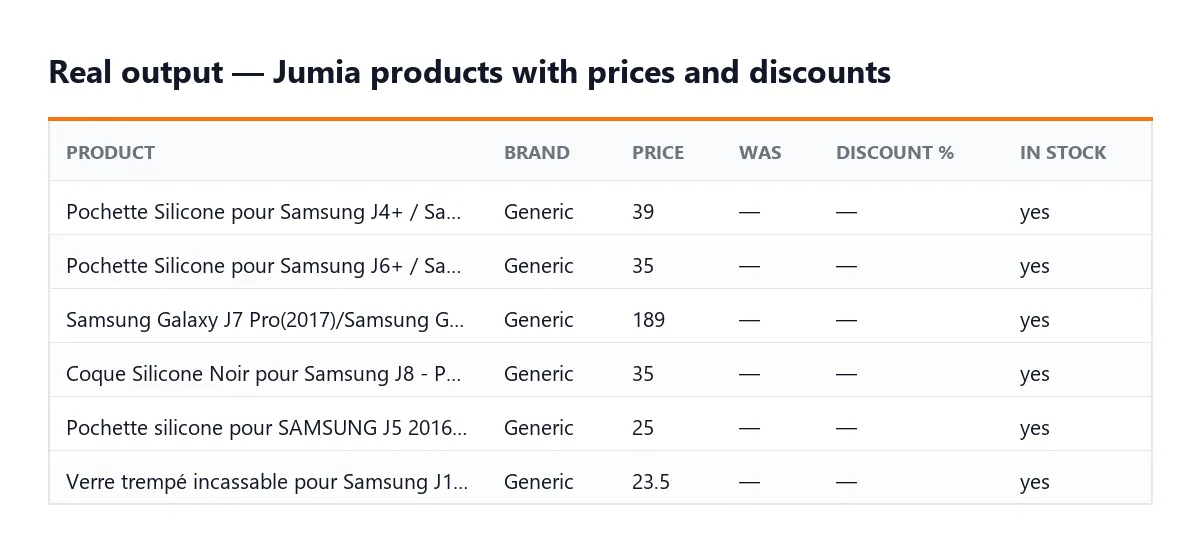
A real row from a category URL with Scrape product pages and reviews on (first run, so tracking fields are still empty; long fields shortened):
Every row has the same columns; fields that only exist on product pages (description, images, sellerName…) are null or empty without Scrape product pages. Each run also stores RUN_SUMMARY (products per country, filtered, duplicates, failures, stoppedReason) and FAILED_INPUTS (keywords, URLs or pages that gave nothing, with the reason — never billed) in its key-value store.
Pricing
Pay per result: one result = one product saved in the dataset. Proxy and compute are included — nothing else to pay.
| Apify plan | Price per 1,000 products |
|---|---|
| Free | $2.50 |
| Starter | $2.00 |
| Scale | $1.63 |
| Business | $1.25 |
Plus $0.01 per run start (one event per GB of memory; the default 256 MB counts as one). Example on the Free plan: a daily watch of 200 products costs about $0.51 per run; with Only changed products, you only pay for the products that moved.
You never pay for unrelated keyword results, filtered-out products, duplicates or failed pages. Set a maximum cost per run in the run options: the Actor stops cleanly when it is reached.
FAQ
Why do keywords return fewer products than categories? Jumia's keyword pages hold about 40 products. Jumia's search URLs (/catalog/?q=) are disallowed to robots by robots.txt, so this Actor does not use them. For volume, use category URLs.
I searched a word and got nothing. If Jumia has no matching keyword page, it still serves a page full of unrelated products. The Actor discards them and lists the keyword in FAILED_INPUTS. Uncheck Keep only products matching the keyword if you want the raw page anyway.
Is maxItems a hard limit? Yes: never more than maxItems products per country are saved and billed. A product that appears under several keywords or categories is saved once.
How does price tracking work? Each product's last price and stock are stored in a named key-value store; the next run fills previousPrice, priceChange, priceChangePercent, stockChanged and isNewProduct. Keep the same inputs on a Schedule for a clean history.
Why did the run stop early? Either your maximum cost per run was reached, or the run was about to time out — the Actor stops shortly before the timeout to save your data, the price history and the summary. RUN_SUMMARY.stoppedReason says which.
Why did an e-mail alert not arrive? Actors started from Apify Store run with limited permissions and cannot send mail on your behalf. Connect Slack, a webhook, Make or Zapier instead, or copy the Actor into your account with full permissions. Changed products are always in the dataset.
Does it need a proxy? No. If you are ever blocked, Apify datacenter proxy is enough.
Do you collect customer names? No. Reviews come without the reviewer's identity.
Can I paste a Jumia search URL? Yes. https://www.jumia.ma/catalog/?q=samsung is turned into the keyword samsung on jumia.ma, because Jumia forbids robots on search URLs but allows its keyword pages.
Can I give the country as a name? Yes, via the API "countries": ["Morocco", "jumia.com.ng", "KE"] all work.
What it can and cannot do
| ✅ Can | ❌ Cannot |
|---|---|
| Keywords, category URLs, product URLs and search URLs (converted to keywords) on 8 Jumia countries | Use Jumia's internal search (/catalog/?q=) directly — robots.txt forbids it, so keywords are capped at ~40 products |
| Up to 50 pages × 40 products per category URL | Read sort URLs (?sort=) or URLs deeper than 3 levels (forbidden by robots.txt) |
| Prices, discounts, stock, rating, seller, specs, images, reviews (with Scrape product pages) | Get seller name, description or specs without Scrape product pages (they only exist on product pages) |
| Price history between runs, e-mail alerts | Collect a whole country catalogue — use Jumia Products Scraper |
| Run without proxy (identified, polite bot) | Scrape Jumia Algeria or Tunisia (closed sites) |
Troubleshooting
- "Nothing to scrape" — every keyword/URL was rejected (not a Jumia link, unknown country…). Open
FAILED_INPUTSin the run's Storage tab: each rejected input is listed with the reason. You are not billed for them. - A keyword returned 0 products — Jumia has no keyword page for it and served unrelated products, which were dropped. Try a more common spelling, a brand name, or use a category URL.
- Fewer products than
maxItems— the category or keyword page simply has fewer products, or your filters removed some (RUN_SUMMARY.filteredOut). Raise Maximum pages per category for categories. - The run says requests failed / no product saved — Jumia was temporarily unavailable or blocked the IP. Run again, or turn on Apify Proxy (datacenter is enough).
- "Unknown input field" warning — a setting pasted from another Actor; it has no effect. Remove it in the JSON input.
Which Jumia Actor should I use?
| Jumia Scraper (this one) | Jumia Products Scraper | |
|---|---|---|
| Best for | Specific keywords, categories or product URLs, competitor watch lists | Whole catalogs, market-wide price intelligence, product databases |
| Input | Keywords, category URLs, product URLs | Countries (+ filters) — every category is walked for you |
| Extras | Keyword relevance check, position on the page | Incremental refresh, URL index, sampling |
| Free plan price | $2.50 / 1,000 products | $3.00 / 1,000 products |
Both share the same row format and price tracking, so their outputs can be merged.
Integrations
- Schedules: a daily run plus Only changed products gives you a competitor price-movement feed.
- Google Sheets: append each run's products or price changes to a spreadsheet from the Integrations tab.
- Make, Zapier and n8n: trigger a scenario when a run succeeds and read the dataset — for example, post price drops to Slack, Telegram or e-mail.
- Webhooks: call your own endpoint on
ACTOR.RUN.SUCCEEDEDand pull the items. - AI agents (MCP): add the Actor to Claude, Cursor or any MCP client through the Apify MCP server and ask "find Samsung phones under 2,000 MAD on Jumia Morocco".
Dataset views for exports: overview (products) and priceChanges (price monitoring).
Use it via API
Get your token in Apify Console → Settings → API & Integrations.
Python (pip install apify-client)
JavaScript / Node.js (npm install apify-client)
cURL (runs and returns the products in one call)
Add &view=priceChanges to get the price-monitoring columns instead.
Support
Open an issue on the Actor's Issues tab for bugs, a missing field or another country.
Did this Actor do the job? Leaving a short review on its Store page takes a minute and helps other people find it — and tells me which feature to build next.
Legal
This Actor reads public category, keyword and product pages, follows Jumia's robots.txt, skips the URLs Jumia disallows, identifies itself honestly and limits its speed. It collects product data, not personal data. How you reuse that data is your responsibility.
En français
Jumia Scraper extrait les produits Jumia au Maroc, au Nigeria, au Kenya, en Égypte, au Ghana, en Côte d'Ivoire, au Sénégal et en Ouganda, par mot-clé, par URL de catégorie ou par fiche produit : prix, anciens prix, remises, stock, notes, vendeurs, caractéristiques et avis clients. Il mémorise les prix d'un run à l'autre : programmé chaque jour, il devient un outil de veille tarifaire et de suivi des concurrents, avec l'option « seulement les produits modifiés ». Vous ne payez que les produits enregistrés : ni les résultats sans rapport, ni les produits filtrés, ni les doublons, ni les pages en échec. L'Actor respecte le robots.txt de Jumia, n'utilise jamais les URL de recherche interdites aux robots et n'a pas besoin de proxy. Pour tout le catalogue d'un pays, préférez Jumia Products Scraper.


