

Temu Scraper: Products, Prices, Variants & Reviews
Pricing
from $1.89 / 1,000 product saveds
Temu Scraper: Products, Prices, Variants & Reviews
Export Temu products from product links or the home feed to JSON or CSV. Get prices, sales, ratings, variants and public reviews. No keyword search. US market.
Pricing
from $1.89 / 1,000 product saveds
Rating
0.0
(0)
Developer

Cliqto Media
Maintained by CommunityActor stats
0
Bookmarked
2
Total users
0
Monthly active users
3 days ago
Last modified
Categories
Security
Limited permissionsShare
Paste Temu product links or the Temu home page link, and get Temu products as clean rows with price, currency, sales, images and a product link. Product links also add rating, review count, variants, specifications and public reviews.
Use it for Temu price checks, dropshipping research and tracking the products you already know, in the US market. This version has no keyword search and no category pages. The prefilled home feed with 10 products finished in about 3 to 7 seconds in our tests.
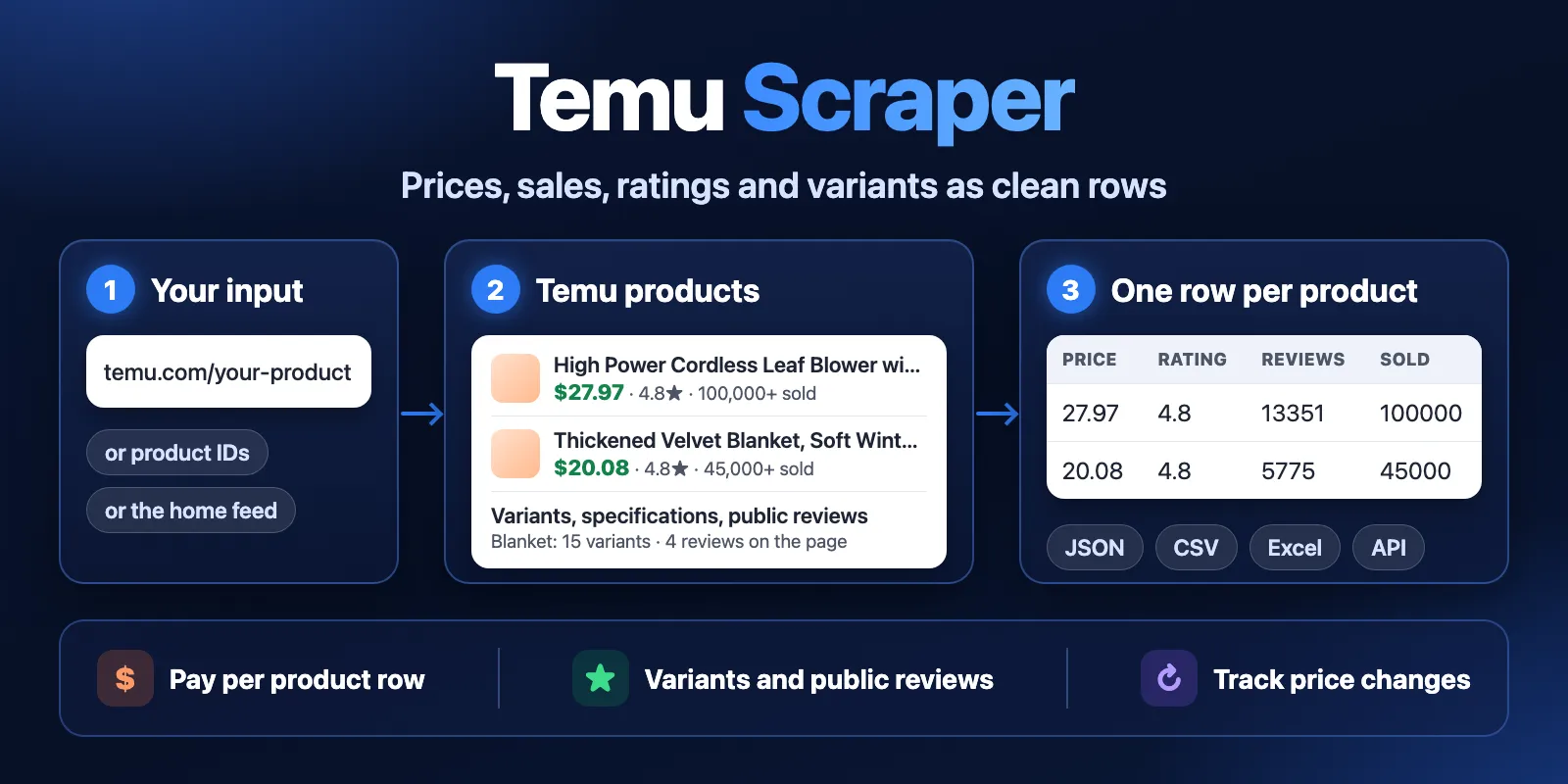
Table of contents
- What it does
- How it works
- Quick start
- Use cases
- Input
- Output
- Pricing
- Limits
- API, export and integrations
- Troubleshooting
- FAQ
- Related Actors
- Support
What it does
This Actor reads public Temu pages for the US market and saves one row for each product. It reads two things: the Temu home feed and single product pages. Prices are in USD. You do not need a Temu account.
A home feed row has the title, price, image, link and usually sales and the original price. Temu does not send ratings or review counts in the feed, so those fields are null there. A product page adds the rating, review count, variants, specifications, the description and the public reviews shown on that page.
Good fit
- Read variants, ratings and public review text for a list of product links.
- Check the prices of products you already know, on a schedule.
- See what Temu shows on its US home feed right now, with price and sales.
Not a fit
- Finding products by keyword. This version has no search.
- Exporting a Temu category. This version does not read category pages.
How it works
- You give product links, product IDs or the Temu home page link.
- The Actor reads those public pages, applies your filters and removes duplicate products.
- It saves one row per product in the Dataset. A short report of the run goes to the Key-value store.
Quick start
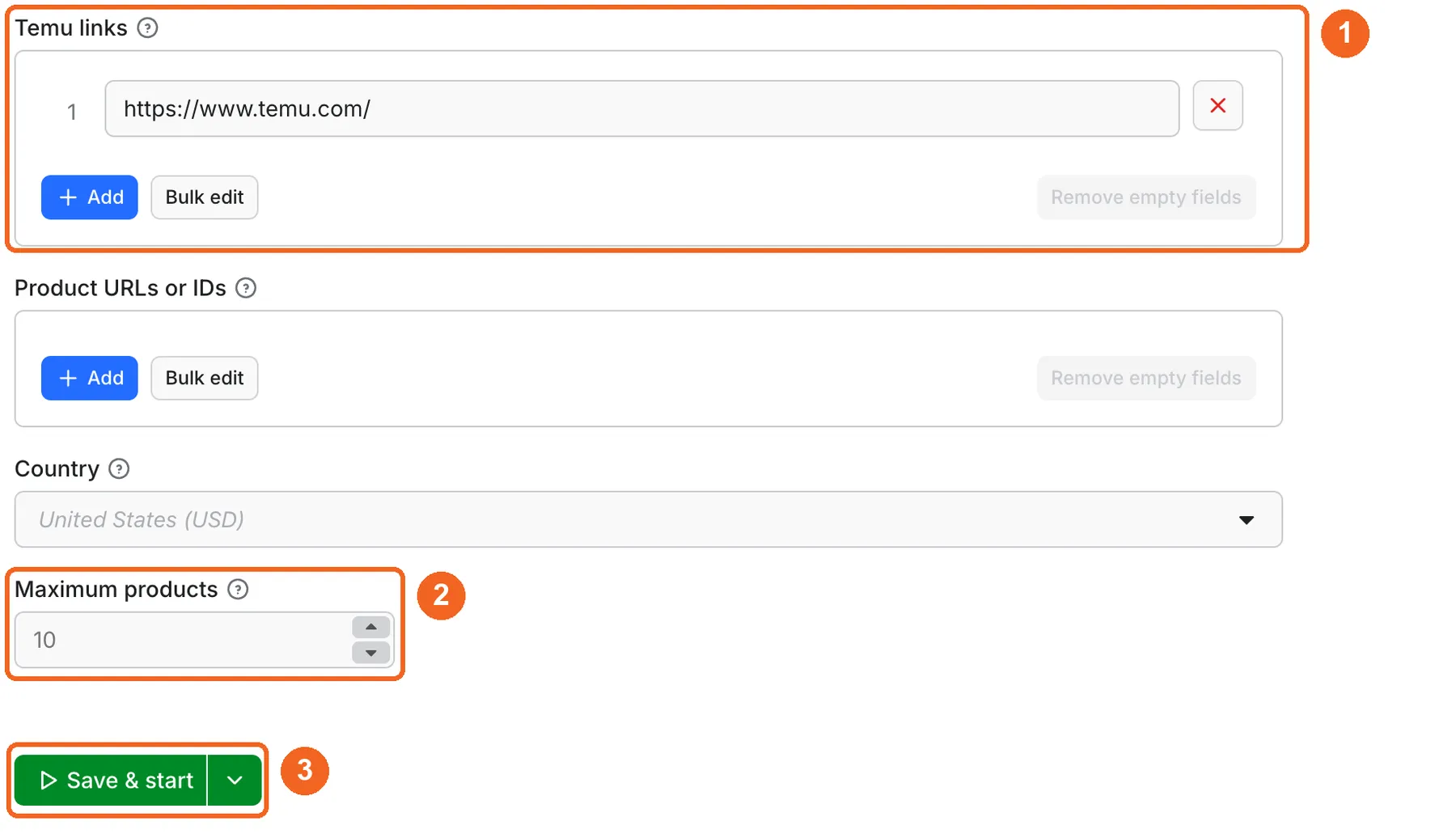
-
Open the Input tab. Keep the home page link in Temu links, or replace it with your product links (box 1 in the picture).
-
Keep Maximum products at 10 for the first run (box 2).
-
Click Start (box 3). The picture shows the owner view, where this button reads Save & start.
-
Open the Output tab and check the Products table: title and price first (box 4).
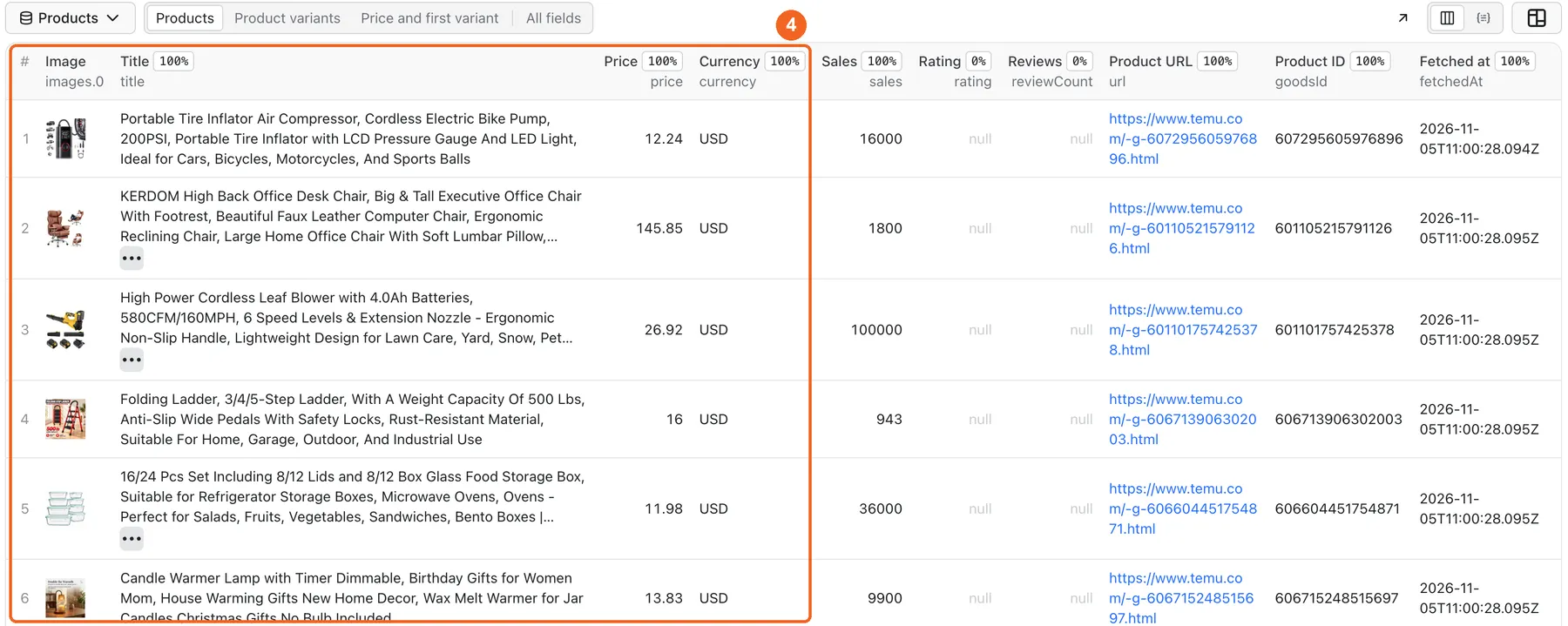
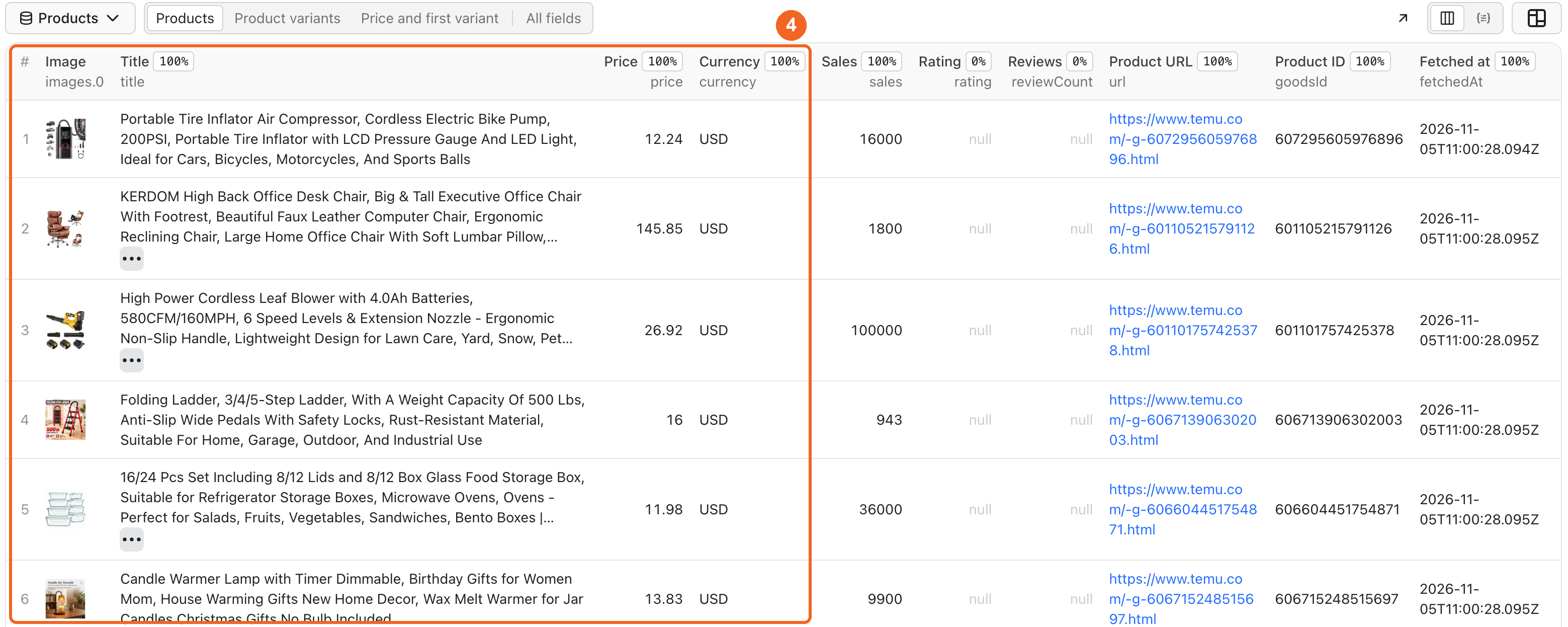
Expected result: 10 rows, each with a title, a USD price, an image and a Temu link. On feed rows rating and reviewCount are null. Use a product link or dataLevel: full when you need them.
Use cases
| Buyer job | Input path | Output entity | Key fields | Next integration |
|---|---|---|---|---|
| Variant and review check | productUrls | Full product row | skus, reviews, specifications, minPrice, maxPrice | JSON or API |
| Price tracking for known products | productUrls, mode: monitor, stateName | Changed product row | changeType, changedFields, price | Schedule and webhook |
| Home feed price and sales export | startUrls with the home page, maxItems | Product row | title, price, discountPercent, sales, url | CSV or Google Sheets |
| Home feed with ratings | startUrls with the home page, dataLevel: full | Full product row | rating, reviewCount, skus, sales | Excel or API |
Input
Input fields
| Field | Plain name | Type | Required | Default / prefill | Allowed values | Effect | Example | Recommendation |
|---|---|---|---|---|---|---|---|---|
startUrls | Temu links | array of strings | one of the two | prefill ["https://www.temu.com/"] | up to 1000 product or home links | The home link reads the feed, product links read those products | ["https://www.temu.com/"] | Keep the home link for a first try |
productUrls | Product URLs or IDs | array of strings | one of the two | none | up to 1000 Temu links or numeric IDs | Reads full product pages | ["606102494273968"] | Remove the home link if you want only these products |
country | Country | string | no | US | US | Sets the market | US | Keep it. Other markets are not supported |
maxItems | Maximum products | integer | no | 10 | 1–100000 | Stops after this many saved rows across all inputs | 200 | Raise it after the first run |
mode | Mode | string | no | auto | auto, products, home, monitor | Chooses which inputs run | monitor | Keep auto unless you want one input type |
dataLevel | Data level | string | no | auto | auto, listing, full | auto and listing save rows from the feed. full also opens each product page | full | Use full only when you need ratings, variants or reviews |
minPrice | Minimum price | number | no | none | 0 or more | Keeps products at or above this price | 5 | Use for price research |
maxPrice | Maximum price | number | no | none | 0 or more | Keeps products at or below this price | 20 | Use for price research |
minRating | Minimum rating | number | no | none | 0–5 | Skips lower ratings and products with no rating | 4.5 | Feed rows have no rating. Use it with product pages |
minReviews | Minimum review count | number | no | none | 0 or more | Skips products with fewer reviews | 100 | Feed rows have no review count. Use it with product pages |
minSold | Minimum sold count | number | no | none | 0 or more | Skips products with fewer sales. 1K+ counts as 1000 | 1000 | Works on the feed |
minDiscount | Minimum discount (%) | number | no | none | 0–100 | Skips smaller or missing discounts | 30 | Works on the feed when Temu shows a discount |
includeKeywords | Title must contain | array of strings | no | none | up to 20 | Keeps titles with every entered word. It filters rows and does not search Temu | ["waterproof"] | Use for a narrow list |
excludeKeywords | Title must not contain | array of strings | no | none | up to 20 | Skips titles with any entered word | ["connector"] | Removes accessories |
excludeAds | Exclude ads | boolean | no | false | true or false | Skips products marked as ads | true | Turn on for clean lists |
excludeAdultProducts | Exclude adult products | boolean | no | false | true or false | Skips products marked as adult | true | Turn on for shared reports |
onlyNew | Only new products | boolean | no | false | true or false | Saves products not yet in this history | true | Use for scheduled runs |
resetState | Reset history | boolean | no | false | true or false | Starts this history again | true | Use once, then turn off |
stateName | History name | string | no | default | lowercase letters, numbers, hyphens, up to 40 characters | Keeps separate history per project | my-mugs-us | Use one name for each project |
deliveryConnector | Send results to | string | no | none | your MCP connector | Posts a short summary after the run | Slack connector | Optional |
deliveryTarget | Notion page or channel | string | no | none | Notion page link or Slack channel ID | Chooses where the summary goes | C0123456789 | Optional |
An empty input stops the run with an error and no catalog or product fee, because the Actor does not guess what you want. The same applies to an invalid value, such as a link from another site, a keyword, or a Temu search or category link. Duplicate products within a run are saved once.
Interacting settings
| When | Input A | Input B | Effective behavior | Example | Cost/result effect |
|---|---|---|---|---|---|
| Both input types | mode: auto | home link and productUrls | Both run until maxItems | The prefilled home link stays next to your links | Remove the home link if you want only your products |
| One input type | mode: products | home link | Only product links run | The home link stays unused | No fee for skipped inputs |
| Product links | productUrls | dataLevel: listing | Product links always use full pages | One product ID | product-details fee applies |
| Full data | dataLevel: full | filters or onlyNew | A checked full page is charged even when the row is skipped | minPrice above all prices | The page stays in a PRODUCT_ID file |
| Filters on the feed | filters | maxItems | The feed reads about maxItems products and at least 60, then stops | minSold: 1000, 10 products | You can get fewer rows than maxItems |
| History | onlyNew or mode: monitor | stateName | The same name continues the history | my-mugs-us | Unchanged feed rows cost no product fee. Product pages are still charged |
| Fresh start | resetState | stateName | This history starts empty | Reset once | All rows count as new |
Input examples
First run: home feed
Expected behavior: the Actor reads the first feed page and saves 10 products.
Expected output: product rows with title, price, currency, url, images, usually sales.
Limit or cost note: about $0.049 on the Free plan.
Variants and reviews
Expected behavior: the Actor opens the product page.
Expected output: one row with skus, specifications, reviews, minPrice, maxPrice.
Limit or cost note: one product-details fee. If Temu blocks the page, you pay no fee for it.
Track prices of known products
Expected behavior: the first run saves the products. The next runs save only new or changed ones.
Expected output: rows with changeType and changedFields.
Limit or cost note: each checked product page pays product-details, even with no changes.
Home feed with ratings and variants
Expected behavior: the Actor reads the feed and opens the page of each product.
Expected output: rows with rating, reviewCount, skus, reviews. A row stays partial if Temu blocks its page.
Limit or cost note: one catalog fee plus one product-details fee per opened page, about $0.19 for 10 on the Free plan.
Output
Output fields
| Field | Meaning | Type | Can be empty? | Example / enum | Source / notes |
|---|---|---|---|---|---|
goodsId | Temu product ID | string | no | 606102494273968 | From the page |
title | Product title | string | conditional | 1pc Vacuum Insulated Coffee Travel Mug | From the page |
price | Current price as a number | number | conditional | 6.61 | In currency units |
priceText | Price as Temu shows it | string | conditional | $6.61 | Raw text |
currency | Currency | string | conditional | USD | From the page |
originalPrice | Price before discount | number | yes | 35.99 | Only when Temu shows it. It can differ between runs |
discountPercent | Discount in percent | number | yes | 79 | Only when Temu shows it. It can differ between runs |
minPrice / maxPrice | Lowest and highest price | number | yes | 6.61 / 12.36 | Differ when variants differ |
sales | Sold count as a number | number | yes | 28000 | Rounded badges give a lower bound |
salesText | Sales badge | string | yes | 28K+ sold | Raw text |
salesIsLowerBound | The sales number is rounded down | boolean | yes | true | True for badges such as 28K+ |
rating | Average rating out of 5 | number | yes | 4.8 | Product pages only. null on feed rows |
reviewCount | Number of reviews | number | yes | 645 | Product pages only. null on feed rows |
url | Product link | string | conditional | https://www.temu.com/-g-606102494273968.html | Public page |
images | Image links | array | yes | ["https://img.kwcdn.com/..."] | Full pages may have more |
videoUrl | Product video link | string | yes | null | When shown |
skuId | Variant ID picked in the listing | string | yes | 109023852495536 | When shown |
skus | Variants with ID, price, specifications and stock | array | yes | 10 items on the example | Full pages |
reviews | Public reviews on the page: text, rating, date, media | array | yes | 4 items on the example | Full pages, no profile data |
specifications | Product specifications | array | yes | material, size | Full pages |
description | Product description | string | yes | text | Full pages |
sellerId / sellerName / sellerUrl | Public shop ID, name and link | string | yes | 634418231860874 | When shown |
categoryId / categoryPath | Category ID and names | string | yes | 2407 | Full pages, when shown |
inStock | Stock status | boolean | yes | true | null means Temu did not report it |
shippingText / returnPolicy | Shipping and return text | string | yes | text | Full pages, when shown |
isAd / isAdultProduct | Temu marks it as an ad or adult product | boolean | yes | false | When shown |
tags | Public labels | array | yes | [] | Listing badges |
rank | Position in the feed before your filters | integer | yes | 1 | Feed rows |
detailLevel | Row source | string | conditional | listing, full | Tells you what to expect |
status | Row state | string | conditional | complete, partial | partial means the product page failed and the feed row stayed |
changeType / changedFields | What changed in monitor mode | string / array | yes | changed, ["price"] | Monitor mode only |
country, source, rowType | Market, source and row type | string | no | US, temu, product | Fixed values |
sourceUrl, fetchedAt | Page read and time in UTC | string | conditional | 2026-11-05T11:45:35.401Z | For your records |
Output entities and surfaces
| Situation | Dataset/API/KVS/live view | Result shape | User action |
|---|---|---|---|
| Normal item | Dataset, views Products, Product variants, Price and first variant, All fields | One row per product | Open the table or export it |
| Domain-empty result | Empty Dataset, RUN_SUMMARY with status not_found, no_matches or no_changes | No rows, run SUCCEEDED | Check the link, the filters or the history |
| Partial result | Dataset rows, status partial in RUN_SUMMARY, stopReason CHARGE_LIMIT, DEADLINE or ITEMS_FAILED | Saved rows stay, run SUCCEEDED | Read errors and unprocessedInputs, then run the rest again |
| Technical failure or retry | RUN_SUMMARY with stopReason SOURCE_ERROR or INVALID_INPUT, run FAILED | Rows saved before the stop stay | Try again later or fix the input |
Full product pages are also kept as PRODUCT_<ID> files in the Key-value store.
Output example
This example is trimmed and contains one product from the "Variants and reviews" input. null means Temu did not show the value on that page. It does not mean zero. We do not promise that every product has every field.
Send results to Slack or Notion
Pick your connector in the optional deliveryConnector field. After the run saves its data, the Actor posts a short summary (up to 25 rows and a link to the full dataset) there. Put a Notion page link or a Slack channel ID in deliveryTarget: in Notion every run is added on top of that one page, so your workspace does not fill up with new pages. A delivery error never fails the run and costs nothing extra. Connect a service once in Apify Console → MCP connectors.
Use case → fields
| Buyer job | Input path | Output entity | Key fields | Next integration |
|---|---|---|---|---|
| Variant check | productUrls | Full product row | skus, minPrice, maxPrice | JSON |
| Review check | productUrls | Full product row | reviews, rating, reviewCount | JSON |
| Change tracking | productUrls, mode: monitor | Changed product row | changeType, changedFields | Webhook |
| Feed export | home link | Product row | price, sales, discountPercent | CSV |
Pricing
Pricing unit
You pay per event. Platform usage is included in these prices.
| Event | When it is charged | Free | Bronze | Silver | Gold and above |
|---|---|---|---|---|---|
| Actor start | Once per run, per GB of memory | $0.00005 | $0.00005 | $0.00005 | $0.00005 |
| Catalog check | Up to three home feed pages. Includes three basic products | $0.03 | $0.03 | $0.03 | $0.03 |
| Product | One saved feed row above the included three | $0.0027 | $0.00243 | $0.00216 | $0.00189 |
| Product details | One full product page | $0.0162 | $0.01458 | $0.01296 | $0.01134 |
- The start fee grows with run memory, per GB. The default is 256 MB.
- A feed page holds about 20 products.
- A filter with no matches pays the catalog fee, the same as a feed run where no row is new. They pay for reading the feed, not for rows.
- A checked full product page is charged even if a filter or the history skips the row. You can still read it in its
PRODUCT_<ID>file. - A page that Temu blocks costs no catalog, product or details fee.
- If a run stops early, you pay only for the work done before the stop.
- Set Maximum cost per run (
maxTotalChargeUsdin the API) to control the cost. At the limit, the run stops and keeps the saved rows. A run with no limit can spend up to your account balance, so always set one for large API runs.
Cost examples
Prices are for the Free plan.
| Scenario | Input scope | Expected item/event count | Base charge | Optional charge | Stop/cap behavior |
|---|---|---|---|---|---|
| First run | Home feed, 10 products | 1 catalog fee, 7 products | $0.04895 | none | Under $1 |
| Home feed | 60 products | 1 catalog fee, 57 products | $0.18395 | none | Under $1 |
| Whole feed | Asked for 300, got 238 | 4 catalog fees, 226 products | $0.73025 | none | Under $1 |
| Feed with full pages | 10 products, dataLevel: full | 1 catalog fee, 10 details | $0.19205 | none | Under $1 |
| One product page | 1 product link | 1 details | $0.01625 | none | Under $1 |
| 20 product pages | 20 product links | 20 details | $0.32405 | none | Under $1 |
| No matches | Home feed, a filter skips all | 1 catalog fee | $0.03005 | none | No product fee |
| Monitor, 5 products, no changes | 5 product links | 5 details | $0.08105 | none | Pages are charged, rows are not saved |
Paid plans pay less for product rows, as the table above shows.
Limits
- No keyword search and no category pages. Temu refuses these pages to anonymous visitors for hours at a time, and we did not find a stable way to read them without an account. A keyword, a search link or a category link stops the run with a clear error and no catalog or product fee.
- US market and USD only. Other Temu markets are not supported.
- The length of the home feed changes from run to run. It ended at 238 products when we asked for 300, and at 40 products when we asked for 60. Both runs finished as
complete.maxItemsof 100000 is an input limit, not a promise that Temu returns that many. - The feed is not the whole catalog. It changes between runs: in one pair of runs a few minutes apart half of the 60 products were different, and in another pair only 1 product was the same. Temu picks what it shows, and you cannot choose a topic.
- Feed rows have no rating and no review count. Open product pages with
dataLevel: fullor use product links to get them. - The price in a feed row can differ from the price on the product page. In one test a product was $12.24 in the feed and $15.97 on its page. Use product links when the exact page price matters.
originalPriceanddiscountPercentcan change or disappear between two runs a few minutes apart. Monitor mode does not count them as a change. It compares title, price, currency, sales, rating, review count and stock.- Temu can also block single product pages. Each page gets up to four attempts. In our last three test batches 56 of 60, 38 of 43 and 41 of 43 product pages were saved, and the others were reported in
errors. A blocked page costs no fee. Run those links again. After eight failed reads in a row, which is two product pages in a row with all attempts refused, the run stops to avoid wasting traffic and ends as FAILED withSOURCE_ERROR. Saved rows stay in the Dataset. - If Temu refuses the feed in the middle of a large run, the run ends as
partial. Saved rows stay in the Dataset, andunprocessedInputsshows what is missing. - After three failed reads of a feed page the run stops with
SOURCE_ERROR. Saved rows stay in the Dataset. - The default run timeout is 300 seconds. Raise it for large runs: 20 product pages took 137 seconds, so plan for about 35 pages per run at the default.
- The history keeps up to 10000 products for each
stateName. - Monitor and
onlyNewwork best with product links. On the home feed a "new" row means new in your history, not new on Temu, because the feed changes on its own. - The Actor reads public data only. It does not log in, solve CAPTCHAs or collect reviewer profiles or contact details.
API, export and integrations
- API: start a run with the input JSON through the Apify API, then read rows from the run's Dataset. Use
goodsIdas a stable key. - Export: download the Dataset as JSON, CSV, Excel, XML or HTML from the Output tab or the API.
- Scheduling: create a task with
mode: monitorand product links and a fixedstateName, then add a schedule in Apify Console. ReadchangeTypeandchangedFieldsin the new rows. - Webhooks / no-code: use a webhook on the run finish event. Make, Zapier and n8n can read the Dataset through the Apify integrations.
- SDK / MCP / agent: call the Actor by
cliqtomedia/temu-scraperfrom the Apify SDK or the MCP server below.
Use with AI agents (MCP)
MCP server URL with only this Actor: https://mcp.apify.com?tools=cliqtomedia/temu-scraper.
Smallest useful input:
Key output fields:
title: product title.priceandcurrency: current price as a number and its currency.rating,reviewCount,skus,reviews: filled on product pages.url: public Temu product link.goodsId: stable product ID.detailLevel:listingorfull, which tells ifskusandreviewscan be filled.
This input cost $0.01625 on the Free plan. An empty input is an error, and this Actor cannot search by keyword. Set maxTotalChargeUsd on each API run. The default timeout is 300 seconds. The US market is the only market.
Troubleshooting
The run failed with INVALID_INPUT
Symptom: the run status is FAILED and stopReason in RUN_SUMMARY is INVALID_INPUT.
Likely reason: the input is empty, or it has a keyword, a Temu search link, a category link or a link from another site.
Check: read the error text in RUN_SUMMARY.
Action: use product links, product IDs or the link https://www.temu.com/.
The run failed with SOURCE_ERROR
Symptom: the run status is FAILED and stopReason in RUN_SUMMARY is SOURCE_ERROR.
Likely reason: Temu pages could not be read several times in a row: three feed reads of one page, or eight product page reads.
Check: open errors and unprocessedInputs in RUN_SUMMARY. Rows saved before the stop stay in the Dataset.
Action: try again later.
The run finished with fewer rows than I asked for
Symptom: status in RUN_SUMMARY is partial, or there are fewer rows than maxItems.
Likely reason: the run reached the cost limit (CHARGE_LIMIT) or the time limit (DEADLINE), a product page failed (ITEMS_FAILED), a filter skipped rows, or the feed ended.
Check: read stopReason, detailFailures and unprocessedInputs.
Action: raise Maximum cost per run or the timeout, then run the rest again. The feed can end early: 238 products at most in our tests, and 40 in the shortest run.
My product links were read, and I also got random products
Symptom: the Dataset has products you did not ask for.
Likely reason: the prefilled home link is still in Temu links.
Check: look at sourceUrl in those rows.
Action: remove the home link or set mode to products.
Rating and review columns are empty
Symptom: rating or reviewCount are null.
Likely reason: the row came from the home feed. Temu does not send these values there.
Check: look at detailLevel in the row.
Action: use productUrls, or set dataLevel to full.
The Dataset is empty and the run succeeded
Symptom: 0 rows, and status is not_found, no_matches or no_changes.
Likely reason: filters skip everything, or the history has no changes.
Check: read scanned, filtered and unchanged in RUN_SUMMARY.
Action: relax the filters, or set resetState to true.
The history warning appears
Symptom: the status message says the history store is unavailable, and RUN_SUMMARY has HISTORY_UNAVAILABLE.
Likely reason: another Actor owns a store with the same name, or access was refused.
Check: read warnings in RUN_SUMMARY. The rows are still saved.
Action: use a new stateName.
FAQ
Can it search Temu by keyword?
No. Temu refuses search and category pages to anonymous visitors for hours at a time, so this version does not offer them. If you need keyword search, this Actor is not the right tool. With product links it works without search.
Do I need a Temu account or cookies?
No. The Actor reads public pages. You do not add any login, cookie or key.
Is this the Temu API?
No. Temu did not make this Actor. You get your own API through Apify: start a run, then read the Dataset as JSON.
Do I need a browser extension or a tool to install?
No. It runs in Apify Console. You can also start it through the API.
Why does a run with no matches cost money?
The fee pays for reading the feed. A filter with no matches pays only the catalog fee and the start fee, with no product fee.
How fresh is the data?
Each row shows the read time in fetchedAt. Temu changes prices and product lists often, so two runs can differ.
Can I get all reviews of a product?
No. The Actor saves the public reviews shown on the product page, in reviews. reviewCount shows the total that Temu reports.
Related Actors
- AliExpress Scraper: compare the same product on AliExpress.
- Taobao & 1688 Scraper: check supplier prices in China.
- Google Shopping Scraper: compare prices across stores.
- Shopify Store Products Export: export the catalog of a store you want to compare.
- Trendyol Scraper: read another marketplace with the same kind of rows.
Support
For a bug, a question or a feature request, open the Issues tab of this Actor on Apify. Include the run ID, the input mode and the error text from RUN_SUMMARY. Never send tokens, cookies or billing data.


