

Google Hotels Scraper: Prices by Date & Site
Pricing
from $1.60 / 1,000 hotel results
Google Hotels Scraper: Prices by Date & Site
Google Hotels prices for any city, hotel and dates: rates from every booking site with links, taxes, ratings, amenities and photos, plus price calendars and changes-only price monitoring. Hotel price comparison from $3 per 1,000 hotels; compact JSON for AI agents.
Pricing
from $1.60 / 1,000 hotel results
Rating
0.0
(0)
Developer

CleanPull
Maintained by CommunityActor stats
0
Bookmarked
2
Total users
1
Monthly active users
2 days ago
Last modified
Categories
Features
Share
This Google Hotels scraper gets Google Hotels prices for any city, area or hotel and any dates: the nightly and total price with and without taxes, every booking site (Booking.com, Expedia, Agoda, Hotels.com, the hotel's own site and more) with booking links, room-level rates with free-cancellation deadlines, ratings, review breakdowns, amenities, location and photos. Price whole calendars of dates in one run, and monitor prices with a changes-only mode that returns just what moved since the last run. Fast, reliable HTTP requests (no browser). It runs once, on a schedule or through the API.
Also known as a Google Hotels API, hotel price scraper, hotel rate shopper, rate parity checker and hotel price tracker.
How to scrape Google Hotels prices
- Open Google Hotels Scraper: Prices by Date & Site on Apify and go to its input form.
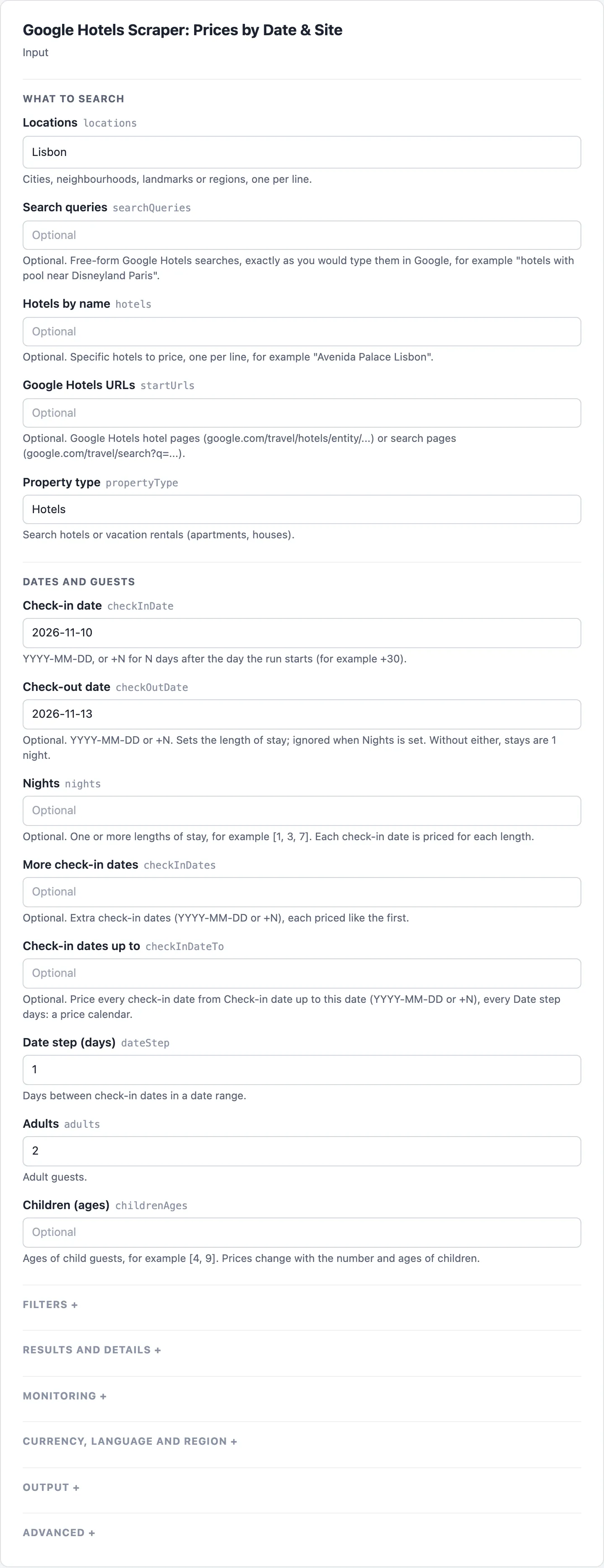
- Enter places in Locations (a city, neighbourhood or landmark), one per line, or specific hotels in Hotels by name. Search queries and Google Hotels URLs take a search as typed in Google, or a Google Hotels page.
- Set the stay with Check-in date and Check-out date (or one or more Nights);
+30means 30 days after the run. For a price calendar, add Check-in dates up to and Date step (days). Set Adults and Currency, and narrow with Sort by, Maximum price per night, Minimum star class and Amenities. Turn on Booking sources (all sites) for every booking site's price and link. - Start the run. Open the Hotels view to read each hotel's Per night, Per night incl. taxes, Stay total incl. taxes, Deal and Rating, and the Booking sources view for the Cheapest site, Cheapest per night and Hotel's own site per night.
- To watch rates, turn on Changes only (monitoring), give the watch a Monitor name, use a
+NCheck-in date, save it as a task and schedule it daily. The Changes (monitoring) view then lists each price drop and rise with Before, Now and Change %, and hotels selling out, coming back, new or removed.
What the Google Hotels scraper gives you
- Compare hotel prices for a trip: "Hotels in Lisbon for 10–13 November, 2 adults, 4 stars and up, under €200 a night, sorted by price."
- Price a whole calendar: "Cheapest night to stay in Rome in December" — price every check-in date in a range, for one or several lengths of stay, in one run.
- Watch your competitors' rates (revenue management): list your hotel and your competitive set by name, schedule the run daily with
+30(30 days ahead), and get only the price changes. - Check rate parity: every booking site's price for a hotel next to the hotel's own site, flagged with
isOfficial, pluscheapestSourceandofficialSiteRatePerNightWithTaxes. - Find deals and drops: Google's deal labels ("25% less than usual") and price-drop alerts from monitoring.
- Research a market: hundreds of hotels per city with star class, rating, review counts, review sentiment by topic (service, location, breakfast…), amenities and coordinates.
- Vacation rentals: apartments and houses with bedrooms, beds, bathrooms and capacity.
- Feed an AI agent, sheet or dashboard: flat rows (one per hotel and booking site), only the fields you choose, and a run summary with the outcome of every search.
Google Hotels scraper features
- It works, and tells you when it can't. Plain HTTP calls to Google Hotels' own data endpoint with automatic session rotation and proxy escalation (direct → datacenter → residential only when needed). A blocked or failed search is retried, then reported in
RUN_SUMMARY— never returned as "0 hotels". A place Google doesn't recognise is reported instead of silently returning hotels from somewhere else (Google falls back to hotels near the caller). - Plain input keys and record fields. The input takes
locations,checkInDate,checkOutDate,adults,currency,languageCode,countryCode,maxResults,requestTimeoutSecsandproxyConfiguration, and every record also carries the short field namesname,price,priceValue,rating,reviewCount,hotelClass,starRating,latitude,longitude,placeId,hotelDescription,imageUrl,googleMapsUrl,googleHotelsUrl,location,checkInDate,checkOutDate,currencyandscrapedAtbeside its own. - Changes-only monitoring. With Changes only (monitoring), each run is compared with the last run of the same search: you get price drops and rises (above your threshold), hotels selling out or coming back, and new or removed hotels — and unchanged hotels cost a fraction of a result.
- Dates that keep working on a schedule. Write
+30instead of a date and a daily schedule always looks 30 days ahead (monitoring compares "the stay 30 days ahead" day after day). - Every filter Google Hotels has: sort, price range, guest rating, star classes, 19 amenities, 9 hotel types, hotel brands by name, free cancellation, special offers, children with ages, vacation rentals.
- Taxes both ways. Every price comes with and without taxes and fees, as numbers and as Google displays them.
Google Hotels scraper input
| Field | Key | What it does |
|---|---|---|
| Locations | locations | Places to search: "Lisbon", "Shibuya, Tokyo", "near Times Square". Each runs "hotels in |
| Search queries | searchQueries | Free-form Google Hotels searches, as typed in Google |
| Hotels by name | hotels | Specific hotels by name, e.g. "Avenida Palace Lisbon" |
| Google Hotels URLs | startUrls | Google Hotels hotel pages or search pages |
| Property type | propertyType | hotels (default) or vacation-rentals |
| Check-in date | checkInDate | YYYY-MM-DD, or +N for N days after the run date (default +14) |
| Check-out date | checkOutDate | YYYY-MM-DD or +N; sets the length of stay (1 night without it or Nights) |
| Nights | nights | Lengths of stay to price, e.g. [1, 3, 7]; overrides Check-out date |
| More check-in dates | checkInDates | More check-in dates, each priced like the first |
| Check-in dates up to | checkInDateTo | Price every check-in date up to this date: a price calendar |
| Date step (days) | dateStep | Days between check-in dates in a calendar (default 1) |
| Adults | adults | Adult guests (default 2, up to 30) |
| Children (ages) | childrenAges | Ages of child guests, e.g. [4, 9] |
| Sort by | sortBy | relevance (default), lowest-price, highest-rating, most-reviewed |
| Minimum price per night | minPrice | In the chosen currency |
| Maximum price per night | maxPrice | In the chosen currency |
| Minimum guest rating | minRating | 3.5, 4 or 4.5 |
| Minimum star class | hotelClass | At least this many stars (2 to 5) |
| Exact star classes | hotelClasses | Only these star classes, e.g. [3, 4]; overrides Minimum star class |
| Amenities | amenities | free-wifi, free-breakfast, pool, spa, pet-friendly, free-parking, ev-charger… (19) |
| Hotel types | hotelTypes | hostel, bed-and-breakfast, boutique-hotel, spa-hotel, beach-hotel, apartment-hotel… |
| Hotel brands | brands | Brand names, e.g. "Marriott Bonvoy" (with all its brands) or "Moxy" |
| Free cancellation only | freeCancellation | Only offers that can be cancelled for free |
| Special offers only | specialOffers | Only hotels with a special offer or deal |
| Max results per search | maxResults | Hotels per search and stay (default 20, up to 1,000) |
| Max results per run | maxItems | Stop after this many results in the run (a cost cap) |
| Booking sources (all sites) | includeBookingSources | Every booking site's price and link, and review scores by site (one extra request per hotel) |
| Room rates | includeRoomRates | Room-level rates with cancellation terms, from the same request |
| Changes only (monitoring) | monitorMode | Return only what changed since the last run under the same Monitor name |
| Monitor name | monitorName | Runs with the same name compare with each other (default default) |
| Changes to report | changeTypes | new, price-drop, price-rise, sold-out, back-in-stock, removed (default all) |
| Minimum price change (%) | priceChangePercent | Ignore smaller price moves (default 1%) |
| Minimum price change (amount) | priceChangeMinAmount | Ignore price moves smaller than this amount (default 0) |
| Removed after missing runs | removedAfterRuns | Missing runs in a row before a hotel counts as removed (default 2) |
| Currency | currency | Prices in this currency, e.g. EUR (default USD) |
| Language | languageCode | Names and descriptions in this language, e.g. de (default en) |
| Country | countryCode | The region Google searches from, e.g. de (default us) |
| Output format | outputFormat | nested (one record per hotel) or flat (one row per hotel and booking site) |
| Only these fields | fields | Return only these fields (dotted paths allowed) |
| Search query (single) | searchQuery | One search query; the same as adding it to Search queries |
| Request timeout (seconds) | requestTimeoutSecs | Timeout for each request to Google (default 30) |
| Proxy | proxyConfiguration | Optional; the actor picks proxies itself (direct, then datacenter, then residential). A proxy set here is used after the direct attempt only when it names proxy URLs, Apify Proxy groups or an Apify Proxy country; Apify Proxy turned on without a group or country is ignored |
| History store | stateStoreName | Optional key-value store for the monitor's memory (default "cleanpull-hotels-monitor"); pick one when running with a scoped API token in Restricted access mode |
Example inputs
A trip search with filters:
A daily competitor-rate monitor (schedule it once a day):
A price calendar: every Friday-to-Sunday stay in December:
Google Hotels scraper output
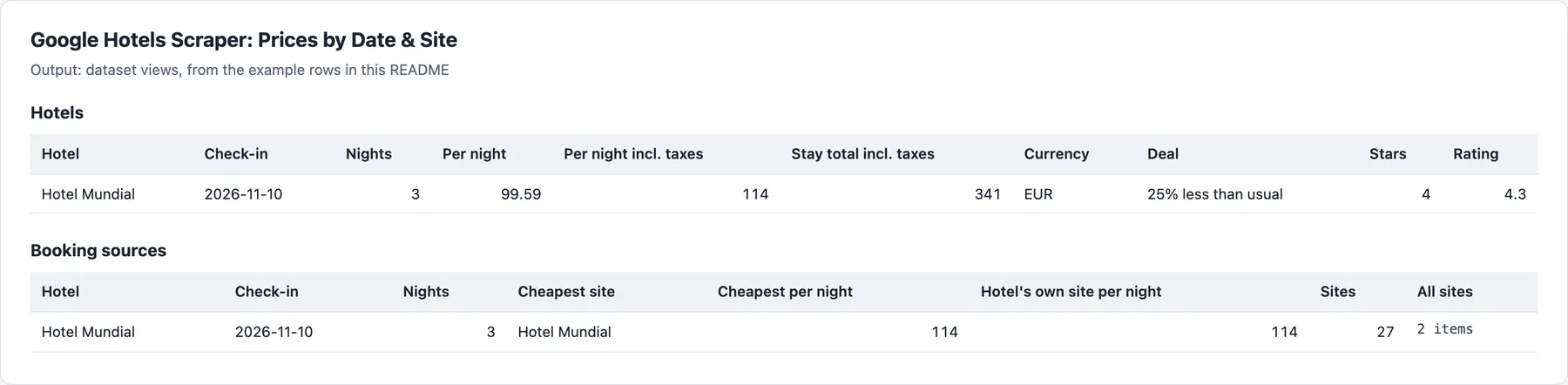
Example rows
One record per hotel and stay (shortened; a real record from 5 October 2026):
location is what you asked for; resolvedLocation is the place Google searched. cheapestSource compares sites on one basis (cheapestBasis): including taxes among the sites that show it, otherwise before taxes. fields paths reach into lists too: ["hotelName", "bookingSources.vendorName", "bookingSources.ratePerNightWithTaxes"].
available: false with null prices means Google shows no price for those dates (sold out or not bookable). Vacation rentals add essentialInfo (for example "Entire apartment", "Sleeps 4", "2 bedrooms").
In monitoring mode each record starts with the change: changeType, previousPricePerNight, priceChange, priceChangePercent and previouslySeenAt. Removed hotels come as a short record with what was last known.
Every run also writes RUN_SUMMARY to the key-value store: the outcome (COMPLETE, PARTIAL, NO_CHANGES, EMPTY or FAILED), counts of results, changes and booking-source lookups, warnings, and the reason for any failed search.
Google Hotels price monitoring
Each search (place or hotel × stay × filters) keeps its own memory under your monitorName. The first run reports every hotel as new and sets the baseline; later runs report only changes. Prices compare per night before taxes. A hotel counts as removed only after it is missing from removedAfterRuns searches in a row that reached the end of Google's results. With a maxResults cap, Google's ranking reshuffles which hotels make the top N, so hotels entering your top N show as new: for exact watch lists, list hotels by name (hotels), or sort by price.
Pricing
Pay for results delivered and, in monitoring, for hotels checked. Blocked or failed searches are never charged.
| Event | Free | Bronze | Silver | Gold |
|---|---|---|---|---|
| Hotel result (one hotel for one stay, with price and listing data) | $3.00 | $2.00 | $1.80 | $1.60 |
| Booking sources and room rates (add-on per hotel, when switched on) | $2.00 | $2.00 | $1.80 | $1.60 |
| Change (monitoring mode: one changed hotel) | $3.00 | $3.00 | $2.70 | $2.40 |
| Unchanged hotel checked (monitoring mode) | $0.50 | $0.50 | $0.45 | $0.40 |
Prices are per 1,000; your tier depends on your Apify plan. Each run also has a $0.00005 start fee. Flat mode is billed per hotel, not per row.
Limits
- Google shows a few hundred hotels per search at most (about 200 when sorted by price). For larger
maxResultsthe actor runs extra passes (other sort orders and price bands, or continuing from the last price when sorted by price), so big cities return up to 1,000 hotels; later passes follow the first in the results. - Prices are what Google Hotels shows a logged-out visitor in the chosen region and currency; booking sites can show different prices to signed-in members.
reviewSourcesholds each site's rating and review count with the few sample reviews Google includes; it is not a full review export.- Amenity filters are the ones Google Hotels offers; any amenity Google lists for a hotel is returned in
amenities. - Google answers a place it doesn't recognise with hotels near the caller; this actor asks again, then reports that search as failed instead.
- Check-in dates already past are skipped with a warning (a scheduled run keeps its other dates); use
+Ndates in schedules. - Two runs with the same
monitorNameand search at the same time share one memory; schedule them apart. - Nothing found: a place Google does not recognise, or a hotel name with no match, is not a failure: when no search finds anything, the run still succeeds, with one free
recordType: "unreadable"row per search giving thereason; nothing is charged. A run near its time limit stops starting searches, delivers what it found and lists the rest in RUN_SUMMARY.
FAQ
How much does Google Hotels data cost per hotel?
A hotel for one stay costs $0.002 on Bronze and $0.003 on the Free plan. Booking sources (all sites) or Room rates adds $0.002 a hotel on both (once, even with both on, as they come from the same request), charged only for hotels whose booking sites were read. A search of 20 hotels costs $0.04 on Bronze ($0.06 on Free), or $0.08 ($0.10) with booking sources. Each check-in date and length of stay is its own search: the December price calendar above prices 4 check-in dates of 10 hotels, 40 results, for $0.08 on Bronze. Output format flat is billed per hotel, not per row. Searches that failed or found nothing are never charged, and higher Apify plans pay less (see Pricing above).
How often should I check hotel prices, and what does monitoring cost?
Daily suits most rate watches; use a +N Check-in date so each run looks the same distance ahead. With Changes only (monitoring), each hotel and stay costs on Free and Bronze either $0.0005 when it is unchanged, or $0.003 when it changed (a price move of at least Minimum price change (%) and Minimum price change (amount), sold out, back, new or removed), instead of a result, plus $0.002 when booking sources are read for it (only for changed hotels). A day where nothing moved, or only a rating or a price move below your threshold, costs $0.0005 a hotel. A change left out of Changes to report is billed as checked, not as a change (a removed hotel left out is free): the competitor watch above leaves out new, so its first run costs 6 × $0.0005 = $0.003 (3 hotels, 2 lengths of stay), and later days $0.003 to $0.03.
What is the difference between price per night, with taxes and the stay total?
pricePerNight is the nightly price before taxes and fees, pricePerNightWithTaxes with them, and totalRate and totalRateWithTaxes the same for the whole stay; pricePerNightDisplay is the price as Google shows it. With Booking sources (all sites), each site in bookingSources has its own ratePerNight and ratePerNightWithTaxes; cheapestSource is the cheapest site on one basis (cheapestBasis: with taxes among the sites that show it, otherwise before taxes), and officialSiteRatePerNightWithTaxes the hotel's own site. Monitoring compares the price per night before taxes.
Why is a hotel price or booking site missing?
- No price:
available: falsewith null prices means Google shows no price for those dates (sold out or not bookable). - No booking sites: Booking sources (all sites) is off, or that hotel's lookup failed; the hotel is then delivered without them, with a warning in
RUN_SUMMARY, and the add-on is not charged. - Fewer hotels than asked: Google shows a few hundred hotels per search at most, and filters narrow them (see Limits above).
- Dates skipped: check-in dates already past are skipped with a warning.
- Unknown brand: a name in Hotel brands that Google does not list for the place is ignored there, with a warning in the log.
- Nothing found: a place Google does not recognise, a hotel name with no match, or a search not started near the run's time limit is listed in
RUN_SUMMARYwith its reason. When the run delivers nothing at all (no hotel, and in monitoring no hotel checked), each such search gets a freerecordType: "unreadable"row instead, and the run succeeds. A run fails only when it delivers nothing and a search was blocked or broke.
Which places, currencies and languages does it support?
Any place or hotel Google Hotels knows, hotels or vacation rentals (Property type). Currency takes any three-letter code (USD, EUR, GBP, JPY…), Language sets names and descriptions (en, fr, de, es…), and Country the region Google searches from (us, gb, de…); prices can differ by region.
Can I use the Google Hotels scraper through the API?
Yes. Start runs through the Apify API or an API client, and read the dataset through its Hotels, Booking sources and Changes (monitoring) views, or the RUN_SUMMARY record with the outcome, counts and the reason for any failed search. Output format gives nested records or flat rows, and Only these fields (fields) trims them to the keys you need, as compact JSON that AI agents can read.
Does it work with Google Sheets, Make, Zapier or Claude?
Yes. Apify's integrations send each run's results to Google Sheets, Make, Zapier, webhooks and other tools, and a schedule keeps them updated; Alerts Sender sends a monitor's changes to email, Slack, Discord or Teams. Claude and other AI agents can run it through Apify's MCP server.
Is it allowed to scrape Google Hotels prices?
The actor reads public Google Hotels pages as a signed-out visitor sees them: no login, no account and no personal data. Review data is each site's rating and review count with the few sample reviews Google shows, without reviewer names. How you use the data, and following the laws and terms that apply to you, is your responsibility. This is not legal advice.
Related actors
Other CleanPull actors for monitoring:
- Alerts Sender: send results to email, Slack, Discord, Teams or a webhook.
- Google Sheets Sync: send any dataset to Google Sheets, or read a sheet into one.
- Google Trends Scraper & API: Google Trends interest over time, regions and related queries.
Use it from Claude
The MarketMage plugin runs these actors from a Claude chat.
Found it useful? A rating on the Store helps others find it.
Changelog
- Price lowered on 5 Nov 2026: a hotel result now costs $2.00 / $1.80 / $1.60 per 1,000 (Bronze / Silver / Gold), down from $3.00 / $2.70 / $2.40. Free plan and other events unchanged.
- 0.1.x, reliability (2026-10-24): runs that find nothing (places Google does not know, hotel names with no match, invalid dates) end SUCCEEDED with a free
unreadablerow saying why, instead of FAILED; dates and currency are checked in the input form; a run stops starting searches before its time limit, never TIMED-OUT. A run whose every search Google blocked still fails. Prices and events unchanged. - 0.1 (October 2026): searches by place, query, hotel name and URL; every Google Hotels filter; booking sources and room rates; price calendars; vacation rentals; changes-only monitoring; flat output and field selection; input keys
locations,checkInDate,checkOutDate,adults,currency,languageCode,countryCode,maxResults,requestTimeoutSecsandproxyConfiguration, and short record field names beside the full ones.


