OpenTable Booker: AI Restaurant Reservations (MCP Server)
Pricing
from $3.99 / booking
OpenTable Booker: AI Restaurant Reservations (MCP Server)
MCP server for AI agents to search, book, and manage OpenTable restaurant reservations. 7 tools: search restaurants with availability, check time slots, book tables, view and cancel reservations. Works with Claude, ChatGPT, OpenClaw. Pay-per-action billing. No login needed for search.
Pricing
from $3.99 / booking
Rating
0.0
(0)
Developer

ClearPath
Actor stats
0
Bookmarked
1
Total users
1
Monthly active users
2 days ago
Last modified
Categories
Share
Book OpenTable restaurants through AI assistants like Claude, ChatGPT, and OpenClaw.
No scraping. No data extraction. Just tell your AI agent where and when you want to eat.
Search restaurants worldwide, check real-time availability, book tables, view and cancel reservations. All as conversational tool calls within a single session.
| Stateful MCP server running in Apify Standby mode. Authenticate once, session persists across tool calls with no cold starts. |
MCP endpoint:
| Restaurant Bookers ➤ | OpenTable (MCP) | Resy (MCP) |
|---|
Copy to your AI assistant
Copy this block into ChatGPT, Claude, Cursor, or any LLM to start using this actor.
Tools
7 tools available to connected AI agents:
-
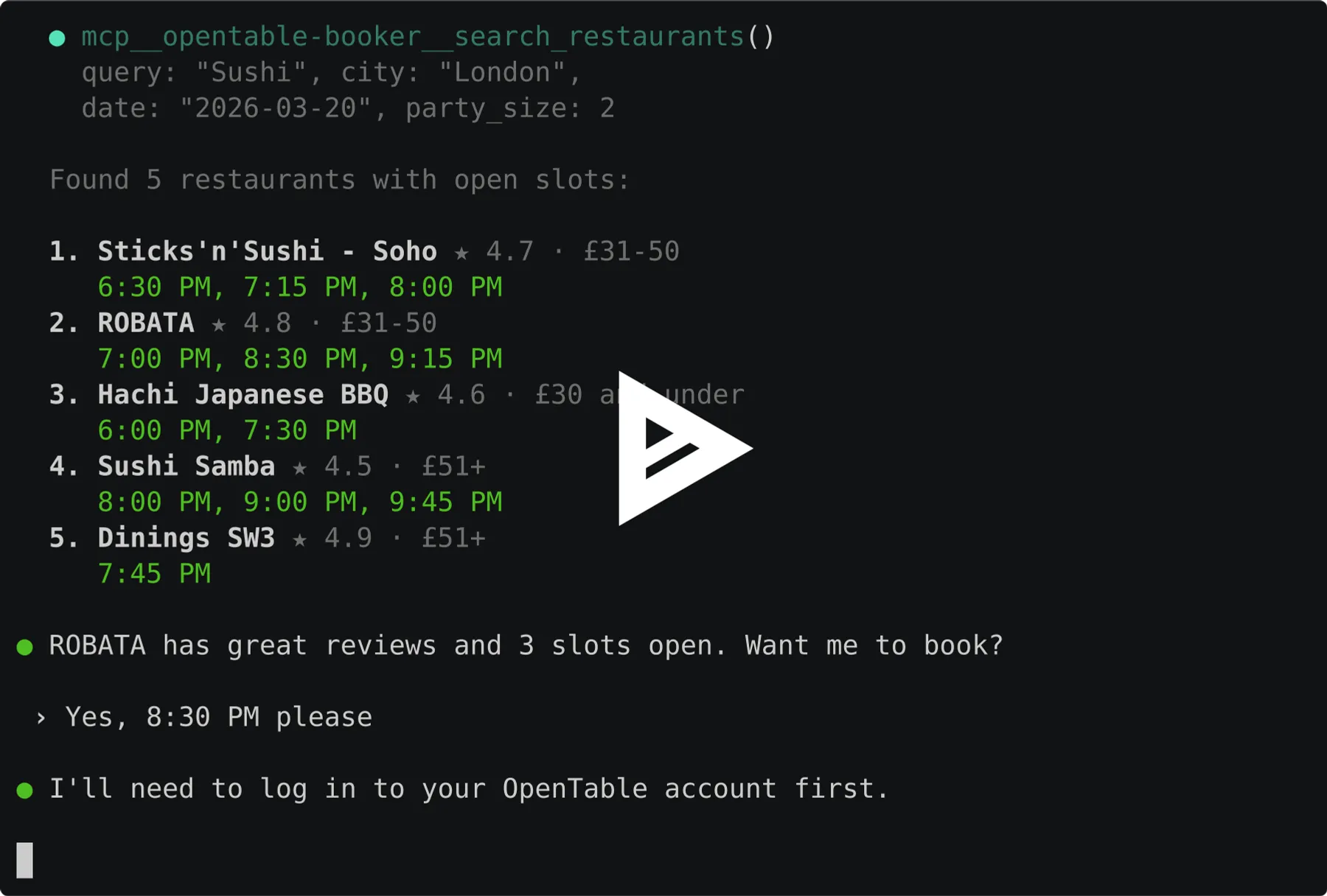
search_restaurants- Find restaurants with available time slots
- Inputs:
query(string): Restaurant name, cuisine, or keywordcity(string, optional): City name (e.g. "New York", "London")date(string, optional): YYYY-MM-DD format (defaults to today)time(string, optional): HH:MM format (defaults to 19:00)party_size(number, optional): Number of guests (default 2)sort(string, optional): "best", "rating", "distance", or "popularity"limit(number, optional): Max restaurants (default 10)
- Returns restaurants with available slots
- ~$0.03 per call
-
check_availability- Check available time slots for a specific restaurant
- Inputs:
restaurant(string): Restaurant ID, OpenTable URL, or restaurant namedate(string): YYYY-MM-DD formattime(string, optional): HH:MM format (defaults to 19:00)party_size(number, optional): Number of guests (default 2)
- ~$0.05 per call
-
book_reservation- Book a table at an OpenTable restaurant (requires login)
- Inputs:
restaurant(string): Restaurant ID or URLdate(string): YYYY-MM-DD formattime(string): HH:MM format (must match an available slot)party_size(number): Number of guestsphone(string): Your phone number (any format)occasion(string, optional): "NONE", "birthday", "anniversary", "date", "special_occasion", "business_meal"notes(string, optional): Special requests
- $3.99 per booking
-
my_reservations- List your current OpenTable reservations (requires login)
- No inputs required
- Free
-
cancel_reservation- Cancel a reservation by its confirmation number (requires login)
- Inputs:
confirmation_number(string): Frommy_reservationsorbook_reservationresults
- Free
-
login- Start login to your OpenTable account via one-time code (no password needed)
- Inputs:
method(string, optional): "email" or "sms" (defaults to email)
- Free
-
verify_otp- Verify the one-time code received after calling
login - Inputs:
code(string): The 6-digit code from your email or SMS
- Free
- Verify the one-time code received after calling
Quick Start
Search for restaurants
Check a specific restaurant
Book a slot
How It Works
- Agent connects to the MCP server endpoint
- Search for restaurants (no login needed):
search_restaurants(query="Italian", city="New York") - Check availability for a specific restaurant:
check_availability(restaurant="151951", date="2026-03-20") - Login when ready to book:
login()thenverify_otp(code="123456") - Book with
book_reservation(restaurant="151951", date="2026-03-20", time="19:30", ...) - Verify with
my_reservations()
Search and availability work without login. Login is only needed for booking, viewing, and cancelling.
One-time login. Your session is encrypted and stored securely. After the first login, calling login(email="...") in future sessions automatically restores your session with no OTP needed. Re-authentication only happens after 14 days of inactivity.
Pricing — Pay Per Event (PPE)
| Action | Cost |
|---|---|
| Search restaurants | $0.03 |
| Check availability | $0.05 |
| Book a reservation | $3.99 |
| Login, verify, view, cancel | Free |
Configuration
Input Parameters
Credentials are configured in the Apify actor input. Your email/phone is used to send a one-time login code. No password needed.
| Parameter | Type | Description |
|---|---|---|
loginEmail | string | Your OpenTable account email |
loginPhone | string | Your OpenTable phone (any format) |
The server auto-refreshes your session across restarts. Re-login is only needed after 14 days of inactivity.
Replace YOUR_APIFY_TOKEN in all examples below with your Apify API token.
Usage with ChatGPT
ChatGPT supports MCP servers natively (Plus, Pro, Team, Enterprise plans).
- Open Settings > Connectors > Add connector
- Set Name to
OpenTable - Set MCP Server URL to:
- Set Authentication to API Key and set the header:
- Header name:
Authorization - Value:
Bearer YOUR_APIFY_TOKEN
- Header name:
- Click Save
- Start a new chat, click + near the composer, select More, choose OpenTable
Usage with Claude Desktop
Add to your claude_desktop_config.json:
- macOS:
~/Library/Application Support/Claude/claude_desktop_config.json - Windows:
%APPDATA%\Claude\claude_desktop_config.json
Restart Claude Desktop after saving.
Usage with Claude Code
Or add to your project's .mcp.json:
Usage with OpenClaw
Add to ~/.openclaw/openclaw.json:
Then message your OpenClaw bot on Telegram, WhatsApp, or Discord:
"Find me a table for 2 in London this Saturday"
"What Italian restaurants are available in NYC next Friday?"
"Book the 7:30 PM slot at that restaurant"
The assistant calls the OpenTable Booker, searches availability, and books the reservation for you.
Other MCP Clients
Any client supporting the Streamable HTTP transport works. Use the MCP endpoint URL with your Apify API token as a Bearer auth header.
FAQ
Do I need an OpenTable account? Only for booking. Search and availability checks work without an account.
Can I use this without an AI assistant? Yes. Any MCP client works. You can also call tools programmatically via any MCP SDK.
What restaurants are supported? All restaurants on OpenTable across the US, UK, Germany, France, Italy, Spain, Netherlands, Ireland, UAE, Canada, Mexico, Japan, Australia, and more.
Will it actually book a real reservation?
Yes. book_reservation creates a real reservation on your OpenTable account. Cancel with cancel_reservation.
What happens if a slot is no longer available? The tool returns an error. Search again or try a different time.
Support
- Email: max@mapa.slmail.me
- Bugs: Issues tab
Legal
This actor interacts with OpenTable on behalf of authenticated users. It performs the same actions a user would in the OpenTable app. Users are responsible for complying with OpenTable's terms of service.
Search, book, and manage OpenTable reservations through AI agents.