
AI Search Visibility Tracker (ChatGPT, Perplexity, Gemini)
Pricing
from $3.50 / 1,000 ai answer checkeds
AI Search Visibility Tracker (ChatGPT, Perplexity, Gemini)
Check if ChatGPT, Perplexity and Gemini mention your brand when people ask about your market. Uses your own API keys and official APIs: one row per prompt and AI with mention, position, competitors and cited sources.
Pricing
from $3.50 / 1,000 ai answer checkeds
Rating
0.0
(0)
Developer

Cliqto Media
Maintained by CommunityActor stats
0
Bookmarked
2
Total users
1
Monthly active users
2 days ago
Last modified
Share
Check whether ChatGPT, Perplexity and Gemini name your brand when buyers ask them about your market. You write the questions, your brand and competitors; the Actor asks each AI through its official API with web search on and returns one row per question and AI: mentioned or not, in which place, which competitors came up and which websites the answer cited.
Built for brands, SEO and GEO (generative engine optimization) teams. The smallest run is one question, your brand and one API key — usually done in under a minute.
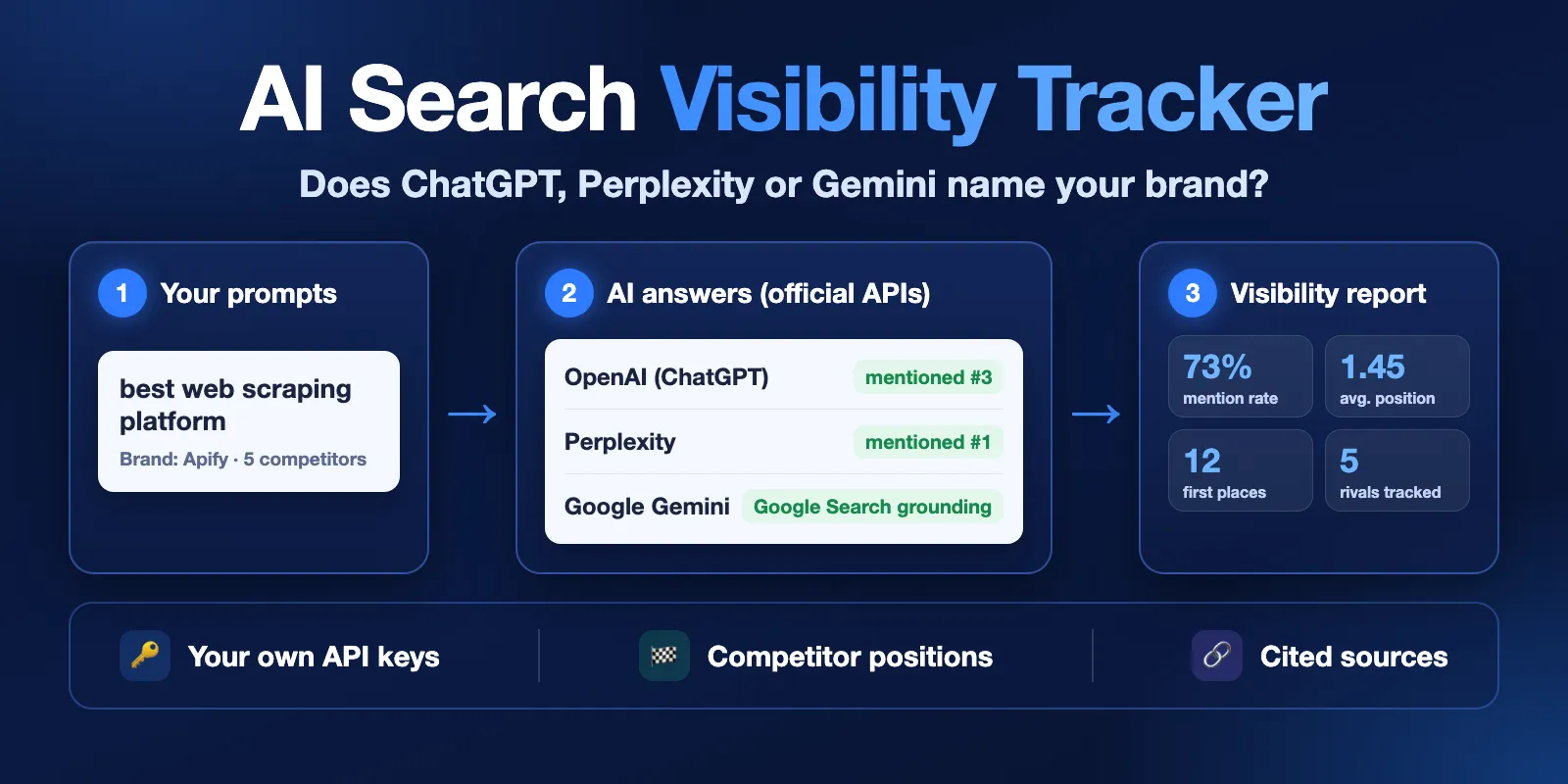
Table of contents
- What it does
- Your API key is required
- Quick start
- Use cases
- Input
- Output
- Pricing
- Limits
- API, export and integrations
- Troubleshooting
- FAQ
- Support
What it does
For every prompt and every AI you pick, the Actor:
- sends the prompt once through the provider's official API with web search enabled — OpenAI Responses API with the
web_searchtool, Perplexity Agent API, Gemini API with Google Search grounding; - reads the answer and finds your brand, its other spellings and your competitors as whole words, case-insensitive;
- ranks the names in the order the answer first mentions them, so you see your position next to the competitors;
- lists the cited sources and tells you whether one of them is on your own domain;
- saves the answer text, an excerpt around the first mention, tokens and the time it was received.
The run summary adds up each AI: mention rate, average position, how often you came first, how often your site was cited, and the mention rate of each competitor.
Good fit
- Track how often AI assistants recommend you versus competitors for the questions your buyers ask.
- Find which pages AI answers cite for your category, so you know where to earn coverage.
- Run the same prompt set every week with an Apify schedule and compare the mention rate over time.
Not a fit / limits
- API answers are not the same as the ChatGPT, Perplexity or Gemini apps. The apps add personal memory, account settings, location and their own system prompts, and they change often. The API with web search is the closest repeatable signal, not a copy of what one person sees on screen.
- AI answers vary from run to run. One answer is a sample; use several prompts and repeat runs to see a trend.
- The Actor never scrapes the consumer apps and never logs in anywhere. It only uses the public APIs with your key.
- Position is the order of first mention among the names you track, not a place in a numbered list the AI might show.
- Gemini's API has no location setting, so
countryapplies only to OpenAI and Perplexity.
Your API key is required
You pay each AI provider directly for its answers through your own key. Without a key the run still succeeds: you get one free api_key_required row that says which field to fill and where to get the key, and no answer is charged.
| AI | Input field | Where to get a key | What the provider bills to your key |
|---|---|---|---|
| ChatGPT models (OpenAI) | openaiApiKey | platform.openai.com/api-keys | Tokens plus a web search tool fee per answer. Needs prepaid API credits; a ChatGPT Plus subscription does not include API use. |
| Perplexity | perplexityApiKey | perplexity.ai/account/api/keys | Per-request and token fees for the preset; each row shows providerCostUsd as Perplexity reports it (about $0.002 per answer with the fast preset in our tests). |
| Gemini (Google AI Studio) | geminiApiKey | aistudio.google.com/apikey | Tokens plus Google Search grounding. Grounding needs billing enabled on the key's Google Cloud project: the free tier does not include it for Gemini 3 models. Paid projects get 5,000 free searches a month, then Google charges per 1,000 searches. |
Provider prices change; check each provider's pricing page before large runs. Every row reports inputTokens and outputTokens so you can check the bill.
Keys are stored encrypted by Apify (secret input), used only for this run and never written to the dataset, the run summary or the log. The Actor checks each key with a free call before it asks any question, so a wrong key costs nothing.
Quick start
- Open the Input tab.
- Keep the prefilled prompt
best web scraping platformor write your own under Prompts. - Enter your brand under Your brand (prefilled:
Apify). - Paste at least one key — OpenAI, Perplexity, or Gemini from a Google AI Studio project with billing on — and pick that AI under AI assistants to check.
- Click Start, then open the Visibility view of the dataset.
Expected result: one row per prompt and AI with mentioned, position, ranking, citedSources and an answerExcerpt.
Use cases
| Buyer job | Input | What you get | Key fields | Next step |
|---|---|---|---|---|
| Am I recommended for my category? | prompts, brand, brandAliases | One row per prompt and AI | mentioned, position, answerExcerpt | Run summary mentionRate per AI |
| Who wins the answer instead of me? | competitors | Names in order of first mention | ranking, competitorsMentioned | Compare competitor mention rates in the run summary |
| Which pages do AI answers trust? | brandDomain | Cited links per answer | citedSources, brandCited | Export the dataset and group by domain |
| Is visibility changing over time? | Same input on a schedule | A new dataset each run | fetchedAt, mentioned, position | Schedule plus webhook or Google Sheets export |
Input
| Field | What it is | Required | Default | Notes |
|---|---|---|---|---|
prompts | Questions buyers ask | yes | prefill: best web scraping platform | Up to 100, each up to 2000 characters. Duplicates are removed. |
brand | Your brand name | yes | prefill: Apify | Whole-word, case-insensitive match. |
brandAliases | Other spellings of the brand | no | — | Up to 10, e.g. a product name. |
brandDomain | Your website domain | no | — | e.g. apify.com. Turns on brandCited; subdomains count. |
competitors | Competitor names | no | — | Up to 25. Other spellings after |: Bright Data|BrightData. |
providers | AIs to ask | no | every AI you gave a key for | openai, perplexity, gemini. |
openaiApiKey, perplexityApiKey, geminiApiKey | Your API keys | at least one for answers | — | Secret, stored encrypted. |
country | Two-letter country code | no | — | Approximate searcher location for OpenAI and Perplexity. |
openaiModel | OpenAI model | no | gpt-5.4-mini | Must support web search. |
perplexityPreset | Perplexity preset | no | fast | Other presets may cost more. |
geminiModel | Gemini model | no | gemini-3.8-flash |
How the settings combine:
- An AI listed in
providerswithout a key → one freeapi_key_requiredrow for it; the other AIs still run. providersempty → every AI that has a key. No key at all → one free row naming all three key fields.- AIs run in parallel; prompts for one AI run one after another.
Input example
This asks 2 prompts × 2 AIs = 4 answers.
Output
Output fields
| Field | Meaning |
|---|---|
prompt, provider, model, requestedModel | The question, the AI (openai, perplexity, gemini), the model that answered and the model you asked for. |
brand | The brand name checked in this row. |
status | ok (answer checked, the only charged status), no_answer (empty answer), api_key_required, error. |
mentioned | true / false; null when there is no answer to check — null is not "not mentioned". |
position | Place of your brand among the tracked names in order of first mention (1 = first); null when not mentioned. |
mentionCount | How many times the brand is named. |
competitorsMentioned | Competitors found: name, position, mentionCount. |
ranking | Brand and competitors in order of first mention. |
brandCited, brandCitedPosition | Whether a cited source is on brandDomain, and its place; null without brandDomain. |
citedSources, citedSourcesCount | position, url, title, domain of each cited page, and how many there are. Gemini returns Google redirect links; domain is the real site. |
searchQueries | Web searches the AI ran, when the API reports them. Empty means the AI answered from its own knowledge — see below. |
answerExcerpt, answer | About 400 characters around the first mention; full answer up to 20,000 characters (answerTruncated). |
country, countryApplied | Country sent and whether this AI used it. |
inputTokens, outputTokens, providerCostUsd | Usage billed to your key; cost only when the provider reports it (Perplexity). |
latencyMs | How long the AI took to answer, in milliseconds. |
errorCode, errorMessage | Why a row is not ok, and what to do. |
fetchedAt | When the answer was received (ISO 8601). |
Web search is switched on for every AI, but the AI decides whether to use it. In our tests Gemini answered general questions such as best web scraping platform from its own knowledge, with no cited sources, and searched the web for questions about fresh facts such as best web scraping platform in 2026 (13 cited sources). Empty citedSources is the AI's choice, not a failed run, and the row is still a checked answer.
Output example
Trimmed row from a real run (Perplexity, US, 22 October 2026):
Run summary
The RUN_SUMMARY record in the key-value store has the run status (COMPLETE, PARTIAL, ERROR, API_KEY_REQUIRED, INVALID_INPUT, CANCELLED), a stop reason, counts, and for each AI: mentionRate, averagePosition, firstPlace, brandCited, each competitor's mentionRate, tokens and provider cost. Key fields only say whether a key was given, never the key.
When something stops a run
| Situation | What you get |
|---|---|
| No key for an AI | One free api_key_required row; the run succeeds. |
| Wrong key or unknown model | One error row for that AI (API_KEY_INVALID / MODEL_UNAVAILABLE), found by the free key check before any question. |
| Your provider quota runs out mid-run | Answers so far are kept, the rest of that AI is skipped, status PARTIAL with stop reason QUOTA_LIMIT; the run succeeds and other AIs continue. |
| Your spending limit on Apify is reached | Answers so far are kept, PARTIAL with CHARGE_LIMIT. |
| One prompt is refused by the AI | An error row for that prompt (PROVIDER_BAD_REQUEST); the next prompt goes on. |
| An AI gives 3 empty or refused answers in a row | That AI stops with stop reason SOURCE_ERROR so it does not keep spending your provider quota; rows so far are kept and other AIs continue. The run is marked failed so you notice it. |
Pricing
Pricing unit
This Actor uses pay-per-event pricing:
| Event | When it is charged | Free plan | Bronze | Silver | Gold and higher |
|---|---|---|---|---|---|
AI answer checked (ai-answer) | Once for each row with status: ok | $0.005 | $0.0045 | $0.004 | $0.0035 |
Actor start (apify-actor-start) | Once per run, for each GB of run memory (default 256 MB = one event) | $0.002 | $0.002 | $0.002 | $0.002 |
Rows with api_key_required, error or no_answer are free, so a run without a key, with a wrong key or with an exhausted quota costs only the start event. A run that stops early keeps and charges only the answers already saved. If you raise the run memory, the start fee grows with it (one event per GB); 256 MB is enough for 100 prompts and 3 AIs.
The AI providers bill their own usage to your API keys (see Your API key is required); that cost is not part of the Apify price.
Cost examples
| Scenario | Input | Charged answers | Apify price, Free plan | Gold plan |
|---|---|---|---|---|
| Try it | 1 prompt, 1 AI | 1 | $0.007 | $0.0055 |
| Weekly check | 10 prompts, 1 AI | 10 | $0.052 | $0.037 |
| Full panel | 10 prompts, 3 AIs | 30 | $0.152 | $0.107 |
| Large set | 100 prompts, 1 AI | 100 | $0.502 | $0.352 |
| No key or wrong key | any | 0 | $0.002 | $0.002 |
Set Max cost per run in the Apify run options to cap spending; when it is reached the run keeps the answers so far with stop reason CHARGE_LIMIT.
Limits
- Up to 100 prompts per run, 3 AIs, 25 competitors, 10 brand aliases.
- In our tests an answer took about 3 seconds on Perplexity, about 4 seconds on OpenAI and 15–27 seconds on Gemini, and 10 prompts on OpenAI and Perplexity finished in 44 seconds. Prompts for one AI run one after another and the AIs run side by side, so the run time grows with the number of prompts. A slower model or a rate-limited key takes longer. The default timeout is 1 hour.
- One answer per prompt and AI per run; answers are not cached between runs.
- No Claude, Google AI Overviews, Copilot or other assistants.
API, export and integrations
- API: start a run with the same JSON as the Input tab through the Apify API or client libraries; read rows from the default dataset and totals from the
RUN_SUMMARYrecord. - Export: the dataset downloads as JSON, CSV, Excel or HTML; the Visibility view keeps the main columns.
- Scheduling: save your input as an Apify task and add a schedule (for example weekly) to track the mention rate over time. Each run creates a new dataset.
- Webhooks / no-code: an Apify webhook on run success can send the dataset to Google Sheets, Make, Zapier or your own endpoint; the next system usually reads
prompt,provider,mentioned,positionandfetchedAt.
Use with AI agents (MCP)
- MCP server with only this Actor:
https://mcp.apify.com?tools=cliqtomedia/ai-search-visibility - Smallest useful input:
{"prompts": ["best web scraping platform"], "brand": "Apify", "providers": ["gemini"], "geminiApiKey": "<key>"} - Key output fields:
mentioned(brand named or not),position(place among tracked names),ranking,citedSources,status. - A run without a key returns one free
api_key_requiredrow; the agent should ask the user for a key. - A run with 1 prompt and 1 AI usually takes under a minute and costs $0.007 on the Free plan, plus what the provider bills to the key.
Troubleshooting
Gemini rows show API_QUOTA_EXHAUSTED
Google Search grounding is not part of the Gemini API free tier. Enable billing for the Google Cloud project behind your key in Google AI Studio, then run again. On a paid project the error means the monthly grounding allowance or your spending cap is used up.
OpenAI rows show API_QUOTA_EXHAUSTED
Your OpenAI API account has no credits. Add credits under Billing at platform.openai.com; a ChatGPT subscription does not cover the API.
mentioned is null
The row has no answer to check (api_key_required, error or no_answer). Only false means the AI answered without naming your brand.
My brand is a common word
Matching is whole-word and case-insensitive, so a brand like "Notion" also matches the plain word. Add a more specific alias (product name, domain) and read answerExcerpt to confirm.
FAQ
Is this what I see in the ChatGPT app?
No. It is the provider's API with web search, which is close but not identical: the apps add personalization, memory and their own settings. Use it as a repeatable benchmark across prompts, competitors and time.
Why do results change between runs?
AI answers are not deterministic and web results change. Ask several related prompts and repeat runs on a schedule; compare mentionRate in the run summary rather than single answers.
Do you store my key or the answers anywhere else?
The key is a secret input, encrypted by Apify and never written to the dataset, run summary or log. Answers go only to your run's dataset.
Can I check Claude, Google AI Overviews or Copilot?
Not in this version. It covers OpenAI, Perplexity and Gemini APIs.
Support
Open an issue on the Actor's Issues tab. Include the run ID and the error code. Never send your API keys.


