

AI Search Visibility Tracker: ChatGPT, Perplexity & Gemini
Pricing
from $6.50 / 1,000 prompt sampled — google ai overviews
AI Search Visibility Tracker: ChatGPT, Perplexity & Gemini
AI brand monitoring across ChatGPT, Perplexity, Gemini and Google AI Overviews. Samples every prompt multiple times for mention rate, share of voice and week-over-week deltas — not a single-shot guess.
Pricing
from $6.50 / 1,000 prompt sampled — google ai overviews
Rating
0.0
(0)
Developer

El Mahdi Moubarak
Maintained by CommunityActor stats
0
Bookmarked
6
Total users
4
Monthly active users
2 months ago
Last modified
Categories
Share
AI Search Visibility Tracker: ChatGPT, Perplexity, Gemini & Google AI Overviews
No API key required. AI brand monitoring that measures instead of guessing. This Actor tracks how AI answer engines describe your brand against your competitors, and how that changes week over week.
A Profound / Otterly / AthenaHQ alternative, without the subscription. Those platforms start at $29–$499 a month for a seat you keep paying for between reports. This is pay-per-event: a sampled audit of 10 prompts across all four engines costs a few dollars, and nothing at all in the weeks you do not run it.
Every prompt is asked several times per engine, because AI answers are non-deterministic: ask "best CRM software" three times and you get three different brand orderings. A tool that asks once reports a coin flip as a metric. This Actor reports rates across samples, with the sample count visible on every row.
Measuring one prompt properly — asked 3 times on Google AI Overviews, so you get a rate rather than a coin flip — costs about $0.027, less than most tools charge for a single unsampled check.
Analysis runs on an included model key, so the Actor works on the first click and is callable by an AI agent with nothing to configure. Bring your own OpenRouter key if you want a specific model and a lower per-analysis rate.
For generative engine optimization (GEO), answer engine optimization (AEO) and LLM SEO work: AI search visibility, share of voice in AI answers, Perplexity citation tracking, Google AI Overview monitoring, and tracking how ChatGPT and Gemini talk about your brand.
Use from an AI agent (MCP)
Connect this URL to any MCP client — Claude, Cursor, or an agent built on the Apify MCP server — and this Actor becomes a callable tool. No install and no OpenRouter key; you authorise Apify once in the browser, then pay per event.
Say to your agent:
- "Check how [brand] shows up in AI search — ChatGPT, Perplexity, Gemini and Google AI Overviews — against [competitor A] and [competitor B]."
- "Run a sampled visibility audit for [brand] in the French market and tell me which sources the AI engines cite."
- "Compare this week's AI visibility for [brand] with last week and summarize what moved."
Each maps to something it really does: sampling, market targeting, deltas.
Why it works unattended. Pay-per-event pricing, limited permissions and no Standby mode make it eligible for autonomous agent workflows with no per-user approval step. Defaults run as-is, and analysisMode: "collect-only" returns raw answers for agents that score them themselves. An agent-scale run — 5 prompts x 2 samples, all four engines — costs about $0.99; Google AI Overviews only, $0.43.
How to track brand mentions in AI search
- Builds a prompt set. Either your own
queries, or a stratified set generated from your brand, competitors, industry and market, spread across five intents: commercial, informational, transactional, brand-defensive and head-to-head comparisons. - Queries each engine, repeatedly.
prompts x engines x samplesPerPromptsamples, run with bounded concurrency, each retried up to 3 times with exponential backoff. - Scores every answer. One structured LLM call per answer extracts brand mention, position, sentiment, every competitor named, and which brand the answer actually recommends.
- Aggregates into rates. Per engine and overall: mention rate, visibility rate, answer trigger rate, average position, share of voice, sentiment distribution and top cited domains.
- Diffs against last week. Each run's summary is stored per brand + market, so the next run reports what moved — including domains that started or stopped being cited.
Engines
| Engine | Downstream Actor | Localizable | Notes |
|---|---|---|---|
| Google AI Overviews | apify/google-ai-overviews-scraper (US) / johnvc/Google-AI-Overview-API (other markets) | Yes | Does not render for every query — measured, not hidden |
| Perplexity | apify/perplexity-search-scraper | No | Answers with cited sources |
| ChatGPT Search | apify/chatgpt-search-scraper | No | Citations only; the "related links" rail is excluded |
| Gemini | apify/gemini-search-scraper | No | Citations only; long, densely sourced answers |
Why one query per prompt is not a measurement
A single query per prompt produces noise and presents it as signal. Two properties of AI answer engines make that unavoidable.
Answers are non-deterministic. The same prompt returns a different answer, and a different brand ordering, on each run. AI Overviews do not always trigger. For many queries Google shows no AI Overview at all, so a tool that asks once and finds nothing cannot tell "we are invisible" apart from "Google didn't answer today".
A measured example, not a hypothetical one
This is a real run of this Actor: brand Notion, US market, 2 prompts x 5 samples x 4 engines = 40 answers, 40 collected, 0 errors. Run JuXrVfwWxMSfwaas5, build 0.4.8, 2026-08-09.
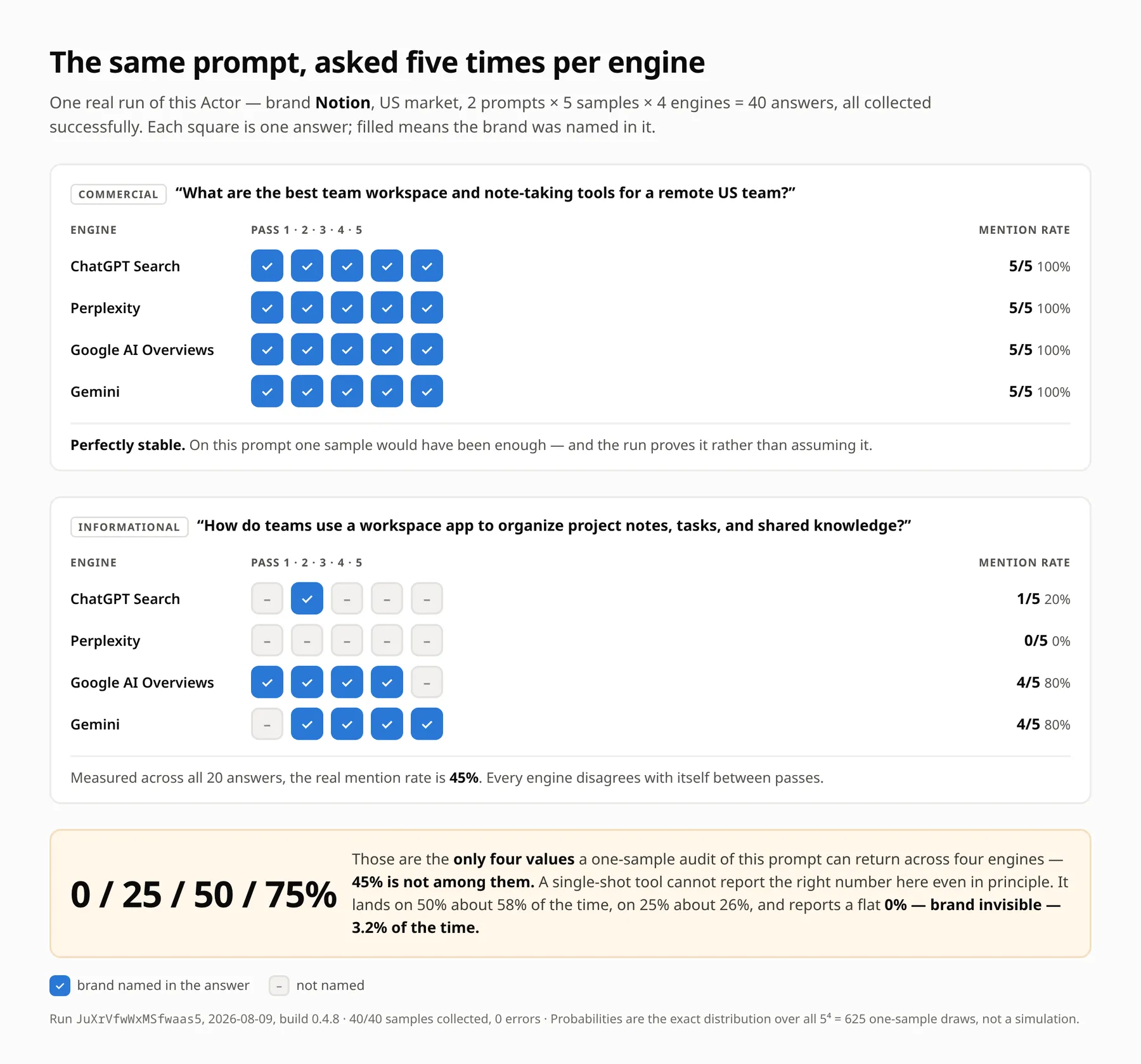
The commercial prompt was perfectly stable — 5/5 on all four engines. One sample would have been enough, and the run demonstrates that instead of assuming it.
The informational prompt was not. On the same question, asked five times each:
| Engine | Passes with the brand named | Mention rate |
|---|---|---|
| Google AI Overviews | 4 of 5 | 80% |
| Gemini | 4 of 5 | 80% |
| ChatGPT Search | 1 of 5 | 20% |
| Perplexity | 0 of 5 | 0% |
Measured across all 20 answers the real mention rate is 45%. Now consider what a single-sample tool can report for that prompt. With one pass on each of four engines there are exactly four reachable answers — 0%, 25%, 50% or 75% — and 45% is not one of them. A one-shot audit cannot return the correct figure here even in principle. Across all 5⁴ = 625 possible draws it lands on 50% about 58% of the time, on 25% about 26% of the time, and reports a flat 0% — "your brand is invisible" — 3.2% of the time.
That is why this Actor asks each prompt samplesPerPrompt times per engine (default 3, max 5) and reports rates — mention rate, answer-trigger rate, visibility rate, share of voice — with the denominator attached to every one of them.
Note what the stable prompt implies: sampling is not uniformly necessary, it is unequally necessary, and you cannot know which prompts need it until you have sampled them. That is the argument for measuring variance rather than assuming it away in either direction.
Comparing cost per check
Most AI visibility tools bill per check, where one check is one prompt sent to one engine, once. This Actor bills the same unit, so the comparison is direct — at the BRONZE tier:
| Engine | Cost per sampled check |
|---|---|
| Google AI Overviews | $0.009 |
| ChatGPT Search | $0.015 |
| Gemini | $0.015 |
| Perplexity | $0.040 |
Multiply by samplesPerPrompt to get the cost of a measured prompt rather than a sampled one: a 3-sample Google AI Overviews prompt costs $0.027, and gives you a rate instead of a coin flip.
An AI answer is a sample from a distribution, not a lookup. Two things follow.
A single query cannot tell you whether you are mentioned. If your brand appears in 40% of answers to "best project management software", one query gives you a 40% chance of "we're visible!" and a 60% chance of "we've disappeared!". Neither is true. With samplesPerPrompt: 3 you get 0%, 33%, 67% or 100% per prompt — still coarse alone, but across 10 prompts that is 30 samples per engine, enough to see a real change from a 10-point shift.
Google AI Overviews often shows nothing at all. For many queries there is simply no AI Overview. A tool that silently drops those queries reports a mention rate computed over the subset where an overview happened to render, which is not the number you want. This Actor reports both:
answerTriggerRate— share of samples where the engine produced an AI answer at allmentionRate— share of answers that mention your brandvisibilityRate— share of samples that show your brand to a user, i.e.mentionRate x answerTriggerRate
visibilityRate is the number to put on a dashboard. An engine that answers 30% of the time and always mentions you is not equivalent to one that always answers and mentions you a third of the time, yet both have mentionRate: 1.0 and mentionRate: 0.33 respectively — figures that describe very different user experiences.
Every metric ships with its denominator (samples, collected, answered, analyzed), so you can always see how much data a number rests on.
Input reference
| Field | Type | Default | Description |
|---|---|---|---|
brand | string | — | Required. The brand to track. |
competitors | string[] | [] | Brands to measure share of voice against. |
industry | string | "" | Category buyers search in. Used to generate prompts. |
language | string | "en" | Language the prompts are written in. |
market | string | "US" | Two-letter country code. Localizes Google AI Overviews; see the section below. |
queries | string[] | [] | Your own prompts. When set, no prompt generation happens. |
maxPrompts | integer | 10 | Prompts to generate (1–50). |
samplesPerPrompt | integer | 3 | Times each prompt is asked per engine (1–5). |
engines | string[] | all four | perplexity, google_aio, chatgpt_search, gemini. |
analysisMode | string | "full" | full scores every answer. collect-only returns raw answers and citations with no LLM call and no analysis charge. |
openRouterApiKey | string (secret) | "" | Optional. Analysis runs on an included key by default. Supply your own to pick any model and be billed the lower response-analyzed-byok rate. Falls back to OPENROUTER_API_KEY. |
analysisModel | string | openai/gpt-5.6-luna | Any OpenRouter model ID when you supply your own key. On the included key only openai/gpt-5.6-luna and deepseek/deepseek-v4-flash-0731 are accepted; anything else falls back to the default with a warning. |
webhookUrl | string | "" | If set, the finished summary is POSTed here as JSON. Costs nothing extra. |
Three things worth knowing before your first run
The form is prefilled for a fast first look, not for a measurement. It opens on 1 prompt x 1 sample across all four engines — four samples, about two minutes, a few cents — so you can see the output shape before committing. That is not a measurement: AI answers are non-deterministic, so a single sample is a coin flip. Raise samplesPerPrompt to 3 (the field's own default, and the useful minimum) and maxPrompts to 10 for a run you intend to act on.
Localization is real for Google, prompt-level for the others. See the section below.
You do not need an OpenRouter account. Answer scoring runs on a key included with the Actor and is billed through the response-analyzed event, so full mode works on the first click with nothing to configure.
Supplying your own key in openRouterApiKey switches to BYOK: the analysis is then billed at the lower response-analyzed-byok rate — a default run drops from $2.72 to $2.57 — you may use any OpenRouter model, and OpenRouter bills you directly for the tokens (about $0.03 for the 112 analyses in a default run). With analysisMode: "collect-only" no LLM is used at all and no key of either kind is involved.
Track AI visibility in any Google market — FR, DE, ES, JP…
Set market to a country code and language to that market's language, and Google AI Overviews are collected as a user in that country actually sees them: local sources, local brands, local phrasing.
A verification run with market: "FR" returned an AI Overview for 10 of 10 French commercial queries, citing French sources (tool-advisor.fr, sellsy.com, yousign.com) and naming French-market brands. A market: "DE" run returned 3 of 3.
How it works, and where it stops. Google AI Overviews is served by a geo-capable scraper for any market other than US, passing Google's own gl (country) and hl (language) parameters. Perplexity and ChatGPT Search expose no country parameter at all — for those engines market only steers how prompts are phrased.
Rather than blur that distinction, every sample row carries geoApplied:
| Engine | market: "US" | market: "FR" |
|---|---|---|
| Google AI Overviews | geoApplied: false (US is the default locale) | geoApplied: true |
| Perplexity | geoApplied: false | geoApplied: false |
| ChatGPT Search | geoApplied: false | geoApplied: false |
| Gemini | geoApplied: false | geoApplied: false |
So you can compute a Google-only, genuinely localized view of your metrics by filtering on geoApplied, and the run's warnings say plainly which engines were not localized.
Localized Google costs more. The geo-capable scraper is roughly 13x the price of the default one, so it is billed as a separate event (prompt-sampled-google-aio-localized) rather than hidden inside a blended average. If you only care about the US market, leave market at its default and pay the cheap rate. One task per market is the right pattern: different markets write to different state keys and never overwrite each other's history.
What the output looks like
SUMMARY in the run's default key-value store (abridged — per-prompt rows and the full domain list are omitted here):
Reading the deltas. Every value is current - previous. A positive mentionRate delta is good. A positive averagePosition delta is bad — it means the brand moved further down the answer. The example above shows -0.3152, an improvement.
Dataset rows
One row per sample, with the raw evidence behind every aggregate:
status is one of:
| Value | Meaning |
|---|---|
ok | Engine answered and the answer was scored |
no_answer | Engine returned no AI answer — counts against answerTriggerRate |
analysis_failed | Engine answered but the answer could not be scored |
error | Engine call failed after 3 attempts — excluded from every rate |
sourceRunId is the downstream Actor's run ID, so any individual answer can be traced back to its source run.
Pricing
Sampling is billed per engine, because the engines do not cost the same: one Perplexity answer costs about 4x one Google AI Overview, and a localized Google AI Overview about 13x. A single blended price would make Google-only users subsidize Perplexity users and would describe nobody's actual bill.
| Event | FREE | BRONZE | SILVER | GOLD | Charged when |
|---|---|---|---|---|---|
prompt-sampled-google-aio | $0.0120 | $0.0090 | $0.0080 | $0.0065 | One Google AI Overviews sample, default market |
prompt-sampled-google-aio-localized | $0.1550 | $0.1200 | $0.1050 | $0.0850 | One Google AI Overviews sample in a targeted market |
prompt-sampled-perplexity | $0.0500 | $0.0400 | $0.0350 | $0.0300 | One Perplexity sample |
prompt-sampled-chatgpt | $0.0195 | $0.0150 | $0.0130 | $0.0110 | One ChatGPT Search sample |
prompt-sampled-gemini | $0.0195 | $0.0150 | $0.0130 | $0.0110 | One Gemini sample |
response-analyzed | $0.0030 | $0.0020 | $0.0018 | $0.0015 | One answer successfully scored |
report-generated | $0.2000 | $0.1250 | $0.1100 | $0.1000 | Once per run — the aggregation and delta layer |
A failed engine call is not charged. If a call fails after all three retries it produces no data, so you are not billed for it. A "no AI answer shown" result is charged: it costs a real call to establish, and it is one of the metrics you came for.
What a run costs
Worked examples at the BRONZE tier. Default settings are 10 prompts x 3 samples, so 30 samples per engine.
| Run | Samples | Full mode | Collect-only | Weekly (full) |
|---|---|---|---|---|
| US, all four engines (default) | 120 | $2.72 | $2.50 | $11.77/month |
| US, Google AI Overviews only | 30 | $0.43 | $0.39 | $1.87/month |
| US, ChatGPT Search + Gemini | 60 | $1.14 | $1.02 | $4.92/month |
| US, all four minus Perplexity | 90 | $1.46 | $1.29 | $6.32/month |
| FR, all four (localized Google) | 120 | $6.05 | $5.82 | $26.19/month |
| Light: 5 prompts x 2 samples, US, all four | 40 | $0.99 | $0.92 | $4.28/month |
Bringing your own OpenRouter key takes the default run from $2.72 to $2.57, because analysis is then billed at the orchestration-only rate — you pay OpenRouter for the model call instead (about $0.03 for 112 analyses).
The three levers are maxPrompts, samplesPerPrompt and engines, and cost scales linearly with their product. Perplexity is the expensive engine at $0.040 a sample — more than the other three combined. Dropping it takes a default run from $2.72 to $1.46 while keeping 90 samples of coverage.
Set a maximum cost per run in the run options as a hard ceiling — the Actor stops collecting when it gets there and writes the summary it has, with a warning, rather than being killed mid-run.
Collect-only mode: raw answers for your own pipeline
Set analysisMode: "collect-only" and the Actor stops after collection. It returns every answer and its citations, makes no LLM call at all, and raises no analysis charges. A default run costs $2.50 instead of $2.72.
Use it when you already have a scoring pipeline, when your definition of "mentioned" is specific to your business, or when an agent wants raw material rather than a verdict. You still get:
answerTriggerRateper engine and overall — which engines answer your prompts at alltopCitedDomainsandcitedDomains— what the engines are reading- week-over-week deltas on those collection metrics, including new and lost sources
- the full
answerTextandcitationson every dataset row
You do not get mention rate, brand position, sentiment, share of voice or recommendation rate: all of those come from the analysis stage. They are absent from SUMMARY rather than reported as zero.
Because this mode uses no LLM at all, prompts are not generated either — supply your own queries unless the built-in fallback set suits you.
Per-engine breakdown: deciding which engines to keep
SUMMARY.costByEngine reports what each engine cost and what it contributed:
Read costShare against mentionShare. In the example above Perplexity is 62% of the cost and 12% of the mentions, while Gemini is 25% of the cost and 35% of the mentions — that is a clear signal to drop Perplexity from the weekly run, or keep it at samplesPerPrompt: 1 as a watchlist while the others run at 3.
The reverse case matters too: an engine with a low mention share because it never mentions you is exactly the engine worth keeping, since that is the gap you are trying to close. Read it alongside byEngine[engine].answerTriggerRate — a low mention share with a high trigger rate is a visibility problem, a low mention share with a low trigger rate is just an engine that stays quiet about your category.
Recipes
Four inputs to copy straight into the Input tab. Prices are BRONZE-tier for a full run.
Full visibility audit — brand vs competitors
The default showcase: 10 prompts x 3 samples across all four engines, scored and ranked. ≈ $2.74 per run.
Cheap weekly Google AI Overviews watch
One engine, the cheapest, at a price that suits a weekly schedule. Google AI Overviews is the engine no LLM-only tracker covers. ≈ $0.45 per run.
French market — genuinely localized AI visibility
Google AI Overviews served from France, in French, citing French sources. Perplexity is included un-localized for contrast — each row says which is which via geoApplied. ≈ $2.09 per run.
Collect-only — raw sampled answers for your own pipeline
No LLM, no analysis charge. Your own prompts, sampled, with the full answer text and citations for you to score however you like. ≈ $0.34 per run.
How to monitor AI search visibility weekly
Deltas come from a named key-value store, ai-brand-monitor-state, keyed by slugified brand + market (for example notion-us). The first run has no baseline and reports deltas: null; every run after that diffs against the one before.
- Open the Actor, configure your input, and save it as a task.
- Add a schedule — weekly is the right cadence. Daily mostly measures noise; monthly misses the movement.
- Keep
maxPrompts,samplesPerPromptandenginesstable between runs. Changing them changes the denominators, which makes the delta a comparison of two different measurements. - To track several markets, use one task per market. Different
marketvalues write to different state keys and never overwrite each other.
The delta compares against the previous run, not against a fixed 7 days. deltas.daysSincePreviousRun tells you the actual gap, so an off-schedule run is visible rather than silently mislabelled as week-over-week.
Run it locally
npm run local mocks the engines unless APIFY_TOKEN is set, and mocks the analysis model unless OPENROUTER_API_KEY is set. With both unset it costs nothing and still exercises the whole pipeline, including the delta path against a seeded baseline.
How to improve brand visibility in AI search engines
The metrics this Actor produces map to three distinct problems, and they need different fixes.
Low answer-trigger rate means the engine rarely answers your category at all — a prompt-set problem, not a brand problem. Rewrite prompts toward the phrasing buyers actually use.
Low mention rate with a healthy trigger rate means answers exist and you are not in them. Look at topCitedDomains: those are the pages the engine is reading. Getting represented on the sources it already trusts moves this number more reliably than changing your own site.
Mentioned but never recommended — a high mention rate with a low recommendationRate — means you are listed as an option, not as the answer. That is a positioning problem in the third-party sources, usually comparison pages and review sites.
Track newSources and lostSources week over week: a domain entering the cited set is a placement worth pursuing, and one leaving is coverage you just lost.
What AI search monitoring tools measure, and what to check before you buy one
Every tool in this category reports some version of "are we mentioned". The differences that matter:
- Does it sample, or ask once? A single query per prompt is a draw from a distribution, not a rate. Ask how many times each prompt is sent and whether the sample count appears in the output.
- Does it report the denominator? A mention rate without
answeredandanalyzedcounts cannot be audited or compared across weeks. - Does it distinguish "no answer" from "not mentioned"? Google AI Overviews frequently renders nothing. Folding those into "not mentioned" understates visibility; dropping them silently overstates it.
- Does it keep the raw answers? Without the answer text and citations, you cannot check a surprising number or re-analyse history when your questions change.
- Can it target a market? Most cannot. Where it can, check which engines are genuinely localized rather than merely prompted in another language.
This Actor answers yes to all five, and geoApplied marks exactly which rows are localized.
FAQ
How many samples do I actually need? Three per prompt is the useful minimum. Across a 10-prompt set that is 30 samples per engine, enough to make a 10-point shift in mention rate visible above noise. Raise to 5 if you need to react to smaller movements, or if you run fewer prompts.
Why does Google AI Overviews show a much lower answer trigger rate than the others?
Because Google genuinely does not generate an AI Overview for every query. That is a property of the engine, not a failure of the scraper. answerTriggerRate is how you track it — a falling trigger rate for your category is itself a finding.
Can I use my own prompts?
Yes. Set queries and no generation happens; your prompts are used verbatim. This is the right choice once you have a prompt set you want to hold constant across weeks.
Does the tracked-competitor list limit what gets measured?
No. Any brand an answer names is counted in share of voice. The competitors list guarantees those brands always get a row (with 0 mentions if they vanish, which is itself signal) and gives the analysis model useful context.
What does recommendedBrand mean?
The single brand an answer pushes hardest as the best choice, as opposed to merely listing it. recommendationRate is the share of scored answers that pick your brand. Being mentioned in every answer while never being recommended is a specific, actionable problem.
Is the answer text stored?
Yes — every sample keeps its full answerText and citations in the dataset, so you can audit any aggregate or re-analyse historical answers with different logic.
What happens if part of the run fails?
It finishes. Failed samples are recorded with status: "error", excluded from every rate, counted in coverage, and summarised in warnings. A run reporting "87/90 samples collected" is a usable run.
Can I push results into my own dashboard automatically?
Set webhookUrl and the finished summary is POSTed there as JSON when the run ends. Delivery is retried twice, a failing webhook never fails the run, and it is not billed. The payload is the SUMMARY object described above, sent with Content-Type: application/json plus X-Actor-Run-Id and X-Brand headers so you can route without parsing the body.
The payload carries schemaVersion at the top level — currently 2. Branch on it rather than sniffing for fields: version 2 added analysisMode, analysisKeySource and costByEngine, and in collect-only mode the analysis-derived metrics are absent rather than zero. A 4xx response is treated as a permanent rejection and not retried; 5xx, 408 and 429 are retried twice with a 10s timeout per attempt.
Can AI agents run this Actor? Yes — see Use from an AI agent (MCP) at the top for the connection URL and example prompts. It uses pay-per-event pricing, runs with limited permissions and has no Standby mode, so it needs no per-user approval step in autonomous workflows.
Why is geoApplied false for Perplexity even when I set a market?
Because the Perplexity and ChatGPT Search scrapers expose no country parameter — there is nothing to pass. The field reports what actually happened rather than implying a localization that did not occur. Only Google AI Overviews can be genuinely localized today.
Why is ChatGPT Search so slow? It is the slowest of the three by a wide margin — 2 to 6 minutes per query is normal, versus 10–40 seconds for the others. A call that exceeds the per-call timeout is retried once. It dominates the wall-clock time of a three-engine run.
Which model should I use for analysis?
The default, openai/gpt-5.6-luna, is cheap and reliable for this extraction task. Note that openai/gpt-5.6 without the suffix routes to a different, more expensive tier. Any OpenRouter model ID works; whichever you choose, keep it stable across runs, since changing the scorer changes the measurement.
License
MIT — see LICENSE.


