

Cian.ru Real Estate Listings Scraper - No Login
Pricing
from $1.26 / 1,000 listings
Cian.ru Real Estate Listings Scraper - No Login
Scrape Cian.ru flats, houses and commercial offers for sale or rent: price, price per m², rooms, area, floor, address, metro, photos and price history. Track prices and new offers. No login.
Pricing
from $1.26 / 1,000 listings
Rating
0.0
(0)
Developer

Cliqto Media
Maintained by CommunityActor stats
0
Bookmarked
2
Total users
1
Monthly active users
2 days ago
Last modified
Categories
Features
Share
Cian.ru Real Estate Listings Scraper reads public sale and rent offers from Cian.ru by a search link, an offer link or simple filters (city, rooms, price) and saves one clean row per offer with price, price per m², rooms, area, floor, address, metro, photos and price history.
It suits rent and price analysts, agents and investors. The prefilled run returns 20 Moscow rentals in 6–22 seconds (our test runs) for about $0.04 on the FREE tier, with no Cian account, login or cookies.
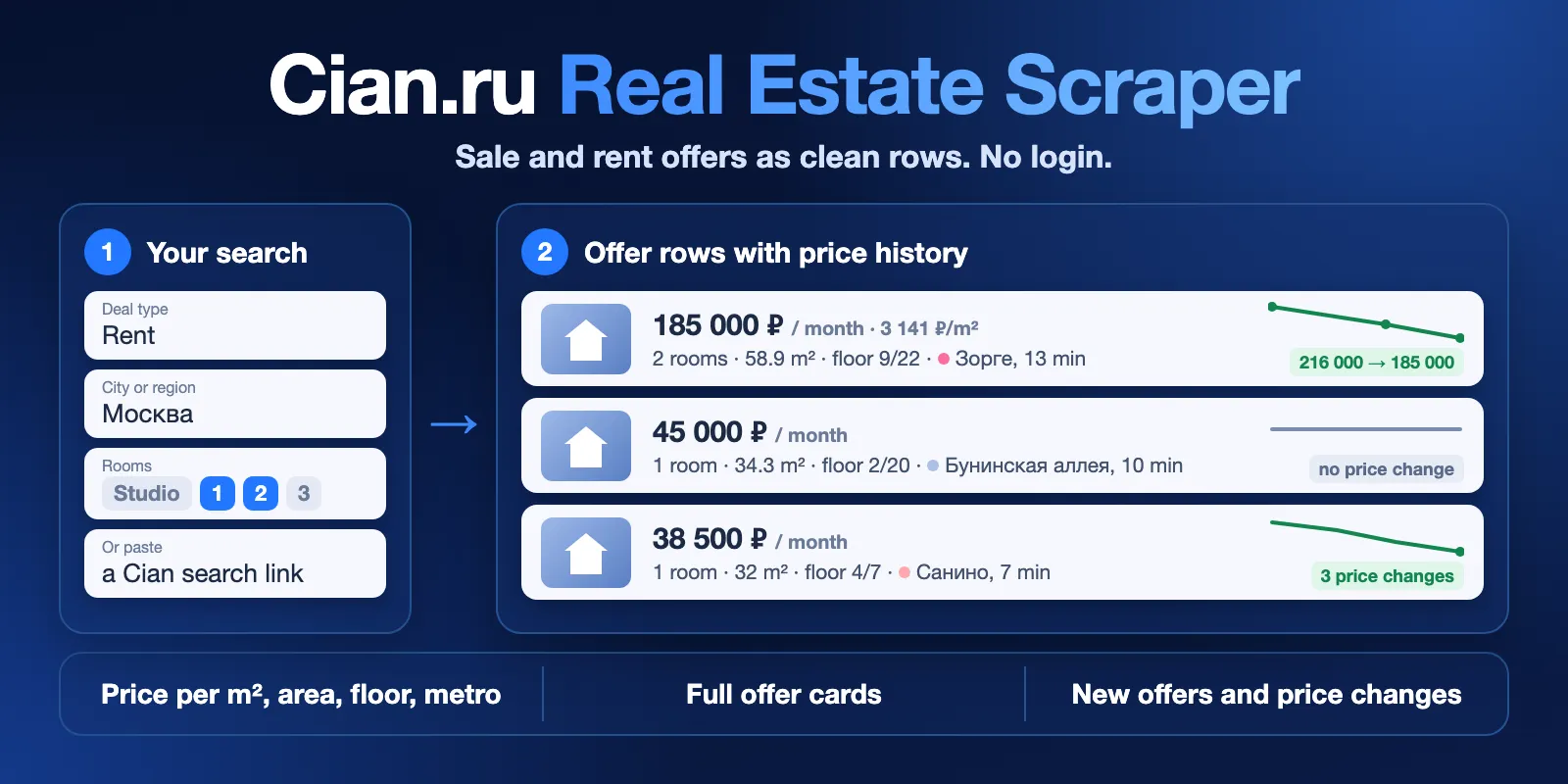
Table of contents
- What it does
- How it works
- Quick start
- Use cases
- Input
- Output
- Pricing
- Limits
- API, export and integrations
- Troubleshooting
- FAQ
- Related Actors
- Support
What it does
The Actor takes Cian search links, single offer links or filters for Cian.ru. It returns one Dataset row for each offer: deal type, price, price per m², rooms, total area, floor, floors in the building, address, district, metro, publication time, photos and the price history. It works for flats, rooms, new buildings, houses, land and commercial property, for sale and for rent. It does not return phone numbers or seller names, and it needs no Cian login.
Good fit
- Compare rent prices by district or metro station in Moscow, Saint Petersburg or another city.
- Collect flats for sale with price per m² for a market study.
- See which offers lowered their price and when (
priceHistory,lastPriceChange). - Get only new offers and price changes of a saved search every day (monitor mode).
- Read all attributes and amenities of chosen offers (offer cards).
How it works
- The Actor reads the Cian search pages for your links or filters, page by page. A big search is split into price ranges, so it can go past the ~1,500 offers that Cian shows for one search.
- It removes duplicate offers, masks phones and e-mails in descriptions and, if you turn it on, opens each offer card for extra fields.
- It saves one row for each offer and writes a run summary (
RUN_SUMMARY) with the counts and the stop reason.
Quick start
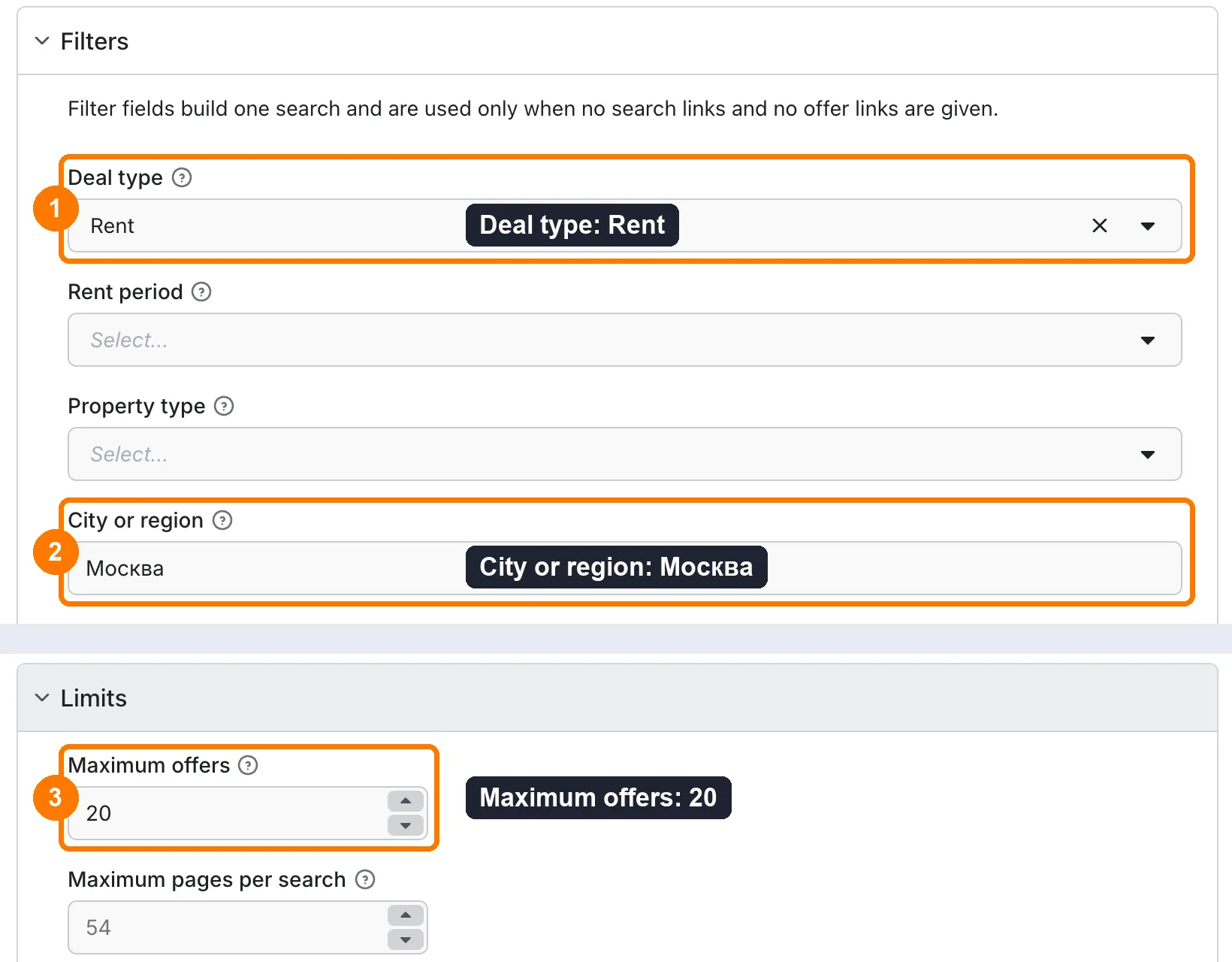
-
Open the input form. Keep
Rentin Deal type or chooseSale(box 1 in the picture). -
Keep
Москваin City or region or type another city, such asСанкт-Петербург(box 2). -
Keep
20in Maximum offers for a first test (box 3). -
Click Start at the bottom of the page (it is below the part in the picture).
-
Open the Output tab and check
price,totalArea,floorandaddress(box 5).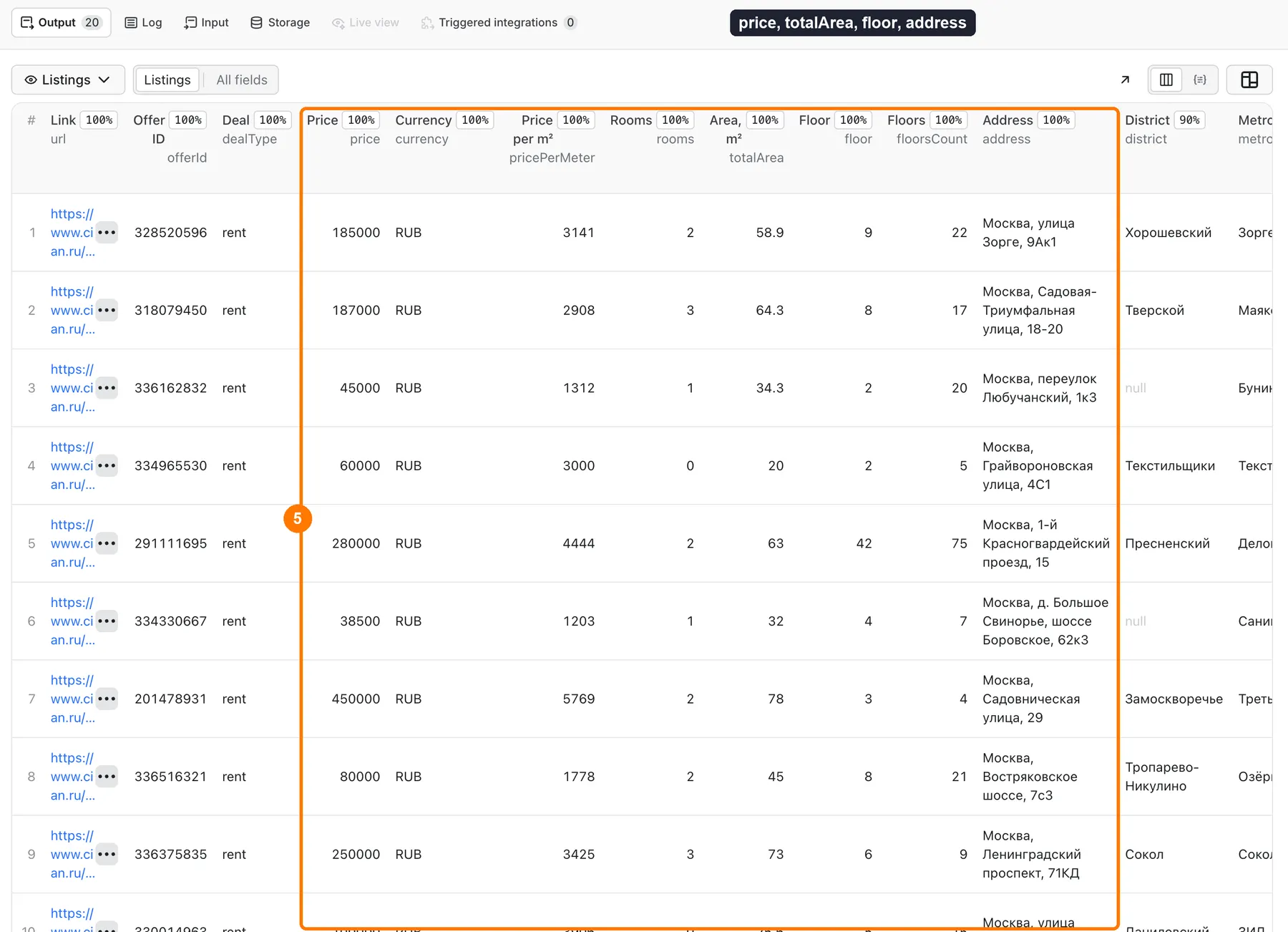
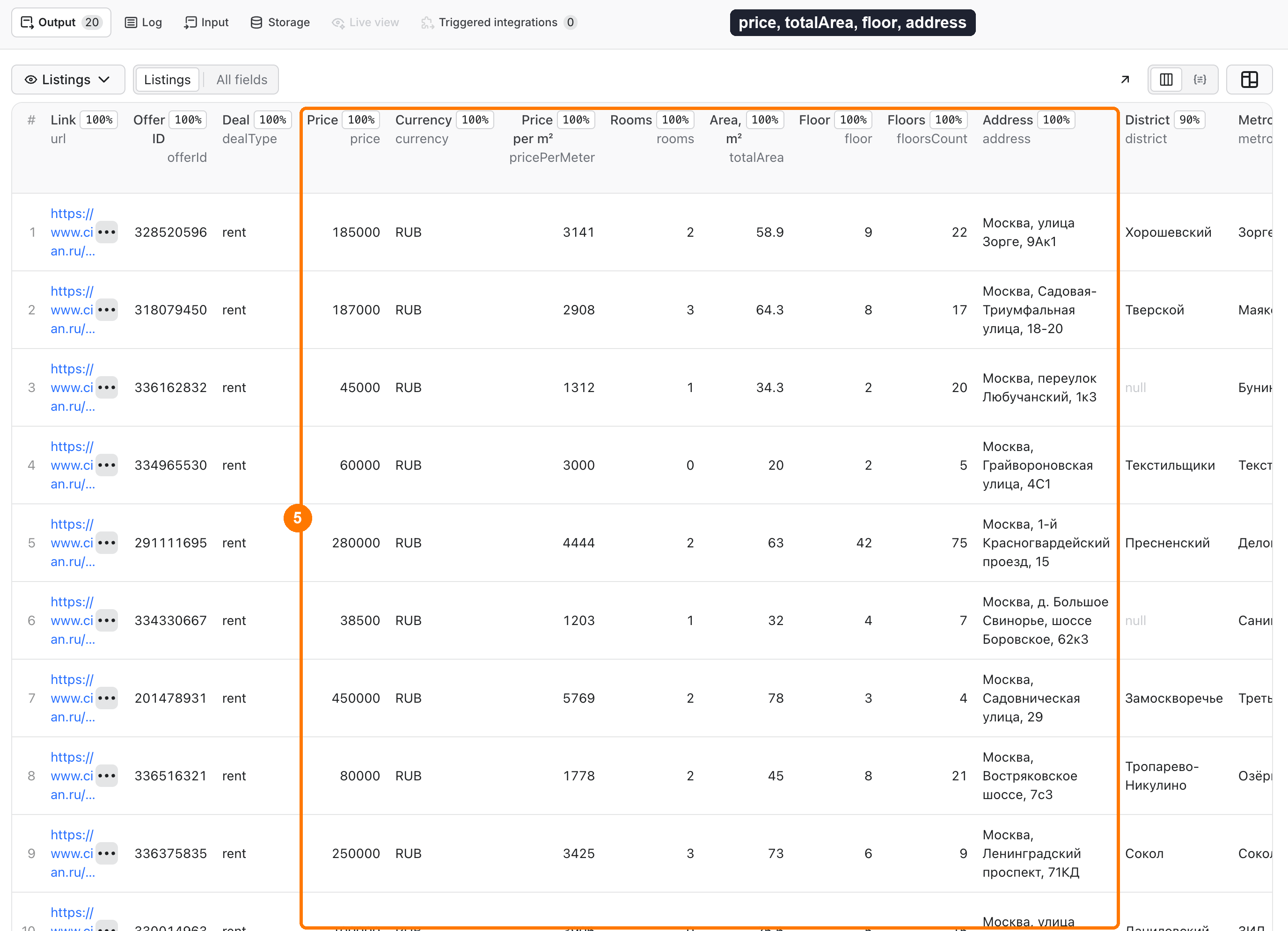
Expected result: 20 rows of long-term rentals in Moscow in the Cian default order, each with a price per month, an area, a floor and a link.
Use cases
| Buyer job | Input path | Output entity | Key fields | Next integration |
|---|---|---|---|---|
| Compare rent prices by district | dealType: rent, region, rooms | Offer row | price, district, metro, totalArea | CSV or Excel export |
| Price per m² market study | dealType: sale, region, minArea, maxArea | Offer row | pricePerMeter, totalArea, buildYear, address | Google Sheets or BI tool |
| Find offers that dropped in price | searchUrls | Offer row | priceHistory, firstPrice, lastPriceChange, priceChangesCount | JSON export or API |
| Daily new offers and price changes | searchUrls or filters, sort: newest, monitorMode, stateName | New or changed offer row | changeType, price, publishedAt, url | Schedule and Slack or Notion summary |
| Full facts for chosen offers | offerUrls, includeDetails | Detailed offer row | details.attributes, details.amenities, priceHistory | JSON export |
Input
Give at least one of: search links, offer links or filters. With nothing set, the Actor searches long-term rent of flats in Moscow.
Input fields
| Field | Plain name | Type | Default | Prefill | Allowed values | Effect |
|---|---|---|---|---|---|---|
searchUrls | Search links | list of links | none | none | up to 50 Cian search links | Reads each search. Filters in the link are kept; filter fields are not applied to it |
offerUrls | Offer links | list of links | none | none | up to 500 links like https://www.cian.ru/rent/flat/312345678/ | Opens each offer card and saves one full row (charged as a page, an offer and an offer card) |
includeDetails | Open each offer card | yes/no | no | none | Adds details and the full price history to search rows; extra event per offer | |
dealType | Deal type | text | rent | rent | sale, rent | Used only when no links are given |
rentPeriod | Rent period | text | long | none | long, daily | Monthly or daily rent |
propertyType | Property type | text | flat | none | flat, room, newbuilding, house, land, commercial | Land and new buildings only with sale |
region | City or region | text | Moscow | Москва | Cian city or region name, or its Cian id, such as 2 | Where to search |
rooms | Rooms | list | any | none | studio, 1–5, 6+, free | Number of rooms |
minPrice, maxPrice | Price range | number | none | none | rubles, ≥ 0 | Price per month for long-term rent |
minArea, maxArea, minLivingArea, minKitchenArea | Areas | number | none | none | m² | Area filters |
minFloor, maxFloor, minFloors, maxFloors, notFirstFloor, notLastFloor | Floors | number, yes/no | none | none | floors −5 to 200 | Floor of the flat and floors in the building |
minBuildYear, maxBuildYear, minCeilingHeight, repair, houseMaterial | Building | number, list | none | none | see the form | Building filters |
ownerOnly, fromDeveloperOnly, withPhotoOnly, withVideoOnly, withLayoutOnly | Seller and media | yes/no | no | none | Narrow the offers | |
publishedWithin | Published within | text | any | none | any, hour, day, week, month | Only recent offers |
maxMetroMinutes, metroOnFoot | Metro | number, yes/no | none | none | 1–120 minutes | Minutes to the metro, on foot or by transport |
latitude, longitude, radiusKm | Map area | number | radius 2 km | none | radius 0.1–50 km | Search around a point |
descriptionInclude, descriptionExclude | Words in description | list | none | none | up to 20 words each | Words that must or must not be in the text |
sort | Sorting | text | Cian order | none | default, newest, priceAsc, priceDesc, areaDesc, pricePerMeterAsc | Order of the results |
advancedQuery | Advanced query (JSON) | object | none | none | up to 30 Cian terms | Rare Cian filters as raw terms |
maxItems | Maximum offers | integer | 100 | 20 | 1–10,000; up to 1,000 with offer cards | Total offers for the whole run |
maxPagesPerSearch | Maximum pages per search | integer | 54 | none | 1–54 | Pages read per search |
splitByPrice | Split big searches by price | yes/no | yes | none | Goes past ~1,500 offers per search | |
monitorMode | Monitor mode | yes/no | no | none | Saves only new offers and price changes | |
emitUnchanged | Also save unchanged offers | yes/no | no | none | In monitor mode, also save unchanged offers | |
stateName | Memory name for monitor mode | text | default | none | lowercase letters, digits, hyphens, up to 40 | Separate memory for each monitor |
includeDescription | Include description | yes/no | yes | none | Description text with phones and e-mails masked | |
includeRawData | Include raw data | yes/no | no | none | Adds the raw Cian offer in raw | |
proxyConfiguration | Proxy | object | Apify Proxy | Apify Proxy | Cian may block data-center addresses | |
deliveryConnector, deliveryTarget | Send results to | connector, text | none | none | Slack or Notion connector | Posts a short run summary |
Interacting settings
| Condition | Input A | Input B | Effective behavior |
|---|---|---|---|
| Links and filters together | searchUrls or offerUrls | dealType, region, rooms, prices and other filters | Filters are not applied to links. A link keeps its own filters. The run summary lists this in warnings |
| Offer links in monitor mode | offerUrls | monitorMode | Monitor mode works only for searches; for offer links it is ignored with a warning |
| Offer cards with a big run | includeDetails | maxItems | Works with maxItems up to 1,000. Each card takes about 2 seconds |
| Monitoring order | monitorMode | sort | Use sort: newest. The monitor checks the top maxItems offers; with Cian's default order, new offers may be lower than that |
| Price per month or per day | dealType: rent | rentPeriod | minPrice and maxPrice are per month for long and per day for daily |
Input examples
Quick test
Result: 20 long-term rentals in Moscow with price, totalArea, floor, address and metro.
Two-room flats for sale in Saint Petersburg, by price per m²
Result: up to 500 rows, cheapest price per m² first.
A search link copied from Cian
Result: the same offers that the link shows on Cian, up to 200 rows.
Daily new offers and price changes
Result: the first run saves all found offers with changeType: new. Later runs save only new offers and offers with a changed price. Run it on a schedule.
Chosen offers with all attributes
Result: one row per link with details.attributes, details.amenities and the full priceHistory. A removed offer gives a free not_found row.
Output
Each offer is one Dataset row. Fields that Cian does not show for an offer are null, lists are empty.
Output fields
| Field | Plain meaning | Type | Can be empty? | Example |
|---|---|---|---|---|
offerId | Cian offer ID | integer | no for offers | 328520596 |
url | Offer link | text | no for offers | https://www.cian.ru/rent/flat/328520596/ |
status | Row status | text | no | complete, partial, not_found, error |
dealType | Sale or rent | text | rarely | rent |
rentPeriod | Long-term or daily rent | text | yes, for sale | long |
propertyType | Property type | text | rarely | flat |
title | Offer title | text | rarely | 2-комн. кв., 58.9 м², 9/22 этаж |
price | Price in the offer currency | number | yes, price on request | 185000 |
currency | Price currency | text | yes | RUB |
priceRub | Price in rubles | number | yes | 185000 |
pricePerMeter | Price per m² | number | yes | 3141 |
pricePeriod | Period of a rent price | text | yes, for sale | month |
deposit, commissionPercent, utilitiesIncluded | Rent terms | number, yes/no | yes | 200000, 0, true |
saleType | Sale type | text | yes | free |
rooms, isStudio | Rooms | integer, yes/no | yes | 2, false |
totalArea, livingArea, kitchenArea | Areas, m² | number | yes | 58.9, 30, 18 |
floor, floorsCount | Floor and floors in the building | integer | yes | 9, 22 |
buildYear, ceilingHeight, houseMaterial, decoration, deadline | Building facts | mixed | often in search rows | 2015, 2.7, monolith |
address | Full address | text | rarely | Москва, улица Зорге, 9Ак1 |
city, okrug, district, street, house | Address parts | text | yes | Москва, САО, Хорошевский |
latitude, longitude | Coordinates | number | rarely | 55.783139, 37.509451 |
metro, metroMinutes, metroTransport | Nearest metro | text, integer | yes, outside metro cities | Зорге, 13, walk |
metroStations | Metro stations near the offer | list | can be empty | [{"name":"Зорге","minutes":13,"transport":"walk"}] |
highways | Highways near the offer | list | can be empty | [] |
residentialComplex, isNewBuilding, fromDeveloper | Complex and new building | text, yes/no | yes | ЖК «Зорге 9», false |
sellerType, agencyName, isByHomeowner | Seller kind, no names or phones | text, yes/no | yes | company, null, false |
publishedAt | Publication time, Moscow time | text | rarely | 2026-04-02T13:13:02.953 |
updatedAt | Last update time, as Cian gives it, without a zone mark | text | yes | 2026-11-20T14:27:23.327000 |
priceHistory | Price changes: date (UTC) and price | list | yes | [{"date":"2026-04-02T10:13:04Z","price":216000}] |
priceChangesCount, firstPrice, lastPriceChange | Price history summary | integer, number, text | yes | 2, 216000, reduced |
viewsTotal, viewsToday | Views on Cian | integer | yes | 274, 42 |
images, imagesCount, hasVideo | Photo links and video | list, integer, yes/no | can be empty | ["https://images.cdn-cian.ru/images/…jpg"] |
description | Description, phones and e-mails masked | text | yes | Сдается квартира… |
isPremium, isTop | Paid placement on Cian | yes/no | yes | false |
searchUrl | Search link, offer link or filter search this row came from | text | no | rent flat in Москва |
changeType | Monitor mode: new, price_changed or unchanged | text | null without monitor mode | new |
route | Cian route of the row | text | yes | mobile, desktop, card |
fetchedAt | When the row was read, UTC | text | no | 2026-11-21T11:27:36.118Z |
details | Offer card: attributes, amenities, tags and more | object | null without offer cards | {"attributes":{"Санузел":"1 совм."}} |
raw | Raw Cian offer | object | null without raw data | |
errorMessage | What went wrong for not_found and error rows | text | null for offers | Cian has no such offer (removed or wrong link). |
Output entities and surfaces
| Situation | Surface | Result shape | User action |
|---|---|---|---|
| Normal offer | Dataset | Row with status: complete | Export or use the fields |
| Some fields missing | Dataset | Row with status: partial (no price or no area) | Check the offer on Cian; open the offer card |
| Removed offer link | Dataset | Free row with status: not_found and errorMessage | Remove the link |
| Wrong link or source error | Dataset | Free row with status: error and errorMessage | Fix the link or run again later |
| Search with no offers | Dataset and RUN_SUMMARY | No offer rows, run status empty, run SUCCEEDED | Broaden the filters or check the link |
| Run summary | Key-value store RUN_SUMMARY | Counts, stop reason, warnings, each search with offerCount and pages | Read why the run stopped |
Output example
The example is shortened; a real row has all fields from the table.
Send results to Slack or Notion
Connect Slack or Notion once in Apify Console → MCP connectors. Then choose it in Send results to (deliveryConnector). For Slack, put a channel ID in Notion page or channel (deliveryTarget); for Notion, put a page link, and each run is added on top of that page. After the run the Actor posts a short summary: how many offers were saved, how many are new or have a new price, and the first offers with price and link. If the summary cannot be sent, the run still ends normally and RUN_SUMMARY.delivery says why.
Use case → fields
| Use case | Fields to use |
|---|---|
| Rent prices by district | price, rooms, totalArea, district, metro, metroMinutes |
| Price per m² study | pricePerMeter, totalArea, buildYear, houseMaterial, latitude, longitude |
| Price drops | priceHistory, firstPrice, lastPriceChange, priceChangesCount |
| New offers alerts | changeType, publishedAt, price, url |
| Offer facts | details.attributes, details.amenities, description, images |
Pricing
Pricing unit
You pay per event. The main event is one saved offer (listing).
| Event | When it is charged | FREE | BRONZE | SILVER | GOLD and higher |
|---|---|---|---|---|---|
listing | One offer saved to the Dataset | $0.0018 | $0.00162 | $0.00144 | $0.00126 |
offer-detail | One offer card opened (includeDetails or an offer link) | $0.0008 | $0.00072 | $0.00064 | $0.00056 |
search-page | One Cian search page or offer link read | $0.0005 | $0.0005 | $0.0005 | $0.0005 |
apify-actor-start | One run start, per GB of memory | $0.0005 | $0.0005 | $0.0005 | $0.0005 |
The start fee scales with run memory (per GB). At the default 256 MB it is one event, $0.0005. not_found and error rows are free, but the Cian page read behind them is one search-page. One search page gives about 25 offers. Apify platform usage is included in these prices.
Cost examples
Prices on the FREE tier.
| Run | Events | Cost |
|---|---|---|
| Prefilled test: 20 rentals in Moscow | 1 start, 1 page, 20 offers | about $0.037 |
| 500 flats for sale | 1 start, about 20 pages, 500 offers | about $0.91 |
| 1,000 offers with offer cards | 1 start, about 40 pages, 1,000 offers, 1,000 cards | about $2.62 |
| 10 offer links | 1 start, 10 pages, 10 offers, 10 cards | about $0.032 |
| Search with no offers | 1 start, 1 page | $0.001 |
Monitor run with no changes (maxItems: 20) | 1 start, 1 page, 0 offers | $0.001 |
Set Maximum cost per run in the run options to cap the cost. The Actor stops before it goes over and keeps all rows saved so far.
Limits
- One run saves up to 10,000 offers; with offer cards, up to 1,000.
- Big searches take time. In our test runs: 500 offers in about 2 minutes, 2,000 in about 10 minutes, 10,000 in about 56 minutes. The default run timeout is 300 seconds, so for more than 500 offers set a longer timeout in the run options.
- Cian shows up to 54 pages (about 1,500 offers) for one search. With
splitByPriceon, the Actor splits a bigger search into price ranges. - Up to 50 search links and 500 offer links in one run. An offer link that Cian answers (the offer, "no such offer" or a refusal) is one
search-page. - If Cian returns 5 offer cards in a row in an unknown format, each of them is still one
search-page(Cian answered), and the run stops witherrorrows for them; the rest of the links are listed inRUN_SUMMARYas unprocessed. - Common field names from other scrapers are read too:
maxResults/limitasmaxItems,cityasregion,operationasdealType,scrapeDetailsasincludeDetails. The Actor field wins, unless it still holds its default value (for examplemaxItems100); the run log says which value was used. - Search rows do not always have building facts (
buildYear,ceilingHeight,houseMaterial,decoration). Turn onincludeDetailsfor them. - Offer cards are slow: about 2 seconds each, so 1,000 cards take about 35 minutes (our test: 1,000 in 33 minutes). Set a longer run timeout for them.
publishedAtis Moscow time (UTC+3) without a time zone mark.priceHistorydates andfetchedAtare UTC.- For old offers, Cian may keep only part of the history, so
firstPricecan be later than the first real price. - Phone numbers, seller names and personal e-mails are never saved. Phones and e-mails in descriptions are masked.
- Data is what Cian shows at the time of the run. Offers can change or close at any time.
API, export and integrations
Open the run's Output tab to export the Dataset as JSON, CSV, Excel, XML or HTML. Use the Apify API or the Apify client for JavaScript or Python to start runs and read rows. Use schedules for daily monitoring and webhooks or integrations (Google Sheets, Zapier, Make and others) to send rows on.
Start a run and get the rows in one call:
Use with AI agents (MCP)
MCP server URL with only this Actor: https://mcp.apify.com?tools=cliqtomedia/cian-scraper
Add it to Claude, Cursor or another MCP client. A small call for an agent:
The agent gets rows with price, pricePerMeter, totalArea, address and url. A call with up to 20 offers ended in 6–22 seconds in our tests and costs about $0.04 on the FREE tier. Keep maxItems small for agent calls; offer cards make each offer slower.
Troubleshooting
The run failed with "Invalid input: Region … was not found in the Cian region list"
The city name is not in the Cian list. Check the spelling in Russian, such as Санкт-Петербург, or use the Cian region id from a Cian search link (region=2). Fix City or region and run again.
The run failed with another "Invalid input" message
A field has a wrong value, for example more than 50 search links or maxItems above 1,000 with offer cards. The message names the field and gives an example. Fix that field and run again; only the start fee is charged.
The run saved 0 offers: "Cian returned no offers for this input"
The filters are too narrow or the link shows no offers. Open the same search on Cian.ru. Broaden the price, rooms or area, or check the link. You paid only the start and one page.
Monitor mode saved 0 offers: "No new offers and no price changes since the last run"
This is normal: nothing changed in the top maxItems offers. Use sort: newest so new offers are on top. Use a new stateName to start a fresh memory.
Some rows have status: partial
Cian did not show the price or the area for that offer. If the run summary warns that Cian blocked the main route, some offers came through a backup route without price history and views. Run again later for those offers.
The run stopped with "stopped at the run time limit"
The run timeout ended before maxItems. All saved rows are kept. Increase the timeout in the run options or lower maxItems; offer cards need about 2 seconds each.
The run stopped with "stopped at the maximum cost per run you set"
The run reached Maximum cost per run. All saved rows are kept and the run is SUCCEEDED. Raise the cost limit or lower maxItems.
The run failed with "Saved N offers, then stopped because of: …"
Cian refused or failed to answer several times in a row. Saved rows are kept and charged; the message gives the reason. Run again later, keep Apify Proxy on, and lower maxItems if it happens often.
Filters had no effect
Filter fields are not applied to searchUrls and offerUrls. Put the filters into the Cian link, or remove the links and use the filter fields. If Cian ignored a part of your link, the run summary lists it in warnings.
FAQ
Do I need a Cian account, cookies or my own proxy?
No. The Actor reads public Cian offers without login. Keep the default Apify Proxy; Cian may block data-center addresses.
Does it return phone numbers or seller names?
No. Phones, seller names and personal e-mails are not saved. Phones and e-mails in descriptions are masked. You get the seller kind (sellerType) and the agency flag only.
Why did I pay for a run with 0 offers?
Each run pays the start fee and the search pages it read ($0.001 for an empty search). Offers are charged only when they are saved.
Can I get more than 1,500 offers from one search?
Yes. Keep splitByPrice on. The Actor splits the search into price ranges and removes duplicates, up to maxItems (10,000).
What is the time zone of publishedAt?
Moscow time (UTC+3), as Cian shows it, without a zone mark. priceHistory dates and fetchedAt are UTC.
How fresh and complete is the data?
Each run reads Cian at that moment. Search rows have the main fields; building facts and amenities are complete only with offer cards (includeDetails).
Related Actors
- Avito Listings Scraper: Prices, Details and New Ads — Avito.ru listings, including real estate, with prices and details.
- Yandex Maps Scraper: Places, Phones & Reviews — places, ratings and reviews from Yandex Maps.
- ImmobilienScout24 Scraper - German Real Estate, No Login — German homes for sale and rent.
- Idealista Scraper - Spain, Italy, Portugal, France Listings — real estate in Southern Europe.
Support
Questions, missing fields or a broken run: open an issue on the Actor's Issues tab. Add the run ID and the input you used (without tokens).
⭐ Found it useful? Rate this Actor. Something wrong? Report a problem — we fix reported problems.


