

ImmobilienScout24 Scraper - German Real Estate, No Login
Pricing
from $0.69 / 1,000 listing with full details
ImmobilienScout24 Scraper - German Real Estate, No Login
Get ImmobilienScout24 listings for German property research: price, area, rooms, address and realtor company. Search by city or link. No login.
Pricing
from $0.69 / 1,000 listing with full details
Rating
0.0
(0)
Developer

Cliqto Media
Maintained by CommunityActor stats
0
Bookmarked
2
Total users
1
Monthly active users
4 days ago
Last modified
Categories
Features
Share
Export property listings from ImmobilienScout24, also called ImmoScout24, for German market research: give a city, region, postcode or search link, and get price, area, rooms, address and realtor company for each listing. No login or API key is needed, and a run with 10 rows costs about $0.011.
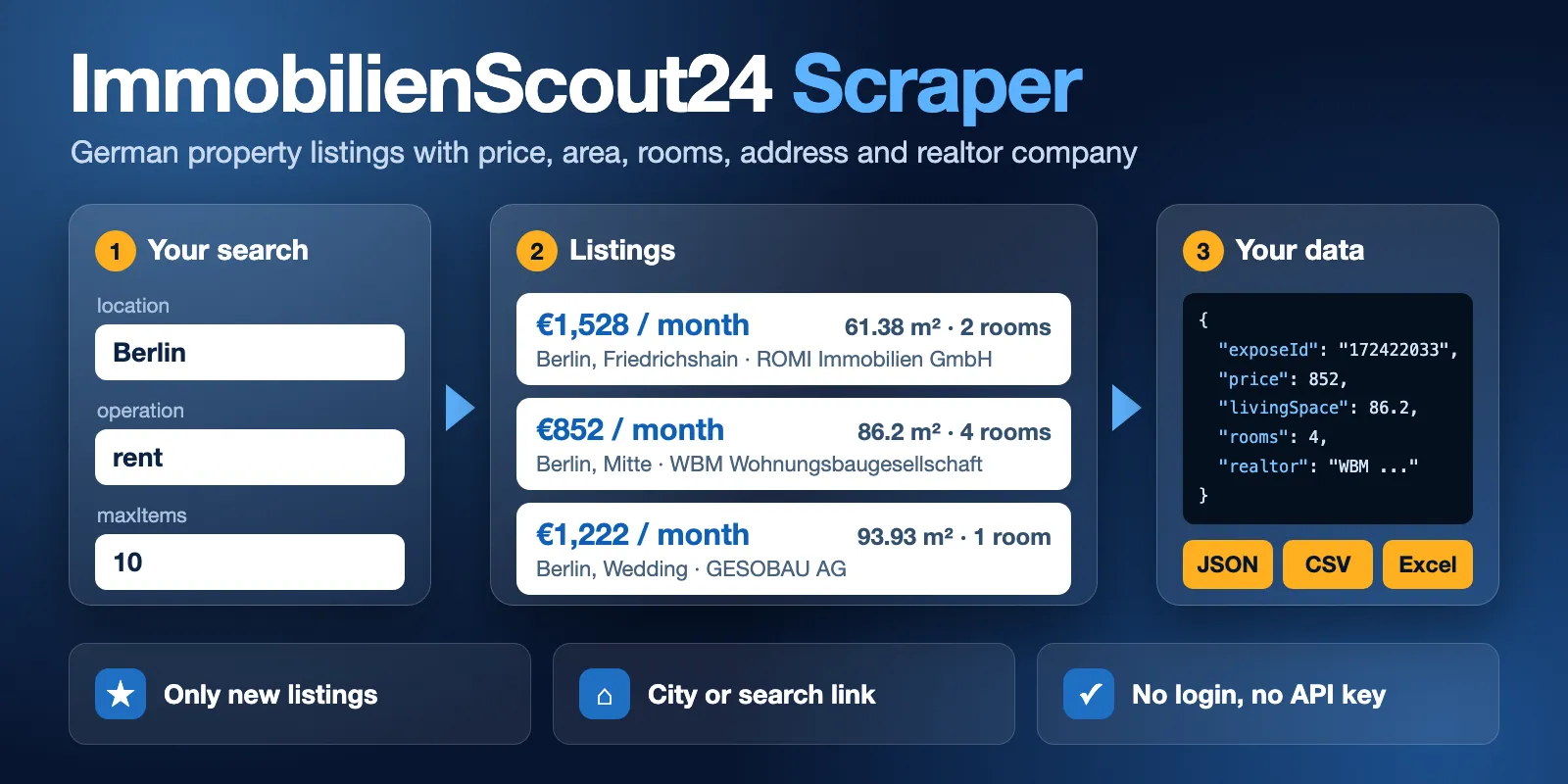
Table of contents
- What it does
- How it works
- Quick start
- Use cases
- Input
- Output
- Pricing
- Limits
- API, export and integrations
- Troubleshooting
- FAQ
- Related Actors
- Support
What it does
This Actor collects public listings from ImmobilienScout24, the German property portal. You search by place, by radius or with links. You get one row per listing, with price, price per square metre, living area, rooms, address, realtor company, energy class and more.
It can also watch a search. With onlyNew it returns only listings it has not seen before, and it can report price changes and removed listings.
It does not collect agent names, phone numbers or email addresses. For private sellers, isPrivate is true and realtor is null.
Good fit
- You invest in German property and want to compare asking prices and rent per square metre.
- You track new listings in a city and want only the new ones each day.
- You need listing data in a spreadsheet, a database or your own tools.
It is not a good fit if you need listings from Austria or Switzerland, seller contact details, or sold prices. This Actor covers public listings in Germany only.
How it works
- You choose a place or paste search links, and you set how many listings you want.
- The Actor reads the matching search pages and opens each listing for its full details.
- It saves each listing as a row. You read the rows in a table, download them, or get them through the API.
Quick start
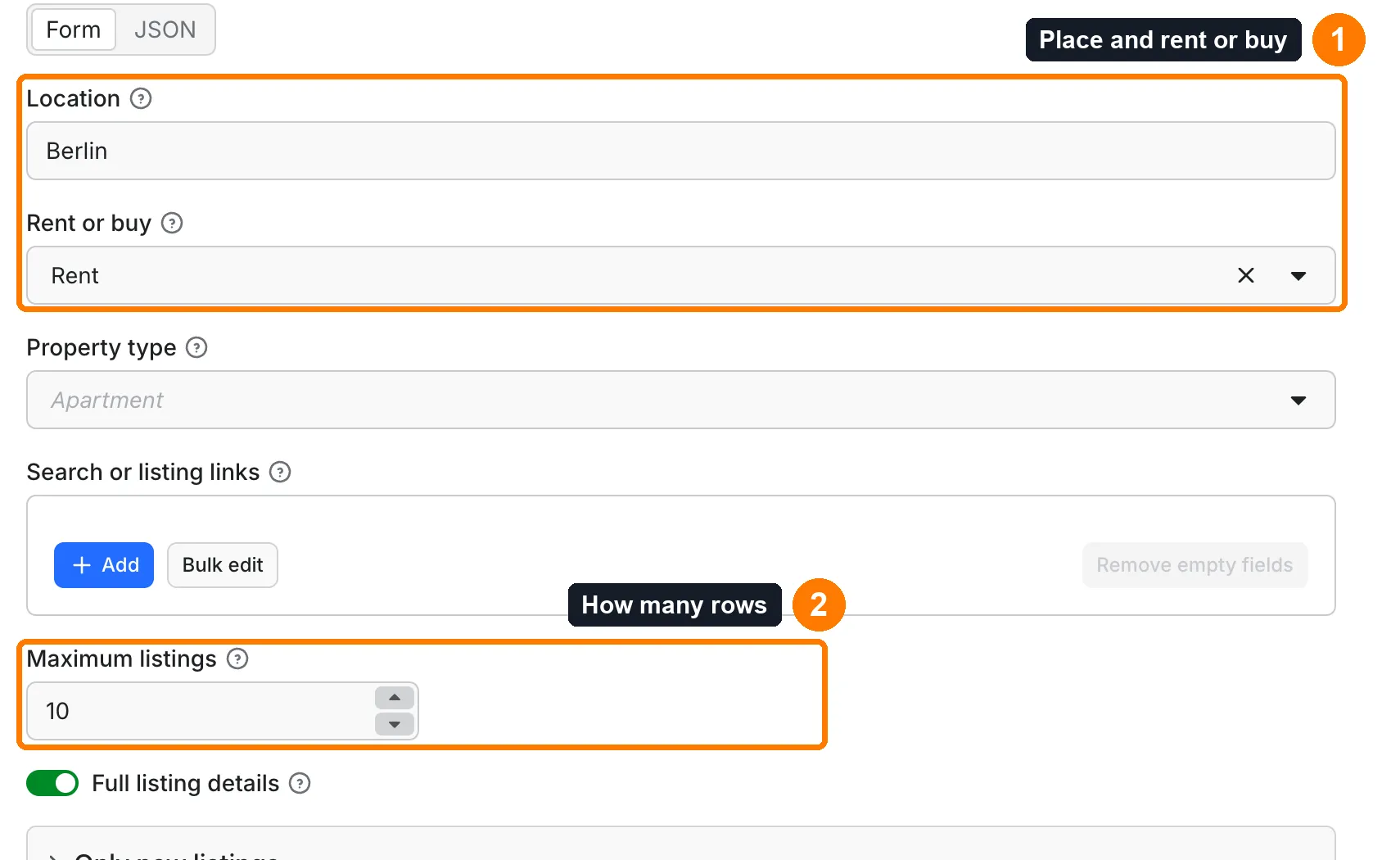
-
Open the Input tab.
locationis set to Berlin andoperationis set to rent (box 1). -
Keep
maxItemsat 10 (box 2). -
Click Start.
-
Open Output and check
price,roomsandlivingSpace(box 4).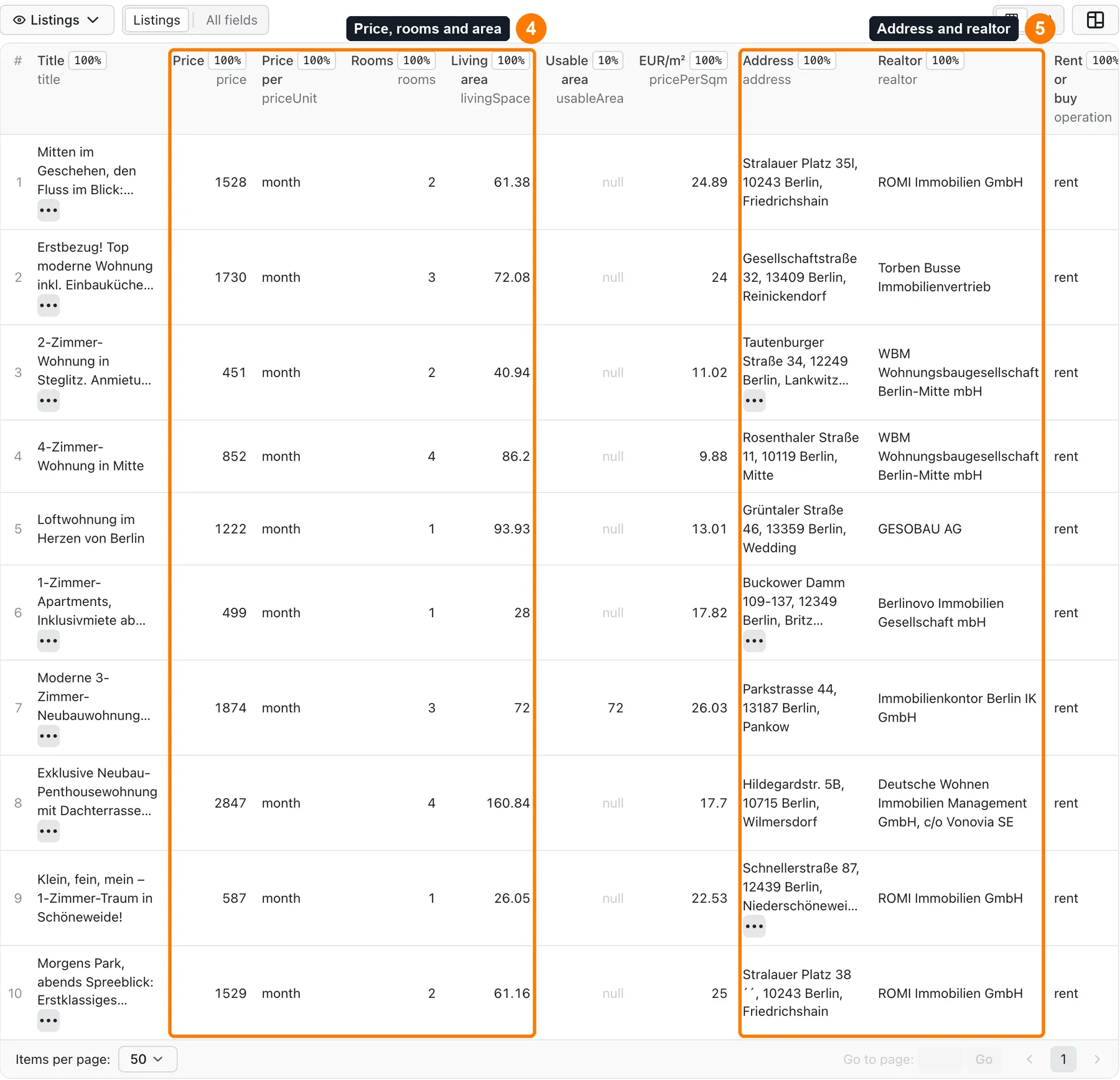
-
Check
addressandrealtor(box 5).
Expected result: 10 rental apartments in Berlin in a few seconds, with the newest listings first.
Use cases
| Buyer job | Input path | Output entity | Key fields | Next integration |
|---|---|---|---|---|
| Compare rent levels between German cities | location with operation rent | One row per listing | price, totalRent, pricePerSqm, livingSpace, postcode | Spreadsheet or BI tool |
| Find investment property for sale | location with operation buy, propertyType apartment, house or investment | One row per listing | price, pricePerSqm, yearBuilt, energyEfficiencyClass, url | Your deal list or CRM |
| Watch a search for new listings and price cuts | location or searchUrls, onlyNew, detectPriceChanges | New and changed rows | changeType, previousPrice, price, firstSeenAt | Slack, Notion or a webhook |
| Map which realtor companies work in an area | location with a high maxItems | One row per listing | realtor, city, district, operation | Market report |
| Refresh a list of known listings | searchUrls with listing links | One row per link | exposeId, price, status, fetchedAt | Your database |
Input
Give at least one of these: location, searchUrls, or a radius with coordinates. If all are empty, the run stops at once with a clear message and costs only the start fee. API calls with empty input do not get the Berlin example.
Input fields
| Field | Plain name | Type | Required | Default / prefill | Allowed values | Effect | Example | Recommendation |
|---|---|---|---|---|---|---|---|---|
location | Location | string | No | Prefill Berlin | City, region or 5-digit postcode in Germany | Searches this place | Bayern | Start here |
operation | Rent or buy | string | No | rent | rent, buy | Picks rental or sale listings | buy | Offices, retail, gastronomy and industry ignore it |
propertyType | Property type | string | No | apartment | apartment, house, shared-flat, short-term, plot, garage, office, retail, gastronomy, industry, investment, auction | Picks the kind of property | house | auction and investment are for buying only |
searchUrls | Search or listing links | array of strings | No | Empty | Up to 100 links: /Suche/... or /expose/<id> | Reads these links | ["https://www.immobilienscout24.de/expose/172422033"] | Filters below do not change a link |
maxItems | Maximum listings | integer | No | 100, prefill 10 | 1 to 10,000 | Limit for rows in the whole run | 500 | Raise the run timeout above about 2,000 |
fetchDetails | Full listing details | boolean | No | true | true, false | Opens each listing. Off is faster and cheaper, with fewer fields and no realtor | false | Turn off for big price scans |
onlyNew | Only new listings | boolean | No | false | true, false | Skips listings seen in earlier runs | true | Use for daily runs |
detectPriceChanges | Also report price changes | boolean | No | false | true, false | Adds rows with changeType price_changed | true | Needs onlyNew |
detectRemovedListings | Also report removed listings | boolean | No | false | true, false | Adds rows with changeType removed after a full walk | true | Needs onlyNew. Keep maxItems above the search size |
stateName | History name | string | No | One history per search | Lowercase letters, digits, hyphens, up to 31 characters | Runs with the same name share a history | berlin-rent | Set it if you change the input between runs |
minPrice, maxPrice | Price from, price to (EUR) | number | No | Empty | 0 or more | Price range. For rent this is monthly cold rent | 1500 | Works with location or radius, not links |
minRooms, maxRooms | Rooms | number | No | Empty | 0 or more | Room range | 2 | Same |
minLivingSpace, maxLivingSpace | Living area in m² | number | No | Empty | 0 or more | Area range | 60 | Same |
minYearBuilt, maxYearBuilt | Year built | integer | No | Empty | 1000 to 2100 | Year range | 2000 | Same |
minFloor, maxFloor | Floor | integer | No | Empty | -5 to 200 | Floor range | 1 | Apartments only |
equipment | Equipment | array | No | Empty | balcony, garden, builtinkitchen, lift, cellar, guesttoilet, parking, handicappedaccessible | Listing must have all selected options | ["balcony"] | An option the type does not support stops the run with a clear message |
apartmentTypes | Apartment types | array | No | Empty | loft, maisonette, penthouse, terracedflat, groundfloor, halfbasement, roofstorey, apartment, raisedgroundfloor, other | Limits to these types | ["loft"] | Apartments only |
energyEfficiencyClasses | Energy classes | array | No | Empty | a_plus, a, b, c, d, e, f, g, h | Limits to these classes | ["a","b"] | Some older listings have no class |
excludeNewBuildProjects | Exclude new-build projects | boolean | No | false | true, false | Removes new-build project listings | true | For apartments and houses for sale, and apartments for rent |
radiusKm, latitude, longitude | Radius search | number | No | Empty | 0.1 to 200 km | Searches a circle | 5, 52.52, 13.40 | Give all three. Do not combine with location |
sortBy | Sort order | string | No | newest | newest, price-asc, price-desc, space-desc, rooms-desc, relevance | Order of rows | price-asc | Not every type supports every order. The message lists those that work |
skipItems | Skip listings | integer | No | 0 | 0 or more | Skips rows at the start of each search | 100 | Use to continue a big search |
language | Text language | string | No | de | de, en | Language of labels from the source | en | Titles and descriptions stay as the seller wrote them |
proxyConfiguration | Proxy | object | No | Empty | Apify proxy settings | Sends requests through a proxy | Not needed in normal runs | |
deliveryConnector, deliveryTarget | Delivery | string | No | Empty | Connector and Notion page link or Slack channel ID | Posts a short summary after the run | See Send results to Slack or Notion |
The same listing found twice in one run gives one row and one charge.
Interacting settings
| When | Input A | Input B | Effective behavior | Example | Cost/result effect |
|---|---|---|---|---|---|
| Links and a place together | searchUrls | location | Both run. The links go first | One link and Berlin | maxItems is shared between them |
| Links with filters | searchUrls | minPrice | The link keeps its own filters. minPrice does not change it | Link and minPrice 1000 | Put filters in the link itself |
| Place and radius | location | radiusKm | The run stops with a clear message | Berlin and 5 | Start fee only |
| Monitor options without monitor | detectPriceChanges | onlyNew false | The run stops with a clear message | Start fee only | |
| Monitor with a low limit | detectRemovedListings | maxItems | Removed listings are reported only after a full walk | Limit 100 for a search of 500 | No removed rows in that run |
| Commercial type with rent or buy | propertyType office | operation | operation is ignored. Each row says rent or buy | Office and rent | Rows can mix both |
| Type and operation that do not fit | propertyType auction | operation rent | The run stops with a clear message | Start fee only |
Input examples
Small example
Expected behavior: reads one search page and opens 10 listings. Expected output: 10 rows in a few seconds. Limit or cost note: about $0.011 on the Free plan.
Investment search with filters
Expected behavior: searches apartments for sale in Leipzig with these limits.
Expected output: up to 200 rows with pricePerSqm and yearBuilt.
Limit or cost note: about $0.20 on the Free plan.
Daily watch with price changes
Expected behavior: the first run saves all current listings. Later runs save only new and changed ones.
Expected output: rows with changeType new or price_changed.
Limit or cost note: a later run with no change has no listing charges. See Cost examples.
Known listing links
Expected behavior: reads the listing and then the search.
Expected output: up to 20 rows. A listing that is gone gives a free row with status not_found.
Limit or cost note: up to 100 links in one run.
Output
The Listings view shows the main fields first. Every row also has all the fields below. The run also saves a summary in the RUN_SUMMARY record of the run's key-value store.
Output fields
A null value means the source does not show this field for this listing. It does not mean zero.
| Field | Meaning | Type | Can be empty? | Example / enum | Source / notes |
|---|---|---|---|---|---|
exposeId | Listing ID | string | No | 172422033 | From the source |
url | Listing page | string | No | https://www.immobilienscout24.de/expose/172422033 | From the source |
title | Listing title | string | Yes | 4-Zimmer-Wohnung in Mitte | As the seller wrote it |
price | Main price in EUR. For rent this is cold rent | number | Yes | 852 | See priceUnit |
priceText | Price as the source shows it | string | Yes | 852 € | From the source |
priceUnit | What price stands for | string | Yes | total, month, day, year, sqm | From the source |
currency | Currency | string | Yes | EUR | From the source |
pricePerSqm | Price per square metre | number | Yes | 9.88 | Worked out from price and area. Null for day and year prices |
totalRent | Total rent in EUR | number | Yes | 1137.67 | Needs full details |
baseRent, serviceCharge, heatingCosts, deposit | Parts of the rent | number | Yes | 852 | Needs full details |
livingSpace | Living area in m² | number | Yes | 86.2 | From the source |
usableArea, plotArea | Usable area and plot area in m² | number | Yes | 450 | Mostly commercial and plots |
rooms, bedrooms, bathrooms | Room counts | number | Yes | 4 | From the source |
address | Address as one line | string | Yes | Rosenthaler Straße 11, 10119 Berlin, Mitte | Sellers can hide the street |
street, postcode, city, district, state | Parts of the address | string | Yes | Berlin | In big cities the part of town is in district |
latitude, longitude | Map position | number | Yes | 52.52785 | Missing when the seller hides the address |
realtor | Realtor company | string | Yes | WBM Wohnungsbaugesellschaft Berlin-Mitte mbH | Needs full details. Null for private sellers. A small business can trade under a person's name |
realtorLogoUrl | Company logo | string | Yes | Link | Needs full details |
isPrivate | A private person placed the listing | boolean | Yes | false | Their name is never collected |
operation | Rent or buy | string | Yes | rent, buy | From the input, or from the listing for commercial types |
propertyType, realEstateType | Your type and the source's type | string | Yes | apartment, apartmentrent | |
isNewBuildProject, isNewObject | New-build flags | boolean | Yes | false | From the source |
energyEfficiencyClass, energyCertificateType, energyDemand, heatingType | Energy data | string | Yes | B | Some listings have none |
fairPrice | Price rating from the source | string | Yes | Often empty | |
yearBuilt, floor, totalFloors, condition, availableFrom, apartmentType | Building and listing facts | mixed | Yes | 1975 | Needs full details |
hasBalcony, hasGarden, hasKitchen, hasLift, hasCellar, petsAllowed | Equipment | boolean | Yes | true | Null means the listing does not say |
attributes | Other facts from the listing | object | Yes | Needs full details | |
publishedText, tags | Age text and labels from the source | mixed | Yes | vor 12 Minuten | As the source shows them |
imageUrl, images, description | Pictures and text | mixed | Yes | Links | As the seller wrote them |
changeType | What changed | string | Yes | new, price_changed, removed | Only with onlyNew |
previousPrice | Earlier price | number | Yes | 900 | For price_changed and removed rows |
firstSeenAt | When the history first saw this listing | string | Yes | ISO 8601 | Only with onlyNew |
status | Row status | string | No | complete, partial, not_found | partial: search fields only |
error | Why a row is partial | string | Yes | ||
source | Source site | string | No | immobilienscout24.de | |
sourceSearch | Search or link that gave this row | string | Yes | Berlin | |
fetchedAt | When the row was fetched | string | No | 2026-11-06T10:12:00.000Z |
For rent, price is cold rent, the first figure the portal shows. Use totalRent for the rent with costs.
Output entities and surfaces
| Situation | Dataset/API/KVS/live view | Result shape | User action |
|---|---|---|---|
| Normal item | Dataset, API, Listings view | Row with status complete | Use the row |
| Domain-empty result | Empty Dataset or free row with status not_found. RUN_SUMMARY says why | The run succeeds. reason is NO_RESULTS or NO_CHANGES | Change the search, or wait for new listings |
| Partial result | Rows you have so far. RUN_SUMMARY has status partial with reason | One listing failed: row with status partial and error. Run stopped early: rows are kept | Raise maxItems, the timeout or the charge limit |
| Technical failure or retry | The run retries up to 4 times, then fails. RUN_SUMMARY has reason SOURCE_ERROR | Saved rows stay in the Dataset | Run again later. An empty failed run does not mean there are no listings |
Output example
This row is trimmed. A full row has all the fields above, and a field with no value is null rather than missing.
Send results to Slack or Notion
Pick your connector in the optional deliveryConnector field. After the run saves its data, the Actor posts a short summary (up to 25 rows and a link to the full dataset) there. Put a Notion page link or a Slack channel ID in deliveryTarget: in Notion every run is added on top of that one page, so your workspace does not fill up with new pages. A delivery error never fails the run and costs nothing extra. Connect a service once in Apify Console → MCP connectors.
Use case → fields
| Buyer job | Input path | Output entity | Key fields | Next integration |
|---|---|---|---|---|
| Compare rent levels | location with rent | Listing rows | price, totalRent, pricePerSqm, postcode | Spreadsheet or BI tool |
| Find property for sale | location with buy | Listing rows | price, pricePerSqm, yearBuilt, url | Deal list or CRM |
| Watch a search | onlyNew | New and changed rows | changeType, previousPrice, firstSeenAt | Slack, Notion or a webhook |
| Map realtor companies | location | Listing rows | realtor, city, district | Market report |
Pricing
Pricing unit
You pay per event. Platform usage is included in these prices.
| Event | What it is | Free | Bronze | Silver | Gold and above |
|---|---|---|---|---|---|
| Listing with full details | One saved row with details | $0.00099 | $0.00089 | $0.00079 | $0.00069 |
| Listing | One saved row without details (fetchDetails off, or the listing page failed) | $0.0005 | $0.00045 | $0.0004 | $0.00035 |
| Check without a paid row | One read that gave no paid row: an empty search, a listing that is gone, or a search page with nothing new. The first read in a run is free | $0.00005 | $0.00005 | $0.00005 | $0.00005 |
| Actor start | Once per run | $0.001 | $0.001 | $0.001 | $0.001 |
- The start fee grows with run memory: one start event per GB, with a minimum of one. At the default 256 MB you pay one.
- A search with no results costs the start fee. A monitor run with no change costs the start fee and small check fees. It is not free.
- A row that lost its details costs the lower Listing price, never more than a full row.
- If a run stops or fails, you pay for what it saved and read before that. Saved rows stay in the Dataset.
- A run stops at your maximum charge and keeps its rows.
Cost examples
Examples use Free plan prices.
| Scenario | Input scope | Expected item/event count | Base charge | Optional charge | Stop/cap behavior |
|---|---|---|---|---|---|
| Small test | Berlin, maxItems 10 | 10 rows with details | $0.001 start | $0.0099 | Stops at 10 rows |
| Medium | maxItems 100 | 100 rows with details | $0.001 start | $0.099 | Stops at 100 rows |
| Large | maxItems 1,000 | 1,000 rows with details | $0.001 start | $0.99 | Stops at 1,000 rows |
| Without details | maxItems 1,000, fetchDetails off | 1,000 rows | $0.001 start | $0.50 | Stops at 1,000 rows |
| No results | A search with no listings | 0 rows, first read free | $0.001 start | $0 | Run succeeds with an empty Dataset |
| 100 gone links | 100 listing links that no longer exist | 100 free rows, 99 checks | $0.001 start | $0.00495 | Run succeeds |
| Monitor with no change | Walks about 100 search pages | 0 rows, about 100 checks | $0.001 start | About $0.005 | Run succeeds with reason NO_CHANGES |
Limits
- Germany only. The source's other country sites are not covered.
- Up to 10,000 rows per run. We tested this limit. A bigger area can have more listings, for example about 89,000 rental apartments in Germany. Split it by region or use
skipItems. - Up to 100 links in
searchUrlsper run. - The default run timeout of 300 seconds is enough for about 2,000 rows with details. A run of 10,000 rows took about 14 minutes, so set a timeout of 1,200 seconds for it. When time runs out, the run keeps its rows and ends with
reasonDEADLINE. - Filter fields work with
locationand radius, not with links. Put filters in the link itself. - Search links with map-drawn areas are not supported. Use a place or a radius.
- Offices, retail, gastronomy and industry cannot be filtered by rent or buy, because the source mixes them.
realtorneeds full details. WithfetchDetailsoff it is null.- Agent names, phone numbers and email addresses are not collected.
- Listings change all the time, so two runs can differ. Rows show the data at
fetchedAt. - Removed listings are reported only after a full walk of the search.
API, export and integrations
- API: Start a run with the same JSON as the input form, for example
locationandmaxItems. Read rows from the run's dataset. Most systems useexposeIdas the key. - Export: Download the Listings view as CSV, Excel, JSON or XML from the Output tab. Spreadsheets mostly use
price,pricePerSqm,addressandurl. - Scheduling: Create an Apify schedule with
onlyNewon. Each run saves only new rows to its own dataset. The next step readschangeType. - Webhooks / no-code: Start a Zapier, Make or n8n flow when a run succeeds. It reads the run's dataset. Check
reasoninRUN_SUMMARYand then usechangeTypeandurl. - SDK / MCP / agent: Call the Actor with the Apify SDK or MCP, using the same input. Rows appear in the dataset, and the run's status appears in
RUN_SUMMARY.
Use with AI agents (MCP)
Server link: https://mcp.apify.com?tools=cliqtomedia/immobilienscout24-scraper
Smallest input:
Key fields: exposeId, price, pricePerSqm, livingSpace, address.
This input takes a few seconds and costs about $0.011 on the Free plan. The limits are 10,000 rows and 100 links per run, and Germany only.
Troubleshooting
The run saved fewer rows than I asked for
Symptom: the Dataset has fewer rows than maxItems.
Likely reason: the search has fewer listings, or the run ran out of time.
Check: reason and totalAvailable in RUN_SUMMARY.
Action: for DEADLINE, give the run a longer timeout. For ALL_SAVED, widen the search.
The Dataset is empty and the run succeeded
Symptom: the run is green with 0 rows.
Likely reason: the search has no listings, or onlyNew found nothing new.
Check: reason in RUN_SUMMARY: NO_RESULTS or NO_CHANGES.
Action: remove some filters. With onlyNew, wait for new listings.
The run failed with a message about input
Symptom: the run fails at once with INVALID_INPUT.
Likely reason: a value is wrong, or two settings do not fit. For example, the type does not support that filter or sort order.
Check: the status message. It names the field and what works instead.
Action: fix the field and start again.
The source does not know my location
Symptom: the message says that ImmobilienScout24 does not know the location. Likely reason: a typo, or a place outside Germany. Check: search for the same name on the site. Action: use the German name or a 5-digit postcode.
Some rows have status partial
Symptom: realtor and other detail fields are null, and error has text.
Likely reason: the source did not return that listing's page in time.
Check: the url of the row.
Action: run the listing link again. You paid the lower price for this row.
The run failed with SOURCE_ERROR
Symptom: the run fails after retries, and rows may be missing.
Likely reason: the source was not available at that moment.
Check: RUN_SUMMARY and any saved rows.
Action: run it again later. This failure does not mean that there are no listings.
FAQ
Do I need an ImmobilienScout24 account or a key?
No. The Actor reads public listings and does not log in.
Do I need a proxy?
No. Normal runs do not use one, and the proxy field is there only if you want it.
Does the data include phone numbers or emails?
No. You get the realtor company name. Private sellers are marked with isPrivate, and their names are not collected.
Why is price lower than the rent I see elsewhere?
For rent, price is cold rent. totalRent includes costs when the listing gives them.
Do I get all listings in Germany?
You get up to 10,000 rows per run, and only those that the source shows. Split big areas by region, or use skipItems.
How fresh is the data?
Each row is read during the run, and fetchedAt gives the time. Sort newest shows the latest listings first.
Does a run with no results cost money?
It costs the start fee. See Pricing.
How does onlyNew remember listings?
It keeps a history in a named store in your Apify account. Without stateName, each search has its own history. The first run counts all rows as new, and you pay for them.
Related Actors
- Zillow Listings Scraper — the same kind of listing research for the US, with price cuts.
- Redfin & Realtor Listings Scraper (US) — US homes for sale, sold and for rent.
- 99acres & MagicBricks India Property Scraper — property listings in India.
Support
Open the Issues tab of this Actor. Include the run ID, your input mode (place, radius or links) and the error message. Do not send tokens, cookies, private source data or billing data.


