
Depop Scraper - Listings, Prices, Brands & Shops
Pricing
from $1.20 / 1,000 listings
Depop Scraper - Listings, Prices, Brands & Shops
Scrape Depop listings by search query or by shop: price, brand, size, condition, likes, sold status, photos and seller. Brand, size, price and condition filters. No login.
Pricing
from $1.20 / 1,000 listings
Rating
0.0
(0)
Developer

Cliqto Media
Maintained by CommunityActor stats
0
Bookmarked
2
Total users
1
Monthly active users
5 days ago
Last modified
Categories
Share
Depop Scraper collects listings from Depop, the second-hand fashion marketplace. Add a search query or a shop username, and you get one row per listing with price, brand, size, condition, likes, sold status, photos and seller. No Depop account or login is needed.
The smallest run is one query, for example vintage nike with 20 listings: it finishes in a few seconds and costs $0.034 on the Free plan.
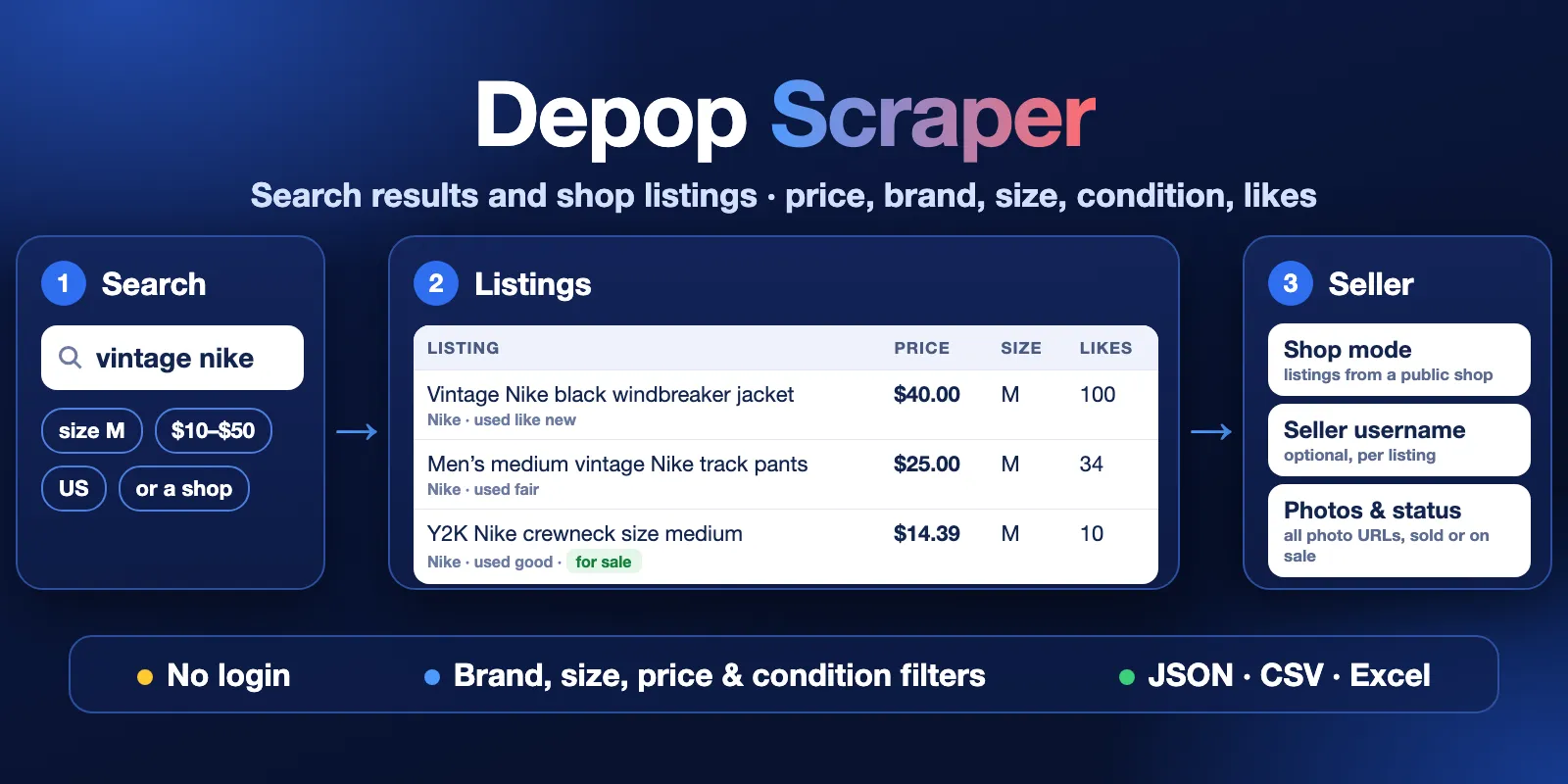
Table of contents
- What it does
- What data you get
- Quick start
- Input
- Input examples
- Output example
- Output fields
- Pricing and cost examples
- Use cases
- Scheduling and monitoring
- API, export and integrations
- Limits and partial results
- Troubleshooting
- FAQ
- Support
What it does
The Actor reads public Depop listings in two ways:
- Search mode — the listings Depop shows for your keywords, like the search box on depop.com.
- Shop mode — the listings of one or more Depop shops, by username or shop link.
You can keep only one brand, one size, a price range and chosen conditions. The Actor saves each listing once per run, even when two queries find it.
Good fit
- Track prices of a brand or item type, for example vintage Nike jackets in size M under $50.
- Check what a shop sells, how items are priced and which items are already sold.
- Collect listing photos, brands and sizes for resale research or price comparison.
Not a fit / limits
- No login: the Actor does not read messages, orders, offers, private data or seller contact details.
- Listing dates are not available without login:
createdAtis alwaysnull. - Search returns the listings Depop shows for a query. It is not a full export of all Depop listings.
- Seller usernames in Search mode are optional and cost extra (see
includeSellerDetails).
What data you get
One Dataset row per listing:
- Listing:
id,url,title,description,category,photos. - Price:
price,originalPrice,isReduced,shippingPrice,currency. - Item:
brand,size,condition,colours,gender. - Demand:
likes,sold,status. - Seller:
sellerId;sellerUsername,sellerUrlandsellerVerifiedin Shop mode or withincludeSellerDetails. - Run context:
mode,searchQuery,shopUsername,position,fetchedAt.
The key-value store also has a RUN_SUMMARY record with the run status, counts per query or shop and public shop numbers (items sold, followers, reviews) in Shop mode.
Quick start
- Open the Input tab.
- Keep What to scrape (
mode) as Search results. - Add a keyword to Search queries (
queries), for examplevintage nike. The form already has it. - Keep Max listings per query or shop (
maxItems) at 20 for a first test. - Click Start.
- Open the Output tab. The Overview table shows photo, title, price, brand, size, condition, likes, sold and link.
Expected result: 20 listings for vintage nike in a few seconds, status message Saved 20 listings from 1 query.
Input
All fields are optional, but Search mode needs queries or brand, and Shop mode needs shopUsernames.
| Field | Plain name | Type | Default / prefill | Allowed values | What it changes | Recommendation |
|---|---|---|---|---|---|---|
mode | What to scrape | string | default search | search, shop | Search by keyword or read shops | Use shop when you know the sellers |
queries | Search queries | array of strings | prefill ["vintage nike"] | up to 50; empty lines and duplicates are dropped | One Depop search per line (Search mode) | Short queries like a Depop user would type |
shopUsernames | Shop usernames | array of strings | none | up to 50; username, @username or https://www.depop.com/username/ | Shops to read (Shop mode) | Check the spelling; a missing shop is reported as not found |
maxItems | Max listings per query or shop | integer | default 100, prefill 20 | 1–5000 | Stops each query or shop after this many saved listings | Start small; each saved listing is one paid result |
brand | Brand | string | none | any brand name, e.g. Nike | Keeps only this brand. Without queries in Search mode, the brand itself is searched | Use the brand name as Depop shows it |
size | Size | string | none | a size label, e.g. M, US 9, 32 | Keeps only listings with this size | Case, spaces and inch marks are ignored |
priceMin | Min price | number | none | 0–1000000 | Lowest item price, without shipping | Price is in the marketplace currency |
priceMax | Max price | number | none | 0–1000000, not below priceMin | Highest item price, without shipping | |
conditions | Condition | array | none (any) | brand_new, used_like_new, used_excellent, used_good, used_fair | Keeps only these conditions | |
sort | Sort | string | default relevance | relevance, priceLowToHigh, priceHighToLow | Order of search results | Use a price order to find the cheapest or most expensive items |
country | Marketplace | string | default us | us, gb, au, ca, de, fr, it, ie | Depop marketplace and currency (USD, GBP, AUD, CAD, EUR) | Choose the market you sell or buy in |
includeSellerDetails | Add seller username (Search mode) | boolean | default false | true, false | Opens each listing page to add sellerUsername, sellerUrl, sellerVerified | Turn on only when you need the seller; it is slower and paid per listing |
How settings work together
| When | Fields | What happens |
|---|---|---|
| Brand without queries | brand, queries empty | Search mode searches the brand name |
| Brand Depop knows | brand | Depop's own brand filter is used; the run summary shows brandFilter.brandId |
| Brand Depop does not know | brand | Rows are matched by brand name, and a warning explains it |
| Size | size | W32 equals 32 (jeans waist); a bare number like 9 also matches US 9, UK 9 or EU 9 |
| Price | priceMin, priceMax | Sent to Depop and checked again on each row |
| Shop mode with filters | mode: shop + brand/size/price/conditions | Filters apply to the shop's listings. queries and includeSellerDetails are ignored in Shop mode |
| Many queries | queries | maxItems applies to each query. A listing found by two queries is saved once |
Input examples
Search: vintage Nike, size M, $10–$50
Expected behavior: the Actor searches vintage nike on the US marketplace and keeps size M items between $10 and $50.
Expected output: up to 50 rows with price, brand, size, likes and url.
Shop: listings of two shops
Expected behavior: up to 200 listings are read from each shop (found through Depop search, see Limits). Rows have sellerUsername and sellerUrl, and RUN_SUMMARY has public shop numbers.
Cost note: shop profiles are not charged; you pay for saved listings.
Search with seller usernames
Expected output: 20 rows where sellerUsername, sellerUrl and sellerVerified are filled and sellerDetailsFetched is true.
Cost note: each enriched listing adds one seller-details event.
Output example
One row from the prefill run (vintage nike, 20 listings). The seller name in slug and url, sellerId and the photo link are placeholders, and the photo list is shortened.
null means Depop did not give this value, or it needs an option that was off (here: seller username in Search mode). An empty list [] means the listing has no value of this kind.
Output fields
| Field | Meaning | Type | Can be null? | Example |
|---|---|---|---|---|
id | Depop listing id | integer | no | 952642444 |
slug | Listing slug from the link | string | no | user-mens-medium-…-156f |
url | Listing page | string | no | https://www.depop.com/products/…/ |
title | First line of the description, without trailing hashtags, up to about 100 characters. Depop has no separate title | string | yes | Men’s medium vintage Nike track pants |
description | Full listing text | string | yes | |
price | Current item price, without shipping | number | yes | 25 |
originalPrice | Price before a discount (same as price when not reduced) | number | yes | 25 |
isReduced | The seller reduced the price | boolean | no | false |
currency | Currency of all prices | string | yes | USD, GBP, EUR |
shippingPrice | Shipping price for the marketplace | number | yes | 3.99 |
brand | Brand name | string | yes | Nike |
brandId | Depop brand id | integer | yes | 270 |
size | All sizes in one text | string | yes | M or S, M |
sizes | Sizes as a list. Removed size variants are left out | array | no (can be []) | ["M"] |
condition | Item condition | string | yes | brand_new, used_like_new, used_excellent, used_good, used_fair |
category | Depop category name | string | yes | Joggers |
productType | Depop product type | string | yes | joggers-tracksuits |
gender | Department | string | yes | male, female |
colours | Colours | array | no (can be []) | ["navy", "black"] |
styles | Style tags | array | no (can be []) | ["streetwear"] |
sellerId | Seller's numeric id | integer | yes | 12345678 |
sellerUsername | Seller's username | string | yes: filled in Shop mode or with includeSellerDetails | some_shop |
sellerUrl | Seller's shop page | string | yes, same as above | https://www.depop.com/some_shop/ |
sellerVerified | Seller has a verified badge | boolean | yes, same as above | false |
likes | Number of likes | integer | yes | 34 |
sold | Item is sold (status is not on sale) | boolean | no | false |
status | Depop listing status | string | yes | STATUS_ONSALE, STATUS_SOLD |
quantity | Listed quantity | integer | yes | 1 |
photo | First photo | string | yes | https://media-photos.depop.com/…/P0.jpg |
photos | All photos | array | no (can be []) | |
isBoosted | Listing is promoted by the seller | boolean | yes | false |
country | Seller's country code | string | yes | US |
createdAt | Listing date. Depop does not show it without login | null | always null | null |
sellerDetailsFetched | Seller fields come from the shop or listing page | boolean | no | false |
mode | Mode that found the row | string | no | search, shop |
searchQuery | Query that found the row (Search mode) | string | yes | vintage nike |
shopUsername | Shop that was read (Shop mode) | string | yes | some_shop |
position | Place of the row in its query or shop | integer | no | 2 |
fetchedAt | When the row was read (UTC) | string | no | 2026-10-15T02:32:21.242Z |
Run summary
The key-value store record RUN_SUMMARY explains every run:
status:COMPLETE,PARTIAL,NO_RESULTS,ERROR,INVALID_INPUTorCANCELLED.reason: why a run stopped early, for exampleMAX_ITEMS,CHARGE_LIMIT,TIME_LIMIT,LOW_YIELD,SPARSE_FILTERorSOURCE_ERROR.targets: one entry per query or shop withstatus(complete,partial,no_results,not_found,error,skipped), pages read and listings saved. In Shop mode it also has public shop numbers: items sold, followers, reviews and rating.counts: saved listings, seller details (fetched, failed, skipped), and rows skipped as duplicates, by filters or as other sellers' items.
In Shop mode, rows have sellerDetailsFetched: true, but counts.sellerDetailsFetched stays 0: the shop page is free, and this counter counts only paid seller-details events.
Pricing and cost examples
This Actor uses pay-per-event pricing. You pay for:
| Event | When | Price |
|---|---|---|
| Actor start | Once per run | $0.004 |
| Listing | Each listing saved to the Dataset | $0.0015 (Free plan), $0.0014 (Bronze), $0.0013 (Silver), $0.0012 (Gold and higher) |
| Seller username | Each Search mode listing enriched when includeSellerDetails is on | $0.0015 |
Search pages, shop profiles, filtered or duplicate rows and the run summary are not charged. A run with no listings costs only the start: $0.004. This is also true for a run that stops on invalid input or a source error.
Cost examples (Free plan prices)
| Scenario | Input | Charged events | Cost |
|---|---|---|---|
| First test | 1 query, maxItems: 20 | 1 start + 20 listings | $0.034 |
| Small | 10 listings | 1 start + 10 listings | $0.019 |
| Normal | 100 listings | 1 start + 100 listings | $0.154 |
| Large | 1,000 listings | 1 start + 1,000 listings | $1.504 |
| With seller usernames | 100 listings + includeSellerDetails | 1 start + 100 listings + 100 seller usernames | $0.304 |
| No matches | a filter that matches nothing | 1 start | $0.004 |
To cap your spend, set Maximum cost per run in the run options. The Actor stops before it goes over it, keeps the listings it saved and ends with PARTIAL and reason CHARGE_LIMIT.
Use cases
| Goal | Input | Key fields | Next step |
|---|---|---|---|
| Price research for resale | queries, size, priceMin/priceMax, sort | price, originalPrice, condition, likes, sold | Export CSV or Excel and compare prices |
| Watch a brand | brand, conditions | brand, price, size, url, fetchedAt | Run on a schedule and compare runs |
| Check a shop | mode: shop, shopUsernames | price, sold, likes, category + shop numbers in RUN_SUMMARY | Track stock and prices over time |
| Find sellers for an item | queries, includeSellerDetails: true | sellerUsername, sellerUrl, sellerVerified | Open the shop link |
Scheduling and monitoring
Use Apify Schedules to run the same input every day or week. Each run is a full snapshot: it does not compare with earlier runs. To see changes, compare id, price and sold between two runs' Datasets, for example in a spreadsheet or with a webhook to your own system.
API, export and integrations
- Export: download the Dataset as JSON, CSV, Excel, XML or HTML from the Output tab or by API.
- API: start a run with
POST https://api.apify.com/v2/acts/cliqtomedia~depop-scraper/runsand the input JSON, then read rows from the run's default Dataset. See the Apify API docs. - Integrations: connect runs to Google Sheets, Make, Zapier, Slack or webhooks in the Integrations tab.
Use with AI agents (MCP)
- MCP server with only this Actor:
https://mcp.apify.com?tools=cliqtomedia/depop-scraper. See the Apify MCP docs. - Smallest useful input:
{"mode": "search", "queries": ["vintage nike"], "maxItems": 20}. - Key fields:
title(what the item is),priceandcurrency(asking price),sizeandcondition(item details),sold(still available or not),url(link to cite). - A 20-listing search finishes in under 20 seconds and costs $0.034 on the Free plan. At most 50 queries or shops per run and up to 5,000 listings per query or shop (the largest tested run saved 1,300).
RUN_SUMMARYexplains empty and partial runs.
Limits and partial results
- Run time: about 1,300 search listings take around 2–3 minutes. With
includeSellerDetails, about 2 listings per second: 100 listings took under a minute in our test. The default timeout is 30 minutes; if time runs out, the run ends withPARTIALand reasonTIME_LIMITand keeps what it saved. - Page limit: at most 250 result pages (about 6,000 listings) per query or shop (
PAGE_LIMIT). The largest run we tested saved 1,300 listings; bigger runs were not tested. - Slow product pages: each Depop request waits at most 20 seconds. If product pages answer too slowly, seller details stop: the remaining listings are saved without a seller username, are not charged for
seller-details, and are counted incounts.sellerDetailsSkippedwith a warning inRUN_SUMMARY. - Few results (
LOW_YIELD): a run reads up to 5 search pages (or 2 shop pages) for free, plus 2 search pages for each saved listing. If pages keep giving almost nothing — typos, a size nobody sells, many overlapping queries — the run stops and the remaining queries or shops areskipped. For example, when the first two shops are not found, later shops are skipped. - Rare filter (
SPARSE_FILTER): after 10 pages, a query whose filters keep fewer than 1 in 100 listings is stopped, and the run moves to the next query. - Shop mode: the Actor finds a shop's listings through Depop search for the username and keeps only that shop's items. It stops after 3 pages in a row without the shop's items. In our tests it returned all listings shown on the shop page, but very large shops may be incomplete.
- Duplicates: a listing found again in the same run is not saved again and not charged.
Troubleshooting
The run ends with no listings
Symptom: status NO_RESULTS, empty Dataset.
Likely reason: the query has a typo, or the filters (size, brand, price, conditions) match nothing.
Check: open RUN_SUMMARY and look at reason and targets[].skippedFilter.
Action: search the same words on depop.com, loosen the filters, and run again.
Some queries or shops are skipped
Symptom: targets shows skipped, reason LOW_YIELD.
Likely reason: earlier queries or shops gave too few listings (see Limits).
Action: fix the spelling, remove queries that find the same items, or run the rest in a separate run.
A shop is not_found
Symptom: warning Shop not found: ….
Likely reason: wrong username, or the shop was closed.
Action: open https://www.depop.com/<username>/ in a browser and copy the username from the link.
The brand filter keeps fewer items than expected
Symptom: warning that the brand is not recognised. Likely reason: Depop does not know this exact brand name, so rows are matched by name. Action: use the brand name exactly as Depop shows it on listings.
The run fails with a source error
Symptom: status ERROR or PARTIAL with reason SOURCE_ERROR, code like SOURCE_BLOCKED or SOURCE_UNAVAILABLE.
Likely reason: Depop was not reachable or blocked requests after several retries.
Action: start the run again later. Saved listings stay in the Dataset.
FAQ
Do I need a Depop account?
No. The Actor reads only public listings and does not log in.
Is this the Depop API?
No. Depop has its own Partner API for sellers to manage their shops, and it needs a key from Depop. This Actor needs no key: it reads the public listings anyone can see and gives you the same data as JSON, CSV or Excel through the Apify API.
Why is createdAt always null?
Depop does not show the listing date to logged-out visitors. The Actor keeps the field null instead of guessing.
Why is sellerUsername empty in Search mode?
Depop search results carry only the seller's numeric id (sellerId). Turn on includeSellerDetails to add the username, or use Shop mode.
Do I pay for listings that do not match my filters?
No. Only saved listings are charged. Filtered and duplicate rows are free.
Are prices and sold status live?
They are what Depop showed at fetchedAt. Prices and status can change at any time.
Which countries are supported?
The US, UK, Australia, Canada, Germany, France, Italy and Ireland marketplaces, chosen with country.
Support
Use the Issues tab of this Actor for bugs, questions and feature requests. Include the run ID, the mode and the error text. Never post tokens, cookies or private data.


