

Threads Scraper — Posts, Profiles, Replies & Search
Pricing
from $1.20 / 1,000 posts
Threads Scraper — Posts, Profiles, Replies & Search
Scrape public Threads posts without login: profile feeds, a post with its replies, or keyword search. Text, likes, replies, reposts, media, quoted post and author with followers in clean JSON. Pay per post.
Pricing
from $1.20 / 1,000 posts
Rating
0.0
(0)
Developer

Cliqto Media
Maintained by CommunityActor stats
0
Bookmarked
2
Total users
1
Monthly active users
3 days ago
Last modified
Categories
Share
Scrape public Threads posts with no login: the latest posts of a profile, one post with its replies, or the top posts for a keyword. Each post is one clean JSON row with text, date, likes, replies, reposts, media, the quoted post and the author with followers.
Use it for social listening, brand and creator research, or AI pipelines. The smallest run is one username, such as zuck, with 20 posts: it finishes in under 10 seconds and costs $0.032 on the Free plan.
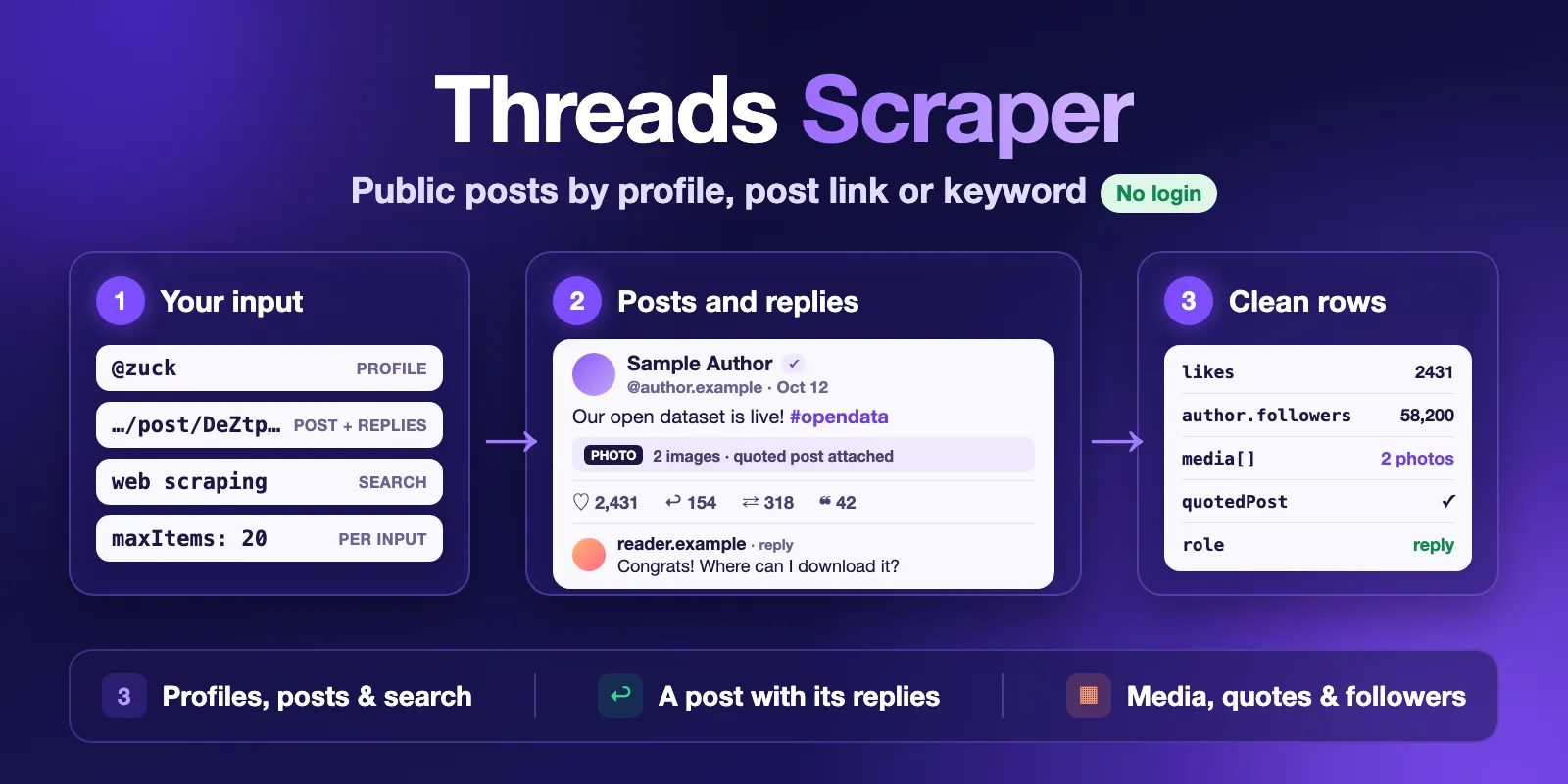
Table of contents
- What it does
- Quick start
- Use cases
- Input
- Output
- Pricing and limits
- Switching from another Threads scraper
- API and integrations
- Troubleshooting
- FAQ
- Support
What it does
Threads Scraper reads public pages of threads.com the way a logged-out visitor sees them. It needs no account, no cookies and no API token. It has three modes:
| Mode | You give | You get |
|---|---|---|
profile | Usernames or profile links | The latest posts of each profile, with the author's follower count |
post | Post links (threads.com or threads.net) | The post, the author's own thread below it, and the replies Threads shows without login |
search | Keywords or hashtags | The top posts Threads shows for each keyword |
A profile, post or search with no public posts returns one not_found row with the reason. It does not disappear silently, so you can see what happened to every input.
Good fit
- Track what a brand, creator or competitor posts on Threads, with likes, replies and reposts.
- Collect a post and its replies for sentiment or discussion analysis.
- Find top posts about a topic or hashtag.
- Feed clean, typed Threads rows into an AI agent, a spreadsheet or a database.
Not a fit / limits
- Only public data. No DMs, no private profiles, nothing that needs login.
- No view counts, bios, followers lists or contact data.
- Some large profiles are shown only to logged-in visitors. They return
not_found. The Actor does not try to get around this. - Search returns the top ~25–30 posts per keyword. There is no "recent" search or date filter without login.
- Replies: only the first page that Threads shows without login, usually 10–15 replies.
- Counts are a snapshot at fetch time.
Quick start
- Open the Input tab.
- Keep Mode on Profile posts and keep
zuckin Usernames, or add your own. - Keep Max posts per input at
20(prefill and default). - Click Start.
- Open the Posts view in the Output tab and check
text,likesandauthor.followers.
Expected result: the 20 newest posts of the profile, one row per post.
Use cases
| Buyer job | Input path | Output entity | Key fields | Next step |
|---|---|---|---|---|
| Brand or creator monitoring | mode: profile, usernames | post | text, createdAt, likes, replies, reposts | Schedule the Actor, export to Sheets |
| Discussion analysis | mode: post, postUrls | post with role | role, text, replyToUsername, likes | Sentiment or topic analysis |
| Topic research | mode: search, queries | post | text, author.username, likes, url | AI summary, content ideas |
| Influencer shortlist | mode: profile, usernames | post with author | author.followers, author.verified, likes | Compare engagement per follower |
Input
Input fields
| Field | Plain name | Type | Required | Default / prefill | Allowed values | Effect | Example |
|---|---|---|---|---|---|---|---|
mode | Mode | string | yes | profile | profile, post, search | Which list is read | "post" |
usernames | Usernames | string[] | for profile | prefill ["zuck"] | up to 50; name, @name or a profile link | Profiles to read | ["zuck", "@natgeo"] |
postUrls | Post URLs | string[] | for post | none | up to 50; …/@user/post/CODE on threads.com or threads.net | Posts to read | ["https://www.threads.com/@zuck/post/DeZtp-TkQHh"] |
queries | Search keywords | string[] | for search | none | up to 50; up to 100 characters each | One search per line | ["web scraping", "#coffee"] |
maxItems | Max posts per input | integer | no | 20 (prefill 20) | 1–500 | Cap for each username, post URL or keyword, not for the whole run | 200 |
includeReplies | Include replies (post mode) | boolean | no | true | Post mode: also save the author's thread and the replies; off = only the post | false | |
proxyConfiguration | Proxy | object | no | Apify Proxy (datacenter) | Apify Proxy groups or your own proxies | Where requests come from | {"useApifyProxy": true} |
Only the list for the chosen mode is used. Duplicate values are removed, also when the same profile is written two ways (for example @NatGeo and its link). A value that cannot be read, such as bad name!!, stops the run at once with a clear message. No requests are made and only the start is charged.
Interacting settings
| When | Input A | Input B | Effective behavior |
|---|---|---|---|
| Post mode | postUrls | maxItems | The post, its thread and its replies together count toward maxItems |
| Post mode | includeReplies: false | maxItems | Only the post itself, one row per URL |
| Search mode | queries | maxItems above 30 | Threads shows only the top ~25–30 posts per keyword; add more specific keywords to get more posts |
| Profile mode | usernames | maxItems | Reading stops at the end of the profile's public feed, even if maxItems is higher |
Input examples
Latest posts of several profiles
Expected output: up to 100 post rows per profile with text, likes, media and author.followers.
A post with its replies
Expected output: one row with role: target, rows with role: self_thread for the author's thread, and rows with role: reply.
Search
Output
Every row goes to the default Dataset. The Posts view in the Output tab shows the main columns. The run summary is in the key-value store as RUN_SUMMARY.
Output fields
| Field | Meaning | Type | Can be empty? |
|---|---|---|---|
status | complete (a post), not_found or error | string | no |
statusReason, errorCode | Why a not_found or error row has no post | string | null on posts |
postId, code, url | Threads post ID, short code and link | string | null on status rows |
mode, input | Mode and the username, post URL or keyword this row came from | string | no |
role | profile_post, search_result, target, self_thread or reply | string | null on status rows |
author | username, fullName, userId, verified, followers, profilePicUrl | object | followers is only filled in profile mode, else null |
text | Post text | string | can be empty for media-only posts |
createdAt | Publish time, ISO 8601 UTC | string | |
likes, replies, reposts, quotes, shares | Counts at fetch time | number | null when Threads does not show it, never a fake 0 |
mediaType | text, photo, video, carousel or other | string | |
media | Photos and videos: type, url, width, height, thumbnailUrl | object[] | empty for text posts |
quotedPost, repostedPost | postId, url, username, text, createdAt | object | null when not a quote or repost |
isReply, replyToUsername | Reply marker and who it replies to | boolean, string | |
linkUrl, linkTitle | Attached link (Threads redirect removed) and its title | string | null without a link |
topic | Topic tag | string | often null |
pinned | Pinned on the author's profile | boolean | |
fetchedAt | When the row was scraped, ISO 8601 UTC | string | no |
Media links are signed by Threads and stop working after some days. Download the files soon if you need them.
Status rows
status | When | errorCode |
|---|---|---|
not_found | The profile does not exist or is shown only to logged-in visitors | NOT_FOUND |
not_found | The profile is private | PRIVATE_PROFILE |
not_found | The profile has no public posts | NO_POSTS |
not_found | The post was deleted or is not public | NOT_FOUND |
not_found | The keyword has no results | NO_RESULTS |
error | Threads failed or refused the request after retries | RATE_LIMITED, BLOCKED, LOGIN_REQUIRED, SOURCE_UNAVAILABLE |
A source failure is never shown as "no results". It is an error row, and the run status says so.
Run summary (RUN_SUMMARY)
| Field | Meaning |
|---|---|
status | COMPLETE, PARTIAL, NOT_FOUND, NO_RESULTS, ERROR, INVALID_INPUT or CANCELLED |
partialReason | For PARTIAL: CHARGE_LIMIT, SOURCE_ERROR, SAFETY_LIMIT or CANCELLED |
message | One plain-English sentence about the result |
counts | inputs, postRows, chargedPostRows, emptyResultEvents, notFoundRows, errorRows, duplicatesSkipped |
inputs | One entry per input (input, status, posts, reason): complete, partial, not_found, no_results, error or not_processed |
warnings | Plain-English notes, for example the first-page-of-replies limit |
Output example
A real profile post, trimmed (long media and picture links shortened):
null means Threads did not provide the value. It never stands for zero.
Pricing and limits
Pricing unit
You pay per event. Platform usage (compute, proxy, storage) is included in the price.
| Event | Free plan | Starter (Bronze) | Scale (Silver) | Business (Gold) and higher |
|---|---|---|---|---|
| Post | $0.0015 | $0.0014 | $0.0013 | $0.0012 |
| Empty result | $0.0005 | $0.0005 | $0.0005 | $0.0005 |
| Actor start | $0.002 | $0.002 | $0.002 | $0.002 |
- Post: one per post row saved (profile post, the target post, a thread post, a reply or a search result). So 1,000 posts cost $1.50 on the Free plan and $1.20 on Business.
- Empty result: one per input that returned no posts: a profile that does not exist, is private, has no posts or is shown only to logged-in visitors; a missing post; a search with no results. It covers the requests made for that input.
- Actor start: charged by Apify once per run, per GB of memory. The default 512 MB counts as one.
- Free:
errorrows (Threads failed), duplicate posts and duplicate inputs.
A run whose input is rejected before any request (for example an invalid username) costs only the start fee.
Cost examples (Free plan prices)
| Scenario | Input | Charged events | Cost |
|---|---|---|---|
| Prefill | 1 profile, 20 posts | start + 20 posts | $0.032 |
| 1,000 posts | 5 profiles × 200 | start + 1,000 posts | $1.502 |
| Profile that does not exist | 1 username | start + 1 empty result | $0.0025 |
| Invalid username | 1 value | start | $0.002 |
Spending limit
Set Maximum cost per run in the run options. The Actor checks the limit before every post. When the next post does not fit, the run stops with status PARTIAL and partialReason: CHARGE_LIMIT, and keeps everything saved so far.
Limits
- Up to 50 usernames, post URLs or keywords per run, and up to 500 posts per input.
- About 3,500 posts per run. In tests, 20 profiles × 200 posts gave 3,444 posts in 142 seconds. A bigger request stops at the Actor's internal time limit with
PARTIALandSAFETY_LIMIT, keeps the posts saved so far, and charges only for them. For more data, use several runs. - A profile ends where its public feed ends, even if
maxItemsis higher. - Search: top ~25–30 posts per keyword. Replies: the first page only, usually 10–15 per post.
author.followersis filled only in profile mode. Threads does not show it on post and search pages without login.- Speed: a 20-post profile takes under 10 seconds; 5 profiles × 100 posts took 24–29 seconds in tests.
Switching from another Threads scraper
Field names are camelCase and the author is a nested object. Typical mapping:
| Other Actor | This Actor |
|---|---|
post_url, post_code | url, code |
text_content | text |
created_at | createdAt |
like_count, reply_count, repost_count, quote_count, share_count | likes, replies, reposts, quotes, shares |
media_type, media_url(s) | mediaType, media[].url |
quoted_post_url | quotedPost.url |
is_reply, reply_to_username | isReply, replyToUsername |
is_pinned, topic_tag, link_title | pinned, topic, linkTitle |
username, display_name, user_id, is_verified, followers_count, profile_pic_url | author.username, author.fullName, author.userId, author.verified, author.followers, author.profilePicUrl |
scraped_at | fetchedAt |
Extra here: a post with its replies in the same Actor (role shows target, thread or reply), and not_found rows that explain every missing input. Not here: view counts, bios and recent search with dates.
API and integrations
- API: start a run with
POST https://api.apify.com/v2/acts/cliqtomedia~threads-scraper/runsand the JSON input above. Read rows from the run's default Dataset, for example with?view=posts. - Export: the Dataset downloads as JSON, CSV, Excel, XML or RSS from the Output tab or the API.
- Scheduling: use Apify Schedules, for example a daily run over your list of profiles.
- Integrations: Make, Zapier, n8n, Google Sheets and webhooks connect through the Apify integrations tab.
Use with AI agents (MCP)
- MCP server with only this Actor:
https://mcp.apify.com?tools=cliqtomedia/threads-scraper. - Smallest useful input:
{"mode": "profile", "usernames": ["zuck"], "maxItems": 20}. - Key fields:
text(post text),author.username(who posted),createdAt(when),likes(engagement),url(link to cite). - A 20-post profile run takes under 10 seconds and costs $0.032 on the Free plan. At most 50 inputs and 500 posts per input; search gives the top ~25–30 posts per keyword.
not_foundanderrorrows explain missing data.
Troubleshooting
A well-known profile returns not_found
Symptom: a row with status: not_found and errorCode: NOT_FOUND for a profile that exists.
Reason: threads.com shows some profiles only to logged-in visitors. The Actor works without login, so it cannot read them.
Action: check the profile in a private browser window. If it asks you to log in, this Actor cannot read it.
Search returns fewer posts than maxItems
Threads shows logged-out visitors only the top ~25–30 posts per keyword. Add more specific keywords, for example coffee roasting and #coffeeshop next to coffee.
The run ends as PARTIAL
Check partialReason in RUN_SUMMARY. CHARGE_LIMIT: raise Maximum cost per run. SAFETY_LIMIT: the request is larger than one run can do; split it into several runs. SOURCE_ERROR: Threads failed for some inputs; run them again later.
Rows with error status, RATE_LIMITED or BLOCKED
Threads refused the requests after retries. These rows are free. Keep the default Apify Proxy on, or switch the proxy to Residential in Advanced, and run the failed inputs again.
The run fails with INVALID_INPUT
A username, post URL or keyword cannot be read, or the list for the chosen mode is empty. The message names the value. Fix it and start again; only the start was charged.
FAQ
Do I need a Threads or Instagram account?
No. The Actor reads only public pages without login, cookies or tokens.
Why not use the official Threads API?
The official Threads API needs an app, an access token and review, and reads mainly your own account. This Actor reads public posts of any public profile, post or keyword without setup.
Why is there no view count?
Threads does not show view counts to logged-out visitors. The Actor never guesses a value.
Are the counts live?
They are a snapshot at fetchedAt. Run again to refresh them.
Is the data complete?
It is what threads.com shows a logged-out visitor at fetch time. Deleted posts, private profiles and profiles that need login are not included, and some counts can be null.
Is scraping Threads allowed?
The Actor reads only public pages at a modest rate and does not log in or bypass any wall. Meta's terms limit automated collection. You are responsible for how you collect, store and reuse the content, including personal data and authors' rights.
Support
Use the Issues tab of this Actor for bugs, questions and feature requests. Include the run ID, the mode and the error text. Never post tokens, cookies or private data.


