
Kleinanzeigen Scraper: Listings, Prices & Photos (No Login)
Pricing
Pay per event
Kleinanzeigen Scraper: Listings, Prices & Photos (No Login)
Scrape Kleinanzeigen.de listings by keyword, city or ZIP, radius, category and price: price and VB, location, date, full description, photos, private or commercial seller, shipping. Only-new mode for alerts. No login.
Pricing
Pay per event
Rating
0.0
(0)
Developer

Cliqto Media
Maintained by CommunityActor stats
0
Bookmarked
2
Total users
1
Monthly active users
a day ago
Last modified
Categories
Share
Scrape classified ads from Kleinanzeigen.de, Germany's biggest classifieds site, by keyword, city or postal code, radius, category, price and seller type. Each row has the title, price and price type (fixed, VB or free), place and postal code, posting date, full description, all photos, private or commercial seller, shipping and the listing's attributes. No login, cookies or account. A 20-listing search costs $0.0305 on the Free plan.
Use it to watch prices, catch new deals or collect market data from Germany. The smallest run is one keyword and one city, and it finishes in about 15 seconds. Turn on onlyNew and schedule the run to get only new listings each time.
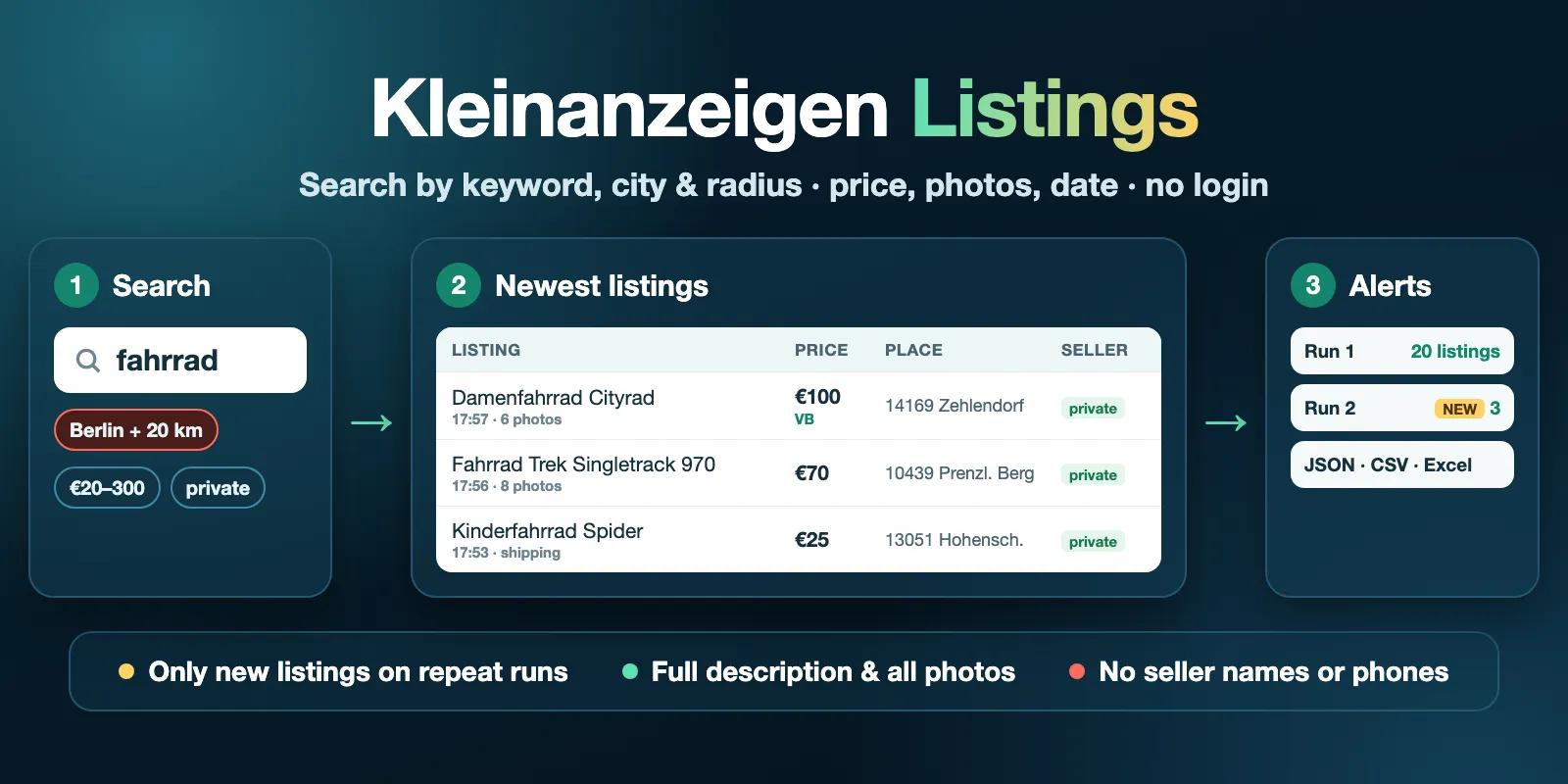
Table of contents
- What it does
- Quick start
- Use cases
- Input
- Input examples
- Output
- Pricing and limits
- API, export and integrations
- Limits and data notes
- Troubleshooting
- FAQ
- Support
What it does
The Actor runs the same searches as the Kleinanzeigen website, newest first, and saves one row per listing. By default it also opens every listing page, so you get the full description, all photo links, the attributes table (for example Zustand, Art, Typ) and the exact seller type.
You can search by:
- Keyword: one search per keyword, such as
fahrrad,iphone 13orsofa. Write keywords in German, as buyers do. - Location: a German city, district or 5-digit postal code, such as
Berlin,Münchenor10115, plus a radius from 5 to 200 km. - Category: 154 Kleinanzeigen categories, such as Autos, Fahrräder & Zubehör, Mietwohnungen or Smartphones.
- Price: minimum and maximum in euros.
- Seller type: private people or commercial sellers (shops and dealers).
- Kleinanzeigen URLs: paste a search URL to use its own filters, or listing URLs to refresh single listings.
Good fit
- Track prices of used bikes, phones, furniture or cars in one city.
- Get new listings for a search every hour or every day with
onlyNew. - Compare private and commercial sellers in a category.
- Check if listings you saved earlier are still online (listing URLs).
Not a fit
- Seller names, phone numbers or e-mails. They are not collected, and phone numbers or e-mails typed into the text are masked (numbers written out in words are not detected).
- Other classifieds sites, or listings outside Germany.
- More than 1,250 listings for one search. Kleinanzeigen shows at most 50 pages of 25 listings. Split a big search by price, city or category to get more.
- Sorting other than newest first (for keyword searches).
Quick start
- Open the Input tab.
- Keep Search terms as
fahrradand Location asBerlin(the prefill). - Keep Max listings per search at
20. - Click Start.
- Open the Listings view of the dataset. Check
title,price,locationandpostedAt.
Expected result: the 20 newest bike listings in Berlin, with full descriptions and photos, in about 15 seconds.
Use cases
| Task | Input | Key fields | Next step |
|---|---|---|---|
| Watch used bike or phone prices in a city | queries, location, radiusKm, priceMin, priceMax | price, priceType, attributes, location | Sort by price in a spreadsheet |
| Get new deals as soon as they appear | queries + location + onlyNew: true | title, price, url, postedAt | Schedule the run every hour |
| Rental market report | category: wohnung-mieten, location, radiusKm | price, attributes, postalCode, latitude, longitude | Group by postalCode |
| Find shops and dealers in a category | category + sellerType: commercial | title, price, location, shipping | Count listings per place |
| Check if saved listings still exist | startUrls with listing URLs | status, statusReason, price | Remove sold listings from your list |
Input
At least one of queries, location, category or startUrls is required. Everything else is optional. Keywords that only differ in upper/lower case or spaces are searched once.
| Field | Type | Default / prefill | Allowed values | What it does |
|---|---|---|---|---|
queries | array of strings | empty / ["fahrrad"] | Up to 20 keywords, each up to 100 characters | One search per keyword with the filters below. Empty: browse the location and/or category. |
location | string | empty (all Germany) / Berlin | City, district or 5-digit postal code | Only listings in this place. The Actor finds it the same way as the site's location box. |
radiusKm | string | 0 | 0, 5, 10, 20, 30, 50, 100, 150, 200 | Search around the location. 0 means only the place itself. Needs location. |
category | string | empty (all) | Category ID (217), URL slug (fahrraeder) or German name (Fahrräder & Zubehör) | Only listings in this category. |
priceMin | integer | empty | 0 or more euros | Only listings with this price or more. |
priceMax | integer | empty | 0 or more euros, not less than priceMin | Only listings with this price or less. |
sellerType | string | all | all, private, commercial | Private people only, or shops and dealers only. |
maxItems | integer | 50 / 20 | 1–1,250 | Listings to save for each search. |
startUrls | array | empty | Up to 100 kleinanzeigen.de URLs | Search URLs (/s-…) are read with their own filters and sort order; with onlyNew they are read newest first. Listing URLs (/s-anzeige/…) are read one by one. |
includeDetails | boolean | true | true / false | Open each listing page for the full description, all photos, coordinates and attributes. Off: faster, fields come from the result list only (short text, one photo). |
includeTopAds | boolean | false | true / false | Also save paid TOP ads. They repeat on many pages and are not sorted by date. |
onlyNew | boolean | false | true / false | Save (and pay for) only listings that this search did not return before. |
stateKey | string | empty | Lowercase letters, digits and dashes | Name of the onlyNew memory. Runs with the same name share it, even if the search changes. |
proxyConfiguration | object | no proxy | Your own proxy URLs | Usually not needed. Apify Proxy is not supported. |
Wrong input (for example priceMin greater than priceMax, radiusKm without a location, an unknown category or a URL from another site) stops the run before any request, with a clear message.
Settings that work together
- All filters apply to every keyword. 3 keywords with
location: Hamburgmake 3 searches, all in Hamburg. maxItemsapplies to each search. 3 keywords withmaxItems: 400can save up to 1,200 listings.- A listing found by two searches is saved and charged once, under the first search.
- Search URLs in
startUrlskeep their own filters; the filter fields above do not change them.maxItemsstill applies to each URL. WithonlyNew, the run sorts a pasted search URL newest first. onlyNewremembers each search by its keyword and filters, unless you setstateKey. If you change a filter, it is a new search, and the first run returns all listings again (up tomaxItems).- With
onlyNew, the run reads the newest listings first and stops at the first result page where every listing is already known. If an earlier run stopped atmaxItems, the next run can also return older listings that it did not reach before.
Input examples
Bikes in Berlin, newest first
Returns the 20 newest bike listings in Berlin. Costs $0.0305 on the Free plan.
Cheap phones from private sellers around Hamburg
Returns up to 100 listings priced €150–400 within 50 km of Hamburg.
Hourly alert: only new listings
The first run returns up to 100 listings per keyword. Each later run returns only the listings added since the run before. If nothing is new, the run saves no rows.
Check saved listings
Returns the current price and data of each listing. A deleted or sold listing comes back as a not_found row.
Output
One dataset row is one listing. The Listings view shows the main columns. Download JSON, CSV or Excel from the dataset.
Output example
This is a real row from the prefill search in October 2026. description and images are shortened here; the real row has the full text and 6 photo links. null means Kleinanzeigen does not show this value for the listing.
Output fields
| Field | Type | Can be null? | Meaning |
|---|---|---|---|
id | string | yes | Kleinanzeigen listing ID (Anzeigen-ID). It stays the same across runs. |
url | string | no | Listing page on www.kleinanzeigen.de. |
title | string | yes | Listing title. Phone numbers and e-mails in it are masked. |
price | number | yes | Price in euros. 0 for free items (Zu verschenken). null when the seller gave no price. |
priceType | string | yes | fixed, negotiable (VB) or free. |
originalPrice | number | yes | Earlier price shown crossed out after a price drop. |
currency | string | no | Always EUR. |
location | string | yes | Place as the listing shows it, such as 10115 Berlin - Mitte. |
postalCode | string | yes | German postal code. |
latitude, longitude | number | yes | Area of the listing from the listing page, not the seller's address. |
postedAt | string | yes | Posting time with the Berlin time offset for today and yesterday; only the date (YYYY-MM-DD) for older listings. |
description | string | yes | Full listing text, or the short text from the result list when details are off. Phone numbers and e-mails are masked. |
images | array of strings | no | Photo links in gallery order. Empty list when there are no photos. |
imageCount | integer | yes | Number of photos. |
sellerType | string | yes | private or commercial. Seller names and contacts are never collected. |
shipping | boolean | yes | true when the seller ships (Versand möglich), false for pickup only. |
buyNow | boolean | yes | true when the listing offers Direkt kaufen. null for listing URLs. |
isTopAd | boolean | yes | true for paid TOP ads (only with includeTopAds). null for listing URLs. |
categoryId, categoryName | integer, string | yes | Kleinanzeigen category, such as 217 / Fahrräder & Zubehör. |
attributes | object | no | The listing's details table as name: value text, such as Zustand, Art, Typ, Kilometerstand or Zimmer. Can be {}. |
detailLevel | string | yes | full when the listing page was read, card when fields come from the result list only. |
status | string | no | complete; partial when the listing page could not be read (result list fields only); not_found when the listing no longer exists. |
statusReason | string | yes | Plain-English reason for partial and not_found rows. |
searchQuery | string | yes | The keyword that found the listing. null for URLs and searches without a keyword. |
searchUrl | string | yes | Kleinanzeigen search URL that found the listing. |
rank | integer | yes | Position in that search (1 = newest). |
source | string | no | Always kleinanzeigen.de. |
fetchedAt | string | no | When the row was read, ISO UTC. |
Run summary
The key-value store record RUN_SUMMARY has status, reason, message, counts and one entry per search (results the site reports, pages read, listings saved, listings skipped as already seen or as duplicates, and why the search stopped). The run's Output tab links to it.
| Situation | Dataset | Status / run | What to do |
|---|---|---|---|
| Listings saved | One row per listing | complete + DONE, succeeded | Export the rows. |
| Some listing pages could not be read | Rows with status: partial | partial + DETAILS_MISSING, succeeded | Read statusReason; run again later for full details. |
| No listings match | Empty | empty + NO_RESULTS, succeeded | Check the keyword, place or filters. |
Nothing new with onlyNew | Empty | empty + NO_NEW_LISTINGS, succeeded | Nothing to do; the next run checks again. |
| Spending limit reached | Rows saved so far | partial + CHARGE_LIMIT, succeeded | Raise the maximum cost per run. |
| Internal time limit reached | Rows saved so far | partial + INTERNAL_LIMIT, succeeded | Run again or narrow the search. |
| Kleinanzeigen failed or blocked the requests | Rows saved so far stay | partial or error + SOURCE_ERROR, failed | Try again later. |
| Invalid input | Empty | error + INVALID_INPUT, failed | Read the message; fix the field it names. |
Pricing and limits
Pay per event. The price includes platform usage; you pay only the events below.
| Event | Price | When it is charged |
|---|---|---|
| Actor start | $0.002 | Once per run. |
| Search lookup | $0.0005 | Once per search, after its first result page is read. Also once per listing URL that no longer exists. |
| Listing | $0.0014 – $0.00119 | Each saved listing row. The price depends on your Apify plan (see below). |
| Apify plan | Per listing | 1,000 listings (one search, with start) |
|---|---|---|
| Free | $0.0014 | $1.4025 |
| Bronze | $0.00133 | $1.3325 |
| Silver | $0.00126 | $1.2625 |
| Gold and higher | $0.00119 | $1.1925 |
Listings skipped as duplicates or as already seen (onlyNew) are not charged. not_found rows are never charged as listings. A search with no results pays only the start and one lookup.
Cost examples (Free plan)
| Scenario | Input | Listings | Total | Time in tests |
|---|---|---|---|---|
| Prefill | fahrrad, Berlin, 20 | 20 | $0.0305 | about 15 s |
| One medium search | kinderwagen, Hamburg + 50 km, 250 | 250 | $0.3525 | about 95 s |
| One full search | iphone, all Germany, 1,250 | 1,141 | $1.5999 | about 11 min |
| No results | an unknown word | 0 | $0.0025 | about 5 s |
| Alert, nothing new | onlyNew, nothing changed | 0 | $0.0025 | a few seconds |
| 100 deleted listing URLs | startUrls | 0 (not_found) | $0.052 | under 2.5 min |
Totals use the listed event prices and the listing counts from test runs.
Set a maximum cost per run to control spending. The Actor checks it before each charge. When the limit is reached, the run stops and keeps the rows saved so far (CHARGE_LIMIT, succeeded).
Speed and size
- Memory is 1,024 MB. With details on, the Actor opens up to 3 listing pages at a time: about 2–3 listings per second in tests. With
includeDetailsoff it reads 25 listings per request and is much faster. - The Actor slows down and pauses when Kleinanzeigen pushes back, to be polite to the site.
- Up to 1,250 listings per search (the site's limit), 20 keywords and 100 URLs per run. One run stops after 60 minutes of work and keeps what it saved.
API, export and integrations
Start a run with the Apify API and the same JSON input as in the examples:
POST https://api.apify.com/v2/acts/cliqtomedia~kleinanzeigen-scraper/runs
Read the default dataset when the run finishes. Export JSON, CSV or Excel. Use id as the key when you join rows from different runs. Keep your Apify token private.
To get alerts for a search, create an Apify schedule with onlyNew: true. Each run then returns only new listings. Add a webhook or an integration (for example Slack, Google Sheets or Zapier) to send the new rows on. This Actor does not create schedules or send alerts itself.
onlyNew keeps the IDs it has seen (up to 5,000 per search) in a key-value store named kleinanzeigen-scraper-seen in your Apify account. Delete a record there to start that search fresh.
Use with AI agents (MCP)
Apify MCP gives agents access to this Actor. The smallest useful input is:
Key output fields: title and price (euros, number) with priceType describe the offer, location and postalCode say where it is, postedAt says when it was posted, and url links to the listing. This run takes about 15 seconds and costs $0.0305 on the Free plan. Limits: up to 1,250 listings per search, 20 keywords and 100 URLs per run.
Limits and data notes
- Search results. Kleinanzeigen decides which listings match a keyword and a place. The Actor does not promise every listing on the site.
- 1,250 per search. The site shows at most 50 pages of 25 listings. When a search has more,
RUN_SUMMARYsays so; split it by price range, city or category. - Dates. The site shows the time only for today and yesterday. Older listings have the date only.
- TOP ads. Paid TOP ads are skipped by default, because they repeat on every page and are not new.
- Privacy. Seller names, user IDs, phone numbers and the legal notice (Impressum) are never collected. Phone numbers and e-mails typed into the title or text are replaced with
[phone removed]/[email removed]. Masking is automatic: a number written out in words or digit by digit can stay in the text. - Changes. If Kleinanzeigen changes its website, a run can fail with
SOURCE_ERRORuntil the Actor is updated.
Data comes from the public search and listing pages of Kleinanzeigen.de. The Kleinanzeigen terms limit automated access and reuse of its content. You are responsible for checking that your use of the data is allowed. This Actor is an independent tool. It is not made by or endorsed by Kleinanzeigen.
Troubleshooting
The dataset is empty
Open RUN_SUMMARY. NO_RESULTS means Kleinanzeigen has no listing for this keyword, place and filters. Check the spelling, write the keyword in German, use a bigger radius or remove a filter. NO_NEW_LISTINGS means onlyNew found nothing new since the last run.
The location is not found
Use a German city name (München, not Munich) or a 5-digit postal code. The run fails with INVALID_INPUT and names the place it could not find.
onlyNew returns all listings again
onlyNew remembers a search by its keyword and all its filters. If you change a filter, it is a new search with an empty history. Keep the same input for each scheduled run, or set the same stateKey.
Some rows have status: partial
The listing page could not be read, so the row has only the result-list fields (short text, one photo). Read statusReason. Run the search again later, or pass the listing URLs in startUrls.
The run failed with SOURCE_ERROR
Kleinanzeigen did not answer after several tries, or refused the requests. Rows saved before the error stay in the dataset. Wait a few minutes and try again.
FAQ
Do I need a Kleinanzeigen account or a proxy?
No. The Actor reads public search and listing pages. You only need an Apify account.
Can I get the seller's name or phone number?
No. Seller names and contact details are not collected, and phone numbers or e-mails typed into the text are masked (except numbers written out in words). Use the url to contact the seller on Kleinanzeigen.
Does a search with no results cost money?
Only the start and one lookup: $0.0025.
Can I search all of Germany?
Yes. Leave location empty. To read a whole category without a keyword, leave queries empty and set category.
How do I get price history?
Each run gives the current listings. Schedule the same input and keep the datasets, or put the listing URLs in startUrls. Use id to follow one listing over time; originalPrice shows the price before the last price drop.
Support
Open an issue in this Actor's Issues tab. Include the run ID, your input and the message from RUN_SUMMARY. Never share your Apify token.


