
GitHub Repositories & Users Search (No Login)
Pricing
from $0.60 / 1,000 repository results
GitHub Repositories & Users Search (No Login)
Search GitHub repositories or users with GitHub's own search syntax. Get stars, forks, language, topics, licence and last push, or user name, company, location and followers. Works without a token; add your own for higher limits. No emails.
Pricing
from $0.60 / 1,000 repository results
Rating
0.0
(0)
Developer

Cliqto Media
Maintained by CommunityActor stats
0
Bookmarked
2
Total users
1
Monthly active users
10 days ago
Last modified
Categories
Security
Limited permissionsShare
Search GitHub repositories or GitHub users with GitHub's own search syntax and get clean rows: stars, forks, language, topics, licence and last push for repositories, or name, company, location, followers and public repos for users. No login and no token needed. A typical 10-repository run finishes in a few seconds and costs under $0.01.
Use it for developer relations, open-source research, tool tracking or technical recruiting. The smallest run is one query, such as apify actor, and 10 results.
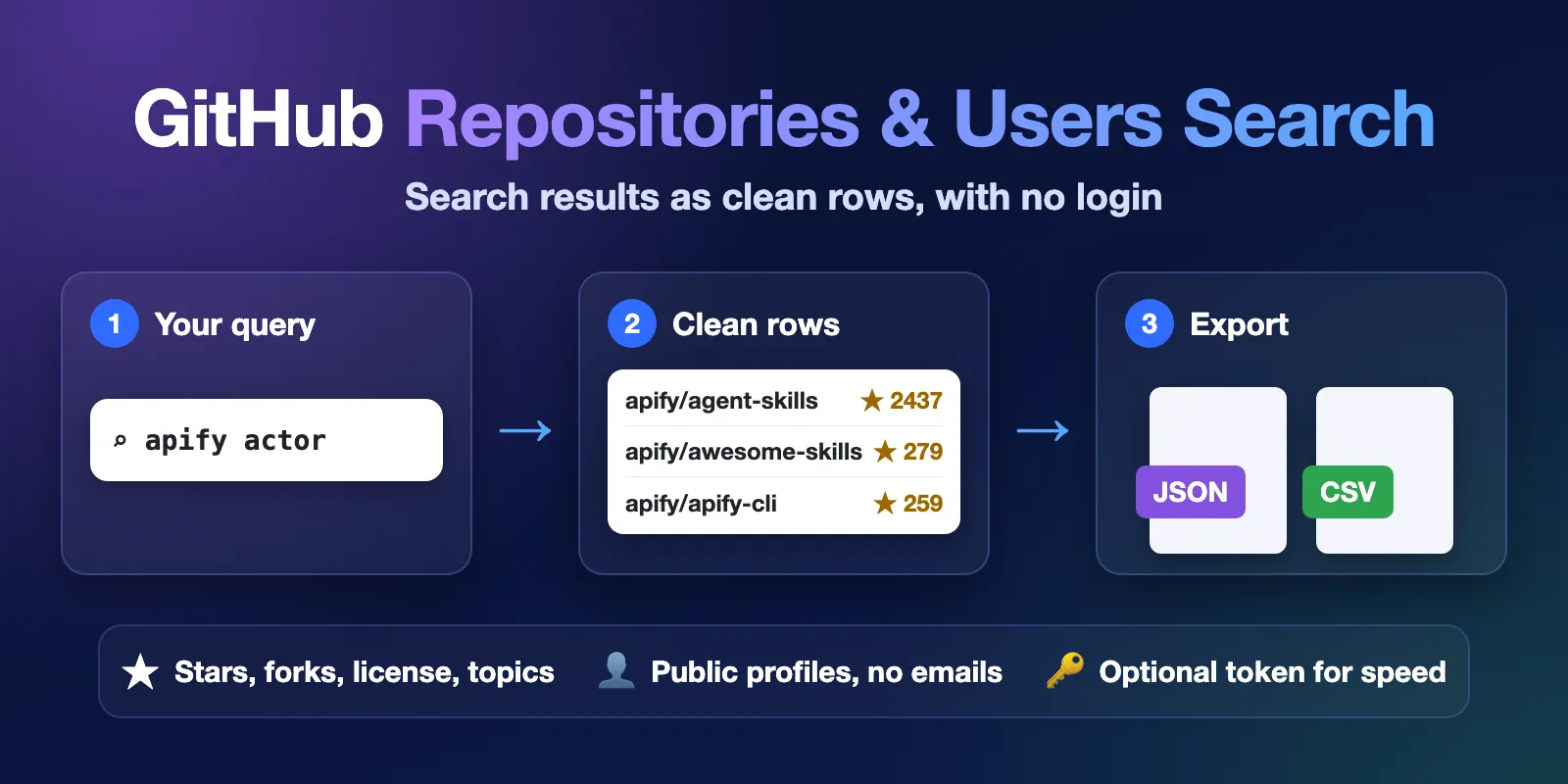
Table of contents
- What it does
- How it works
- Quick start
- Use cases
- Input
- Output
- Pricing
- Limits
- API, export and integrations
- Troubleshooting
- FAQ
- Related Actors
- Support
What it does
The Actor sends your query to the official GitHub REST API search and saves one row per result in the Dataset.
- Repositories mode: one row per repository with
fullName,url,description,stars,forks,language,topics,license,pushedAtand more. - Users mode: one row per user or organisation with
login,url,name,company,location,followers,publicReposand more. Profile details come from the public GitHub profile.
The Actor never collects email addresses. If a bio, blog or company text contains an email address, it is replaced with [email removed].
Every row has query, rank, source and fetchedAt, so you always know where and when the value came from.
Good fit
- Find the most-starred repositories for a topic or language, for example
web scraper language:pythonsorted bystars. - Track tools in your niche: repositories with a topic, licence or recent activity (
pushed:>2026-01-01). - Build a list of public developer profiles by location and language, for example
location:berlin language:rust, sorted by followers.
Not a fit / limits
- No code search, issues, pull requests, commits or README text. Only repositories and users.
- No emails and no private data. Only public fields that GitHub shows to anyone.
- GitHub returns at most 1,000 results per query. To get more, split the query, for example by
created:date ranges or bylanguage:, and put the parts in More search queries. - Without a token, GitHub gives about 60 full profile lookups per hour to the shared Apify IP. Bigger users runs still finish, but some profiles are partial or unavailable (see Limits).
How it works
- You type a search query in GitHub's own search syntax and choose repositories or users.
- The Actor sends the query to GitHub's public search and reads the results page by page, up to your
maxItems. In users mode it also opens each public profile for the name, company, location and follower counts. When GitHub's anonymous profile quota runs out, it reads the public github.com user search results for the remaining users instead (detailsSource = web_search,detailsStatus = partial). - It saves one row per result in the Dataset, plus a
RUN_SUMMARYrecord with the status, counts and warnings.
Quick start
-
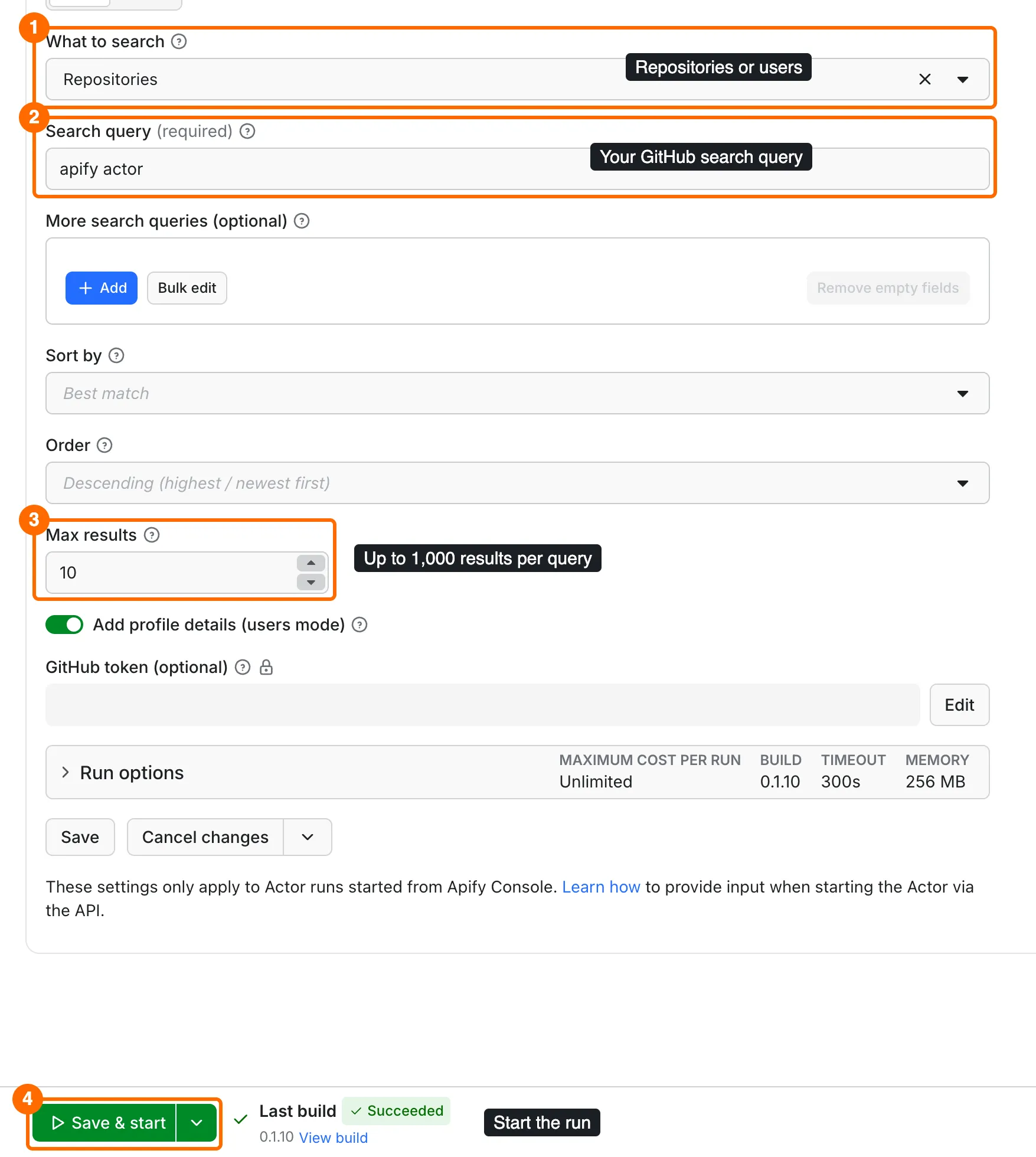
On the Input tab, keep What to search (
mode) asRepositories(box 1). -
Keep the prefilled Search query (
query)apify actor, or type your own query (box 2). Leave More search queries (extraQueries) empty for this first run. -
Keep Max results (
maxItems) at the prefilled10(box 3). The limit applies to each query. -
Click Start (box 4 on the form). When the run finishes, open the Output tab: the Repositories view shows one row per repository with stars, forks and language (box 4 on the table).
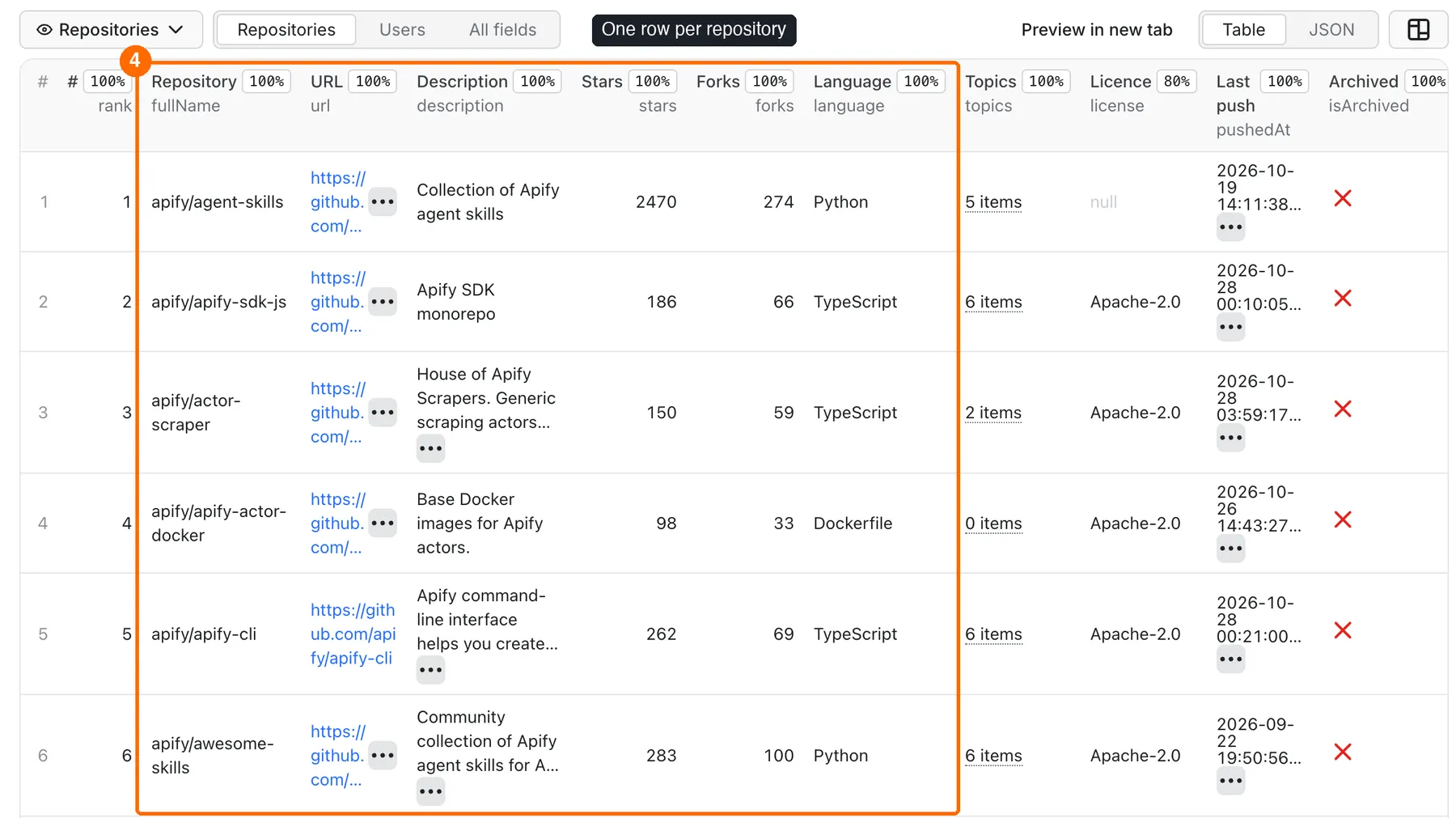
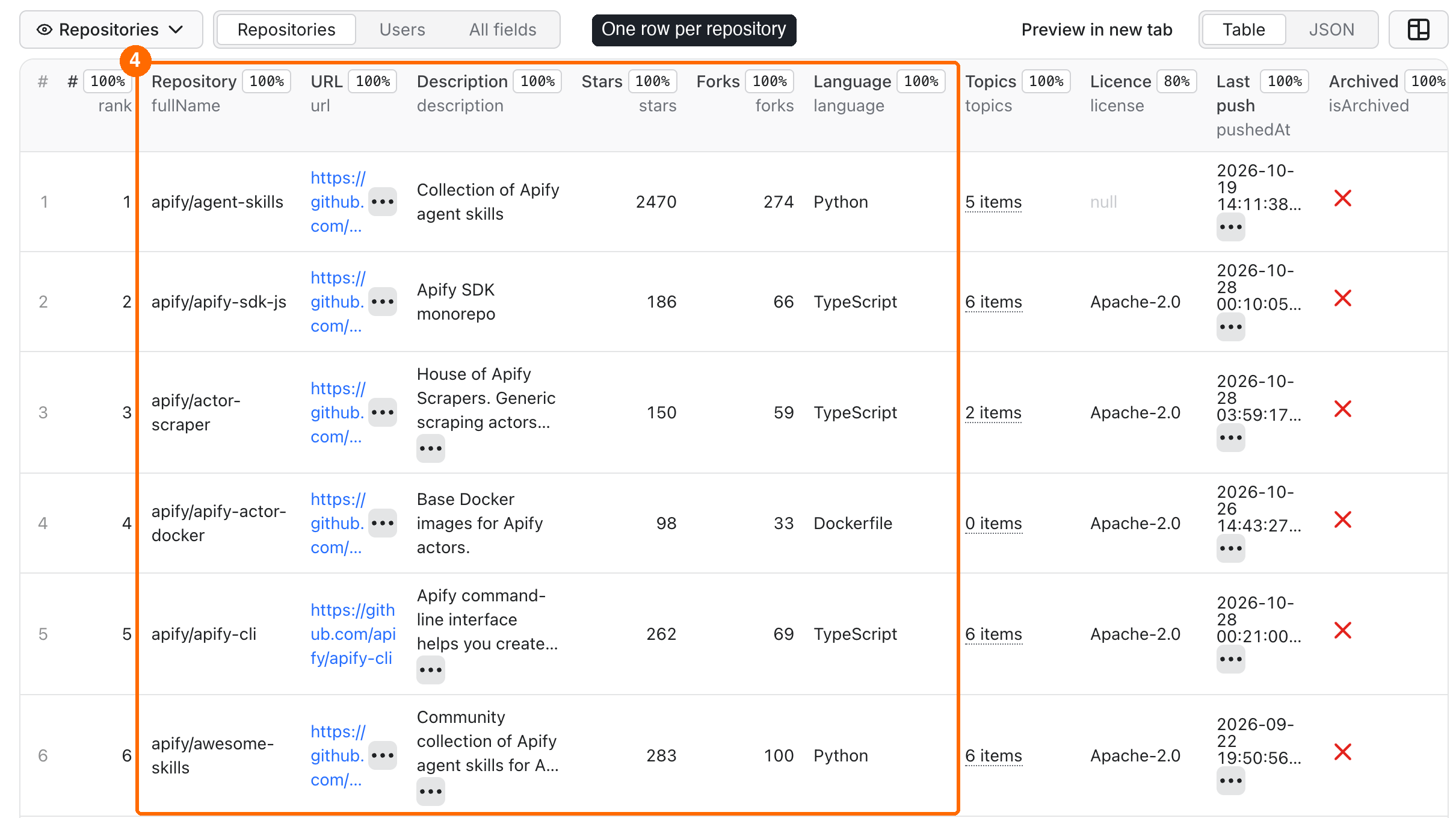
Expected result: 10 repository rows in a few seconds, with stars, forks, language, licence and topics.
Use cases
| Buyer job | Input path | Output entity | Key fields | Next integration |
|---|---|---|---|---|
| Find popular projects for a topic | mode=repositories, query, sort=stars | Repository | fullName, stars, language, topics | Export to CSV or Google Sheets |
| Watch recent activity in a niche | query with pushed:>YYYY-MM-DD, sort=updated | Repository | fullName, pushedAt, isArchived | Schedule the run and compare Datasets |
| Build a list of public developer profiles | mode=users, query with location: and language:, sort=followers | User | login, name, location, company, followers | Your CRM or spreadsheet |
Input
Input fields
| Field | Plain name | Type | Required | Default / prefill | Allowed values | Effect |
|---|---|---|---|---|---|---|
mode | What to search | string | no | default repositories | repositories, users | Repository rows or user rows |
query | Search query | string | yes | prefill apify actor | 1–256 characters, GitHub search qualifiers allowed | The GitHub search query |
extraQueries | More search queries | list of strings | no | empty | up to 9 queries, 1–256 characters each | More queries in the same run; each gets up to maxItems rows |
sort | Sort by | string | no | default best-match | repositories: best-match, stars, forks, updated, help-wanted-issues; users: best-match, followers, repositories, joined | Result order |
order | Order | string | no | default desc | desc, asc | Sort direction. Ignored with best-match |
maxItems | Max results | integer | no | default 100, prefill 10 | 1–1000 | How many rows to save per query |
includeUserDetails | Add profile details | boolean | no | default true | true, false | Users mode only: adds name, company, location, followers and other profile fields |
githubToken | GitHub token | secret string | no | none | a GitHub personal access token | Uses your own GitHub quota (see below) |
The query uses GitHub search syntax. Useful qualifiers:
- repositories:
language:,topic:,stars:>100,license:mit,pushed:>2026-01-01,user:ororg:,archived:false - users:
location:,language:,followers:>100,repos:>10,type:userortype:org
Filters such as language, minimum stars, topic, forks or archived repositories go into the query itself, for example topic:scraper language:go stars:>50 fork:false archived:false.
The token is stored as a secret input. It is not saved in the Dataset, the summary or the logs. A token without any scopes is enough for public data.
Interacting settings
| When | Input A | Input B | Effective behavior |
|---|---|---|---|
| Sort does not match the mode | mode=repositories | sort=followers | The run fails at once with a clear message. Use a sort from the list for your mode |
| Users without details | mode=users | includeUserDetails=false | Rows have only login, url, accountType, avatarUrl and rank. Faster; the price per row is the same |
| More results than GitHub serves | maxItems=1000 | a query with 6,000 matches | The Actor saves 1,000 rows and the summary says that GitHub stops at 1,000 |
| Several queries | query | extraQueries | Queries run one after another. A result found by an earlier query is saved once, under that query. If GitHub rejects one query, the others still run and the run ends as PARTIAL with partialReason = QUERY_FAILED |
| Token | mode=users | githubToken set | Profiles use your token's quota instead of the shared anonymous one |
Input examples
Popular Python scraping repositories
Expected output: 100 repository rows, most stars first.
Rust developers in Berlin
Expected output: 25 user rows with profile details, most followers first.
Three topics in one run
Expected output: up to 150 repository rows, up to 50 per topic; a repository with two of these topics appears once.
Output
Output example (repository)
From the prefill run (apify actor, 10 results):
Output example (user)
An organisation account from the query apify type:org:
Here company and location are null because the profile does not fill them, while following is a real 0.
null means GitHub does not have or does not show the value. 0 is a real zero. For example, license is null when a repository has no licence file or GitHub cannot detect it (NOASSERTION).
Repository fields
| Field | Meaning | Type | Can be null? |
|---|---|---|---|
type | Row kind, always repository | string | no |
query, rank | The query that found the row and its position in that query's results (1 = first) | string, integer | no |
id | GitHub repository ID | integer | no |
fullName, name, owner | owner/name, name, owner login | string | no |
ownerType | User or Organization | string | yes |
url, homepage | GitHub page and project website | string | homepage: yes |
description | Repository description | string | yes |
stars, forks, openIssues, watchers | Counts from GitHub search (openIssues includes pull requests) | integer | yes |
language | Main language | string | yes |
topics | Topics | array of strings | empty array when none |
license, licenseName | SPDX ID (for example MIT) and licence name | string | yes |
isFork, isArchived, isTemplate | Repository flags | boolean | yes |
defaultBranch, sizeKb | Default branch and size in KB | string, integer | yes |
createdAt, updatedAt, pushedAt | ISO dates. pushedAt is the last code push | string | yes |
source, fetchedAt | Where and when the row was collected | string | no |
User fields
| Field | Meaning | Type | Can be null? |
|---|---|---|---|
type | Row kind, always user | string | no |
query, rank | The query that found the row and its position in that query's results | string, integer | no |
id, login, url, avatarUrl | GitHub ID, login, profile page, avatar | integer, string | no |
accountType | User or Organization | string | yes |
name, company, location, bio, blog, twitterUsername | Public profile text. Emails are removed | string | yes |
followers, following, publicRepos, publicGists | Public counts | integer | yes |
hireable | The "available for hire" flag | boolean | yes |
createdAt, updatedAt | Account dates | string | yes |
detailsStatus | full, partial, not_requested, not_found or unavailable | string | no |
detailsSource | api (GitHub API profile) or web_search (github.com user search) | string | yes |
source, fetchedAt | Where and when the row was collected | string | no |
detailsStatus tells you how complete a profile row is:
full: all profile fields from the GitHub API.partial: name, location, bio, followers and public repos from github.com user search;company,blog,twitterUsername,following,publicGists,hireableand dates arenull.not_requested: you setincludeUserDetails=false.not_found: the account was deleted between search and lookup.unavailable: no time or quota was left for this profile; only the search fields are filled.
Output surfaces and run statuses
| Situation | Where | What you see |
|---|---|---|
| Normal run | Dataset views Repositories or Users | One row per result |
| Query with 0 matches | Dataset is empty, run Succeeded | Status message: "GitHub search returned no repositories for this query." |
| Some profiles without details | Run Succeeded, RUN_SUMMARY.partialReason = DETAILS_UNAVAILABLE | Rows with detailsStatus partial or unavailable |
| GitHub search timed out on its side | Run Succeeded, partialReason = INCOMPLETE_RESULTS | Rows GitHub returned (can be 0); try again or narrow the query |
| One of several queries rejected or unavailable | Run Succeeded, partialReason = QUERY_FAILED | Rows from the other queries; RUN_SUMMARY.search.queries says which query failed and why |
| Your spending limit reached | Run Succeeded, partialReason = CHARGE_LIMIT | Rows saved up to the limit |
| GitHub error or time limit after some rows | Run Failed, partialReason = SOURCE_ERROR or DEADLINE | Rows saved so far stay in the Dataset |
| Broken query or bad token | Run Failed, no rows | A message that says what to fix |
The RUN_SUMMARY record in the key-value store has the status, counts, the GitHub total and the number of results GitHub can serve (reachableResults, at most 1,000 per query), one entry per query in search.queries, and warnings.
Pricing
This Actor uses pay-per-event pricing. You pay only for the events below; platform usage is included.
| Event | Free plan | Bronze | Silver | Gold |
|---|---|---|---|---|
| Actor start (once per run) | $0.0009 | $0.0009 | $0.0009 | $0.0009 |
| Repository row saved | $0.00085 | $0.000765 | $0.00068 | $0.000595 |
| User row saved | $0.00085 | $0.000765 | $0.00068 | $0.000595 |
- The start fee scales with run memory (per GB of memory). This Actor runs with at most 512 MB, so it is charged once per run.
- A run with 0 results costs only the start: $0.0009.
- A failed run (for example a broken query) costs only the start.
- Every saved user row is charged once, whatever its
detailsStatus. - Set Maximum cost per run in the run options to cap the cost. The Actor stops when the next row would go over it and saves what fits.
Cost examples (Free plan)
| Scenario | Rows | Cost |
|---|---|---|
Prefill: apify actor, 10 repositories | 10 | $0.0094 |
| 100 repositories | 100 | $0.0859 |
| Three queries, 50 repositories each | 150 | $0.1284 |
| 1,000 repositories (GitHub maximum for one query) | 1,000 | $0.8509 |
| 25 users | 25 | $0.02215 |
| Query with no results | 0 | $0.0009 |
Limits
Measured without a token on the default 256 MB memory:
| Run | Rows | Time | Notes |
|---|---|---|---|
| 10 repositories (prefill) | 10 | about 2–4 s | up to about 40 s when GitHub asks the shared IP to slow down |
| 1,000 repositories | 1,000 | about 30 s, up to about 4 min | GitHub serves at most 1,000 per query; slow runs waited for GitHub's rate limit |
| 200 users with details | 200 | about 75 s | 60 full profiles, the rest partial after the anonymous quota ran out |
| 500 users with details | 500 | about 205 s | 80 profiles unavailable because of the run time limit |
| 3 queries × 50 repositories | 150 | about 9 s | one search page per query |
- The default run timeout is 300 seconds. The Actor stops searching and saving at about 240 seconds so that the run ends cleanly.
maxItemsis 1–1000. Users mode was tested up to 500 rows in one run without a token.- Several queries share one run and its 240 seconds. Without a token GitHub allows about 10 search pages per minute, so 10 queries × 1,000 results (100 pages) do not fit in one run: the rows reached stay in the Dataset, the run stops with
partialReason = DEADLINE, and queries that did not start showNOT_RUNinRUN_SUMMARY.search.queries. For big multi-query jobs, add agithubTokenor split the queries across runs. - GitHub sometimes asks the shared Apify IP to slow down (a "secondary rate limit"). The Actor then waits about a minute and continues. Your cost does not change: you pay per saved row, not per second.
- Without a token, GitHub allows about 10 searches per minute (100 results each) and about 60 full profile lookups per hour for the shared IP. GitHub documents higher limits for requests made with a token.
- For more than about 60 users with full profiles per hour, add a
githubToken. For more than about 300 users, split the search into smaller runs (for example bylocation:orfollowers:ranges).
API, export and integrations
- API: start the Actor with the Apify API and read rows from the default Dataset. Use
?view=repositoriesor?view=usersfor the table columns. - Export: download the Dataset as JSON, CSV, Excel, XML or HTML from the run page.
- Scheduling: run a saved input daily or weekly with Apify schedules, for example to follow new repositories in a topic.
Use with AI agents (MCP)
Add this Actor to an AI agent with the Apify MCP server: https://mcp.apify.com?tools=cliqtomedia/github-search.
Smallest useful input:
Key output fields: fullName (owner/name), url, stars, language, pushedAt; in users mode login, followers, location. A 10-row call finishes in a few seconds and costs $0.0094 on the Free plan. Results stop at 1,000 per query.
Troubleshooting
The run failed with "GitHub rejected the query (HTTP 422)"
Symptom: the run fails at once with no rows.
Likely reason: a qualifier has a wrong value, for example stars:>abc.
Action: fix the qualifier. The message quotes GitHub's own explanation.
"GitHub rejected the githubToken (HTTP 401)"
Likely reason: the token is wrong, expired or revoked. Action: create a new token on GitHub, or leave the field empty to run without one.
Fewer rows than maxItems
Check RUN_SUMMARY.search.totalCount. If GitHub found fewer matches, you get all of them. If it found more than 1,000, GitHub serves only the first 1,000; split the query by date or language.
The run is slow, or the status says GitHub's rate limit was reached
Likely reason: GitHub limits anonymous requests from the shared Apify IP. The Actor waits and continues while time allows; RUN_SUMMARY.http.rateLimitWaitMs shows how long it waited.
Action: add a githubToken so that requests use your own GitHub quota, or run again later.
Many users have detailsStatus "partial" or "unavailable"
Likely reason: without a token, the shared anonymous quota for full profiles (about 60 per hour) ran out.
Action: add a githubToken, or run smaller users searches.
FAQ
Do I need a GitHub account or token?
No. The Actor works without a login. A token only gives you your own GitHub quota, which helps for big users searches.
Does it return email addresses?
No. The Actor never reads the email field and removes email addresses from bio, blog and company text.
How fresh is the data?
Each row is read from GitHub at run time; fetchedAt shows when. Star and follower counts change all the time.
Is the result complete?
You get what GitHub search returns for your query, up to 1,000 results. GitHub can report incomplete_results when its search times out; the summary then shows a warning.
Can I use the data for outreach?
Use profile data only within GitHub's Acceptable Use Policies and your local privacy law. Do not use it for spam or resell personal information.
Related Actors
- GitHub Releases Scraper & Monitor: after you find repositories, follow their new releases, notes and assets.
- Hacker News Scraper: see which repositories and tools developers discuss on Hacker News.
- Website Tech Stack Detector: check the CMS, frameworks and CDN of the project and company websites you found.
Support
For bugs, questions or feature requests, open an issue on the Issues tab of this Actor. Include the run ID and your input without the token.


