

Glassdoor Jobs & Reviews Scraper
Pricing
from $0.25 / 1,000 jobs
Glassdoor Jobs & Reviews Scraper
Scrape Glassdoor jobs, company reviews, salaries, interviews and company profiles from 23 country sites. Research employers, track hiring and benchmark pay with full job descriptions in JSON, CSV or Excel.
Pricing
from $0.25 / 1,000 jobs
Rating
0.0
(0)
Developer

Cliqto Media
Maintained by CommunityActor stats
0
Bookmarked
2
Total users
1
Monthly active users
4 days ago
Last modified
Security
Limited permissionsShare
Collect public Glassdoor jobs with full descriptions, company reviews, salaries, interviews and company profiles from 23 country sites. Research employers, track hiring and compare pay, then export JSON, CSV or Excel with no Glassdoor login.
Run the prefilled search (10 data analyst jobs in London) to test it: it costs $0.0049 on the Free plan, and our test run finished in about 5 seconds. This Actor is not affiliated with Glassdoor.
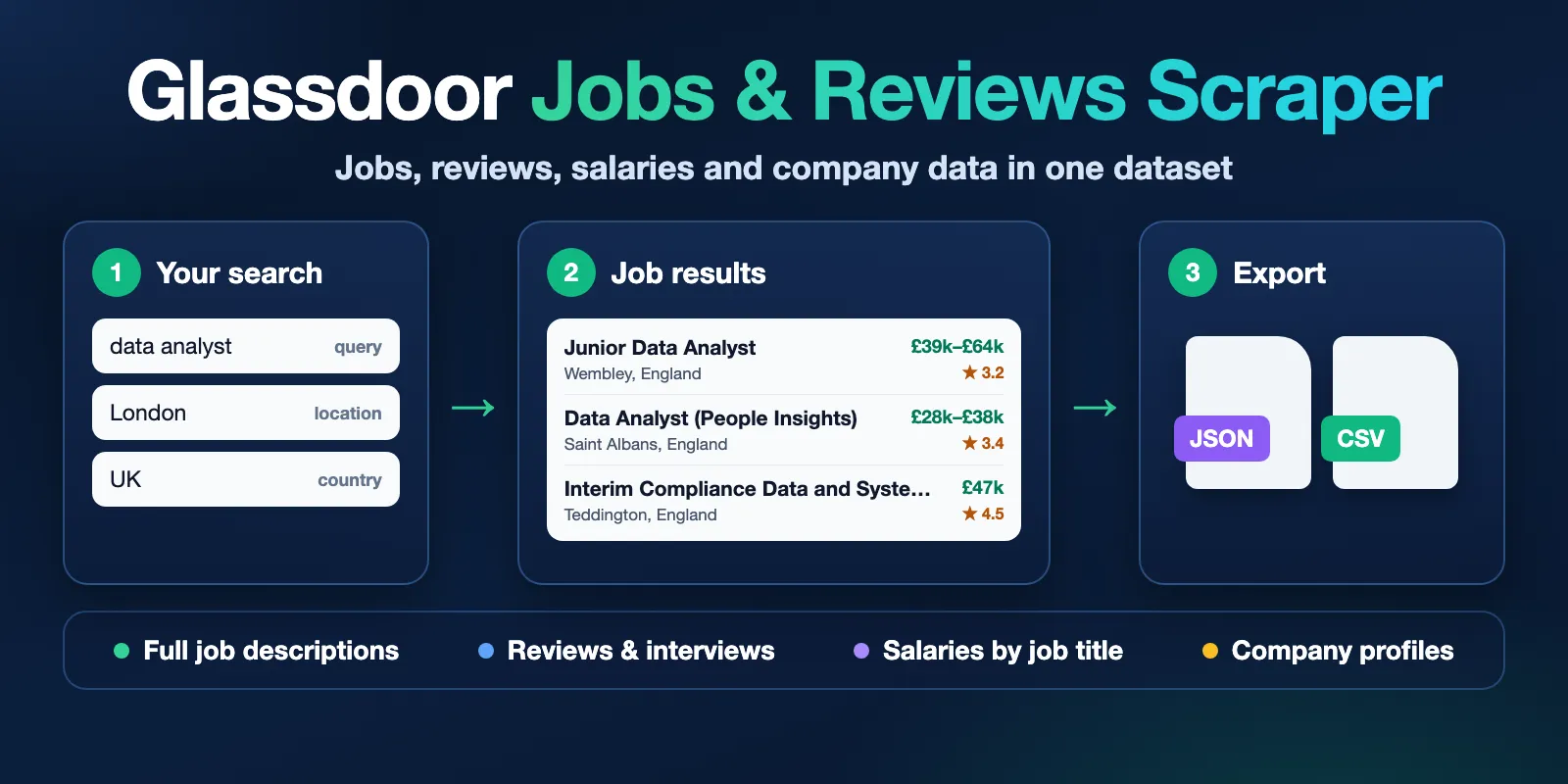
Table of contents
- What it does
- How it works
- Quick start
- Use cases
- Input
- Output
- Pricing
- Limits
- API, export and integrations
- Troubleshooting
- FAQ
- Related Actors
- Support
What it does
The Actor reads public Glassdoor pages for 23 country sites and saves what it finds as Dataset rows. You choose one of 12 modes with the mode field:
| Mode | What you get |
|---|---|
jobs | Job listings with full descriptions, pay when shown, apply link and employer ratings |
company | Company profiles: ratings, size, industry, headquarters, awards, offices |
reviews | Employee reviews with pros, cons, advice and star ratings |
salaries | Salary titles of one company with percentiles and pay parts |
interviews | Interview reports with outcome, difficulty and process text |
benefits | Benefit reviews with rating and comment |
locations | Public office addresses |
culture | Culture and values ratings by group |
photos | Photo links and captions (images are not downloaded) |
companySearch | Companies found by name, with rating filters |
salarySearch | Market salary data for a job title and place |
salaryReports | Anonymous salary reports for a job title at a company |
Only public data is collected. The Actor does not log in, does not collect names of review authors and does not collect personal email addresses.
Good fit
- Track job openings for a role, city or employer, and see only new jobs on each run.
- Read what employees write about a company: reviews, interviews and benefits.
- Compare pay for a job title across companies or places.
- Build company lists by rating, review count or headquarters.
How it works
- You pick a mode and give a search, a list of company links or names, or job IDs.
- The Actor reads the public Glassdoor pages for that request, applies your filters and removes duplicates.
- It saves rows to the Dataset and writes a run summary (
RUN_SUMMARY) and company reports (REPORTS) to the Key-value store. The summary shows how many rows were saved and why the run stopped.
Quick start
-
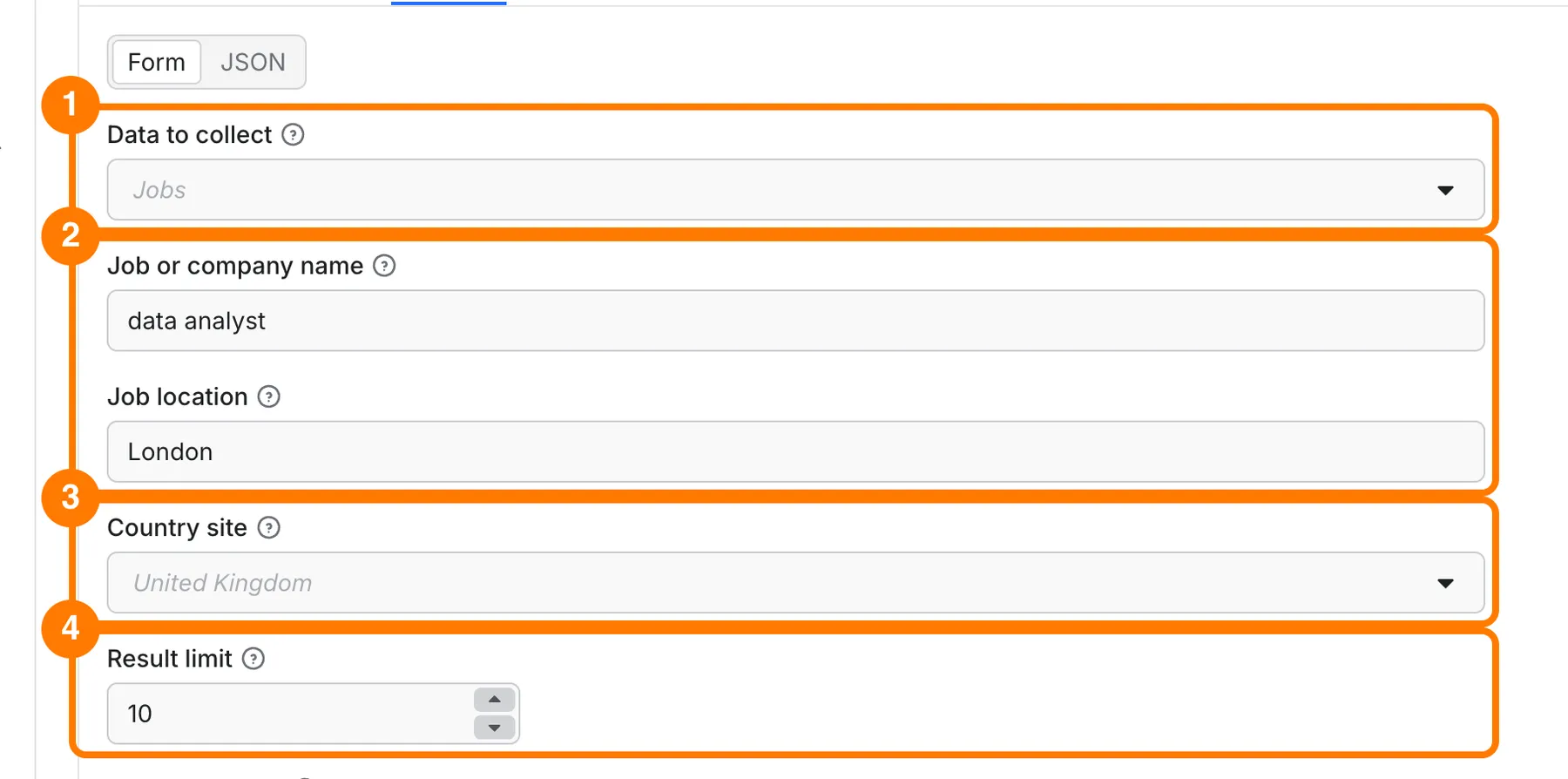
Open the Input tab. In Data to collect (
mode), keep Jobs (box 1 in the picture). -
In Job or company name (
query) typedata analyst. In Job location (location) typeLondon(box 2). -
In Country site (
country) chooseUnited Kingdom(box 3). -
Set Result limit (
maxItems) to10(box 4). Keep it small for the first run. -
Click Start at the bottom of the form.
-
When the run is done, open the Output tab. Pick a view in the view tabs (1), read the job title, company and rating columns (2) and the salary columns (3), and use Export (4) to download the data.
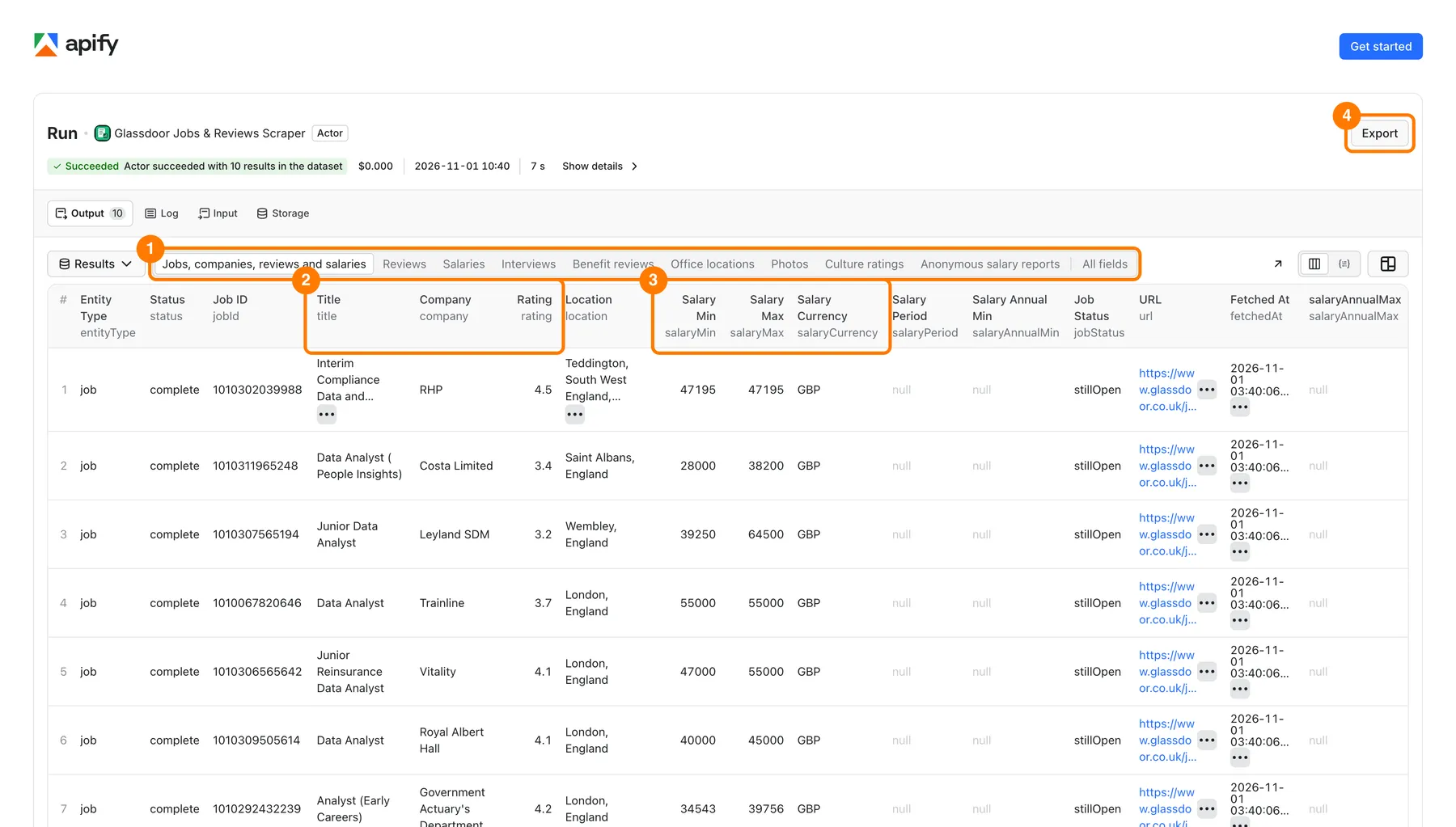
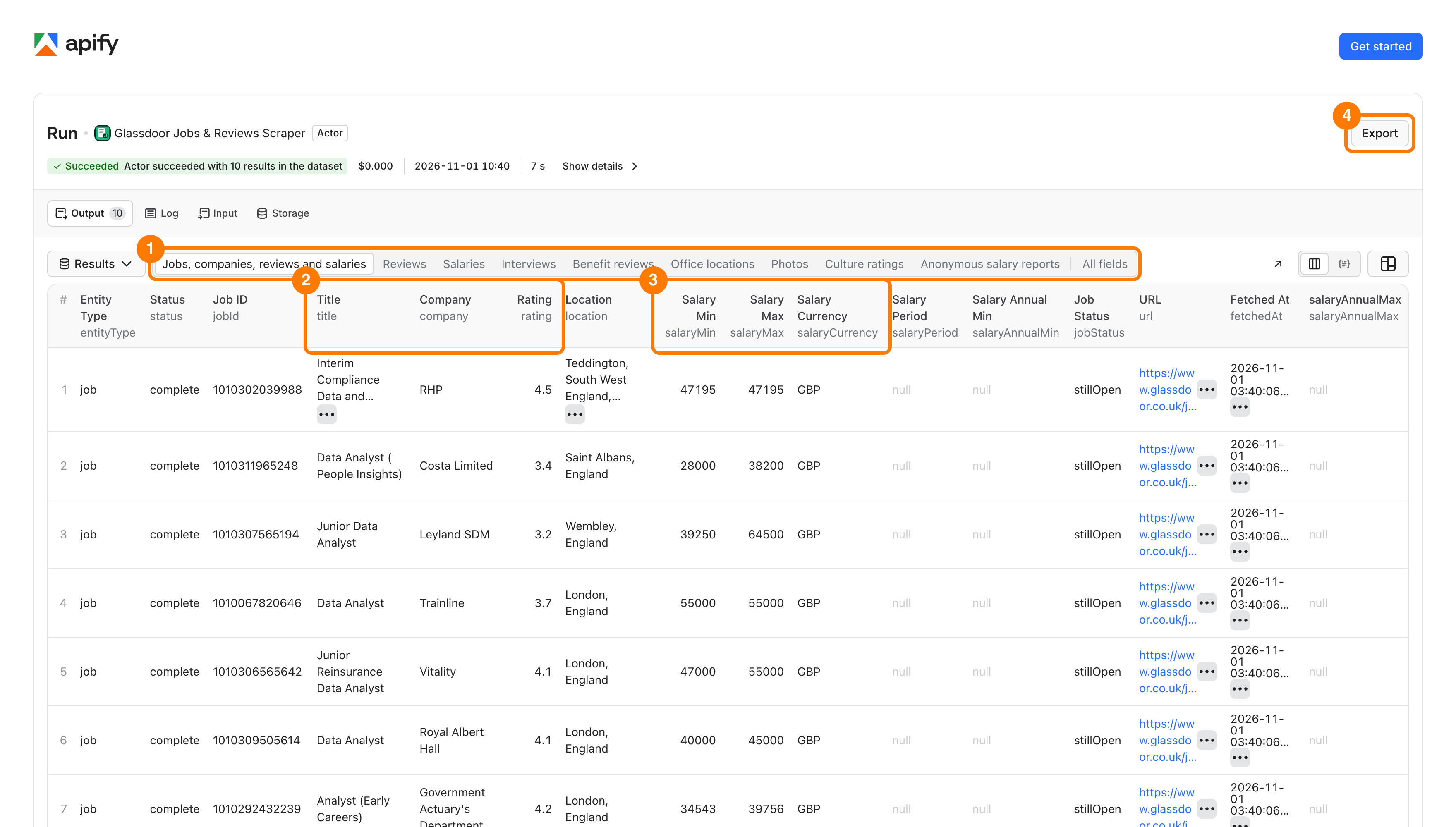
Expected result: 10 job rows with a full description, employer ratings and a link to the Glassdoor listing. The run summary says MAX_ITEMS, which means your limit was reached.
When you change the mode, change or clear the prefilled Job or company name, Job location and Result limit too. In company modes the query is used as a company name.
Use cases
| Buyer job | Input path | Output entity | Key fields | Next integration |
|---|---|---|---|---|
| Find data analyst jobs in a city | mode jobs, query, location, country | Job | title, company, location, salaryMin, salaryMax, url | Dataset export to CSV or Excel |
| Monitor new jobs every day | monitor or onlyNew, stateName, an Apify schedule | Job | jobId, jobStatus, postedDateEstimate, url | Apify schedule and webhook |
| Read employee feedback for a company | mode reviews, companyUrls | Review | title, pros, cons, ratingOverall, reviewDate | Dataset export, API |
| Find pay for a role | mode salaries, salarySearch or salaryReports | Salary | title, basePayP50, totalPayP50, currency, period | Spreadsheet |
| Build a company list | mode companySearch, minCompanyRating, minReviewCount | Company | company, rating, reviewCount, size, headquarters | Dataset export |
Input
All fields are optional. The form has no required field, and every field has a safe default.
- Empty input runs
modejobs,countryUKand searchesdata analystinLondon, for 10 jobs. - Runtime default and form prefill are different. The form prefills
querydata analyst,locationLondon,countryUKandmaxItems10. A field you leave out uses its runtime default from the tables below. - Maximum items when you leave it out: 10 for
jobs,company,culture,companySearchandsalarySearch. Forreviews,salaries,salaryReports,interviews,benefits,locationsandphotosthe default is 20,000. - Lists (arrays) take one item per line in the form, or a JSON array. Duplicates are removed. Each company ID is collected once.
- Field names are exact.
keywordsis an alias forquery, andlimitis an alias formaxItems. The main field wins when both are set. - Dates use
YYYY-MM-DD. - Some modes need a target. Company modes need
companyUrls,companyNames,employerIdsorquery(a company name).salaryReportsneedssalaryJobTitle. If a target is missing the run fails at the start with a clear code (see Troubleshooting).
Input fields
Run basics (all modes)
| Field | Type | Default / prefill | Allowed values | Effect | Recommendation |
|---|---|---|---|---|---|
mode | string | Default jobs | jobs, company, reviews, salaries, interviews, benefits, locations, culture, photos, companySearch, salarySearch, salaryReports | Chooses what to collect. | Start with jobs. |
query | string | Prefill data analyst. No other default, except in jobs mode with no other target, which uses data analyst. | Any text | Job title or skill. In company modes it is the company name. Job search URLs win over query. | Clear the prefill when you switch mode. |
keywords | string | None | Any text | Alias for query. query wins. | Use query. |
location | string | Prefill London. Runtime default London only when query is data analyst. | City, state or country | Place for job and salary search. An unknown place returns no results with LOCATION_NOT_FOUND. | Use a city name the Glassdoor site knows. |
country | string | Default UK | UK, US, CA, DE, FR, AU, AR, AT, BR, HK, IE, IN, IT, MX, NL, NZ, SG, ES, BE, CH, BE_FR, CH_FR, CA_FR | Glassdoor site for search and source links. Salary and benefit countries have their own fields. | Match it to your location. |
maxItems | integer | Prefill 10. Runtime default 10 or 20,000 (see above). | 1 or more | Stops after this many primary results. Jobs, profiles, company search and market salary use one total for the run. Reviews, salary titles and the other company sections use it for each company. | Keep it small for tests. |
limit | integer | None | 1 or more | Alias for maxItems. maxItems wins. | Use maxItems. |
outputFormat | string | Default flat | flat, nested | flat gives simple columns for Sheets and CSV. nested keeps objects such as location and salaryEstimate. | Use flat for spreadsheets. |
proxyMode | string | Default auto | auto, direct, datacenter, unblocker | Chooses the connection route. auto starts direct and switches to other routes if Glassdoor blocks the request. unblocker uses a paid page fetch for every page. direct and datacenter never use the paid fetch. | Keep auto. Use direct to avoid paid page fetches. |
maxSourceRequests | integer | None (no limit) | Whole number | Extra cap on page requests for the run. | Leave empty unless you need a hard cap. |
sourceDataLimitMB | number | None (no limit) | Number above 0 | Extra cap on downloaded data, in decimal MB. | Leave empty unless you need a hard cap. |
Jobs: what to search
| Field | Type | Default / prefill | Allowed values | Effect | Recommendation |
|---|---|---|---|---|---|
searchUrls | array of strings | [] | Glassdoor job search URLs | Searches from these URLs. They win over query. Your input filters win over URL filters. | Several narrow searches reach more jobs than one broad search. |
queries | array of strings | [] | Up to 300 characters each | Several job titles. They share maxItems. | Use with locations. Each extra search adds source work. |
locations | array of strings | [] | Up to 300 characters each | Searches each place. Results share maxItems. Empty means use location. | Pair with queries. |
maxResultsPerSearch | integer | None | 1 or more | Stops each query and place pair after this many saved results. maxItems is the total. | Use it so one search does not use the whole total. |
jobIds | array of strings | [] | 1 to 16 digits each | Fetches these job IDs directly, with no keyword search. Duplicate and excluded IDs are skipped. | Use to refresh known jobs. |
companyName | string | None | Any text | Finds this company and searches only its jobs. No default job title is added. | Use for one employer. |
employerIds | array of integers | [] | Numeric employer IDs, for example 1651 | Works for jobs of one employer and for company modes. | Use when you know the ID. |
excludeJobIds | array of strings | [] | 1 to 16 digits each. Up to 1,000 IDs. | Does not return or charge these jobs. | Use with results you already have. |
includeDetails | boolean | Default true | true, false | true adds the full description and employer details. false keeps search results only. | Keep true unless you only need titles. |
descriptionFormat | string | Default text | text, html, markdown | Format of the full job description. | text for analysis. |
includeDescriptionHtml | boolean | Default false | true, false | Also keeps the original HTML description. | Turn on only if you need HTML. |
Jobs: filters sent to Glassdoor
| Field | Type | Default / prefill | Allowed values | Effect | Recommendation |
|---|---|---|---|---|---|
daysOld | integer | None (source default) | 1 to 365 | Keeps jobs posted within this many days. | 7 for a weekly check. |
easyApply | boolean | false | true, false | Only jobs marked Easy Apply. | Optional. |
remoteWorkType | boolean | false | true, false | Asks Glassdoor for remote jobs. Hybrid jobs can appear. Check remoteType in the output. | For strict remote use workplaceType. |
minRating | number | None | 0 to 5 | Employers with a rating at least this high. Jobs without a rating keep null. Also used in company search. | Optional. |
employerSizes | string | None (all sizes) | 1, 2, 3, 4, 5 | Glassdoor company size group. | Optional. |
radius | string | None | 0, 5, 10, 15, 25, 50, 100 (miles) | Distance around the location. Glassdoor may adjust it by market. | Use miles, or radiusKm. |
radiusKm | string | None | 0, 10, 20, 30, 50, 100, 200 (km) | Distance in kilometres, converted to miles. | Use for km markets. |
sortBy | string | relevant_desc | relevant_desc, date_desc | Most relevant or most recent first. | date_desc for monitoring. |
urlParam | array of objects | [] | Objects { "key": ..., "value": ... }. Keys: industryNId, jobType, seniorityType, minSalary, maxSalary, sgocId, includeNoSalaryJob, employerId, companyId. Value: up to 100 characters of letters, digits, ,, ., _, -. | Adds raw Glassdoor filters. Other names are rejected. | For advanced users. Prefer the named fields. |
employmentType | array of strings | [] | Full-time, Part-time, Contract, Internship, Temporary, Apprenticeship, Entry level, Permanent, Fixed Term Contract | Several types run as separate searches. Duplicates are removed. | Pick the types you need. |
seniority | array of strings | [] | Internship, Entry level, Mid-senior, Director, Executive | Glassdoor seniority filter. | Optional. |
industry | array of strings | [] | 20 industry names, for example Information Technology, Healthcare, Financial Services | Glassdoor industry filter. The form lists all names. | Optional. |
jobFunction | array of strings | [] | 23 job functions, for example Engineering, Sales, Marketing | Glassdoor job function filter. The form lists all names. | Optional. |
minSalary | number | None | 0 or more | Minimum yearly pay in the market currency. No currency conversion. | Pair with includeJobsWithoutSalary false. |
maxSalary | number | None | 0 or more | Maximum yearly pay. The run fails if it is below minSalary. | Optional. |
includeJobsWithoutSalary | boolean | true | true, false | false asks for jobs with a public salary only. | Turn off for pay research. |
Jobs: filters applied after the search
These filters run on the saved job data. Jobs that fail a filter are counted as filtered and are not charged. Using any of them adds source work (see Pricing).
| Field | Type | Default / prefill | Allowed values | Effect | Recommendation |
|---|---|---|---|---|---|
matchTitle | string | off | off, loose, strict | loose keeps titles with any search word. strict keeps titles with every word. | strict for exact roles. |
excludeCompanies | array of strings | [] | Phrases, up to 300 characters | Removes employers that match a phrase. Word boundaries apply. | Remove staffing firms. |
includeKeywords | array of strings | [] | Phrases | Keeps jobs with at least one phrase in the title or description. | Needs includeDetails true for description matches. |
excludeKeywords | array of strings | [] | Phrases | Removes jobs with any phrase in the title or description. | Optional. |
includeTitleKeywords | array of strings | [] | Phrases | Keeps jobs with at least one phrase in the title. | Optional. |
excludeTitleKeywords | array of strings | [] | Phrases | Removes jobs with any phrase in the title. | Optional. |
locationIncludes | array of strings | [] | Phrases | Keeps jobs whose location contains a phrase. | Optional. |
workplaceType | string | any | any, remote, hybrid, onsite | Keeps jobs with a matching source label. Jobs without a label are not guessed. | Use for strict remote. |
postedAfter | string | None | YYYY-MM-DD | Keeps jobs with an estimated posting day on or after this date. | Use daysOld for simple cases. |
postedBefore | string | None | YYYY-MM-DD | Keeps jobs with an estimated posting day on or before this date. Jobs without an estimate are removed. | Optional. |
excludeSponsored | boolean | false | true, false | Removes jobs marked as sponsored. Unknown sponsorship is kept. | Optional. |
Jobs: extras and tracking
| Field | Type | Default / prefill | Allowed values | Effect | Recommendation |
|---|---|---|---|---|---|
resumeKeywords | array of objects | [] | { "keyword": "Python", "aliases": ["py"] } | Scores each job against your skills and adds matched and missing skills. It does not remove jobs. | Keep the list short. |
deepSearch | boolean | false | true, false | Also searches related titles and expandKeywords, then removes duplicates. | Use to widen a search. |
expandKeywords | array of strings | [] | Phrases | Extra job titles for deepSearch. | Use with deepSearch. |
includeCompanyDetails | boolean | false | true, false | Adds the full public company profile to each job: mission, CEO, counts, links, awards. | Optional. |
salaryBenchmark | boolean | false | true, false | Adds public salary percentiles for the job title and place, with source place and confidence. | Optional. |
monitor | boolean | false | true, false | Compares jobs with a private saved history. Needs stateName. | Use with an Apify schedule. |
onlyNew | boolean | false | true, false | Returns only job IDs not yet in the history. Turns monitoring on. Unchanged jobs are free. | Good for daily runs. |
checkClosed | boolean | false | true, false | Checks saved jobs that are missing from this search. A job is closed only when Glassdoor shows an explicit expiry. Ignored with onlyNew. | Use for a full history check. |
stateName | string | None | 3 to 41 lowercase letters, digits or hyphens, starting with a letter and not ending with a hyphen | Name of one search history. Names of 40 or 41 characters are cut to 30 characters plus - and 8 hex characters in the storage name. Use the same search settings on every run. | One writer per name. |
Company profiles and company sections
Used in company mode, and in the other company modes to choose the company.
| Field | Type | Default / prefill | Allowed values | Effect | Recommendation |
|---|---|---|---|---|---|
companyUrls | array of strings | [] | Public Glassdoor company links (overview, reviews, salaries and other tabs), or a custom company page | Chooses companies. Each company ID is collected once. | The safest way to pick a company. |
companyNames | array of strings | [] | Company names | Finds companies by name. Each completed lookup costs extra, also when nothing matches. More than one name adds source work. | Check company IDs, because the closest match is used. |
includeCompanyExtras | boolean | true | true, false | Adds photos, review distributions, review locations, demographic ratings, employer content and updates inside the profile. | Turn off for a smaller profile. |
maxProfilePhotos | integer | 100 | 0 or more | Photos inside each profile. Separate photo rows use maxPhotos. | Lower it for small rows. |
maxProfileUpdates | integer | 400 | 0 or more | Company updates inside each profile. | Lower it for small rows. |
includeDemographicRatings | boolean | false | true, false | Adds public aggregate demographic ratings. No individual data. | Optional. |
enrichEmails | boolean | false | true, false | Reads the company website (up to five pages) for public role addresses such as info@ or sales@. Personal addresses are excluded. Results vary by site. | Optional. |
qualifyByPayment | boolean | false | true, false | Looks for public payment or shop scripts on the company website and returns processor names. A missing signal means unknown. | Optional. |
includeSalaries | boolean | false | true, false | Also saves salary-title rows with each profile. Salary rows are charged separately. | Use maxSalaryTitles to cap it. |
includeReviews | boolean | false | true, false | Also saves review rows and review insights. Review rows are charged separately. | Use maxReviews to cap it. |
includeInterviews | boolean | false | true, false | Also saves interview rows. | Use maxInterviews. |
includeBenefits | boolean | false | true, false | Also saves benefit review rows. | Use maxBenefits. |
includePhotos | boolean | false | true, false | Also saves photo rows (links and captions). | Use maxPhotos. |
includeLocations | boolean | false | true, false | Also saves office address rows. | Use maxLocations. |
includeJobs | boolean | false | true, false | Also saves jobs of each company. Job rows are charged as jobs. | Use maxJobs. |
maxJobs | integer | 20000 | Whole number | Jobs per company when includeJobs is on. | Set a lower number for a first run. |
jobQuery | string | None | Any text | Job title filter inside each company. Empty means all its jobs. | Optional. |
Company search filters
Used by companySearch and the company filters.
| Field | Type | Default / prefill | Allowed values | Effect | Recommendation |
|---|---|---|---|---|---|
minCompanyRating | number | None | 0 to 5 | Minimum company rating on the rating type below. | Optional. |
minReviewCount | integer | 0 | 0 or more | Minimum number of public company reviews. | Use to skip tiny companies. |
companyRatingType | string | overallRating | overallRating, careerOpportunitiesRating, compensationAndBenefitsRating, cultureAndValuesRating, diversityAndInclusionRating, seniorManagementRating, workLifeBalanceRating | Rating used for company search and company filters. | Optional. |
companyHeadquarters | string | None | Any text | Keeps profiles whose headquarters contain this text. | Optional. |
Reviews
Used by reviews mode, and by includeReviews in company mode. Most filters add source work (see Pricing).
| Field | Type | Default / prefill | Allowed values | Effect | Recommendation |
|---|---|---|---|---|---|
maxReviews | integer | 20000 | 1 or more | Reviews for each company when includeReviews is on. reviews mode uses maxItems. | Lower it to control cost. |
reviewSort | string | DATE | DATE, RELEVANCE_V2, RATING, RATING_ASC | Review order. Monthly averages and repeated phrases cover the reviews collected in this run. | DATE for newest first. |
reviewLanguage | string | eng | Three-letter code, for example eng, fra, deu | Language filter. Reviews stay in their source language. | Set it to your market. |
reviewLanguages | array of strings | [] | Three-letter codes | Collects these languages. Empty uses reviewLanguage. Date sorting merges languages by date. | Optional. |
includeAllReviews | boolean | false | true, false | Collects all seven languages of the Glassdoor review filter. One shared limit. Duplicates are removed. | Optional. |
reviewsStartDate | string | None | YYYY-MM-DD | Keeps reviews on or after this date. Date sorting can stop early. | Use for new reviews only. |
reviewsEndDate | string | None | YYYY-MM-DD | Keeps reviews on or before this date. | Optional. |
reviewIncludes | array of strings | [] | Phrases | Keeps reviews with at least one phrase in the field set by reviewSearchField. | Optional. |
reviewExcludes | array of strings | [] | Phrases | Removes reviews with any phrase in that field. | Optional. |
reviewSearchField | string | cons | cons, pros, title, all | Which review text the phrase filters read. all includes title, pros, cons and advice. | Set it when you use phrase filters. |
onlyCurrentEmployees | boolean | false | true, false | Keeps reviews marked as written by current employees. | Optional. |
reviewMinRating | number | None | 0 to 5 | Overall rating at least this high. | Optional. |
reviewMaxRating | number | None | 0 to 5 | Overall rating at most this high. The run fails if it is below reviewMinRating. | Optional. |
reviewStars | array of integers | [] | Whole numbers 1 to 5 | Keeps reviews with one of these exact star ratings. | Optional. |
reviewJobTitle | string | None | Any text | Keeps reviews whose job title contains this text. | Optional. |
reviewLocation | string | None | Any text | Keeps reviews whose location contains this text. | Optional. |
reviewEmploymentStatuses | array of strings | [] | Source labels such as REGULAR. Case is ignored. | Keeps these employment status labels. | Optional. |
minReviewWords | integer | 0 | 0 or more | Minimum words across title, pros, cons and advice. | Use to skip very short reviews. |
painPointAnalysis | boolean | false | true, false | Adds a rule-based report with complaint themes, strengths, possible attrition signals and the review IDs behind them. It is not an AI report and not a prediction. | Optional. |
Salaries
Used by salaries, salarySearch and salaryReports. In salarySearch the search text comes from query or queries, and the place from location or locations.
| Field | Type | Default / prefill | Allowed values | Effect | Recommendation |
|---|---|---|---|---|---|
maxSalaryTitles | integer | 20000 | 1 or more | Salary titles for each company when includeSalaries is on. salaries mode uses maxItems. | Lower it to control cost. |
salaryCountryId | integer | 1 | Glassdoor country ID: 1 United States, 2 United Kingdom, 3 Canada | Country for company salary tables. | Set it for non-US companies. |
benefitsCountryId | integer | 1 | Same IDs as above | Country for benefit reviews. | Set it for non-US companies. |
includeAllSalaries | boolean | false | true, false | Collects salary tables for every country Glassdoor lists, within maxItems. Each row names its country. | Adds source work. |
payPeriod | string | ANNUAL | ANNUAL, MONTHLY, HOURLY | Pay period for company salary tables. Glassdoor converts available estimates. | ANNUAL for comparison. |
salaryJobTitle | string | None | Any text, for example Software Engineer | Job title for anonymous salary reports. Required for salaryReports. | Use a common title. |
yearsOfExperience | string | ALL | ALL, LESS_THAN_ONE, ONE_TO_THREE, FOUR_TO_SIX, SEVEN_TO_NINE, TEN_TO_FOURTEEN, FIFTEEN_PLUS | Experience filter for anonymous salary reports. Company salary tables always cover all years. | Optional. |
Interviews, benefits, offices and photos
| Field | Type | Default / prefill | Allowed values | Effect | Recommendation |
|---|---|---|---|---|---|
maxInterviews | integer | 20000 | 1 or more | Interviews for each company when includeInterviews is on. | Lower it to control cost. |
interviewSort | string | DATE | DATE, RELEVANCE, DIFFICULTY, DIFFICULTY_ASC | Interview order. | DATE for newest. |
interviewJobTitle | string | None | Any text | Keeps interviews for this job title. | Optional. |
interviewOutcome | array of strings | [] | ACCEPT_OFFER, DECLINE_OFFER, NO_OFFER | Keeps these outcomes. | Optional. |
interviewExperience | array of strings | [] | POSITIVE, NEUTRAL, NEGATIVE | Keeps these experiences. | Optional. |
interviewDifficulty | array of strings | [] | VERY_EASY, EASY, AVERAGE, DIFFICULT, VERY_DIFFICULT | Keeps these difficulty labels. Empty keeps all. | Optional. |
interviewsStartDate | string | None | YYYY-MM-DD | Keeps interviews on or after this date. | Optional. |
maxBenefits | integer | 20000 | 1 or more | Benefit reviews for each company when includeBenefits is on. | Lower it to control cost. |
benefitsStartDate | string | None | YYYY-MM-DD | Keeps benefit reviews on or after this date. Source dates have day precision. | Optional. |
maxPhotos | integer | 20000 | 1 or more | Photo rows for each company. | Lower it to control cost. |
maxLocations | integer | 20000 | 1 or more | Office rows for each company. | Lower it to control cost. |
Interacting settings
| When | Input A | Input B | Effective behavior | Example | Cost/result effect |
|---|---|---|---|---|---|
| Both a search URL and a query are set | searchUrls | query | The URL wins. | A job search link and data analyst | Same as the URL search. |
| Both a URL filter and an input filter are set | searchUrls | daysOld, easyApply and other filters | The input filter wins. | URL says 30 days, input says daysOld 7 | Fewer rows. |
Both maxItems and limit are set | maxItems | limit | maxItems wins. | maxItems 10, limit 50 | 10 rows. |
Both query and keywords are set | query | keywords | query wins. | ||
| Several queries or places | queries, locations | maxItems, maxResultsPerSearch | All searches share maxItems. maxResultsPerSearch caps each pair. | 3 queries, maxItems 30 | Source work is charged. |
| Monitoring | monitor, onlyNew, checkClosed | stateName | Any of the three turns monitoring on and needs stateName. checkClosed is ignored with onlyNew. | onlyNew true, stateName london-data-analyst | Source work is charged. Unchanged jobs are free. |
| Changed filters on the same history | stateName | Any search or filter field | The run stops with STATE_SCOPE_MISMATCH. | Change location and keep the name | Use a new stateName. |
| Name already used by another Actor | stateName | A storage with this name made by another Actor in your account | The run still returns results. Warning STATE_STORE_FALLBACK: history is kept in the storage glassdoor-scraper-<first 24 characters of stateName>-<8 hex characters>. Warning STATE_STORE_UNAVAILABLE: jobs are compared only within this run. | stateName london-data-analyst used by another Actor | Use a new stateName. |
| Company options in jobs mode | mode jobs | companyUrls, companyNames | Rejected. Use companyName or employerIds for jobs of one employer. | Run fails at the start. | |
| Search URLs in company modes | mode other than jobs | searchUrls | Rejected. | Run fails at the start. | |
| Company section limits | includeReviews and others | maxReviews and others | A section is saved only when its include switch is on. The max field caps it per company. | includeReviews true, maxReviews 50 | Review rows are charged. |
| Paid page fetch | proxyMode | Glassdoor blocking | auto can switch to the paid page fetch if other routes are blocked. direct never does. | $0.012 per successful page on the Free plan. |
Input examples
Find new data analyst jobs in London
Expected behavior: searches the UK Glassdoor site and saves up to 10 unique jobs with full descriptions.
Expected output: job rows with title, company, location, salaryMin, salaryMax, url.
Limit or cost note: $0.0049 on the Free plan. No source work fee.
Read the newest reviews of one company
Expected behavior: saves up to 100 reviews of that company, newest first.
Expected output: review rows with title, pros, cons, ratingOverall, reviewDate.
Limit or cost note: $0.0058 on the Free plan for 100 reviews ($0.0013 start plus $0.0045 for reviews).
Get salary titles of one company
Expected behavior: saves 3 salary titles with percentiles and pay parts.
Expected output: salary rows with title, salaryCount, basePayP50, totalPayP50, currency.
Limit or cost note: $0.0094 on the Free plan. Salary titles cost more than other rows.
Check only new jobs each day
Expected behavior: the first run saves the jobs it finds and remembers their IDs. Later runs with the same settings return only new IDs. A repeat run with no new jobs ends with NO_NEW_RESULTS.
Expected output: job rows with jobId, jobStatus, url.
Limit or cost note: source work is charged for monitoring. Keep one run at a time for each stateName.
Output
Rows are saved in the Dataset. Every row has entityType (job, company, review, salary, salaryReport, interview, benefit, location, culture or photo), status, source, sourceUrl and fetchedAt. Missing source values stay null. The Actor does not invent values.
The Console Dataset has these views:
| View title | Shows |
|---|---|
| Jobs, companies, reviews and salaries | Overview table of jobs and companies |
| Reviews | Review text and ratings |
| Salaries | Salary titles with percentiles |
| Interviews | Interview reports |
| Benefit reviews | Benefit ratings and comments |
| Office locations | Office addresses |
| Culture ratings | Culture ratings by group |
| Photos | Photo links and captions |
| Anonymous salary reports | Anonymous pay ranges |
The Output tab also links the run summary, the company comparison, review insights and company reports. These are records in the Key-value store (RUN_SUMMARY and REPORTS). In the other modes REPORTS only says that the run made no company reports.
Output fields
With outputFormat flat (the default) all values are simple columns. Lists and objects such as awards or counts are saved as JSON text in columns that end in Json. With nested, location and pay are objects (location.name, salaryEstimate.min).
Job fields
| Field | Type | Can be null? | Example | Meaning |
|---|---|---|---|---|
entityType | string | no | job | Row type. |
status | string | no | complete | Row status. Missing source fields stay empty. |
jobId | string | no | 1010302039988 | Glassdoor job ID. |
title | string | no | Interim Compliance Data and System Analyst | Job title. |
company | string | yes | RHP | Employer name. |
companyId | integer | yes | 765675 | Glassdoor employer ID. |
rating | number | yes | 4.5 | Employer overall rating, 0 to 5. |
location | string | yes | Teddington, South West England, England | Job location. |
url | string | no | https://www.glassdoor.co.uk/job-listing/j?jl=1010302039988 | Public job page. |
seoUrl | string | yes | https://www.glassdoor.co.uk/job-listing/... | Longer public job page link. |
ageInDays | integer | yes | 10 | Age of the listing in days. |
postedDateEstimate | string | yes | 2026-10-22 | Posting day estimated from the listing age. |
postedAt | string | yes | null | Exact posting time, when Glassdoor gives it. |
sourceDiscoverDate | string | yes | 2026-10-21T00:00:00 | When Glassdoor first discovered the job. It is not the exact posting date. |
postedLabel | string | yes | Oct 21, 2026 | Date label shown by Glassdoor. |
jobStatus | string | yes | stillOpen | New, stillOpen or closed. closed needs an explicit Glassdoor expiry. |
expired | boolean | yes | false | Glassdoor expiry flag. |
sponsored | boolean | yes | false | Marked as sponsored. |
easyApply | boolean | yes | false | Easy Apply job. |
occupation | string | yes | systems analyst | Glassdoor occupation label. |
occupationId | integer | yes | 100136 | Glassdoor occupation ID. |
employmentType | string | yes | Full-time | Employment type. |
remoteType | string | yes | null | Remote or hybrid label, when Glassdoor gives one. |
remoteTypeSource | string | yes | null | Where the remote label came from. |
seniority | string | yes | null | Seniority label. |
senioritySource | string | yes | null | Where the seniority label came from. |
description | string | yes | What we offer ... | Full job description in the chosen format. null when includeDetails is off. |
descriptionFormat | string | no | text | Format of description. |
descriptionSnippet | string | yes | You'll act as the lead administrator ... | Short description from the search page. |
applyUrl | string | yes | /partner/jobListing.htm?... | Apply link from Glassdoor. |
salaryMin | number | yes | 47195 | Lowest pay shown. Check currency and period. |
salaryMax | number | yes | 47195 | Highest pay shown. |
salaryMedian | number | yes | 47195 | Median pay shown. |
salaryCurrency | string | yes | GBP | Pay currency. No conversion. |
salaryPeriod | string | yes | null | Pay period shown. |
salarySource | string | yes | EMPLOYER_PROVIDED | Where the pay came from. |
salaryAnnualMin | number | yes | null | Yearly estimate of the lowest pay. Hourly pay assumes 2,080 hours a year. |
salaryAnnualMax | number | yes | null | Yearly estimate of the highest pay. |
salaryAnnualHours | number | yes | null | Hours used for the yearly estimate. |
companySize | string | yes | 201 to 500 Employees | Employer size. |
companyIndustry | string | yes | Civic & Social Services | Employer industry. |
companyHeadquarters | string | yes | Teddington, United Kingdom | Employer headquarters. |
companyRevenue | string | yes | Unknown / Non-Applicable | Employer revenue band. |
companyYearFounded | integer | yes | 2000 | Year founded. |
companyWebsite | string | yes | rhp.example | Employer website. |
companyType | string | yes | Nonprofit Organization | Employer type. |
companyDescription | string | yes | RHP is an award-winning ... | Employer description. |
overallRating | number | yes | 4.5 | Employer overall rating. |
cultureAndValuesRating | number | yes | 4.6 | Culture and values rating. |
compensationAndBenefitsRating | number | yes | 4.8 | Pay and benefits rating. |
seniorManagementRating | number | yes | 4.4 | Senior management rating. |
workLifeBalanceRating | number | yes | 4.5 | Work-life balance rating. |
careerOpportunitiesRating | number | yes | 4.5 | Career opportunities rating. |
diversityAndInclusionRating | number | yes | 4.6 | Diversity and inclusion rating. |
recommendToFriendRating | number | yes | 0.92 | Share who recommend the employer, 0 to 1. |
ceoRating | number | yes | 0.98 | Share who approve the CEO, 0 to 1. |
businessOutlookRating | number | yes | 0.93 | Share with a positive business outlook, 0 to 1. |
attributesJson | string | yes | ["Flexible working benefit", ...] | Skills and benefit tags as JSON text. |
source, sourceUrl | string | no | Glassdoor | Source name and public source page. |
fetchedAt | string | no | 2026-11-01T03:40:06.974Z | Time the data was fetched, in UTC. |
Optional job fields appear only when you turn on the matching option: matched and missing skills and a score (resumeKeywords), salary percentiles with source place and confidence (salaryBenchmark), company profile data (includeCompanyDetails), website contact and payment markers (enrichEmails, qualifyByPayment).
Company profile fields
| Field | Type | Can be null? | Example | Meaning |
|---|---|---|---|---|
entityType, status | string | no | company, complete | Row type and status. |
companyId | integer | no | 1651 | Glassdoor employer ID. |
company | string | no | Microsoft | Company name. |
rating, overallRating | number | yes | 3.9 | Overall rating, 0 to 5. |
cultureAndValuesRating, compensationAndBenefitsRating, seniorManagementRating, workLifeBalanceRating, careerOpportunitiesRating, diversityAndInclusionRating | number | yes | 3.8 | Ratings by topic, 0 to 5. |
recommendPercent, ceoApprovalPercent | number | yes | 74, 73 | Share who recommend the company and approve the CEO, 0 to 100. |
recommendToFriendRating, ceoRating, businessOutlookRating | number | yes | 0.74 | The same shares as 0 to 1, plus business outlook. |
reviewCount | integer | yes | 69878 | Public review count. |
size, industry, headquarters, revenue, companyType | string | yes | 10000+ Employees | Company facts. |
yearFounded | integer | yes | 1975 | Year founded. |
description, mission | string | yes | To empower every person ... | Company text. |
website, logoUrl | string | yes | https://company.example/ | Links. |
awardsJson, bestPlacesToWorkJson, bestLedCompaniesJson, ceoJson, countsJson, officeAddressesJson, subsidiariesJson, competitorsJson, linksJson and similar ...Json columns | string | yes | [{"name":"..."}] | Lists and objects saved as JSON text in flat output. |
url, sourceUrl, fetchedAt | string | no | Public page and fetch time. |
Review fields
| Field | Type | Can be null? | Example | Meaning |
|---|---|---|---|---|
reviewId | string | no | 106152257 | Glassdoor review ID. |
companyId, company | integer, string | no | 1651, Microsoft | Company of the review. |
title | string | yes | Toxic politics and constant layoffs ... | Review headline. |
pros, cons, advice | string | yes | Politics, no WLB, ... | Review text. advice is the advice to management. |
reviewDate | string | yes | 2026-10-29T22:10:28.997 | Review date. |
jobTitle, location | string | yes | Data Scientist | Job title and place given by the author. |
isCurrentEmployee | boolean | yes | true | Author is a current employee. |
employmentStatus | string | yes | REGULAR | Employment status label. |
employmentLength, jobEndingYear, divisionName | number, number, string | yes | 0 | Tenure, end year and division when given. |
ratingOverall | number | yes | 3 | Overall stars, 1 to 5. |
ratingWorkLifeBalance, ratingCultureAndValues, ratingDiversityAndInclusion, ratingCareerOpportunities, ratingCompensationAndBenefits, ratingSeniorLeadership | number | yes | 3 | Stars by topic. |
ratingRecommendToFriend, ratingCeo, ratingBusinessOutlook | number | yes | null | Opinions the author gave, when given. |
language, requestedLanguage, originalLanguage | string | yes | eng | Review language. |
prosOriginal, consOriginal, adviceOriginal, summaryOriginal, translationMethod | string | yes | null | Original text and translation method, when Glassdoor translated the review. |
employerResponsesJson | string | yes | [] | Company replies as JSON text. |
helpfulCount, unhelpfulCount | integer | yes | 0 | Votes. |
featured | boolean | yes | false | Featured review. |
sourceUrl, fetchedAt | string | no | Public page and fetch time. |
No names of review authors or contact fields are collected.
Salary fields (salaries and salarySearch)
| Field | Type | Can be null? | Example | Meaning |
|---|---|---|---|---|
companyId, company | integer, string | yes | 1651, Microsoft | Company. Market salary rows may have a different employer or none. |
title | string | no | Software Engineer | Job title. |
salaryCount | integer | yes | 44811 | Number of reports behind the figures. |
currency, period | string | yes | USD, ANNUAL | Currency (not converted) and pay period. |
basePayMean, basePayP10, basePayP25, basePayP50, basePayP75, basePayP90 | number | yes | 174722.12 | Base pay: mean and percentiles. P50 is the source median. |
totalPayMean, totalPayP10 to totalPayP90 | number | yes | 232934.71 | Total pay: mean and percentiles. |
cashBonus, stockBonus, profitSharing, salesCommission, tips, totalAdditionalPay columns (...Mean, ...P10 to ...P90) | number | yes | 23004.45 | Pay parts. Not every part has all percentiles. |
confidence | string | yes | CONFIDENT | Glassdoor confidence label. |
salaryLocation, countryId | string, integer | yes | United States, 1 | Actual place and country of the figures. It can be wider than the place you asked for. |
updatedAt | string | yes | 2026-10-30T02:36:23.387 | Last source update. |
sourceUrl, fetchedAt | string | no | Public page and fetch time. |
salarySearch rows also have query, companyJobCount and companyRating and keep the searched place in locationJson.
Anonymous salary report fields (salaryReports)
| Field | Type | Can be null? | Example | Meaning |
|---|---|---|---|---|
company | string | no | Microsoft | Company. |
requestedTitle, title | string | no | Software Engineer | Title you asked for and title of the report. |
matchedBy | string | yes | occupation | How the report matched your title: exact title or occupation fallback. |
yearsOfExperience | string | yes | ONE_TO_THREE | Experience band. |
annualBasePay, annualCashBonus, annualStockBonus, annualAdditionalPay | number | yes | null | Pay parts, when shown. |
annualTotalPayMin, annualTotalPayMax | number | yes | 116000, 134000 | Total pay range shown for the report. |
currency, period | string | yes | USD, ANNUAL | Currency and period. |
reviewDate | string | yes | 2026-10-31 | Report date. |
city, state, metro, country | string | yes | Seattle, WA | Place of the report. |
reportFingerprint | string | no | 81fb8fa5... | Stable ID used to remove duplicates. |
Interview, benefit, office, photo and culture fields
| Field | Type | Can be null? | Example | Meaning |
|---|---|---|---|---|
interviewId, title, experience, outcome, difficulty | string | title yes | 106168088, Intern, POSITIVE, DECLINE_OFFER, EASY | Interview ID, job title, and the author's experience, outcome and difficulty. |
interviewDate, reviewDate | string | yes | 2026-10-31T20:14:04.617 | Interview date (often empty) and report date. |
processDescription, negotiationDescription, advice | string | yes | Fair, 3 rounds ... | Interview text. |
questionsJson, employerResponsesJson | string | yes | [] | Questions and company replies as JSON text. |
benefitReviewId, rating, comment, isCurrentEmployee | string, number, string, boolean | yes | 14639050, 5 | Benefit review ID, stars, comment and employee status. |
location, state, metro, country | string | yes | Redmond, WA | Place given for a benefit review or interview. |
locationId, address, city | string | yes | Office ID, address and city (country as above). | |
photoId, caption, photoUrl | string | yes | Photo ID, caption and image link. The image is not downloaded. | |
category, group, reviewCount | string, string, integer | no | gender, man, 4419 | Culture group type, group name and number of reviews behind it. |
overallRating and topic ratings | number | yes | 4 | Group ratings, 0 to 5. Recommend, CEO and outlook shares are 0 to 1. |
company, companyId, sourceUrl, fetchedAt | no | Company, public page and fetch time. |
Output entities and surfaces
| Situation | Dataset/API/KVS/live view | Result shape | User action |
|---|---|---|---|
| Normal item | Dataset rows. RUN_SUMMARY says status complete. | One row per job, review, salary title and so on. | Open a view, export or call the API. |
| Valid search with no match | The Dataset is empty. The run is SUCCEEDED. RUN_SUMMARY has status not_found and stopReason NO_RESULTS. | No rows. | Check the query, place and filters. |
| Result limit reached | Dataset rows. stopReason MAX_ITEMS. | Rows up to your limit. | Raise maxItems if you need more. |
| Cost limit reached | The run is SUCCEEDED. RUN_SUMMARY has status partial and stopReason CHARGE_LIMIT. | Rows saved before the limit. | Raise the maximum cost per run. |
| Partial data | Dataset rows with null fields. warnings in RUN_SUMMARY name partial sections. | Rows with empty fields. | Read warnings and coverageComplete. |
| Technical failure | The run is FAILED. Rows saved before the failure stay in the Dataset. RUN_SUMMARY has stopReason with the code. | Rows saved so far. | Read the code in Troubleshooting. Retry later. |
Output example
This example is trimmed. It shows one job from a prefill run (10 data analyst jobs, London, UK). A null value means Glassdoor did not give that value, for example salaryPeriod here. A field that does not apply to the mode is not in the row. Do not expect every field in every row, and do not expect every job to show a salary.
Pricing
Pricing unit
The Actor uses pay per event. You pay for the events below, and the platform usage of the run is paid by the Actor developer, not by you. The primary event is Job. The prices below are for the Free plan. Paid Apify plans get a discount: Bronze 10%, Silver 20%, and Gold, Platinum and Diamond 30%.
| Event | Charged for | Free | Bronze | Silver | Gold and above |
|---|---|---|---|---|---|
Actor Start (apify-actor-start) | Once per run. Apify charges one start event per GB of memory; the Actor always runs with 256 MB, so it is always one start event. | $0.0013 | $0.00117 | $0.00104 | $0.00091 |
Job (job) | One unique job | $0.00036 | $0.000324 | $0.000288 | $0.000252 |
Review (review) | One review | $0.000045 | $0.0000405 | $0.000036 | $0.0000315 |
Salary title (salary) | One company salary title or market salary result | $0.0027 | $0.00243 | $0.00216 | $0.00189 |
Interview (interview) | One interview | $0.0027 | $0.00243 | $0.00216 | $0.00189 |
Company profile (company) | One company profile | $0.0009 | $0.00081 | $0.00072 | $0.00063 |
Company lookup (company-search) | One completed company-name lookup, also when nothing matches | $0.00005 | $0.000045 | $0.00004 | $0.000035 |
Benefit review (benefit) | One benefit review | $0.00004 | $0.000036 | $0.000032 | $0.000028 |
Office location (location) | One office | $0.00004 | $0.000036 | $0.000032 | $0.000028 |
Culture rating (culture) | One culture rating row | $0.00004 | $0.000036 | $0.000032 | $0.000028 |
Photo metadata (photo) | One photo row | $0.00004 | $0.000036 | $0.000032 | $0.000028 |
Source work (source-work) | Only for the options below | $0.0003 | $0.00027 | $0.00024 | $0.00021 |
Unblocker page (public-page) | One successful page, only with proxyMode unblocker, or when auto has to switch to it | $0.012 | $0.0108 | $0.0096 | $0.0084 |
Source work. One unit is 2 seconds of work on the source plus 100 kB of estimated request data. Fractions add up over the run and round up once at the end. An ordinary, non-empty run has no source work fee. Source work is charged when you use:
- monitoring (
monitor,onlyNew,checkClosed); - more than one company name, more than one query, place or search URL, or
deepSearch; - any job filter applied after the search (see the "Jobs: filters applied after the search" table);
- review filters, several review languages,
includeAllReviews, or interview and benefit date, experience and difficulty filters; minCompanyRating,minReviewCountabove 0, orcompanyHeadquarters;includeCompanyDetails,salaryBenchmark,enrichEmails,qualifyByPayment;salaryReportsmode andincludeAllSalaries;- a search with no results (empty search).
Unblocker pages. With proxyMode auto, the Actor first tries cheaper routes. If Glassdoor blocks them, it can switch to a paid page fetch. You pay the public-page price only for pages that load with usable content. Failed HTTP responses and pages that hold only an error message are not charged. Use proxyMode direct if you never want this charge.
Empty and failed runs.
- A valid search with no results costs the start fee plus 1 source work unit: $0.0016 on the Free plan.
- Failed requests are not charged. If Glassdoor gives no successful answer for about 4 minutes, the run stops with
SOURCE_STALLED. Rows saved before a failure are charged, because they were delivered. - Set Maximum cost per run to at least $0.00166, the minimum Apify accepts for this Actor. When the limit is reached, the run stops with
CHARGE_LIMITand keeps the rows it saved. - Platform usage is paid by the developer on every run.
Measured run. The prefill run (10 jobs, London, UK) finished in about 5 seconds. Its platform usage was $0.0003, paid by the developer.
Cost examples
| Scenario | Input scope | Expected item/event count | Base charge | Optional charge | Stop/cap behavior |
|---|---|---|---|---|---|
| Empty search | Valid search, no results | 1 start, 1 source work | $0.0016 | None | Run ends NO_RESULTS |
| Small test | 10 jobs, London, UK | 1 start, 10 jobs | $0.0049 | None | Ends at MAX_ITEMS |
| Normal | 100 jobs | 1 start, 100 jobs | $0.0373 | None | Ends at MAX_ITEMS |
| Large | 1,000 jobs | 1 start, 1,000 jobs | $0.3613 | None | Ends at MAX_ITEMS |
| Reviews | 1,000 reviews of one company by URL | 1 start, 1,000 reviews | $0.0463 | None | Ends at MAX_ITEMS |
| Salaries | 3 salary titles of one company | 1 start, 3 salary titles | $0.0094 | None | Ends at MAX_ITEMS |
| Salaries, larger | 1,000 salary titles of one company | 1 start, 1,000 salary titles | $2.7013 | None | Ends at MAX_ITEMS |
The start fee is paid on every run, so very small runs are not the cheapest option per row. Salary titles and interviews cost more per row than jobs and reviews.
Jobs by plan (start fee included):
| Jobs | Free | Bronze | Silver | Gold and above |
|---|---|---|---|---|
| 10 | $0.0049 | $0.00441 | $0.00392 | $0.00343 |
| 100 | $0.0373 | $0.03357 | $0.02984 | $0.02611 |
| 1,000 | $0.3613 | $0.32517 | $0.28904 | $0.25291 |
For more about pay per event, see Apify Store pricing.
Limits
- Public data only. No login, no private pages and no paywalled content. The Actor does not collect names of review authors or personal email addresses.
enrichEmailsreads only the company website (up to five pages) and keeps generic role addresses. - Source changes. The Actor reads public Glassdoor data that is not documented by Glassdoor. Glassdoor can change or block it. Then a run can fail, and the data can be incomplete.
- Not all results. A search can show more matches than the Actor can collect. Reaching your
maxItemsdoes not mean you have everything.RUN_SUMMARYshowssourceTotal(the total Glassdoor shows) andcoverageComplete. Use several narrow searches to reach more jobs. - Speed. The Actor pauses about 0.3 seconds between requests. In our tests 50 full jobs took about 10 seconds, 1,000 reviews about 7 seconds and 7,736 salary titles of one large company about 65 seconds.
- Run time and memory. The default run timeout is 14,400 seconds (4 hours). You can change it in the run options. The Actor stops 15 seconds before the platform timeout. The Actor runs with 256 MB.
- Size. One source response is limited to 16 MB. One Dataset row is limited to about 9 MB. A larger one stops the run with
DATASET_ROW_TOO_LARGE, and earlier rows stay saved. - Monitoring. The history keeps up to 50,000 jobs or 8 MB. Older closed jobs are removed first. Use one run at a time for each
stateName. Changed filters need a newstateName. A job missing from a search is not called closed. Glassdoor must show an expiry. - Dates.
sourceDiscoverDateis when Glassdoor found the job.postedDateEstimateis calculated from the listing age. Neither is an exact posting time. - Pay. Currencies are not converted. A salary row names its actual country and place, and it can be wider than the place you asked for. Company salary tables cover all years of experience.
- Language. Job and review text stays in its source language. Reviews use
reviewLanguage(defaulteng). - Photos. Photo rows have links and captions. Images are not downloaded.
- Not an AI. Resume scores and pain point reports use fixed rules. They are not AI output and not predictions.
- Not affiliated. This Actor is not affiliated with, endorsed by or sponsored by Glassdoor. Check Glassdoor's terms for your use of the data.
API, export and integrations
- API: Start the Actor with the Apify API and read the Dataset. The Actor ID is
vhYvuITavD5kacL8L, and the Store name iscliqtomedia/glassdoor-scraper. See the Apify API reference. - Export: Download the Dataset as JSON, CSV, Excel, XML, HTML or RSS from the Console or the API. Use
outputFormatflatfor spreadsheets. - Scheduling: Run the same input every day with an Apify schedule. For job monitoring, set
onlyNewand astateNameso each run returns only new jobs. - Webhooks / no-code: Start another system when a run finishes with Apify webhooks and integrations. The next system reads the Dataset rows.
- SDK: Use the Apify JavaScript client or the Python client.
Run it with one HTTP call. This call waits for the run and returns the rows:
Use the asynchronous run endpoint for large runs, because a synchronous call times out after a few minutes.
Use with AI agents (MCP)
- MCP server URL with only this Actor:
https://mcp.apify.com?tools=cliqtomedia/glassdoor-scraper. See the Apify MCP docs. - Smallest useful input (same as the form prefill):
- Key output fields:
title(job title),company(employer),location(job place),salaryMinandsalaryMax(pay shown, withsalaryCurrency),url(public job page),description(full text). - Typical run: about 5 seconds and $0.0049 on the Free plan for 10 jobs.
- Limits an agent must respect: set
maxItemsto what you need, set a maximum cost per run, and use filters on purpose, because they add source work. Salary titles and interviews cost $0.0027 each on the Free plan. Large runs take longer than a tool call waits, so poll the run.
Troubleshooting
Run failed with SOURCE_BLOCKED, RATE_LIMIT, SOURCE_HTTP_ERROR, NETWORK_ERROR or SOURCE_STALLED
Symptom: the run is FAILED. Some rows may already be in the Dataset.
Likely reason: Glassdoor refused or slowed the requests, or the network failed. The Actor already retried and, with proxyMode auto, tried other routes.
Check: open RUN_SUMMARY and read stopReason, requests, retries and warnings. Rows saved before the failure stay in the Dataset and are charged.
Action: run again later with a smaller maxItems, or split the search. A failure is never shown as an empty result.
Dataset is empty and the run is SUCCEEDED
Symptom: no rows, stopReason NO_RESULTS, or LOCATION_NOT_FOUND.
Likely reason: the search matched nothing, a filter removed everything, or Glassdoor does not know the place.
Check: try the same search on the Glassdoor site you chose in country. Remove filters one by one. Read filtered and discovered in RUN_SUMMARY.
Action: change the query or place, or remove filters. You paid the start fee and one source work unit.
Fewer rows than maxItems
Symptom: the run ends with EXHAUSTED or NO_RESULTS and fewer rows than your limit.
Likely reason: Glassdoor has fewer matching items, filters removed some, duplicates were removed, or a listing was removed between the search and the details. Removed listings are skipped, are not charged and are noted as LISTING_REMOVED_BEFORE_DETAILS.
Check: RUN_SUMMARY fields sourceTotal, discovered, duplicates, filtered and coverageComplete.
Action: widen the search or use several searches.
Warning STATE_STORE_FALLBACK or STATE_STORE_UNAVAILABLE
Symptom: RUN_SUMMARY warnings lists STATE_STORE_FALLBACK or STATE_STORE_UNAVAILABLE in a monitor or onlyNew run.
Likely reason: your account already has a storage named glassdoor-scraper-state-<stateName> that another Actor or you made. This Actor may not open storages it did not create.
Check: open Storage > Key-value stores in your account and look for glassdoor-scraper-<first 24 characters of stateName>-<8 hex characters>. That is where STATE_STORE_FALLBACK keeps the history. With STATE_STORE_UNAVAILABLE nothing is kept and jobs are compared only inside the run.
Action: the results are complete either way. For a clean history use a new stateName.
Run ended with CHARGE_LIMIT
Symptom: the run is SUCCEEDED but status is partial.
Likely reason: the maximum cost per run was reached.
Check: the run's cost limit and the number of rows saved.
Action: raise the limit and run again. Use excludeJobIds to skip jobs you already have.
Run failed at the start with an input code
Symptom: the run fails in seconds with a code in stopReason.
Likely reason: a required input is missing or wrong.
Check and action:
| Code | What to do |
|---|---|
COMPANY_REQUIRED | In a company mode, add companyUrls, companyNames, employerIds or query. |
INVALID_COMPANY_URL | Use a public Glassdoor company link (overview, reviews, salaries and other tabs). |
INVALID_SEARCH_URL | Use a Glassdoor job search link on a supported country site. |
SEARCH_URLS_REQUIRE_JOBS_MODE | searchUrls works only in jobs mode. |
COMPANY_INPUT_REQUIRES_COMPANY_MODE | In jobs mode use companyName or employerIds, not companyUrls or companyNames. |
SALARY_JOB_TITLE_REQUIRED | Add salaryJobTitle for salaryReports. |
QUERY_REQUIRED | Add query or queries for salarySearch. |
STATE_NAME_REQUIRED | Add stateName when you use monitor, onlyNew or checkClosed. |
INVALID_SALARY_RANGE, INVALID_REVIEW_DATE_RANGE, INVALID_REVIEW_RATING_RANGE | Make the minimum smaller than the maximum, or the start date earlier than the end date. |
STATE_SCOPE_MISMATCH | You changed the search for an existing stateName. Use a new name. |
A value outside the allowed list or range (for example an unknown mode) is rejected by the Apify platform before the run starts.
Run failed with DEADLINE
Symptom: the run is FAILED after a long time.
Likely reason: the run timeout was reached.
Check: the timeout in the run options and the rows saved.
Action: raise the timeout, lower maxItems, or split the work. Saved rows stay in the Dataset.
The cost is higher than expected
Symptom: the bill has source work or Unblocker page charges.
Likely reason: you used an option that adds source work, or proxyMode auto switched to the paid page fetch.
Check: RUN_SUMMARY fields sourceWorkUnits, workReasons and unblockerPages.
Action: remove the option, set proxyMode to direct, and set a maximum cost per run.
FAQ
Do I need a Glassdoor account, cookies or an API key?
No. The Actor reads public pages and does not log in. Do not send your Glassdoor password or cookies.
Does it collect personal data?
No names of review authors and no personal email addresses. With enrichEmails it may return generic company mailboxes such as info@ from the company's own website.
Why does my review or salary run cost more than a job run?
Each event has its own price. A salary title or an interview costs $0.0027 on the Free plan. A job costs $0.00036 and a review $0.000045. Use maxItems and a maximum cost per run to stay in budget.
Why did I get fewer rows than I asked for?
maxItems is a limit, not a promise. Glassdoor may have fewer matches, and filters and duplicates remove rows. Check sourceTotal and coverageComplete in RUN_SUMMARY.
How fresh is the data?
Each row has fetchedAt, the time of the fetch. Job ages and posting dates come from Glassdoor and may be estimates. Run again to refresh.
Can I get only new jobs each day?
Yes. Set onlyNew true and a stateName, and run the Actor on an Apify schedule with the same settings.
Which countries are supported?
The 23 Glassdoor sites in the country list. Company salary and benefit tables use salaryCountryId and benefitsCountryId (1 United States, 2 United Kingdom, 3 Canada).
Is this affiliated with Glassdoor?
No. It is an independent Actor and is not affiliated with, endorsed by or sponsored by Glassdoor.
Related Actors
- Google Jobs Scraper - Salary, Apply Links & Dates, No Login — the same job searches across many job boards at once.
- StepStone Jobs Scraper DE, AT, BE, NL — New Jobs, No Login — job listings for Germany, Austria, Belgium and the Netherlands.
- SEEK Jobs Scraper AU & NZ — Filters, No Login — job listings for Australia and New Zealand.
- Greenhouse Jobs Scraper & Monitor: Job Board Export — open roles straight from company career pages.
Support
For a bug, a question or a feature request, open the Issues tab of this Actor on Apify. Please add the run ID, the mode you used and the non-sensitive error text or stopReason from RUN_SUMMARY. Never send tokens, cookies, billing data or private data.


