

Google Trends Scraper - Interest by Time, Region & Queries
Pricing
from $0.04 / 1,000 data rows
Google Trends Scraper - Interest by Time, Region & Queries
Get Google Trends data for up to 50 keywords: interest over time, interest by country, region, metro or city, and related queries. Compare up to 5 terms. No login or API key. Pay per data row.
Pricing
from $0.04 / 1,000 data rows
Rating
0.0
(0)
Developer

Cliqto Media
Maintained by CommunityActor stats
0
Bookmarked
2
Total users
1
Monthly active users
2 days ago
Last modified
Share
Google Trends Scraper gets Google Trends data for your keywords: interest over time, interest by country, region, metro or city, and related queries and topics. Add one or more search terms, pick a location and a time range, and the Actor returns clean rows that you can open as a table, export to CSV or Excel, or read with the API.
No Google login, cookies or API key. The prefilled run (web scraping, past 12 months, worldwide) usually takes 5–35 seconds, returns about 150–170 rows and costs about $0.018 on the free plan.
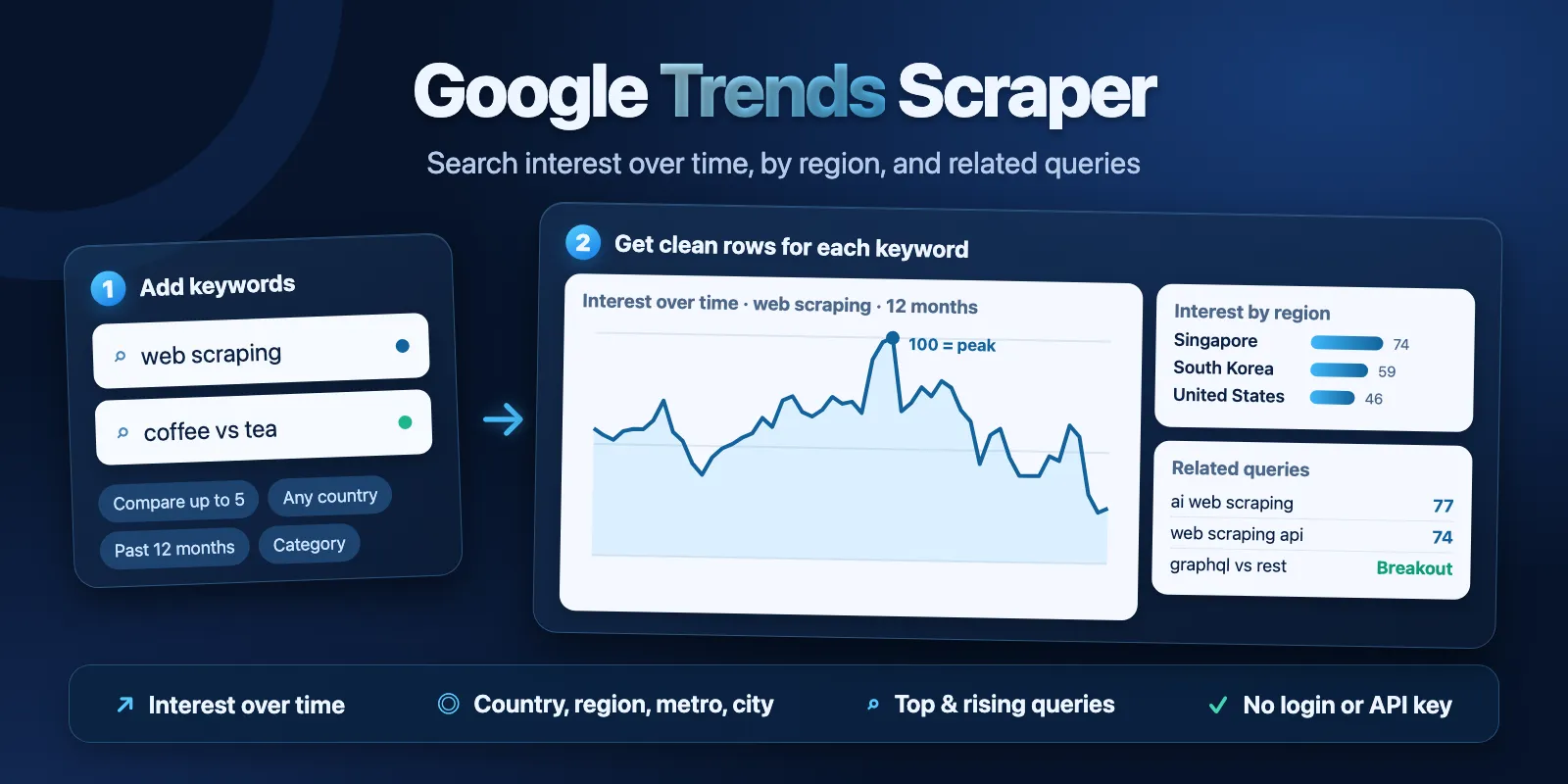
Table of contents
- What it does
- Quick start
- Input
- Output
- Pricing
- Use cases
- Scheduling and monitoring
- API, export and integrations
- Limits and partial results
- Migrating from another Google Trends Actor
- Troubleshooting
- FAQ
- Related Actors
- Support
What it does
For each search term, the Actor asks Google Trends the same questions as the Google Trends Explore page and saves the answers as rows:
- Interest over time: one row per time point with a value from 0 to 100 (100 = the highest interest in the chosen period and place).
- Interest by region: one row per country, region, US metro area or city that has data.
- Related queries: top and rising searches that people also made.
- Related topics: top and rising topics, only when Google sends them.
- Summary: one row per term with its status, average interest and row counts.
You can also compare 2–5 terms on one chart, like typing them side by side in Google Trends. Then the values are relative to the most popular term, and every region row shows each term's share of searches.
Good fit
- Check how interest in a product, brand or topic changes over months or years.
- Find the countries or US states where a term is most popular.
- Collect rising queries for content and SEO ideas.
- Compare up to 5 brands or keywords on one scale.
Not a fit / limits
- Google Trends shows relative interest (0–100), not the number of searches. It is not a keyword volume tool.
- It does not collect "Trending now" daily trends or real-time trending stories.
- Google gives no region data for some terms and filters (for example many terms at city level). The Actor then returns the other sections and explains it in a warning.
- Related topics: in our tests in October 2026, Google sent empty topic lists for most terms. The Actor returns topics only when Google sends them.
Quick start
- Open the Input tab.
- Keep the prefilled term
web scrapingin Search terms, or add your own terms (up to 50). - Keep Time range at Past 12 months, or choose another period. Leave Location empty for worldwide data.
- Click Start.
- Open the Output tab. Every row has a
recordTypecolumn:interest_over_time,interest_by_region,related_query,related_topicorterm_summary. Sort or filter by this column, or export and filter in a spreadsheet.
Expected result: 53 weekly points, about 65 countries and about 35–50 related queries for web scraping, plus one summary row.
Input
Input fields
| Field | Plain name | Type | Required | Default / prefill | Allowed values | Effect | Example | Recommendation |
|---|---|---|---|---|---|---|---|---|
searchTerms | Search terms | array of strings | yes | prefill ["web scraping"] | 1–50 terms; duplicates (case and spaces ignored) are removed | each term is a separate Google Trends query | ["coffee", "tea"] | start with 1–5 terms |
compareTerms | Compare terms | boolean | no | false | true, false | puts all terms into one comparison | true | use for 2–5 terms that you want on one scale |
geo | Location | string | no | empty = worldwide | Google Trends location code: country US, region US-CA, US metro US-NY-501 | limits data to one place | "DE" | leave empty for a world view |
timeRange | Time range | string (list) | no | today 12-m (also the prefill) | now 1-H, now 4-H, now 1-d, now 7-d, today 1-m, today 3-m, today 12-m, today 5-y, all (since 2004) | period and step of the time points | "today 5-y" | 12 months for most jobs |
customTimeRange | Custom time range | string | no | empty | YYYY-MM-DD YYYY-MM-DD, from 2004-01-01 to today | exact dates; overrides timeRange | "2024-01-01 2024-06-30" | use for a past event or season |
category | Category | string (list) | no | "0" (all categories) | 25 main Google Trends categories | limits data to searches in one category | "7" (Finance) | use when a word has several meanings |
categoryId | Category ID | integer | no | empty | any Google Trends category id | overrides category; also subcategories | 1227 (Android OS) | only when the list has no fitting category |
searchType | Search type | string (list) | no | web | web, images, news, shopping, youtube | which Google search is measured | "youtube" | web for most jobs |
includeTimeline | Interest over time | boolean | no | true | true, false | writes the time point rows | false | turn off if you only need regions or queries |
includeRegions | Interest by region | boolean | no | true | true, false | writes the region rows | false | |
regionResolution | Region level | string (list) | no | auto | auto, COUNTRY, REGION, DMA, CITY | level of the region rows | "DMA" | auto = countries worldwide, subregions in a country |
includeLowVolumeRegions | Include low-volume regions | boolean | no | false | true, false | adds regions with few searches | true | keep off: small places often show a misleading 100 |
includeRelated | Related queries and topics | boolean | no | true | true, false | writes related query and topic rows | false | |
outputFormat | Output format | string (list) | no | rows | rows, grouped | rows: one flat row per data point; grouped: one item per term with nested lists | "grouped" | rows for spreadsheets |
proxyConfiguration | Proxy | object | no | Apify Proxy | Apify Proxy settings | how the Actor connects to Google | keep the default |
The input must have at least one of includeTimeline, includeRegions or includeRelated turned on. An invalid input (for example an unknown geo code) fails at the start with a clear message and no charge except the start event.
Interacting settings
| When | Input A | Input B | Effective behavior | Example | Cost/result effect |
|---|---|---|---|---|---|
| Custom dates | customTimeRange | timeRange | custom dates win | 2024-01-01 2024-06-30 | none |
| Category ID set | categoryId | category | categoryId wins | 1227 | none |
| Comparison | compareTerms = true | searchTerms | 2–5 terms in one query; more than 5 is an input error | ["coffee", "tea"] | same row price; related topics are not sent by Google for comparisons |
| Country level | regionResolution = COUNTRY | geo | works only worldwide (geo empty) | ||
| US metro level | regionResolution = DMA | geo | works only for US locations (US, US-CA, …) | geo US, DMA | about 200 metro rows |
| City level | regionResolution = CITY | any | Google often has no city data; then the term has no region rows and the run shows a warning | fewer paid rows | |
| Short periods | timeRange = now 1-H … now 7-d | minute or hourly points | now 7-d | more time point rows (up to about 170) |
Input examples
One keyword, worldwide, past 12 months (prefill)
Expected behavior: one Google Trends query.
Expected output: 53 interest_over_time rows, about 65 interest_by_region rows (countries), about 35–50 related_query rows and 1 term_summary row.
Limit or cost note: about $0.018 (start + about 150–170 data rows).
Compare two drinks in the United States by state
Expected behavior: one comparison query for both terms.
Expected output: time points and US state rows for each term; comparisonGroup is coffee | tea and comparisonShare shows each term's share in a state.
YouTube interest by US metro area
Expected behavior: YouTube searches only, regions as US metro areas (geoCode is the metro number).
Output
Results are saved to the default Dataset. The run summary is saved as RUN_SUMMARY in the default key-value store.
Output example
These are four real rows (shortened) from the prefilled run on 2026-10-15. All rows also have comparisonGroup (null), geo (WORLDWIDE), timeRange (today 12-m), categoryId (0), searchType (web), exploreUrl, sourceUrl and fetchedAt.
null means "Google has no value here". The Actor never writes 0 in place of a missing value. Regions without data are left out (Google Trends shows them as empty), so interest_by_region has only regions with a number.
Output fields
| Field | Meaning | Type | Can be empty? | Example / enum | Source / notes |
|---|---|---|---|---|---|
recordType | what the row holds | string | no | interest_over_time, interest_by_region, related_query, related_topic, term_summary, term | term only in grouped format |
searchTerm | the term of this row | string | no | web scraping | as you typed it, trimmed |
comparisonGroup | all compared terms | string | yes, null without comparison | coffee | tea | |
geo | location of the query | string | no | WORLDWIDE, US, US-CA | |
timeRange | period sent to Google | string | no | today 12-m, 2024-01-01 2024-06-30 | |
categoryId | Google Trends category | integer | no | 0 (all) | |
searchType | measured Google search | string | no | web, images, news, shopping, youtube | |
exploreUrl | the same query in Google Trends | string | no | https://trends.google.com/trends/explore?... | open it to check the chart |
sourceUrl | Google Trends endpoint of the data | string | no | https://trends.google.com/trends/api/widgetdata/multiline | |
fetchedAt | when the data was fetched | string (ISO 8601, UTC) | no | 2026-10-15T05:03:44.876Z | |
date | start of the time point | string (ISO 8601, UTC) | time rows only | 2025-10-12T00:00:00.000Z | weeks, days, hours or minutes, as Google sends them |
formattedTime | time label as Google shows it | string | yes | Oct 12 – 18, 2025 | |
value | interest 0–100, or score of a related item | integer | yes, null when Google has no data | 56 | rising items: growth in %, e.g. 23350 |
hasData | Google has data for this time point | boolean | time rows only | true | |
isPartial | the latest point is not finished yet | boolean | time rows only | true for the last point | its value can still change |
geoCode | region code | string | yes | US, US-CA, 501 (metro) | null for cities |
geoName | region name | string | region rows only | United States | |
formattedValue | value as Google shows it | string | yes | 50, <1, +250%, Breakout | |
comparisonShare | term's share of searches in this region (%) | integer | yes, null without comparison | 69 | |
latitude, longitude | city position | number | yes, only at city level | 40.71, -74.0 | |
regionResolution | level of the region rows | string | yes | COUNTRY, REGION, DMA, CITY | |
rankType | type of related item | string | related rows only | top, rising | |
query | related query text | string | related query rows | web data scraping | |
topicTitle, topicType, topicMid | related topic name, type and Knowledge Graph id | string | related topic rows | Python, Programming language, /m/05z1_ | only when Google sends topics |
isBreakout | rising item marked Breakout (growth over 5000%) | boolean | related rows only | true | |
link | Google Trends link for the related item | string | yes | https://trends.google.com/trends/explore?q=... | |
status | result of the term | string | summary rows | complete, partial, not_found, error | only complete and partial terms are charged |
statusReason | why a term is partial, not found or error | string | yes, null when complete | Google Trends has not enough search data ... | plain English |
errorCode | machine code of a problem | string | yes | SOURCE_UNAVAILABLE, RATE_LIMITED | |
average | average interest over the period | integer | yes | 58 | |
timelinePoints, regionRows, relatedQueryRows, relatedTopicRows | rows written for the term | integer | summary rows | 53, 65, 45, 0 | |
interestOverTime, interestByRegion, relatedQueriesTop, relatedQueriesRising, relatedTopicsTop, relatedTopicsRising | nested lists of the same data | array | grouped format only; null when not requested | same fields as the flat rows |
Output entities and surfaces
| Situation | Dataset/API/KVS/live view | Result shape | User action |
|---|---|---|---|
| Normal term | Dataset (all rows; views Overview, Interest over time, Interest by region, Related queries and topics, Per-term summary set the columns) | time, region and related rows + 1 term_summary row | filter by recordType or export |
| Term with too little search data | Dataset, Per-term summary | 1 term_summary row with status not_found | try a wider location, period or category |
| Missing section | Dataset | status partial, statusReason says which section is missing | use the rows you have, or run the term again |
| Source problem | Dataset + RUN_SUMMARY | status error rows, run status PARTIAL or ERROR with a message | run again later |
RUN_SUMMARY has the run status (COMPLETE, PARTIAL, NO_RESULTS, CAPPED, ERROR, INVALID_INPUT, CANCELLED), stopReason, a plain message, counts per status and row type (chargedRows is the number of paid data rows), one entry per term, and warnings.
The Dataset views only choose the columns for one row type. They do not hide other rows: every view has all rows. Filter by recordType when you need one type, or use outputFormat grouped to get one item per term.
Pricing
Pricing unit
This Actor uses pay-per-event pricing. You pay for the data rows you get, and a small start fee per run:
| Event | When | FREE | BRONZE | SILVER | GOLD and higher |
|---|---|---|---|---|---|
| Actor start | once per run (one event per GB of memory; default 256 MB = 1 event) | $0.01 | $0.01 | $0.01 | $0.01 |
| Data row | each time point, region, related query or related topic of a term with data | $0.00005 | $0.0000475 | $0.000045 | $0.0000425 |
- 1,000 data rows cost $0.05 on the free plan ($0.0425 on GOLD).
- The
term_summaryrow is free. Terms withnot_foundorerrorstatus are free. - In
groupedformat you pay for the same number of data rows inside each item. - You do not pay platform usage on top.
- A run where no term has data costs only the start fee ($0.01).
You can set a maximum cost per run in Apify. The Actor writes a term only if all its rows fit in that limit. When the next term does not fit, the run stops, keeps what it saved, and RUN_SUMMARY shows CAPPED with CHARGE_LIMIT.
Cost examples
Prices for the FREE plan, from our test runs in October 2026. Row counts change a little from run to run, because Google samples related queries.
| Scenario | Input scope | Data rows | Start | Rows | Total | Time |
|---|---|---|---|---|---|---|
| Prefill | 1 term, 12 months, worldwide | 163 | $0.01 | $0.0082 | about $0.018 | 5–35 s |
| Small | 5 terms, 12 months, worldwide | about 850 | $0.01 | about $0.042 | about $0.052 | 5–10 s |
| Large | 50 terms, 12 months, worldwide | about 6,500 | $0.01 | about $0.33 | about $0.34 | about 110 s |
| Timeline only | 1 term, now 1-H, no regions or related | 58 | $0.01 | $0.0029 | about $0.013 | under 15 s |
| Nothing found | 50 terms with no search data | 0 | $0.01 | $0 | $0.01 | about 20 s |
A term can have more rows with today 5-y or all (more time points) or with includeLowVolumeRegions (more regions): usually 300–400 data rows, about $0.015–0.02 per term.
Use cases
| Buyer job | Input path | Output entity | Key fields | Next integration |
|---|---|---|---|---|
| Seasonality of a product | searchTerms, timeRange today 5-y | time rows | date, value, isPartial | chart in Google Sheets or BI |
| Where to launch | searchTerms, regionResolution | region rows | geoName, geoCode, value | map or market list |
| Content and SEO ideas | searchTerms, includeRelated | related query rows | query, rankType, value, isBreakout | keyword list |
| Brand comparison | searchTerms (2–5) + compareTerms | time and region rows | value, comparisonShare, comparisonGroup | dashboard |
| News and YouTube interest | searchType news or youtube | time rows | date, value | report |
Scheduling and monitoring
- Create an Apify schedule that runs the same input every day, week or month.
- Each run is a new snapshot. Google rescales values (0–100) for every query, so compare whole series, not one point between two runs.
- The latest time point has
isPartialtrue. Its value can change in the next run.
API, export and integrations
- API: start the Actor with the Apify API and read Dataset items as JSON. Add
?view=timeline,?view=regionsor?view=relatedto get only the columns of that view (all rows stay; filter byrecordTypein your code). - Export: download the Dataset as JSON, CSV, Excel or XML from the Output tab.
- Integrations: use Apify integrations (Make, Zapier, Google Sheets, webhooks) to move rows into your tools.
Use with AI agents (MCP)
- MCP server URL with only this Actor:
https://mcp.apify.com?tools=cliqtomedia/google-trends-scraper - Smallest useful input:
- Key output fields:
recordType(row type),date+value(interest over time, 0–100),geoName+value(interest by region),query+rankType(related searches),status(term result). - Typical run: one term in 5–35 seconds for about $0.018. Limits: up to 50 terms per run, up to 5 terms in one comparison.
Limits and partial results
- Up to 50 terms per run. 50 terms took about 110 seconds in our tests.
- Up to 5 terms in one comparison (Google Trends limit).
- Values are relative (0–100) inside one query. Values of terms from separate queries are not on the same scale; use
compareTermsfor that. - A run works for up to about 4.5 minutes with the default 300-second timeout. If it has more terms, it stops with the rows it has and
RUN_SUMMARYshowsCAPPEDwithDEADLINE. - A
partialterm is charged for the rows it has.statusReasontells you which section is missing. - If Google refuses many requests, the Actor first switches to new connections and then to residential proxies. If Google still refuses, the run stops; terms that were not done get free
errorrows.
Migrating from another Google Trends Actor
This Actor is not a drop-in replacement. The main differences:
- One flat row per time point, region or related item (
outputFormatrows), instead of one item per term with nested arrays. Choosegroupedif you want one item per term. - Dates are ISO 8601 strings, and
valueis a number (not a list). - Only regions with data are returned.
- City and metro data come from
regionResolution(CITY,DMA), not from separate fields. - Rising items have
isBreakouttruewhen Google shows "Breakout".
Troubleshooting
A term has status not_found
Symptom: the term has only a term_summary row.
Likely reason: Google Trends has not enough search data for this term with your filters.
Check: open exploreUrl from the row. Google Trends shows the same "not enough data" message.
Action: use a wider location, a longer period or all categories. The term is free.
No region rows at city level
Symptom: regionRows is 0 and the run has a warning about the CITY level.
Likely reason: Google Trends often has no city data for a term, a location or a search type.
Action: use regionResolution auto or REGION, or DMA for US locations.
RUN_SUMMARY shows CAPPED
Symptom: some terms have not_processed in the summary.
Likely reason: the maximum cost per run (CHARGE_LIMIT) or the time limit (DEADLINE) was reached.
Action: raise the maximum cost, or split the terms into more runs.
Terms have status error
Symptom: errorCode such as RATE_LIMITED or SOURCE_UNAVAILABLE.
Likely reason: Google Trends refused or did not answer requests at that time.
Action: run the same input again later. Error terms are not charged.
FAQ
Do I need a Google account or an API key?
No. The Actor reads public Google Trends data without login.
Is this the number of searches?
No. Google Trends gives relative interest from 0 to 100. 100 is the highest point for the chosen term, place and period. It does not show search volume.
Why are the numbers a little different from yesterday?
Google Trends uses a sample of searches and rescales each query. Small changes between runs are normal, mostly for small terms and short periods.
Why are there no related topics?
Google sends related topics only for single terms (not for comparisons), and in our tests in October 2026 the topic lists were often empty. The Actor returns topics only when Google sends them.
Why does a small country have 100?
Region values are the share of all searches in that place, not the number of searches. A small country with few searches can get 100. This is how Google Trends shows it; the Actor does not change values. Rising values like 23350 (+23,350%) and "Breakout" also come from Google.
How fresh is the data?
Each run asks Google Trends at the time of the run. The latest time point is often not finished yet (isPartial true).
Related Actors
- Google Autocomplete Scraper — collect search phrases for a seed word, then check their interest here.
Support
For a bug, a question or a feature request, open an issue in the Issues tab of this Actor. Include the run ID, your input and the statusReason or RUN_SUMMARY message. Never send tokens, cookies or billing data.


