

Idealista Scraper - Spain, Italy, Portugal, France Listings
Pricing
from $0.40 / 1,000 saved results
Idealista Scraper - Spain, Italy, Portugal, France Listings
Scrape Idealista property listings in Spain, Italy, Portugal and France. Get prices, sizes, locations and agencies, then track new listings and price changes. No account needed.
Pricing
from $0.40 / 1,000 saved results
Rating
0.0
(0)
Developer

Cliqto Media
Maintained by CommunityActor stats
0
Bookmarked
2
Total users
1
Monthly active users
5 days ago
Last modified
Categories
Features
Share
Search Idealista property listings in Spain, Italy, Portugal and France, and get a table of prices, sizes, locations, agencies and photos. You enter an area and a property type. You need no Idealista account, API key or proxy setup.
Use it for market research, price tracking or lead lists. A first test with 10 Madrid homes takes 1 to 3 minutes and costs about $0.04 on the Free plan.
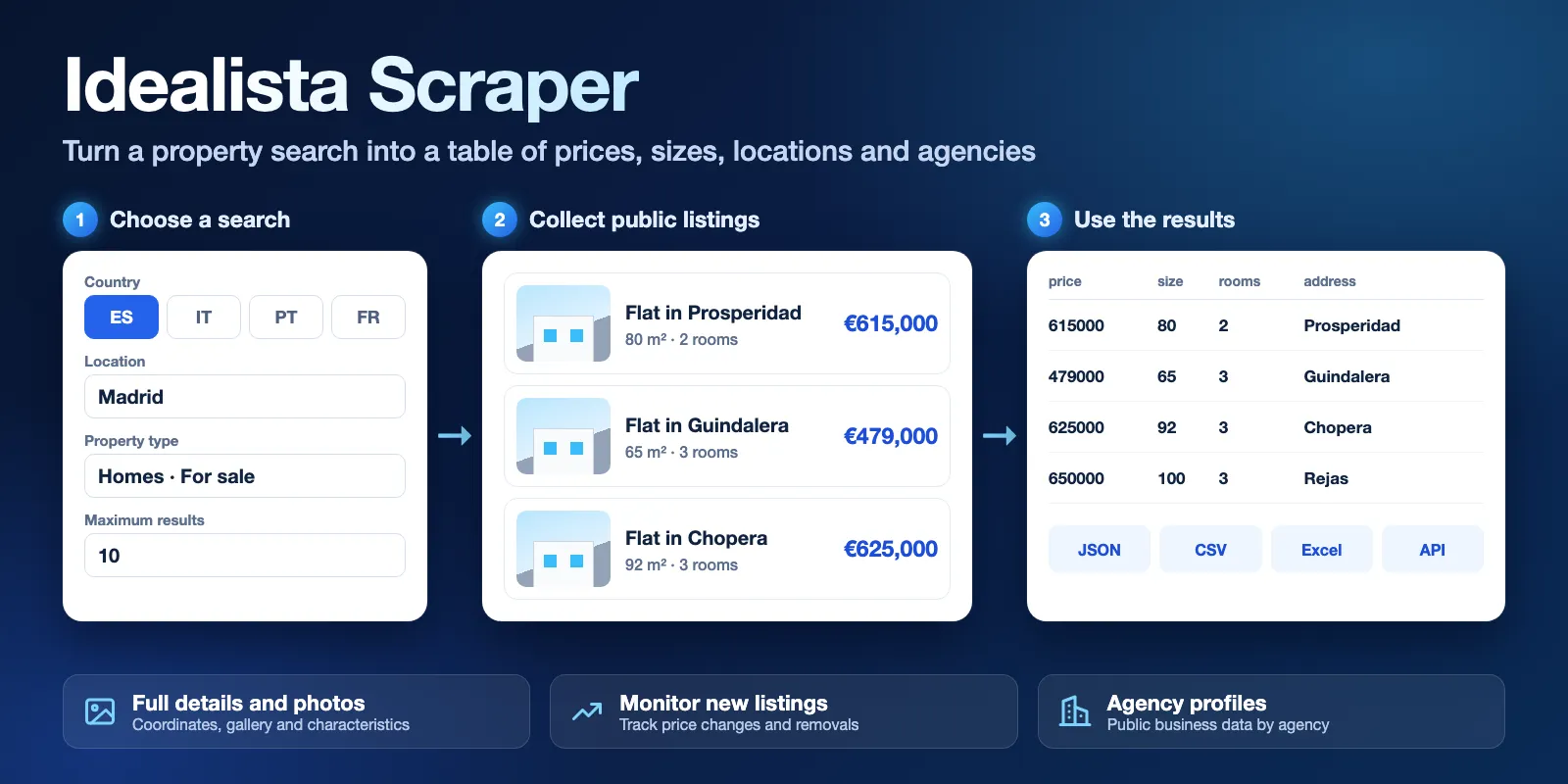
Table of contents
- What it does
- How it works
- Quick start
- Use cases
- Input
- Output
- Pricing
- Limits
- API, export and integrations
- Troubleshooting
- FAQ
- Related Actors
- Support
What it does
The Actor collects public property listings from the Idealista sites for Spain, Italy, Portugal and France. Each listing becomes one dataset row with its title, price, size, rooms, floor, address, agency and main photo. Turn on full details to add coordinates, bathrooms, price per square meter, the full gallery and property characteristics.
You can search by area, postal code, circle, polygon or Idealista URL. You can also look up known listing IDs, watch a search for changes, or collect public agency profiles.
It does not log in, and it does not collect private seller contacts. Phone numbers and email addresses in listing text are replaced with [redacted].
Good fit
- Compare asking prices and sizes across areas.
- Get new listings from a saved search on a schedule.
- Follow price changes and missing listings for one search.
- Build a list of agencies with their public addresses and listing counts.
- Pull full details for a known set of listing IDs.
How it works
- You choose a country, an operation, a property type and an area. You can also start from an Idealista URL or from listing IDs.
- The Actor reads the search results page by page and applies your filters. Idealista shows at most 1,800 listings per search. Above that, the Actor splits the search by region or price range, so rows follow your sort order only within each part.
- It saves one row per listing to the dataset and a run report to
RUN_SUMMARY. With monitoring on, it also keeps a private history for the next run.
Quick start
-
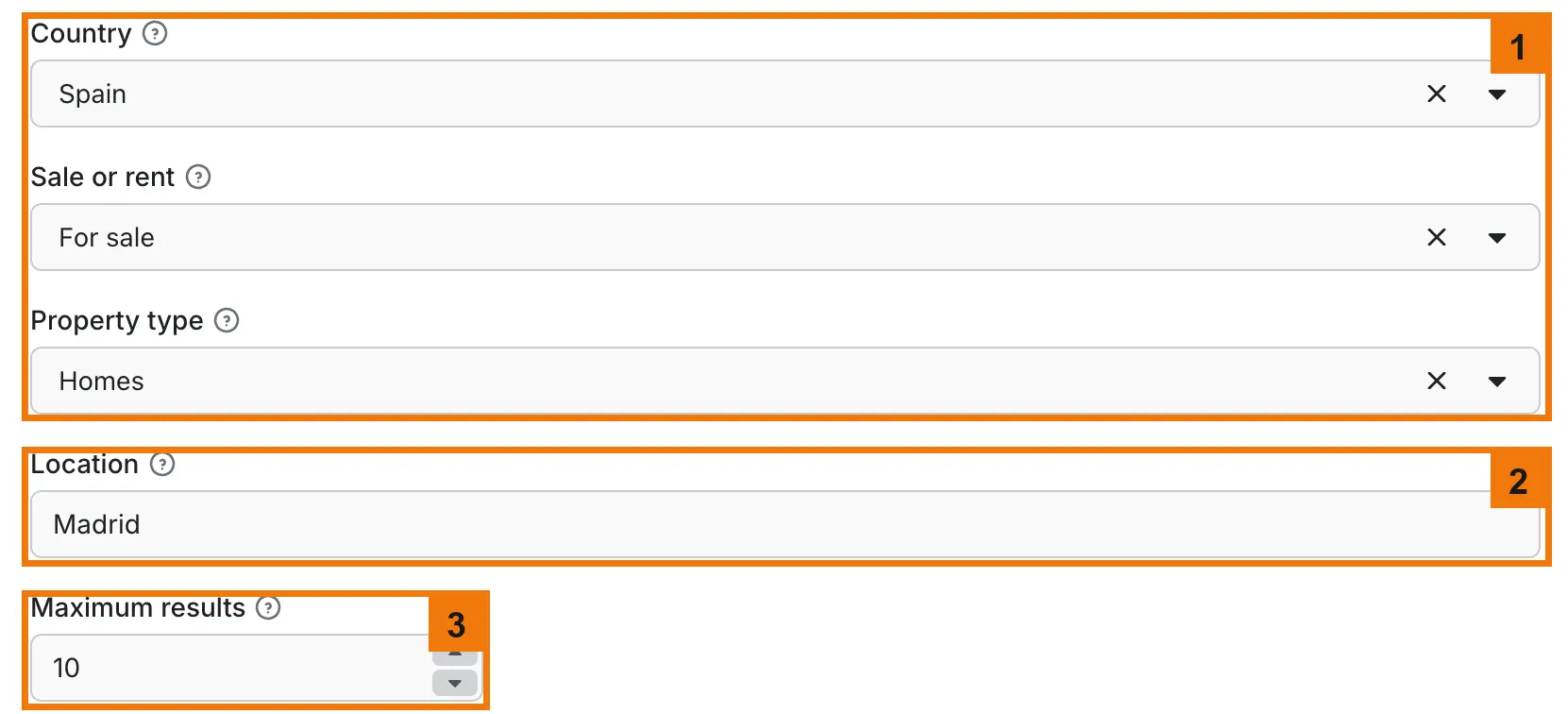
Open the Input tab. Keep Country, Sale or rent and Property type at Spain, For sale and Homes (box 1).
-
Keep Location as Madrid, or enter another area (box 2).
-
Keep Maximum results at the prefilled 10 (box 3). A larger value costs more, as shown in Pricing.
-
Click Start at the bottom of the page, below the screenshot.
-
When the run finishes, check the
price,sizeandaddresscolumns in the results table (box 5).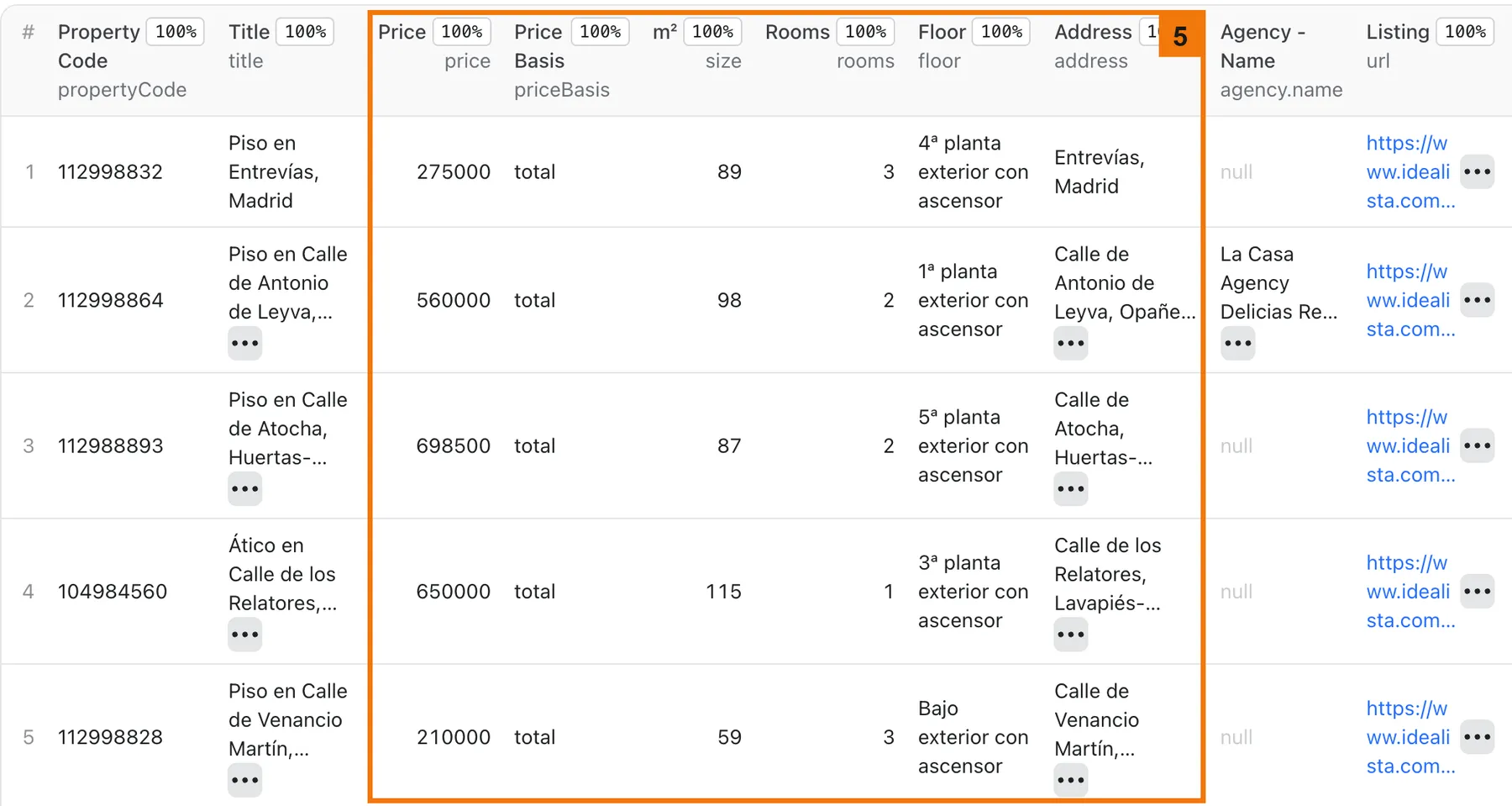
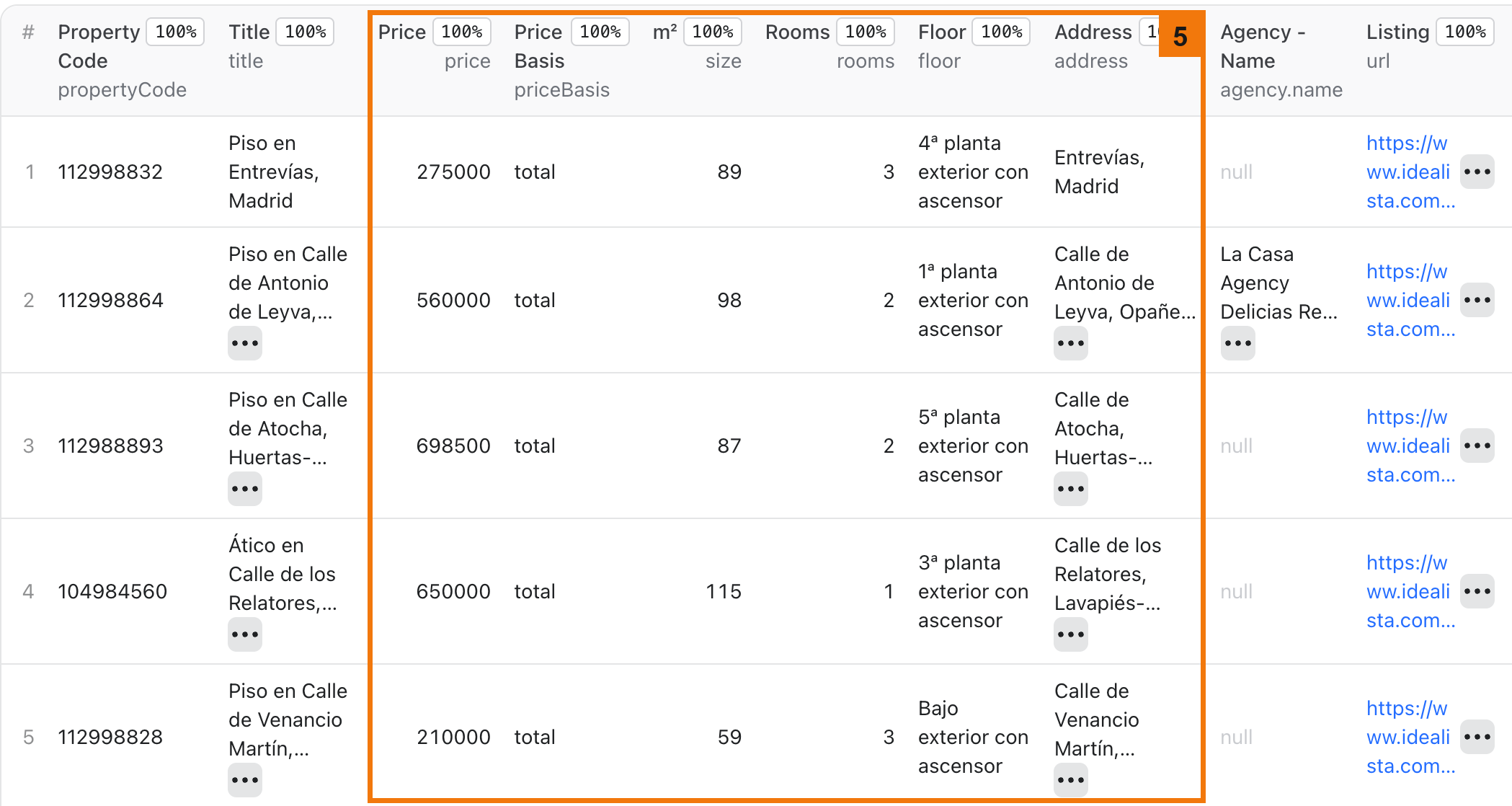
Expected result: 10 rows with Madrid homes for sale, newest first, each with a price in EUR.
Use cases
| Buyer job | Input path | Output entity | Key fields | Next integration |
|---|---|---|---|---|
| Compare prices in a city | location, propertyType, maxItems | Listing | price, size, rooms, address | CSV or Excel export |
| Get new listings from a search | startUrls or location, onlyNew | Listing | propertyCode, url, price, firstSeen | Schedule, then Slack or Notion |
| Track price changes | monitoringMode, detectPriceChanges, onlyNew | price_change row | oldPrice, newPrice, priceDelta, pctChange | Webhook or API |
| Find reduced listings | onlyPriceDrops, minPriceDropPercentage | Listing | price, priceDrop, url | CSV export |
| Review agencies | mode, agencySlugs | Agency profile | name, totalListings, businessAddress, activeSinceYear | CRM import |
Input
Input fields
Only country, operation and propertyType are required. An unknown field or a wrong value stops the run with INVALID_INPUT and names the field.
- Empty input: the form defaults apply: homes for sale in Madrid, Spain, up to 50 rows.
- Lists: enter one value per row in the form, or a JSON array of strings through the API.
- Largest tested run: 3,000 rows in 25 to 30 minutes. Larger runs depend on the limits in Limits.
- Duplicates: a listing found twice in one run is saved and charged once.
| Field | Plain name | Type | Required | Default / prefill | Allowed values | Effect | Example | Recommendation |
|---|---|---|---|---|---|---|---|---|
country | Country | enum | yes | es / es | es, it, pt, fr | Picks the Idealista site | it | URLs must match it |
operation | Sale or rent | enum | yes | sale / sale | sale, rent | Sale or rental listings | rent | Rent prices are per month |
propertyType | Property type | enum | yes | homes / homes | newDevelopments, homes, bedrooms, vacationRentals, garages, storageRooms, offices, premises, transfers, lands, buildings | Kind of property | offices | bedrooms means rooms for rent |
location | Location | string | no | Madrid / Madrid | City, district or postal area name, the place part of an Idealista URL, or a search URL | One search area | madrid-madrid | A name needs one extra checked page, and the URL part saves it. Blank searches all provinces, so set a limit |
maxItems | Maximum results | integer | no | 50 / 10 | 0 or more | Row limit across all areas | 100 | 0 means no row limit |
locations | Locations | string array | no | empty | Names, URL parts or search URLs | Several areas, in this order | ["Madrid","Barcelona"] | Use for several cities |
postalCodes | Postal codes | string array | no | empty | Postal codes of Spain, Italy or Portugal | Searches each code | ["28001"] | France has no postal code search. Replaces other area fields |
latitude, longitude | Center point | number | no | empty | -90 to 90, -180 to 180 | Circle search | 40.4168, -3.7038 | Set both |
distanceKm | Radius in km | integer | no | 20 | 1 or more | Circle size in km | 5 | Used only with a center point |
polygon | Map polygon | array | no | empty | 3 or more [lat, lng] pairs | Searches inside a shape | [[40.45,-3.72],[40.45,-3.66],[40.40,-3.69]] | Use for custom areas |
propertyCodes | Property codes or URLs | string array | no | empty | Listing IDs or URLs | Direct lookup with full details | ["112993138"] | Use when you know the listings |
startUrls | Listing or search URLs | request list | no | empty | Listing or search URLs of the country | Uses the URL area, sort and filters | Search URL from your browser | Copy a search you built on the site |
sortBy | Sort order | enum | no | mostRecent | 12 orders in the form | Order within each area | lowestPrice | Holiday homes and new developments sort only by price |
fetchDetails | Include full details | boolean | no | false | true, false | Adds coordinates, full photos, characteristics and _details | true | Much slower, about 11 to 14 seconds per listing in Spain. Adds a Listing detail charge per listing |
minPrice, maxPrice | Price range | number | no | 0 | 0 or more, EUR | Limits the price | 200000 | 0 means no limit |
minSize, maxSize | Size range | number | no | 0 | 0 or more, m² | Limits the size | 60 | 0 means no limit |
publicationDate | Published since | enum | no | Any time | blank, Y (48 hours, sale), T (24 hours, rent), W, M | Limits listing age | W | Use for recent listings |
rentalTypes | Rental types | enum array | no | empty | longTerm, seasonal | Limits rentals | ["longTerm"] | Use with rent |
bedrooms, bathrooms | Bedrooms, bathrooms | enum array | no | empty | studio, 1–4 and 1–3; the top value means that or more | Limits room counts | ["2","3"] | Select each count you want |
homeType | Home types | enum array | no | empty | 10 kinds in the form | Limits kind of home | ["penthouse"] | Use with homes |
condition, propertyStatus, floor | Condition, occupancy, floor | enum array | no | empty | Listed in the form | Limits by each value | ["good"] | Leave empty for all |
| 16 feature switches | Required features | boolean | no | false | bankOffer, airConditioning, fittedWardrobes, lift, balcony, terrace, exterior, garage, garden, swimmingPool, storageRoom, accessible, seaViews, luxury, plan, virtualTour | On keeps only matching listings | lift: true | Not all property types support each one |
agency | Agency slug | string | no | empty | Agency slug or /pro/ URL | Returns only this agency's listings, or picks a profile | clikalia | The agency page replaces the area, so location is not used |
onlyPriceDrops | Only price drops | boolean | no | false | true, false | Saves reduced listings only | true | Checked pages are charged |
minPriceDropPercentage | Minimum price reduction (%) | number | no | 0 | 0–100 | Saves larger reductions only | 10 | Above 0 also limits to reduced listings |
onlyNew | Only new listings | boolean | no | false | true, false | Saves listings missing from the history | true | The first run saves all it finds |
monitoringMode | Monitor listings | boolean | no | false | true, false | Keeps a history between runs | true | Needed for the two options below |
detectPriceChanges | Report price changes | boolean | no | false | true, false | Adds price_change rows | true | Needs monitoringMode |
detectRemovedListings | Report removed listings | boolean | no | false | true, false | Adds removed rows | true | Needs monitoringMode and maxItems 0 |
stateName | History store name | string | no | empty | Letters, numbers, hyphens, up to 63 characters | Names your private history | madrid-flats | Empty gives each search its own history. If the name is taken by a store this Actor cannot open, the run uses a private store instead and reports stateFallback in RUN_SUMMARY |
mode | Result type | enum | no | listings | listings, agencies | Listings or agency profiles | agencies | Agency mode ignores area filters |
agencySlugs | Agency profiles | string array | no | empty | Slugs or /pro/ URLs | Agencies to read | ["clikalia"] | Use with agencies |
deliveryConnector | Send results to | connector | no | none | Your MCP connector | Posts a summary after the run | Slack connector | Optional |
deliveryTarget | Notion page or channel | string | no | empty | Notion page link or Slack channel ID | Where the summary goes | Slack channel ID | Empty lets the connector decide |
Interacting settings
| When | Input A | Input B | Effective behavior | Example | Cost/result effect |
|---|---|---|---|---|---|
| Several area fields are set | postalCodes | latitude, polygon, locations, location | The first one set wins, in this order: postal codes, center point, polygon, locations, location | postalCodes and location | Only the postal codes run |
| A search URL is set | startUrls | Area fields | The URL replaces the area fields | Search URL and location | Only the URL runs |
| Only direct listings are set | propertyCodes | Area fields and filters | No search runs, and full details are included | One code | One Listing detail and one row per listing |
| Direct listings and a search URL are set | propertyCodes | startUrls | Both run | One code and one URL | Checks for both |
| Agency mode is on | mode | Area fields and filters | Only agencySlugs or agency is read | agencies with agencySlugs | One check and one row per profile |
| Removed listings are on | detectRemovedListings | maxItems | maxItems must be 0, or the run stops with an input error | maxItems: 0 | Scans the full search |
| Minimum drop is above 0 | minPriceDropPercentage | onlyPriceDrops | Saves reduced listings even with the switch off | 10 | Checked pages are charged |
| New and changed rows only | onlyNew | monitoringMode, detectPriceChanges | Known listings are saved only when their price changed | All three on | Unchanged pages are still charged |
Input examples
First test in Madrid
Expected behavior: finds the area, reads one search page and stops at 10 rows.
Expected output: listings with price, size, rooms, address and url.
Limit or cost note: two checks and 10 rows, about $0.04 on the Free plan.
Daily check for new and changed listings
Expected behavior: the first run saves all listings it finds, up to 500. Later runs with the same search save new listings and price_change rows.
Expected output: event, propertyCode, price, oldPrice, newPrice.
Limit or cost note: checked pages are charged even when nothing changed.
Agency profiles
Expected behavior: reads one public profile per slug.
Expected output: name, totalListings, businessAddress, activeSinceYear.
Limit or cost note: one check and one row per profile.
Output
Output fields
Search rows are read from the results page, and full-detail rows from each listing page. Search rows have the title, price, size, rooms, floor, address, agency, one photo, a short description and any price drop. Fields marked "Full details only" need Include full details or a direct lookup. The Overview table in the dataset shows most of them, and the Agencies table shows agency rows. Export includes all fields.
| Field | Meaning | Type | Can be empty? | Example / enum | Source / notes |
|---|---|---|---|---|---|
title | Listing title | string | yes | Piso en Ronda de Segovia, Imperial, Madrid | Source text |
propertyCode | Listing ID | string | no, except agency rows | 112993138 | Idealista listing ID |
url | Listing page | string | no | https://www.idealista.com/inmueble/112993138/ | Public URL |
event | Row type | enum | no | listing, price_change, removed, agency | Set by the Actor |
price | Price in EUR | number | yes | 615000 | Read priceBasis |
priceBasis | Price meaning | enum | no | total, per_month, per_night | Holiday rentals are per night |
priceIsFrom | Starting price | boolean | no | false | True for new developments |
priceByArea | Price per m² | number | yes | 3107 | Full details only |
size, rooms, bathrooms | Size in m², bedrooms, bathrooms | number | yes | 140, 5, 2 | bathrooms needs full details. 0 rooms means a studio |
floor | Floor | string | yes | 2ª planta exterior con ascensor | Source text in the local language |
address | Address text | string | yes | Ronda de Segovia, Imperial, Madrid | Can be approximate, and on search rows it can repeat the title |
areas | Street, neighborhood and larger places | array | yes | ["Quartiere Villa Bonelli","Roma"] | Full details only |
lat, lng, latitude, longitude | Coordinates | number | yes | 41.846098, 12.4534943 | Full details only. Can be approximate, and some listings have none, more often in France |
agency | Agency name, slug and logo | object | yes | {"name":"FH Inmobiliaria","slug":"fh-inmobiliaria"} | Null for private sellers and when the page names no agency |
photos, numPhotos | Image URLs and photo count | array, number | yes | 25 | One photo on search rows, the gallery with full details. Image URLs can expire |
description | Listing text | string | yes | Short text | Short on search rows, full with full details. Phones and emails are replaced |
features | Listed characteristics by group | object | yes | {"basic":["Balcone"],"building":["Con ascensor"]} | Full details only, as source text. Empty on search rows |
priceDrop | Current reduction | object | yes | null | Amount, percentage and date |
_details, energyCertification, hasPlan, subtype, externalReference | Full details | mixed | yes | location, characteristics, images | With fetchDetails or direct lookup. The energy rating is filled only when the page shows its letter |
firstSeen | First time in your history | string | yes | ISO date | With monitoring or onlyNew |
oldPrice, newPrice, priceDelta, pctChange | Price change | number | yes | 600000 | On price_change rows |
lastSeenInSnapshot | Last saved observation | string | yes | ISO date | On removed rows |
name, agencySlug, logo, image, totalListings, activeSinceYear, languages, businessAddress | Agency profile | mixed | yes | clikalia | On agency rows |
fetchedAt | Fetch time in UTC | string | no | 2026-11-05T04:47:37.261Z | Set by the Actor |
Output entities and surfaces
| Situation | Dataset/API/KVS/live view | Result shape | User action |
|---|---|---|---|
| Normal item | Dataset, plus RUN_SUMMARY in the key-value store | One row per listing, status complete | Open the table or export |
| Domain-empty result | Empty dataset, run succeeds, savedCount 0 | No rows, searchPages shows the check | Widen the area or filters |
| Partial result | Saved rows stay, run succeeds with status partial, stopReason DEADLINE, CHARGE_LIMIT or INCOMPLETE_SCAN | Rows up to the stop | Increase the limit, or read Troubleshooting |
| Technical failure or retry | Run fails, saved rows stay, stopReason holds the error code | Rows saved before the error | Read the code in Troubleshooting, then retry |
A deadline with no saved rows counts as a failed run. Direct listings that no longer exist are listed in notFound in RUN_SUMMARY.
Output example
This search row is trimmed and comes from a Madrid run. Null means Idealista did not show the value. It does not mean zero.
Send results to Slack or Notion
Pick your connector in the optional deliveryConnector field. After the run saves its data, the Actor posts a short summary (up to 25 rows and a link to the full dataset) there. Put a Notion page link or a Slack channel ID in deliveryTarget: in Notion every run is added on top of that one page, so your workspace does not fill up with new pages. A delivery error never fails the run and costs nothing extra. Connect a service once in Apify Console → MCP connectors.
Use case → fields
| Buyer job | Input path | Output entity | Key fields | Next integration |
|---|---|---|---|---|
| Price comparison | location | Listing | price, size, address | Spreadsheet |
| New listing alerts | onlyNew | Listing | url, firstSeen | Slack or Notion |
| Price tracking | detectPriceChanges | price_change row | oldPrice, newPrice | Webhook |
| Removed listing review | detectRemovedListings | removed row | propertyCode, lastSeenInSnapshot | API |
| Agency research | agencySlugs | Agency profile | totalListings, businessAddress | CRM |
Pricing
Pricing unit
You pay per event. Apify platform usage is included in these prices.
| Event | Free | Bronze | Silver | Gold, Platinum, Diamond |
|---|---|---|---|---|
| Run start | $0.0121 | $0.0109 | $0.0097 | $0.0085 |
| Saved result | $0.00057 | $0.00051 | $0.00046 | $0.0004 |
| Checked page or object | $0.0093 | $0.0084 | $0.0074 | $0.0065 |
| Listing detail | $0.0093 | $0.0084 | $0.0074 | $0.0065 |
A checked page is one search page of up to 30 listings, or one agency profile. A listing detail is one full listing page, read when Include full details is on or for a direct lookup. Each page goes through a paid unblocking service, which is included in these prices and makes pages cost more than rows.
- No matches: a valid search with no results costs the start fee and its checks, usually one or two.
- Filters: pages checked by
onlyPriceDropsor a minimum drop are charged even if no row is saved. - Monitoring: an unchanged run costs the start fee and its checked pages, and saves no rows with
onlyNew. - Missing listing: a direct listing that no longer exists costs one checked page and saves no row.
- Partial or failed run: you pay for pages that were read and rows that were saved. A failed request is free.
- Start fee: it scales with run memory, per GB. Up to 1 GB is one fee, and this Actor uses at most 256 MB.
Cost examples
| Scenario | Input scope | Expected item/event count | Base charge | Optional charge | Stop/cap behavior |
|---|---|---|---|---|---|
| First test (calculated from measured counts) | Madrid, 10 rows | 10 rows, 2 checks | $0.04 Free, $0.026 Gold | none | Stops at maxItems, 1 to 3 minutes |
| Full details (calculated from measured counts) | Valencia, 100 rows | 100 rows, 5 checks, 100 details | $0.12 Free, $0.081 Gold | $0.93 Free, $0.65 Gold | Stops at maxItems or your charge limit, 17 to 24 minutes |
| Typical large search (calculated) | 1,000 rows | 1,000 rows, about 35 checks | $0.91 Free, $0.64 Gold | none | Stops at maxItems or your charge limit |
| Big search (calculated from measured counts) | Madrid, 3,000 rows | 3,000 rows, about 107 checks | $2.72 Free, $1.90 Gold | none | Stops at maxItems, 25 to 30 minutes |
Set Maximum cost per run when you start a run. At that limit the run stops, keeps its rows and ends with stopReason CHARGE_LIMIT.
Limits
- Idealista can change its pages or block access. Saved rows stay in the dataset when a run stops.
maxItems0 reads as far as time, cost and the source allow. A run stops at 30,000 page requests or 1 GB of responses, and a single page above 8 MB is refused.- A search above the 1,800-listing window that cannot be split further keeps its first 1,800 listings and ends with
scanCompletefalse andstopReasonINCOMPLETE_SCAN. Splitting by price can miss listings with no price. - Addresses and coordinates can be approximate, and coordinates can be missing, more often in France.
- Idealista shows view and contact counters only to signed-in users, so this Actor does not return them.
- Holiday rental pages show no size or agency, and those fields are null.
- Photo and media URLs are signed and can expire. Download what you need soon after the run.
- If Apify moves a run to another server, the run continues where it stopped, without saving or charging the same rows and pages twice.
restartsinRUN_SUMMARYcounts these moves, andremovedrows wait for the next complete scan. - A
removedrow means the listing is missing from a complete scan of the same search. It does not prove a sale. - A history keeps up to 100,000 listings, and the oldest closed ones go first. Run one search with the same history at a time.
- Agency mode reads the profiles you name. It does not list all agencies, and it does not add contact details from other sources.
- The
currencyfield is always EUR. - Run memory is 128 to 256 MB, and the default is 256 MB. A run needs at least 60 seconds.
- Full details are slow: 100 listings in Spain took 17 to 24 minutes, so the default 1-hour timeout fits about 200 of them. For more, raise the timeout, or the run stops with partial results and
stopReasonDEADLINE. - The Actor is not affiliated with Idealista. Idealista's terms limit commercial data extraction, so check that your use follows them and applicable privacy law.
API, export and integrations
- API: start a run with the input JSON at
POST https://api.apify.com/v2/acts/cliqtomedia~idealista-scraper/runs, then read rows from the default dataset. - Export: download the dataset as JSON, CSV, Excel, XML or HTML.
- Scheduling: create an Apify schedule with
onlyNewand astateName. Each run saves only what is new. - Webhooks / no-code: an Apify webhook on run success can pass the dataset ID to Make, Zapier or n8n. Your next step reads
url,priceandevent. - Slack or Notion: use
deliveryConnector, as described in Output.
Use with AI agents (MCP)
MCP server URL with only this Actor: https://mcp.apify.com?tools=cliqtomedia/idealista-scraper.
Smallest useful input:
Key output fields:
price: price in EUR.priceBasissays if it is total, monthly or nightly.size: built area in square meters.rooms: bedrooms, with 0 for a studio.address: address text from the listing.url: public listing page.
A 10-row run takes 1 to 3 minutes and costs about $0.04 on the Free plan. Keep maxItems above 0 unless a full scan is needed. Coordinates can be approximate, and null values mean the source gave no value.
Troubleshooting
The run ended with no rows
Symptom: the dataset is empty and the run succeeded.
Likely reason: the filters match nothing, or onlyNew found nothing new.
Check: savedCount and searchPages in RUN_SUMMARY.
Action: remove a filter or widen the area.
INVALID_INPUT
Symptom: the run fails at once and the message names fields.
Likely reason: a wrong value or a missing partner field, such as latitude without longitude, or minPrice above maxPrice.
Check: the field named in the message.
Action: fix the value in the Input tab.
LOCATION_NOT_FOUND or LOCATION_NOT_RESOLVED
Symptom: the run stops before any rows.
Likely reason: Idealista does not know the name, or it did not answer when the name was looked up.
Check: country and the spelling, including the local name.
Action: retry once, use a larger area name, or start from a search URL.
UNSUPPORTED_FILTER
Symptom: the run stops at once and the message names a field.
Likely reason: Idealista has no such page for this country and property type.
Check: the field named in the message, then the same filter on the site.
Action: remove the filter, or paste a search URL that has it into startUrls.
UNRECOGNIZED_SEARCH_URL or INVALID_SEARCH_URL
Symptom: a URL in startUrls stops the run.
Likely reason: the URL has a filter that cannot be read, or it belongs to another site. The run stops so that no filter is lost.
Check: the error names the part it could not read. The host must be www.idealista.com, .it, .pt or .fr.
Action: remove that filter from the URL, or use the input fields.
SOURCE_UNAVAILABLE, SOURCE_PAGE_UNRECOGNIZED or SOURCE_RETRY_LIMIT
Symptom: the run stops with one of these codes. Rows saved earlier stay.
Likely reason: Idealista did not answer after several tries, returned a page the Actor could not read, or too many paid tries gave no usable page. A page gets up to 6 tries, or 4 once the run has read a page. During a failure streak requests try one at a time, and the streak stops the run after about 6 paid tries, or fewer if they are slow, so that retries do not run up a bill. A run that has read many pages gets more tries. One bad page alone does not stop the run.
Check: stopReason, savedCount in RUN_SUMMARY.
Action: retry later. If it repeats, open an issue with the run ID.
DEADLINE or CHARGE_LIMIT
Symptom: the run succeeded with status partial.
Likely reason: the timeout or your maximum cost was reached.
Check: stopReason in RUN_SUMMARY.
Action: increase the limit, or split the search.
INCOMPLETE_SCAN
Symptom: the run succeeded with rows, status partial and scanComplete false.
Likely reason: too many listings share one price, so the search could not be split further, or some pages or areas could not be read.
Check: windowLimited, skippedPages and skippedAreas in RUN_SUMMARY.
Action: narrow the area, add filters, or retry.
RESOURCE_ERROR
Symptom: the run stops at once with this code. Likely reason: the run has less than 60 seconds, or its memory is outside 128 to 256 MB. Check: Timeout and Memory in the run options. Action: set a longer timeout, or go back to the default 256 MB.
STATE_SCOPE_MISMATCH
Symptom: a monitoring run stops at once.
Likely reason: stateName is already used by a different search.
Check: the search fields against the earlier run.
Action: use a new stateName.
FAQ
Does it return view or contact counters?
No. Idealista shows them only to signed-in users, and this Actor does not log in.
Do I need an Idealista account or API key?
No. The Actor reads public listings, and you need only an Apify account.
Does it return seller phone numbers?
No. It saves public business data for agencies, and it replaces phones and email addresses in listing text with [redacted].
Will I get every listing in an area?
Set maxItems to 0 for a full scan. scanComplete in RUN_SUMMARY tells you if the scan finished. The result can still miss listings that change during the run.
What does a run with no results cost?
The start fee and the checked pages, so about $0.02 for one page on the Free plan.
How fresh is the data?
Each row shows what Idealista returned at fetchedAt. Use a schedule to keep it current.
How do I keep two monitors apart?
Give each search its own stateName, or leave it empty so that each search gets its own history.
Related Actors
- Zillow Listings Scraper: Zestimates & Price Cuts, No Login: the same kind of data for US homes.
- Redfin & Realtor Listings Scraper (US): Sale, Sold & Rent: US listings for sale, sold and for rent.
- 99acres & MagicBricks India Property Scraper - No Login: property listings in India.
- Airbnb Scraper: Listings, Prices, Calendar - No Login: short-stay prices to compare with holiday rentals.
Support
For a bug, question or feature request, open the Issues tab of this Actor on Apify. Include the run ID, the input mode and the error code. Do not send tokens, cookies or private data.


